Background


Timmy 2 toes

Well-known member
Member
Local time
6:02 PM
Posts
464
OS
win11
Why when restarting my Dell computer the background had changed from a solid color to a theme automatically?
Thank you
TIMMY 2 TOES
 

My Computer

System One

  • OS
    win11
    Computer type
    PC/Desktop
    Manufacturer/Model
    DELL INSPRON
    CPU
    13TH GEN INTEL
    Monitor(s) Displays
    DELL
    Keyboard
    AMZN
    Browser
    EDGE
    Antivirus
    NONE
Copilot says this:

It’s a surprisingly common experience, and it usually isn’t a sign that anything is wrong with your Dell computer. Windows 10 and Windows 11 both include features that can automatically change your background—even if you originally set it to a solid color.

Here are the most likely reasons it happened:

Why Your Background Changed Automatically​

1. Windows applied a theme after an update

Occasionally, after a major Windows update, the system may:

  • Re‑enable default themes
  • Switch from a solid color to a Windows Spotlight or picture theme
  • Sync settings from your Microsoft account
This can feel random, but it’s usually Windows restoring defaults after updating system files.

2. Sync settings changed your wallpaper

If you sign in with a Microsoft account, Windows can sync:

  • Themes
  • Backgrounds
  • Colors
If you changed the wallpaper on another device, Windows might have applied it to your Dell automatically.

3. Dell or Windows personalization features were turned on

Some Dell systems ship with:

  • Dell Optimizer
  • Dell MyDell app
  • Dell-branded themes
These can occasionally reapply a theme after a restart or update.

4. Windows Spotlight turned itself on

Windows Spotlight is the feature that rotates scenic images on the lock screen and sometimes the desktop. After updates, it can turn itself back on.

5. A temporary glitch reset your personalization settings

If Windows encounters a profile or settings glitch during restart, it may revert to a default theme.


How to Switch Back to a Solid Color​

You can restore your original look in a few steps:

  1. Open Settings
  2. Go to Personalization
  3. Select Background
  4. Change the dropdown to Solid color
  5. Pick your preferred color
If you want to prevent future changes, you can also turn off theme syncing under:Settings → Accounts → Windows backup → Remember my preferences

 

My Computers

System One System Two

  • OS
    Windows 11 Pro
    Computer type
    PC/Desktop
    Manufacturer/Model
    ASUS ROG Strix
  • Operating System
    Windows 11 Pro
    Computer type
    Laptop
    Manufacturer/Model
    ASUS VivoBook

My Computer

System One

  • OS
    win11
    Computer type
    PC/Desktop
    Manufacturer/Model
    DELL INSPRON
    CPU
    13TH GEN INTEL
    Monitor(s) Displays
    DELL
    Keyboard
    AMZN
    Browser
    EDGE
    Antivirus
    NONE
I keep changing to the solid color but themes come back
Something is not Saving, or, something else is taking over your preferences.

Try this:
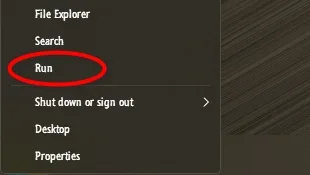
From the WinX Menu, open a Run box...

12343.webp

... paste the following into the Run box and press Enter:

Code:
explorer shell:::{ED834ED6-4B5A-4bfe-8F11-A626DCB6A921} -Microsoft.Personalization\pageWallpaper

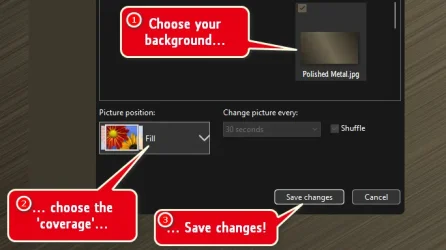
... in the subsequent window, choose your background, coverage and Save changes...

12342.webp

Restart your machine and see if that sticks.
 

My Computers

System One System Two

  • OS
    Windows 11 Pro
    Computer type
    PC/Desktop
    Manufacturer/Model
    ASUS ROG Strix
  • Operating System
    Windows 11 Pro
    Computer type
    Laptop
    Manufacturer/Model
    ASUS VivoBook

My Computers

System One System Two

  • OS
    Windows 11 Pro
    Computer type
    PC/Desktop
    Manufacturer/Model
    ASUS ROG Strix
  • Operating System
    Windows 11 Pro
    Computer type
    Laptop
    Manufacturer/Model
    ASUS VivoBook
explorer shell:::{ED834ED6-4B5A-4bfe-8F11-A626DCB6A921} -Microsoft.Personalization\pageWallpaper
tried that will see
 

My Computer

System One

  • OS
    win11
    Computer type
    PC/Desktop
    Manufacturer/Model
    DELL INSPRON
    CPU
    13TH GEN INTEL
    Monitor(s) Displays
    DELL
    Keyboard
    AMZN
    Browser
    EDGE
    Antivirus
    NONE
no luck still changing
Don't know what to tell you, my friend.
In light of all the seemingly unresolved issues you've been having lately, I suggest you get a professional of some sort to sit down at your PC and go over everything.
 
Last edited:

My Computers

System One System Two

  • OS
    Windows 11 Pro
    Computer type
    PC/Desktop
    Manufacturer/Model
    ASUS ROG Strix
  • Operating System
    Windows 11 Pro
    Computer type
    Laptop
    Manufacturer/Model
    ASUS VivoBook
Maybe the current theme is corrupt. I would select a different theme and modify that.
 

My Computers

System One System Two

  • OS
    Windows 11 Pro 23H2 (5699), 25H2 (8457)
    Computer type
    Laptop
    Manufacturer/Model
    Acer Extensa 5630EZ
    CPU
    Mobile DualCore Intel Core 2 Duo T7250, 2000 MHz
    Motherboard
    Acer Extensa 5630
    Memory
    4GB
    Graphics Card(s)
    Mobile Intel(R) GMA 4500M (Mobile 4 series)
    Sound Card
    Realtek ALC268 @ Intel 82801IB ICH9 - High Definition Audio Controller
    Monitor(s) Displays
    1
    Screen Resolution
    1280x800
    Hard Drives
    Samsung SSD 850 EVO 250GB SATA Device (250 GB, SATA-III)
    Internet Speed
    VDSL 50 Mbps
    Browser
    MICROSOFT EDGE
    Antivirus
    WINDOWS DEFENDER
    Other Info
    Legacy MBR installation, no TPM, no Secure Boot, no WDDM 2.0 graphics drivers, no SSE4.2, cannot get more unsupported ;) This is only my test laptop. I had installed Windows 11 here before upgrading my main PC. For my main PC I use everyday see my 2nd system specs.
  • Operating System
    Windows 11 Pro v25H2 (build 26200.8457)
    Computer type
    PC/Desktop
    Manufacturer/Model
    Custom-built PC
    CPU
    Intel Core-i7 3770 3.40GHz s1155 (3rd generation)
    Motherboard
    Asus P8H61 s1155 ATX
    Memory
    2x Kingston Hyper-X Blu 8GB DDR3-1600
    Graphics card(s)
    GIGABYTE GeForce RTX 3050 WINDFORCE OC V2 6GB (GV-N3050WF2OCV2-6GD)
    Sound Card
    Realtek HD audio (ALC887)
    Monitor(s) Displays
    Sony Bravia KDL-19L4000 19" LCD TV via VGA
    Screen Resolution
    1440x900 32-bit 60Hz
    Hard Drives
    WD Blue SA510 2.5 1000GB SSD as system disk, Western Digital Caviar Purple 4TB SATA III (WD40PURZ) as second
    PSU
    Thermaltake Litepower RGB 550W Full Wired
    Case
    SUPERCASE MIDI-TOWER
    Cooling
    Deepcool Gamma Archer CPU cooler, 1x 8cm fan at the back
    Keyboard
    Mitsumi 101-key PS/2
    Mouse
    Sunnyline OptiEye PS/2
    Internet Speed
    100Mbps
    Browser
    Microsoft Edge, Mozilla Firefox
    Antivirus
    Microsoft Windows Defender
    Other Info
    Legacy BIOS (MBR) installation, no TPM, no Secure Boot, WDDM 3.0 graphics drivers, WEI score 7.4

Latest Support Threads

Back
Top Bottom