Backup / Sync Software Recommendations Please


Witterings

Member
Local time
2:49 AM
Posts
36
OS
Windows 11
I've used Goodsync in the past which I actually think is a great tool but I absolutely abhor companies that charge you £10 for the 1st year, the 2nd year it increases to £35 when they think they've hooked you until you don't renew your subsciption for 6 weeks and the price drops back to £10.

I don't mind paying £150 for a lifetime licence if it does what I want but that's not an option with Goodsync.

I don't work in IT but I'm generally very IT literate, I very recently bought a Synology DS224+ and setup Plex within minutes .... I've tried setting up their Synology Drive backup and after many hours have completely given up.

Most of the other tools as in TB EaseUS don't do a real sync , if you remove something from the original folder and try syncing again, it doesn't then remove it from the backup, I tried their paid version so I could back up to the cloud and it was completely useless ... down to like 1 mbps which for backing up 360gb of photos on a 1Gbps line was a complete non starter.

Most of my backups are a main source of say photos which the folder may regularly be added to, and for work, hundreds of word docs so it's not for complete PC / Laptop backups and probably hence why Syncing is a better option for me.

If anyone can recommend a decent alternative with a lifetime licence at a sensible price I'd be really interested to hear it.
 

My Computers

System One System Two

  • OS
    Windows 11
    Computer type
    Laptop
    Manufacturer/Model
    Lenovo Yoga 7 Gen10
    CPU
    Intel(R) Core(TM) Ultra 7 258V (2.20 GHz)
    Memory
    32gb
    Hard Drives
    1tb
  • Operating System
    Windows 11 Pro
    Computer type
    PC/Desktop
    Manufacturer/Model
    Dell Optiplex 7090
    CPU
    Intel i7
    Memory
    Currently 16gb ... may upgrade to 32gb+
    Hard Drives
    NVME 512gb
    Internet Speed
    1tb
    Browser
    Chrome
    Antivirus
    Windows Defender

There are several backup software apps you can choose. they are all good and come highly recommended.
Hasleo Backup Suite Free is good one

Aomei AOMEI Backupper | Best Backup Software for Windows PC and Server

Acronis Easy & Reliable personal backup software for home and office

Among many others
 

My Computer

System One

  • OS
    Windows 11 Pro Insider 64 bit 25H2 26200.5742
    Computer type
    PC/Desktop
    Manufacturer/Model
    Gigabyte Z390 UD
    CPU
    Intel Core i7 9700K 3.60
    Motherboard
    Gigabyte Z390 UD
    Memory
    16 GB
    Graphics Card(s)
    nVidia GEForce RTX 2060 Super
    Sound Card
    onboard
    Monitor(s) Displays
    Two 27" Dell 4K monitors
    Screen Resolution
    3840 x 2160
    Hard Drives
    M.2 NVME SSD, 500 GB; Two 2TB Mechanical HDD's
    PSU
    850w PSU
    Case
    Cyberpower PC
    Cooling
    Water cooled
    Keyboard
    Backlit Cyberpower gaming keyboard
    Mouse
    Backlit Cyberpower gaming mouse
    Internet Speed
    1 GB mbps
    Browser
    Brave
    Antivirus
    Windows Security
Not sure if you are looking for a backup program or a sync program. There are lots of great backup programs recommended here.

If you are looking for something to sync with your Synology then try SyncThing. I have heard extremely high praise for it.
 

My Computer

System One

  • OS
    Windows 11 Pro
    Computer type
    Laptop
    Manufacturer/Model
    ASUS Zenbook 14 OLED
    CPU
    Intel Core Ultra
    Memory
    16GB
    Graphics Card(s)
    Intel(R) Arc Graphics
    Sound Card
    Realtek High Definition Audio(SST)
    Screen Resolution
    2880 x 1800
    Hard Drives
    500 GB NVMe SSD
    Internet Speed
    1,500Mbps
    Browser
    Firefox, Edge
    Antivirus
    Windows Defender

I'm currently testing out Hasleo and the WD Limited Version of Acronis for file/folder backups.

So far they're both working good but I'll give the edge to Hasleo since it doesn't have a program running in the background and the backups are smaller at medium compression.
 

My Computer

System One

  • OS
    Windows 11 Pro 25H2 (26200.8457)
    Computer type
    PC/Desktop
    Manufacturer/Model
    Pre-built
    CPU
    AMD Ryzen 7 7800X3D
    Motherboard
    MSI Pro B650-VC WiFi
    Memory
    32gb Team Group (T-Force) DDR5-6000
    Graphics Card(s)
    Zotac nVidia GeForce RTX 4070 SUPER - 12gb
    Sound Card
    Sound BlasterX G6
    Monitor(s) Displays
    Koorui G2421V and ViewSonic VX2453
    Screen Resolution
    P:2560x1440 S:1920x1080
    Hard Drives
    WD Blue SN5000 - 500gb NVME
    WD Blue SN580 - 2TB NVME
    Seagate 4TB HDD - ST4000VN008-2DR166
    Keyboard
    Mountain Everest
    Mouse
    Logitech G502 Hero
    Internet Speed
    T-Mobile Home Internet
    Browser
    Firefox
    Other Info
    QNAP TS-469 Pro NAS
    TP-Link W7200 (2 unit mesh network)
    Elgato Streamdeck
I've been using SyncBack Pro for quite a few years and paid for a couple of upgrades along the way, going years in between. It continues to work even after the support period for the version you have has expired.
 

My Computer

System One

  • OS
    Windows 11
If you’re looking for a replacement for Goodsync, I’ve been using FreeFileSync (Free, they don’t sell it) for quite a while now to sync my personal files (I use Hasleo Free for System images, however Hasleo will backup anything), I love that free software. Works so well.


My Computers

System One System Two

  • OS
    Windows 11 Pro 25H2 Build 26200.8524
    Computer type
    PC/Desktop
    Manufacturer/Model
    Sin-built 2013
    CPU
    Intel(R) Core(TM) i7-4770K CPU @ 3.50GHz
    Motherboard
    ASUS ROG Maximus VI Formula
    Memory
    32.0 GB of I forget and the box is in storage.
    Graphics Card(s)
    Gigabyte nVidia GeForce GTX 1660 Super OC 6GB
    Sound Card
    Onboard thingy
    Monitor(s) Displays
    5 x LG 25MS500-B - 1 x 24MK430H-B - 1 x Wacom Pro 22" Touch Screen Tablet
    Screen Resolution
    All over the place
    Hard Drives
    Too many to list.
    OS on Samsung 1TB 870 QVO SATA
    PSU
    Silverstone 1500
    Case
    NZXT Phantom 820 Full-Tower Case
    Cooling
    Noctua NH-D15 Elite Class Dual Tower CPU Cooler / 6 x EziDIY 120mm / 2 x Corsair 140mm somethings / 1 x 140mm Thermaltake something / 2 x 200mm Corsair.
    Keyboard
    Corsair K95 / Logitech diNovo Edge Wireless
    Mouse
    Logitech: G402 / G502 / Mx Masters / Mx Air Cordless
    Internet Speed
    2000/500Mbps
    Browser
    All sorts
    Antivirus
    Kaspersky Premium
    Other Info
    ㅤㅤㅤㅤㅤㅤㅤㅤㅤㅤㅤㅤㅤㅤㅤㅤㅤㅤㅤㅤㅤㅤㅤㅤㅤㅤㅤㅤㅤㅤㅤㅤㅤㅤㅤㅤㅤㅤㅤㅤ⠀⠀⠀⠀⠀⠀⠀⠀⠀⠀
    TP-Link BE9300 WiFi 7 Bluetooth 5.4 (Archer TBE550E)
    TP-Link TX201 V1 2.5GB Lan

    Grandstream HT812 - VoIP
    ASUS DSL-AX82U - Mesh
    ASUS RT-AC68U - Mesh
    ASUS RT-BE88U Router

    Brother MFC-L2880DW Printer

    I’m on a horse.
  • Operating System
    Windows 11 Pro 25H2 Build 26200.8524
    Computer type
    Laptop
    Manufacturer/Model
    LENOVO Yoga 7 14IRL8 - 7i EVO OLED 14" Touchscreen i5 12 Core 16GB/512GB
    CPU
    Intel Core 12th Gen i5-1240P Processor (1.7 - 4.4GHz)
    Memory
    16GB LPDDR5 RAM
    Graphics card(s)
    Intel Iris Xe Graphics Processor
    Sound Card
    Optimized with Dolby Atmos®
    Screen Resolution
    QHD 2880 x 1800 OLED
    Hard Drives
    M.2 512GB
    Antivirus
    Defender / Malwarebytes
    Other Info
    …still on a horse.
Btillaint and cheers eveyone for such quick responses ... Aomei I tested again yesterday, did a new sync with a few folders, then removed 1 folder from the source and synced again and the change wasn't passed to the target .... I think Hasleo is the same but I'll try it again in a minute.

Not heard of SyncBack Pro or FreeFileSync but will have a look at them now / tomorrow

If you are looking for something to sync with your Synology then try SyncThing. I have heard extremely high praise for it.

Is this something that's generally available for anyone do you know or is it part of the "Synology Suit" so I download it from theor consul .... I'll research but thought I'd ask in case you had a quick reply which ,ay save some time on me researching.
 

My Computers

System One System Two

  • OS
    Windows 11
    Computer type
    Laptop
    Manufacturer/Model
    Lenovo Yoga 7 Gen10
    CPU
    Intel(R) Core(TM) Ultra 7 258V (2.20 GHz)
    Memory
    32gb
    Hard Drives
    1tb
  • Operating System
    Windows 11 Pro
    Computer type
    PC/Desktop
    Manufacturer/Model
    Dell Optiplex 7090
    CPU
    Intel i7
    Memory
    Currently 16gb ... may upgrade to 32gb+
    Hard Drives
    NVME 512gb
    Internet Speed
    1tb
    Browser
    Chrome
    Antivirus
    Windows Defender

I also vote for FreeFileSync for data backup

Been using it for 6 or 8 years. No issues. You make one or more profiles and it does whatever you have specified in the profile. On demand with one click. I have 4 profiles, but you might use just one. I'm offered a free upgrade maybe twice a year and have always said no to it...the version I have does exactly what I want. I back up about a Terabyte a couple of times a day. Takes under 3 minutes.

I used to use Second Copy. I think it is still around. It was superb, with a great interface. Cost 30 dollars for a one-time license. Made by "Centered Systems", if I recall correctly?

For system backup, I use Macrium...but I guess it is now strictly on a subscription model, so you might look elsewhere. The latest rage seems to be Hasleo.
 

My Computer

System One

  • OS
    Windows 11 Pro
    Computer type
    PC/Desktop
    Manufacturer/Model
    Fishmill Special
    CPU
    Intel 265K
    Motherboard
    MSI Pro Z890-A
    Memory
    G Skill DDR5 2 x 16 kit 6000/36
    Graphics Card(s)
    none
    Sound Card
    none
    Monitor(s) Displays
    Dell 2316H
    Screen Resolution
    1600 x 900
    Hard Drives
    WD SN770 NVME 500 GB boot; Intel 660p NVME 2 TB and WD Green 3 TB storage
    PSU
    Be Quiet 13M 750 ATX 3.1
    Case
    Lancool PC-K65
    Cooling
    Noctua U12S
    Keyboard
    Logitech K120 Wired
    Mouse
    Dell MS-116
    Browser
    Chrome
    Antivirus
    Microsoft Defender and Malwarebytes
Last edited:

My Computer

System One

  • OS
    Windows 11 Pro @2N23
    Computer type
    Laptop
    Manufacturer/Model
    Dell
    CPU
    AMD Ryzen 7
    Memory
    16gb
    Hard Drives
    M2 2TB SSD
    Browser
    Edge
    Antivirus
    ioBit
@Quandary .... you asked if it was a backup or sync .... ideally both but that said the emphasis is probably heavily on sync.

My work files and photos change on a daily basis and it;s probaly easier to sync those, because of Win 11 upgrade and my previous computers not being compatible, I'll do a backup of the new ones with OS once every 6 months.
It's the imformation stored and changes that's much more important to me and needs doing more regularly, including what changes have been made in terms of adding and deleting.
 

My Computers

System One System Two

  • OS
    Windows 11
    Computer type
    Laptop
    Manufacturer/Model
    Lenovo Yoga 7 Gen10
    CPU
    Intel(R) Core(TM) Ultra 7 258V (2.20 GHz)
    Memory
    32gb
    Hard Drives
    1tb
  • Operating System
    Windows 11 Pro
    Computer type
    PC/Desktop
    Manufacturer/Model
    Dell Optiplex 7090
    CPU
    Intel i7
    Memory
    Currently 16gb ... may upgrade to 32gb+
    Hard Drives
    NVME 512gb
    Internet Speed
    1tb
    Browser
    Chrome
    Antivirus
    Windows Defender

My Computers

System One System Two

  • OS
    Windows 11 Pro
    Computer type
    PC/Desktop
    Manufacturer/Model
    Stigg's Build
    CPU
    Intel Core i9-10900X
    Motherboard
    GIGABYTE X299X DESIGNARE 10G
    Memory
    Corsair 64 GB (4 x 16 GB) CMW64GX4M4C3000C15 Vengeance RGB Pro 3000Mhz DDR4
    Graphics Card(s)
    GIGABYTE GeForce GTX 1660 Super Mini ITX 6 GB OC
    Sound Card
    Realtek ALC1220
    Monitor(s) Displays
    Samsung 27" FHD LED FreeSync Gaming Monitor (LS27F350FHEXXY)
    Screen Resolution
    1920 x 1080
    Hard Drives
    Samsung 970 Pro Series 1TB M.2 2280 NVMe SSD
    Western Digital Red Pro WD8003FFBX-68B9AN0 8 TB, 7200 RPM, SATA-III
    Western Digital Red Pro WD8003FFBX-68B9AN0 8 TB, 7200 RPM, SATA-III
    PSU
    Corsair HX1200 1200W 80 Plus Platinum
    Case
    Fractal Design Define 7 Black Solid Case
    Cooling
    Noctua NH-D15 Chromax Black
    Keyboard
    Razer Ornata V2
    Mouse
    Razer DeathAdder Essential
    Internet Speed
    FTTN 100Mbps / 40Mbps
    Browser
    Mozilla Firefox
    Antivirus
    N/A
    Other Info
    Logitech BRIO 4k Ultra HD USB-C Webcam
  • Operating System
    Windows 10 Pro
    Computer type
    Laptop
    Manufacturer/Model
    ASUS ROG Zephyrus M GM501GS
    CPU
    Core i7-8750H
    Motherboard
    Zephyrus M GM501GS
    Memory
    SK Hynix 32 GB (2 x 16 GB) HMA82GS6CJR8N-VK 16 GB DDR4-2666 DDR4 SDRAM
    Graphics card(s)
    NVIDIA GeForce GTX 1070
    Sound Card
    Realtek ALC294
    Monitor(s) Displays
    AU Optronics B156HAN07.1 [15.6" LCD]
    Screen Resolution
    1920 x 1080
    Hard Drives
    Samsung MZVKW512HMJP-00000 512 GB, PCI-E 3.0 x4
    Samsung SSD 860 QVO 4TB 4 TB, SATA-III
    PSU
    N/A
    Case
    N/A
    Cooling
    N/A
    Keyboard
    PC/AT Enhanced PS2 Keyboard (101/102-Key)
    Mouse
    Razer DeathAdder Essential
    Internet Speed
    FTTN 100Mbps / 40Mbps
    Browser
    Mozilla Firefox
    Antivirus
    N/A
    Other Info
    USB2.0 HD UVC Webcam
I also vote for FreeFileSync for data backup

Been using it for 6 or 8 years. No issues. You make one or more profiles and it does whatever you have specified in the profile. On demand with one click. I have 4 profiles, but you might use just one. I'm offered a free upgrade maybe twice a year and have always said no to it...the version I have does exactly what I want.

I am not sure what you mean? FreeFileSync is free, they have never sold it. You can donate and get a couple of extra settings but that’s not for the average user. If they’re pushing an update, take it.
 

My Computers

System One System Two

  • OS
    Windows 11 Pro 25H2 Build 26200.8524
    Computer type
    PC/Desktop
    Manufacturer/Model
    Sin-built 2013
    CPU
    Intel(R) Core(TM) i7-4770K CPU @ 3.50GHz
    Motherboard
    ASUS ROG Maximus VI Formula
    Memory
    32.0 GB of I forget and the box is in storage.
    Graphics Card(s)
    Gigabyte nVidia GeForce GTX 1660 Super OC 6GB
    Sound Card
    Onboard thingy
    Monitor(s) Displays
    5 x LG 25MS500-B - 1 x 24MK430H-B - 1 x Wacom Pro 22" Touch Screen Tablet
    Screen Resolution
    All over the place
    Hard Drives
    Too many to list.
    OS on Samsung 1TB 870 QVO SATA
    PSU
    Silverstone 1500
    Case
    NZXT Phantom 820 Full-Tower Case
    Cooling
    Noctua NH-D15 Elite Class Dual Tower CPU Cooler / 6 x EziDIY 120mm / 2 x Corsair 140mm somethings / 1 x 140mm Thermaltake something / 2 x 200mm Corsair.
    Keyboard
    Corsair K95 / Logitech diNovo Edge Wireless
    Mouse
    Logitech: G402 / G502 / Mx Masters / Mx Air Cordless
    Internet Speed
    2000/500Mbps
    Browser
    All sorts
    Antivirus
    Kaspersky Premium
    Other Info
    ㅤㅤㅤㅤㅤㅤㅤㅤㅤㅤㅤㅤㅤㅤㅤㅤㅤㅤㅤㅤㅤㅤㅤㅤㅤㅤㅤㅤㅤㅤㅤㅤㅤㅤㅤㅤㅤㅤㅤㅤ⠀⠀⠀⠀⠀⠀⠀⠀⠀⠀
    TP-Link BE9300 WiFi 7 Bluetooth 5.4 (Archer TBE550E)
    TP-Link TX201 V1 2.5GB Lan

    Grandstream HT812 - VoIP
    ASUS DSL-AX82U - Mesh
    ASUS RT-AC68U - Mesh
    ASUS RT-BE88U Router

    Brother MFC-L2880DW Printer

    I’m on a horse.
  • Operating System
    Windows 11 Pro 25H2 Build 26200.8524
    Computer type
    Laptop
    Manufacturer/Model
    LENOVO Yoga 7 14IRL8 - 7i EVO OLED 14" Touchscreen i5 12 Core 16GB/512GB
    CPU
    Intel Core 12th Gen i5-1240P Processor (1.7 - 4.4GHz)
    Memory
    16GB LPDDR5 RAM
    Graphics card(s)
    Intel Iris Xe Graphics Processor
    Sound Card
    Optimized with Dolby Atmos®
    Screen Resolution
    QHD 2880 x 1800 OLED
    Hard Drives
    M.2 512GB
    Antivirus
    Defender / Malwarebytes
    Other Info
    …still on a horse.
I vote for FreeFileSync also. You can do 2-way sync or one-way sync (mirroring). I have a 4-pack Macruim subscription for half off for life. For a free option, Hasleo seems to be pretty good..
 

My Computers

System One System Two

  • OS
    Windows 11 Pro 25H2
    Computer type
    PC/Desktop
    Manufacturer/Model
    Geekom AX7 Pro
    CPU
    AMD Ryzen 9 7940HS
    Memory
    32 GB
    Graphics Card(s)
    Radeon 780M Graphics
    Monitor(s) Displays
    Dell S2425H 24"
    Screen Resolution
    1920 x 1080
    Hard Drives
    2 TB NVMe SSD
    Internet Speed
    100 Mbs
    Browser
    Microsoft Edge / Firefox
    Antivirus
    F-Secure Security Suite
  • Operating System
    Windows 11 Pro 25H2
    Computer type
    PC/Desktop
    Manufacturer/Model
    Dell Inspiron 3910
    CPU
    12th Gen Intel Core i7-12700 processor (12-Core, 25M Cache, 2.1GHz to 4.8GHz)
    Motherboard
    Dell 0KHP4K
    Memory
    16 GB
    Graphics card(s)
    Intel(R) UHD Graphics 770 with shared graphics memory
    Monitor(s) Displays
    Dell 27" Monitor S2721DS,
    Screen Resolution
    QHD 2560 x 1440 @ 75 Hz
    Hard Drives
    1TB M.2, PCIe NVMe, SSD
    Internet Speed
    100 Mbps
    Browser
    Edge
    Antivirus
    F-Secure Security Suite
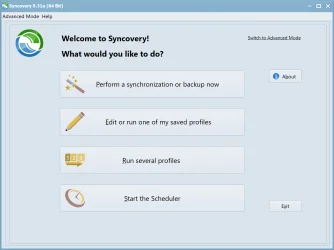
I bought Syncovery Standard Edition for its simplicity of use. Great sync program.

I know FreeFileSync is very popular but I have been using the former a long time and it has never let me down.

This is an earlier version. I only paid a little for the upgrade. It is now v11.8.
 

Attachments

  • 9F2EF847-C847-478D-A76A-2F5F361A9308.webp
    9F2EF847-C847-478D-A76A-2F5F361A9308.webp
    35 KB · Views: 3

My Computer

System One

  • OS
    Win 7,8.1,10,11, Mint, Kde Plasma, Debian
    Computer type
    Laptop
    Manufacturer/Model
    Dell
    CPU
    Intel(R) Core(TM) i7-6500U CPU @ 2.50GHz
    Memory
    16 GB
    Graphics Card(s)
    Intel(R) HD Graphics 520/Nvidia GeForce 930M
    Sound Card
    Intel(R) Display Audio/RealtekAudio
    Monitor(s) Displays
    Generic Pnp Monitor
    Screen Resolution
    1366 X 768
    Hard Drives
    ST2000LM024-1EJ164
    Keyboard
    Eng (US)
    Mouse
    Sanwa Supply
    Browser
    Firefox
    Antivirus
    Avast One
    Other Info
    Too many laptops with different system specifications.
Is this something that's generally available for anyone do you know or is it part of the "Synology Suit" so I download it from theor consul .... I'll research but thought I'd ask in case you had a quick reply which ,ay save some time on me researching.
SyncThing is not part of Synology Suit. It is a separate and a free product with a donation option.
 

My Computer

System One

  • OS
    Windows 11 Pro
    Computer type
    Laptop
    Manufacturer/Model
    ASUS Zenbook 14 OLED
    CPU
    Intel Core Ultra
    Memory
    16GB
    Graphics Card(s)
    Intel(R) Arc Graphics
    Sound Card
    Realtek High Definition Audio(SST)
    Screen Resolution
    2880 x 1800
    Hard Drives
    500 GB NVMe SSD
    Internet Speed
    1,500Mbps
    Browser
    Firefox, Edge
    Antivirus
    Windows Defender
@Quandary .... you asked if it was a backup or sync .... ideally both but that said the emphasis is probably heavily on sync.

My work files and photos change on a daily basis and it;s probaly easier to sync those, because of Win 11 upgrade and my previous computers not being compatible, I'll do a backup of the new ones with OS once every 6 months.
It's the imformation stored and changes that's much more important to me and needs doing more regularly, including what changes have been made in terms of adding and deleting.
Ideally your data should be on a different logical drive from your data. Then you do full and incremental backups of the OS, where the frequency of these are discretionary. This is different to your day where the data is identical in both places. And add, change, and deletions on the main sources are reflected in the second location. There should be a strategy for version history or archiving to allow recovery (changes need to be reverted or recovery accidental deletion).

I also use FreeFileSync for data duplication but not in real-time mode.
 

My Computer

System One

  • OS
    Windows 11 Pro
    Computer type
    Laptop
    Manufacturer/Model
    ASUS Zenbook 14 OLED
    CPU
    Intel Core Ultra
    Memory
    16GB
    Graphics Card(s)
    Intel(R) Arc Graphics
    Sound Card
    Realtek High Definition Audio(SST)
    Screen Resolution
    2880 x 1800
    Hard Drives
    500 GB NVMe SSD
    Internet Speed
    1,500Mbps
    Browser
    Firefox, Edge
    Antivirus
    Windows Defender
Cheers again for eveyryone's suggestons, I've been working my way through a few of them to see if tey do what I want them to.

FreeFileSync is good and easy to use, I've found how you can backup to googledrive but I can't see that it backs up to Onedrive unless I've missed something?

SyncBack Pro seems to do everything I want including Onedrive so at the moment is looking like the most likely but still going through some of the others.
 

My Computers

System One System Two

  • OS
    Windows 11
    Computer type
    Laptop
    Manufacturer/Model
    Lenovo Yoga 7 Gen10
    CPU
    Intel(R) Core(TM) Ultra 7 258V (2.20 GHz)
    Memory
    32gb
    Hard Drives
    1tb
  • Operating System
    Windows 11 Pro
    Computer type
    PC/Desktop
    Manufacturer/Model
    Dell Optiplex 7090
    CPU
    Intel i7
    Memory
    Currently 16gb ... may upgrade to 32gb+
    Hard Drives
    NVME 512gb
    Internet Speed
    1tb
    Browser
    Chrome
    Antivirus
    Windows Defender
Remember, whatever backup software you're using, if you're doing it on a running system, you'll want an application that supports Volume Shadow Copy Service (VSS). Some of the file-by-file and even image applications don't properly support it. That doesn't make them useless, only you should recognize that limitation.
 

My Computers

System One System Two

  • OS
    Win 11 Pro 25H2, Build 26200.8524
    Computer type
    PC/Desktop
    Manufacturer/Model
    Home Brew
    CPU
    Intel Core i5 14500
    Motherboard
    Gigabyte B760M G P WIFI
    Memory
    64GB DDR4
    Graphics Card(s)
    GeForce RTX 4060
    Sound Card
    Chipset Realtek
    Monitor(s) Displays
    LG 45" Ultragear, Acer 24" 1080p
    Screen Resolution
    5120x1440, 1920x1080
    Hard Drives
    Crucial P310 2TB 2280 PCIe Gen4 3D NAND NVMe M.2 SSD (O/S)
    Silicon Power 2TB US75 NVMe PCIe Gen4 M.2 2280 SSD (backup)
    Crucial BX500 2TB 3D NAND (2nd backup)
    Seagate 4TB Ironwolf, rotating HDD archive files
    External off-line backup Drives: 2 NVMe 4TB drives in external enclosures
    PSU
    Thermaltake Toughpower GF3 750W
    Case
    LIAN LI LANCOOL 216 E-ATX PC Case
    Cooling
    Lots of fans!
    Keyboard
    Microsoft Comfort Curve 2000
    Mouse
    Logitech G305
    Internet Speed
    Verizon FiOS 1GB
    Browser
    Firefox
    Antivirus
    Malware Bytes & Windows Defender Security
  • Operating System
    Win 11 Pro 25H2, Build 26200.8524
    Computer type
    PC/Desktop
    Manufacturer/Model
    Home Brew
    CPU
    Intel Core i5 14400
    Motherboard
    Gigabyte B760M DS3H AX
    Memory
    32GB DDR5
    Graphics card(s)
    Intel 700 Embedded GPU
    Sound Card
    Realtek Embedded
    Monitor(s) Displays
    27" HP 1080p
    Screen Resolution
    1920x1080
    Hard Drives
    Crucial P310 2TB 2280 PCIe Gen4 eD NAND PCIe SSD
    Samsung EVO 990 2TB NVMe Gen4 SSD
    Samsung 2TB SATA SSD
    PSU
    Thermaltake Smart BM3 650W
    Case
    Okinos Micro ATX Case
    Cooling
    Fans
    Keyboard
    Microsoft Comfort Curve 2000
    Mouse
    Logitech G305
    Internet Speed
    Verizon FiOS 1GB
    Browser
    Firefox
    Antivirus
    Malware Bytes & Windows Defender Security
Aomei Backup Pro does image backups and sync backups. Although not that cheap, it is a one off payment and there are often special offers now and then (I bougyt mine for c. £20.

There seem to be a few 3rd party sellers offering it for £20 to £30 range. At lower end, no lifetime updates, at upper end with lifetime updates.
 

My Computer

System One

  • OS
    Windows 11 Pro + Win11 Canary VM.
    Computer type
    Laptop
    Manufacturer/Model
    ASUS Zenbook 14
    CPU
    I9 13th gen i9-13900H 2.60 GHZ
    Motherboard
    Yep, Laptop has one.
    Memory
    16 GB soldered
    Graphics Card(s)
    Integrated Intel Iris XE
    Sound Card
    Realtek built in
    Monitor(s) Displays
    laptop OLED screen
    Screen Resolution
    2880x1800 touchscreen
    Hard Drives
    1 TB NVME SSD (only weakness is only one slot)
    PSU
    Internal + 65W thunderbolt USB4 charger
    Case
    Yep, got one
    Cooling
    Stella Artois (UK pint cans - 568 ml) - extra cost.
    Keyboard
    Built in UK keybd
    Mouse
    Bluetooth , wireless dongled, wired
    Internet Speed
    900 mbs (ethernet), wifi 6 typical 350-450 mb/s both up and down
    Browser
    Edge
    Antivirus
    Defender
    Other Info
    TPM 2.0, 2xUSB4 thunderbolt, 1xUsb3 (usb a), 1xUsb-c, hdmi out, 3.5 mm audio out/in combo, ASUS backlit trackpad (inc. switchable number pad)

    Macrium Reflect Home V8
    Office 365 Family (6 users each 1TB onedrive space)
    Hyper-V (a vm runs almost as fast as my older laptop)

Latest Support Threads

Back
Top Bottom