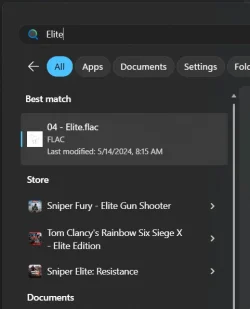
25H2 - Microsoft Store recommendations in search


Hello everyone, I still can't find any setting and/or policy to disable those suggestions, so I made a feedback. Here's the link: Feedback hub
Hope you can help upvote it. Thank you.

Edit to add: if it's of your interest, here is the blog which explains the addition of Store catalogue in Start/Taskbar Search : Leveling up your Microsoft Store on Windows experience . On footnote number 1, it mentions that "Feature availability varies by market."
 

My Computer

System One

  • OS
    Windows 11 version 25H2
    Computer type
    PC/Desktop

My Computer

System One

  • OS
    Windows 7
Hello everyone, I still can't find any setting and/or policy to disable those suggestions, so I made a feedback. Here's the link: Feedback hub
Hope you can help upvote it. Thank you.

Edit to add: if it's of your interest, here is the blog which explains the addition of Store catalogue in Start/Taskbar Search : Leveling up your Microsoft Store on Windows experience . On footnote number 1, it mentions that "Feature availability varies by market."

Excellent work. If everyone upvotes and comments on that Feedback Hub link, that would be helpful.


Also great find with the blog. That mentions exactly what we're talking about here:
You’ll now be able to launch Windows search, search for an app or game from the Store and install it quickly.


That strongly implies there's a Feature ID (gradual rollout) or geo-location tied to the Search function.

In regards to the footnote, I personally think that simply means that the various apps within the Store will vary by location, not this functionality itself. But who knows.
 

My Computer

System One

  • OS
    Windows 11
    Computer type
    PC/Desktop
In regards to the footnote, I personally think that simply means that the various apps within the Store will vary by location, not this functionality itself. But who knows.
Adding Search results from your own app store (and not someone else's store) is exactly what the EU loves to whack with competition fines.
 

My Computer

System One

  • OS
    Windows 7
Adding Search results from your own app store (and not someone else's store) is exactly what the EU loves to whack with competition fines.

Good point, in that case yeah you were probably right about what that footnote means.

In which case, it's surprising this function is now released to the public yet without a way to de-activate already. I suppose we'll have to wait until we get the new start menu.
 

My Computer

System One

  • OS
    Windows 11
    Computer type
    PC/Desktop
Good point, in that case yeah you were probably right about what that footnote means.

In which case, it's surprising this function is now released to the public yet without a way to de-activate already. I suppose we'll have to wait until we get the new start menu.

I have been hit by the store recommendations shenanigans and have been searching for everything and anywhere, to no avail.
I would be extremely interested if someone comes up with any ideas to disable it.
And of course I would be thrilled if an official (or unofficial) update solves the issue.

Thanks to all for sharing your similar (frustrating) experiences.
 

My Computer

System One

  • OS
    Windows 11
Don't know if you use Vivetool but you can easily enable the new Start Menu with the vivetool codes.
I didn't have the new start menu despite being on 25H2. I used ViVeTool to enable the new start menu, but I'm still seeing results from the store in start menu search:
1763368043679.webp

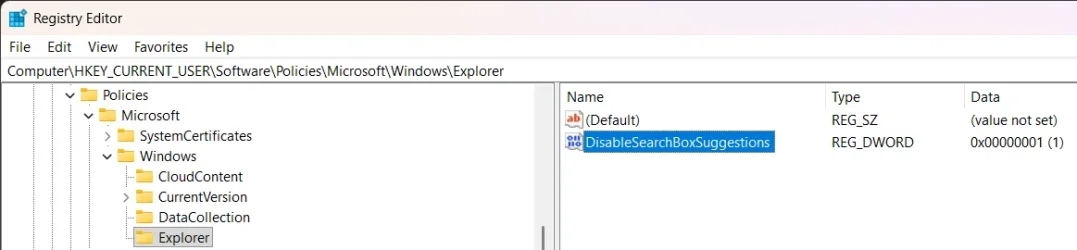
This is despite having the "DisableSearchBoxSuggestions" registry enabled:
1763368227371.webp

I also don't have the "Let search apps show results" in my search settings:
1763368123048.webp

I saw some folks speculating that the ability to disable Store results in Search requires having the new start menu, but it seems that there's more to it than that.
 

My Computer

System One

  • OS
    Windows 11
    Computer type
    PC/Desktop
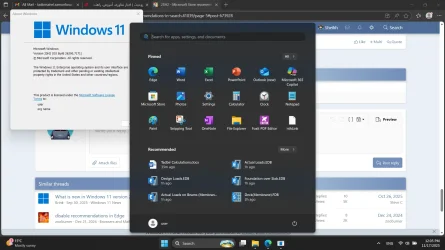
Hmmm...
It's still the old start menu ...

1763368526735.webp
 

My Computers

System One System Two

  • OS
    Windows 11 Pro 25H2
    Computer type
    Laptop
    Manufacturer/Model
    Huawei MateBook D15
    CPU
    Ryzen 5 3500U
    Memory
    8GB
    Graphics Card(s)
    Vega 8
    Screen Resolution
    FHD
    Hard Drives
    256GB Samsung SSD + 1TB HDD
    Browser
    Microsoft Edge
    Antivirus
    ESET Smart Security Premium
  • Operating System
    Windows 10 Enterprise LTSC 21H2
    Computer type
    Laptop
    Manufacturer/Model
    MSI GS73 6RF Stealth Pro
    CPU
    intel core i7 6700HQ
    Memory
    16GB
    Graphics card(s)
    Nvidia Geforce GTX1060 (6GB)
    Screen Resolution
    FHD
    Hard Drives
    128GB SSD + 1TB HDD
    Browser
    Microsoft Edge
    Antivirus
    Windows Defender
I was in a similar boat, where I still had the old start menu despite being on 25H2. You can enable it by downloading ViVeTool and running it as admin with the following arguments:
ViVeTool.exe /enable /id:47205210

That said, enabling the new start menu did not fix the problem for me
 

My Computer

System One

  • OS
    Windows 11
    Computer type
    PC/Desktop
I was in a similar boat, where I still had the old start menu despite being on 25H2. You can enable it by downloading ViVeTool and running it as admin with the following arguments:
ViVeTool.exe /enable /id:47205210

That said, enabling the new start menu did not fix the problem for me
It doesn't matter... It's an important PC in our office I can't risk using ViveTool. Just wanted to note it.
 

My Computers

System One System Two

  • OS
    Windows 11 Pro 25H2
    Computer type
    Laptop
    Manufacturer/Model
    Huawei MateBook D15
    CPU
    Ryzen 5 3500U
    Memory
    8GB
    Graphics Card(s)
    Vega 8
    Screen Resolution
    FHD
    Hard Drives
    256GB Samsung SSD + 1TB HDD
    Browser
    Microsoft Edge
    Antivirus
    ESET Smart Security Premium
  • Operating System
    Windows 10 Enterprise LTSC 21H2
    Computer type
    Laptop
    Manufacturer/Model
    MSI GS73 6RF Stealth Pro
    CPU
    intel core i7 6700HQ
    Memory
    16GB
    Graphics card(s)
    Nvidia Geforce GTX1060 (6GB)
    Screen Resolution
    FHD
    Hard Drives
    128GB SSD + 1TB HDD
    Browser
    Microsoft Edge
    Antivirus
    Windows Defender
Here's a link to a crappy workaround until there's a better option. Better than nothing: I found how to remove store results if anyone is interested
and how-to-remove-the-store-results-from-the-start-menu
Note: I'm not the author.
not 100% certain if this will work as i cant get those results to show to test this, but this should do what your linked answer describes (save as .bat)


Code:
@echo off
:: --- Elevate to Administrator ---
net session >nul 2>&1
if %errorlevel% neq 0 (
    powershell -Command "Start-Process '%~f0' -Verb RunAs"
    exit /b
)

setlocal enabledelayedexpansion

cls
echo Cleaning Windows Store search history...
timeout /t 1 >nul

:: --- Run PowerShell logic ---
powershell -NoProfile -ExecutionPolicy Bypass -Command ^
"if ((Get-PackageProvider -ListAvailable -Name 'NuGet' -ErrorAction SilentlyContinue) -eq \$null) { Install-PackageProvider -Name NuGet -Force | Out-Null }; ^
 if ((Get-Module PSSQLite -ListAvailable) -eq \$null) { Install-Module PSSQLite -Scope CurrentUser -Force | Out-Null }; ^
 \$db = \"\$env:LOCALAPPDATA\Packages\Microsoft.WindowsStore_8wekyb3d8bbwe\LocalState\store.db\"; ^
 try { ^
     Invoke-SqliteQuery -DataSource \$db -Query 'DELETE FROM SearchProducts'; ^
     Write-Output 'Deleted all entries from SearchProducts.'; ^
     # Set file to read-only
     Set-ItemProperty -Path \$db -Name IsReadOnly -Value \$true; ^
     Write-Output 'store.db is now read-only.'; ^
 } catch { Write-Output \$_.Exception.Message }"

exit /b
 

My Computer

System One

  • OS
    Windows 11 Pro
Try by the group policy: computer configuration\administrative templates\windows components\store--> disable app store
 

My Computer

System One

  • OS
    windows 11 Pro
    Computer type
    PC/Desktop
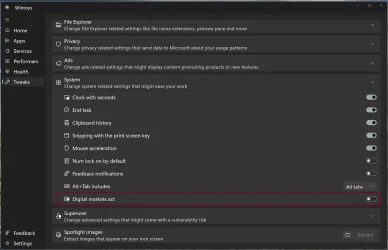
for anyone using wintoys, enable the digital markets act, the store recommendations will go away
Wow it did work, from what I've seen enabling dma has no downsides, i mean so far
 

My Computer

System One

  • OS
    Windows 11 Pro
    Computer type
    Laptop
I completely understand your frustration with these unwanted Store recommendations! They can be really intrusive, especially when you're trying to find actual files or apps on your system.

Have you tried using the Group Policy Editor to disable these recommendations? You can navigate to:
Computer Configuration > Administrative Templates > Windows Components > Search

Look for "Allow Cloud Search" and set it to Disabled. This should help reduce those Microsoft Store suggestions. Also, make sure "Don't search the web or display web results in Search" is enabled.

If you're on Windows 11 Home and don't have access to gpedit.msc, you can achieve similar results through registry edits, though it's a bit more involved.
 

My Computer

System One

  • OS
    windows 11
for anyone using wintoys, enable the digital markets act, the store recommendations will go away
Just a screen shot to make it easier to find.

Screenshot 2026-01-01 154732.webp
 

My Computers

System One System Two

  • OS
    Windows 11 25H2
    Computer type
    Laptop
    Manufacturer/Model
    Alienware 18 Area-51
    CPU
    Intel Core Ultra 9 275HX (24-Core)
    Motherboard
    Alienware
    Memory
    64GB DDR5 6400MT/s
    Graphics Card(s)
    NVIDIA GeForce RTX 5080 and Intel UHD Graphics
    Sound Card
    Onboard, Realtek high-performance Audio chips (ALC3329 & ALC1708))
    Monitor(s) Displays
    300HZ 18-inch QHD 500 nit Comfort View+
    Screen Resolution
    2560 x 1600
    Hard Drives
    2TB NVMe M.2 PCIe Gen 5 SSD
    Case
    Magnesium Alloy
    Cooling
    Advanced Cryo-Tech Quad-Fan Cooling system & large vapor chamber
    Keyboard
    Cherry MX ultra low profile mechanical keyboard with per key AlienFX RGB lighting
    Mouse
    Logitech MX Master 4
    Browser
    Vivaldi (main), Firefox, Chrome, Edge
    Antivirus
    MS Defender and Malwarebytes Free
  • Operating System
    Windows 11 25H2
    Computer type
    Laptop
    Manufacturer/Model
    Microsoft Surface Laptop 7
    CPU
    Qualcomm Snapdragon X Elite (12 Core) ARM based CPU
    Motherboard
    Microsoft Corp.
    Memory
    16GB LPDDR5
    Graphics card(s)
    Qualcomm Adreno X1-85
    Sound Card
    Omnisonic speakers with Dolby Atmos spatial sound
    Monitor(s) Displays
    120 Hz 13.8-inch 600 nit PixelSense Flow touchscreen
    Screen Resolution
    2304x1536
    Hard Drives
    1TB NVMe Gen 4 SSD
    Case
    Anodized Aluminum
    Cooling
    Traditional active cooling fan system
    Keyboard
    Mechanical QWERTY, backlit when in use
    Mouse
    Logitech MX Master 4 and Surface Arc Mouse
    Browser
    Vivaldi (main), Firefox, Chrome, Edge
    Antivirus
    MS Defender and Malwarebytes Free
I can confirm that DMA works on my machine with 25H2. for those who do not want to use a closed-source software to modify system files, refer to this:
Wintoys does it by directly modifying "\Windows\System32\IntegratedServicesRegionPolicySet.json".

There's this constant debate over which method is better (hacking your region in the registry vs. editing the JSON file). Updating your region might have weird consequences because Windows thinks you're somewhere else, and the JSON file can get overwritten when you do a SFC /scannow.

The JSON rule is "Show modified UX layout, such as unweighted options, for Privacy-related settings". Flipping the default from "disabled" to "enabled" allows everyone in the world to use the setting.
 

My Computer

System One

  • OS
    Windows 7

Latest Support Threads

Back
Top Bottom