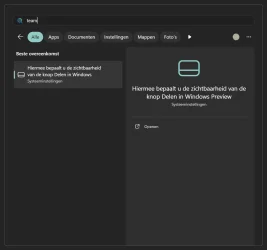
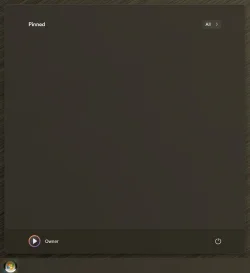
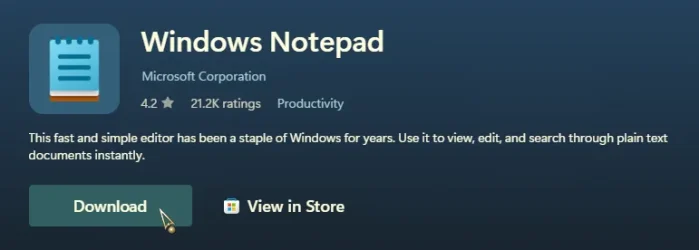
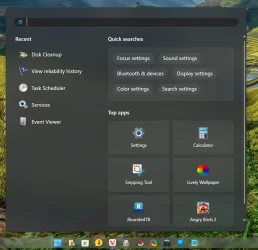
25H2 - Microsoft Store recommendations in search


WinAero shouldn't necessarily be needed, presumably.

True, but since I'm already using Winaero for other things, I might as well take advantage of that setting.

I'm using a local account (not that I think it will make any difference) and I've tried these web-search settings via powershell, to no avail.

I don't recall ever having this kind of trouble before - something seems weird.

Yeah, Microsoft keeps pushing ads to people who don't want them. They've decided to make it a bit more difficult, even against the tiny minority of users (like in this thread) who are trying to remove it.
 

My Computers

System One System Two

  • OS
    Windows 11 Pro 25H2 build: (26200.7623)
    Computer type
    Laptop
    Manufacturer/Model
    Microsoft Surface Pro
    Memory
    32GB
  • Operating System
    Microsoft 25H2 Pro
    Computer type
    Laptop
    Manufacturer/Model
    Dell Pro 14 - PC14250
    CPU
    Intel Core Ultra 7
    Memory
    64GB
    Graphics card(s)
    Intel Integrated Graphics
    Hard Drives
    Micron 1TB SSD
please try Wintoys from the Microsoft store

in the tweak section of Wintoys
there is an ad section where you can disable 9 sections of ads
which includes the start menu along with other tweaks and settings.

best of luck Steve ..
 

My Computers

System One System Two

  • OS
    Windows 11 Home
    Computer type
    PC/Desktop
    Manufacturer/Model
    HP 24" AiO
    CPU
    Ryzen 7 5825u
    Motherboard
    HP
    Memory
    64GB DDR4 3200
    Graphics Card(s)
    Ryzen 7 5825u
    Sound Card
    RealTek
    Monitor(s) Displays
    24" HP AiO
    Screen Resolution
    1920 x 1080 @60 Hz
    Hard Drives
    1TB WD Blue SN580 M2 SSD Partitioned.
    2x 1TB USB HDD External Backup/Storage.
    PSU
    90W external power brick
    Case
    24" All in One
    Cooling
    Default Air Cooling
    Keyboard
    HP WiFi UK extended
    Mouse
    HP WiFi 3 Button
    Internet Speed
    1GB full fibre
    Browser
    Edge & Firefox
    Antivirus
    AVG Internet Security/Windows Defender
    Other Info
    Mainly Open Source Software
  • Operating System
    Ubuntu 22.04.5 LTS
    Computer type
    Laptop
    Manufacturer/Model
    Dell 13" Latitude 2017
    CPU
    i5 7200u
    Motherboard
    Dell
    Memory
    16GB DDR4
    Graphics card(s)
    Intel
    Sound Card
    Intel
    Monitor(s) Displays
    13" Dell Laptop
    Hard Drives
    250GB Crucial 2.5" SSD
    Mouse
    Generic WiFi 3 button
    Internet Speed
    WiFi only
    Browser
    Firefox
    Antivirus
    ClamAV TK
    Other Info
    Mainly Open Source Software
I use ExplorerPatcher to remove the Recommended section from the Start menu, but my primary Start menu is still Open-Shell Menu (using the Windows 7 style option). My secondary menu is SystemTrayMenu. Tertiary is Everything (from voidtools). And then there's the Windows 11 Start menu that just sits there waiting to grow up (which I don't expect will happen).

Start menu search.webp
ep-start-menu-webp.148045
 

My Computers

System One System Two

  • OS
    11 Home
    Computer type
    Laptop
    Manufacturer/Model
    Asus TUF Gaming F16 (2024)
    CPU
    i7 13650HX
    Memory
    16GB DDR5
    Graphics Card(s)
    GeForce RTX 4060 Mobile
    Sound Card
    Eastern Electric MiniMax DAC Supreme; Emotiva UMC-200; Astell & Kern AK240
    Monitor(s) Displays
    Sony Bravia XR-55X90J
    Screen Resolution
    3840×2160
    Hard Drives
    512GB SSD internal
    37TB external
    PSU
    Li-ion
    Cooling
    2× Arc Flow Fans, 4× exhaust vents, 5× heatpipes
    Keyboard
    Logitech K800
    Mouse
    Logitech G402
    Internet Speed
    30Mbit/s up, 500Mbit/s down
    Browser
    FF
    Antivirus
    What's an antivirus?
  • Operating System
    11 Home
    Computer type
    Laptop
    Manufacturer/Model
    Medion S15450
    CPU
    i5 1135G7
    Memory
    16GB DDR4
    Graphics card(s)
    Intel Iris Xe
    Sound Card
    Eastern Electric MiniMax DAC Supreme; Emotiva UMC-200; Astell & Kern AK240
    Monitor(s) Displays
    Sony Bravia XR-55X90J
    Screen Resolution
    3840×2160
    Hard Drives
    2TB SSD internal
    37TB external
    PSU
    Li-ion
    Keyboard
    Logitech K800
    Mouse
    Logitech G402
    Internet Speed
    30Mbit/s up, 500Mbit/s down
    Browser
    FF
If you don't use UWP Apps, there's no need for the Store.

0008007.webp
 

My Computers

System One System Two

  • OS
    Windows 11 Pro
    Computer type
    PC/Desktop
    Manufacturer/Model
    ASUS ROG Strix
  • Operating System
    Windows 11 Pro
    Computer type
    Laptop
    Manufacturer/Model
    ASUS VivoBook
If you don't use UWP Apps, there's no need for the Store.
Yes and no. The store is no longer limited to UWP apps and is used to distribute other types of apps, including some traditional desktop applications. The store handles various system components and updates, which can affect your Windows installation. You can bypass it for certain apps by using alternatives like winget or by downloading .MSIX packages directly, though uninstalling it is not a supported option and can cause problems.
 

My Computers

System One System Two

  • OS
    11 Home
    Computer type
    Laptop
    Manufacturer/Model
    Asus TUF Gaming F16 (2024)
    CPU
    i7 13650HX
    Memory
    16GB DDR5
    Graphics Card(s)
    GeForce RTX 4060 Mobile
    Sound Card
    Eastern Electric MiniMax DAC Supreme; Emotiva UMC-200; Astell & Kern AK240
    Monitor(s) Displays
    Sony Bravia XR-55X90J
    Screen Resolution
    3840×2160
    Hard Drives
    512GB SSD internal
    37TB external
    PSU
    Li-ion
    Cooling
    2× Arc Flow Fans, 4× exhaust vents, 5× heatpipes
    Keyboard
    Logitech K800
    Mouse
    Logitech G402
    Internet Speed
    30Mbit/s up, 500Mbit/s down
    Browser
    FF
    Antivirus
    What's an antivirus?
  • Operating System
    11 Home
    Computer type
    Laptop
    Manufacturer/Model
    Medion S15450
    CPU
    i5 1135G7
    Memory
    16GB DDR4
    Graphics card(s)
    Intel Iris Xe
    Sound Card
    Eastern Electric MiniMax DAC Supreme; Emotiva UMC-200; Astell & Kern AK240
    Monitor(s) Displays
    Sony Bravia XR-55X90J
    Screen Resolution
    3840×2160
    Hard Drives
    2TB SSD internal
    37TB external
    PSU
    Li-ion
    Keyboard
    Logitech K800
    Mouse
    Logitech G402
    Internet Speed
    30Mbit/s up, 500Mbit/s down
    Browser
    FF
... uninstalling it is not a supported option and can cause problems.
Ah! That's where all my problems are coming from! 🤷‍♂️

Anyway, I didn't give them permission to open a Store on my property!
It's too big, too ugly, has no curb appeal and there's no ample parking!
Besides, they didn't even file with the city for a zoning permit!
 

My Computers

System One System Two

  • OS
    Windows 11 Pro
    Computer type
    PC/Desktop
    Manufacturer/Model
    ASUS ROG Strix
  • Operating System
    Windows 11 Pro
    Computer type
    Laptop
    Manufacturer/Model
    ASUS VivoBook
I wouldn't delete the Store, either. Like what @hdmi said, there are certain things in there that are necessary or something that some people want, but it is unique and exclusive to the Microsoft Store. Something you can't get anywhere else.

But I do want it to be benign, just sitting there not doing anything unless I call on it without any stupid nag "Recommended" appearing in my Start Menu.
 

My Computers

System One System Two

  • OS
    Windows 11 Pro 25H2 build: (26200.7623)
    Computer type
    Laptop
    Manufacturer/Model
    Microsoft Surface Pro
    Memory
    32GB
  • Operating System
    Microsoft 25H2 Pro
    Computer type
    Laptop
    Manufacturer/Model
    Dell Pro 14 - PC14250
    CPU
    Intel Core Ultra 7
    Memory
    64GB
    Graphics card(s)
    Intel Integrated Graphics
    Hard Drives
    Micron 1TB SSD
I uninstalled the Store from all devices ages ago, I don't miss it.
You can get most of their rubbish online anyway...

10847.webp
 

My Computers

System One System Two

  • OS
    Windows 11 Pro
    Computer type
    PC/Desktop
    Manufacturer/Model
    ASUS ROG Strix
  • Operating System
    Windows 11 Pro
    Computer type
    Laptop
    Manufacturer/Model
    ASUS VivoBook
As others have said, the Store is pretty important, it's not something most people would be happy removing entirely even if they barely use it.
 

My Computer

System One

  • OS
    Windows 11
    Computer type
    PC/Desktop
What worked for me to Disable Windows Web Search:

Navigate to HKEY_CURRENT_USER\Software\Policies\Microsoft\Windows

Go to or create a new key (aka folder) called Explorer (if missing) and navigate to it.

Create a new DWORD (32-bit) registry key and name it DisableSearchBoxSuggestions

Double-click on DisableSearchBoxSuggestions to edit it and set the Value data field to 1 and click OK then reboot.
 

Attachments

  • Screenshot 2025-10-19 140220.webp
    Screenshot 2025-10-19 140220.webp
    92.4 KB · Views: 4

My Computers

System One System Two

  • OS
    Windows 11 25H2
    Computer type
    Laptop
    Manufacturer/Model
    Alienware 18 Area-51
    CPU
    Intel Core Ultra 9 275HX (24-Core)
    Motherboard
    Alienware
    Memory
    64GB DDR5 6400MT/s
    Graphics Card(s)
    NVIDIA GeForce RTX 5080 and Intel UHD Graphics
    Sound Card
    Onboard, Realtek high-performance Audio chips (ALC3329 & ALC1708))
    Monitor(s) Displays
    300HZ 18-inch QHD 500 nit Comfort View+
    Screen Resolution
    2560 x 1600
    Hard Drives
    2TB NVMe M.2 PCIe Gen 5 SSD
    Case
    Magnesium Alloy
    Cooling
    Advanced Cryo-Tech Quad-Fan Cooling system & large vapor chamber
    Keyboard
    Cherry MX ultra low profile mechanical keyboard with per key AlienFX RGB lighting
    Mouse
    Logitech MX Master 4
    Browser
    Vivaldi (main), Firefox, Chrome, Edge
    Antivirus
    MS Defender and Malwarebytes Free
  • Operating System
    Windows 11 25H2
    Computer type
    Laptop
    Manufacturer/Model
    Microsoft Surface Laptop 7
    CPU
    Qualcomm Snapdragon X Elite (12 Core) ARM based CPU
    Motherboard
    Microsoft Corp.
    Memory
    16GB LPDDR5
    Graphics card(s)
    Qualcomm Adreno X1-85
    Sound Card
    Omnisonic speakers with Dolby Atmos spatial sound
    Monitor(s) Displays
    120 Hz 13.8-inch 600 nit PixelSense Flow touchscreen
    Screen Resolution
    2304x1536
    Hard Drives
    1TB NVMe Gen 4 SSD
    Case
    Anodized Aluminum
    Cooling
    Traditional active cooling fan system
    Keyboard
    Mechanical QWERTY, backlit when in use
    Mouse
    Logitech MX Master 4 and Surface Arc Mouse
    Browser
    Vivaldi (main), Firefox, Chrome, Edge
    Antivirus
    MS Defender and Malwarebytes Free
What worked for me to Disable Windows Web Search:

Navigate to HKEY_CURRENT_USER\Software\Policies\Microsoft\Windows

Go to or create a new key (aka folder) called Explorer (if missing) and navigate to it.

Create a new DWORD (32-bit) registry key and name it DisableSearchBoxSuggestions

Double-click on DisableSearchBoxSuggestions to edit it and set the Value data field to 1 and click OK then reboot.

Are you sure this fixed this specific issue and not something very, very similar?

Because as far as the experts here are saying, this seems to be new with 25H2, whereas the methods you mention are for very similar, but older things.
 

My Computer

System One

  • OS
    Windows 11
    Computer type
    PC/Desktop
Are you sure this fixed this specific issue and not something very, very similar?

Because as far as the experts here are saying, this seems to be new with 25H2, whereas the methods you mention are for very similar, but older things.
I just used it to stop all the silly ads on the back of my start menu. Was that what your goal was? They started with 24H2 though not just 25H2.
 

My Computers

System One System Two

  • OS
    Windows 11 25H2
    Computer type
    Laptop
    Manufacturer/Model
    Alienware 18 Area-51
    CPU
    Intel Core Ultra 9 275HX (24-Core)
    Motherboard
    Alienware
    Memory
    64GB DDR5 6400MT/s
    Graphics Card(s)
    NVIDIA GeForce RTX 5080 and Intel UHD Graphics
    Sound Card
    Onboard, Realtek high-performance Audio chips (ALC3329 & ALC1708))
    Monitor(s) Displays
    300HZ 18-inch QHD 500 nit Comfort View+
    Screen Resolution
    2560 x 1600
    Hard Drives
    2TB NVMe M.2 PCIe Gen 5 SSD
    Case
    Magnesium Alloy
    Cooling
    Advanced Cryo-Tech Quad-Fan Cooling system & large vapor chamber
    Keyboard
    Cherry MX ultra low profile mechanical keyboard with per key AlienFX RGB lighting
    Mouse
    Logitech MX Master 4
    Browser
    Vivaldi (main), Firefox, Chrome, Edge
    Antivirus
    MS Defender and Malwarebytes Free
  • Operating System
    Windows 11 25H2
    Computer type
    Laptop
    Manufacturer/Model
    Microsoft Surface Laptop 7
    CPU
    Qualcomm Snapdragon X Elite (12 Core) ARM based CPU
    Motherboard
    Microsoft Corp.
    Memory
    16GB LPDDR5
    Graphics card(s)
    Qualcomm Adreno X1-85
    Sound Card
    Omnisonic speakers with Dolby Atmos spatial sound
    Monitor(s) Displays
    120 Hz 13.8-inch 600 nit PixelSense Flow touchscreen
    Screen Resolution
    2304x1536
    Hard Drives
    1TB NVMe Gen 4 SSD
    Case
    Anodized Aluminum
    Cooling
    Traditional active cooling fan system
    Keyboard
    Mechanical QWERTY, backlit when in use
    Mouse
    Logitech MX Master 4 and Surface Arc Mouse
    Browser
    Vivaldi (main), Firefox, Chrome, Edge
    Antivirus
    MS Defender and Malwarebytes Free
An observation only: Did the account you're working with go through oobe?
I have 4 machines. Each updated from 24h2 to 25h2 using the enhancement package. Recommendations,search highlights, bing search, & suggested content were turned off in 24h2 start menu settings using Brink's instructions. I don't use 3d party apps.

None of the machines running 25h2 show this 'MS store recommendation" on start menu.

A wild guess here but If you did go through oobe, quite possibly MS may honor the old settings until the machine goes through oobe (new computers with 25h2 pre-installed, clean installs, or new accounts created in 25h2 after upgrade.)
 

My Computers

System One System Two

  • OS
    Windows 11 Pro 25H2
    Computer type
    PC/Desktop
    Manufacturer/Model
    Dell Optiplex 7080
    CPU
    i9-10900 10 core 20 threads
    Motherboard
    DELL 0J37VM
    Memory
    32 gb
    Graphics Card(s)
    none-Intel UHD Graphics 630
    Sound Card
    Integrated Realtek
    Monitor(s) Displays
    Benq 27
    Screen Resolution
    2560x1440
    Hard Drives
    2x1tb Solidigm m.2 nvme /External drives 512gb Samsung m.2 sata+2tb Kingston m2.nvme
    PSU
    500w
    Case
    MT
    Cooling
    Dell Premium
    Keyboard
    Logitech wired
    Mouse
    Logitech wireless
    Internet Speed
    so slow I'm too embarrassed to tell
    Browser
    #1 Edge #2 Firefox
    Antivirus
    Defender+MWB Premium
  • Operating System
    Windows 11 Pro 24H2 26200.8457
    Computer type
    PC/Desktop
    Manufacturer/Model
    Beelink Mini PC SER5
    CPU
    AMD Ryzen 7 6800U
    Memory
    32 gb
    Graphics card(s)
    integrated
    Sound Card
    integrated
    Monitor(s) Displays
    Benq 27
    Screen Resolution
    2560x1440
    Hard Drives
    1TB Crucial nvme
    Keyboard
    Logitech wired
    Mouse
    Logitech wireless
    Internet Speed
    still too embarrassed to tell
    Browser
    Firefox
    Antivirus
    Defender
    Other Info
    System 3 is non compliant Dell 9020 i7-4770/24gb ram Win11 PRO 26200.8457
An observation only: Did the account you're working with go through oobe?
I have 4 machines. Each updated from 24h2 to 25h2 using the enhancement package. Recommendations,search highlights, bing search, & suggested content were turned off in 24h2 start menu settings using Brink's instructions. I don't use 3d party apps.

None of the machines running 25h2 show this 'MS store recommendation" on start menu.

A wild guess here but If you did go through oobe, quite possibly MS may honor the old settings until the machine goes through oobe (new computers with 25h2 pre-installed, clean installs, or new accounts created in 25h2 after upgrade.)
no i updated a 24h2 home to 25h2 via enablement package to replicate the issue OP has. it did get those store section results in start menu search too
 

My Computer

System One

  • OS
    Windows 11 Pro
@That's so weird that none of my 4 have it.
 

My Computers

System One System Two

  • OS
    Windows 11 Pro 25H2
    Computer type
    PC/Desktop
    Manufacturer/Model
    Dell Optiplex 7080
    CPU
    i9-10900 10 core 20 threads
    Motherboard
    DELL 0J37VM
    Memory
    32 gb
    Graphics Card(s)
    none-Intel UHD Graphics 630
    Sound Card
    Integrated Realtek
    Monitor(s) Displays
    Benq 27
    Screen Resolution
    2560x1440
    Hard Drives
    2x1tb Solidigm m.2 nvme /External drives 512gb Samsung m.2 sata+2tb Kingston m2.nvme
    PSU
    500w
    Case
    MT
    Cooling
    Dell Premium
    Keyboard
    Logitech wired
    Mouse
    Logitech wireless
    Internet Speed
    so slow I'm too embarrassed to tell
    Browser
    #1 Edge #2 Firefox
    Antivirus
    Defender+MWB Premium
  • Operating System
    Windows 11 Pro 24H2 26200.8457
    Computer type
    PC/Desktop
    Manufacturer/Model
    Beelink Mini PC SER5
    CPU
    AMD Ryzen 7 6800U
    Memory
    32 gb
    Graphics card(s)
    integrated
    Sound Card
    integrated
    Monitor(s) Displays
    Benq 27
    Screen Resolution
    2560x1440
    Hard Drives
    1TB Crucial nvme
    Keyboard
    Logitech wired
    Mouse
    Logitech wireless
    Internet Speed
    still too embarrassed to tell
    Browser
    Firefox
    Antivirus
    Defender
    Other Info
    System 3 is non compliant Dell 9020 i7-4770/24gb ram Win11 PRO 26200.8457
@That's so weird that none of my 4 have it.
yeah that is odd. on that test machine i have:

used the reg that worked in 24h2 to make it think its EDU... no go
disabled recommended via EP... no go
disabled Microsoft store via multiple methods... no go
uninstalled store, then reinstalled store immediately... GO

i dont foresee Microsoft allowing this to be disabled easily as they have already removed the recommended section in the new start menu, so they will get their ads in somehow. windows home and pro have become digital billboards for Microsoft in recent years. only EDU and ENT are good quality anymore

*caveat - the test machine i replicated it on did have the new start menu pushed to it and i disabled it via vive. have your machines received the new start menu yet? maybe the coding is not in-place if the new menu has not been pushed to yours yet... just a thought
 

My Computer

System One

  • OS
    Windows 11 Pro
An observation only: Did the account you're working with go through oobe?
I have 4 machines. Each updated from 24h2 to 25h2 using the enhancement package. Recommendations,search highlights, bing search, & suggested content were turned off in 24h2 start menu settings using Brink's instructions. I don't use 3d party apps.

None of the machines running 25h2 show this 'MS store recommendation" on start menu.

A wild guess here but If you did go through oobe, quite possibly MS may honor the old settings until the machine goes through oobe (new computers with 25h2 pre-installed, clean installs, or new accounts created in 25h2 after upgrade.)

Good thinking tbh.

This was a 24H2 clean install after some tweaking with NTLite; I did whatever the current bypass was a few months ago in order to use a local account. And then upgraded to 25H2 via WU. Regarding OOBE, that may or may not answer your question (I'm not entirely sure exactly what OOBE comprises).

One thing I will say is that on the first restart after updating to 25H2, I had a random popup box on the desktop from MS asking me to sign in. That was new, and I wonder if that's related somehow. I have always been signed into Store, but not signed into to Windows itself (as otherwise, it immediately swaps you from a local account to an MS account). Unsure if that's related to this.
 

My Computer

System One

  • OS
    Windows 11
    Computer type
    PC/Desktop
popup box on the desktop from MS asking me to sign in. That was new, and I wonder if that's related somehow. I have always been signed into Store, but not signed into to Windows itself (as otherwise, it immediately swaps you from a local account to an MS account). Unsure if that's related to this.
not related
 

My Computer

System One

  • OS
    Windows 11 Pro
Back
Top Bottom