25H2 - Microsoft Store recommendations in search


Random question: Everyone who has Store app results, do you live in the EU or outside of it?
I'm not from the EU.
I saw on YouTube that they have some kind of extra tab in their privacy settings, but I don't have it.
 

My Computer

System One

  • OS
    Windows 11 Pro
I'm in US, Nevada and had all kinds of ads and web content until I did the reg tweak I posted. Now the Start Menu search screen stays clean just showing recent apps.
Sorry just to recap do you have the new start menu too? As it's starting to seem like that's connected
 

My Computer

System One

  • OS
    Windows 11
    Computer type
    PC/Desktop
Sorry just to recap do you have the new start menu too? As it's starting to seem like that's connected
Yup, been running it since it first appeared full of bugs in 24H2
 

My Computers

System One System Two

  • OS
    Windows 11 25H2
    Computer type
    Laptop
    Manufacturer/Model
    Alienware 18 Area-51
    CPU
    Intel Core Ultra 9 275HX (24-Core)
    Motherboard
    Alienware
    Memory
    64GB DDR5 6400MT/s
    Graphics Card(s)
    NVIDIA GeForce RTX 5080 and Intel UHD Graphics
    Sound Card
    Onboard, Realtek high-performance Audio chips (ALC3329 & ALC1708))
    Monitor(s) Displays
    300HZ 18-inch QHD 500 nit Comfort View+
    Screen Resolution
    2560 x 1600
    Hard Drives
    2TB NVMe M.2 PCIe Gen 5 SSD
    Case
    Magnesium Alloy
    Cooling
    Advanced Cryo-Tech Quad-Fan Cooling system & large vapor chamber
    Keyboard
    Cherry MX ultra low profile mechanical keyboard with per key AlienFX RGB lighting
    Mouse
    Logitech MX Master 4
    Browser
    Vivaldi (main), Firefox, Chrome, Edge
    Antivirus
    MS Defender and Malwarebytes Free
  • Operating System
    Windows 11 25H2
    Computer type
    Laptop
    Manufacturer/Model
    Microsoft Surface Laptop 7
    CPU
    Qualcomm Snapdragon X Elite (12 Core) ARM based CPU
    Motherboard
    Microsoft Corp.
    Memory
    16GB LPDDR5
    Graphics card(s)
    Qualcomm Adreno X1-85
    Sound Card
    Omnisonic speakers with Dolby Atmos spatial sound
    Monitor(s) Displays
    120 Hz 13.8-inch 600 nit PixelSense Flow touchscreen
    Screen Resolution
    2304x1536
    Hard Drives
    1TB NVMe Gen 4 SSD
    Case
    Anodized Aluminum
    Cooling
    Traditional active cooling fan system
    Keyboard
    Mechanical QWERTY, backlit when in use
    Mouse
    Logitech MX Master 4 and Surface Arc Mouse
    Browser
    Vivaldi (main), Firefox, Chrome, Edge
    Antivirus
    MS Defender and Malwarebytes Free
Yup, been running it since it first appeared full of bugs in 24H2

You probably already mentioned earlier, sorry it's hard to keep track!

Ok well that's great info, thanks for sharing. SO FAR... it kind of seems like this is directly connected to the new start menu - and unless you have the new Start Menu... you can't turn this rubbish off. Which is probably something Dacrone has already mentioned too.
 

My Computer

System One

  • OS
    Windows 11
    Computer type
    PC/Desktop
You probably already mentioned earlier, sorry it's hard to keep track!

Ok well that's great info, thanks for sharing. SO FAR... it kind of seems like this is directly connected to the new start menu - and unless you have the new Start Menu... you can't turn this rubbish off. Which is probably something Dacrone has already mentioned too.
The reg tweak turned it off on three of my machines though with the new Start menu. At least where I'm at it did, don't know why you guys are having issues turning it off.
 

Attachments

  • Screenshot 2025-10-20 131428.webp
    Screenshot 2025-10-20 131428.webp
    46 KB · Views: 12

My Computers

System One System Two

  • OS
    Windows 11 25H2
    Computer type
    Laptop
    Manufacturer/Model
    Alienware 18 Area-51
    CPU
    Intel Core Ultra 9 275HX (24-Core)
    Motherboard
    Alienware
    Memory
    64GB DDR5 6400MT/s
    Graphics Card(s)
    NVIDIA GeForce RTX 5080 and Intel UHD Graphics
    Sound Card
    Onboard, Realtek high-performance Audio chips (ALC3329 & ALC1708))
    Monitor(s) Displays
    300HZ 18-inch QHD 500 nit Comfort View+
    Screen Resolution
    2560 x 1600
    Hard Drives
    2TB NVMe M.2 PCIe Gen 5 SSD
    Case
    Magnesium Alloy
    Cooling
    Advanced Cryo-Tech Quad-Fan Cooling system & large vapor chamber
    Keyboard
    Cherry MX ultra low profile mechanical keyboard with per key AlienFX RGB lighting
    Mouse
    Logitech MX Master 4
    Browser
    Vivaldi (main), Firefox, Chrome, Edge
    Antivirus
    MS Defender and Malwarebytes Free
  • Operating System
    Windows 11 25H2
    Computer type
    Laptop
    Manufacturer/Model
    Microsoft Surface Laptop 7
    CPU
    Qualcomm Snapdragon X Elite (12 Core) ARM based CPU
    Motherboard
    Microsoft Corp.
    Memory
    16GB LPDDR5
    Graphics card(s)
    Qualcomm Adreno X1-85
    Sound Card
    Omnisonic speakers with Dolby Atmos spatial sound
    Monitor(s) Displays
    120 Hz 13.8-inch 600 nit PixelSense Flow touchscreen
    Screen Resolution
    2304x1536
    Hard Drives
    1TB NVMe Gen 4 SSD
    Case
    Anodized Aluminum
    Cooling
    Traditional active cooling fan system
    Keyboard
    Mechanical QWERTY, backlit when in use
    Mouse
    Logitech MX Master 4 and Surface Arc Mouse
    Browser
    Vivaldi (main), Firefox, Chrome, Edge
    Antivirus
    MS Defender and Malwarebytes Free
The reg tweak turned it off on three of my machines though with the new Start menu. At least where I'm at it did, don't know why you guys are having issues turning it off.

That's really weird.

It's possible that those reg tweaks only work IF you have the new start menu maybe? Seeing as this is a new thing with 25H2. And in all other cases, those tweaks just do what they've always done?

For clarity, what were those 3 tweaks again exactly? As there's several that have been mentioned so far
 

My Computer

System One

  • OS
    Windows 11
    Computer type
    PC/Desktop
That's really weird.

It's possible that those reg tweaks only work IF you have the new start menu maybe? Seeing as this is a new thing with 25H2. And in all other cases, those tweaks just do what they've always done?

For clarity, what were those 3 tweaks again exactly? As there's several that have been mentioned so far
This is what I used:

Navigate to HKEY_CURRENT_USER\Software\Policies\Microsoft\Windows

Go to or create a new key (aka folder) called Explorer (if missing) and navigate to it.

Create a new DWORD (32-bit) registry key and name it DisableSearchBoxSuggestions

Double-click on DisableSearchBoxSuggestions to edit it and set the Value data field to 1 and click OK then reboot.
 

My Computers

System One System Two

  • OS
    Windows 11 25H2
    Computer type
    Laptop
    Manufacturer/Model
    Alienware 18 Area-51
    CPU
    Intel Core Ultra 9 275HX (24-Core)
    Motherboard
    Alienware
    Memory
    64GB DDR5 6400MT/s
    Graphics Card(s)
    NVIDIA GeForce RTX 5080 and Intel UHD Graphics
    Sound Card
    Onboard, Realtek high-performance Audio chips (ALC3329 & ALC1708))
    Monitor(s) Displays
    300HZ 18-inch QHD 500 nit Comfort View+
    Screen Resolution
    2560 x 1600
    Hard Drives
    2TB NVMe M.2 PCIe Gen 5 SSD
    Case
    Magnesium Alloy
    Cooling
    Advanced Cryo-Tech Quad-Fan Cooling system & large vapor chamber
    Keyboard
    Cherry MX ultra low profile mechanical keyboard with per key AlienFX RGB lighting
    Mouse
    Logitech MX Master 4
    Browser
    Vivaldi (main), Firefox, Chrome, Edge
    Antivirus
    MS Defender and Malwarebytes Free
  • Operating System
    Windows 11 25H2
    Computer type
    Laptop
    Manufacturer/Model
    Microsoft Surface Laptop 7
    CPU
    Qualcomm Snapdragon X Elite (12 Core) ARM based CPU
    Motherboard
    Microsoft Corp.
    Memory
    16GB LPDDR5
    Graphics card(s)
    Qualcomm Adreno X1-85
    Sound Card
    Omnisonic speakers with Dolby Atmos spatial sound
    Monitor(s) Displays
    120 Hz 13.8-inch 600 nit PixelSense Flow touchscreen
    Screen Resolution
    2304x1536
    Hard Drives
    1TB NVMe Gen 4 SSD
    Case
    Anodized Aluminum
    Cooling
    Traditional active cooling fan system
    Keyboard
    Mechanical QWERTY, backlit when in use
    Mouse
    Logitech MX Master 4 and Surface Arc Mouse
    Browser
    Vivaldi (main), Firefox, Chrome, Edge
    Antivirus
    MS Defender and Malwarebytes Free
This is what I used:

Navigate to HKEY_CURRENT_USER\Software\Policies\Microsoft\Windows

Go to or create a new key (aka folder) called Explorer (if missing) and navigate to it.

Create a new DWORD (32-bit) registry key and name it DisableSearchBoxSuggestions

Double-click on DisableSearchBoxSuggestions to edit it and set the Value data field to 1 and click OK then reboot.

Much obliged. Yeah that's already set for me, so I guess I just have to wait and hope that once the new start menu comes in for me, it fixes itself....
 

My Computer

System One

  • OS
    Windows 11
    Computer type
    PC/Desktop
Much obliged. Yeah that's already set for me, so I guess I just have to wait and hope that once the new start menu comes in for me, it fixes itself....
Don't know if you use Vivetool but you can easily enable the new Start Menu with the vivetool codes.
 

My Computers

System One System Two

  • OS
    Windows 11 25H2
    Computer type
    Laptop
    Manufacturer/Model
    Alienware 18 Area-51
    CPU
    Intel Core Ultra 9 275HX (24-Core)
    Motherboard
    Alienware
    Memory
    64GB DDR5 6400MT/s
    Graphics Card(s)
    NVIDIA GeForce RTX 5080 and Intel UHD Graphics
    Sound Card
    Onboard, Realtek high-performance Audio chips (ALC3329 & ALC1708))
    Monitor(s) Displays
    300HZ 18-inch QHD 500 nit Comfort View+
    Screen Resolution
    2560 x 1600
    Hard Drives
    2TB NVMe M.2 PCIe Gen 5 SSD
    Case
    Magnesium Alloy
    Cooling
    Advanced Cryo-Tech Quad-Fan Cooling system & large vapor chamber
    Keyboard
    Cherry MX ultra low profile mechanical keyboard with per key AlienFX RGB lighting
    Mouse
    Logitech MX Master 4
    Browser
    Vivaldi (main), Firefox, Chrome, Edge
    Antivirus
    MS Defender and Malwarebytes Free
  • Operating System
    Windows 11 25H2
    Computer type
    Laptop
    Manufacturer/Model
    Microsoft Surface Laptop 7
    CPU
    Qualcomm Snapdragon X Elite (12 Core) ARM based CPU
    Motherboard
    Microsoft Corp.
    Memory
    16GB LPDDR5
    Graphics card(s)
    Qualcomm Adreno X1-85
    Sound Card
    Omnisonic speakers with Dolby Atmos spatial sound
    Monitor(s) Displays
    120 Hz 13.8-inch 600 nit PixelSense Flow touchscreen
    Screen Resolution
    2304x1536
    Hard Drives
    1TB NVMe Gen 4 SSD
    Case
    Anodized Aluminum
    Cooling
    Traditional active cooling fan system
    Keyboard
    Mechanical QWERTY, backlit when in use
    Mouse
    Logitech MX Master 4 and Surface Arc Mouse
    Browser
    Vivaldi (main), Firefox, Chrome, Edge
    Antivirus
    MS Defender and Malwarebytes Free
Don't know if you use Vivetool but you can easily enable the new Start Menu with the vivetool codes.

I don't, I guess I could use it, but if the new menu isn't far away, maybe I'll just wait.
 

My Computer

System One

  • OS
    Windows 11
    Computer type
    PC/Desktop
Hello everyone, I'm new here and I am very interested in joining due to this specific case.
This 'Store suggestions' has been reported by Neowin, WindowsLatest, etc back in 7-8 May 2025.
So I am not sure if this is due to recent realisation, the 25h2 ekb, or the 26x00.6725 update. I got this on my PC too.
For a few years, since Windows 10 v2004 I already disabled online / web search via gpedit.

So here are what I found so far.
Those suggestions does not always show up.

When it shows up, it will suggest any app that is not installed on your computer.

Certain trigger words like zip, store, vlc, gramm ('grammarly'), hw, twi (Twitter), fli sim (I do have Flight Simulator 2020, Start suggests FS2024) will make those suggestions appear.

However longer keywords like when I look for documents or movies do not cause Store suggetions to appear.

Anyways, those store suggestions are showing up even after I went offline (detailed preview are not showing when offline). It's as if the whole app catalogue has been integrated to Start.
Going offline, then logging out and logging back in won't clear these suggestions.
Going offline and restarting the PC also does not work.

However, I do have a habit of going offline before I shut down my PC, and sometimes after a few days of not using Windows 11, when I came back those suggestions are gone until I went online again.

I tried looking for any related gpo and scheduled tasks, but I can't find any. No settings to disable too.

 
Last edited:

My Computer

System One

  • OS
    Windows 11 version 25H2
    Computer type
    PC/Desktop
Hello everyone, I'm new here and I am very interested in joining due to this specific case.
This 'Store suggestions' has been reported by Neowin, WindowsLatest, etc back in 7-8 May 2025.
So I am not sure if this is due to recent realisation, the 25h2 ekb, or the 26x00.6725 update. I got this on my PC too.
For a few years, since Windows 10 v2004 I already disabled online / web search via gpedit.

So here are what I found so far.
Those suggestions does not always show up.

When it shows up, it will suggest any app that is not installed on your computer.

Certain trigger words like zip, store, vlc, gramm ('grammarly'), hw, twi (Twitter), fli sim (I do have Flight Simulator 2020, Start suggests FS2024) will make those suggestions appear.

However longer keywords like when I look for documents or movies do not cause Store suggetions to appear.

Anyways, those store suggestions are showing up even after I went offline (detailed preview are not showing when offline). It's as if the whole app catalogue has been integrated to Start.
Going offline, then logging out and logging back in won't clear these suggestions.
Going offline and restarting the PC also does not work.

However, I do have a habit of going offline before I shut down my PC, and sometimes after a few days of not using Windows 11, when I came back those suggestions are gone until I went online again.

I tried looking for any related gpo and scheduled tasks, but I can't find any. No settings to disable too.

Damn, now here is some deep insight.

And so do you have the new start menu too?
 

My Computer

System One

  • OS
    Windows 11
    Computer type
    PC/Desktop
This is what I used:

Navigate to HKEY_CURRENT_USER\Software\Policies\Microsoft\Windows

Go to or create a new key (aka folder) called Explorer (if missing) and navigate to it.

Create a new DWORD (32-bit) registry key and name it DisableSearchBoxSuggestions

Double-click on DisableSearchBoxSuggestions to edit it and set the Value data field to 1 and click OK then reboot.
I haven't applied this tweak. The only tweak I have under this registry key is unrelated to the Start menu, it's the one from this tutorial: Enable or Disable Open with when New App Installed in Windows 11

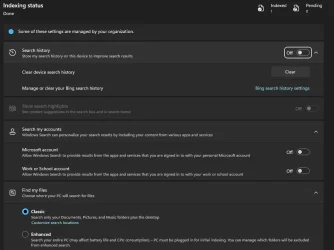
BTW, I don't know if it makes any difference but here are my Search related settings:

search-highlights-webp.149935
 

My Computers

System One System Two

  • OS
    11 Home
    Computer type
    Laptop
    Manufacturer/Model
    Asus TUF Gaming F16 (2024)
    CPU
    i7 13650HX
    Memory
    16GB DDR5
    Graphics Card(s)
    GeForce RTX 4060 Mobile
    Sound Card
    Eastern Electric MiniMax DAC Supreme; Emotiva UMC-200; Astell & Kern AK240
    Monitor(s) Displays
    Sony Bravia XR-55X90J
    Screen Resolution
    3840×2160
    Hard Drives
    512GB SSD internal
    37TB external
    PSU
    Li-ion
    Cooling
    2× Arc Flow Fans, 4× exhaust vents, 5× heatpipes
    Keyboard
    Logitech K800
    Mouse
    Logitech G402
    Internet Speed
    30Mbit/s up, 500Mbit/s down
    Browser
    FF
    Antivirus
    What's an antivirus?
  • Operating System
    11 Home
    Computer type
    Laptop
    Manufacturer/Model
    Medion S15450
    CPU
    i5 1135G7
    Memory
    16GB DDR4
    Graphics card(s)
    Intel Iris Xe
    Sound Card
    Eastern Electric MiniMax DAC Supreme; Emotiva UMC-200; Astell & Kern AK240
    Monitor(s) Displays
    Sony Bravia XR-55X90J
    Screen Resolution
    3840×2160
    Hard Drives
    2TB SSD internal
    37TB external
    PSU
    Li-ion
    Keyboard
    Logitech K800
    Mouse
    Logitech G402
    Internet Speed
    30Mbit/s up, 500Mbit/s down
    Browser
    FF
Random question: Everyone who has Store app results, do you live in the EU or outside of it?
I have it on the official version of Windows.
From birthplace of wars ✌️
 

My Computers

System One System Two

  • OS
    Windows 11 Pro 25H2
    Computer type
    Laptop
    Manufacturer/Model
    Huawei MateBook D15
    CPU
    Ryzen 5 3500U
    Memory
    8GB
    Graphics Card(s)
    Vega 8
    Screen Resolution
    FHD
    Hard Drives
    256GB Samsung SSD + 1TB HDD
    Browser
    Microsoft Edge
    Antivirus
    ESET Smart Security Premium
  • Operating System
    Windows 10 Enterprise LTSC 21H2
    Computer type
    Laptop
    Manufacturer/Model
    MSI GS73 6RF Stealth Pro
    CPU
    intel core i7 6700HQ
    Memory
    16GB
    Graphics card(s)
    Nvidia Geforce GTX1060 (6GB)
    Screen Resolution
    FHD
    Hard Drives
    128GB SSD + 1TB HDD
    Browser
    Microsoft Edge
    Antivirus
    Windows Defender

My Computer

System One

  • OS
    Windows 11
    Computer type
    PC/Desktop
can very easily enable it by changing your region to EU (i tested with Ireland). showed up as expected upon booting back up. no reinstall necessary.
 

My Computer

System One

  • OS
    Windows 11 Pro
Thankfully, this isn't as bad as it sounds as generally, apps updating is a good thing.

It's unrelated to this specific issue though, but it's a good find and thanks for sharing
 

My Computer

System One

  • OS
    Windows 11
    Computer type
    PC/Desktop

Latest Support Threads

Back
Top Bottom