
horsepower
Member
- Local time
- 3:27 AM
- Posts
- 1
- OS
- Windows 11
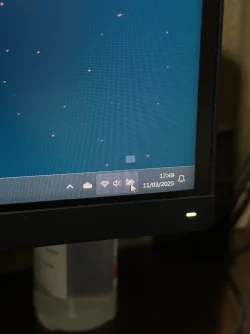
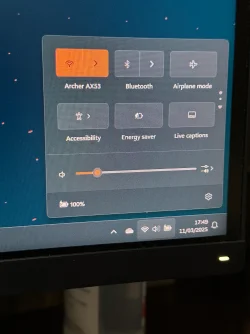
Hi, recently just install PowerChute Serial Shutdown for APC UPS. After installation windows showing battery icon in taskbar. But when i hover my mouse into the battery icon it only show small box with nothing inside. But if i click the battery icon it show 100%. What i want to know is how to show battery percentage when i hover my cursor on the battery icon?
1. Have tried to disable HID UPS Battery from device manager and restart windows
2. Re-enabling HID UPS Battery from device manager and restart windows
3. Uninstall HID UPS Battery from device manager
4. Follow instruction on Enable or Disable Show Battery Percentage on Taskbar in Windows 11
Step above that i mention is not working at all
Thank you and sorry for the messy English.
1. Have tried to disable HID UPS Battery from device manager and restart windows
2. Re-enabling HID UPS Battery from device manager and restart windows
3. Uninstall HID UPS Battery from device manager
4. Follow instruction on Enable or Disable Show Battery Percentage on Taskbar in Windows 11
Step above that i mention is not working at all
Thank you and sorry for the messy English.
- Windows Build/Version
- 24H2 (OS Build 26100.3323)
Attachments
My Computer
At a glance
Windows 11AMD Ryzen 9 9900X2x24GBGALAX RTX 4080 SUPER
- OS
- Windows 11
- Computer type
- PC/Desktop
- CPU
- AMD Ryzen 9 9900X
- Motherboard
- MSI MPG X870E CARBON
- Memory
- 2x24GB
- Graphics Card(s)
- GALAX RTX 4080 SUPER
- Screen Resolution
- 3440x1440
- Hard Drives
- SEAGATE FIRECUDA 530 2TB
- PSU
- ASUS TUF GAMING 1000W GOLD
- Case
- NZXT H7 FLOW
- Cooling
- COOLER MASTER MASTERLIQUID 360 ATMOS
- Keyboard
- KEYCHRON Q5
- Mouse
- LOGITECH G502 HERO
- Internet Speed
- 300 Mbps






