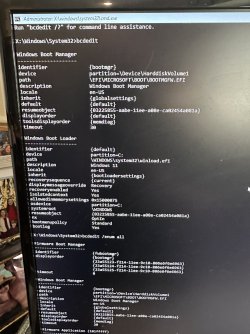
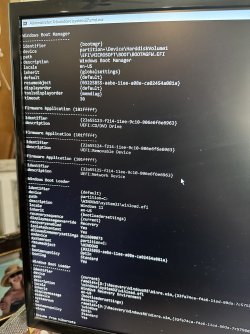
BCDedit /enum all


ddbbmm190010

Well-known member
Local time
4:23 PM
Posts
11
OS
Windows 11 Home, Version 22H2 Build 22621.819
Hello,

I have a couple of Windows Desktops that have been acting funny. Both are UEFI booted, versions 11 home, 23h2, clean installed from Media Creation Tool via Windows official website. One is a Dell XPS 8950 desktop, and the other is an HP Pavilion TP01 Desktop. They both are Intel based machines with similar hardware before I get into what acting funny means, I would like to get a check regarding the bios settings. Could you please check the following photographs, and see if these look correct?

These are listings of. BCDEDIT BCDEDIT /enum all. This is from the HP, but the Dell looked almost identical. The bad memory and RAMdisk portions are what got me concerned, but the debug and hyper visor settings are concerning as well.

Forgive any mistaken terminology and please correct as I’m a novice at best. I’m trying to learn to a) diagnose, and b) eventually treat the home network and it’s PCs.
 
Windows Build/Version
22631.3527

Attachments

  • IMG_3150.jpeg
    IMG_3150.jpeg
    814.4 KB · Views: 2
  • IMG_3151.jpeg
    IMG_3151.jpeg
    778.1 KB · Views: 2
  • IMG_3152.jpeg
    IMG_3152.jpeg
    904.7 KB · Views: 1
  • IMG_3153.jpeg
    IMG_3153.jpeg
    811.9 KB · Views: 1
  • IMG_3154.jpeg
    IMG_3154.jpeg
    726.6 KB · Views: 2
Last edited:

My Computer My Computer

At a glance

Windows 11 Home, Version 22H2 Build 22621.819Intel(R) Core(TM) i7-12700, 2100 Mhz16GB DDR5, 1x16GB, at 4400MHz;AMD Radeon RX 6700XT
OS
Windows 11 Home, Version 22H2 Build 22621.819
Computer type
PC/Desktop
Manufacturer/Model
Dell XPS 8950
CPU
Intel(R) Core(TM) i7-12700, 2100 Mhz
Motherboard
Dell BaseBoard Product 0R6PCT
Memory
16GB DDR5, 1x16GB, at 4400MHz;
Graphics Card(s)
AMD Radeon RX 6700XT
Sound Card
Realtek Audio (Integrated is my guess)
Monitor(s) Displays
Samsung 23" LS24F352FFHNXZA Old HDMI
Screen Resolution
1920x1080 60Hz
Hard Drives
Kioxia KBG50ZNS256G 256 GB,
Raid w/
ST1000DM010-2EP102
1.0 TB Spinning Non SSD
PSU
750 W
Case
"750W Night Sky Bezel Chassis"
Cooling
Basis Fan, not upgraded to Increased Air or Water Cooling
Keyboard
Dell Wireless
Mouse
Logitech M310 Wireless USB w/ dongle
Internet Speed
ATT Fiber 300Mb
Browser
Prefer Chrome, but use Edge. I'm open to suggestions on this.
Antivirus
Windows Defender
Other Info
Killer E3100G 2.5 Gigabit Ethernet Controller
Killer(R) Wi-Fi 6E AX1675x 160MHz Wireless Network Adapter (210NGW)
w/ bluetooth

Bios 1.7 Dell -- w/errors of not started in past event log.
It would be much easier if you cut and paste text into thread.
 

My Computer My Computer

At a glance

Windows 11 Pro + Win11 Canary VM.I9 13th gen i9-13900H 2.60 GHZ16 GB solderedIntegrated Intel Iris XE
OS
Windows 11 Pro + Win11 Canary VM.
Computer type
Laptop
Manufacturer/Model
ASUS Zenbook 14
CPU
I9 13th gen i9-13900H 2.60 GHZ
Motherboard
Yep, Laptop has one.
Memory
16 GB soldered
Graphics Card(s)
Integrated Intel Iris XE
Sound Card
Realtek built in
Monitor(s) Displays
laptop OLED screen
Screen Resolution
2880x1800 touchscreen
Hard Drives
1 TB NVME SSD (only weakness is only one slot)
PSU
Internal + 65W thunderbolt USB4 charger
Case
Yep, got one
Cooling
Stella Artois (UK pint cans - 568 ml) - extra cost.
Keyboard
Built in UK keybd
Mouse
Bluetooth , wireless dongled, wired
Internet Speed
900 mbs (ethernet), wifi 6 typical 350-450 mb/s both up and down
Browser
Edge
Antivirus
Defender
Other Info
TPM 2.0, 2xUSB4 thunderbolt, 1xUsb3 (usb a), 1xUsb-c, hdmi out, 3.5 mm audio out/in combo, ASUS backlit trackpad (inc. switchable number pad)

Macrium Reflect Home V8
Office 365 Family (6 users each 1TB onedrive space)
Hyper-V (a vm runs almost as fast as my older laptop)
Forgive any mistaken terminology and please correct as I’m a novice at best. I’m trying to learn to

a) diagnose, and
b) eventually treat the home network and it’s PCs.

c) take screenshots that someone has a half chance of reading
I've added category C for you.
 

My Computers My Computers

  • At a glance

    Windows 11 Enterprise 25H2 26200 7462Intel XEON E5-2699 v364GB Teamgroup UD4-3600NVIDIA GeForce GTX 1080 Ti
    OS
    Windows 11 Enterprise 25H2 26200 7462
    Computer type
    PC/Desktop
    Manufacturer/Model
    Custom Build
    CPU
    Intel XEON E5-2699 v3
    Motherboard
    ASUS X99-A
    Memory
    64GB Teamgroup UD4-3600
    Graphics Card(s)
    NVIDIA GeForce GTX 1080 Ti
    Sound Card
    Integrated
    Monitor(s) Displays
    ACER X34 Predator
    Screen Resolution
    3440 x 1440
    Hard Drives
    Crucial CT1000P 3P SSD8 1TB
    Crucial CT1000 BX500 SSD 1TB
    PSU
    GameMax Pro
    Case
    Fractal Design
    Cooling
    Corsair H110iGT + 6 140mm Fans
    Keyboard
    Corsair K4
    Mouse
    G-Skill G502
    Internet Speed
    300MBs
    Browser
    Chrome
    Antivirus
    OEM
    Other Info
    ASUS RT-AC87U Router
  • At a glance

    25H2 26200.50748GB
    Operating System
    25H2 26200.5074
    Computer type
    Laptop
    Manufacturer/Model
    ASUS X555LA
    Memory
    8GB
    Browser
    Chrome
    Antivirus
    OEM
Does this help? If not, Ill try again. It seems as though I am having trouble with copy/paste function.
Simple problems like this below listed text (keyboard controls of copy/paste when connected to internet--I use Control+C and Control+V on the keyboard). It shoud be a readout of the text listed in the photos. I sorry I am having trouble with a simple text format).


DLOGFILE00010000DUMP°
Dump stack initialized at UTC: 2024/02/08 17:45:03, local time: 2024/02/08 11:45:03.
#BugCheckCode 0x0000000000000139
#BugCheckP1 0x0000000000000003
#BugCheckP2 0xFFFFBA894621F7E0
#BugCheckP3 0xFFFFBA894621F738
#BugCheckP4 0x0000000000000000
Progress 0x00000042
Elapsed BugCheck duration 00001804ms
Starting get secondary dump callbacks size.
Progress 0x00000052
Finish get secondary dump callbacks size.
Dump Type: 6, Total Dump Size: 2828238576, Secondary Dump Size: 2830064.
Progress 0x00000051
Dump file is too small - switching to minidump. Dump file size = 1879048192, required size = 2828238576.
Elapsed BugCheck duration 00001812ms
Starting get secondary dump callbacks size.
Progress 0x00000452
Finish get secondary dump callbacks size.
Dump Type: 4, Total Dump Size: 2991981, Secondary Dump Size: 2845549.
Starting write of dump header.
Finish write of dump header.
Starting write of minidump data.
Finish write of minidump data.
Progress 0x00000444
Elapsed BugCheck duration 00003455ms
Starting invoking secondary dump callbacks.
Calling Win32kWPP secondary callback.
Return from Win32kWPP secondary callback.
Writing Win32kWPP secondary callback data.
Writing Win32kWPP secondary callback data done.
Calling Win32kWPP secondary callback.
Return from Win32kWPP secondary callback.
Writing Win32kWPP secondary callback data.
Writing Win32kWPP secondary callback data done.
Calling Win32kWPP secondary callback.
Return from Win32kWPP secondary callback.
Writing Win32kWPP secondary callback data.
Writing Win32kWPP secondary callback data done.
Calling Win32kWPP secondary callback.
Return from Win32kWPP secondary callback.
Writing Win32kWPP secondary callback data.
Writing Win32kWPP secondary callback data done.
Calling Win32kWPP secondary callback.
Return from Win32kWPP secondary callback.
Writing Win32kWPP secondary callback data.
Writing Win32kWPP secondary callback data done.
Calling Win32kWPP secondary callback.
Return from Win32kWPP secondary callback.
Writing Win32kWPP secondary callback data.
Writing Win32kWPP secondary callback data done.
Calling Win32kWPP secondary callback.
Return from Win32kWPP secondary callback.
Writing Win32kWPP secondary callback data.
Writing Win32kWPP secondary callback data done.
Calling igdkmdn64.sys secondary callback.
Return from igdkmdn64.sys secondary callback.
Writing igdkmdn64.sys secondary callback data.
Writing igdkmdn64.sys secondary callback data done.
Calling Win32kWPP secondary callback.
Return from Win32kWPP secondary callback.
Writing Win32kWPP secondary callback data.
Writing Win32kWPP secondary callback data done.
Calling Win32kWPP secondary callback.
Return from Win32kWPP secondary callback.
Writing Win32kWPP secondary callback data.
Writing Win32kWPP secondary callback data done.
Calling Win32kWPP secondary callback.
Return from Win32kWPP secondary callback.
Writing Win32kWPP secondary callback data.
Writing Win32kWPP secondary callback data done.
Calling Win32kWPP secondary callback.
Return from Win32kWPP secondary callback.
Writing Win32kWPP secondary callback data.
Writing Win32kWPP secondary callback data done.
Calling Win32kWPP secondary callback.
Return from Win32kWPP secondary callback.
Writing Win32kWPP secondary callback data.
Writing Win32kWPP secondary callback data done.
Calling Win32kWPP secondary callback.
Return from Win32kWPP secondary callback.
Writing Win32kWPP secondary callback data.
Writing Win32kWPP secondary callback data done.
Calling Win32kWPP secondary callback.
Return from Win32kWPP secondary callback.
Writing Win32kWPP secondary callback data.
Writing Win32kWPP secondary callback data done.
Calling CRASHDUMP secondary callback.
Return from CRASHDUMP secondary callback.
Writing CRASHDUMP secondary callback data.
Writing CRASHDUMP secondary callback data done.
Calling wdiwifi secondary callback.
Return from wdiwifi secondary callback.
Writing wdiwifi secondary callback data.
Writing wdiwifi secondary callback data done.
Calling wdiwifi secondary callback.
Return from wdiwifi secondary callback.
Writing wdiwifi secondary callback data.
Writing wdiwifi secondary callback data done.
Calling rt640x64 secondary callback.
Return from rt640x64 secondary callback.
Writing rt640x64 secondary callback data.
Writing rt640x64 secondary callback data done.
Calling \Device\DxgKrnl secondary callback.
Return from \Device\DxgKrnl secondary callback.
Writing \Device\DxgKrnl secondary callback data.
Writing \Device\DxgKrnl secondary callback data done.
Calling PortDriverStandard secondary callback.
Return from PortDriverStandard secondary callback.
Writing PortDriverStandard secondary callback data.
Writing PortDriverStandard secondary callback data done.
Calling Wdf01000 secondary callback.
Return from Wdf01000 secondary callback.
Writing Wdf01000 secondary callback data.
Writing Wdf01000 secondary callback data done.
Calling blackbox - CI secondary callback.
Return from blackbox - CI secondary callback.
Writing blackbox - CI secondary callback data.
Writing blackbox - CI secondary callback data done.
Calling blackbox - Winlogon secondary callback.
Return from blackbox - Winlogon secondary callback.
Writing blackbox - Winlogon secondary callback data.
Writing blackbox - Winlogon secondary callback data done.
Calling blackbox - NTFS secondary callback.
Return from blackbox - NTFS secondary callback.
Writing blackbox - NTFS secondary callback data.
Writing blackbox - NTFS secondary callback data done.
Calling blackbox - CrashedProcess secondary callback.
Return from blackbox - CrashedProcess secondary callback.
Writing blackbox - CrashedProcess secondary callback data.
Writing blackbox - CrashedProcess secondary callback data done.
Calling blackbox - PNP secondary callback.
Return from blackbox - PNP secondary callback.
Writing blackbox - PNP secondary callback data.
Writing blackbox - PNP secondary callback data done.
Calling blackbox - BSD secondary callback.
Return from blackbox - BSD secondary callback.
Writing blackbox - BSD secondary callback data.
Writing blackbox - BSD secondary callback data done.
Calling SecureKernelFailureLog secondary callback.
Return from SecureKernelFailureLog secondary callback.
Writing SecureKernelFailureLog secondary callback data.
Writing SecureKernelFailureLog secondary callback data done.
Calling SecureKernelCrashdumpArea secondary callback.
Return from SecureKernelCrashdumpArea secondary callback.
Writing SecureKernelCrashdumpArea secondary callback data.
Writing SecureKernelCrashdumpArea secondary callback data done.
Calling secondary multi-part dump callbacks.
Starting TRIAGEDUMPDATA multi-part secondary callback.
Finish TRIAGEDUMPDATA multi-part secondary callback.
Starting SMBiosData multi-part secondary callback.
Finish SMBiosData multi-part secondary callback.
Starting SMBiosRegistry multi-part secondary callback.
Finish SMBiosRegistry multi-part secondary callback.
Starting SMBiosRegisters multi-part secondary callback.
Finish SMBiosRegisters multi-part secondary callback.
Starting SMBiosDataACPI multi-part secondary callback.
Finish SMBiosDataACPI multi-part secondary callback.
Starting PCI multi-part secondary callback.
Finish PCI multi-part secondary callback.
Starting Etw multi-part secondary callback.
Finish Etw multi-part secondary callback.
Finish calling secondary multi-part dump callbacks.
Progress 0x00000445
Finish invoking secondary dump callbacks.
Starting invoking dump complete callbacks.
Progress 0x00000446
Finish invoking dump complete callbacks.
Dump ended at UTC: 2024/02/08 17:45:03, local time: 2024/02/08 11:45:03.
Elapsed BugCheck duration 00003758ms
Dump completed successfully.
Progress 0x00000453
 

My Computer My Computer

At a glance

Windows 11 Home, Version 22H2 Build 22621.819Intel(R) Core(TM) i7-12700, 2100 Mhz16GB DDR5, 1x16GB, at 4400MHz;AMD Radeon RX 6700XT
OS
Windows 11 Home, Version 22H2 Build 22621.819
Computer type
PC/Desktop
Manufacturer/Model
Dell XPS 8950
CPU
Intel(R) Core(TM) i7-12700, 2100 Mhz
Motherboard
Dell BaseBoard Product 0R6PCT
Memory
16GB DDR5, 1x16GB, at 4400MHz;
Graphics Card(s)
AMD Radeon RX 6700XT
Sound Card
Realtek Audio (Integrated is my guess)
Monitor(s) Displays
Samsung 23" LS24F352FFHNXZA Old HDMI
Screen Resolution
1920x1080 60Hz
Hard Drives
Kioxia KBG50ZNS256G 256 GB,
Raid w/
ST1000DM010-2EP102
1.0 TB Spinning Non SSD
PSU
750 W
Case
"750W Night Sky Bezel Chassis"
Cooling
Basis Fan, not upgraded to Increased Air or Water Cooling
Keyboard
Dell Wireless
Mouse
Logitech M310 Wireless USB w/ dongle
Internet Speed
ATT Fiber 300Mb
Browser
Prefer Chrome, but use Edge. I'm open to suggestions on this.
Antivirus
Windows Defender
Other Info
Killer E3100G 2.5 Gigabit Ethernet Controller
Killer(R) Wi-Fi 6E AX1675x 160MHz Wireless Network Adapter (210NGW)
w/ bluetooth

Bios 1.7 Dell -- w/errors of not started in past event log.

Latest Support Threads

Back
Top Bottom