Bitlocker Recovery


Pnokio

Well-known member
Member
Local time
2:08 AM
Posts
333
Location
Scotland UK
OS
Windows 11 Home 25H2 64-Bit
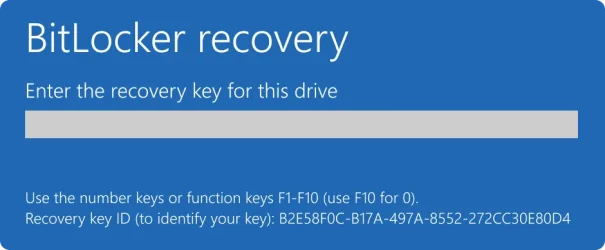
Hi Folks, today, I needed to enter the recovery key for my Laptop. I opened this page aka.ms/recoverykeyfaq in my browser, it did not help.
So I opened this page aka.ms/myrecoverykey it gave me the list of my 2 laptops which I copied & pasted in notepad
I entered the 48 numbers into the space for the Code, double checking it before pressing enter only to see it was wrong. I have tried it 2 more times as carefully as I could but still wrong.
Can you tell me where I went wrong????
 

My Computer

System One

  • OS
    Windows 11 Home 25H2 64-Bit
    Computer type
    Laptop
    Manufacturer/Model
    asus f515ja
    CPU
    Intel(R) Core(TM) i5-1035G1 CPU @ 1.00GHz 1.19 GHz
    Motherboard
    ASUSTeK COMPUTER INC. X515JA (U3E1)
    Memory
    8.00GB HDD
    Graphics Card(s)
    Standard Monitor on Intel UHD Graphics
    Sound Card
    Realtek HDA
    Screen Resolution
    1366 x 768 x 60
    Hard Drives
    1HDD 2 Partitions
    Mouse
    Logitech Cordless
    Internet Speed
    38mbps
    Browser
    Chrome+FF
    Antivirus
    Malwarebytes (Premium)
    Other Info
    When I find it.
Does the text that you copied from myrecoverykey include a key called "Identifier"? Does the alphanumeric code underneath match the "Recovery Key ID" shown on the screen that asked you for the recovery key?
 

Attachments

  • 70d2ab07-0b73-4c82-b439-15c6f4235f96.webp
    70d2ab07-0b73-4c82-b439-15c6f4235f96.webp
    23.3 KB · Views: 1

My Computer

System One

  • OS
    Windows 11 Pro 25H2
    Computer type
    PC/Desktop
Hello echo2446, yes they do match and were accepted almost. Now, I have got a BSOD (Blue Screen of Death)
I tried to find a fix on YouTube, it was like trying to read a Chinese menu in Chinese without my reading glasses.
It seems I will have to try a reset.
Thanks.
 

My Computer

System One

  • OS
    Windows 11 Home 25H2 64-Bit
    Computer type
    Laptop
    Manufacturer/Model
    asus f515ja
    CPU
    Intel(R) Core(TM) i5-1035G1 CPU @ 1.00GHz 1.19 GHz
    Motherboard
    ASUSTeK COMPUTER INC. X515JA (U3E1)
    Memory
    8.00GB HDD
    Graphics Card(s)
    Standard Monitor on Intel UHD Graphics
    Sound Card
    Realtek HDA
    Screen Resolution
    1366 x 768 x 60
    Hard Drives
    1HDD 2 Partitions
    Mouse
    Logitech Cordless
    Internet Speed
    38mbps
    Browser
    Chrome+FF
    Antivirus
    Malwarebytes (Premium)
    Other Info
    When I find it.
Yeah, if the strings match but the recovery key (make triple-sure you have the right one!!!! maybe go over with someone both from the source and on entry) doesn't work, the "ultimate" fallback path to use the key to access the actual decryption key is corrupted. If I were in your position, I'd assume there's a BitLocker (metadata) corruption at this point. Resetting wouldn't allow you to access the existing encrypted data, though. Unless you have good system and/or data backups (or if you find other solutions that work), the data on your system drive is probably unrecoverable.

Hopefully, you have good backups (and good friends to help you make sure about the key).
 

My Computer

System One

  • OS
    Windows 11 Pro 25H2
    Computer type
    PC/Desktop
I have good backups but I'm 74 and live alone.
Thanks again.
 

My Computer

System One

  • OS
    Windows 11 Home 25H2 64-Bit
    Computer type
    Laptop
    Manufacturer/Model
    asus f515ja
    CPU
    Intel(R) Core(TM) i5-1035G1 CPU @ 1.00GHz 1.19 GHz
    Motherboard
    ASUSTeK COMPUTER INC. X515JA (U3E1)
    Memory
    8.00GB HDD
    Graphics Card(s)
    Standard Monitor on Intel UHD Graphics
    Sound Card
    Realtek HDA
    Screen Resolution
    1366 x 768 x 60
    Hard Drives
    1HDD 2 Partitions
    Mouse
    Logitech Cordless
    Internet Speed
    38mbps
    Browser
    Chrome+FF
    Antivirus
    Malwarebytes (Premium)
    Other Info
    When I find it.
Back
Top Bottom