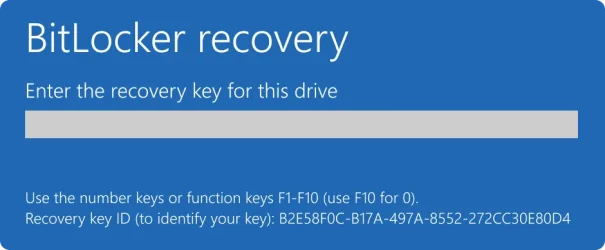
Hi Folks, today, I needed to enter the recovery key for my Laptop. I opened this page aka.ms/recoverykeyfaq in my browser, it did not help.
So I opened this page aka.ms/myrecoverykey it gave me the list of my 2 laptops which I copied & pasted in notepad
I entered the 48 numbers into the space for the Code, double checking it before pressing enter only to see it was wrong. I have tried it 2 more times as carefully as I could but still wrong.
Can you tell me where I went wrong????
So I opened this page aka.ms/myrecoverykey it gave me the list of my 2 laptops which I copied & pasted in notepad
I entered the 48 numbers into the space for the Code, double checking it before pressing enter only to see it was wrong. I have tried it 2 more times as carefully as I could but still wrong.
Can you tell me where I went wrong????
My Computer
At a glance
Windows 11 Home 26H2 64-BitIntel(R) Core(TM) i5-1035G1 CPU @ 1.00GHz 1.1...8.00GB HDDStandard Monitor on Intel UHD Graphics
- OS
- Windows 11 Home 26H2 64-Bit
- Computer type
- Laptop
- Manufacturer/Model
- asus f515ja
- CPU
- Intel(R) Core(TM) i5-1035G1 CPU @ 1.00GHz 1.19 GHz
- Motherboard
- ASUSTeK COMPUTER INC. X515JA (U3E1)
- Memory
- 8.00GB HDD
- Graphics Card(s)
- Standard Monitor on Intel UHD Graphics
- Sound Card
- Realtek HDA
- Screen Resolution
- 1366 x 768 x 60
- Hard Drives
- 1HDD 2 Partitions
- Mouse
- Logitech Cordless
- Internet Speed
- 38mbps
- Browser
- Chrome+FF
- Antivirus
- Malwarebytes (Premium)
- Other Info
- When I find it.