BitLocker


GrayOldman1

I play with Trains
Member
Local time
7:11 AM
Posts
48
OS
Windows 11
Running Windows 11 home. Should bit locker be on or off.
 

My Computer My Computer

At a glance

Windows 11Ryzen 5-5600x16 GBNvida GeForce GTX 1060 6GB
OS
Windows 11
Computer type
PC/Desktop
Manufacturer/Model
Myself
CPU
Ryzen 5-5600x
Motherboard
Asus B550A Gaming
Memory
16 GB
Graphics Card(s)
Nvida GeForce GTX 1060 6GB
Sound Card
On board sound
Monitor(s) Displays
Wide screen Samsung
Hard Drives
Evo M.2 Boot Drive 500GB, Evo 250 GB ssd, 2 each Seagate 3 Terabyte Hard disks.
Teramaster NAS F4-210 with 4 6TB drives.
PSU
EVGA
Case
Rosewell
Cooling
Cooler master
Mouse
Logtech
Internet Speed
1.2 Mbps
Other Info
Computers I have had are Ti-99A, Commodore 64(2) Original IBM PC with 2 floppies drives. Commodore 128, PC base 286, 386 cpu, Compaq 386 with internal DSL modem.
A number of other computers, and now my last one.(I think)
It depends whether you wish to have the extra security it provides.

You need to be fully aware of the implications of running BitLocker, mainly that you absolutely must back up your recovery keys in case you need them at any time. Fwiw I use BitLocker and have all drives and their partitions encrypted including external HDD's and flash drives using 'BitLocker To Go' for those. As long as you have a copy of the keys you should be fine. You need the keys if for example you clean install and need to access an encrypted drive or partition or if you perhaps alter the disk structure and resize a partition. Apart from major events like that it operates seamlessly.
 

My Computer My Computer

At a glance

W11 Pro x64 ongoing Canary 29500 latest buildsIntel i58GbIntel HD Graphics
OS
W11 Pro x64 ongoing Canary 29500 latest builds
Computer type
Laptop
Manufacturer/Model
Dell 7760 Mobile Precision 17"
CPU
Intel i5
Motherboard
Unknown
Memory
8Gb
Graphics Card(s)
Intel HD Graphics
Sound Card
Realtek
Monitor(s) Displays
Internal
Hard Drives
2 x 256Gb SSD
PSU
Dell 240 watt
Mouse
Dell Premier Bluetooth
Internet Speed
50Mbps
Browser
Edge
Antivirus
Default Microsoft Security
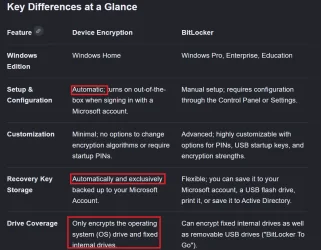
There is no Bitlocker in Home but is called device encryption. There are differences.
Screenshot 2026-06-05 140827.webp
 

My Computers My Computers

  • At a glance

    Windows 11 Pro 25H2 26200.8875i9-10900 10 core 20 threads32 gbnone-Intel UHD Graphics 630
    OS
    Windows 11 Pro 25H2 26200.8875
    Computer type
    PC/Desktop
    Manufacturer/Model
    Dell Optiplex 7080
    CPU
    i9-10900 10 core 20 threads
    Motherboard
    DELL 0J37VM
    Memory
    32 gb
    Graphics Card(s)
    none-Intel UHD Graphics 630
    Sound Card
    Integrated Realtek
    Monitor(s) Displays
    Benq 27
    Screen Resolution
    2560x1440
    Hard Drives
    2x1tb Solidigm m.2 nvme /External drives 512gb Samsung m.2 sata+2tb Kingston m2.nvme
    PSU
    500w
    Case
    MT
    Cooling
    Dell Premium
    Keyboard
    Logitech wired
    Mouse
    Logitech wireless
    Internet Speed
    so slow I'm too embarrassed to tell
    Browser
    #1 Edge #2 Firefox
    Antivirus
    Defender+MWB Premium
  • At a glance

    Windows 11 Pro 24H2 26200.8875AMD Ryzen 7 6800U32 gbintegrated
    Operating System
    Windows 11 Pro 24H2 26200.8875
    Computer type
    PC/Desktop
    Manufacturer/Model
    Beelink Mini PC SER5
    CPU
    AMD Ryzen 7 6800U
    Memory
    32 gb
    Graphics card(s)
    integrated
    Sound Card
    integrated
    Monitor(s) Displays
    Benq 27
    Screen Resolution
    2560x1440
    Hard Drives
    1TB Crucial nvme
    Keyboard
    Logitech wired
    Mouse
    Logitech wireless
    Internet Speed
    still too embarrassed to tell
    Browser
    Firefox
    Antivirus
    Defender
    Other Info
    System 3 is non compliant Dell 9020 i7-4770/24gb ram Win11 PRO 26200.8875
So, based on the two comments above, the OP should make sure the correct recovery keys are saved to their Microsoft accounts, and that they can access their Microsoft account even when the computer in question is unavailable.

The questions are:
  1. How does the user check the Microsoft‑stored Recovery Key ID against their local devices when the utilities to manage Bitlocker are unavailable? No tutorial! (now that this has become the default)
  2. What happens for people using local accounts only?
 

My Computer My Computer

At a glance

Windows 11 Pro 25H2
OS
Windows 11 Pro 25H2
Computer type
PC/Desktop
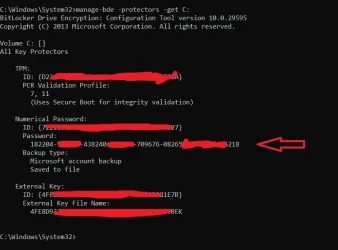
At a basic level you can get the keys using a command prompt. For drives other than the main C drive simply replace the C with the appropriate designation. I would assume this would work for any Windows version running BitLocker.

Use the code:
Code:
manage-bde -protectors -get C:

Personally I print them out and securely file them should they be needed. I would have to be sat in front of the Home edition to see what options were available but normally you can use 'Control Panel' to access the BitLocker settings page although I see typing just 'Encryption' into W11 settings gives the option as well.

The arrowed number (password) if the 48 digit key needed.


Screenshot 2026-06-06 140023.webp
 

My Computer My Computer

At a glance

W11 Pro x64 ongoing Canary 29500 latest buildsIntel i58GbIntel HD Graphics
OS
W11 Pro x64 ongoing Canary 29500 latest builds
Computer type
Laptop
Manufacturer/Model
Dell 7760 Mobile Precision 17"
CPU
Intel i5
Motherboard
Unknown
Memory
8Gb
Graphics Card(s)
Intel HD Graphics
Sound Card
Realtek
Monitor(s) Displays
Internal
Hard Drives
2 x 256Gb SSD
PSU
Dell 240 watt
Mouse
Dell Premier Bluetooth
Internet Speed
50Mbps
Browser
Edge
Antivirus
Default Microsoft Security

My Computers My Computers

  • At a glance

    Windows 11 Pro 25H2 26200.8894AMD Ryzen 7 5825U with Radeon Graphics16GB
    OS
    Windows 11 Pro 25H2 26200.8894
    Computer type
    Laptop
    Manufacturer/Model
    Acemagic LX15PRO
    CPU
    AMD Ryzen 7 5825U with Radeon Graphics
    Motherboard
    BIOS CT_BI_AMI_LX15PRO_AB8139_A-004
    Memory
    16GB
    Screen Resolution
    1920 x 1080
    Hard Drives
    SSD 2TB
    Internet Speed
    30 Mbps
    Browser
    Brave
    Antivirus
    Webroot SecureAnywhere Complete beta
  • At a glance

    Windows 11 Pro 23H2 22631.2506Atom N450 1.66GHz2GB
    Operating System
    Windows 11 Pro 23H2 22631.2506
    Computer type
    Laptop
    Manufacturer/Model
    HP Mini 210-1090NR PC (bought in late 2009!)
    CPU
    Atom N450 1.66GHz
    Memory
    2GB
    Browser
    Brave
    Antivirus
    Webroot
  • Acer Swift SF114-34 laptop
    OS Windows 11 Pro 26200.8894
    CPU Pentium Silver N6000
    RAM 4GB
    BIOS v1.17
    SSD Samsung 970 EVO Plus SSD 2TB (an upgrade)
Back
Top Bottom