Blacklisted drive letter? Executing files gives Security Warning, Do you want to run this file?


FMBz

New member
Local time
4:35 AM
Posts
12
OS
Windows 11
Win version 24H2 26100.6901

I switched from Windows 10 to Windows 11 a few months ago and ever since I have been experiencing trouble with one of my internal drives (that has been in use for years on W10 without issue).
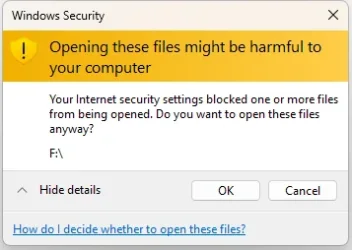
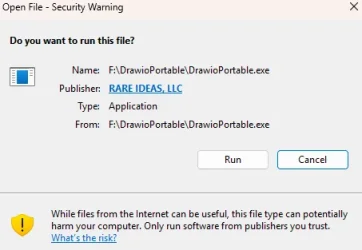
It's an encrypted (VeraCrypt) volume from which I am unable to execute files (exe, bat, lnk) without a Security Warning (see attached screenshot for an example).
I have several other VeraCrypt volumes that do not experience this problem, and there is nothing meaningfully different about how they are mounted or set up that I can see.

The most curious thing is, if I mount the drive under a different drive letter, the issue does not appear. Moreover, if I mount a different drive under the "problematic" drive letter (F), I start getting warnings when executing things on that drive. So, it can't have anything to do with the specific executables themselves, it seems. It's only the fact that they are located, sometimes, on a path that starts with F:\... that gives Windows reason to mistrust them.
In short, Windows seems to have "blacklisted" drive letter F on my system.

I also stumbled across another workaround that I don't understand why works, which is to run the following batch file after the drive has been mounted:
Batch:
taskkill /F /IM explorer.exe
start explorer
So, not only is it blacklisting drive F, it seems to do so (or remember to do so) at the time the drive is mounted, not before.

Any clues as to what part of Windows might do something like that and where one might go to fix this?

I would rather not change drive letter permanently as I've gotten extremely used to it being "the F drive".
I am also aware that I could disable that part of Windows Security entirely, so that no warnings are given for any files at all. But I'd rather not do that, either.

Thanks in advance for any insight...
 

Attachments
  • Clipboard_11-04-2025_01.webp
    Clipboard_11-04-2025_01.webp
    15.3 KB · Views: 1

My Computer My Computer

At a glance

Windows 11
OS
Windows 11
Computer type
PC/Desktop
Manufacturer/Model
custom
Right click on an exe file and select properties. If you find a message that says "This file came from another computer and might be blocked..."
Uncheck the box and click apply. Then you should be able to run it. You can do that for all of your files one by one, or just run this command in Powershell to unblock all the files in the folder.

Get-ChildItem -Path "F:/(folder name)" -Recurse | Unblock-File
 

My Computer My Computer

At a glance

Windows 11 22H2 Pro (X-lite Micro 11 version)i7 13850HX (20 cores, 28 threads)32GB DDR5Intel UHD/ RTX 1000 ADA
OS
Windows 11 22H2 Pro (X-lite Micro 11 version)
Computer type
Laptop
Manufacturer/Model
Dell/ Precision 7680
CPU
i7 13850HX (20 cores, 28 threads)
Motherboard
Dell
Memory
32GB DDR5
Graphics Card(s)
Intel UHD/ RTX 1000 ADA
Sound Card
Realtek
Monitor(s) Displays
4K UHD Touchscreen
Screen Resolution
3840 x 2400
Hard Drives
Samsung 512GB system drive
WD Blue 1TB game drive
PSU
240W AC adapter, 1800W when docked
Internet Speed
1 gigabit symmetrical
Browser
Firefox, Librewolf
Antivirus
None. Manully configured so nobody except me can change any critical system files. (Don't ask how, it's probably against some rule somewhere)
Right click on an exe file and select properties. If you find a message that says "This file came from another computer and might be blocked..."
Uncheck the box and click apply. Then you should be able to run it. You can do that for all of your files one by one, or just run this command in Powershell to unblock all the files in the folder.

Get-ChildItem -Path "F:/(folder name)" -Recurse | Unblock-File
Thanks for the response! There is no such message, and no box to untick on any of the exe files I checked.

The powershell command does not seem to do anything:
PS F:\> Get-ChildItem -Path "F:\DrawioPortable\DrawioPortable.exe" -Recurse | Unblock-File
Unblock-File: The filename, directory name, or volume label syntax is incorrect. : 'F:\DrawioPortable\DrawioPortable.exe:Zone.Identifier'.
 

My Computer My Computer

At a glance

Windows 11
OS
Windows 11
Computer type
PC/Desktop
Manufacturer/Model
custom
Slightly different reason for the same kind of problem I've encountered before, apparently. The kind of problem I lack the skills to solve without the machine in hand. Most of the people who have been here a while probably know more.
 

My Computer My Computer

At a glance

Windows 11 22H2 Pro (X-lite Micro 11 version)i7 13850HX (20 cores, 28 threads)32GB DDR5Intel UHD/ RTX 1000 ADA
OS
Windows 11 22H2 Pro (X-lite Micro 11 version)
Computer type
Laptop
Manufacturer/Model
Dell/ Precision 7680
CPU
i7 13850HX (20 cores, 28 threads)
Motherboard
Dell
Memory
32GB DDR5
Graphics Card(s)
Intel UHD/ RTX 1000 ADA
Sound Card
Realtek
Monitor(s) Displays
4K UHD Touchscreen
Screen Resolution
3840 x 2400
Hard Drives
Samsung 512GB system drive
WD Blue 1TB game drive
PSU
240W AC adapter, 1800W when docked
Internet Speed
1 gigabit symmetrical
Browser
Firefox, Librewolf
Antivirus
None. Manully configured so nobody except me can change any critical system files. (Don't ask how, it's probably against some rule somewhere)
I'm curious. I wonder what would happen if you used a plain bare drive with no data on it if Windows 11 would still black list it.
 

My Computer My Computer

At a glance

WIN 11, WIN 10, WIN 8.1, WIN 7 U, WIN 7 PRO, ...Intel i7 6900K and i9-7960X / AMD 3800X (8 core)128 GB CORSAIR DOMINATOR PLATINUM (B DIE)NVIDIA 1070 and RTX 3070
OS
WIN 11, WIN 10, WIN 8.1, WIN 7 U, WIN 7 PRO, WIN 7 HOME (32 Bit), LINUX MINT
Computer type
PC/Desktop
Manufacturer/Model
DIY, ASUS, and DELL
CPU
Intel i7 6900K and i9-7960X / AMD 3800X (8 core)
Motherboard
ASUS X99E-WS USB 3.1 and ASUS X299 SAGE
Memory
128 GB CORSAIR DOMINATOR PLATINUM (B DIE)
Graphics Card(s)
NVIDIA 1070 and RTX 3070
Sound Card
Crystal Sound (onboard)
Monitor(s) Displays
single Samsung 30" 4K and 8" aux monitor
Screen Resolution
4K and something equally attrocious. I'll be working on this.
Hard Drives
A, B, C, D, E, F, G, H, I, J, K, L, M, N, O, P, Q, R, S, T, U, V, W

Ports X, Y, and Z are reserved for USB access and removable drives.

Drive types consist of the following: Various mechanical hard drives bearing the brand names, Seagate, Toshiba, and Western Digital. Various NVMe drives bearing the brand names Kingston, Intel, Silicon Power, Crucial, Western Digital, and Team Group. Various SATA SSDs bearing various different brand names.

RAID arrays included:

LSI RAID 10 (WD Velociraptors) 1115.72 GB
LSI RAID 10 (WD SSDS) 463.80 GB

INTEL RAID 0 (KINGSTON HYPER X) System 447.14 GB
INTEL RAID 1 TOSHIBA ENTERPRIZE class Data 2794.52 GB
INTEL RAID 1 SEAGATE HYBRID 931.51 GB
PSU
SEVERAL. I prefer my Corsair Platinum HX1000i but I also like EVGA power supplies
Case
ThermalTake Level 10 GT (among others)
Cooling
Noctua is my favorite and I use it in my main. I also own various other coolers.
Keyboard
all kinds.
Mouse
all kinds
Internet Speed
360 mbps - 1 gbps (depending)
Browser
FIREFOX
Antivirus
KASPERSKY (no apologies)
Other Info
Gave Dell touch screen with Windows 11 to daughter and got me an OTVOC. Being a PC builder I own many desktop PCs as well. I am a father of five providing PCs, laptops, and tablets for all my family, most of which I have modified, rebuilt, or simply built from scratch. I do not own a cell phone, never have, never will.
This is just a hunch because the problem symptoms are not quite the same as those I've seen before.

Look in the Registry Key
HKEY_LOCAL_MACHINE\SYSTEM\MountedDevices
at the bottom of this list are your drive letter assignments \DosDevices\D:, \DosDevices\E:, \DosDevices\F:, etc
and look in
HKEY_CURRENT_USER\Software\Microsoft\Windows\CurrentVersion\Explorer\MountPoints2
for mapped network paths.

If you mounted a network path with the same drive letter that you have assigned to a drive then it can cause problems so remove both entries and re-assign the drive letter.


All the best,
Denis
 

My Computer My Computer

At a glance

Windows 11 Home x64 Version 25H2 Build 26200....
OS
Windows 11 Home x64 Version 25H2 Build 26200.8037
I'm curious. I wonder what would happen if you used a plain bare drive with no data on it if Windows 11 would still black list it.

That's an interesting question. Best I could do right this moment was to create a VeraCrypt file container and mount that as "F" - trying to run things from this caused the same warnings.
Tomorrow maybe I'll see about finding an actual hard drive I can empty out to test this with. It would be good to rule out VeraCrypt if nothing else.

This is just a hunch because the problem symptoms are not quite the same as those I've seen before.

Look in the Registry Key
HKEY_LOCAL_MACHINE\SYSTEM\MountedDevices
at the bottom of this list are your drive letter assignments \DosDevices\D:, \DosDevices\E:, \DosDevices\F:, etc
and look in
HKEY_CURRENT_USER\Software\Microsoft\Windows\CurrentVersion\Explorer\MountPoints2
for mapped network paths.

If you mounted a network path with the same drive letter that you have assigned to a drive then it can cause problems so remove both entries and re-assign the drive letter.


All the best,
Denis
Thank you for this. I have indeed found entries for F (as well as my other VeraCrypt drive, G) under
MountPoints2, but removing them (as well as the ones under MountedDevices) unfortunately did not change the behavior (tested after reboot).
 

My Computer My Computer

At a glance

Windows 11
OS
Windows 11
Computer type
PC/Desktop
Manufacturer/Model
custom
save this as a .bat on your external drive (or drive with other letter) and run it while its there.

Code:
@echo off
for /r %%i in (*) do (
    echo Unblocking: %%i
    streams -d "%%i"
)
pause
 

My Computer My Computer

At a glance

Windows 11 Pro
OS
Windows 11 Pro
save this as a .bat on your external drive (or drive with other letter) and run it while its there.

Code:
@echo off
for /r %%i in (*) do (
    echo Unblocking: %%i
    streams -d "%%i"
)
pause
Hi, thank you!
That batch is relying on a command that doesn't come with Windows though:
'streams' is not recognized as an internal or external command,
operable program or batch file.
Based on the syntax and context I assume it's this: Streams - Sysinternals

However, the volume in question is actually exFAT, not NTFS (as are the ones that work fine), so streams does not apply:
The specified volume does not support streams.
 

My Computer My Computer

At a glance

Windows 11
OS
Windows 11
Computer type
PC/Desktop
Manufacturer/Model
custom
I'm curious. I wonder what would happen if you used a plain bare drive with no data on it if Windows 11 would still black list it.
That's an interesting question. Best I could do right this moment was to create a VeraCrypt file container and mount that as "F" - trying to run things from this caused the same warnings.
Tomorrow maybe I'll see about finding an actual hard drive I can empty out to test this with. It would be good to rule out VeraCrypt if nothing else.
So, I actually didn't end up emptying the drive for this, figured it was not necessary. But I did dig up an older drive that had never been plugged in on this machine before. After I attached it, it was assigned drive letter D by the system, and when I put a program on it for testing, the executable could be run without issue.
This changed when I assigned it the letter F in disk management - same warning as with other volumes.
So, we can probably say that it's not about VeraCrypt, or at least not now.


Incidentally, @dacrone this other drive is NTFS, so I wanted to test what would happen with your batch file.
I downloaded the sysinternals zip straight to F:\Streams.zip. Right-clicking on that gave me a new warning:
streams.webp


This file now had the "unblock" checkbox in its properties as well, but I left that alone and ran the batch file instead. It went through all the files on the drive, but only this zip was modified:
Unblocking: F:\Streams.zip

streams v1.60 - Reveal NTFS alternate streams.
Copyright (C) 2005-2016 Mark Russinovich
Sysinternals - www.sysinternals.com

F:\Streams.zip:
Deleted :Zone.Identifier:$DATA
Result:
Right-clicking the zip still produces the warning, but the properties no longer have the unblock checkbox. (I also, maybe obviously, still cannot execute programs from that drive without the original warning.)
 

My Computer My Computer

At a glance

Windows 11
OS
Windows 11
Computer type
PC/Desktop
Manufacturer/Model
custom
I am unable to execute files (exe, bat, lnk) without a Security Warning
I'm wondering if that warning is being triggered by 'file integrity' issues.
It's almost a decade since I experienced the problem with my IE Favourites folder.
There have been a few reports of it more recently e.g. Why am I suddenly getting this security warning - TenForums

If it is a file integrity issue then I'd expect you to see the same warning if you merely moved a file from F:\ to somewhere else [not from somewhere else to F:\].

Icacls can be used to reset file integrity to Medium e.g.
ICACLS "F:\" /T /SETINTEGRITYLEVEL (OI)(CI)M
which is the cmd I would use. Icacls cmds need to be run as Admin.

You can read about Icacls by entering this command in a Terminal-Cmd prompt window
[Admin is not needed just to see its Help]
icacls /?
or save it to a convenient folder [using a path of your own choosing] with a cmd in the form:-
icacls /? >E:\Wherever\IcaclsHelp.txt
and you can read
Icacls - MSLearn
iCacls - SS64


Denis
 

My Computer My Computer

At a glance

Windows 11 Home x64 Version 25H2 Build 26200....
OS
Windows 11 Home x64 Version 25H2 Build 26200.8037
are the permissions different?
 

My Computer My Computer

At a glance

Win117800X3D32gb G.Skill4070 Ti Super
OS
Win11
Computer type
PC/Desktop
Manufacturer/Model
Mine 1.5
CPU
7800X3D
Motherboard
ASUS B650 Tuf with wifi.
Memory
32gb G.Skill
Graphics Card(s)
4070 Ti Super
Monitor(s) Displays
1x Nixeus NX_EDG27, 2x Dell S2440L (16:9)
Screen Resolution
1440p
Hard Drives
C:\NVME (500GB), D:\Seagate (2TB), E:\ & F:\ SSD 990EVO (1TB)
PSU
Corsair HX1000i
Case
Phanteks Enthoo Primo w/10 140mm SP Fans
Cooling
Artic TF2 420
Keyboard
Corsair 1000
Mouse
Steel Series Prime Wireless
Internet Speed
20 MB/s
Browser
Firefox 64
Antivirus
not telling!
Other Info
https://i.imgur.com/aoz3vWY.jpg?2
If it is a file integrity issue then I'd expect you to see the same warning if you merely moved a file from F:\ to somewhere else [not from somewhere else to F:\].
I can move files freely from and to F without triggering any warning, including exe or zip files.

Still tried out the command you suggested, limited to just this subfolder:
F:\>ICACLS "F:\DrawioPortable" /T /SETINTEGRITYLEVEL (OI)(CI)M
processed file: F:\DrawioPortable
processed file: F:\DrawioPortable\DrawioPortable.exe
processed file: F:\DrawioPortable\help.html
processed file: F:\DrawioPortable\App
[...]
Successfully processed 186 files; Failed processing 0 files
Unfortunately, behavior remains unchanged, could not run that exe afterwards without warning.


are the permissions different?
Could you be more specific? What permissions do you mean, and different from what?
The only permissions that come to mind are those on NTFS volumes, available through Properties > Security
But I have the same issue if I mount an exFAT volume as "F", so not sure what to do regarding permissions there, or whether that would even apply.
 

My Computer My Computer

At a glance

Windows 11
OS
Windows 11
Computer type
PC/Desktop
Manufacturer/Model
custom
Well I'm out of sensible suggestions.
What I would do is search the Registry for F:\
I use NirSoft RegScanner for such tasks.
I would hope that the results would provide me with sufficient inspiration about the cause of the problem.
I would probably then change the drive letter to G:\ and search the Registry for G:\ in the hope that comparing the two sets of results would yield something useful.


Best of luck,
Denis
 

My Computer My Computer

At a glance

Windows 11 Home x64 Version 25H2 Build 26200....
OS
Windows 11 Home x64 Version 25H2 Build 26200.8037

My Computer My Computer

At a glance

Windows 11 Pro
OS
Windows 11 Pro
Try clearing the Defender protection history. Use this script:
 

My Computer My Computer

At a glance

Windows 10/11
OS
Windows 10/11
Computer type
Laptop
Manufacturer/Model
Acer
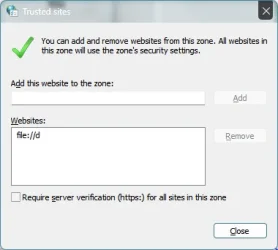
for this one, Internet Options > Security > Trusted Sites > add "file://f" and see if that stops those prompts

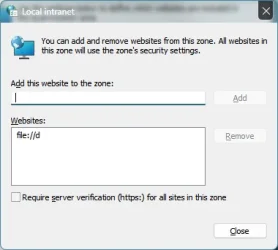
also, Internet Options > Security > Local Intranet > Sites > Advanced
These had no effect on either of the warning popups.

Try clearing the Defender protection history. Use this script:
The Defender History shown in Windows Security > Protection History appeared to be empty already.
I ran the script anyway, but the behavior did not change.
 

My Computer My Computer

At a glance

Windows 11
OS
Windows 11
Computer type
PC/Desktop
Manufacturer/Model
custom
This changed when I assigned it the letter F in disk management - same warning as with other volumes.
So, we can probably say that it's not about VeraCrypt, or at least not now.
Well at least we eliminated one variable. For F sake! This is driving me crazy. I play with drives all the time and I've not seen the likes of it. Could it possibly be that you are running a card with a hidden drive? How many drives in total are you using? (I'm using around 30 on this PC.) What is Disk Management telling you? Can you give us screen shots?

Admittedly, I'm not an IT. I'm a retired PC builder/enthusiast. That said I've had experience with networking and HBA devices (Mostly LSI and Broadcom). If this happened to me I'd be very annoyed. Windows generally won't let you use a drive letter because it "thinks" that letter has already been spoken for. Well, maybe if I keep watching this thread I'll learn something.

Wishing you the best
 

My Computer My Computer

At a glance

WIN 11, WIN 10, WIN 8.1, WIN 7 U, WIN 7 PRO, ...Intel i7 6900K and i9-7960X / AMD 3800X (8 core)128 GB CORSAIR DOMINATOR PLATINUM (B DIE)NVIDIA 1070 and RTX 3070
OS
WIN 11, WIN 10, WIN 8.1, WIN 7 U, WIN 7 PRO, WIN 7 HOME (32 Bit), LINUX MINT
Computer type
PC/Desktop
Manufacturer/Model
DIY, ASUS, and DELL
CPU
Intel i7 6900K and i9-7960X / AMD 3800X (8 core)
Motherboard
ASUS X99E-WS USB 3.1 and ASUS X299 SAGE
Memory
128 GB CORSAIR DOMINATOR PLATINUM (B DIE)
Graphics Card(s)
NVIDIA 1070 and RTX 3070
Sound Card
Crystal Sound (onboard)
Monitor(s) Displays
single Samsung 30" 4K and 8" aux monitor
Screen Resolution
4K and something equally attrocious. I'll be working on this.
Hard Drives
A, B, C, D, E, F, G, H, I, J, K, L, M, N, O, P, Q, R, S, T, U, V, W

Ports X, Y, and Z are reserved for USB access and removable drives.

Drive types consist of the following: Various mechanical hard drives bearing the brand names, Seagate, Toshiba, and Western Digital. Various NVMe drives bearing the brand names Kingston, Intel, Silicon Power, Crucial, Western Digital, and Team Group. Various SATA SSDs bearing various different brand names.

RAID arrays included:

LSI RAID 10 (WD Velociraptors) 1115.72 GB
LSI RAID 10 (WD SSDS) 463.80 GB

INTEL RAID 0 (KINGSTON HYPER X) System 447.14 GB
INTEL RAID 1 TOSHIBA ENTERPRIZE class Data 2794.52 GB
INTEL RAID 1 SEAGATE HYBRID 931.51 GB
PSU
SEVERAL. I prefer my Corsair Platinum HX1000i but I also like EVGA power supplies
Case
ThermalTake Level 10 GT (among others)
Cooling
Noctua is my favorite and I use it in my main. I also own various other coolers.
Keyboard
all kinds.
Mouse
all kinds
Internet Speed
360 mbps - 1 gbps (depending)
Browser
FIREFOX
Antivirus
KASPERSKY (no apologies)
Other Info
Gave Dell touch screen with Windows 11 to daughter and got me an OTVOC. Being a PC builder I own many desktop PCs as well. I am a father of five providing PCs, laptops, and tablets for all my family, most of which I have modified, rebuilt, or simply built from scratch. I do not own a cell phone, never have, never will.
I replicated the exact same error by running an exe from my "server" (SMB 1 share of a USB drive plugged into my LinkSys router). I resolved the error by adding the server's IP address to the Local Intranet zone (Internet Options > Security > Local Intranet > Sites > Advanced). Adding it to Trusted Sites did not resolve the error. However, it did not work to add the mapped drive letter, so, unless there is an IP address or host name associated with your drive F, I'm not sure if this is any help.
 

My Computer My Computer

At a glance

Windows 10/11
OS
Windows 10/11
Computer type
Laptop
Manufacturer/Model
Acer
Well at least we eliminated one variable. For F sake! This is driving me crazy. I play with drives all the time and I've not seen the likes of it. Could it possibly be that you are running a card with a hidden drive? How many drives in total are you using? (I'm using around 30 on this PC.) What is Disk Management telling you? Can you give us screen shots?

Admittedly, I'm not an IT. I'm a retired PC builder/enthusiast. That said I've had experience with networking and HBA devices (Mostly LSI and Broadcom). If this happened to me I'd be very annoyed. Windows generally won't let you use a drive letter because it "thinks" that letter has already been spoken for. Well, maybe if I keep watching this thread I'll learn something.

Wishing you the best
There are 3 internal SSDs that are on by default, connected to the on-board sata ports and power supply, completely normal in other words.
I also have a hot swap bay that can take up to three 3.5" SATA HDDs. Each slot has its own off-switch and they are off 99.9% of the time.
-- tl;dr: I don't think it's anything to do with the storage hardware I'm using, it's not that exotic.

On a hunch, I made a new local User account in Windows last night. As it turns out, the problem does not exist there. So, wherever exactly this blacklist might be located or whatever is causing it, it seems to be tied to the Windows user account or at least limited to my main account.

It has occurred to me that I've been modding Windows 11 with several pieces of third-party software, each of which might have unintended consequences. So, I will spend some time slowly and deliberately modding this new windows account to look and feel exactly like the main one, and testing whether the same problem will occur there, and at what stage. Maybe I can narrow it down to some software that way (although I don't see why any of them would have anything to do with any mounted drives or one specific letter, so it's probably a wild goose chase).
 

My Computer My Computer

At a glance

Windows 11
OS
Windows 11
Computer type
PC/Desktop
Manufacturer/Model
custom
Back
Top Bottom