
Solved Block program(s) from re-adding context menu entries?


Titanonectes

Member
Member
Local time
4:28 PM
Posts
16
OS
Windows 11 Pro
Many programs add entries to our context menu without giving us a choice. Manually removing them does not work out long-term because an update can re-add them at any moment.

My example here is iDrive. iDrive adds a context menu entry via IDContextMenu.dll. This file is redownloaded every update if it is deleted or disabled.
IDContextMenu.dll adds/modifies this entry in the Registry.
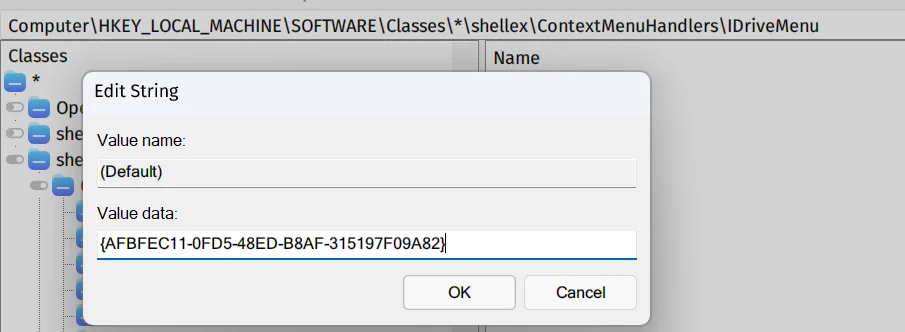
Screenshot 2026-10-22 163451.webp


Is there a reliable way to remove it from the context menu and block it from re-adding the entry after update? Many thanks.
 

My Computer My Computer

At a glance

Windows 11 ProIntel Core Ultra 7 255H32GB DDR5 SDRAMIntel Arc 140T Arrow Lake 8XE
OS
Windows 11 Pro
Computer type
Laptop
Manufacturer/Model
Lenovo/Thinkpad P14s Intel g6
CPU
Intel Core Ultra 7 255H
Motherboard
LENOVO 21QTCTO1WW
Memory
32GB DDR5 SDRAM
Graphics Card(s)
Intel Arc 140T Arrow Lake 8XE
Sound Card
Intel Arrow Lake-U/H PCH
Browser
Firefox - Nightly channel

@Titanonectes
Here's ten points just for filling out your computer specs. :-)

Probably the easiest thing to do would be to write one big registry patch, for removing all the items from the context menu that you don't want.

The best part is that if you find another program that does that, you can just add it to the registry patch.


There's also this...


My Computers My Computers

  • At a glance

    Win 11 Home 26H2 26300.9818AMD Ryzen 7 3700XG.Skill (F4-3200C14D-16GTZKW)EVGA RTX 2070 (08G-P4-2171-KR)
    OS
    Win 11 Home 26H2 26300.9818
    Computer type
    PC/Desktop
    Manufacturer/Model
    Built by Ghot® [May 2020]
    CPU
    AMD Ryzen 7 3700X
    Motherboard
    Asus Pro WS X570-ACE (BIOS 5302)
    Memory
    G.Skill (F4-3200C14D-16GTZKW)
    Graphics Card(s)
    EVGA RTX 2070 (08G-P4-2171-KR)
    Sound Card
    Realtek ALC1220P / ALC S1220A
    Monitor(s) Displays
    Dell U3011 30"
    Screen Resolution
    2560 x 1600
    Hard Drives
    2x Samsung 860 EVO 500GB,
    WD 4TB Black FZBX - SATA III,
    WD 8TB Black FZBX - SATA III,
    DRW-24B1ST CD/DVD Burner
    PSU
    PC Power & Cooling 750W Quad EPS12V
    Case
    Cooler Master ATCS 840 Tower
    Cooling
    CM Hyper 212 EVO (push/pull)
    Keyboard
    Ducky DK9008 Shine II Blue LED
    Mouse
    Logitech Optical M-100
    Internet Speed
    300/300
    Browser
    Firefox (latest)
    Antivirus
    Bitdefender Total Security
    Other Info
    Speakers: Klipsch Pro Media 2.1
  • At a glance

    Windows XP Pro 32bit w/SP3AMD Athlon 64 X2 5000+ (OC'd @ 3.2Ghz)TWIN2X2048-6400C4DHX (2 x 1GB, DDR2 800)EVGA 256-P2-N758-TR GeForce 8600GT SSC
    Operating System
    Windows XP Pro 32bit w/SP3
    Computer type
    PC/Desktop
    Manufacturer/Model
    Built by Ghot® (not in use)
    CPU
    AMD Athlon 64 X2 5000+ (OC'd @ 3.2Ghz)
    Motherboard
    ASUS M2N32-SLI Deluxe Wireless Edition
    Memory
    TWIN2X2048-6400C4DHX (2 x 1GB, DDR2 800)
    Graphics card(s)
    EVGA 256-P2-N758-TR GeForce 8600GT SSC
    Sound Card
    Onboard
    Monitor(s) Displays
    ViewSonic G90FB Black 19" Professional (CRT)
    Screen Resolution
    up to 2048 x 1536
    Hard Drives
    WD 36GB 10,000rpm Raptor SATA
    Seagate 80GB 7200rpm SATA
    Lite-On LTR-52246S CD/RW
    Lite-On LH-18A1P CD/DVD Burner
    PSU
    PC Power & Cooling Silencer 750 Quad EPS12V
    Case
    Generic Beige case, 80mm fans
    Cooling
    ZALMAN 9500A 92mm CPU Cooler
    Keyboard
    Logitech Classic Keybooard 200
    Mouse
    Logitech Optical M-BT96a
    Internet Speed
    300/300
    Browser
    Firefox 3.x ??
    Antivirus
    Symantec (Norton)
    Other Info
    Still assembled, still runs. Haven't turned it on for 15 years?
Nirsoft has a couple of free tools for managing the context menu.

Look into ShellMenuView and ShellExView

I have never seen anything that blocks a context menu entry on install.
 

My Computer My Computer

At a glance

Windows 11 Pro 26H2
OS
Windows 11 Pro 26H2
Computer type
Laptop
Manufacturer/Model
Toshiba
Antivirus
Defender

My Computer My Computer

At a glance

Windows 11 Pro 25H2i7 Ultra16GBIntel
OS
Windows 11 Pro 25H2
Computer type
Laptop
Manufacturer/Model
LG
CPU
i7 Ultra
Memory
16GB
Graphics Card(s)
Intel
Sound Card
Intel Realtek
Monitor(s) Displays
Laptop 17" & TB4 Dell 27" QHD Ultrasharp w/integral TB4 hub
Screen Resolution
2560x1600
Hard Drives
1TB SSD, 5 external WDs
Mouse
Logitech Master MX 3S
Browser
Vivaldi
Antivirus
Kaspersky Premium Suite
Is there a reliable way to remove it from the context menu and block it from re-adding the entry
I would have thought that if you 'hide' the entry using e.g. Shellexview (free, mentioned above, tick box) then that entry will not be shown again. Similarly and more completely, Autoruns (free from MS).

I've never actually specifically checked to see if any I've hidden that way reappear after updating a program.
 

My Computer My Computer

At a glance

Windows 11 Proi7-8650U16GBIntel UHD 620
OS
Windows 11 Pro
Computer type
Laptop
Manufacturer/Model
Lenovo t480s
CPU
i7-8650U
Memory
16GB
Graphics Card(s)
Intel UHD 620
Screen Resolution
1920x1080
Hard Drives
C SN810 SDCPNRY-512G-1006
Browser
Edge, Firefox
Antivirus
Defender
Manually removing them does not work out long-term because an update can re-add them at any moment.
Well, you would expect an update or reinstall/repair to do that.

So you need to block the shell extension from loading by another method. This is what ShellExView mentioned above does. It adds the CLSID to HKEY_LOCAL_MACHINE\SOFTWARE\Microsoft\Windows\CurrentVersion\Shell Extensions\Blocked registry key. It's unlikely that the installer will clear that entry.
You can do this directly with regedit if you wish. Create a string value named for the CLSID, and set it to anything you like, blank is fine, but you might find it helpful to use "iDrive context menu". You can also use the equivalent key in HKEY_CURRENT_USER.
 

My Computers My Computers

  • At a glance

    Windows 11 25H2 Pro Build 26200i3-1215U8GB
    OS
    Windows 11 25H2 Pro Build 26200
    Computer type
    PC/Desktop
    Manufacturer/Model
    MSI PRO ADL-U Cubi 5 (MS-B0A8)
    CPU
    i3-1215U
    Memory
    8GB
    Monitor(s) Displays
    Sony 43" 4k TV
    Screen Resolution
    3840x2160
    Hard Drives
    250GB NVMe M.2 PCIe Gen 3 SSD
    PSU
    External 65W
    Case
    Mini PC
    Browser
    FireFox
    Antivirus
    MS
  • At a glance

    Windows 11 Pro 25H2Intel i3-910016GB DDR4
    Operating System
    Windows 11 Pro 25H2
    Computer type
    PC/Desktop
    Manufacturer/Model
    Dell Optiplex 3070 SFF
    CPU
    Intel i3-9100
    Memory
    16GB DDR4
    Monitor(s) Displays
    Dell S2721
    Screen Resolution
    3840 x 2160
    Hard Drives
    Samsung 500GB nvMe
    Case
    Dell small form factor
    Keyboard
    Cherry mechanical (Blue)
    Mouse
    Microsoft
    Antivirus
    MS Defender
Thanks everyone for chiming in!

Nirsoft tools seem like the way to go. I have already used his FileTypesManager anyway and the tool takes <1MB of storage.
Here's ten points just for filling out your computer specs. :-)
I'm no programmer, so I just figured that is the fastest way to make troubleshooting less time-consuming.
 

My Computer My Computer

At a glance

Windows 11 ProIntel Core Ultra 7 255H32GB DDR5 SDRAMIntel Arc 140T Arrow Lake 8XE
OS
Windows 11 Pro
Computer type
Laptop
Manufacturer/Model
Lenovo/Thinkpad P14s Intel g6
CPU
Intel Core Ultra 7 255H
Motherboard
LENOVO 21QTCTO1WW
Memory
32GB DDR5 SDRAM
Graphics Card(s)
Intel Arc 140T Arrow Lake 8XE
Sound Card
Intel Arrow Lake-U/H PCH
Browser
Firefox - Nightly channel

Another item in the same umbrella of "annoying context menu entries". This time it's PowerToys.
1793180494071.webp


More than one of their tools would add duplicate context menu entries to anyone using legacy context menu. It's an ongoing, multiyear issue that they still haven't fixed.

I have a powershell script to delete it, however it looks like they created a new registry folder the context menu for every new patch? ShellExView cannot detect PowerToys' injected context menu entries either. I do use the tool, just don't want to have duplicate items in my bloating context menu. Is this a lost cause?
 

My Computer My Computer

At a glance

Windows 11 ProIntel Core Ultra 7 255H32GB DDR5 SDRAMIntel Arc 140T Arrow Lake 8XE
OS
Windows 11 Pro
Computer type
Laptop
Manufacturer/Model
Lenovo/Thinkpad P14s Intel g6
CPU
Intel Core Ultra 7 255H
Motherboard
LENOVO 21QTCTO1WW
Memory
32GB DDR5 SDRAM
Graphics Card(s)
Intel Arc 140T Arrow Lake 8XE
Sound Card
Intel Arrow Lake-U/H PCH
Browser
Firefox - Nightly channel

Hi,
1. See my post above mentioning Autoruns.

2.webp


Shellexview does NOT show all context menu entries.


2. You have this option in Powertoys:
Untitled.webp


So you seem to have 2 options....
 

My Computer My Computer

At a glance

Windows 11 Proi7-8650U16GBIntel UHD 620
OS
Windows 11 Pro
Computer type
Laptop
Manufacturer/Model
Lenovo t480s
CPU
i7-8650U
Memory
16GB
Graphics Card(s)
Intel UHD 620
Screen Resolution
1920x1080
Hard Drives
C SN810 SDCPNRY-512G-1006
Browser
Edge, Firefox
Antivirus
Defender
Hi,
1. See my post above mentioning Autoruns.

Shellexview does NOT show all context menu entries.


2. You have this option in Powertoys:

So you seem to have 2 options....

The duplicate entries are in extended menu, so it has nothing to do with that setting. The bug has been well-documented and well-reported since 2022.

I will take a look at Autoruns.
 

My Computer My Computer

At a glance

Windows 11 ProIntel Core Ultra 7 255H32GB DDR5 SDRAMIntel Arc 140T Arrow Lake 8XE
OS
Windows 11 Pro
Computer type
Laptop
Manufacturer/Model
Lenovo/Thinkpad P14s Intel g6
CPU
Intel Core Ultra 7 255H
Motherboard
LENOVO 21QTCTO1WW
Memory
32GB DDR5 SDRAM
Graphics Card(s)
Intel Arc 140T Arrow Lake 8XE
Sound Card
Intel Arrow Lake-U/H PCH
Browser
Firefox - Nightly channel
Since adding options to the context menu requires admin permissions (for writing to HKLM), you can block the recreation by NOT elevating the program in question. This effectively prevents modifications that add the library back after you delete it. That won't prevent adding to the per-user context menu entries, but that registry keys are much less known and programs often ignores them.

Of course, programs updates often require admin rights which once again allows it. Not updating until it's absolute imperative it's a good way to prevent this, but won't work forever.

Adding an explicit deny permission entry to the appropriate registry keys can work if the program doesn't modifies that too, thus giving the admin user an access denied. As long as the installer doesn't attempts to bypass that it could work.

Another option, if you have the Pro edition of Windows 11 is to use AppLocker to block the loaded dll. As long as further upates place the library in the same place you can block its loading by its path, preventing Windows Explorer from loading it. I haven't tested this particular AppLocker usage but it could work. It has a system-wide performance impact, however.

I'm not aware of any other method that effectively prevents this, other than waiting for readdition and delete afterwards.
 

My Computer My Computer

At a glance

Windows 11
OS
Windows 11
Computer type
PC/Desktop
The duplicate entries are in extended menu, so it has nothing to do with that setting. The bug has been well-documented and well-reported since 2022.

I will take a look at Autoruns.


- and thank you for taking the trouble to reply. Well documented? So you say.. no evidence.

I took the time and trouble to provide screenshots for you.

Which 'bug'? Context menu entries being reported?

If you don't want to see the option in your normal context menu (which is what I had assumed) the extended context menu option does that for you. Why is that not good enough for you?
 

My Computer My Computer

At a glance

Windows 11 Proi7-8650U16GBIntel UHD 620
OS
Windows 11 Pro
Computer type
Laptop
Manufacturer/Model
Lenovo t480s
CPU
i7-8650U
Memory
16GB
Graphics Card(s)
Intel UHD 620
Screen Resolution
1920x1080
Hard Drives
C SN810 SDCPNRY-512G-1006
Browser
Edge, Firefox
Antivirus
Defender

Latest Support Threads

Back
Top Bottom

