Bluetooth audio stutters in screen off state


magrega

New member
Local time
11:24 AM
Posts
7
OS
Windows 11
I am running Win11 24H2 on an asus laptop m3402ra. Since I bought this laptop 2 years ago I've been experiencing bluetooth stutters during playback when the screen turns off after idling out.

I've literally done everything there is in terms of updating drivers, bios, updates, you name it. I tried different combination of those and I've been to multiple repair centers.
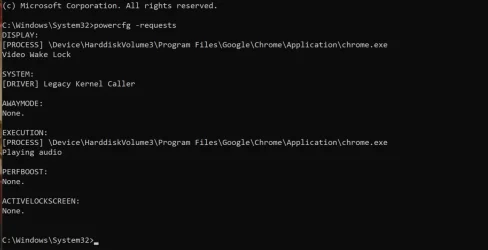
The only thing that helps is disabling AMD GPU Driver in Device Manager. Only then the stutters go away. The recent observation I made is that If I play music through built-in speakers and I run powercfg -requests in powershell it shows that there's An audio stream is currently in use and also there's a driver specified which plays audio.

But when I use bluetooth to play audio there's no mention of audio streaming and there's no driver that plays audio.

I've seen endless number of posts about how their computer doesn't go to sleep because of some ghost audio stream but my situation is reversed. I have an actual audio stream but it doesn't show in powercfg.

Can anybody help me figure out what is going on?

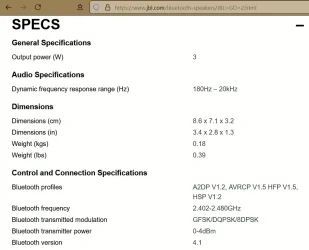
On screenshots you can see the difference when the music is played with a usb speaker and with a bluetooth speaker (I tried JBL GO 2, 3, 4 and Airpods Pro 2). Both times the music is actively playing.
 

Attachments

  • photo_2025-03-01_13-41-48.webp
    photo_2025-03-01_13-41-48.webp
    41.5 KB · Views: 1
  • photo_2025-03-01_13-41-49.webp
    photo_2025-03-01_13-41-49.webp
    37.9 KB · Views: 1
Last edited:

My Computer My Computer

At a glance

Windows 11Ryzen 7 6800H8gb on board + 8gb ram stick
OS
Windows 11
Computer type
Laptop
Manufacturer/Model
Asus m3402ra
CPU
Ryzen 7 6800H
Memory
8gb on board + 8gb ram stick
Monitor(s) Displays
1 laptop olde display + 1 thunderbolt external monitor
Hard Drives
nvme 512gb
Browser
Edge, Chrome
Antivirus
Windows Defender
It has something to do with Bluetooth version 4.x (on your computer 5.x)
Just wait for about a minute and then connect the audio stream.
 

My Computer My Computer

At a glance

Microsoft Windows 11 HomeIntel Core i5-13490F2 x 16 Patriot Memory (PDP Systems) PSD516G56...GIGABYTE GeForce RTX 4070 WINDFORCE OC 12G (G...
OS
Microsoft Windows 11 Home
Computer type
PC/Desktop
Manufacturer/Model
MSI MS-7D98
CPU
Intel Core i5-13490F
Motherboard
MSI B760 GAMING PLUS WIFI
Memory
2 x 16 Patriot Memory (PDP Systems) PSD516G560081 6400MT (32-37-37-74); 1.35V)
Graphics Card(s)
GIGABYTE GeForce RTX 4070 WINDFORCE OC 12G (GV-N4070WF3OC-12GD)
Sound Card
Bluetooth Аудио
Monitor(s) Displays
INNOCN 15K1F
Screen Resolution
1920 x 1080
Hard Drives
WD_BLACK SN770 250GB
KINGSTON SNV2S1000G (ELFK0S.6)
PSU
Thermaltake Toughpower GF3 1000W
Case
CG560 - DeepCool
Cooling
ID-COOLING SE-224-XTS / 2 x 140Mm Fan - rear and top; 3 x 120Mm - front
Keyboard
Corsair K70 RGB TKL
Mouse
Corsair KATAR PRO XT
Internet Speed
100 Mbps
Browser
Firefox
Antivirus
Microsoft Defender Antivirus
Other Info
https://www.userbenchmark.com/UserRun/66553205
In this guide, we’ll discuss what Audio latency is, some of the common symptoms, and how to troubleshoot any issues you may encounter.


My Computer My Computer

At a glance

Windows 11AMD Ryzen 7 5700GMicron Technology DDR4-3200 16GBNVIDIA GeForce RTX 3060
OS
Windows 11
Computer type
PC/Desktop
Manufacturer/Model
HP Pavilion
CPU
AMD Ryzen 7 5700G
Motherboard
Erica6
Memory
Micron Technology DDR4-3200 16GB
Graphics Card(s)
NVIDIA GeForce RTX 3060
Sound Card
Realtek ALC671
Monitor(s) Displays
Samsung SyncMaster U28E590
Screen Resolution
3840 x 2160
Hard Drives
SAMSUNG MZVLQ1T0HALB-000H1
It has something to do with Bluetooth version 4.x (on your computer 5.x)
Just wait for about a minute and then connect the audio stream.
Thanks for the input. Could you clarify this a bit? I tried connecting bluetooth at very different points in time and never ever I have seen a bluetooth stream in powercfg -requests
 

My Computer My Computer

At a glance

Windows 11Ryzen 7 6800H8gb on board + 8gb ram stick
OS
Windows 11
Computer type
Laptop
Manufacturer/Model
Asus m3402ra
CPU
Ryzen 7 6800H
Memory
8gb on board + 8gb ram stick
Monitor(s) Displays
1 laptop olde display + 1 thunderbolt external monitor
Hard Drives
nvme 512gb
Browser
Edge, Chrome
Antivirus
Windows Defender
In this guide, we’ll discuss what Audio latency is, some of the common symptoms, and how to troubleshoot any issues you may encounter.
Tinkering with this right now. Thanks. Will report back.
 
Last edited:

My Computer My Computer

At a glance

Windows 11Ryzen 7 6800H8gb on board + 8gb ram stick
OS
Windows 11
Computer type
Laptop
Manufacturer/Model
Asus m3402ra
CPU
Ryzen 7 6800H
Memory
8gb on board + 8gb ram stick
Monitor(s) Displays
1 laptop olde display + 1 thunderbolt external monitor
Hard Drives
nvme 512gb
Browser
Edge, Chrome
Antivirus
Windows Defender
Good luck!
 

My Computer My Computer

At a glance

Windows 11AMD Ryzen 7 5700GMicron Technology DDR4-3200 16GBNVIDIA GeForce RTX 3060
OS
Windows 11
Computer type
PC/Desktop
Manufacturer/Model
HP Pavilion
CPU
AMD Ryzen 7 5700G
Motherboard
Erica6
Memory
Micron Technology DDR4-3200 16GB
Graphics Card(s)
NVIDIA GeForce RTX 3060
Sound Card
Realtek ALC671
Monitor(s) Displays
Samsung SyncMaster U28E590
Screen Resolution
3840 x 2160
Hard Drives
SAMSUNG MZVLQ1T0HALB-000H1
Good luck!
I ran LatencyMon to see what causes DPC latency to be high and noted that there are two drivers that have the highest dpc counts: ntoskrnl.exe and Wdf01000.sys.

ntoskrnl.exe - i think this is the legacy kernel caller thing.
But right now I don't know what to do with this info. Probably running Windows Performance Recorder + Windows Performance Analyzer is an option now to go deeper to see what causes DPC to run high. Pretty sure it will be something amd related
 

My Computer My Computer

At a glance

Windows 11Ryzen 7 6800H8gb on board + 8gb ram stick
OS
Windows 11
Computer type
Laptop
Manufacturer/Model
Asus m3402ra
CPU
Ryzen 7 6800H
Memory
8gb on board + 8gb ram stick
Monitor(s) Displays
1 laptop olde display + 1 thunderbolt external monitor
Hard Drives
nvme 512gb
Browser
Edge, Chrome
Antivirus
Windows Defender
Could you clarify this a bit?

I suggested testing with a BT 5.x device.
I have a somewhat similar problem when I turn on BT 4.0 speakers.
There is no such problem with BT 5.2 headphones.
I can't reproduce exactly your scenario.
 

My Computer My Computer

At a glance

Microsoft Windows 11 HomeIntel Core i5-13490F2 x 16 Patriot Memory (PDP Systems) PSD516G56...GIGABYTE GeForce RTX 4070 WINDFORCE OC 12G (G...
OS
Microsoft Windows 11 Home
Computer type
PC/Desktop
Manufacturer/Model
MSI MS-7D98
CPU
Intel Core i5-13490F
Motherboard
MSI B760 GAMING PLUS WIFI
Memory
2 x 16 Patriot Memory (PDP Systems) PSD516G560081 6400MT (32-37-37-74); 1.35V)
Graphics Card(s)
GIGABYTE GeForce RTX 4070 WINDFORCE OC 12G (GV-N4070WF3OC-12GD)
Sound Card
Bluetooth Аудио
Monitor(s) Displays
INNOCN 15K1F
Screen Resolution
1920 x 1080
Hard Drives
WD_BLACK SN770 250GB
KINGSTON SNV2S1000G (ELFK0S.6)
PSU
Thermaltake Toughpower GF3 1000W
Case
CG560 - DeepCool
Cooling
ID-COOLING SE-224-XTS / 2 x 140Mm Fan - rear and top; 3 x 120Mm - front
Keyboard
Corsair K70 RGB TKL
Mouse
Corsair KATAR PRO XT
Internet Speed
100 Mbps
Browser
Firefox
Antivirus
Microsoft Defender Antivirus
Other Info
https://www.userbenchmark.com/UserRun/66553205
Head over to Asus support site for your computer to install AMD Chipset Driver and Realtek Bluetooth Driver.


My Computer My Computer

At a glance

Windows 11AMD Ryzen 7 5700GMicron Technology DDR4-3200 16GBNVIDIA GeForce RTX 3060
OS
Windows 11
Computer type
PC/Desktop
Manufacturer/Model
HP Pavilion
CPU
AMD Ryzen 7 5700G
Motherboard
Erica6
Memory
Micron Technology DDR4-3200 16GB
Graphics Card(s)
NVIDIA GeForce RTX 3060
Sound Card
Realtek ALC671
Monitor(s) Displays
Samsung SyncMaster U28E590
Screen Resolution
3840 x 2160
Hard Drives
SAMSUNG MZVLQ1T0HALB-000H1
I suggested testing with a BT 5.x device.
I have a somewhat similar problem when I turn on BT 4.0 speakers.
There is no such problem with BT 5.2 headphones.
I can't reproduce exactly your scenario.
Both JBL GO 2 and 3 as well as AirPods Pro 2 are bluetooth 5+ version.

Head over to Asus support site for your computer to install AMD Chipset Driver and Realtek Bluetooth Driver.

My laptop has mediatek mt7921 wifi\bt module chip. Will it make sense instaling Realtek drivers? I've installed only mediatek ones.
 

My Computer My Computer

At a glance

Windows 11Ryzen 7 6800H8gb on board + 8gb ram stick
OS
Windows 11
Computer type
Laptop
Manufacturer/Model
Asus m3402ra
CPU
Ryzen 7 6800H
Memory
8gb on board + 8gb ram stick
Monitor(s) Displays
1 laptop olde display + 1 thunderbolt external monitor
Hard Drives
nvme 512gb
Browser
Edge, Chrome
Antivirus
Windows Defender

My Computer My Computer

At a glance

Microsoft Windows 11 HomeIntel Core i5-13490F2 x 16 Patriot Memory (PDP Systems) PSD516G56...GIGABYTE GeForce RTX 4070 WINDFORCE OC 12G (G...
OS
Microsoft Windows 11 Home
Computer type
PC/Desktop
Manufacturer/Model
MSI MS-7D98
CPU
Intel Core i5-13490F
Motherboard
MSI B760 GAMING PLUS WIFI
Memory
2 x 16 Patriot Memory (PDP Systems) PSD516G560081 6400MT (32-37-37-74); 1.35V)
Graphics Card(s)
GIGABYTE GeForce RTX 4070 WINDFORCE OC 12G (GV-N4070WF3OC-12GD)
Sound Card
Bluetooth Аудио
Monitor(s) Displays
INNOCN 15K1F
Screen Resolution
1920 x 1080
Hard Drives
WD_BLACK SN770 250GB
KINGSTON SNV2S1000G (ELFK0S.6)
PSU
Thermaltake Toughpower GF3 1000W
Case
CG560 - DeepCool
Cooling
ID-COOLING SE-224-XTS / 2 x 140Mm Fan - rear and top; 3 x 120Mm - front
Keyboard
Corsair K70 RGB TKL
Mouse
Corsair KATAR PRO XT
Internet Speed
100 Mbps
Browser
Firefox
Antivirus
Microsoft Defender Antivirus
Other Info
https://www.userbenchmark.com/UserRun/66553205

My Computer My Computer

At a glance

Windows 11Ryzen 7 6800H8gb on board + 8gb ram stick
OS
Windows 11
Computer type
Laptop
Manufacturer/Model
Asus m3402ra
CPU
Ryzen 7 6800H
Memory
8gb on board + 8gb ram stick
Monitor(s) Displays
1 laptop olde display + 1 thunderbolt external monitor
Hard Drives
nvme 512gb
Browser
Edge, Chrome
Antivirus
Windows Defender
So that's not it. I don't have a laptop to add more to that.
 

My Computer My Computer

At a glance

Microsoft Windows 11 HomeIntel Core i5-13490F2 x 16 Patriot Memory (PDP Systems) PSD516G56...GIGABYTE GeForce RTX 4070 WINDFORCE OC 12G (G...
OS
Microsoft Windows 11 Home
Computer type
PC/Desktop
Manufacturer/Model
MSI MS-7D98
CPU
Intel Core i5-13490F
Motherboard
MSI B760 GAMING PLUS WIFI
Memory
2 x 16 Patriot Memory (PDP Systems) PSD516G560081 6400MT (32-37-37-74); 1.35V)
Graphics Card(s)
GIGABYTE GeForce RTX 4070 WINDFORCE OC 12G (GV-N4070WF3OC-12GD)
Sound Card
Bluetooth Аудио
Monitor(s) Displays
INNOCN 15K1F
Screen Resolution
1920 x 1080
Hard Drives
WD_BLACK SN770 250GB
KINGSTON SNV2S1000G (ELFK0S.6)
PSU
Thermaltake Toughpower GF3 1000W
Case
CG560 - DeepCool
Cooling
ID-COOLING SE-224-XTS / 2 x 140Mm Fan - rear and top; 3 x 120Mm - front
Keyboard
Corsair K70 RGB TKL
Mouse
Corsair KATAR PRO XT
Internet Speed
100 Mbps
Browser
Firefox
Antivirus
Microsoft Defender Antivirus
Other Info
https://www.userbenchmark.com/UserRun/66553205
In this guide, we’ll discuss what Audio latency is, some of the common symptoms, and how to troubleshoot any issues you may encounter.
Thank you! This video gave me enough info to find out that ntoskrnl.exe was having a high DPC count despite LatencyMon showing me that everything is alright.

AMD Graphic driver caused DPC count of ntoskrnl.exe to go high, throttling cpu. I found this post on reddit and went to the second solution.

What I did was:
1. Downloaded and extracted PowerSettingsExplorer.zip contents
2. Launched PowerSettingsExplorer.exe as admin
3. Found 2 options: Processor Idle Demote Threshold and Processor Idle Promote Threshold
4. Unticked them
5. Went to power plan settings, found new options under "Processor Power Management" and set both to 100%

I understand that this is probably more of a workaround than a solution. I don't really know what these two options do but I think always running them at 100% without letting the system control them would lead to a faster CPU wear but at least this solution allows for experience I was hoping to achieve (which is a basic user laptop experience, jesus christ).
 

My Computer My Computer

At a glance

Windows 11Ryzen 7 6800H8gb on board + 8gb ram stick
OS
Windows 11
Computer type
Laptop
Manufacturer/Model
Asus m3402ra
CPU
Ryzen 7 6800H
Memory
8gb on board + 8gb ram stick
Monitor(s) Displays
1 laptop olde display + 1 thunderbolt external monitor
Hard Drives
nvme 512gb
Browser
Edge, Chrome
Antivirus
Windows Defender
Back
Top Bottom