Bluetooth Blues


None of your images match what I see on my bt or sound or anything settings. If I say don't allow Senary to maybe get back to blue tooth, it says I won't be able to hear anything. But should I do that to get back to bt?
 

My Computer My Computer

At a glance

1113th Gen Intel(R) Core(TM) i5-1335U 1.30 GHz8 gb
OS
11
Computer type
Laptop
Manufacturer/Model
Lenovo Ideapad
CPU
13th Gen Intel(R) Core(TM) i5-1335U 1.30 GHz
Memory
8 gb
Screen Resolution
1900x1200
Hard Drives
500 gb ssd
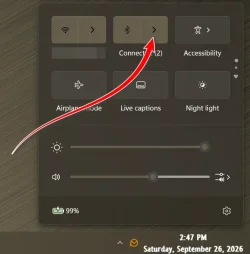
Press WinKey+A then click on the arrow next to the Bluetooth logo to see if the buds are listed there...
(You may have to connect them manually every time unless you make them the default..., if they're not listed there, you'll have to re-pair them)

13453.webp
 

My Computers My Computers

  • At a glance

    Windows 11 Pro
    OS
    Windows 11 Pro
    Computer type
    PC/Desktop
    Manufacturer/Model
    ASUS ROG Strix
  • At a glance

    Windows 11 Pro
    Operating System
    Windows 11 Pro
    Computer type
    Laptop
    Manufacturer/Model
    ASUS VivoBook
  • ASUS VivoBook 'Lite' ~ Windows 11 Home
Hi - went to the adapter -- did as instructed. No option available in properties to unselect box. I had seen that option in human interface device - I unchecked the box there. Don't know if it will have the same effect. Thanks for your input.
The BT just not being seen on my system. Thanks again.
The human interface device section is the same thing. The BT adapter could be there or where I mentioned. It depends on the Window version you use.
The link I posted describes this case too at the end of its page (with yellow background).
See the sample names they use in the description in case they are similar to what you have.

Good luck.
 

My Computer My Computer

At a glance

Windows 11 Pro for Workstations 25H2 26200.95506C+4c Intel 13th Gen Intel(R) Core(TM) i5-134...64 GBNVIDIA GeForce RTX 4060, Intel UHD Graphics 730
OS
Windows 11 Pro for Workstations 25H2 26200.9550
Computer type
PC/Desktop
Manufacturer/Model
ASRock
CPU
6C+4c Intel 13th Gen Intel(R) Core(TM) i5-13400, 4100 M
Motherboard
ASRock B660M-HDV
Memory
64 GB
Graphics Card(s)
NVIDIA GeForce RTX 4060, Intel UHD Graphics 730
Sound Card
Realtek
Monitor(s) Displays
AOC 24V2W1G5
Screen Resolution
1920x1080
Hard Drives
Samsung SSD 990 Pro with Heatsink
Keyboard
Logitech
Mouse
Logitech
Internet Speed
1GB
Antivirus
Windows Defender
On my pc that picture you show sez "not connected" Duh. How do I re-pair them pls?
 

My Computer My Computer

At a glance

1113th Gen Intel(R) Core(TM) i5-1335U 1.30 GHz8 gb
OS
11
Computer type
Laptop
Manufacturer/Model
Lenovo Ideapad
CPU
13th Gen Intel(R) Core(TM) i5-1335U 1.30 GHz
Memory
8 gb
Screen Resolution
1900x1200
Hard Drives
500 gb ssd
On my pc that picture you show sez "not connected" Duh. How do I re-pair them pls?
If they show up there, they're paired..., just click to connect.
 

My Computers My Computers

  • At a glance

    Windows 11 Pro
    OS
    Windows 11 Pro
    Computer type
    PC/Desktop
    Manufacturer/Model
    ASUS ROG Strix
  • At a glance

    Windows 11 Pro
    Operating System
    Windows 11 Pro
    Computer type
    Laptop
    Manufacturer/Model
    ASUS VivoBook
  • ASUS VivoBook 'Lite' ~ Windows 11 Home
Considering the fact that they were working fine 2 days ago, i find this disappearance quite troubling and annoying!
 

My Computer My Computer

At a glance

1113th Gen Intel(R) Core(TM) i5-1335U 1.30 GHz8 gb
OS
11
Computer type
Laptop
Manufacturer/Model
Lenovo Ideapad
CPU
13th Gen Intel(R) Core(TM) i5-1335U 1.30 GHz
Memory
8 gb
Screen Resolution
1900x1200
Hard Drives
500 gb ssd
They used to show there -- not now..that my friend is the problem. They no longer show up anywhere!!
 

My Computer My Computer

At a glance

1113th Gen Intel(R) Core(TM) i5-1335U 1.30 GHz8 gb
OS
11
Computer type
Laptop
Manufacturer/Model
Lenovo Ideapad
CPU
13th Gen Intel(R) Core(TM) i5-1335U 1.30 GHz
Memory
8 gb
Screen Resolution
1900x1200
Hard Drives
500 gb ssd
They no longer show up anywhere!!
Go to Settings/Bluetooth & devices/View more devices..., check to make sure they are not listed there.
If they are, click the dropdown and Remove them.

Then Pair them up fresh...,
Remove both buds from the case, a light should be flashing on one of them indicating Pairing Mode...,
in Settings Add device/Bluetooth........
 

My Computers My Computers

  • At a glance

    Windows 11 Pro
    OS
    Windows 11 Pro
    Computer type
    PC/Desktop
    Manufacturer/Model
    ASUS ROG Strix
  • At a glance

    Windows 11 Pro
    Operating System
    Windows 11 Pro
    Computer type
    Laptop
    Manufacturer/Model
    ASUS VivoBook
  • ASUS VivoBook 'Lite' ~ Windows 11 Home
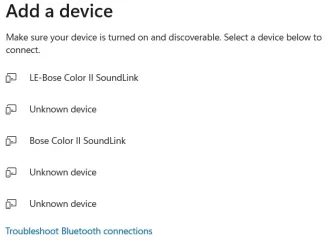
ok -- did a re-pair. Went to settings -- add device /Bluetooth -- here's what we get:
bt2.webp
 

My Computer My Computer

At a glance

1113th Gen Intel(R) Core(TM) i5-1335U 1.30 GHz8 gb
OS
11
Computer type
Laptop
Manufacturer/Model
Lenovo Ideapad
CPU
13th Gen Intel(R) Core(TM) i5-1335U 1.30 GHz
Memory
8 gb
Screen Resolution
1900x1200
Hard Drives
500 gb ssd
I have done the troubleshoot BT connections til I'm blue in the face - or should I say, Bluetooth in the face? Aaaargh!!
 

My Computer My Computer

At a glance

1113th Gen Intel(R) Core(TM) i5-1335U 1.30 GHz8 gb
OS
11
Computer type
Laptop
Manufacturer/Model
Lenovo Ideapad
CPU
13th Gen Intel(R) Core(TM) i5-1335U 1.30 GHz
Memory
8 gb
Screen Resolution
1900x1200
Hard Drives
500 gb ssd
Back
Top Bottom