Bluetooth Blues


The black box is the adapter for Barrot dongle. I took it off and BT on device manager looks normal. Barrot not listed. I will go back and do your steps again. Will post.
I still do not know when/how you saw...when I say add device.
1.7 -- did all. nothing comes up. The BT dongle from Amazon is not plugged in. Doesn't it need to be?
 

My Computer My Computer

At a glance

1113th Gen Intel(R) Core(TM) i5-1335U 1.30 GHz8 gb
OS
11
Computer type
Laptop
Manufacturer/Model
Lenovo Ideapad
CPU
13th Gen Intel(R) Core(TM) i5-1335U 1.30 GHz
Memory
8 gb
Screen Resolution
1900x1200
Hard Drives
500 gb ssd
1.7 -- did all. nothing comes up
But you said it reported unknown device.

If it is not seeing the earbuds at all then try pairing them with something else such as a smartphone to check that they are working [then unpair them afterwards so the phone pairing cannot disrupt further computer testing].


The BT dongle from Amazon is not plugged in
No. I want to test the original RealTek BT adapter first.


Denis
 

My Computer My Computer

At a glance

Windows 11 Home x64 Version 26H2 Build 26300....
OS
Windows 11 Home x64 Version 26H2 Build 26300.9457
It seems to vary. I just said add device and this time it said "unknown device" as before. As I posted earlier, the instructions for the new dongle said to disable current BT installations. .History: So you know what I did -- "Bought a new dongle/adapter. Followed instructions. Disable BT currently on system. Did so in device manager. Uninstalled anything that said BT. Disabled the current adapter. Then uninstalled it. Restarted. Paired the buds. Put new dongle in - add device -- NO DEAL...What is the problem? I am not sure anyone can cure this but I am checking in one more time. If I can't get this thing to work, I'll return - easy. But I want the BT to work." Thanks.
I will try pairing them with my kindle. I have another set that works fine with the kindle. I'll unpair them and try these.
 

My Computer My Computer

At a glance

1113th Gen Intel(R) Core(TM) i5-1335U 1.30 GHz8 gb
OS
11
Computer type
Laptop
Manufacturer/Model
Lenovo Ideapad
CPU
13th Gen Intel(R) Core(TM) i5-1335U 1.30 GHz
Memory
8 gb
Screen Resolution
1900x1200
Hard Drives
500 gb ssd
I just said add device and this time it said "unknown device"
I do not know where it could have said that - please post a screenshot.


Denis
 

My Computer My Computer

At a glance

Windows 11 Home x64 Version 26H2 Build 26300....
OS
Windows 11 Home x64 Version 26H2 Build 26300.9457
I tried pairing with my kindle. I gave them 10 minutes. No deal. Maybe the buds are broken and why I can't connect. The kindle came up with a lot of other bt "things" -- none audio. I am charging another pair I have. I will try them later. Thanks again for your help. I'll let you know.
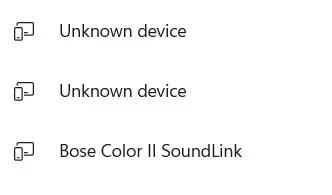
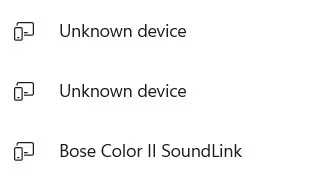
uk.webpHere is ss of add device
 

My Computer My Computer

At a glance

1113th Gen Intel(R) Core(TM) i5-1335U 1.30 GHz8 gb
OS
11
Computer type
Laptop
Manufacturer/Model
Lenovo Ideapad
CPU
13th Gen Intel(R) Core(TM) i5-1335U 1.30 GHz
Memory
8 gb
Screen Resolution
1900x1200
Hard Drives
500 gb ssd
OK, and when they are charged, first check them by pairing with your Kindle then unpair them to make sure there is nothing to interfere with the computer testing.

And then do the test in post #89 and post screenshots of any untoward responses.
[I've split step 1.6 into 3 substeps to make sure you get to see any changes made.]
And please remember that this is only a test of the original Realtek BT adapter. We've really got to assess those results before we can move on to the dongles you've bought.

We're in different timezones. I'll be turning off soon.


Denis
 

My Computer My Computer

At a glance

Windows 11 Home x64 Version 26H2 Build 26300....
OS
Windows 11 Home x64 Version 26H2 Build 26300.9457
1790883947040.webp
That looks like a screenshot from
Settings, Devices
rather than
Settings, Devices, Add a device, Bluetooth, ... [the step 1.7 task].


OK, I think I misinterpreted that diagram. It shows that it detected but did not pair with the listed devices. Most interestingly, it does not show any detection of your earphones.


Denis
 
Last edited:

My Computer My Computer

At a glance

Windows 11 Home x64 Version 26H2 Build 26300....
OS
Windows 11 Home x64 Version 26H2 Build 26300.9457
OK. I'' keep working...:rolleyes:
 

My Computer My Computer

At a glance

1113th Gen Intel(R) Core(TM) i5-1335U 1.30 GHz8 gb
OS
11
Computer type
Laptop
Manufacturer/Model
Lenovo Ideapad
CPU
13th Gen Intel(R) Core(TM) i5-1335U 1.30 GHz
Memory
8 gb
Screen Resolution
1900x1200
Hard Drives
500 gb ssd
♫
I got the no good lowdown Bluetooth Blues
I got the no good lowdown dirty Bluetooth blues
And I just can't shake them off
No matter what I do
I got the no good lowdown Bluetooth blues ♫


From the song "Lowdown Blues"
 

My Computers My Computers

  • At a glance

    Win 11 Home ♦♦♦26300.9550 ♦♦♦♦♦♦♦26H2AMD Ryzen 7 3700XG.Skill (F4-3200C14D-16GTZKW)EVGA RTX 2070 (08G-P4-2171-KR)
    OS
    Win 11 Home ♦♦♦26300.9550 ♦♦♦♦♦♦♦26H2
    Computer type
    PC/Desktop
    Manufacturer/Model
    Built by Ghot® [May 2020]
    CPU
    AMD Ryzen 7 3700X
    Motherboard
    Asus Pro WS X570-ACE (BIOS 5302)
    Memory
    G.Skill (F4-3200C14D-16GTZKW)
    Graphics Card(s)
    EVGA RTX 2070 (08G-P4-2171-KR)
    Sound Card
    Realtek ALC1220P / ALC S1220A
    Monitor(s) Displays
    Dell U3011 30"
    Screen Resolution
    2560 x 1600
    Hard Drives
    2x Samsung 860 EVO 500GB,
    WD 4TB Black FZBX - SATA III,
    WD 8TB Black FZBX - SATA III,
    DRW-24B1ST CD/DVD Burner
    PSU
    PC Power & Cooling 750W Quad EPS12V
    Case
    Cooler Master ATCS 840 Tower
    Cooling
    CM Hyper 212 EVO (push/pull)
    Keyboard
    Ducky DK9008 Shine II Blue LED
    Mouse
    Logitech Optical M-100
    Internet Speed
    300/300
    Browser
    Firefox (latest)
    Antivirus
    Bitdefender Total Security
    Other Info
    Speakers: Klipsch Pro Media 2.1
  • At a glance

    Windows XP Pro 32bit w/SP3AMD Athlon 64 X2 5000+ (OC'd @ 3.2Ghz)TWIN2X2048-6400C4DHX (2 x 1GB, DDR2 800)EVGA 256-P2-N758-TR GeForce 8600GT SSC
    Operating System
    Windows XP Pro 32bit w/SP3
    Computer type
    PC/Desktop
    Manufacturer/Model
    Built by Ghot® (not in use)
    CPU
    AMD Athlon 64 X2 5000+ (OC'd @ 3.2Ghz)
    Motherboard
    ASUS M2N32-SLI Deluxe Wireless Edition
    Memory
    TWIN2X2048-6400C4DHX (2 x 1GB, DDR2 800)
    Graphics card(s)
    EVGA 256-P2-N758-TR GeForce 8600GT SSC
    Sound Card
    Onboard
    Monitor(s) Displays
    ViewSonic G90FB Black 19" Professional (CRT)
    Screen Resolution
    up to 2048 x 1536
    Hard Drives
    WD 36GB 10,000rpm Raptor SATA
    Seagate 80GB 7200rpm SATA
    Lite-On LTR-52246S CD/RW
    Lite-On LH-18A1P CD/DVD Burner
    PSU
    PC Power & Cooling Silencer 750 Quad EPS12V
    Case
    Generic Beige case, 80mm fans
    Cooling
    ZALMAN 9500A 92mm CPU Cooler
    Keyboard
    Logitech Classic Keybooard 200
    Mouse
    Logitech Optical M-BT96a
    Internet Speed
    300/300
    Browser
    Firefox 3.x ??
    Antivirus
    Symantec (Norton)
    Other Info
    Still assembled, still runs. Haven't turned it on for 15 years?
Patsy,

I misinterpreted your last diagram and have corrected my post #107.
I now realise that the diagram was showing what you said it showed.


Denis
 

My Computer My Computer

At a glance

Windows 11 Home x64 Version 26H2 Build 26300....
OS
Windows 11 Home x64 Version 26H2 Build 26300.9457
Funny the first time --need I say more?
Denis - got the funky buds to connect to laptop. So that says the current setup works. There is no dongle in usb slot. Don't need a dongle?
 

My Computer My Computer

At a glance

1113th Gen Intel(R) Core(TM) i5-1335U 1.30 GHz8 gb
OS
11
Computer type
Laptop
Manufacturer/Model
Lenovo Ideapad
CPU
13th Gen Intel(R) Core(TM) i5-1335U 1.30 GHz
Memory
8 gb
Screen Resolution
1900x1200
Hard Drives
500 gb ssd

My Computer My Computer

At a glance

Windows 11 Home x64 Version 26H2 Build 26300....
OS
Windows 11 Home x64 Version 26H2 Build 26300.9457
@Patsy1011


Ok I gave up and wrote one myself...


Here's my story it's not bad
You know I'm feelin' kind of sad
With a bad case of the Bluetooth blues

And no matter what I try,
My earbuds won't come to life
I got a bad case of those Bluetooth blues

So I'm drivin' in my car,
On down to the local bar
To put a hurtin' on those Bluetooth blues
 
Last edited:

My Computers My Computers

  • At a glance

    Win 11 Home ♦♦♦26300.9550 ♦♦♦♦♦♦♦26H2AMD Ryzen 7 3700XG.Skill (F4-3200C14D-16GTZKW)EVGA RTX 2070 (08G-P4-2171-KR)
    OS
    Win 11 Home ♦♦♦26300.9550 ♦♦♦♦♦♦♦26H2
    Computer type
    PC/Desktop
    Manufacturer/Model
    Built by Ghot® [May 2020]
    CPU
    AMD Ryzen 7 3700X
    Motherboard
    Asus Pro WS X570-ACE (BIOS 5302)
    Memory
    G.Skill (F4-3200C14D-16GTZKW)
    Graphics Card(s)
    EVGA RTX 2070 (08G-P4-2171-KR)
    Sound Card
    Realtek ALC1220P / ALC S1220A
    Monitor(s) Displays
    Dell U3011 30"
    Screen Resolution
    2560 x 1600
    Hard Drives
    2x Samsung 860 EVO 500GB,
    WD 4TB Black FZBX - SATA III,
    WD 8TB Black FZBX - SATA III,
    DRW-24B1ST CD/DVD Burner
    PSU
    PC Power & Cooling 750W Quad EPS12V
    Case
    Cooler Master ATCS 840 Tower
    Cooling
    CM Hyper 212 EVO (push/pull)
    Keyboard
    Ducky DK9008 Shine II Blue LED
    Mouse
    Logitech Optical M-100
    Internet Speed
    300/300
    Browser
    Firefox (latest)
    Antivirus
    Bitdefender Total Security
    Other Info
    Speakers: Klipsch Pro Media 2.1
  • At a glance

    Windows XP Pro 32bit w/SP3AMD Athlon 64 X2 5000+ (OC'd @ 3.2Ghz)TWIN2X2048-6400C4DHX (2 x 1GB, DDR2 800)EVGA 256-P2-N758-TR GeForce 8600GT SSC
    Operating System
    Windows XP Pro 32bit w/SP3
    Computer type
    PC/Desktop
    Manufacturer/Model
    Built by Ghot® (not in use)
    CPU
    AMD Athlon 64 X2 5000+ (OC'd @ 3.2Ghz)
    Motherboard
    ASUS M2N32-SLI Deluxe Wireless Edition
    Memory
    TWIN2X2048-6400C4DHX (2 x 1GB, DDR2 800)
    Graphics card(s)
    EVGA 256-P2-N758-TR GeForce 8600GT SSC
    Sound Card
    Onboard
    Monitor(s) Displays
    ViewSonic G90FB Black 19" Professional (CRT)
    Screen Resolution
    up to 2048 x 1536
    Hard Drives
    WD 36GB 10,000rpm Raptor SATA
    Seagate 80GB 7200rpm SATA
    Lite-On LTR-52246S CD/RW
    Lite-On LH-18A1P CD/DVD Burner
    PSU
    PC Power & Cooling Silencer 750 Quad EPS12V
    Case
    Generic Beige case, 80mm fans
    Cooling
    ZALMAN 9500A 92mm CPU Cooler
    Keyboard
    Logitech Classic Keybooard 200
    Mouse
    Logitech Optical M-BT96a
    Internet Speed
    300/300
    Browser
    Firefox 3.x ??
    Antivirus
    Symantec (Norton)
    Other Info
    Still assembled, still runs. Haven't turned it on for 15 years?
Patsy,

Actually, I was just returning to this thread as you posted.

I had run through the same steps with my smartphone that I had suggested to you.
- I unpaired my earbuds from the phone.
- When I'd finished, I tried to re-pair them again but could not.
- I tried several times to no avail.
- Then I tried the most horrific experiment of all - I read the earbuds' instructions. Then, magically, it all worked again.
- I had forgotten that, when I open the earbuds' case, I have to press a tiny white button on the case for 2 secs before I even take the earbuds out to put them into pairing mode. I had forgotten to RTFM [Pardon my French. That's what we always say but it makes no sense because it's an old Anglo-Saxon / Norse word].


Denis
 

My Computer My Computer

At a glance

Windows 11 Home x64 Version 26H2 Build 26300....
OS
Windows 11 Home x64 Version 26H2 Build 26300.9457
Yep - that horrific instruction booklet does have merit -- on occasion. So no dongle needed. The RealTek BT adapter -- is all that is needed. Now that we know for sure that the adapter is working I think I"ll disconnect the i54's (very funky little set) and try my adult looking ear buds. Now, all I have to do is disconnect the others right?. That un-pairs them? Will wait for answer.
 

My Computer My Computer

At a glance

1113th Gen Intel(R) Core(TM) i5-1335U 1.30 GHz8 gb
OS
11
Computer type
Laptop
Manufacturer/Model
Lenovo Ideapad
CPU
13th Gen Intel(R) Core(TM) i5-1335U 1.30 GHz
Memory
8 gb
Screen Resolution
1900x1200
Hard Drives
500 gb ssd
disconnect the others right?. That un-pairs them?
Disconnecting is not the same as unpairing.
You can disconnect something then re-connect later because it's still paired.

There's no harm in keeping them all paired and hence ready for use.
I'd only unpair if I had made the decision never to use them again.

Removing a device from Settings, Devices does not always unpair them properly so people find problems later on because it seems to leave unknown remnants behind. That's part of the reason those BTCLTools became popular.
BTCLTools can be used to unpair specific devices but it is not straightforward. I only bothered doing it with my headphones when they were a regular problem [but they have settled down again now] e.g. my ditty - use BCLT - my post #6 - ElevenForum


Denis
 

My Computer My Computer

At a glance

Windows 11 Home x64 Version 26H2 Build 26300....
OS
Windows 11 Home x64 Version 26H2 Build 26300.9457
I kinda thought that might be the case. So they are disconnected but not un-paired. From what I read in your statement, I can pair another pair...Oui??
 

My Computer My Computer

At a glance

1113th Gen Intel(R) Core(TM) i5-1335U 1.30 GHz8 gb
OS
11
Computer type
Laptop
Manufacturer/Model
Lenovo Ideapad
CPU
13th Gen Intel(R) Core(TM) i5-1335U 1.30 GHz
Memory
8 gb
Screen Resolution
1900x1200
Hard Drives
500 gb ssd
So they are disconnected but not un-paired
Yes.
Every time I turn my headphones off, they disconnect but remain paired.
Every time I turn my headphones back on, they reconnect automatically because they have remained paired.

I can pair another pair
Yes, you can pair as many things as you want with your computer.
I have some mice, two pairs of headphones & a BT keyboard paired with my main computer. And I often have both mice turned on & in use at the same time.
I have two pairs of earphones, the same BT keyboard & two tripod phone-camera operating buttons paired with my smartphone.
My BT keyboard is deliberately designed to be able to be paired with both my computer & my phone at the same time. Even then I did not trust it until I'd tested it because, years ago, many devices claimed to be able to pair with multiple computers-phones yet failed to be able to in practice.


Denis
 

My Computer My Computer

At a glance

Windows 11 Home x64 Version 26H2 Build 26300....
OS
Windows 11 Home x64 Version 26H2 Build 26300.9457

Latest Support Threads

Back
Top Bottom