Bluetooth - unable to make connections


Ed McCauley

Well-known member
Member
Local time
1:38 AM
Posts
147
OS
Windows 11 Pro 25H2
Windows 11 Pro 25H2
Dell Precision 531 Laptop

Samsung Tablet S9 FE
Samsung Galaxy S22+ Cell

Bluetooth connections can't be sustained between my Laptop and either my Tablet or Cell. Sometimes, I get popups with ID numbers on both devices.. I click OK and the connection is completed - but only for a few seconds. I've tried off and on for months without any success using everything I can find online. Any help would be greatly appreciated.
 

My Computers

System One System Two

  • OS
    Windows 11 Pro 25H2
    Computer type
    Laptop
    Manufacturer/Model
    Dell/Precision 351
    CPU
    Intel i7 2.60Ghz
    Motherboard
    Dell 0y8h01
    Memory
    16GB
    Graphics Card(s)
    Nvidia Quadro P620 + Intel UHD Graphics 630
    Sound Card
    Realtek
    Monitor(s) Displays
    Laptop screen only
    Screen Resolution
    1920x1080p
    Hard Drives
    PC SN730 NVMe WDC 512GB
    Mouse
    Logitech Gaming Mouse G600
    Browser
    DuckDuckGo
    Antivirus
    BitDefender
  • Operating System
    Win 11
    Computer type
    PC/Desktop
    CPU
    AMD Ryzen 9950X3D
    Motherboard
    Asus ROG Crosshair X870E
    Memory
    Corsair Dominator DDR5 32GB
    Graphics card(s)
    nVidia RTX 5080
    Hard Drives
    2 Samsung NVMe M.2 SSD 9100 4TB
    PSU
    Seasonic GX-1200W
    Case
    LanCool 216
    Keyboard
    Steelseries Apex Pro Gen 3

Last edited:

My Computer

System One

  • OS
    Windows 11 & Zorin Pro
    Computer type
    Laptop
    Manufacturer/Model
    Asus Rog Strix G16
    CPU
    Intel® Core™ Ultra 9 Processor 275HX 2.7 GHz
    Motherboard
    AsusteK Computer
    Memory
    32 gb
    Graphics Card(s)
    NVIDIA® GeForce RTX™ 5060 Laptop GPU
    Sound Card
    Realtek High Definition Audio
    Monitor(s) Displays
    Laptop 16 inch
    Screen Resolution
    2560 X 1600
    Hard Drives
    Boot: Samsung 9100 NVME 2 TB Microsoft Storage Controller: Standard NVM Express Driver: Microsoft 6/21/2006. No SATA/AHCI on my motherboard or in bios
    Mouse
    Pad
    Browser
    Google Chrome
    Antivirus
    Microsoft
    Other Info
    Printer: HP Color LaserJet MFP M477dw
Go to device manager and double click it to open. Click on the Power Management Tab and make sure 'allow the computer to turn off this device to save power is not selected'.

Check this also: Enable or Disable USB Selective Suspend in Windows 11
Thanks for the reply.

'allow the computer to turn off this device to save power is not selected' was not selected.

"Disable USB Selective Suspend" for Plugged In and for Battery, was selected.

Laptop says "connected", Tablet says "unable to connect."
 

My Computers

System One System Two

  • OS
    Windows 11 Pro 25H2
    Computer type
    Laptop
    Manufacturer/Model
    Dell/Precision 351
    CPU
    Intel i7 2.60Ghz
    Motherboard
    Dell 0y8h01
    Memory
    16GB
    Graphics Card(s)
    Nvidia Quadro P620 + Intel UHD Graphics 630
    Sound Card
    Realtek
    Monitor(s) Displays
    Laptop screen only
    Screen Resolution
    1920x1080p
    Hard Drives
    PC SN730 NVMe WDC 512GB
    Mouse
    Logitech Gaming Mouse G600
    Browser
    DuckDuckGo
    Antivirus
    BitDefender
  • Operating System
    Win 11
    Computer type
    PC/Desktop
    CPU
    AMD Ryzen 9950X3D
    Motherboard
    Asus ROG Crosshair X870E
    Memory
    Corsair Dominator DDR5 32GB
    Graphics card(s)
    nVidia RTX 5080
    Hard Drives
    2 Samsung NVMe M.2 SSD 9100 4TB
    PSU
    Seasonic GX-1200W
    Case
    LanCool 216
    Keyboard
    Steelseries Apex Pro Gen 3

Same here with a Samsung S25 it will Pair but not Connect.
The best I get is the same as you, connects briefly and almost immediately disconnects.
The dialogue box says "Your device is ready to go! below that it says Galaxy S25 Not connected.

I have been through all the troubleshooting steps many times before. The box for power saving on the Wireless card is not selected, it is not a USB device either.

The phone says it is paired to the Laptop and shows it's name.

On the Laptop going to Bluetooth & devices > Devices > Other devices > Galaxy S25 > PAN > Join > Direct connection > Connect.
Again, it briefly shows connected then Not connected.

I have several brands of Bluetooth mice and they all work without any problem.
 

My Computer

System One

  • OS
    Windows 11
I also have a problem with my laptop staying connected to my Samsung Galaxy S25 Ultra. It's not the phone's problem as it's conneected to my watch and immediately connects to my trucks entertainment system To play music over bluetooth. I don't use the laptop's bluetooth connection that often but started to after reading this thread. I'm going to see if it will connect to my TV which shows avaiable to be connected too.

My Microsoft bluetooth mouse works just tried it.

Apple iPad (old) works

I wonder if this is related to the Microsoft Link app that is being pushed. I found link to windows and link to windows service apps installed and not removable. The Revo Uninstaller for Android does not uninstall system apps!!!

I tried Zorin Pro my linux partion on the same laptop, It works great with my Samsung phone, It's definitley a Samsung / Microsoft thing,
 
Last edited:

My Computer

System One

  • OS
    Windows 11 & Zorin Pro
    Computer type
    Laptop
    Manufacturer/Model
    Asus Rog Strix G16
    CPU
    Intel® Core™ Ultra 9 Processor 275HX 2.7 GHz
    Motherboard
    AsusteK Computer
    Memory
    32 gb
    Graphics Card(s)
    NVIDIA® GeForce RTX™ 5060 Laptop GPU
    Sound Card
    Realtek High Definition Audio
    Monitor(s) Displays
    Laptop 16 inch
    Screen Resolution
    2560 X 1600
    Hard Drives
    Boot: Samsung 9100 NVME 2 TB Microsoft Storage Controller: Standard NVM Express Driver: Microsoft 6/21/2006. No SATA/AHCI on my motherboard or in bios
    Mouse
    Pad
    Browser
    Google Chrome
    Antivirus
    Microsoft
    Other Info
    Printer: HP Color LaserJet MFP M477dw
It's definitley a Samsung / Microsoft thing,
Right now, I have to agree with you! Perhaps, MS has prevented anything other than Link to function, but you'd think Samsung would have mentioned that in the manual if true...

One of the "fixes" I found says: go to Services; change Bluetooth Audio Gateway, BT Support Services and BT User Service to "Automatic," and then Reboot. I was able to change the first two Services from Manual to Auto, but for the third Service, any selection, including Manual, which was already selected, caused I popup message stating "wrong parameter." I rebooted and tried again, but received the same popup.
 
Last edited:

My Computers

System One System Two

  • OS
    Windows 11 Pro 25H2
    Computer type
    Laptop
    Manufacturer/Model
    Dell/Precision 351
    CPU
    Intel i7 2.60Ghz
    Motherboard
    Dell 0y8h01
    Memory
    16GB
    Graphics Card(s)
    Nvidia Quadro P620 + Intel UHD Graphics 630
    Sound Card
    Realtek
    Monitor(s) Displays
    Laptop screen only
    Screen Resolution
    1920x1080p
    Hard Drives
    PC SN730 NVMe WDC 512GB
    Mouse
    Logitech Gaming Mouse G600
    Browser
    DuckDuckGo
    Antivirus
    BitDefender
  • Operating System
    Win 11
    Computer type
    PC/Desktop
    CPU
    AMD Ryzen 9950X3D
    Motherboard
    Asus ROG Crosshair X870E
    Memory
    Corsair Dominator DDR5 32GB
    Graphics card(s)
    nVidia RTX 5080
    Hard Drives
    2 Samsung NVMe M.2 SSD 9100 4TB
    PSU
    Seasonic GX-1200W
    Case
    LanCool 216
    Keyboard
    Steelseries Apex Pro Gen 3

New app from Samsung in the Microsoft Store called Galaxy Connect. I installed it this morning it works great, You do have to use your Samsung account to install it but I don't mind that. If you have a Samsung phone you have an account.
 

My Computer

System One

  • OS
    Windows 11 & Zorin Pro
    Computer type
    Laptop
    Manufacturer/Model
    Asus Rog Strix G16
    CPU
    Intel® Core™ Ultra 9 Processor 275HX 2.7 GHz
    Motherboard
    AsusteK Computer
    Memory
    32 gb
    Graphics Card(s)
    NVIDIA® GeForce RTX™ 5060 Laptop GPU
    Sound Card
    Realtek High Definition Audio
    Monitor(s) Displays
    Laptop 16 inch
    Screen Resolution
    2560 X 1600
    Hard Drives
    Boot: Samsung 9100 NVME 2 TB Microsoft Storage Controller: Standard NVM Express Driver: Microsoft 6/21/2006. No SATA/AHCI on my motherboard or in bios
    Mouse
    Pad
    Browser
    Google Chrome
    Antivirus
    Microsoft
    Other Info
    Printer: HP Color LaserJet MFP M477dw
One of the "fixes" I found says: go to Services; change Bluetooth Audio Gateway, BT Support Services and BT User Service to "Automatic," and then Reboot. I was able to change the first two Services from Manual to Auto, but for the third Service, any selection, including Manual, which was already selected, caused a popup message stating "wrong parameter." I rebooted and tried again, but received the same popup.
Anyone willing to go to "Services" and try resetting 'BlueTooth User Service' to "Automatic" per my comment above? The popup message stating "wrong parameter" after choosing from a dropdown menu is truly bizarre, and I have no idea what to do about it...
 

My Computers

System One System Two

  • OS
    Windows 11 Pro 25H2
    Computer type
    Laptop
    Manufacturer/Model
    Dell/Precision 351
    CPU
    Intel i7 2.60Ghz
    Motherboard
    Dell 0y8h01
    Memory
    16GB
    Graphics Card(s)
    Nvidia Quadro P620 + Intel UHD Graphics 630
    Sound Card
    Realtek
    Monitor(s) Displays
    Laptop screen only
    Screen Resolution
    1920x1080p
    Hard Drives
    PC SN730 NVMe WDC 512GB
    Mouse
    Logitech Gaming Mouse G600
    Browser
    DuckDuckGo
    Antivirus
    BitDefender
  • Operating System
    Win 11
    Computer type
    PC/Desktop
    CPU
    AMD Ryzen 9950X3D
    Motherboard
    Asus ROG Crosshair X870E
    Memory
    Corsair Dominator DDR5 32GB
    Graphics card(s)
    nVidia RTX 5080
    Hard Drives
    2 Samsung NVMe M.2 SSD 9100 4TB
    PSU
    Seasonic GX-1200W
    Case
    LanCool 216
    Keyboard
    Steelseries Apex Pro Gen 3

Finally succeeded.

The momentary Connected > Disconnected appears to be due to trying to trying to connect the same Device twice.

This appears to work:
Laptop: Disconnect Phone from Windows Settings > Bluetooth & devices > devices > Other devices Remove device.
Close PhoneLink.

Phone: Disconnect WiFi to your router. Disconnect USB cable.

Restart both Phone and Laptop.

Go through the Bluetooth pairing again to connect.

On the Phone > Connected devices
Only appears to be 3 choices there without a Samsung Account.
Under Bluetooth paired devices says Connected for calls

But it does remain connected.

For a lot of functionality better to have Phone connected by WiFi and use an Account, MS or Samsung. With an MS Account it is PhoneLink.
 

My Computer

System One

  • OS
    Windows 11
Finally succeeded.

The momentary Connected > Disconnected appears to be due to trying to trying to connect the same Device twice.

This appears to work:
Laptop: Disconnect Phone from Windows Settings > Bluetooth & devices > devices > Other devices Remove device.
Close PhoneLink.

Phone: Disconnect WiFi to your router. Disconnect USB cable.

Restart both Phone and Laptop.

Go through the Bluetooth pairing again to connect.

On the Phone > Connected devices
Only appears to be 3 choices there without a Samsung Account.
Under Bluetooth paired devices says Connected for calls

But it does remain connected.

For a lot of functionality better to have Phone connected by WiFi and use an Account, MS or Samsung. With an MS Account it is PhoneLink.
Helmut,

My Laptop says "Connection Succeeded" in one place, and "Connected" in another place. My Samsung S22+ under "Paired Devices" doesn't say connection failed, it's just blank. Does this mean it is connected?
 

My Computers

System One System Two

  • OS
    Windows 11 Pro 25H2
    Computer type
    Laptop
    Manufacturer/Model
    Dell/Precision 351
    CPU
    Intel i7 2.60Ghz
    Motherboard
    Dell 0y8h01
    Memory
    16GB
    Graphics Card(s)
    Nvidia Quadro P620 + Intel UHD Graphics 630
    Sound Card
    Realtek
    Monitor(s) Displays
    Laptop screen only
    Screen Resolution
    1920x1080p
    Hard Drives
    PC SN730 NVMe WDC 512GB
    Mouse
    Logitech Gaming Mouse G600
    Browser
    DuckDuckGo
    Antivirus
    BitDefender
  • Operating System
    Win 11
    Computer type
    PC/Desktop
    CPU
    AMD Ryzen 9950X3D
    Motherboard
    Asus ROG Crosshair X870E
    Memory
    Corsair Dominator DDR5 32GB
    Graphics card(s)
    nVidia RTX 5080
    Hard Drives
    2 Samsung NVMe M.2 SSD 9100 4TB
    PSU
    Seasonic GX-1200W
    Case
    LanCool 216
    Keyboard
    Steelseries Apex Pro Gen 3
I'm going to try this app that's available for Samsing phones and Windows P'C's, It's failry new. lets use choose between bluetooth, wifi or both, The app needs to be installed on both devices to work.'


My Computer

System One

  • OS
    Windows 11 & Zorin Pro
    Computer type
    Laptop
    Manufacturer/Model
    Asus Rog Strix G16
    CPU
    Intel® Core™ Ultra 9 Processor 275HX 2.7 GHz
    Motherboard
    AsusteK Computer
    Memory
    32 gb
    Graphics Card(s)
    NVIDIA® GeForce RTX™ 5060 Laptop GPU
    Sound Card
    Realtek High Definition Audio
    Monitor(s) Displays
    Laptop 16 inch
    Screen Resolution
    2560 X 1600
    Hard Drives
    Boot: Samsung 9100 NVME 2 TB Microsoft Storage Controller: Standard NVM Express Driver: Microsoft 6/21/2006. No SATA/AHCI on my motherboard or in bios
    Mouse
    Pad
    Browser
    Google Chrome
    Antivirus
    Microsoft
    Other Info
    Printer: HP Color LaserJet MFP M477dw
I just installed it and gave it a try it lets you share contacts, message and make phone calls which I wouldn't use. I use google phone, contacts and message already so not something I would use very often,,,
 

My Computer

System One

  • OS
    Windows 11 & Zorin Pro
    Computer type
    Laptop
    Manufacturer/Model
    Asus Rog Strix G16
    CPU
    Intel® Core™ Ultra 9 Processor 275HX 2.7 GHz
    Motherboard
    AsusteK Computer
    Memory
    32 gb
    Graphics Card(s)
    NVIDIA® GeForce RTX™ 5060 Laptop GPU
    Sound Card
    Realtek High Definition Audio
    Monitor(s) Displays
    Laptop 16 inch
    Screen Resolution
    2560 X 1600
    Hard Drives
    Boot: Samsung 9100 NVME 2 TB Microsoft Storage Controller: Standard NVM Express Driver: Microsoft 6/21/2006. No SATA/AHCI on my motherboard or in bios
    Mouse
    Pad
    Browser
    Google Chrome
    Antivirus
    Microsoft
    Other Info
    Printer: HP Color LaserJet MFP M477dw
My Laptop says "Connection Succeeded" in one place, and "Connected" in another place. My Samsung S22+ under "Paired Devices" doesn't say connection failed, it's just blank. Does this mean it is connected?
No it is not connected.
Blank under paired devices - not paired or connected.
My Laptop says "Connection Succeeded" in one place, and "Connected" in another place - What places, it should have Connected in Windows settings and phone name on Bluetooth quick links icon.

---------------------------------------------------------------------------------------------
The proposal was "Connected to Device twice ?, what to do to ensure one Bluetooth connection".

Thus methodology was to remove all connections and start again Bluetooth only.

The conclusion indicators were Phone name on the Laptops Bluetooth Icon, and Laptop's name with Connected for calls only under in the Bluetooth Paired Devices section on Phone. File transfers seemed to work as well.

No AI engine or Search engines led me to the solution they just added more almost random confusion, and Zero test methodology, wasted a lot of time with those.

A further conclusion was that the Bluetooth only useful functionalities were limited to devices such as BT Mice, Keyboard, Earphones etc.
 

My Computer

System One

  • OS
    Windows 11
New app from Samsung in the Microsoft Store called Galaxy Connect. I installed it this morning it works great, You do have to use your Samsung account to install it but I don't mind that. If you have a Samsung phone you have an account.
How do you dl Galaxy Connect? I can find it in the MS store and it has pages and pages of info, but no install or DL link, button or anything else. We have 4 Samsung S22+ cells in the house and they all produce the above result...
 

My Computers

System One System Two

  • OS
    Windows 11 Pro 25H2
    Computer type
    Laptop
    Manufacturer/Model
    Dell/Precision 351
    CPU
    Intel i7 2.60Ghz
    Motherboard
    Dell 0y8h01
    Memory
    16GB
    Graphics Card(s)
    Nvidia Quadro P620 + Intel UHD Graphics 630
    Sound Card
    Realtek
    Monitor(s) Displays
    Laptop screen only
    Screen Resolution
    1920x1080p
    Hard Drives
    PC SN730 NVMe WDC 512GB
    Mouse
    Logitech Gaming Mouse G600
    Browser
    DuckDuckGo
    Antivirus
    BitDefender
  • Operating System
    Win 11
    Computer type
    PC/Desktop
    CPU
    AMD Ryzen 9950X3D
    Motherboard
    Asus ROG Crosshair X870E
    Memory
    Corsair Dominator DDR5 32GB
    Graphics card(s)
    nVidia RTX 5080
    Hard Drives
    2 Samsung NVMe M.2 SSD 9100 4TB
    PSU
    Seasonic GX-1200W
    Case
    LanCool 216
    Keyboard
    Steelseries Apex Pro Gen 3
You need to download 2 apps from the Microsoft store, Galaxy Connect and Samsung Account. Just click on the Get button and it will download and install automatically on your PC ( Select and fillout Samsung Account app first) You need bluetooth and Wifi turned on as this app requires both connections. On your phone go to Setting / Connected Devices and turn on Continue on other devices, Storage share, Link to Windows. You get to choose what your willing to share depending on what you want to do with the connection. The link to windows is the key to getting a good connection... Use the Windows key + A to display your bluetooth and wifi connection in the lower right corner of the screen, Good luck,,, let me know if you get it to work,,, It's a bit much the first time,
 

My Computer

System One

  • OS
    Windows 11 & Zorin Pro
    Computer type
    Laptop
    Manufacturer/Model
    Asus Rog Strix G16
    CPU
    Intel® Core™ Ultra 9 Processor 275HX 2.7 GHz
    Motherboard
    AsusteK Computer
    Memory
    32 gb
    Graphics Card(s)
    NVIDIA® GeForce RTX™ 5060 Laptop GPU
    Sound Card
    Realtek High Definition Audio
    Monitor(s) Displays
    Laptop 16 inch
    Screen Resolution
    2560 X 1600
    Hard Drives
    Boot: Samsung 9100 NVME 2 TB Microsoft Storage Controller: Standard NVM Express Driver: Microsoft 6/21/2006. No SATA/AHCI on my motherboard or in bios
    Mouse
    Pad
    Browser
    Google Chrome
    Antivirus
    Microsoft
    Other Info
    Printer: HP Color LaserJet MFP M477dw
You need to download 2 apps from the Microsoft store, Galaxy Connect and Samsung Account. Just click on the Get button and it will download and install automatically on your PC ( Select and fillout Samsung Account app first) You need bluetooth and Wifi turned on as this app requires both connections. On your phone go to Setting / Connected Devices and turn on Continue on other devices, Storage share, Link to Windows. You get to choose what your willing to share depending on what you want to do with the connection. The link to windows is the key to getting a good connection... Use the Windows key + A to display your bluetooth and wifi connection in the lower right corner of the screen, Good luck,,, let me know if you get it to work,,, It's a bit much the first time,
Asus272,

Thanks for the replies and the instructions!

It took me way too long to find this info, but after passing the computer min requirements during the install process; when I try to run Galaxy Connect I get a popup saying my computer doesn't meet the "minimum" requirements to run GC. Eventually, I found that an Intel xxx is required for the Bluetooth and WiFi adapters. My Laptop has Qualcomm adapters - why it only works with Intel is absurd...
 

My Computers

System One System Two

  • OS
    Windows 11 Pro 25H2
    Computer type
    Laptop
    Manufacturer/Model
    Dell/Precision 351
    CPU
    Intel i7 2.60Ghz
    Motherboard
    Dell 0y8h01
    Memory
    16GB
    Graphics Card(s)
    Nvidia Quadro P620 + Intel UHD Graphics 630
    Sound Card
    Realtek
    Monitor(s) Displays
    Laptop screen only
    Screen Resolution
    1920x1080p
    Hard Drives
    PC SN730 NVMe WDC 512GB
    Mouse
    Logitech Gaming Mouse G600
    Browser
    DuckDuckGo
    Antivirus
    BitDefender
  • Operating System
    Win 11
    Computer type
    PC/Desktop
    CPU
    AMD Ryzen 9950X3D
    Motherboard
    Asus ROG Crosshair X870E
    Memory
    Corsair Dominator DDR5 32GB
    Graphics card(s)
    nVidia RTX 5080
    Hard Drives
    2 Samsung NVMe M.2 SSD 9100 4TB
    PSU
    Seasonic GX-1200W
    Case
    LanCool 216
    Keyboard
    Steelseries Apex Pro Gen 3
That is crazy,, but it's Microsoft's way of forcing all of us to upgrade and buy new equipment. They have learned from Apple who have followed this model since day one
 

My Computer

System One

  • OS
    Windows 11 & Zorin Pro
    Computer type
    Laptop
    Manufacturer/Model
    Asus Rog Strix G16
    CPU
    Intel® Core™ Ultra 9 Processor 275HX 2.7 GHz
    Motherboard
    AsusteK Computer
    Memory
    32 gb
    Graphics Card(s)
    NVIDIA® GeForce RTX™ 5060 Laptop GPU
    Sound Card
    Realtek High Definition Audio
    Monitor(s) Displays
    Laptop 16 inch
    Screen Resolution
    2560 X 1600
    Hard Drives
    Boot: Samsung 9100 NVME 2 TB Microsoft Storage Controller: Standard NVM Express Driver: Microsoft 6/21/2006. No SATA/AHCI on my motherboard or in bios
    Mouse
    Pad
    Browser
    Google Chrome
    Antivirus
    Microsoft
    Other Info
    Printer: HP Color LaserJet MFP M477dw
That is crazy,, but it's Microsoft's way of forcing all of us to upgrade and buy new equipment. They have learned from Apple who have followed this model since day one
Not just upgrade...I'd have to limit myself to Intel components, or get a Mac.

They know they're the only game in town for most us because we couldn't run apps that we need on anything else. I tried switching to several different Linux programs. It couldn't run virtually every program I use. It had a few poor substitutes, but they would require relearning my skills. After several months in several different Linux forums, I still was unable to get newly installed programs to appear in the Programs menu.

I'm totally disgusted with my Laptop, Desktop, Tablet, and phone. If you have to screw with them for weeks on end just to get a common feature like Bluetooth to function then they don't work - it's as simple as that. And after months of work, I still can't get my Samsung phone and Samsung Tablet to connect. Not directly with a wire, not with Wifi, and not with Bluetooth.
 

My Computers

System One System Two

  • OS
    Windows 11 Pro 25H2
    Computer type
    Laptop
    Manufacturer/Model
    Dell/Precision 351
    CPU
    Intel i7 2.60Ghz
    Motherboard
    Dell 0y8h01
    Memory
    16GB
    Graphics Card(s)
    Nvidia Quadro P620 + Intel UHD Graphics 630
    Sound Card
    Realtek
    Monitor(s) Displays
    Laptop screen only
    Screen Resolution
    1920x1080p
    Hard Drives
    PC SN730 NVMe WDC 512GB
    Mouse
    Logitech Gaming Mouse G600
    Browser
    DuckDuckGo
    Antivirus
    BitDefender
  • Operating System
    Win 11
    Computer type
    PC/Desktop
    CPU
    AMD Ryzen 9950X3D
    Motherboard
    Asus ROG Crosshair X870E
    Memory
    Corsair Dominator DDR5 32GB
    Graphics card(s)
    nVidia RTX 5080
    Hard Drives
    2 Samsung NVMe M.2 SSD 9100 4TB
    PSU
    Seasonic GX-1200W
    Case
    LanCool 216
    Keyboard
    Steelseries Apex Pro Gen 3
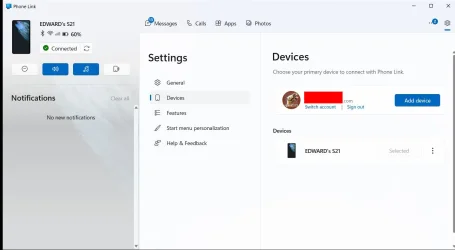
I have a Samsung S21 5G phone. I normally use the Windows Phone Link program to connect to it. It mainly connects with WiFi. It also uses Bluetooth but only for Audio. That is it steams audio when Phone Link makes/receives phone calls or runs apps on the phone.

When Phone Link is configured I use my Microsoft Account. Phone Link connects to the Link to Windows app on the phone.

Phone Link - Device.webp

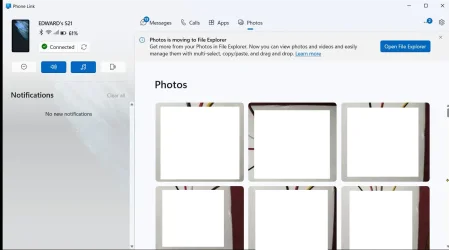
The app Phone Link comes with Windows 10 and 11. After you you have configured it with your phone you can use it to
* Send/receive Messages
* Make/Receive Calls
* Run phone apps and show output on laptop
* Show photos

Phone Link.webp

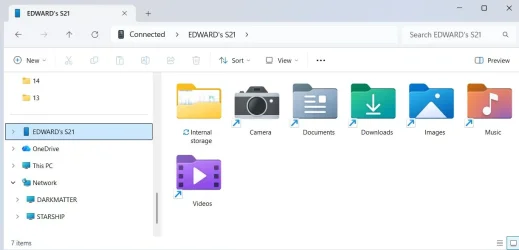
The photos can also be viewed in the Windows File Explorer.

S21 - File Explorer.webp

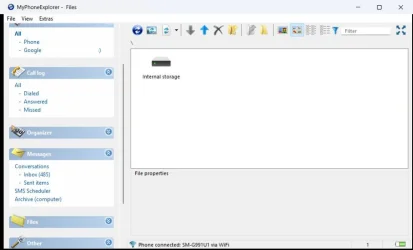
I also use an app called MyPhoneExplorer to do similar things. It normally connects with WiFi. It does not connect with Bluetooth. It can also connect with USB. Note MyPhoneExplorer also has to be installed on the phone.

MyPhoneExplorer.webp
 
Last edited:

My Computers

System One System Two

  • OS
    Windows 11 Pro 25H2 (26200.6901)
    Computer type
    Laptop
    Manufacturer/Model
    ASUS TUF Gaming A15 (2022)
    CPU
    AMD Ryzen 7 6800H with Radeon 680M GPU (486MB RAM)
    Memory
    Crucial DDR5-4800 (2400MHz) 32GB (2 x 16GB)
    Graphics Card(s)
    NVIDIA RTX 3060 Laptop (6GB RAM)
    Sound Card
    n/a
    Monitor(s) Displays
    15.6-inch
    Screen Resolution
    1920x1080 300Hz
    Hard Drives
    2 x Samsung 990 Evo Plus (2TB M.2 NVME SSD)
    PSU
    n/a
    Mouse
    Wireless Mouse M510
    Internet Speed
    2100Mbps/300Mbps
    Browser
    Firefox
    Antivirus
    Malwarebytes
  • Operating System
    Windows 11 Pro 25H2 (26200.8246)
    Computer type
    PC/Desktop
    Manufacturer/Model
    Custom build
    CPU
    AMD Ryzen 7 5700X3D
    Motherboard
    ASUS ROG Strix B550-F Gaming WiFi II
    Memory
    G.SKILL Flare X 32GB (2x16GB) DDR4
    Graphics card(s)
    ASUS ROG-STRIX-RTX3060TI-08G-V2-GAMING (RTX 3060-Ti, 8GB RAM)
    Monitor(s) Displays
    Samsung G50D IPS 27"
    Screen Resolution
    1440p/180Hz
    Hard Drives
    SAMSUNG 990 EVO Plus (2TB] M.2 NVME SSD
    SAMSUNG 990 EVO Plus (4TB) M.2 NVME SSD
    PSU
    Corsair RM750x (750 watts)
    Case
    Cooler Master MasterCase 5
    Cooling
    Scythe Mugen 6
    Keyboard
    Logitech K520 (MK540 keyboard/mouse combo)
    Mouse
    Logitech M310 (MK540 keyboard/mouse combo)
    Internet Speed
    2100 Mbps down / 300 Mbps up
    Browser
    Firefox, Edge, Chrome
    Antivirus
    Malwarebytes (Premium)
    Other Info
    ASUS Blu-ray Burner BW-16D1HT (SATA) || Western Digital Easystore 20TB USB 3.0 external hard drive used with Acronis True Image 2025 backup software || HP OfficeJet Pro 6975 Printer/Scanner

Another new app that I read about on Google news this morning...
 

My Computer

System One

  • OS
    Windows 11 & Zorin Pro
    Computer type
    Laptop
    Manufacturer/Model
    Asus Rog Strix G16
    CPU
    Intel® Core™ Ultra 9 Processor 275HX 2.7 GHz
    Motherboard
    AsusteK Computer
    Memory
    32 gb
    Graphics Card(s)
    NVIDIA® GeForce RTX™ 5060 Laptop GPU
    Sound Card
    Realtek High Definition Audio
    Monitor(s) Displays
    Laptop 16 inch
    Screen Resolution
    2560 X 1600
    Hard Drives
    Boot: Samsung 9100 NVME 2 TB Microsoft Storage Controller: Standard NVM Express Driver: Microsoft 6/21/2006. No SATA/AHCI on my motherboard or in bios
    Mouse
    Pad
    Browser
    Google Chrome
    Antivirus
    Microsoft
    Other Info
    Printer: HP Color LaserJet MFP M477dw
Back
Top Bottom