Brightness Control has disappeared.


Critical Mass

Member
Local time
6:23 AM
Posts
34
OS
Windows 11
Does anyone know how to get it back. It disappeared from Taskbar popup and Settings menu after restarting my laptop after lunch.

Thanks in advance.
 

My Computer

System One

  • OS
    Windows 11
    Computer type
    Laptop
    Manufacturer/Model
    Dell Inspiron 7737
Hi, have you tried a Google search for
restore missing brightness slider
yet?

Googe AI offers some suggestions and a video.... here's the text:

Key Solutions to Restore Brightness Slider:

  • Enable Monitor Driver (Most Common):
    1. Right-click the Start button and select Device Manager.
    2. Expand Monitors.
    3. If your monitor (e.g., "Generic PnP Monitor") is disabled, right-click it and select Enable device.
  • Update/Reinstall Display Adapters:
    1. In Device Manager, expand Display adapters.
    2. Right-click your graphics driver (e.g., Intel, NVIDIA, AMD) and select Update driver.
    3. If that fails, select Uninstall device, then restart your computer to force Windows to reinstall the driver.
  • Restart Display Enhancement Service:
    1. Press Windows Key + R, type services.msc, and hit Enter.
    2. Locate Display Enhancement Service.
    3. Right-click it and select Restart. If it's not running, double-click it and set Startup type to Automatic.
  • Run Windows Updates:
    1. Go to Settings > Windows Update and check for updates. Missing drivers are often provided through mandatory system updates.
  • Check Action Center Settings:
    1. Click the Quick Settings icon (network/sound) in the taskbar.
    2. Click the pencil icon (Edit quick settings).
    3. Select Add and choose Brightness if it is missing.
Additional Tips:

  • Restart the Computer: A simple restart can resolve temporary service failures.
  • Toggle Power: Unplug your laptop or toggle the Battery Saver mode

Suggest you start there and advise what you find. Thanks.
 
Last edited:

My Computer

System One

  • OS
    Windows 11 Pro
    Computer type
    Laptop
    Manufacturer/Model
    Lenovo t480s
    CPU
    i7-8650U
    Memory
    16GB
    Graphics Card(s)
    Intel UHD 620
    Screen Resolution
    1920x1080
    Hard Drives
    C SN810 SDCPNRY-512G-1006
    Browser
    Edge, Firefox
    Antivirus
    Defender

My Computers

System One System Two

  • OS
    Win 11 Home ♦♦♦26200.8655 ♦♦♦♦♦♦♦25H2
    Computer type
    PC/Desktop
    Manufacturer/Model
    Built by Ghot® [May 2020]
    CPU
    AMD Ryzen 7 3700X
    Motherboard
    Asus Pro WS X570-ACE (BIOS 5302)
    Memory
    G.Skill (F4-3200C14D-16GTZKW)
    Graphics Card(s)
    EVGA RTX 2070 (08G-P4-2171-KR)
    Sound Card
    Realtek ALC1220P / ALC S1220A
    Monitor(s) Displays
    Dell U3011 30"
    Screen Resolution
    2560 x 1600
    Hard Drives
    2x Samsung 860 EVO 500GB,
    WD 4TB Black FZBX - SATA III,
    WD 8TB Black FZBX - SATA III,
    DRW-24B1ST CD/DVD Burner
    PSU
    PC Power & Cooling 750W Quad EPS12V
    Case
    Cooler Master ATCS 840 Tower
    Cooling
    CM Hyper 212 EVO (push/pull)
    Keyboard
    Ducky DK9008 Shine II Blue LED
    Mouse
    Logitech Optical M-100
    Internet Speed
    300/300
    Browser
    Firefox (latest)
    Antivirus
    Bitdefender Total Security
    Other Info
    Speakers: Klipsch Pro Media 2.1
  • Operating System
    Windows XP Pro 32bit w/SP3
    Computer type
    PC/Desktop
    Manufacturer/Model
    Built by Ghot® (not in use)
    CPU
    AMD Athlon 64 X2 5000+ (OC'd @ 3.2Ghz)
    Motherboard
    ASUS M2N32-SLI Deluxe Wireless Edition
    Memory
    TWIN2X2048-6400C4DHX (2 x 1GB, DDR2 800)
    Graphics card(s)
    EVGA 256-P2-N758-TR GeForce 8600GT SSC
    Sound Card
    Onboard
    Monitor(s) Displays
    ViewSonic G90FB Black 19" Professional (CRT)
    Screen Resolution
    up to 2048 x 1536
    Hard Drives
    WD 36GB 10,000rpm Raptor SATA
    Seagate 80GB 7200rpm SATA
    Lite-On LTR-52246S CD/RW
    Lite-On LH-18A1P CD/DVD Burner
    PSU
    PC Power & Cooling Silencer 750 Quad EPS12V
    Case
    Generic Beige case, 80mm fans
    Cooling
    ZALMAN 9500A 92mm CPU Cooler
    Keyboard
    Logitech Classic Keybooard 200
    Mouse
    Logitech Optical M-BT96a
    Internet Speed
    300/300
    Browser
    Firefox 3.x ??
    Antivirus
    Symantec (Norton)
    Other Info
    Still assembled, still runs. Haven't turned it on for 15 years?
These, I believe:
Untitled.webp
 

My Computer

System One

  • OS
    Windows 11 Pro
    Computer type
    Laptop
    Manufacturer/Model
    Lenovo t480s
    CPU
    i7-8650U
    Memory
    16GB
    Graphics Card(s)
    Intel UHD 620
    Screen Resolution
    1920x1080
    Hard Drives
    C SN810 SDCPNRY-512G-1006
    Browser
    Edge, Firefox
    Antivirus
    Defender
It might be possible for such a symptom to be caused by corruption in the user account so try using a different user account to see if the problem affects that as well.
If the fault affects another user account then I suspect the display driver.

This really sounds to me like you have had display driver corruption, a corrupt display driver update or a generic display driver installed in place of the proper one.
Check the display driver entry in Device manager.
Get & install the latest display driver directly from Dell's support site using your Dell Service Tag to ensure that you select the correct driver.

I avoid Windows update installing incorrect driver updates -
Enable or Disable Include Drivers with Windows Updates - ElevenForumTutorials
and I back up installed drivers
Backup and Restore Device Drivers - ElevenForumTutorials


Denis
 
Last edited:

My Computer

System One

  • OS
    Windows 11 Home x64 Version 25H2 Build 26200.8037
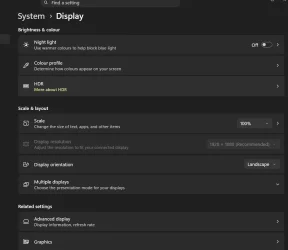
My Settings/System/Display Menu looks like this. Note no Brightness (should be first/top on list)

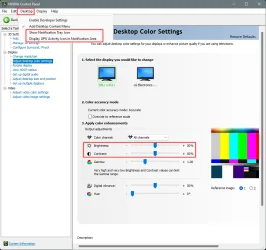
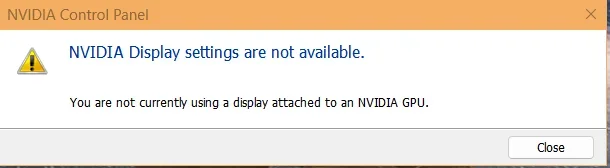
Nvidia control panel looks like this.

Brightness doesn't appear when clicking on any of the normal Taskbar Icons (Volume/ Wifi etc). In fact the popup looks like the Win 10 not Win 11)

@Try3 My Windows Driver updates are disabled.
I've reinstalled (clean install) latest available Nvidia driver for my GPU after uninstalling with DDU
I can't find adaptive brightness controls anywhere (to switch off).
 

Attachments

  • 2026-04-10 19 34 40.webp
    2026-04-10 19 34 40.webp
    29.1 KB · Views: 1
  • 2026-04-10 19 38 04.webp
    2026-04-10 19 38 04.webp
    9.5 KB · Views: 1

My Computer

System One

  • OS
    Windows 11
    Computer type
    Laptop
    Manufacturer/Model
    Dell Inspiron 7737
Thank you for your reply.

Await comment on your experience with ideas in my post #2

Please confirn you don't have and haven't had an external monitor attached as your screenshot seems to suggest.

Also quote your full build number.
 

My Computer

System One

  • OS
    Windows 11 Pro
    Computer type
    Laptop
    Manufacturer/Model
    Lenovo t480s
    CPU
    i7-8650U
    Memory
    16GB
    Graphics Card(s)
    Intel UHD 620
    Screen Resolution
    1920x1080
    Hard Drives
    C SN810 SDCPNRY-512G-1006
    Browser
    Edge, Firefox
    Antivirus
    Defender
PROBLEM SOLVED.
Thanks everyone. I rolled back the Intel driver that I'd installed yesterday and It solved the problem. Thanks again.
 

My Computer

System One

  • OS
    Windows 11
    Computer type
    Laptop
    Manufacturer/Model
    Dell Inspiron 7737
Good. Why did you install that driver? Surely not via a driver updater tool...?
It disappeared from Taskbar popup and Settings menu after restarting my laptop after lunch.

The obvious thing to try if you didn't know what changed in those circumstances is to use a System Restore point. Try that next time.
 

My Computer

System One

  • OS
    Windows 11 Pro
    Computer type
    Laptop
    Manufacturer/Model
    Lenovo t480s
    CPU
    i7-8650U
    Memory
    16GB
    Graphics Card(s)
    Intel UHD 620
    Screen Resolution
    1920x1080
    Hard Drives
    C SN810 SDCPNRY-512G-1006
    Browser
    Edge, Firefox
    Antivirus
    Defender
It was via Windows updates. I'd checked for updates and windows had reinstalled an old Intel driver for my Intel GPU. I rolled back to the latest driver. I couldn't understand why this affected Nvidia GPU.
Thanks anyway.
 

My Computer

System One

  • OS
    Windows 11
    Computer type
    Laptop
    Manufacturer/Model
    Dell Inspiron 7737
Ok sounds like you need to block it (hide the update).
 

My Computer

System One

  • OS
    Windows 11 Pro
    Computer type
    Laptop
    Manufacturer/Model
    Lenovo t480s
    CPU
    i7-8650U
    Memory
    16GB
    Graphics Card(s)
    Intel UHD 620
    Screen Resolution
    1920x1080
    Hard Drives
    C SN810 SDCPNRY-512G-1006
    Browser
    Edge, Firefox
    Antivirus
    Defender

My Computer

System One

  • OS
    Windows 11 Home x64 Version 25H2 Build 26200.8037
I couldn't understand why this affected Nvidia GPU
If your Dell is like mine, it uses the built-in Intel display adapter almost all the time and it automatically switches to the Nvidia one just for those applications that need its enhanced capabilities. So I don't know why you say the problem was affecting your Nvidia GPU as that might not have been in use.
I disabled my Nvidia one because I do not do anything that needs sophisticated display control.

I used Dell updates while it was in support then switched over to Intel ones -
How to Use Intel Driver & Support Assistant, contains download link
- It just sits in my system tray and checks for new Intel updates for my specific Intel hardware.
- When it finds new updates, its SysTray icon's tiny indicator 'light' turns from green to red [both illustrated below].
Intel DnSA, SysTray.webp
- When it finds new updates, it would let me then download-install them all in one action.
- But, instead, I always click on its link for more info so that I get taken to a different page that allows me to download the update without installing - I can then install it when I feel like it and I can copy it to other computers to install on them when appropriate.
Example of Intel Driver & Support Assistant SysTray icon's context menu:-
Intel DnSA, SysTray, context menu.webp
Example of Intel Driver & Support Assistant SysTray icon & the webpage it takes me to when there are updates:-
SysTray, IDnSA.webp


Denis
 
Last edited:

My Computer

System One

  • OS
    Windows 11 Home x64 Version 25H2 Build 26200.8037
Thanks dalchina and Dennis. I'd somehow switched off blocking updates; it installed an older driver. I rolled back to a newer driver that allows security improvements in Windows. My laptop is a 4th Gen chip so shouldn't be on Win 11 anyway, but it works and is improving as Win 11 matures; although it's best to wait a few months before using the latest Feature update. All current drivers are backed up and are easy to reinstall.
Display is Intel. All apps use the NVidia.
I've got Intel Driver Support assistant but it no longer supports my CPU (to old).
Thanks again
 

My Computer

System One

  • OS
    Windows 11
    Computer type
    Laptop
    Manufacturer/Model
    Dell Inspiron 7737

Latest Support Threads

Back
Top Bottom