Solved BSOD after I upgraded to Windows 11


empleat

Well-known member
Local time
4:10 AM
Posts
116
OS
Windows 11 Pro 22H2 22621.963
I clean uninstalled NVIDIA drivers using DDU, and installed drivers for Windows 11. It seems some system driver causing BSOD. Have no idea what that is tho!

Please help.
 

Attachments

My Computer My Computer

At a glance

Windows 11 Pro 22H2 22621.963I5 9600 KfG.Skill Trident Z 3200mhz 2x8GBRTX 3070
OS
Windows 11 Pro 22H2 22621.963
Computer type
PC/Desktop
CPU
I5 9600 Kf
Motherboard
ASUS Z390-i Gaming
Memory
G.Skill Trident Z 3200mhz 2x8GB
Graphics Card(s)
RTX 3070
Monitor(s) Displays
AOC G2590fx
Screen Resolution
1920x1080
Hard Drives
NVME:
Adata XPG8200 Pro (1024GB)
HDD:
WDC WD40EZRZ-00GXCB0
PSU
Corsair RX650RM .2018
Keyboard
Cooler master Nova Touch PRO
Mouse
MX VERTICAL ADVANCED ERGONOMIC MOUSE
Browser
Chrome, Firefox
Upgrade from Windows 10? Or clean install?
 

My Computer My Computer

At a glance

Windows 11i5-12400HP AMD RX 5500
OS
Windows 11
Computer type
PC/Desktop
Manufacturer/Model
HP
CPU
i5-12400
Motherboard
HP Reno 89B5 (AMI)
Graphics Card(s)
HP AMD RX 5500
PSU
500W
I clean uninstalled NVIDIA drivers using DDU, and installed drivers for Windows 11. It seems some system driver causing BSOD. Have no idea what that is tho!

Please help.
Able access PC still what about Dump file. Few Programs analyze dump file see exactly what’s causing crash. You say drivers, what does BSOD say which driver then ? Was it related to NVIDIA drivers ?
BlueScreen View
WinDbg
WhoCrashed
These will help people on here to help you by posting Dump file.
One place can look is Event Viewer> Administrator Events check for the date and time when you know event happened for error events in red.
 
Last edited:

My Computer My Computer

At a glance

Windows 11 ProIntel Core i7 10700KF 3.8 MHzG.Skill Trident RGB Series 64GB DDR4-3600MHzASUS ROG Strix GeForce RTX 3060 Ti OC Edition
OS
Windows 11 Pro
Computer type
PC/Desktop
Manufacturer/Model
jds63 /self built
CPU
Intel Core i7 10700KF 3.8 MHz
Motherboard
ASUS ROG Strix Z490-E Gaming
Memory
G.Skill Trident RGB Series 64GB DDR4-3600MHz
Graphics Card(s)
ASUS ROG Strix GeForce RTX 3060 Ti OC Edition
Sound Card
Creative Sound BlasterX AE-5 Plus
Monitor(s) Displays
ASUS VG28UQL1A 28" 144 Mhz 4K Monitor
Screen Resolution
3840 X 2160p HDR
Hard Drives
Samsung 970 EVO Plus NVMe 500GB M.2 Drive, (2) Samsung 870 EVO 1TB SATA III Internal SSD, (2) Samsung 860 EVO 1TB SATA III Internal SSD & Seagate Barracuda 2TB
PSU
ASUS ROG Thor 850 80+ Platinum 850W Fully Modular RGB Power Supply
Case
Lian Li Lancool II Mesh Performance
Cooling
Noctua NH-U12A CPU Cooler, (5) Noctua NF-A12x15 chromax.black.swap 120mm, (3) Lepa BOL.Quiet PWM LED 120mm
Keyboard
Logitech MX Keys
Mouse
Logitech MX Ergo Trackball
Internet Speed
325Mbps/ 20Mbps
Browser
Mozilla Firefox 64-bit, Microsoft Edge
Antivirus
Kaspersky Plus 2023
Other Info
Pioneer Blu-Ray/DVD Burner 209DBK, Logitech Z906 5.1 Speakers and Epson XP7100 All-in-One Printer
I literally posted v2 file.

I also included imagine, here is quick INFO in case someone knows what this is...
bsod quick inof.png
Full minidump file: https://file.io/dMKItShXWCYs
 

My Computer My Computer

At a glance

Windows 11 Pro 22H2 22621.963I5 9600 KfG.Skill Trident Z 3200mhz 2x8GBRTX 3070
OS
Windows 11 Pro 22H2 22621.963
Computer type
PC/Desktop
CPU
I5 9600 Kf
Motherboard
ASUS Z390-i Gaming
Memory
G.Skill Trident Z 3200mhz 2x8GB
Graphics Card(s)
RTX 3070
Monitor(s) Displays
AOC G2590fx
Screen Resolution
1920x1080
Hard Drives
NVME:
Adata XPG8200 Pro (1024GB)
HDD:
WDC WD40EZRZ-00GXCB0
PSU
Corsair RX650RM .2018
Keyboard
Cooler master Nova Touch PRO
Mouse
MX VERTICAL ADVANCED ERGONOMIC MOUSE
Browser
Chrome, Firefox
I literally posted v2 file.

I also included imagine, here is quick INFO in case someone knows what this is...
View attachment 49339
Full minidump file: https://file.io/dMKItShXWCYs
Mini Dump was deleted. Is this what was on blue screen ? Usually caused by drivers some other reasons.
Any access to PC without it crashing constantly ?
If can access it try running this at admin command prompt one at a time let first finish then next one, may or may not help, but if u can try.

Dism /online /cleanup-image /restorehealth

SFC /scannow

Good article for things for you to try along with first mention
 

My Computer My Computer

At a glance

Windows 11 ProIntel Core i7 10700KF 3.8 MHzG.Skill Trident RGB Series 64GB DDR4-3600MHzASUS ROG Strix GeForce RTX 3060 Ti OC Edition
OS
Windows 11 Pro
Computer type
PC/Desktop
Manufacturer/Model
jds63 /self built
CPU
Intel Core i7 10700KF 3.8 MHz
Motherboard
ASUS ROG Strix Z490-E Gaming
Memory
G.Skill Trident RGB Series 64GB DDR4-3600MHz
Graphics Card(s)
ASUS ROG Strix GeForce RTX 3060 Ti OC Edition
Sound Card
Creative Sound BlasterX AE-5 Plus
Monitor(s) Displays
ASUS VG28UQL1A 28" 144 Mhz 4K Monitor
Screen Resolution
3840 X 2160p HDR
Hard Drives
Samsung 970 EVO Plus NVMe 500GB M.2 Drive, (2) Samsung 870 EVO 1TB SATA III Internal SSD, (2) Samsung 860 EVO 1TB SATA III Internal SSD & Seagate Barracuda 2TB
PSU
ASUS ROG Thor 850 80+ Platinum 850W Fully Modular RGB Power Supply
Case
Lian Li Lancool II Mesh Performance
Cooling
Noctua NH-U12A CPU Cooler, (5) Noctua NF-A12x15 chromax.black.swap 120mm, (3) Lepa BOL.Quiet PWM LED 120mm
Keyboard
Logitech MX Keys
Mouse
Logitech MX Ergo Trackball
Internet Speed
325Mbps/ 20Mbps
Browser
Mozilla Firefox 64-bit, Microsoft Edge
Antivirus
Kaspersky Plus 2023
Other Info
Pioneer Blu-Ray/DVD Burner 209DBK, Logitech Z906 5.1 Speakers and Epson XP7100 All-in-One Printer
I clean uninstalled NVIDIA drivers using DDU
Be careful with this program, how did you do this in safe mode or not ? After this when BSOD happened ?
Have a copy of Windows 11 ?
 

My Computer My Computer

At a glance

Windows 11 ProIntel Core i7 10700KF 3.8 MHzG.Skill Trident RGB Series 64GB DDR4-3600MHzASUS ROG Strix GeForce RTX 3060 Ti OC Edition
OS
Windows 11 Pro
Computer type
PC/Desktop
Manufacturer/Model
jds63 /self built
CPU
Intel Core i7 10700KF 3.8 MHz
Motherboard
ASUS ROG Strix Z490-E Gaming
Memory
G.Skill Trident RGB Series 64GB DDR4-3600MHz
Graphics Card(s)
ASUS ROG Strix GeForce RTX 3060 Ti OC Edition
Sound Card
Creative Sound BlasterX AE-5 Plus
Monitor(s) Displays
ASUS VG28UQL1A 28" 144 Mhz 4K Monitor
Screen Resolution
3840 X 2160p HDR
Hard Drives
Samsung 970 EVO Plus NVMe 500GB M.2 Drive, (2) Samsung 870 EVO 1TB SATA III Internal SSD, (2) Samsung 860 EVO 1TB SATA III Internal SSD & Seagate Barracuda 2TB
PSU
ASUS ROG Thor 850 80+ Platinum 850W Fully Modular RGB Power Supply
Case
Lian Li Lancool II Mesh Performance
Cooling
Noctua NH-U12A CPU Cooler, (5) Noctua NF-A12x15 chromax.black.swap 120mm, (3) Lepa BOL.Quiet PWM LED 120mm
Keyboard
Logitech MX Keys
Mouse
Logitech MX Ergo Trackball
Internet Speed
325Mbps/ 20Mbps
Browser
Mozilla Firefox 64-bit, Microsoft Edge
Antivirus
Kaspersky Plus 2023
Other Info
Pioneer Blu-Ray/DVD Burner 209DBK, Logitech Z906 5.1 Speakers and Epson XP7100 All-in-One Printer

Dism, sfc tried recently...

DDU is perfectly safe I was assured by both devs and NVIDIA, that is if used properly. Yes I use recommended setting in safe mode, didn't have problems so far!
 

My Computer My Computer

At a glance

Windows 11 Pro 22H2 22621.963I5 9600 KfG.Skill Trident Z 3200mhz 2x8GBRTX 3070
OS
Windows 11 Pro 22H2 22621.963
Computer type
PC/Desktop
CPU
I5 9600 Kf
Motherboard
ASUS Z390-i Gaming
Memory
G.Skill Trident Z 3200mhz 2x8GB
Graphics Card(s)
RTX 3070
Monitor(s) Displays
AOC G2590fx
Screen Resolution
1920x1080
Hard Drives
NVME:
Adata XPG8200 Pro (1024GB)
HDD:
WDC WD40EZRZ-00GXCB0
PSU
Corsair RX650RM .2018
Keyboard
Cooler master Nova Touch PRO
Mouse
MX VERTICAL ADVANCED ERGONOMIC MOUSE
Browser
Chrome, Firefox

Dism, sfc tried recently...

DDU is perfectly safe I was assured by both devs and NVIDIA, that is if used properly. Yes I use recommended setting in safe mode, didn't have problems so far!
meaning you did it in safe mode when removing drivers. ?
What showed in DISM and SFC when done ? How recent right after BSOD ? Have you yet tried any other suggestions from article besides sfc and DISM ? What about using programs mentioned in post #3 to analyze dump file.
 

My Computer My Computer

At a glance

Windows 11 ProIntel Core i7 10700KF 3.8 MHzG.Skill Trident RGB Series 64GB DDR4-3600MHzASUS ROG Strix GeForce RTX 3060 Ti OC Edition
OS
Windows 11 Pro
Computer type
PC/Desktop
Manufacturer/Model
jds63 /self built
CPU
Intel Core i7 10700KF 3.8 MHz
Motherboard
ASUS ROG Strix Z490-E Gaming
Memory
G.Skill Trident RGB Series 64GB DDR4-3600MHz
Graphics Card(s)
ASUS ROG Strix GeForce RTX 3060 Ti OC Edition
Sound Card
Creative Sound BlasterX AE-5 Plus
Monitor(s) Displays
ASUS VG28UQL1A 28" 144 Mhz 4K Monitor
Screen Resolution
3840 X 2160p HDR
Hard Drives
Samsung 970 EVO Plus NVMe 500GB M.2 Drive, (2) Samsung 870 EVO 1TB SATA III Internal SSD, (2) Samsung 860 EVO 1TB SATA III Internal SSD & Seagate Barracuda 2TB
PSU
ASUS ROG Thor 850 80+ Platinum 850W Fully Modular RGB Power Supply
Case
Lian Li Lancool II Mesh Performance
Cooling
Noctua NH-U12A CPU Cooler, (5) Noctua NF-A12x15 chromax.black.swap 120mm, (3) Lepa BOL.Quiet PWM LED 120mm
Keyboard
Logitech MX Keys
Mouse
Logitech MX Ergo Trackball
Internet Speed
325Mbps/ 20Mbps
Browser
Mozilla Firefox 64-bit, Microsoft Edge
Antivirus
Kaspersky Plus 2023
Other Info
Pioneer Blu-Ray/DVD Burner 209DBK, Logitech Z906 5.1 Speakers and Epson XP7100 All-in-One Printer

My Computer My Computer

At a glance

Windows 11 ProIntel Core i7 10700KF 3.8 MHzG.Skill Trident RGB Series 64GB DDR4-3600MHzASUS ROG Strix GeForce RTX 3060 Ti OC Edition
OS
Windows 11 Pro
Computer type
PC/Desktop
Manufacturer/Model
jds63 /self built
CPU
Intel Core i7 10700KF 3.8 MHz
Motherboard
ASUS ROG Strix Z490-E Gaming
Memory
G.Skill Trident RGB Series 64GB DDR4-3600MHz
Graphics Card(s)
ASUS ROG Strix GeForce RTX 3060 Ti OC Edition
Sound Card
Creative Sound BlasterX AE-5 Plus
Monitor(s) Displays
ASUS VG28UQL1A 28" 144 Mhz 4K Monitor
Screen Resolution
3840 X 2160p HDR
Hard Drives
Samsung 970 EVO Plus NVMe 500GB M.2 Drive, (2) Samsung 870 EVO 1TB SATA III Internal SSD, (2) Samsung 860 EVO 1TB SATA III Internal SSD & Seagate Barracuda 2TB
PSU
ASUS ROG Thor 850 80+ Platinum 850W Fully Modular RGB Power Supply
Case
Lian Li Lancool II Mesh Performance
Cooling
Noctua NH-U12A CPU Cooler, (5) Noctua NF-A12x15 chromax.black.swap 120mm, (3) Lepa BOL.Quiet PWM LED 120mm
Keyboard
Logitech MX Keys
Mouse
Logitech MX Ergo Trackball
Internet Speed
325Mbps/ 20Mbps
Browser
Mozilla Firefox 64-bit, Microsoft Edge
Antivirus
Kaspersky Plus 2023
Other Info
Pioneer Blu-Ray/DVD Burner 209DBK, Logitech Z906 5.1 Speakers and Epson XP7100 All-in-One Printer
There are no Windows 11 updates tho for my mobo and BIOS is latest. It started happening after like 2 weeks at least tho. Correction: it happened just once luckily so far. I Am not missing any drivers otherwise, and didn't have BSOD with drivers on Windows 10.
 

My Computer My Computer

At a glance

Windows 11 Pro 22H2 22621.963I5 9600 KfG.Skill Trident Z 3200mhz 2x8GBRTX 3070
OS
Windows 11 Pro 22H2 22621.963
Computer type
PC/Desktop
CPU
I5 9600 Kf
Motherboard
ASUS Z390-i Gaming
Memory
G.Skill Trident Z 3200mhz 2x8GB
Graphics Card(s)
RTX 3070
Monitor(s) Displays
AOC G2590fx
Screen Resolution
1920x1080
Hard Drives
NVME:
Adata XPG8200 Pro (1024GB)
HDD:
WDC WD40EZRZ-00GXCB0
PSU
Corsair RX650RM .2018
Keyboard
Cooler master Nova Touch PRO
Mouse
MX VERTICAL ADVANCED ERGONOMIC MOUSE
Browser
Chrome, Firefox
mamflt.sys's description is "Mirekusoft Activity Monitor Filter Driver.

Uninstall mamflt.sys driver to see BSOD resolves.


My Computer My Computer

At a glance

Windows 11AMD Ryzen 7 5700GMicron Technology DDR4-3200 16GBNVIDIA GeForce RTX 3060
OS
Windows 11
Computer type
PC/Desktop
Manufacturer/Model
HP Pavilion
CPU
AMD Ryzen 7 5700G
Motherboard
Erica6
Memory
Micron Technology DDR4-3200 16GB
Graphics Card(s)
NVIDIA GeForce RTX 3060
Sound Card
Realtek ALC671
Monitor(s) Displays
Samsung SyncMaster U28E590
Screen Resolution
3840 x 2160
Hard Drives
SAMSUNG MZVLQ1T0HALB-000H1
Hmm didn't have problem with this so far, i will unload this in autoruns if needed, i don't want to lose monitored installations.

Ha, I could even looked this up, i didn't think it will be anything common. And i have chronic pain...

Thanks!
 

My Computer My Computer

At a glance

Windows 11 Pro 22H2 22621.963I5 9600 KfG.Skill Trident Z 3200mhz 2x8GBRTX 3070
OS
Windows 11 Pro 22H2 22621.963
Computer type
PC/Desktop
CPU
I5 9600 Kf
Motherboard
ASUS Z390-i Gaming
Memory
G.Skill Trident Z 3200mhz 2x8GB
Graphics Card(s)
RTX 3070
Monitor(s) Displays
AOC G2590fx
Screen Resolution
1920x1080
Hard Drives
NVME:
Adata XPG8200 Pro (1024GB)
HDD:
WDC WD40EZRZ-00GXCB0
PSU
Corsair RX650RM .2018
Keyboard
Cooler master Nova Touch PRO
Mouse
MX VERTICAL ADVANCED ERGONOMIC MOUSE
Browser
Chrome, Firefox
There are no Windows 11 updates tho for my mobo and BIOS is latest. It started happening after like 2 weeks at least tho. Correction: it happened just once luckily so far. I Am not missing any drivers otherwise, and didn't have BSOD with drivers on Windows 10.
What ? Happened what just once BSOD ?
 

My Computer My Computer

At a glance

Windows 11 ProIntel Core i7 10700KF 3.8 MHzG.Skill Trident RGB Series 64GB DDR4-3600MHzASUS ROG Strix GeForce RTX 3060 Ti OC Edition
OS
Windows 11 Pro
Computer type
PC/Desktop
Manufacturer/Model
jds63 /self built
CPU
Intel Core i7 10700KF 3.8 MHz
Motherboard
ASUS ROG Strix Z490-E Gaming
Memory
G.Skill Trident RGB Series 64GB DDR4-3600MHz
Graphics Card(s)
ASUS ROG Strix GeForce RTX 3060 Ti OC Edition
Sound Card
Creative Sound BlasterX AE-5 Plus
Monitor(s) Displays
ASUS VG28UQL1A 28" 144 Mhz 4K Monitor
Screen Resolution
3840 X 2160p HDR
Hard Drives
Samsung 970 EVO Plus NVMe 500GB M.2 Drive, (2) Samsung 870 EVO 1TB SATA III Internal SSD, (2) Samsung 860 EVO 1TB SATA III Internal SSD & Seagate Barracuda 2TB
PSU
ASUS ROG Thor 850 80+ Platinum 850W Fully Modular RGB Power Supply
Case
Lian Li Lancool II Mesh Performance
Cooling
Noctua NH-U12A CPU Cooler, (5) Noctua NF-A12x15 chromax.black.swap 120mm, (3) Lepa BOL.Quiet PWM LED 120mm
Keyboard
Logitech MX Keys
Mouse
Logitech MX Ergo Trackball
Internet Speed
325Mbps/ 20Mbps
Browser
Mozilla Firefox 64-bit, Microsoft Edge
Antivirus
Kaspersky Plus 2023
Other Info
Pioneer Blu-Ray/DVD Burner 209DBK, Logitech Z906 5.1 Speakers and Epson XP7100 All-in-One Printer
My platform: i7 13700k, MSI Tomahawk Z790. RTX 4080, 2 x 16G 5600 Corsair, NZXT Z73 AI cooler.

I think I have the same problem, but it may have mutated a little. No solution as yet. I've got as far as suspecting drivers and mostly ruling out hardware. Everything said on this forum reinforces that. Too many hardware permutations. Even happening in Win10.

Problem mutated a little. Originally lots of nvidia issues, still get some, but mostly resolved by reinstalling windows, re-seating 4080 and adjusting the stand (can't use supplied bracket on case).

Now normally crashes a few minutes after booting the system, frequently at idle when I'm reviewing the event log. Then an error in the log saying that the system had not shutdown properly. But timing indicates that it appears to have crashed during the previous boot where it was unable to write dump file. Oddly during this the Windows Spotlight cache gets corrupted, so I login from the default screen.

Memory checked (memtest86). CPU under load fine (cinebench) and gaming for hours. But crashes at idle after boot. If it survives 10 mins, its probably OK . BIOS and GPU flashed. All drivers up to date. Clean Win 11 install, shutdown and boot every time. Still crashing, but a little more stable.

Initially, had to sort out fans and the LED light show. Ended up installing MSI command center, NZXT Cam and iCue (1GB seriously). When problems started, assumed just too much contention. Flashed BIOS for a second time. Cleaned disk. Install Windows 11. Seemed fine. Intended to build gradually. Win 11 decided licence no longer active after BIOS upgrade. Annoyed by pestering. Contacted helpdesk. Activated Windows. Everything working. Fixed!!!

Next day issue returned. Maybe coincidence. MS Store proactively pushed updates. Started getting issues again. Disabled Intel Command Center. Seems a little more stable, but suspect it is not the root cause. The system is very fragile. Now mostly OK, but installed Gigabyte tool to underclock GPU which decides to start on boot, and PC becomes unstable.

The number of people, and platforms that are experiencing a very similar issues, suggest that this is not directly hardware related, but driver / windows related. Still investigating.

 
Last edited:

My Computer My Computer

At a glance

Windows 11 Home - 10.0.22621 Build 22621i7-13700KCorsair Vengeance 32GB (2 x 16GB) 5600MHz DDR5Gigabyte Eagle OC RTX 4080
OS
Windows 11 Home - 10.0.22621 Build 22621
Computer type
PC/Desktop
Manufacturer/Model
Self build
CPU
i7-13700K
Motherboard
MAG Z790 TOMAHAWK WIFI (MS-7D91)
Memory
Corsair Vengeance 32GB (2 x 16GB) 5600MHz DDR5
Graphics Card(s)
Gigabyte Eagle OC RTX 4080
Monitor(s) Displays
Samsung Neo G7
Screen Resolution
3840 x 2160
Hard Drives
Samsung 980 Pro 2TB M.2 2280 NVMe PCIe 4.0 SSD
Samsung 850 Evo 500GB SATA3 SSD
PSU
Corsair RMx Series RM1000x
Case
NXZT H7 Flow
Cooling
NZXT Z73 AIO
Keyboard
Corsair Platinum K95
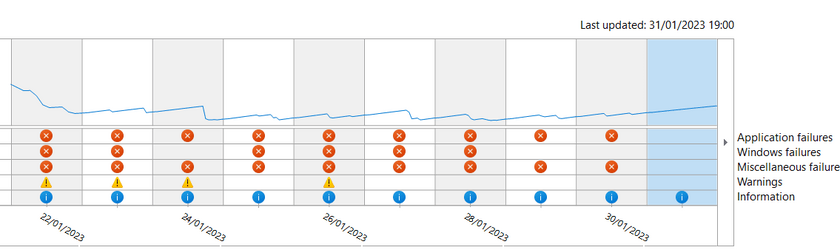
Too early to claim victory, but I've had my first clear day after last install.

Last two changes:

1. Force to performance (which I have tried before)
2. And don't laugh - disabled windows spotlight

Previously possible significant changes (as previous)

3. Avoided potentially conflicting drivers - only NZXT Cam
3.1 Disabled Intel Cam
4 Remounted / stabilized GPU
5 Disable windows fast start1675196631306.png

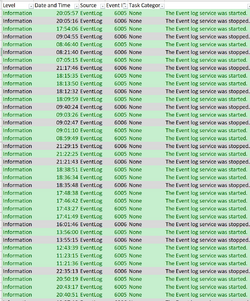
Exporting event log start/stop shows the pattern more clearly.

1675197049003.png

After a little stability, I may start to unwind changes methodically, to see if I can degrade the system to find root cause, but I'm a reluctant to disturb this right now.
 

My Computer My Computer

At a glance

Windows 11 Home - 10.0.22621 Build 22621i7-13700KCorsair Vengeance 32GB (2 x 16GB) 5600MHz DDR5Gigabyte Eagle OC RTX 4080
OS
Windows 11 Home - 10.0.22621 Build 22621
Computer type
PC/Desktop
Manufacturer/Model
Self build
CPU
i7-13700K
Motherboard
MAG Z790 TOMAHAWK WIFI (MS-7D91)
Memory
Corsair Vengeance 32GB (2 x 16GB) 5600MHz DDR5
Graphics Card(s)
Gigabyte Eagle OC RTX 4080
Monitor(s) Displays
Samsung Neo G7
Screen Resolution
3840 x 2160
Hard Drives
Samsung 980 Pro 2TB M.2 2280 NVMe PCIe 4.0 SSD
Samsung 850 Evo 500GB SATA3 SSD
PSU
Corsair RMx Series RM1000x
Case
NXZT H7 Flow
Cooling
NZXT Z73 AIO
Keyboard
Corsair Platinum K95
@MetaMorpheus May I suggest you start your own thread about your issue. It will get more attention that way. Don't know if it's the cause of your issue but Icue has been known to cause crash on startup. Do a web search for "icue crashes computer" and you will find solutions from fellow Corsair users in the same boat as you.
 

My Computers My Computers

  • At a glance

    Windows 11 Pro 25H2 26200.9457i9-10900 10 core 20 threads32 gbnone-Intel UHD Graphics 630
    OS
    Windows 11 Pro 25H2 26200.9457
    Computer type
    PC/Desktop
    Manufacturer/Model
    Dell Optiplex 7080
    CPU
    i9-10900 10 core 20 threads
    Motherboard
    DELL 0J37VM
    Memory
    32 gb
    Graphics Card(s)
    none-Intel UHD Graphics 630
    Sound Card
    Integrated Realtek
    Monitor(s) Displays
    Benq 27
    Screen Resolution
    2560x1440
    Hard Drives
    2x1tb Solidigm m.2 nvme /External drives 512gb Samsung m.2 sata+2tb Kingston m2.nvme
    PSU
    500w
    Case
    MT
    Cooling
    Dell Premium
    Keyboard
    Logitech wired
    Mouse
    Logitech wireless
    Internet Speed
    so slow I'm too embarrassed to tell
    Browser
    #1 Edge #2 Firefox
    Antivirus
    Defender+MWB Premium
  • At a glance

    Windows 11 Pro 24H2 26200.9457AMD Ryzen 7 6800U32 gbintegrated
    Operating System
    Windows 11 Pro 24H2 26200.9457
    Computer type
    PC/Desktop
    Manufacturer/Model
    Beelink Mini PC SER5
    CPU
    AMD Ryzen 7 6800U
    Memory
    32 gb
    Graphics card(s)
    integrated
    Sound Card
    integrated
    Monitor(s) Displays
    Benq 27
    Screen Resolution
    2560x1440
    Hard Drives
    1TB Crucial nvme
    Keyboard
    Logitech wired
    Mouse
    Logitech wireless
    Internet Speed
    still too embarrassed to tell
    Browser
    Firefox
    Antivirus
    Defender
  • System 3 is non compliant Dell 9020 i7-4770/24gb ram Win11 PRO 26200.9457

Latest Support Threads

Back
Top Bottom