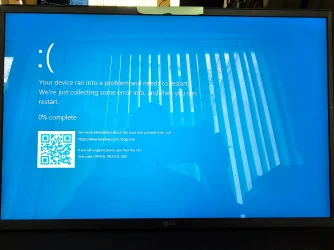
BSOD Crashes from 1 per day to 1 per hour


Group c Results:

No BSOD on startup or opening cmd prompt, notepad, or Chrome
 

Attachments

My Computer My Computer

At a glance

Windows 11GenuineIntel 11th Gen Intel(R) Core(TM) i7-11...16.0 GbIntel(R) Iris(R) Xe Graphics
OS
Windows 11
Computer type
Laptop
Manufacturer/Model
LG
CPU
GenuineIntel 11th Gen Intel(R) Core(TM) i7-1195G7 @ 2.9
Motherboard
BaseBoard Product 17Z95P, BaseBoard Version FAB1
Memory
16.0 Gb
Graphics Card(s)
Intel(R) Iris(R) Xe Graphics
Sound Card
Intel® Smart Sound Technology for USB Audio
Monitor(s) Displays
PNP Device ID PCI\VEN_8086&DEV_9A49&SUBSYS_04591854&REV_03\3&11583659&0&10
Screen Resolution
2560 x 1600 x 60 hertz
Hard Drives
Description Local Fixed Disk
Compressed No
File System NTFS
Size 952.12 GB (1,022,329,090,048 bytes)
Free Space 654.00 GB (702,225,670,144 bytes)
Volume Name
Volume Serial Number 5E40B982
Keyboard
Description Standard PS/2 Keyboard Name Enhanced (101- or 102-key) Layout 00000409 PNP Device ID ACPI\LGEX0001\4&1D6AE7E5&0 Number of Function Keys 12 I/O Port 0x00000060-0x00000060 I/O Port 0x00000064-0x00000064 IRQ Channel IRQ 1
Browser
Chrome
Antivirus
Kaspersky Premium
Group d Results:

No BSOD on startup or opening cmd prompt, BSOD occurred on opening notepad.

Latest v2: CMS_GRAM-(2025-06-17_15-47-39).zip

Note regarding group d:
After selecting parameters and hitting enter to proceed with the test, Driver Verifier Manager returned the attached message. "IRP Logging cannot be enabled without I/O verification. Would you like to enable I/O verification, too?" Since IRP logging was a requirement I selected "Yes" in order to proceed with the test.

After restarting the laptop after the BSOD I ran the new V2 and was able to rerun the Verifier querysettings and saved the results by opening a previously saved archive that had contained the Verifier querysettings from group c, pasting the results from group d and saving the file.

Please advise on next steps.
 

Attachments

  • Critical Process Died 2025 06 17 WDV Test Group d.webp
    Critical Process Died 2025 06 17 WDV Test Group d.webp
    506.9 KB · Views: 1
  • Driver Veifier Manager Message.webp
    Driver Veifier Manager Message.webp
    1.1 MB · Views: 1
  • WDV Customized Tests Group d.txt
    WDV Customized Tests Group d.txt
    2.3 KB · Views: 2

My Computer My Computer

At a glance

Windows 11GenuineIntel 11th Gen Intel(R) Core(TM) i7-11...16.0 GbIntel(R) Iris(R) Xe Graphics
OS
Windows 11
Computer type
Laptop
Manufacturer/Model
LG
CPU
GenuineIntel 11th Gen Intel(R) Core(TM) i7-1195G7 @ 2.9
Motherboard
BaseBoard Product 17Z95P, BaseBoard Version FAB1
Memory
16.0 Gb
Graphics Card(s)
Intel(R) Iris(R) Xe Graphics
Sound Card
Intel® Smart Sound Technology for USB Audio
Monitor(s) Displays
PNP Device ID PCI\VEN_8086&DEV_9A49&SUBSYS_04591854&REV_03\3&11583659&0&10
Screen Resolution
2560 x 1600 x 60 hertz
Hard Drives
Description Local Fixed Disk
Compressed No
File System NTFS
Size 952.12 GB (1,022,329,090,048 bytes)
Free Space 654.00 GB (702,225,670,144 bytes)
Volume Name
Volume Serial Number 5E40B982
Keyboard
Description Standard PS/2 Keyboard Name Enhanced (101- or 102-key) Layout 00000409 PNP Device ID ACPI\LGEX0001\4&1D6AE7E5&0 Number of Function Keys 12 I/O Port 0x00000060-0x00000060 I/O Port 0x00000064-0x00000064 IRQ Channel IRQ 1
Browser
Chrome
Antivirus
Kaspersky Premium
Please restart WDV with all customized tests except:

[ ] 0x00000004 Randomized low resources simulation.


If there is no immediate BSOD then open administrative command prompt and copy and paste:

verifier /querysettings

Post a share link.

Run for 24 - 48 hours.


After the above testing has completed and if there were no major performance problems then restart WDV with all customized tests.
 

My Computer My Computer

At a glance

Windows 10Intel(R) Core(TM) i7-4800MQ CPU @ 2.70GHz16 GB Total: Manufacturer : Samsung MemoryTyp...NVIDIA Quadro K3100M; Intel(R) HD Graphics 4600
OS
Windows 10
Computer type
Laptop
Manufacturer/Model
HP
CPU
Intel(R) Core(TM) i7-4800MQ CPU @ 2.70GHz
Motherboard
Product : 190A Version : KBC Version 94.56
Memory
16 GB Total: Manufacturer : Samsung MemoryType : DDR3 FormFactor : SODIMM Capacity : 8GB Speed : 1600
Graphics Card(s)
NVIDIA Quadro K3100M; Intel(R) HD Graphics 4600
Sound Card
IDT High Definition Audio CODEC; PNP Device ID HDAUDIO\FUNC_01&VEN_111D&DEV_76E0
Hard Drives
Model Hitachi HTS727575A9E364
Antivirus
Microsoft Defender
Other Info
Mobile Workstation
Okay, just to be clear, the next test will look like this:

Standard Flags:

[X] 0x00000001 Special pool.
[X] 0x00000002 Force IRQL checking.
[X] 0x00000008 Pool tracking.
[X] 0x00000010 I/O verification.
[X] 0x00000020 Deadlock detection.
[X] 0x00000080 DMA checking.
[X] 0x00000100 Security checks.
[X] 0x00000800 Miscellaneous checks.
[X] 0x00020000 DDI compliance checking.

Additional Flags:

[ ] 0x00000004 Randomized low resources simulation.
[X] 0x00000200 Force pending I/O requests.
[X] 0x00000400 IRP logging.
[X] 0x00002000 Invariant MDL checking for stack.
[X] 0x00004000 Invariant MDL checking for driver.
[X] 0x00008000 Power framework delay fuzzing.
[X] 0x00010000 Port/miniport interface checking.
[X] 0x00040000 Systematic low resources simulation.
[X] 0x00080000 DDI compliance checking (additional).
[X] 0x00200000 NDIS/WIFI verification.
[X] 0x00800000 Kernel synchronization delay fuzzing.
[X] 0x01000000 VM switch verification.
[X] 0x02000000 Code integrity checks.

Again testing only non-microsoft drivers

I just want to make sure that I am doing this correctly.

Thank you for your help with this.
 

My Computer My Computer

At a glance

Windows 11GenuineIntel 11th Gen Intel(R) Core(TM) i7-11...16.0 GbIntel(R) Iris(R) Xe Graphics
OS
Windows 11
Computer type
Laptop
Manufacturer/Model
LG
CPU
GenuineIntel 11th Gen Intel(R) Core(TM) i7-1195G7 @ 2.9
Motherboard
BaseBoard Product 17Z95P, BaseBoard Version FAB1
Memory
16.0 Gb
Graphics Card(s)
Intel(R) Iris(R) Xe Graphics
Sound Card
Intel® Smart Sound Technology for USB Audio
Monitor(s) Displays
PNP Device ID PCI\VEN_8086&DEV_9A49&SUBSYS_04591854&REV_03\3&11583659&0&10
Screen Resolution
2560 x 1600 x 60 hertz
Hard Drives
Description Local Fixed Disk
Compressed No
File System NTFS
Size 952.12 GB (1,022,329,090,048 bytes)
Free Space 654.00 GB (702,225,670,144 bytes)
Volume Name
Volume Serial Number 5E40B982
Keyboard
Description Standard PS/2 Keyboard Name Enhanced (101- or 102-key) Layout 00000409 PNP Device ID ACPI\LGEX0001\4&1D6AE7E5&0 Number of Function Keys 12 I/O Port 0x00000060-0x00000060 I/O Port 0x00000064-0x00000064 IRQ Channel IRQ 1
Browser
Chrome
Antivirus
Kaspersky Premium
Yes.
 

My Computer My Computer

At a glance

Windows 10Intel(R) Core(TM) i7-4800MQ CPU @ 2.70GHz16 GB Total: Manufacturer : Samsung MemoryTyp...NVIDIA Quadro K3100M; Intel(R) HD Graphics 4600
OS
Windows 10
Computer type
Laptop
Manufacturer/Model
HP
CPU
Intel(R) Core(TM) i7-4800MQ CPU @ 2.70GHz
Motherboard
Product : 190A Version : KBC Version 94.56
Memory
16 GB Total: Manufacturer : Samsung MemoryType : DDR3 FormFactor : SODIMM Capacity : 8GB Speed : 1600
Graphics Card(s)
NVIDIA Quadro K3100M; Intel(R) HD Graphics 4600
Sound Card
IDT High Definition Audio CODEC; PNP Device ID HDAUDIO\FUNC_01&VEN_111D&DEV_76E0
Hard Drives
Model Hitachi HTS727575A9E364
Antivirus
Microsoft Defender
Other Info
Mobile Workstation
Got one while using Chrome. Then got another one the same while preparing this post.

Should I continue and report each one? Or only if I get a different stop code?

Latest v2: CMS_GRAM-(2025-06-17_20-05-23).zip
 

Attachments

  • Stop Code 0xc000021a.webp
    Stop Code 0xc000021a.webp
    315.5 KB · Views: 2

My Computer My Computer

At a glance

Windows 11GenuineIntel 11th Gen Intel(R) Core(TM) i7-11...16.0 GbIntel(R) Iris(R) Xe Graphics
OS
Windows 11
Computer type
Laptop
Manufacturer/Model
LG
CPU
GenuineIntel 11th Gen Intel(R) Core(TM) i7-1195G7 @ 2.9
Motherboard
BaseBoard Product 17Z95P, BaseBoard Version FAB1
Memory
16.0 Gb
Graphics Card(s)
Intel(R) Iris(R) Xe Graphics
Sound Card
Intel® Smart Sound Technology for USB Audio
Monitor(s) Displays
PNP Device ID PCI\VEN_8086&DEV_9A49&SUBSYS_04591854&REV_03\3&11583659&0&10
Screen Resolution
2560 x 1600 x 60 hertz
Hard Drives
Description Local Fixed Disk
Compressed No
File System NTFS
Size 952.12 GB (1,022,329,090,048 bytes)
Free Space 654.00 GB (702,225,670,144 bytes)
Volume Name
Volume Serial Number 5E40B982
Keyboard
Description Standard PS/2 Keyboard Name Enhanced (101- or 102-key) Layout 00000409 PNP Device ID ACPI\LGEX0001\4&1D6AE7E5&0 Number of Function Keys 12 I/O Port 0x00000060-0x00000060 I/O Port 0x00000064-0x00000064 IRQ Channel IRQ 1
Browser
Chrome
Antivirus
Kaspersky Premium
1) Please reinstall the most up to date BIOS


2) Restart WDV to create multiple crashes


3) Make free or pay backup images

(Acronis, Aoemi, EaseUS, Hasleo, Macrium, Paragon, etc.)


Code:
Event[16049]
  Log Name: System
  Source: ACPI
  Date: 2025-06-17T20:03:39.9830000Z
  Event ID: 13
  Task: None
  Level: Error
  Opcode: N/A
  Keyword: Classic,
  User: N/A
  User Name: N/A
  Computer: CMS_Gram
  Description:
: The embedded controller (EC) did not respond within the specified timeout period. This may indicate that there is an error in the EC hardware or firmware or that the BIOS is accessing the EC incorrectly. You should check with your computer manufacturer for an upgraded BIOS. In some situations, this error may cause the computer to function incorrectly.

Event[16050]
  Log Name: System
  Source: ACPI
  Date: 2025-06-17T20:03:44.9840000Z
  Event ID: 13
  Task: None
  Level: Error
  Opcode: N/A
  Keyword: Classic,
  User: N/A
  User Name: N/A
  Computer: CMS_Gram
  Description:
: The embedded controller (EC) did not respond within the specified timeout period. This may indicate that there is an error in the EC hardware or firmware or that the BIOS is accessing the EC incorrectly. You should check with your computer manufacturer for an upgraded BIOS. In some situations, this error may cause the computer to function incorrectly.


Code:
Event[16051]
  Log Name: System
  Source: ACPI
  Date: 2025-06-17T20:03:49.9850000Z
  Event ID: 13
  Task: None
  Level: Error
  Opcode: N/A
  Keyword: Classic,
  User: N/A
  User Name: N/A
  Computer: CMS_Gram
  Description:
: The embedded controller (EC) did not respond within the specified timeout period.
This may indicate that there is an error in the EC hardware or firmware or that the BIOS is accessing the EC incorrectly.
You should check with your computer manufacturer for an upgraded BIOS. 
In some situations, this error may cause the computer to function incorrectly.
 
Last edited:

My Computer My Computer

At a glance

Windows 10Intel(R) Core(TM) i7-4800MQ CPU @ 2.70GHz16 GB Total: Manufacturer : Samsung MemoryTyp...NVIDIA Quadro K3100M; Intel(R) HD Graphics 4600
OS
Windows 10
Computer type
Laptop
Manufacturer/Model
HP
CPU
Intel(R) Core(TM) i7-4800MQ CPU @ 2.70GHz
Motherboard
Product : 190A Version : KBC Version 94.56
Memory
16 GB Total: Manufacturer : Samsung MemoryType : DDR3 FormFactor : SODIMM Capacity : 8GB Speed : 1600
Graphics Card(s)
NVIDIA Quadro K3100M; Intel(R) HD Graphics 4600
Sound Card
IDT High Definition Audio CODEC; PNP Device ID HDAUDIO\FUNC_01&VEN_111D&DEV_76E0
Hard Drives
Model Hitachi HTS727575A9E364
Antivirus
Microsoft Defender
Other Info
Mobile Workstation
I just wanted to give an update to this project.

I have communicated the need to re-install my BIOS to LG Electronics USA, but since their maintenance system is so closed, I have not been able to get anywhere with that. I will try again today to get some action from their side.

In the meantime I have disabled the driver verification program but not to worry; my machine continues to produce a plethora of crashes. At times it will run for a few hours in a stable state, but most of the time it crashes every 15 minutes. But it reboots quickly and it seems that both Chrome browser and Adobe Acrobat Reader are set up to support constant crashes because they both are able to bring me back to exactly where I was before any given crash.

Here is the lates V2 if you are interested.

CMS_GRAM-(2025-06-24_09-26-04).zip

Any suggestions would be warmly welcomed.

Take care...
 

My Computer My Computer

At a glance

Windows 11GenuineIntel 11th Gen Intel(R) Core(TM) i7-11...16.0 GbIntel(R) Iris(R) Xe Graphics
OS
Windows 11
Computer type
Laptop
Manufacturer/Model
LG
CPU
GenuineIntel 11th Gen Intel(R) Core(TM) i7-1195G7 @ 2.9
Motherboard
BaseBoard Product 17Z95P, BaseBoard Version FAB1
Memory
16.0 Gb
Graphics Card(s)
Intel(R) Iris(R) Xe Graphics
Sound Card
Intel® Smart Sound Technology for USB Audio
Monitor(s) Displays
PNP Device ID PCI\VEN_8086&DEV_9A49&SUBSYS_04591854&REV_03\3&11583659&0&10
Screen Resolution
2560 x 1600 x 60 hertz
Hard Drives
Description Local Fixed Disk
Compressed No
File System NTFS
Size 952.12 GB (1,022,329,090,048 bytes)
Free Space 654.00 GB (702,225,670,144 bytes)
Volume Name
Volume Serial Number 5E40B982
Keyboard
Description Standard PS/2 Keyboard Name Enhanced (101- or 102-key) Layout 00000409 PNP Device ID ACPI\LGEX0001\4&1D6AE7E5&0 Number of Function Keys 12 I/O Port 0x00000060-0x00000060 I/O Port 0x00000064-0x00000064 IRQ Channel IRQ 1
Browser
Chrome
Antivirus
Kaspersky Premium
I just wanted to give an update to this project.

I have communicated the need to re-install my BIOS to LG Electronics USA, but since their maintenance system is so closed, I have not been able to get anywhere with that. I will try again today to get some action from their side.

In the meantime I have disabled the driver verification program but not to worry; my machine continues to produce a plethora of crashes. At times it will run for a few hours in a stable state, but most of the time it crashes every 15 minutes. But it reboots quickly and it seems that both Chrome browser and Adobe Acrobat Reader are set up to support constant crashes because they both are able to bring me back to exactly where I was before any given crash.

Here is the lates V2 if you are interested.

CMS_GRAM-(2025-06-24_09-26-04).zip

Any suggestions would be warmly welcomed.

Take care...


Was a repair install, reset save files or clean install recently performed?
 

My Computer My Computer

At a glance

Windows 10Intel(R) Core(TM) i7-4800MQ CPU @ 2.70GHz16 GB Total: Manufacturer : Samsung MemoryTyp...NVIDIA Quadro K3100M; Intel(R) HD Graphics 4600
OS
Windows 10
Computer type
Laptop
Manufacturer/Model
HP
CPU
Intel(R) Core(TM) i7-4800MQ CPU @ 2.70GHz
Motherboard
Product : 190A Version : KBC Version 94.56
Memory
16 GB Total: Manufacturer : Samsung MemoryType : DDR3 FormFactor : SODIMM Capacity : 8GB Speed : 1600
Graphics Card(s)
NVIDIA Quadro K3100M; Intel(R) HD Graphics 4600
Sound Card
IDT High Definition Audio CODEC; PNP Device ID HDAUDIO\FUNC_01&VEN_111D&DEV_76E0
Hard Drives
Model Hitachi HTS727575A9E364
Antivirus
Microsoft Defender
Other Info
Mobile Workstation
I did a reset save files again about two days ago, electing to download the windows installation from the cloud. One thing that I noticed was that when the reset finished, it left windows nearly up to date. It seemed to run okay for about half a day, but then the BSODs began again. One of the things I am curious about is whether these problems have been endemic in other LG Laptops of my vintage or if this is sort of unique to my machine. It is only a little over 2-1/2 years old and up until this problem started about a month and a half ago, it was by far the best laptop that I have ever owned. I would leave it booted up for literally weeks at a time, only rebooting for occasional installs or updates and it would never miss a beat.
But with these issues I am thinking I may have to replace it with a Lenovo Think Pad which used to be my favorite and would last for five years or more.
 

My Computer My Computer

At a glance

Windows 11GenuineIntel 11th Gen Intel(R) Core(TM) i7-11...16.0 GbIntel(R) Iris(R) Xe Graphics
OS
Windows 11
Computer type
Laptop
Manufacturer/Model
LG
CPU
GenuineIntel 11th Gen Intel(R) Core(TM) i7-1195G7 @ 2.9
Motherboard
BaseBoard Product 17Z95P, BaseBoard Version FAB1
Memory
16.0 Gb
Graphics Card(s)
Intel(R) Iris(R) Xe Graphics
Sound Card
Intel® Smart Sound Technology for USB Audio
Monitor(s) Displays
PNP Device ID PCI\VEN_8086&DEV_9A49&SUBSYS_04591854&REV_03\3&11583659&0&10
Screen Resolution
2560 x 1600 x 60 hertz
Hard Drives
Description Local Fixed Disk
Compressed No
File System NTFS
Size 952.12 GB (1,022,329,090,048 bytes)
Free Space 654.00 GB (702,225,670,144 bytes)
Volume Name
Volume Serial Number 5E40B982
Keyboard
Description Standard PS/2 Keyboard Name Enhanced (101- or 102-key) Layout 00000409 PNP Device ID ACPI\LGEX0001\4&1D6AE7E5&0 Number of Function Keys 12 I/O Port 0x00000060-0x00000060 I/O Port 0x00000064-0x00000064 IRQ Channel IRQ 1
Browser
Chrome
Antivirus
Kaspersky Premium
Last edited:

My Computer My Computer

At a glance

Windows 10Intel(R) Core(TM) i7-4800MQ CPU @ 2.70GHz16 GB Total: Manufacturer : Samsung MemoryTyp...NVIDIA Quadro K3100M; Intel(R) HD Graphics 4600
OS
Windows 10
Computer type
Laptop
Manufacturer/Model
HP
CPU
Intel(R) Core(TM) i7-4800MQ CPU @ 2.70GHz
Motherboard
Product : 190A Version : KBC Version 94.56
Memory
16 GB Total: Manufacturer : Samsung MemoryType : DDR3 FormFactor : SODIMM Capacity : 8GB Speed : 1600
Graphics Card(s)
NVIDIA Quadro K3100M; Intel(R) HD Graphics 4600
Sound Card
IDT High Definition Audio CODEC; PNP Device ID HDAUDIO\FUNC_01&VEN_111D&DEV_76E0
Hard Drives
Model Hitachi HTS727575A9E364
Antivirus
Microsoft Defender
Other Info
Mobile Workstation

Latest Support Threads

Back
Top Bottom