BSOD error please help


partytimeson

Member
Local time
1:22 AM
Posts
5
OS
Windows 11
I have been getting a BSOD error this week and it has been crashing more often.

There are 2 big changes i did to my computer:
1. Update to windows 11 24H2
2. Update the nvda driver to 566.36

This is what i got from the event viewer:
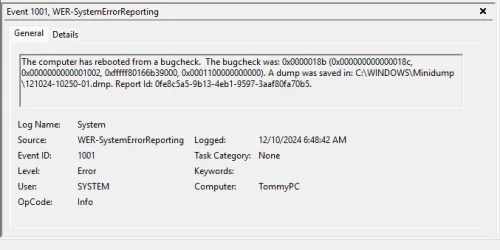
1733836794058.webp

I restored my PC from scratch and it seems my NVDIA driver is still using the latest so it still gave me the same issue. However it came with a new issue that said 'tcip.sys error" or something like that.

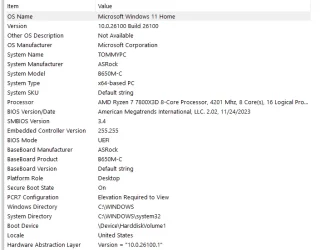
below are my windows specs right now:
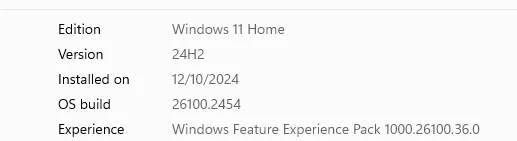
1733837038270.webp

Please help!
 
Windows Build/Version
windows 11 24h2

My Computer My Computer

At a glance

Windows 11AMD Ryzen 7 7800X3D 8-Core Processor32NVIDIA GeForce RTX 4070 Ti
OS
Windows 11
Computer type
PC/Desktop
CPU
AMD Ryzen 7 7800X3D 8-Core Processor
Memory
32
Graphics Card(s)
NVIDIA GeForce RTX 4070 Ti
This guide will walk you through opening, analyzing, managing, and making sense of Windows crash dump files.


My Computer My Computer

At a glance

Windows 11AMD Ryzen 7 5700GMicron Technology DDR4-3200 16GBNVIDIA GeForce RTX 3060
OS
Windows 11
Computer type
PC/Desktop
Manufacturer/Model
HP Pavilion
CPU
AMD Ryzen 7 5700G
Motherboard
Erica6
Memory
Micron Technology DDR4-3200 16GB
Graphics Card(s)
NVIDIA GeForce RTX 3060
Sound Card
Realtek ALC671
Monitor(s) Displays
Samsung SyncMaster U28E590
Screen Resolution
3840 x 2160
Hard Drives
SAMSUNG MZVLQ1T0HALB-000H1
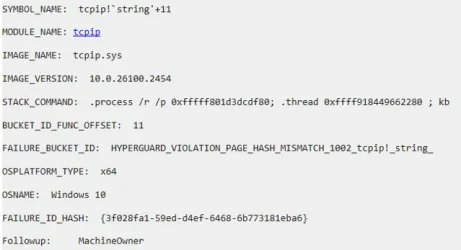
Thanks for the video! I managed to get this far. It seems to be the tcpip.sys

1733841172968.webp

ideas on how to fix?

I tried to update the drivers but it says its the most up to date version
 
Last edited:

My Computer My Computer

At a glance

Windows 11AMD Ryzen 7 7800X3D 8-Core Processor32NVIDIA GeForce RTX 4070 Ti

OS
Windows 11
Computer type
PC/Desktop
CPU
AMD Ryzen 7 7800X3D 8-Core Processor
Memory
32
Graphics Card(s)
NVIDIA GeForce RTX 4070 Ti

I found this article that might be relevant


I went to realtek and updated my network drivers. Will update if this fixes the issue in case someone else has the same issue.
 

My Computer My Computer

At a glance

Windows 11AMD Ryzen 7 7800X3D 8-Core Processor32NVIDIA GeForce RTX 4070 Ti

OS
Windows 11
Computer type
PC/Desktop
CPU
AMD Ryzen 7 7800X3D 8-Core Processor
Memory
32
Graphics Card(s)
NVIDIA GeForce RTX 4070 Ti

When a Windows error message points to an internal file system drive like tcpip.sys, it usually means Windows cannot detect which driver causing the BSOD and points to a driver on the stack this driver also can indicate faulty hardware like network card.

I suggest you update network card driver and graphic card driver from device manufacturer website.

You can also try older or beta version of drivers like graphic card.

Also execute Sfc /Scannow command from admin Command Prompt.


You could run Driver Verifier to find out which driver causing the problem or hardware from the driver.

I suggest you make an image of your system and System Restore point before running Driver Verifier also make sure you have Windows 11 bootable media.

Here's how you fix Windows blue screen of death (BSoD) error with Driver Verifier.
 

My Computer My Computer

At a glance

Windows 11AMD Ryzen 7 5700GMicron Technology DDR4-3200 16GBNVIDIA GeForce RTX 3060
OS
Windows 11
Computer type
PC/Desktop
Manufacturer/Model
HP Pavilion
CPU
AMD Ryzen 7 5700G
Motherboard
Erica6
Memory
Micron Technology DDR4-3200 16GB
Graphics Card(s)
NVIDIA GeForce RTX 3060
Sound Card
Realtek ALC671
Monitor(s) Displays
Samsung SyncMaster U28E590
Screen Resolution
3840 x 2160
Hard Drives
SAMSUNG MZVLQ1T0HALB-000H1
Attention: partytimeson
Before posting a BSOD thread, please read the instructions here: Blue/Black Screen of Death (BSOD) Posting Instructions
If you need to add new information, please make a new post in your initial BSOD thread. Please do not make an extra new thread.

Please do not post anything other than Windows 11 Blue/Black Screen Of Death problems in this section.
 
Last edited:

My Computer My Computer

At a glance

Windows 10Intel(R) Core(TM) i7-4800MQ CPU @ 2.70GHz16 GB Total: Manufacturer : Samsung MemoryTyp...NVIDIA Quadro K3100M; Intel(R) HD Graphics 4600
OS
Windows 10
Computer type
Laptop
Manufacturer/Model
HP
CPU
Intel(R) Core(TM) i7-4800MQ CPU @ 2.70GHz
Motherboard
Product : 190A Version : KBC Version 94.56
Memory
16 GB Total: Manufacturer : Samsung MemoryType : DDR3 FormFactor : SODIMM Capacity : 8GB Speed : 1600
Graphics Card(s)
NVIDIA Quadro K3100M; Intel(R) HD Graphics 4600
Sound Card
IDT High Definition Audio CODEC; PNP Device ID HDAUDIO\FUNC_01&VEN_111D&DEV_76E0
Hard Drives
Model Hitachi HTS727575A9E364
Antivirus
Microsoft Defender
Other Info
Mobile Workstation
Hello,

The crash happened again but this time not while I was playing the game (Path of Exile 2). It was when I was turning off my computer then it BSOD.

This last crash was due to:
1733934269296.webp

1. I did roll back the NVIDIA drivers to the previous drivers
2. Unfortunately i cannot rollback windows to 23H2
3. I did run the HCI Memtest and windows diagnostics and nothing failed
4. It could be the game itself long with windows 11 24h2? Early Access Bug Reports - POE2 Win11 24H2 Crashes - Constant crashing, >100% CPU usage, and more - Forum - Path of Exile

Below are the files from the BSOD thread instructions.

TOMMYPC-(2024-12-11_10-12-22).zip

My system specs
1733934677867.webp
RTX 4070 Ti

Please advice
 

My Computer My Computer

At a glance

Windows 11AMD Ryzen 7 7800X3D 8-Core Processor32NVIDIA GeForce RTX 4070 Ti

OS
Windows 11
Computer type
PC/Desktop
CPU
AMD Ryzen 7 7800X3D 8-Core Processor
Memory
32
Graphics Card(s)
NVIDIA GeForce RTX 4070 Ti
You did not follow the @zbook instructions please do so.
 

My Computer My Computer

At a glance

Windows 11AMD Ryzen 7 5700GMicron Technology DDR4-3200 16GBNVIDIA GeForce RTX 3060
OS
Windows 11
Computer type
PC/Desktop
Manufacturer/Model
HP Pavilion
CPU
AMD Ryzen 7 5700G
Motherboard
Erica6
Memory
Micron Technology DDR4-3200 16GB
Graphics Card(s)
NVIDIA GeForce RTX 3060
Sound Card
Realtek ALC671
Monitor(s) Displays
Samsung SyncMaster U28E590
Screen Resolution
3840 x 2160
Hard Drives
SAMSUNG MZVLQ1T0HALB-000H1
Sorry @FreeBooter. Is this the missing information? I am not very tech savvy so I apologize if i am doing anything incorrectly.
  • I have posted the v2 log. Microsoft OneDrive
  • These files are available under Resources. It helps if your system is using the English language so that the logs can be read ( see here & here for help)
  • System specs
  • 1733935753576.webp
  • 1733935784969.webp
  • Sorry having trouble locating the PSU information
  • These crashes typically occur after I play Path of Exile 2 something while in the game but others after I leave the game or turn off the computer. But it all happened within the week after I updated to windows 11 24H2 and the new nvidia driver 566.36.
  • My system is not overclocked and i have gotten the BSOD.
  • The system was bought in September. It has a one year warranty.
 

My Computer My Computer

At a glance

Windows 11AMD Ryzen 7 7800X3D 8-Core Processor32NVIDIA GeForce RTX 4070 Ti
OS
Windows 11
Computer type
PC/Desktop
CPU
AMD Ryzen 7 7800X3D 8-Core Processor
Memory
32
Graphics Card(s)
NVIDIA GeForce RTX 4070 Ti

My Computer My Computer

At a glance

Windows 11AMD Ryzen 7 5700GMicron Technology DDR4-3200 16GBNVIDIA GeForce RTX 3060
OS
Windows 11
Computer type
PC/Desktop
Manufacturer/Model
HP Pavilion
CPU
AMD Ryzen 7 5700G
Motherboard
Erica6
Memory
Micron Technology DDR4-3200 16GB
Graphics Card(s)
NVIDIA GeForce RTX 3060
Sound Card
Realtek ALC671
Monitor(s) Displays
Samsung SyncMaster U28E590
Screen Resolution
3840 x 2160
Hard Drives
SAMSUNG MZVLQ1T0HALB-000H1

Latest Support Threads

Back
Top Bottom