Solved bsod every 6 hours


ilovecats63

Member
Member
Local time
8:04 PM
Posts
2
OS
W11 Pro 25H2
Hi, I have been having issues with my pc crashing every 6 hours for a while, and have not been able to diagnose the issue.
I have ran memory diagnostics, driver verifier, tried undervolting cpu, reseating cpu, swapping out ram all to no avail.

It crashes every 6 hours on the dot, and upon restarting it will crash or freeze soon after, and only functions properly when completely the PSU is turned off and restarted.
it is usually always a ntoskrnl.exe error, and occurs even when idle.

any guidance at all would be appreciated.

 
Windows Build/Version
windows 11 25h2

My Computer

System One

  • OS
    W11 Pro 25H2
    Computer type
    PC/Desktop
    Manufacturer/Model
    Custom
    CPU
    i7-14700k
    Motherboard
    aorus gigabyte pro x rev 1.2
    Memory
    32gb DDR5 Corsair vengeance
    Graphics Card(s)
    aero 4080 super
    Hard Drives
    NVME Boot drive: Samsung 970 evo 2tb
    NVME secondary drives:
    500GB WD Blue SSD
    2TB WD Black ssd
    2TB Samsung 980 evo ssd
    PSU
    Corsair 1000W 80 Plus Platinum
    Cooling
    lian li 360mm
Hello @ilovecats63 and welcome to ElevenForum. :-)


Here's some reading while you wait for @zbook to analyze your logs...


My Computers

System One System Two

  • OS
    Win 11 Home ♦♦♦26200.8655 ♦♦♦♦♦♦♦25H2
    Computer type
    PC/Desktop
    Manufacturer/Model
    Built by Ghot® [May 2020]
    CPU
    AMD Ryzen 7 3700X
    Motherboard
    Asus Pro WS X570-ACE (BIOS 5302)
    Memory
    G.Skill (F4-3200C14D-16GTZKW)
    Graphics Card(s)
    EVGA RTX 2070 (08G-P4-2171-KR)
    Sound Card
    Realtek ALC1220P / ALC S1220A
    Monitor(s) Displays
    Dell U3011 30"
    Screen Resolution
    2560 x 1600
    Hard Drives
    2x Samsung 860 EVO 500GB,
    WD 4TB Black FZBX - SATA III,
    WD 8TB Black FZBX - SATA III,
    DRW-24B1ST CD/DVD Burner
    PSU
    PC Power & Cooling 750W Quad EPS12V
    Case
    Cooler Master ATCS 840 Tower
    Cooling
    CM Hyper 212 EVO (push/pull)
    Keyboard
    Ducky DK9008 Shine II Blue LED
    Mouse
    Logitech Optical M-100
    Internet Speed
    300/300
    Browser
    Firefox (latest)
    Antivirus
    Bitdefender Total Security
    Other Info
    Speakers: Klipsch Pro Media 2.1
  • Operating System
    Windows XP Pro 32bit w/SP3
    Computer type
    PC/Desktop
    Manufacturer/Model
    Built by Ghot® (not in use)
    CPU
    AMD Athlon 64 X2 5000+ (OC'd @ 3.2Ghz)
    Motherboard
    ASUS M2N32-SLI Deluxe Wireless Edition
    Memory
    TWIN2X2048-6400C4DHX (2 x 1GB, DDR2 800)
    Graphics card(s)
    EVGA 256-P2-N758-TR GeForce 8600GT SSC
    Sound Card
    Onboard
    Monitor(s) Displays
    ViewSonic G90FB Black 19" Professional (CRT)
    Screen Resolution
    up to 2048 x 1536
    Hard Drives
    WD 36GB 10,000rpm Raptor SATA
    Seagate 80GB 7200rpm SATA
    Lite-On LTR-52246S CD/RW
    Lite-On LH-18A1P CD/DVD Burner
    PSU
    PC Power & Cooling Silencer 750 Quad EPS12V
    Case
    Generic Beige case, 80mm fans
    Cooling
    ZALMAN 9500A 92mm CPU Cooler
    Keyboard
    Logitech Classic Keybooard 200
    Mouse
    Logitech Optical M-BT96a
    Internet Speed
    300/300
    Browser
    Firefox 3.x ??
    Antivirus
    Symantec (Norton)
    Other Info
    Still assembled, still runs. Haven't turned it on for 15 years?
Since I just know you're gonna add the make/model of you drives and power supply to your specs... I'll give you ten points. :-)
 

My Computers

System One System Two

  • OS
    Win 11 Home ♦♦♦26200.8655 ♦♦♦♦♦♦♦25H2
    Computer type
    PC/Desktop
    Manufacturer/Model
    Built by Ghot® [May 2020]
    CPU
    AMD Ryzen 7 3700X
    Motherboard
    Asus Pro WS X570-ACE (BIOS 5302)
    Memory
    G.Skill (F4-3200C14D-16GTZKW)
    Graphics Card(s)
    EVGA RTX 2070 (08G-P4-2171-KR)
    Sound Card
    Realtek ALC1220P / ALC S1220A
    Monitor(s) Displays
    Dell U3011 30"
    Screen Resolution
    2560 x 1600
    Hard Drives
    2x Samsung 860 EVO 500GB,
    WD 4TB Black FZBX - SATA III,
    WD 8TB Black FZBX - SATA III,
    DRW-24B1ST CD/DVD Burner
    PSU
    PC Power & Cooling 750W Quad EPS12V
    Case
    Cooler Master ATCS 840 Tower
    Cooling
    CM Hyper 212 EVO (push/pull)
    Keyboard
    Ducky DK9008 Shine II Blue LED
    Mouse
    Logitech Optical M-100
    Internet Speed
    300/300
    Browser
    Firefox (latest)
    Antivirus
    Bitdefender Total Security
    Other Info
    Speakers: Klipsch Pro Media 2.1
  • Operating System
    Windows XP Pro 32bit w/SP3
    Computer type
    PC/Desktop
    Manufacturer/Model
    Built by Ghot® (not in use)
    CPU
    AMD Athlon 64 X2 5000+ (OC'd @ 3.2Ghz)
    Motherboard
    ASUS M2N32-SLI Deluxe Wireless Edition
    Memory
    TWIN2X2048-6400C4DHX (2 x 1GB, DDR2 800)
    Graphics card(s)
    EVGA 256-P2-N758-TR GeForce 8600GT SSC
    Sound Card
    Onboard
    Monitor(s) Displays
    ViewSonic G90FB Black 19" Professional (CRT)
    Screen Resolution
    up to 2048 x 1536
    Hard Drives
    WD 36GB 10,000rpm Raptor SATA
    Seagate 80GB 7200rpm SATA
    Lite-On LTR-52246S CD/RW
    Lite-On LH-18A1P CD/DVD Burner
    PSU
    PC Power & Cooling Silencer 750 Quad EPS12V
    Case
    Generic Beige case, 80mm fans
    Cooling
    ZALMAN 9500A 92mm CPU Cooler
    Keyboard
    Logitech Classic Keybooard 200
    Mouse
    Logitech Optical M-BT96a
    Internet Speed
    300/300
    Browser
    Firefox 3.x ??
    Antivirus
    Symantec (Norton)
    Other Info
    Still assembled, still runs. Haven't turned it on for 15 years?
Please perform the following steps: (in sequence)


1) Run Tuneup plus > post a share link

https://www.tenforums.com/attachmen...-files-use-bsod-debugging-tuneup_plus_log.bat

Batch files for use in BSOD debugging - Windows 10 Help Forums


2) Enable regback:

Enable Automatic Backup of System Registry when Restart in Windows 10


3) Create a new restore point:


4) Open administrative command prompt and copy and paste:

reagentc /enable

reagentc /info


5) Run diskparinfo.bat > post a share link


Batch files for use in BSOD debugging - Windows 10 Help Forums


6) Reboot into safe mode (shift + restart) > rerun V2 while in safe mode > post a new share link into the newest post


7) Run Memtest86+ for 8 or more passes > take pictures > post images or share links

Memtest86+ | The Open-Source Memory Testing Tool

Just 1 error is a test fail and testing can be aborted.

The more the passes the better the testing conditions.

It sometimes takes passes into the 20's to detect malfunctioning RAM.

The RAM can be tested all at one time or one at a time in the same DIMM.

Memtest86+ | The Open-Source Memory Testing Tool

MemTest86+ - Test RAM


8) Open administrative command prompt and copy and paste:

chkdsk /b /v

Run these chkdsk switches on all drives using the syntax: chkdsk /b /v C: or chkdsk /b /v D: or chkdsk /b /v E: etc.

Make sure that the windows drive runs overnight while sleeping.

C:\WINDOWS\system32>chkdsk /b /v
The type of the file system is NTFS.
Cannot lock current drive.
Chkdsk cannot run because the volume is in use by another
process. Would you like to schedule this volume to be
checked the next time the system restarts? (Y/N)

Type: Y

Reboot as needed.


9) After completing all chkdsk /b /v run:

https://www.tenforums.com/attachmen...-files-use-bsod-debugging-chkdskfromevent.bat

Batch files for use in BSOD debugging - Windows 10 Help Forums

Batch files for use in BSOD debugging - Windows 10 Help Forums


10) More to follow pending the above results


Code:
Windows has found problems that must be fixed offline.
Please run "chkdsk /f" to fix the issues.
 

My Computer

System One

  • OS
    Windows 10
    Computer type
    Laptop
    Manufacturer/Model
    HP
    CPU
    Intel(R) Core(TM) i7-4800MQ CPU @ 2.70GHz
    Motherboard
    Product : 190A Version : KBC Version 94.56
    Memory
    16 GB Total: Manufacturer : Samsung MemoryType : DDR3 FormFactor : SODIMM Capacity : 8GB Speed : 1600
    Graphics Card(s)
    NVIDIA Quadro K3100M; Intel(R) HD Graphics 4600
    Sound Card
    IDT High Definition Audio CODEC; PNP Device ID HDAUDIO\FUNC_01&VEN_111D&DEV_76E0
    Hard Drives
    Model Hitachi HTS727575A9E364
    Antivirus
    Microsoft Defender
    Other Info
    Mobile Workstation
Might also check Task Scheduler to see if something is activating every six hours. Could also see if disabling scheduled tasks one at a time has any effect. Seems strange it appears to be time based.
 

My Computer

System One

  • OS
    11 Pro 25H2
    Computer type
    Laptop
    Manufacturer/Model
    MSI
    CPU
    i7-10750H
    Motherboard
    MSI MS-17F5
    Memory
    16GB Samsung DDR4 3200
    Graphics Card(s)
    Intel + Nvidia RTX3060 Laptop
    Sound Card
    Realtek
    Monitor(s) Displays
    Samsung 24" Curved (HDMI)
    Screen Resolution
    1920x1080
    Hard Drives
    Sabrent Rocket Gen3 1Tb Smasung EVO 870 1TB
    Antivirus
    Bitdefender
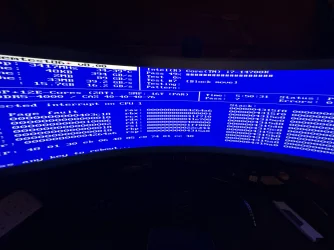
While running memtest, it crashed at 5:50:31 with an unexpected error on cpu 1, so faulty cpu?
1 16GB DDR5 stick in the first dimm slot closest to the CPU


Correction: I have an i7-14700K, I had previously put 11700K in my system specs
 

Attachments

  • image.webp
    image.webp
    950.8 KB · Views: 3
Last edited:

My Computer

System One

  • OS
    W11 Pro 25H2
    Computer type
    PC/Desktop
    Manufacturer/Model
    Custom
    CPU
    i7-14700k
    Motherboard
    aorus gigabyte pro x rev 1.2
    Memory
    32gb DDR5 Corsair vengeance
    Graphics Card(s)
    aero 4080 super
    Hard Drives
    NVME Boot drive: Samsung 970 evo 2tb
    NVME secondary drives:
    500GB WD Blue SSD
    2TB WD Black ssd
    2TB Samsung 980 evo ssd
    PSU
    Corsair 1000W 80 Plus Platinum
    Cooling
    lian li 360mm
Please update the progress with steps #1 - #6.


16 GB
7 passes
0 errors
 

My Computer

System One

  • OS
    Windows 10
    Computer type
    Laptop
    Manufacturer/Model
    HP
    CPU
    Intel(R) Core(TM) i7-4800MQ CPU @ 2.70GHz
    Motherboard
    Product : 190A Version : KBC Version 94.56
    Memory
    16 GB Total: Manufacturer : Samsung MemoryType : DDR3 FormFactor : SODIMM Capacity : 8GB Speed : 1600
    Graphics Card(s)
    NVIDIA Quadro K3100M; Intel(R) HD Graphics 4600
    Sound Card
    IDT High Definition Audio CODEC; PNP Device ID HDAUDIO\FUNC_01&VEN_111D&DEV_76E0
    Hard Drives
    Model Hitachi HTS727575A9E364
    Antivirus
    Microsoft Defender
    Other Info
    Mobile Workstation

Latest Support Threads

Back
Top Bottom