BSOD Nightmare


For any BSOD please run the V2 log collector > post a new share link into the newest post

 

My Computer My Computer

At a glance

Windows 10Intel(R) Core(TM) i7-4800MQ CPU @ 2.70GHz16 GB Total: Manufacturer : Samsung MemoryTyp...NVIDIA Quadro K3100M; Intel(R) HD Graphics 4600
OS
Windows 10
Computer type
Laptop
Manufacturer/Model
HP
CPU
Intel(R) Core(TM) i7-4800MQ CPU @ 2.70GHz
Motherboard
Product : 190A Version : KBC Version 94.56
Memory
16 GB Total: Manufacturer : Samsung MemoryType : DDR3 FormFactor : SODIMM Capacity : 8GB Speed : 1600
Graphics Card(s)
NVIDIA Quadro K3100M; Intel(R) HD Graphics 4600
Sound Card
IDT High Definition Audio CODEC; PNP Device ID HDAUDIO\FUNC_01&VEN_111D&DEV_76E0
Hard Drives
Model Hitachi HTS727575A9E364
Antivirus
Microsoft Defender
Other Info
Mobile Workstation
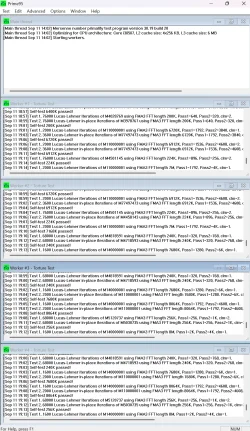
Prime95 running all day so far. BSOD log attached.
 

Attachments

My Computer My Computer

At a glance

Windows 11
OS
Windows 11
Computer type
PC/Desktop
The latest crashes were debugged.

1E
1A
A
D1


Multiple drivers were seen in the crashes.


Please place the computer into continuous safe mode (the longer the continuous duration the better the testing conditions) > for any BSOD run V2 > post a new V2 share link into the newest post


1E
1A
D1
124
7F
A
1A8
 

My Computer My Computer

At a glance

Windows 10Intel(R) Core(TM) i7-4800MQ CPU @ 2.70GHz16 GB Total: Manufacturer : Samsung MemoryTyp...NVIDIA Quadro K3100M; Intel(R) HD Graphics 4600
OS
Windows 10
Computer type
Laptop
Manufacturer/Model
HP
CPU
Intel(R) Core(TM) i7-4800MQ CPU @ 2.70GHz
Motherboard
Product : 190A Version : KBC Version 94.56
Memory
16 GB Total: Manufacturer : Samsung MemoryType : DDR3 FormFactor : SODIMM Capacity : 8GB Speed : 1600
Graphics Card(s)
NVIDIA Quadro K3100M; Intel(R) HD Graphics 4600
Sound Card
IDT High Definition Audio CODEC; PNP Device ID HDAUDIO\FUNC_01&VEN_111D&DEV_76E0
Hard Drives
Model Hitachi HTS727575A9E364
Antivirus
Microsoft Defender
Other Info
Mobile Workstation
Prime95 running all day so far. BSOD log attached.
That Prime95 run, looks very good. Usually, Prime95 would have failed at the 2 hour mark, especially if core(s) unstable.
 

My Computers My Computers

  • At a glance

    Windows 11 Pro x64 24H2Ryzen 9 5900X64 GB G.Skill RipJaws V F4-3200C16D-64GVKASRock Steel Legend Arc B580 12 GB
    OS
    Windows 11 Pro x64 24H2
    Computer type
    PC/Desktop
    CPU
    Ryzen 9 5900X
    Motherboard
    ASRock B550 PG Velocita (UEFI-BIOS 3.90)
    Memory
    64 GB G.Skill RipJaws V F4-3200C16D-64GVK
    Graphics Card(s)
    ASRock Steel Legend Arc B580 12 GB
    Monitor(s) Displays
    Alienware AW3423DWF OLED ultrawide
    Hard Drives
    Samsung 990 Pro 1 TB NVMe SSD
    PSU
    eVGA Supernova 750 G3
    Case
    Corsair 275R
    Internet Speed
    VTel FTTH 1 Gb down and 1 Gb up
  • At a glance

    Windows 11 Home x64 25H2Ryzen 7 5800X3D32 GB (2x16 GB G.Skill TridentZ Neo)Sapphire Nitro+ Radeon RX 6750 XT
    Operating System
    Windows 11 Home x64 25H2
    Computer type
    PC/Desktop
    CPU
    Ryzen 7 5800X3D
    Motherboard
    Asus ROG Strix B550-F Gaming (UEFI-BIOS version 3636)
    Memory
    32 GB (2x16 GB G.Skill TridentZ Neo)
    Graphics card(s)
    Sapphire Nitro+ Radeon RX 6750 XT
    Hard Drives
    Samsung 970 Pro 512 GB NVMe SSD
    PSU
    Corsair RM850x
    Case
    Fractal Focus G
That Prime95 run, looks very good. Usually, Prime95 would have failed at the 2 hour mark, especially if core(s) unstable.
Just in case, now run Prime95 with strictly small FFTs! Run that for at least 2 hours. Even though giving it 3 hours won't hurt.
 

My Computers My Computers

  • At a glance

    Windows 11 Pro x64 24H2Ryzen 9 5900X64 GB G.Skill RipJaws V F4-3200C16D-64GVKASRock Steel Legend Arc B580 12 GB
    OS
    Windows 11 Pro x64 24H2
    Computer type
    PC/Desktop
    CPU
    Ryzen 9 5900X
    Motherboard
    ASRock B550 PG Velocita (UEFI-BIOS 3.90)
    Memory
    64 GB G.Skill RipJaws V F4-3200C16D-64GVK
    Graphics Card(s)
    ASRock Steel Legend Arc B580 12 GB
    Monitor(s) Displays
    Alienware AW3423DWF OLED ultrawide
    Hard Drives
    Samsung 990 Pro 1 TB NVMe SSD
    PSU
    eVGA Supernova 750 G3
    Case
    Corsair 275R
    Internet Speed
    VTel FTTH 1 Gb down and 1 Gb up
  • At a glance

    Windows 11 Home x64 25H2Ryzen 7 5800X3D32 GB (2x16 GB G.Skill TridentZ Neo)Sapphire Nitro+ Radeon RX 6750 XT
    Operating System
    Windows 11 Home x64 25H2
    Computer type
    PC/Desktop
    CPU
    Ryzen 7 5800X3D
    Motherboard
    Asus ROG Strix B550-F Gaming (UEFI-BIOS version 3636)
    Memory
    32 GB (2x16 GB G.Skill TridentZ Neo)
    Graphics card(s)
    Sapphire Nitro+ Radeon RX 6750 XT
    Hard Drives
    Samsung 970 Pro 512 GB NVMe SSD
    PSU
    Corsair RM850x
    Case
    Fractal Focus G
The latest crashes were debugged.

1E
1A
A
D1


Multiple drivers were seen in the crashes.


Please place the computer into continuous safe mode (the longer the continuous duration the better the testing conditions) > for any BSOD run V2 > post a new V2 share link into the newest post


1E
1A
D1
124
7F
A
1A8

The latest crashes were debugged.

1E
1A
A
D1


Multiple drivers were seen in the crashes.


Please place the computer into continuous safe mode (the longer the continuous duration the better the testing conditions) > for any BSOD run V2 > post a new V2 share link into the newest post


1E
1A
D1
124
7F
A
1A8
The computer is stable, i've been running on currently with Prime95 for 10 hours now. The BSOD is only upon wake from sleep. If i don't do that i won't trigger a BSOD. I can try this in Safe but it doesn't crash if that's what you mean.
 

My Computer My Computer

At a glance

Windows 11
OS
Windows 11
Computer type
PC/Desktop
The computer is stable, i've been running on currently with Prime95 for 10 hours now. The BSOD is only upon wake from sleep. If i don't do that i won't trigger a BSOD. I can try this in Safe but it doesn't crash if that's what you mean.
Oops no sleep in safe!
 

My Computer My Computer

At a glance

Windows 11
OS
Windows 11
Computer type
PC/Desktop
The computer is stable, i've been running on currently with Prime95 for 10 hours now. The BSOD is only upon wake from sleep. If i don't do that i won't trigger a BSOD. I can try this in Safe but it doesn't crash if that's what you mean.

The goal is to see the continuous duration of stability in safe mode.

The longer the testing period the better the testing conditions.
 

My Computer My Computer

At a glance

Windows 10Intel(R) Core(TM) i7-4800MQ CPU @ 2.70GHz16 GB Total: Manufacturer : Samsung MemoryTyp...NVIDIA Quadro K3100M; Intel(R) HD Graphics 4600
OS
Windows 10
Computer type
Laptop
Manufacturer/Model
HP
CPU
Intel(R) Core(TM) i7-4800MQ CPU @ 2.70GHz
Motherboard
Product : 190A Version : KBC Version 94.56
Memory
16 GB Total: Manufacturer : Samsung MemoryType : DDR3 FormFactor : SODIMM Capacity : 8GB Speed : 1600
Graphics Card(s)
NVIDIA Quadro K3100M; Intel(R) HD Graphics 4600
Sound Card
IDT High Definition Audio CODEC; PNP Device ID HDAUDIO\FUNC_01&VEN_111D&DEV_76E0
Hard Drives
Model Hitachi HTS727575A9E364
Antivirus
Microsoft Defender
Other Info
Mobile Workstation
The goal is to see the continuous duration of stability in safe mode.

The longer the testing period the better the testing conditions.
I know I'm being stupid, but since it runs indefinitely in normal mode can I not just leave it powered up to do the same test but actually use it?

I suppose I'm asking is there a difference in me messaging you next Friday after a week of being left on in normal mode vs next Friday of it running a week in safe mode?
 

My Computer My Computer

At a glance

Windows 11
OS
Windows 11
Computer type
PC/Desktop
1) Please read this link on Windows Driver Verifier (WDV):

Enable and Disable Driver Verifier in Windows 10


2) Create a new restore point


3) Learn the methods to recover from BSOD caused by WDV by booting into safe mode and running one or more of these commands:

verifier /reset

verifier /bootmode resetonbootfail


(option nine and seven)


4) Plan to run the tool with various customized test settings.

a) Test all non-Microsoft drivers

b) Test no Microsoft drivers

c) For the first run of WDV select the 3 customized tests displayed in the TF tutorial


5) Whenever the WDV tool is started if there is no immediate BSOD then open administrative command prompt and copy and paste:

verifier /querysettings

Post a share link.


Customized tests will then be posted for the next run of WDV.


WDV can run continuously during the testing.


For any BSOD post a new V2 share link into the newest post.
 

My Computer My Computer

At a glance

Windows 10Intel(R) Core(TM) i7-4800MQ CPU @ 2.70GHz16 GB Total: Manufacturer : Samsung MemoryTyp...NVIDIA Quadro K3100M; Intel(R) HD Graphics 4600
OS
Windows 10
Computer type
Laptop
Manufacturer/Model
HP
CPU
Intel(R) Core(TM) i7-4800MQ CPU @ 2.70GHz
Motherboard
Product : 190A Version : KBC Version 94.56
Memory
16 GB Total: Manufacturer : Samsung MemoryType : DDR3 FormFactor : SODIMM Capacity : 8GB Speed : 1600
Graphics Card(s)
NVIDIA Quadro K3100M; Intel(R) HD Graphics 4600
Sound Card
IDT High Definition Audio CODEC; PNP Device ID HDAUDIO\FUNC_01&VEN_111D&DEV_76E0
Hard Drives
Model Hitachi HTS727575A9E364
Antivirus
Microsoft Defender
Other Info
Mobile Workstation
There were approximately two months without thread activity.

What was done?

What happened?


Are important files backed up for GoFlex Home?


Are you planning to run WDV as per post #30?


Code:
Event[1010]
  Log Name: Application
  Source: Chkdsk
  Date: 2025-10-15T02:30:20.5740000Z
  Event ID: 26228
  Task: None
  Level: Information
  Opcode: Info 
  Keyword: Classic,
  User: N/A
  User Name: N/A
  Computer: DESKTOP-8AUP7VP
  Description:
Chkdsk was executed in verify mode on a volume snapshot. 

Checking file system on \Device\HarddiskVolume12
Volume label is GoFlex Home.

Examining 1 corruption record ...

Record 1 of 1: Corrupt File "<0xfc,0xf22>" ... Attribute list entry with type code 80 in file F22 is corrupt.
Unable to find child frs 0xa844 with sequence number 0x426.
Attribute list entry with type code 80 in file F22 is corrupt.
Unable to find child frs 0xa845 with sequence number 0x427.
Attribute list entry with type code 80 in file F22 is corrupt.
Unable to find child frs 0xa846 with sequence number 0x428.
Attribute list entry with type code 80 in file F22 is corrupt.
Unable to find child frs 0xa847 with sequence number 0x429.
Attribute list entry with type code 80 in file F22 is corrupt.
Unable to find child frs 0xa848 with sequence number 0x42a.
Attribute list entry with type code 80 in file F22 is corrupt.
Unable to find child frs 0xa849 with sequence number 0x42b.
Attribute list entry with type code 80 in file F22 is corrupt.
Unable to find child frs 0xa84a with sequence number 0x42c.
Attribute list entry with type code 80 in file F22 is corrupt.
Unable to find child frs 0xa84b with sequence number 0x42d.
Attribute list entry with type code 80 in file F22 is corrupt.
Unable to find child frs 0xa84c with sequence number 0x42e.
Attribute list entry with type code 80 in file F22 is corrupt.
Unable to find child frs 0xa84d with sequence number 0x42f.
Attribute list entry with type code 80 in file F22 is corrupt.
Unable to find child frs 0xa84e with sequence number 0x430.
Attribute list entry with type code 80 in file F22 is corrupt.
Unable to find child frs 0xa84f with sequence number 0x431.
The attribute of type 0x80 and instance tag 0x0 in file 0xf22
has allocated length of 0xc249000 instead of 0x2bf2000.
Deleted corrupt attribute list entry
with type code 80 in file F22.
Unable to locate attribute with instance tag 0x0 and segment
reference 0x41900000000a837.  The expected attribute type is 0x80.
Attribute record (80, "") from file record segment A837
is corrupt.
Unable to locate attribute with instance tag 0x0 and segment
reference 0x41a00000000a838.  The expected attribute type is 0x80.
Attribute record (80, "") from file record segment A838
is corrupt.
Unable to locate attribute with instance tag 0x0 and segment
reference 0x41e00000000a83c.  The expected attribute type is 0x80.
Attribute record (80, "") from file record segment A83C
is corrupt.
Unable to locate attribute with instance tag 0x0 and segment
reference 0x42100000000a83f.  The expected attribute type is 0x80.
Attribute record (80, "") from file record segment A83F
is corrupt.
Unable to locate attribute with instance tag 0x0 and segment
reference 0x42200000000a840.  The expected attribute type is 0x80.
Attribute record (80, "") from file record segment A840
is corrupt.
Unable to locate attribute with instance tag 0x0 and segment
reference 0x42300000000a841.  The expected attribute type is 0x80.
Attribute record (80, "") from file record segment A841
is corrupt.
corruption found.

1 corruption record processed in 0.1 seconds.

Windows has examined the list of previously identified potential issues and found problems.
Please run chkdsk /scan to fully analyze the problems and queue them for repair.
 

My Computer My Computer

At a glance

Windows 10Intel(R) Core(TM) i7-4800MQ CPU @ 2.70GHz16 GB Total: Manufacturer : Samsung MemoryTyp...NVIDIA Quadro K3100M; Intel(R) HD Graphics 4600
OS
Windows 10
Computer type
Laptop
Manufacturer/Model
HP
CPU
Intel(R) Core(TM) i7-4800MQ CPU @ 2.70GHz
Motherboard
Product : 190A Version : KBC Version 94.56
Memory
16 GB Total: Manufacturer : Samsung MemoryType : DDR3 FormFactor : SODIMM Capacity : 8GB Speed : 1600
Graphics Card(s)
NVIDIA Quadro K3100M; Intel(R) HD Graphics 4600
Sound Card
IDT High Definition Audio CODEC; PNP Device ID HDAUDIO\FUNC_01&VEN_111D&DEV_76E0
Hard Drives
Model Hitachi HTS727575A9E364
Antivirus
Microsoft Defender
Other Info
Mobile Workstation
There were approximately two months without thread activity.

What was done?
As per previous posts, i found the computer was stable until i restarted it/shutdown. To be honest, it was easier to leave it running than risk the continuous boot loops. Like i found it difficult to even run the BSOD compiler.

What happened?
I've been redecorated, the PC was off for a about 3 weeks.

Are important files backed up for GoFlex Home?
The above might as well be chinese to me, the go flex is a USB attached storage device i remove and plug in. It doesn't have anything important.

Are you planning to run WDV as per post #30?
I'm running it now on all Microsoft drivers, no BSOD

Microsoft Windows [Version 10.0.26100.6899]
(c) Microsoft Corporation. All rights reserved.

C:\Windows\System32>verifier /querysettings

Verifier Flags: 0x00100610

Standard Flags:

[ ] 0x00000001 Special pool.
[ ] 0x00000002 Force IRQL checking.
[ ] 0x00000008 Pool tracking.
[X] 0x00000010 I/O verification.
[ ] 0x00000020 Deadlock detection.
[ ] 0x00000080 DMA checking.
[ ] 0x00000100 Security checks.
[ ] 0x00000800 Miscellaneous checks.
[ ] 0x00020000 DDI compliance checking.

Additional Flags:

[ ] 0x00000004 Randomized low resources simulation.
[X] 0x00000200 Force pending I/O requests.
[X] 0x00000400 IRP logging.
[ ] 0x00002000 Invariant MDL checking for stack.
[ ] 0x00004000 Invariant MDL checking for driver.
[ ] 0x00008000 Power framework delay fuzzing.
[ ] 0x00010000 Port/miniport interface checking.
[ ] 0x00040000 Systematic low resources simulation.
[ ] 0x00080000 DDI compliance checking (additional).
[ ] 0x00200000 NDIS/WIFI verification.
[ ] 0x00800000 Kernel synchronization delay fuzzing.
[ ] 0x01000000 VM switch verification.
[ ] 0x02000000 Code integrity checks.

Internal Flags:

[X] 0x00100000 Extended Verifier flags (internal).

[X] Indicates flag is enabled.

Active Rule Classes:

5 - I/O verification.
10 - Force pending I/O requests.
11 - IRP logging.
21 - Extended Verifier flags (internal).
34 - WDF verfication.
37 - File system filter verification.

Boot Mode:

Persistent

Rules:

All rules are using default settings

Verified Drivers:

mcupdate_genuineintel.dll
globmerger.sys
iastoravc.sys
amdkmdag.sys
amdfendr.sys
igdkmd64.sys
teedriverw10x64.sys
amdfendrmgr.sys
intcdaud.sys
dump_diskdump.sys
dump_iastoravc.sys
dump_dumpfve.sys
googledrivefs31931.sys
bedaisy.sys
 

My Computer My Computer

At a glance

Windows 11
OS
Windows 11
Computer type
PC/Desktop
How come Qcamain10x64.sys was not selected / tested?


When selecting non-Microsoft drivers:

a) click on the column heading so that it sorts
b) scroll up a down
c) select all non-Microsoft drivers
 

My Computer My Computer

At a glance

Windows 10Intel(R) Core(TM) i7-4800MQ CPU @ 2.70GHz16 GB Total: Manufacturer : Samsung MemoryTyp...NVIDIA Quadro K3100M; Intel(R) HD Graphics 4600
OS
Windows 10
Computer type
Laptop
Manufacturer/Model
HP
CPU
Intel(R) Core(TM) i7-4800MQ CPU @ 2.70GHz
Motherboard
Product : 190A Version : KBC Version 94.56
Memory
16 GB Total: Manufacturer : Samsung MemoryType : DDR3 FormFactor : SODIMM Capacity : 8GB Speed : 1600
Graphics Card(s)
NVIDIA Quadro K3100M; Intel(R) HD Graphics 4600
Sound Card
IDT High Definition Audio CODEC; PNP Device ID HDAUDIO\FUNC_01&VEN_111D&DEV_76E0
Hard Drives
Model Hitachi HTS727575A9E364
Antivirus
Microsoft Defender
Other Info
Mobile Workstation
How come Qcamain10x64.sys was not selected / tested?


When selecting non-Microsoft drivers:

a) click on the column heading so that it sorts
b) scroll up a down
c) select all non-Microsoft drivers
I didn't realise there were letters after M apparently in the alphabet. This may be it:

Microsoft Windows [Version 10.0.26100.6899]
(c) Microsoft Corporation. All rights reserved.

C:\Windows\System32>verifier /querysettings

Verifier Flags: 0x00100610

Standard Flags:

[ ] 0x00000001 Special pool.
[ ] 0x00000002 Force IRQL checking.
[ ] 0x00000008 Pool tracking.
[X] 0x00000010 I/O verification.
[ ] 0x00000020 Deadlock detection.
[ ] 0x00000080 DMA checking.
[ ] 0x00000100 Security checks.
[ ] 0x00000800 Miscellaneous checks.
[ ] 0x00020000 DDI compliance checking.

Additional Flags:

[ ] 0x00000004 Randomized low resources simulation.
[X] 0x00000200 Force pending I/O requests.
[X] 0x00000400 IRP logging.
[ ] 0x00002000 Invariant MDL checking for stack.
[ ] 0x00004000 Invariant MDL checking for driver.
[ ] 0x00008000 Power framework delay fuzzing.
[ ] 0x00010000 Port/miniport interface checking.
[ ] 0x00040000 Systematic low resources simulation.
[ ] 0x00080000 DDI compliance checking (additional).
[ ] 0x00200000 NDIS/WIFI verification.
[ ] 0x00800000 Kernel synchronization delay fuzzing.
[ ] 0x01000000 VM switch verification.
[ ] 0x02000000 Code integrity checks.

Internal Flags:

[X] 0x00100000 Extended Verifier flags (internal).

[X] Indicates flag is enabled.

Active Rule Classes:

5 - I/O verification.
10 - Force pending I/O requests.
11 - IRP logging.
21 - Extended Verifier flags (internal).
34 - WDF verfication.
37 - File system filter verification.

Boot Mode:

Persistent

Rules:

All rules are using default settings

Verified Drivers:

mcupdate_genuineintel.dll
globmerger.sys
iastoravc.sys
amdkmdag.sys
amdfendr.sys
igdkmd64.sys
teedriverw10x64.sys
qcamain10x64.sys
amdfendrmgr.sys
intcdaud.sys
dump_diskdump.sys
dump_iastoravc.sys
dump_dumpfve.sys
googledrivefs31931.sys

C:\Windows\System32>
 

My Computer My Computer

At a glance

Windows 11
OS
Windows 11
Computer type
PC/Desktop
Please restart WDV with these groups of customized tests:


Group a
Code:
    [ ] 0x00000010 I/O verification.
    [ ] 0x00000200 Force pending I/O requests.
    [ ] 0x00000400 IRP logging.
    [ ] 0x00002000 Invariant MDL checking for stack.
    [ ] 0x00004000 Invariant MDL checking for driver.
    [ ] 0x00000001 Special pool.
    [ ] 0x00000002 Force IRQL checking


Group b
Code:
    [ ] 0x00000008 Pool tracking.
    [ ] 0x00000020 Deadlock detection.
    [ ] 0x00008000 Power framework delay fuzzing.
    [ ] 0x00010000 Port/miniport interface checking.
    [ ] 0x01000000 VM switch verification.
    [ ] 0x02000000 Code integrity checks.
    [ ] 0x00200000 NDIS/WIFI verification.


Group c
Code:
    [ ] 0x00000080 DMA checking.
    [ ] 0x00000100 Security check.
    [ ] 0x00000800 Miscellaneous checks.
    [ ] 0x00020000 DDI compliance checking.
    [ ] 0x00080000 DDI compliance checking (additional).
    [ ] 0x00800000 Kernel synchronization delay fuzzing.
    [ ] 0x00040000 Systematic low resources simulation.[/COLOR]


For each group if there is no immediate BSOD then open administrative command prompt and copy and paste:

verifier /querysettings

Post a share link.


For any BSOD post a new V2 share link into the newest post.
 

My Computer My Computer

At a glance

Windows 10Intel(R) Core(TM) i7-4800MQ CPU @ 2.70GHz16 GB Total: Manufacturer : Samsung MemoryTyp...NVIDIA Quadro K3100M; Intel(R) HD Graphics 4600
OS
Windows 10
Computer type
Laptop
Manufacturer/Model
HP
CPU
Intel(R) Core(TM) i7-4800MQ CPU @ 2.70GHz
Motherboard
Product : 190A Version : KBC Version 94.56
Memory
16 GB Total: Manufacturer : Samsung MemoryType : DDR3 FormFactor : SODIMM Capacity : 8GB Speed : 1600
Graphics Card(s)
NVIDIA Quadro K3100M; Intel(R) HD Graphics 4600
Sound Card
IDT High Definition Audio CODEC; PNP Device ID HDAUDIO\FUNC_01&VEN_111D&DEV_76E0
Hard Drives
Model Hitachi HTS727575A9E364
Antivirus
Microsoft Defender
Other Info
Mobile Workstation
Using the same set of drivers as before? (Non-Microsoft)
 

My Computer My Computer

At a glance

Windows 11
OS
Windows 11
Computer type
PC/Desktop
Using the same set of drivers as before? (Non-Microsoft)

Yes, please select all non-Microsoft drivers for each WDV run.
 

My Computer My Computer

At a glance

Windows 10Intel(R) Core(TM) i7-4800MQ CPU @ 2.70GHz16 GB Total: Manufacturer : Samsung MemoryTyp...NVIDIA Quadro K3100M; Intel(R) HD Graphics 4600
OS
Windows 10
Computer type
Laptop
Manufacturer/Model
HP
CPU
Intel(R) Core(TM) i7-4800MQ CPU @ 2.70GHz
Motherboard
Product : 190A Version : KBC Version 94.56
Memory
16 GB Total: Manufacturer : Samsung MemoryType : DDR3 FormFactor : SODIMM Capacity : 8GB Speed : 1600
Graphics Card(s)
NVIDIA Quadro K3100M; Intel(R) HD Graphics 4600
Sound Card
IDT High Definition Audio CODEC; PNP Device ID HDAUDIO\FUNC_01&VEN_111D&DEV_76E0
Hard Drives
Model Hitachi HTS727575A9E364
Antivirus
Microsoft Defender
Other Info
Mobile Workstation

Latest Support Threads

Back
Top Bottom