Persistant BSOD when trying to use the Framework Desktop


Please run these groups:


Instead of verifier /querysettings please use verifier /querysettings /all


Group A:
verifier /flags 0x0000002A /driver *!microsoft*


Group B:
verifier /flags 0x00006A10 /driver *!microsoft*


Group C:
verifier /flags 0x01840008 /driver *!microsoft*


Group D:
verifier /flags 0x000A0000 /driver *!microsoft*


Group E:
verifier /flags 0x02000000 /driver *!microsoft*
 

My Computer My Computer

At a glance

Windows 10Intel(R) Core(TM) i7-4800MQ CPU @ 2.70GHz16 GB Total: Manufacturer : Samsung MemoryTyp...NVIDIA Quadro K3100M; Intel(R) HD Graphics 4600
OS
Windows 10
Computer type
Laptop
Manufacturer/Model
HP
CPU
Intel(R) Core(TM) i7-4800MQ CPU @ 2.70GHz
Motherboard
Product : 190A Version : KBC Version 94.56
Memory
16 GB Total: Manufacturer : Samsung MemoryType : DDR3 FormFactor : SODIMM Capacity : 8GB Speed : 1600
Graphics Card(s)
NVIDIA Quadro K3100M; Intel(R) HD Graphics 4600
Sound Card
IDT High Definition Audio CODEC; PNP Device ID HDAUDIO\FUNC_01&VEN_111D&DEV_76E0
Hard Drives
Model Hitachi HTS727575A9E364
Antivirus
Microsoft Defender
Other Info
Mobile Workstation
verifier /querysettings /all doesn't seem to exist?
1776881871092.webp


Going to continue with just querysettings for the recent post group a-e.
 

My Computer My Computer

At a glance

Windows 11AMD RYZEN AI MAX+ 395AMD Radeon 8060s
OS
Windows 11
Computer type
PC/Desktop
Manufacturer/Model
Framework Desktop 64GB
CPU
AMD RYZEN AI MAX+ 395
Graphics Card(s)
AMD Radeon 8060s
Monitor(s) Displays
SCEPTRE Ultra Wide
Screen Resolution
2560x1080
Hard Drives
WD_BLACK SN850 2tb C:
WD_BLACK SN770 2tb D:/steamlibrary
Group A:
verifier /flags 0x0000002A /driver *!microsoft*
boots, responsive as usual, /querysettings Hastebin
----------------------------------
----------------------------------
----------------------------------

Group B:
verifier /flags 0x00006A10 /driver *!microsoft*
boots, is very sluggish/slow to load, /querysettings Hastebin

----------------------------------
----------------------------------
----------------------------------
Group C:
verifier /flags 0x01840008 /driver *!microsoft*
bsod, IRQL_NOT_LESS_OR_EQUAL (0xA), stuck at 100% wouldn't reboot, v2 logs - 0X01840008-FRMWRK-(2026-04-22_12-48-07).zip


----------------------------------
----------------------------------
----------------------------------
Group D:
verifier /flags 0x000A0000 /driver *!microsoft*
boots, unsure if it was just a long boot or didn't interact enough, doesn't seem sluggish after login, /querysettings Hastebin


----------------------------------
----------------------------------
----------------------------------
Group E:
verifier /flags 0x02000000 /driver *!microsoft*
bsod, SYSTEM_THREAD_EXCEPTION_NOT_HANDLED (0x7E), stuck at 100% wouldn't reboot, v2 logs - 0x02000000-FRMWRK-(2026-04-22_13-16-13).zip
 

My Computer My Computer

At a glance

Windows 11AMD RYZEN AI MAX+ 395AMD Radeon 8060s
OS
Windows 11
Computer type
PC/Desktop
Manufacturer/Model
Framework Desktop 64GB
CPU
AMD RYZEN AI MAX+ 395
Graphics Card(s)
AMD Radeon 8060s
Monitor(s) Displays
SCEPTRE Ultra Wide
Screen Resolution
2560x1080
Hard Drives
WD_BLACK SN850 2tb C:
WD_BLACK SN770 2tb D:/steamlibrary
Microsoft announced that they will deprecate the GUI for WDV.


Driver Verifier GUI (verifiergui.exe)Driver Verifier GUI, verifiergui.exe, is deprecated and will be removed in a future version of Windows. You can use the Verifier Command Line (verifier.exe) instead of the Driver Verifier GUI.May 2024

The date that the GUI will disappear has not been announced.

The command line method has sparse information and does not match GUI.

So lets shift back to GUI.

Sorry for the inconvenience.

Please run these groups of customized tests with all non-Microsoft drivers.

For each group when the WDV tool is started if there is no immediate BSOD then open administrative command prompt and copy and paste:

verifier /querysettings

Post a share link.

For any BSOD post a new V2 share link into the newest post.


Group one:
Code:
    [ ] 0x00000001 Special pool.
    [ ] 0x00000002 Force IRQL checking.
    [ ] 0x00000008 Pool tracking.
    [ ] 0x00000010 I/O verification.
    [ ] 0x00000020 Deadlock detection.
    [ ] 0x00000080 DMA checking.
    [ ] 0x00000800 Miscellaneous checks.
    [ ] 0x00020000 DDI compliance checking.
    [ ] 0x00080000 DDI compliance checking (additional).
    [ ] 0x00000200 Force pending I/O requests.
    [ ] 0x00000400 IRP logging.
    [ ] 0x00002000 Invariant MDL checking for stack.
    [ ] 0x00004000 Invariant MDL checking for driver.
    [ ] 0x00008000 Power framework delay fuzzing.
    [ ] 0x00010000 Port/miniport interface checking.
    [ ] 0x00200000 NDIS/WIFI verification.


Group two:
Code:
    [ ] 0x00040000 Systematic low resources simulation.


Group three:
Code:
    [ ] 0x00800000 Kernel synchronization delay fuzzing.
    [ ] 0x01000000 VM switch verification.


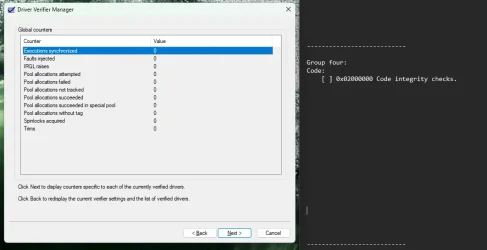
Group four:
Code:
    [ ] 0x02000000 Code integrity checks.


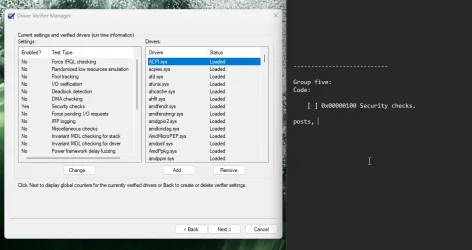
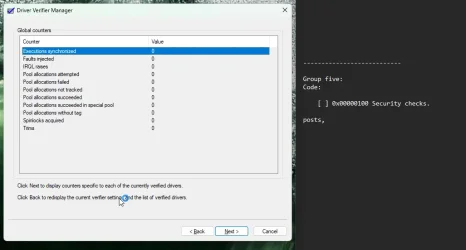
Group five:
Code:
    [ ] 0x00000100 Security checks.
 
Last edited:

My Computer My Computer

At a glance

Windows 10Intel(R) Core(TM) i7-4800MQ CPU @ 2.70GHz16 GB Total: Manufacturer : Samsung MemoryTyp...NVIDIA Quadro K3100M; Intel(R) HD Graphics 4600
OS
Windows 10
Computer type
Laptop
Manufacturer/Model
HP
CPU
Intel(R) Core(TM) i7-4800MQ CPU @ 2.70GHz
Motherboard
Product : 190A Version : KBC Version 94.56
Memory
16 GB Total: Manufacturer : Samsung MemoryType : DDR3 FormFactor : SODIMM Capacity : 8GB Speed : 1600
Graphics Card(s)
NVIDIA Quadro K3100M; Intel(R) HD Graphics 4600
Sound Card
IDT High Definition Audio CODEC; PNP Device ID HDAUDIO\FUNC_01&VEN_111D&DEV_76E0
Hard Drives
Model Hitachi HTS727575A9E364
Antivirus
Microsoft Defender
Other Info
Mobile Workstation
for all of these group testing, rebooting, and safemode nightmares w/ entering that bitlocker recovery key over and over, added safemode as a bcd selection screen on boot for convience, never had to enter the bitlocker key and able to enter safemode with ease
Code:
bcdedit /copy {current} /d "Safe Mode"
bcdedit /set {GUID} safeboot minimal
bcdedit /set {bootmgr} displaybootmenu yes
bcdedit /timeout 10


---------------------------
---------------------------
---------------------------
---------------------------
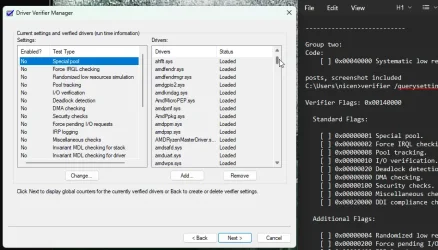
Group one:
Code:
[ ] 0x00000001 Special pool.
[ ] 0x00000002 Force IRQL checking.
[ ] 0x00000008 Pool tracking.
[ ] 0x00000010 I/O verification.
[ ] 0x00000020 Deadlock detection.
[ ] 0x00000080 DMA checking.
[ ] 0x00000800 Miscellaneous checks.
[ ] 0x00020000 DDI compliance checking.
[ ] 0x00080000 DDI compliance checking (additional).
[ ] 0x00000004 Randomized low resources simulation.
[ ] 0x00000200 Force pending I/O requests.
[ ] 0x00000400 IRP logging.
[ ] 0x00002000 Invariant MDL checking for stack.
[ ] 0x00004000 Invariant MDL checking for driver.
[ ] 0x00008000 Power framework delay fuzzing.
[ ] 0x00010000 Port/miniport interface checking.
[ ] 0x00200000 NDIS/WIFI verification.

bsod, driver verifier detected violation 0xC4, attached v2logs


---------------------------
---------------------------
---------------------------
---------------------------Notepad_EATYgt1q39.webp
Notepad_YCXmWEekVx.webp
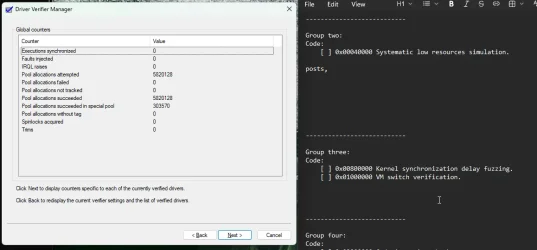
Group two:
Code:
[ ] 0x00040000 Systematic low resources simulation.

posts, screenshot included
C:\Users\nicen>verifier /querysettings

Verifier Flags: 0x00140000

Standard Flags:

[ ] 0x00000001 Special pool.
[ ] 0x00000002 Force IRQL checking.
[ ] 0x00000008 Pool tracking.
[ ] 0x00000010 I/O verification.
[ ] 0x00000020 Deadlock detection.
[ ] 0x00000080 DMA checking.
[ ] 0x00000100 Security checks.
[ ] 0x00000800 Miscellaneous checks.
[ ] 0x00020000 DDI compliance checking.

Additional Flags:

[ ] 0x00000004 Randomized low resources simulation.
[ ] 0x00000200 Force pending I/O requests.
[ ] 0x00000400 IRP logging.
[ ] 0x00002000 Invariant MDL checking for stack.
[ ] 0x00004000 Invariant MDL checking for driver.
[ ] 0x00008000 Power framework delay fuzzing.
[ ] 0x00010000 Port/miniport interface checking.
[X] 0x00040000 Systematic low resources simulation.
[ ] 0x00080000 DDI compliance checking (additional).
[ ] 0x00200000 NDIS/WIFI verification.
[ ] 0x00800000 Kernel synchronization delay fuzzing.
[ ] 0x01000000 VM switch verification.
[ ] 0x02000000 Code integrity checks.

Internal Flags:

[X] 0x00100000 Extended Verifier flags (internal).

[X] Indicates flag is enabled.

Active Rule Classes:

19 - Systematic low resources simulation.
21 - Extended Verifier flags (internal).
34 - WDF verfication.
37 - File system filter verification.

Boot Mode:

Persistent

Rules:

All rules are using default settings

Verified Drivers:

All Drivers


---------------------------
---------------------------
---------------------------
---------------------------
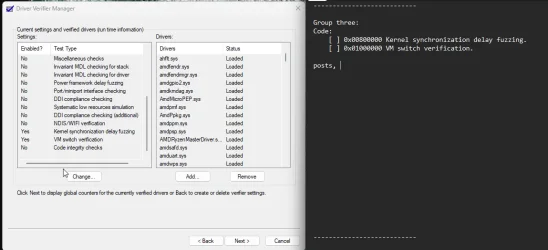
Notepad_1nXKZdvGpU.webp
Notepad_iJLlktyLOZ.webpGroup three:
Code:
[ ] 0x00800000 Kernel synchronization delay fuzzing.
[ ] 0x01000000 VM switch verification.

posts, screenshots taken,


C:\Windows\System32>verifier /querysettings

Verifier Flags: 0x01900000

Standard Flags:

[ ] 0x00000001 Special pool.
[ ] 0x00000002 Force IRQL checking.
[ ] 0x00000008 Pool tracking.
[ ] 0x00000010 I/O verification.
[ ] 0x00000020 Deadlock detection.
[ ] 0x00000080 DMA checking.
[ ] 0x00000100 Security checks.
[ ] 0x00000800 Miscellaneous checks.
[ ] 0x00020000 DDI compliance checking.

Additional Flags:

[ ] 0x00000004 Randomized low resources simulation.
[ ] 0x00000200 Force pending I/O requests.
[ ] 0x00000400 IRP logging.
[ ] 0x00002000 Invariant MDL checking for stack.
[ ] 0x00004000 Invariant MDL checking for driver.
[ ] 0x00008000 Power framework delay fuzzing.
[ ] 0x00010000 Port/miniport interface checking.
[ ] 0x00040000 Systematic low resources simulation.
[ ] 0x00080000 DDI compliance checking (additional).
[ ] 0x00200000 NDIS/WIFI verification.
[X] 0x00800000 Kernel synchronization delay fuzzing.
[X] 0x01000000 VM switch verification.
[ ] 0x02000000 Code integrity checks.

Internal Flags:

[X] 0x00100000 Extended Verifier flags (internal).

[X] Indicates flag is enabled.

Active Rule Classes:

21 - Extended Verifier flags (internal).
24 - Kernel synchronization delay fuzzing.
25 - VM switch verification.
34 - WDF verfication.
37 - File system filter verification.

Boot Mode:

Persistent

Rules:

All rules are using default settings

Verified Drivers:

All Drivers


---------------------------
---------------------------
---------------------------
---------------------------Notepad_OFJOlpuNMC.webp
Notepad_sk0VG6lzqx.webp
Group four:
Code:
[ ] 0x02000000 Code integrity checks.

posts, screenshots taken

C:\Windows\System32>verifier /querysettings

Verifier Flags: 0x02100000

Standard Flags:

[ ] 0x00000001 Special pool.
[ ] 0x00000002 Force IRQL checking.
[ ] 0x00000008 Pool tracking.
[ ] 0x00000010 I/O verification.
[ ] 0x00000020 Deadlock detection.
[ ] 0x00000080 DMA checking.
[ ] 0x00000100 Security checks.
[ ] 0x00000800 Miscellaneous checks.
[ ] 0x00020000 DDI compliance checking.

Additional Flags:

[ ] 0x00000004 Randomized low resources simulation.
[ ] 0x00000200 Force pending I/O requests.
[ ] 0x00000400 IRP logging.
[ ] 0x00002000 Invariant MDL checking for stack.
[ ] 0x00004000 Invariant MDL checking for driver.
[ ] 0x00008000 Power framework delay fuzzing.
[ ] 0x00010000 Port/miniport interface checking.
[ ] 0x00040000 Systematic low resources simulation.
[ ] 0x00080000 DDI compliance checking (additional).
[ ] 0x00200000 NDIS/WIFI verification.
[ ] 0x00800000 Kernel synchronization delay fuzzing.
[ ] 0x01000000 VM switch verification.
[X] 0x02000000 Code integrity checks.

Internal Flags:

[X] 0x00100000 Extended Verifier flags (internal).

[X] Indicates flag is enabled.

Active Rule Classes:

21 - Extended Verifier flags (internal).
26 - Code integrity checks.
34 - WDF verfication.
37 - File system filter verification.

Boot Mode:

Persistent

Rules:

All rules are using default settings

Verified Drivers:

All Drivers


---------------------------
---------------------------
---------------------------
---------------------------
Notepad_gFKLQ4tijU.webp
Notepad_J4sJMufFOE.webpGroup five:
Code:

[ ] 0x00000100 Security checks.

posts, screenshots taken

C:\Windows\System32>verifier /querysettings

Verifier Flags: 0x00100100

Standard Flags:

[ ] 0x00000001 Special pool.
[ ] 0x00000002 Force IRQL checking.
[ ] 0x00000008 Pool tracking.
[ ] 0x00000010 I/O verification.
[ ] 0x00000020 Deadlock detection.
[ ] 0x00000080 DMA checking.
[X] 0x00000100 Security checks.
[ ] 0x00000800 Miscellaneous checks.
[ ] 0x00020000 DDI compliance checking.

Additional Flags:

[ ] 0x00000004 Randomized low resources simulation.
[ ] 0x00000200 Force pending I/O requests.
[ ] 0x00000400 IRP logging.
[ ] 0x00002000 Invariant MDL checking for stack.
[ ] 0x00004000 Invariant MDL checking for driver.
[ ] 0x00008000 Power framework delay fuzzing.
[ ] 0x00010000 Port/miniport interface checking.
[ ] 0x00040000 Systematic low resources simulation.
[ ] 0x00080000 DDI compliance checking (additional).
[ ] 0x00200000 NDIS/WIFI verification.
[ ] 0x00800000 Kernel synchronization delay fuzzing.
[ ] 0x01000000 VM switch verification.
[ ] 0x02000000 Code integrity checks.

Internal Flags:

[X] 0x00100000 Extended Verifier flags (internal).

[X] Indicates flag is enabled.

Active Rule Classes:

9 - Security checks.
21 - Extended Verifier flags (internal).
34 - WDF verfication.
37 - File system filter verification.

Boot Mode:

Persistent

Rules:

All rules are using default settings

Verified Drivers:

All Drivers
 

Attachments

Last edited:

My Computer My Computer

At a glance

Windows 11AMD RYZEN AI MAX+ 395AMD Radeon 8060s
OS
Windows 11
Computer type
PC/Desktop
Manufacturer/Model
Framework Desktop 64GB
CPU
AMD RYZEN AI MAX+ 395
Graphics Card(s)
AMD Radeon 8060s
Monitor(s) Displays
SCEPTRE Ultra Wide
Screen Resolution
2560x1080
Hard Drives
WD_BLACK SN850 2tb C:
WD_BLACK SN770 2tb D:/steamlibrary
Noticed vgk.sys with the group 1, so disabled it via
Code:
sc config vgc start= disabled & sc config vgk start= disabled

---------------------------
---------------------------
---------------------------
---------------------------

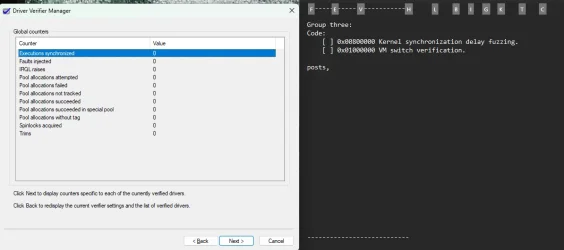
Group one B - vgk.sys disabled?
Code:
[ ] 0x00000001 Special pool.
[ ] 0x00000002 Force IRQL checking.
[ ] 0x00000008 Pool tracking.
[ ] 0x00000010 I/O verification.
[ ] 0x00000020 Deadlock detection.
[ ] 0x00000080 DMA checking.
[ ] 0x00000800 Miscellaneous checks.
[ ] 0x00020000 DDI compliance checking.
[ ] 0x00080000 DDI compliance checking (additional).
[ ] 0x00000004 Randomized low resources simulation.
[ ] 0x00000200 Force pending I/O requests.
[ ] 0x00000400 IRP logging.
[ ] 0x00002000 Invariant MDL checking for stack.
[ ] 0x00004000 Invariant MDL checking for driver.
[ ] 0x00008000 Power framework delay fuzzing.
[ ] 0x00010000 Port/miniport interface checking.
[ ] 0x00200000 NDIS/WIFI verification.

bsod, DPC_WATCHDOG_VIOLATION 0x133, attached v2logs oneB


---------------------------
---------------------------
---------------------------
---------------------------
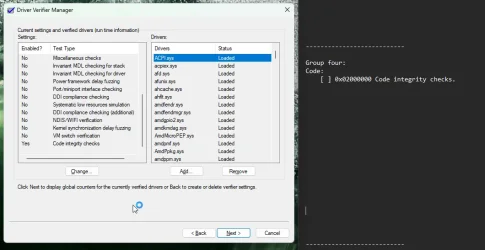
 

Attachments

My Computer My Computer

At a glance

Windows 11AMD RYZEN AI MAX+ 395AMD Radeon 8060s
OS
Windows 11
Computer type
PC/Desktop
Manufacturer/Model
Framework Desktop 64GB
CPU
AMD RYZEN AI MAX+ 395
Graphics Card(s)
AMD Radeon 8060s
Monitor(s) Displays
SCEPTRE Ultra Wide
Screen Resolution
2560x1080
Hard Drives
WD_BLACK SN850 2tb C:
WD_BLACK SN770 2tb D:/steamlibrary
digged through that oneB group v2 logs,

seems to be complaining about the RZ717 WiFi 7 160MHz driver?

Code:
PS C:\WINDOWS\system32> Get-PnpDevice | Where-Object {$_.InstanceId -like "*MTK*" -or $_.InstanceId -like "*VEN_14C3*"} | Select FriendlyName, DriverVersion, InstanceId

FriendlyName                       DriverVersion InstanceId
------------                       ------------- ----------
RZ717 WiFi 7 160MHz                              PCI\VEN_14C3&DEV_0717&SUBSYS_071714C3&REV_00\4&1218B00&0&0013
MediaTek Bluetooth Audio Component               SWD\DRIVERENUM\MTKBTACX&8&37D96301&0


PS C:\WINDOWS\system32> Get-WmiObject Win32_PnPSignedDriver | Where-Object {$_.DeviceName -like "*RZ717*" -or $_.InfName -like "*mtkwecx*"} | Select DeviceName, DriverVersion, InfName

DeviceName                 DriverVersion InfName
----------                 ------------- -------
RZ717 Bluetooth(R) Adapter 1.1043.0.555  oem83.inf
RZ717 WiFi 7 160MHz        5.6.0.4444    oem82.inf


PS C:\WINDOWS\system32>

Would I technically then use this site to grab the newest drivers for this?


My current version based on the powershell above is 5.6.0.4444, and this site seems to have either 5.7.0.5659, or 26.30.3.61

It would be very infuriating if it just ended up being this wifi adapter for this computer all along 😭
 

My Computer My Computer

At a glance

Windows 11AMD RYZEN AI MAX+ 395AMD Radeon 8060s
OS
Windows 11
Computer type
PC/Desktop
Manufacturer/Model
Framework Desktop 64GB
CPU
AMD RYZEN AI MAX+ 395
Graphics Card(s)
AMD Radeon 8060s
Monitor(s) Displays
SCEPTRE Ultra Wide
Screen Resolution
2560x1080
Hard Drives
WD_BLACK SN850 2tb C:
WD_BLACK SN770 2tb D:/steamlibrary
1) Please uninstall Riot / Vanguard

vgk vgk \??\c:\program files\riot vanguard\vgk.sys


2) Reinstall

mtkwecx Mediatek PCI LE Extensible Wireless LAN Card Driver c:\windows\system32\driverstore\filerepository\mtkwecx.inf_amd64_9c4bb421fd8e841e\mtkwecx.sys


3) Restart WDV with all customized tests except:

[ ] 0x00000004 Randomized low resources simulation.


If there is no immediate BSOD then open administrative command prompt and copy and paste:

verifier /querysettings

Post a share link.


For any BSOD post a new V2 share link into the newest post.


Code:
Name    [00000010] RZ717 WiFi 7 160MHz
Adapter Type    Not Available
Product Type    RZ717 WiFi 7 160MHz
Installed    Yes
PNP Device ID    PCI\VEN_14C3&DEV_0717&SUBSYS_071714C3&REV_00\4&1218B00&0&0013
Last Reset    4/23/2026 9:46 PM
Index    10
Service Name    mtkwecx
Driver    C:\WINDOWS\SYSTEM32\DRIVERSTORE\FILEREPOSITORY\MTKWECX.INF_AMD64_9C4BB421FD8E841E\MTKWECX.SYS (5.6.0.4444, 2.40 MB (2,513,792 bytes), 12/29/2025 1:04 AM)


Code:
vgk.sys      Mon Dec  1 23:46:20 2025 (692E7D2C)

Code:
mtkwecx.sys     Fri Aug 22 01:07:34 2025 (68A80926)
 

My Computer My Computer

At a glance

Windows 10Intel(R) Core(TM) i7-4800MQ CPU @ 2.70GHz16 GB Total: Manufacturer : Samsung MemoryTyp...NVIDIA Quadro K3100M; Intel(R) HD Graphics 4600
OS
Windows 10
Computer type
Laptop
Manufacturer/Model
HP
CPU
Intel(R) Core(TM) i7-4800MQ CPU @ 2.70GHz
Motherboard
Product : 190A Version : KBC Version 94.56
Memory
16 GB Total: Manufacturer : Samsung MemoryType : DDR3 FormFactor : SODIMM Capacity : 8GB Speed : 1600
Graphics Card(s)
NVIDIA Quadro K3100M; Intel(R) HD Graphics 4600
Sound Card
IDT High Definition Audio CODEC; PNP Device ID HDAUDIO\FUNC_01&VEN_111D&DEV_76E0
Hard Drives
Model Hitachi HTS727575A9E364
Antivirus
Microsoft Defender
Other Info
Mobile Workstation
For post #28 step #3 if there is no immediate BSOD then:

a) post verifier /querysettings results

b) run WDV continuously for 48 hours

c) post a new V2 share link before turning off WDV
 

My Computer My Computer

At a glance

Windows 10Intel(R) Core(TM) i7-4800MQ CPU @ 2.70GHz16 GB Total: Manufacturer : Samsung MemoryTyp...NVIDIA Quadro K3100M; Intel(R) HD Graphics 4600
OS
Windows 10
Computer type
Laptop
Manufacturer/Model
HP
CPU
Intel(R) Core(TM) i7-4800MQ CPU @ 2.70GHz
Motherboard
Product : 190A Version : KBC Version 94.56
Memory
16 GB Total: Manufacturer : Samsung MemoryType : DDR3 FormFactor : SODIMM Capacity : 8GB Speed : 1600
Graphics Card(s)
NVIDIA Quadro K3100M; Intel(R) HD Graphics 4600
Sound Card
IDT High Definition Audio CODEC; PNP Device ID HDAUDIO\FUNC_01&VEN_111D&DEV_76E0
Hard Drives
Model Hitachi HTS727575A9E364
Antivirus
Microsoft Defender
Other Info
Mobile Workstation
1 > uninstalled vanguard completely
2 > I wasn't sure exactly where to find drivers, if a newer version would work better, as the latest framework desktop driver pack was the one to install this driver and Windows Update won't show any results for drivers to use.
went ahead and grabbed drivers from https://rog-forum.asus.com/t5/downl...ivers-amd-mediatek-wifi-bluetooth/td-p/857576 , although this isn't an asus product, it is just the wifi-card's drivers on their own. Rebooted and it seems to still function with WiFi and the driver version is now 5.7.0.5659

Code:
PS C:\WINDOWS\system32> Get-WmiObject Win32_PnPSignedDriver | Where-Object {$_.DeviceName -like "*RZ717*" -or $_.InfName -like "*mtkwecx*"} | Select DeviceName, DriverVersion, InfName


DeviceName                 DriverVersion InfName

----------                 ------------- -------

RZ717 Bluetooth(R) Adapter 1.1043.0.555  oem83.inf

RZ717 WiFi 7 160MHz        5.7.0.5659    oem11.inf


PS C:\WINDOWS\system32>
If this was not the right way to go about this, let me know.

----------------
----------------
Restart WDV with all customized tests except:

[ ] 0x00000004 Randomized low resources simulation.
----------------
----------------

bsod, DPC_WATCHDOG_VIOLATION, attached v2 ng-allbt1
 

Attachments

My Computer My Computer

At a glance

Windows 11AMD RYZEN AI MAX+ 395AMD Radeon 8060s
OS
Windows 11
Computer type
PC/Desktop
Manufacturer/Model
Framework Desktop 64GB
CPU
AMD RYZEN AI MAX+ 395
Graphics Card(s)
AMD Radeon 8060s
Monitor(s) Displays
SCEPTRE Ultra Wide
Screen Resolution
2560x1080
Hard Drives
WD_BLACK SN850 2tb C:
WD_BLACK SN770 2tb D:/steamlibrary
1) Make sure that Riot / Vanguard remains uninstalled


2) Uninstall the AMD GPU driver amdkmdag.sys using DDU > reinstall from the AMD website


3) Uninstall and reinstall:

Code:
ipumcdmdriver    IpuMcdmDriver    c:\windows\system32\driverstore\filerepository\kipudrv.inf_amd64_1a1aa059597c4810\ipustack.sys


4) Restart WDV with all customized tests except:

[ ] 0x00000004 Randomized low resources simulation.


If there is no immediate BSOD then:

a) post verifier /querysettings results

b) run WDV continuously for 48 hours

c) post a new V2 share link before turning off WDV

d) for any BSOD post a new V2 share link into the newest post


Code:
amdkmdag.sys Mon Mar  9 16:46:29 2026 (69AF3FB5)

Code:
ipustack.sys Thu Dec  4 16:28:21 2025 (69320B05)
 
Last edited:

My Computer My Computer

At a glance

Windows 10Intel(R) Core(TM) i7-4800MQ CPU @ 2.70GHz16 GB Total: Manufacturer : Samsung MemoryTyp...NVIDIA Quadro K3100M; Intel(R) HD Graphics 4600
OS
Windows 10
Computer type
Laptop
Manufacturer/Model
HP
CPU
Intel(R) Core(TM) i7-4800MQ CPU @ 2.70GHz
Motherboard
Product : 190A Version : KBC Version 94.56
Memory
16 GB Total: Manufacturer : Samsung MemoryType : DDR3 FormFactor : SODIMM Capacity : 8GB Speed : 1600
Graphics Card(s)
NVIDIA Quadro K3100M; Intel(R) HD Graphics 4600
Sound Card
IDT High Definition Audio CODEC; PNP Device ID HDAUDIO\FUNC_01&VEN_111D&DEV_76E0
Hard Drives
Model Hitachi HTS727575A9E364
Antivirus
Microsoft Defender
Other Info
Mobile Workstation
Have entered safemode, DDU and uninstalled amd, rebooted to normal system, directly downloaded the AMD setup tool from the website,
amd-software-adrenalin-edition-26.3.1-minimalsetup-260317_web(1).exe
rebooted, then rebooted again after using verifiergui

was still unable to boot,
v2logs
 

Attachments

My Computer My Computer

At a glance

Windows 11AMD RYZEN AI MAX+ 395AMD Radeon 8060s
OS
Windows 11
Computer type
PC/Desktop
Manufacturer/Model
Framework Desktop 64GB
CPU
AMD RYZEN AI MAX+ 395
Graphics Card(s)
AMD Radeon 8060s
Monitor(s) Displays
SCEPTRE Ultra Wide
Screen Resolution
2560x1080
Hard Drives
WD_BLACK SN850 2tb C:
WD_BLACK SN770 2tb D:/steamlibrary
1) Uninstall:

steamstreamingmicrophone Steam Streaming Microphone c:\windows\system32\drivers\steamstreamingmicrophone.sys


2) Rerun Tuneup plus > post a share link

https://www.tenforums.com/attachmen...-files-use-bsod-debugging-tuneup_plus_log.bat


3) Create a new restore point:


4) Restart WDV with all customized tests except:

[ ] 0x00000004 Randomized low resources simulation.


If there is no immediate BSOD then:

a) post verifier /querysettings results

b) run WDV continuously for 48 hours

c) post a new V2 share link before turning off WDV

d) for any BSOD post a new V2 share link into the newest post


Code:
Name    Steam Streaming Microphone
Manufacturer    Valve Corporation Audio DDK
Status    Error
PNP Device ID    ROOT\STEAMSTREAMINGMICROPHONE\0000
Driver    C:\WINDOWS\SYSTEM32\DRIVERS\STEAMSTREAMINGMICROPHONE.SYS (, 39.78 KB (40,736 bytes), 9/15/2025 4:45 PM)


Code:
SteamStreamingMicrophone.sys Fri Jul 28 10:33:15 2017 (597B593B)
 

My Computer My Computer

At a glance

Windows 10Intel(R) Core(TM) i7-4800MQ CPU @ 2.70GHz16 GB Total: Manufacturer : Samsung MemoryTyp...NVIDIA Quadro K3100M; Intel(R) HD Graphics 4600
OS
Windows 10
Computer type
Laptop
Manufacturer/Model
HP
CPU
Intel(R) Core(TM) i7-4800MQ CPU @ 2.70GHz
Motherboard
Product : 190A Version : KBC Version 94.56
Memory
16 GB Total: Manufacturer : Samsung MemoryType : DDR3 FormFactor : SODIMM Capacity : 8GB Speed : 1600
Graphics Card(s)
NVIDIA Quadro K3100M; Intel(R) HD Graphics 4600
Sound Card
IDT High Definition Audio CODEC; PNP Device ID HDAUDIO\FUNC_01&VEN_111D&DEV_76E0
Hard Drives
Model Hitachi HTS727575A9E364
Antivirus
Microsoft Defender
Other Info
Mobile Workstation
Please see above edits.

When running WDV > manually select all non-Microsoft drivers by clicking on the column heading to sort

(Instead of querysettings displaying All Drivers it should display each driver)
 
Last edited:

My Computer My Computer

At a glance

Windows 10Intel(R) Core(TM) i7-4800MQ CPU @ 2.70GHz16 GB Total: Manufacturer : Samsung MemoryTyp...NVIDIA Quadro K3100M; Intel(R) HD Graphics 4600
OS
Windows 10
Computer type
Laptop
Manufacturer/Model
HP
CPU
Intel(R) Core(TM) i7-4800MQ CPU @ 2.70GHz
Motherboard
Product : 190A Version : KBC Version 94.56
Memory
16 GB Total: Manufacturer : Samsung MemoryType : DDR3 FormFactor : SODIMM Capacity : 8GB Speed : 1600
Graphics Card(s)
NVIDIA Quadro K3100M; Intel(R) HD Graphics 4600
Sound Card
IDT High Definition Audio CODEC; PNP Device ID HDAUDIO\FUNC_01&VEN_111D&DEV_76E0
Hard Drives
Model Hitachi HTS727575A9E364
Antivirus
Microsoft Defender
Other Info
Mobile Workstation
Would be still having a BSOD,

seems to be pointing to a microsoft driver but I'm not selecting that driver to be verified?
 

Attachments

My Computer My Computer

At a glance

Windows 11AMD RYZEN AI MAX+ 395AMD Radeon 8060s
OS
Windows 11
Computer type
PC/Desktop
Manufacturer/Model
Framework Desktop 64GB
CPU
AMD RYZEN AI MAX+ 395
Graphics Card(s)
AMD Radeon 8060s
Monitor(s) Displays
SCEPTRE Ultra Wide
Screen Resolution
2560x1080
Hard Drives
WD_BLACK SN850 2tb C:
WD_BLACK SN770 2tb D:/steamlibrary
1) Please rerun Tuneup plus > post a share link

https://www.tenforums.com/attachmen...-files-use-bsod-debugging-tuneup_plus_log.bat


2) Uninstall:

vdvad_waveextensible Virtual Desktop Audio c:\windows\system32\drivers\vdvad.sys


3) Create a new restore point:


4) Restart WDV with all customized tests except:

[ ] 0x00000004 Randomized low resources simulation.


If there is no immediate BSOD then:

a) post verifier /querysettings results

b) run WDV continuously for 48 hours

c) post a new V2 share link before turning off WDV

d) for any BSOD post a new V2 share link into the newest post


Code:
Name    Virtual Desktop Audio
Manufacturer    Virtual Desktop, Inc.
Status    OK
PNP Device ID    ROOT\MEDIA\0001
Driver    C:\WINDOWS\SYSTEM32\DRIVERS\VDVAD.SYS (1.6.1.0, 43.88 KB (44,936 bytes), 1/29/2025 3:47 PM)
 

My Computer My Computer

At a glance

Windows 10Intel(R) Core(TM) i7-4800MQ CPU @ 2.70GHz16 GB Total: Manufacturer : Samsung MemoryTyp...NVIDIA Quadro K3100M; Intel(R) HD Graphics 4600
OS
Windows 10
Computer type
Laptop
Manufacturer/Model
HP
CPU
Intel(R) Core(TM) i7-4800MQ CPU @ 2.70GHz
Motherboard
Product : 190A Version : KBC Version 94.56
Memory
16 GB Total: Manufacturer : Samsung MemoryType : DDR3 FormFactor : SODIMM Capacity : 8GB Speed : 1600
Graphics Card(s)
NVIDIA Quadro K3100M; Intel(R) HD Graphics 4600
Sound Card
IDT High Definition Audio CODEC; PNP Device ID HDAUDIO\FUNC_01&VEN_111D&DEV_76E0
Hard Drives
Model Hitachi HTS727575A9E364
Antivirus
Microsoft Defender
Other Info
Mobile Workstation
1 > tuneup attached
2 > uninstalled virturaldesktop
3 > restorepoint created
4 > still crash, v2 attached
 

Attachments

My Computer My Computer

At a glance

Windows 11AMD RYZEN AI MAX+ 395AMD Radeon 8060s
OS
Windows 11
Computer type
PC/Desktop
Manufacturer/Model
Framework Desktop 64GB
CPU
AMD RYZEN AI MAX+ 395
Graphics Card(s)
AMD Radeon 8060s
Monitor(s) Displays
SCEPTRE Ultra Wide
Screen Resolution
2560x1080
Hard Drives
WD_BLACK SN850 2tb C:
WD_BLACK SN770 2tb D:/steamlibrary
Tuneup plus results were good.

The computer is now optimally configured so that it is least likely to miss BSODs.

And the computer is optimally configured to create memory dump files.


mtkwecx.sys was a recurrent misbehaving driver.


1) If available, please connect Ethernet > report into the thread


2) Then uninstall:

mtkwecx Mediatek PCI LE Extensible Wireless LAN Card Driver c:\windows\system32\driverstore\filerepository\mtkwecx.inf_amd64_9c4bb421fd8e841e\mtkwecx.sys


3) If Ethernet is unavailable (report into the thread) then download a replacement Wifi driver to a new desktop folder > uninstall:

mtkwecx Mediatek PCI LE Extensible Wireless LAN Card Driver c:\windows\system32\driverstore\filerepository\mtkwecx.inf_amd64_9c4bb421fd8e841e\mtkwecx.sys


4) Restart WDV with all customized tests except:

[ ] 0x00000004 Randomized low resources simulation.


If there is no immediate BSOD then:

a) post verifier /querysettings results

b) run WDV continuously for 48 hours

c) post a new V2 share link before turning off WDV

d) for any BSOD post a new V2 share link into the newest post
 
Last edited:

My Computer My Computer

At a glance

Windows 10Intel(R) Core(TM) i7-4800MQ CPU @ 2.70GHz16 GB Total: Manufacturer : Samsung MemoryTyp...NVIDIA Quadro K3100M; Intel(R) HD Graphics 4600
OS
Windows 10
Computer type
Laptop
Manufacturer/Model
HP
CPU
Intel(R) Core(TM) i7-4800MQ CPU @ 2.70GHz
Motherboard
Product : 190A Version : KBC Version 94.56
Memory
16 GB Total: Manufacturer : Samsung MemoryType : DDR3 FormFactor : SODIMM Capacity : 8GB Speed : 1600
Graphics Card(s)
NVIDIA Quadro K3100M; Intel(R) HD Graphics 4600
Sound Card
IDT High Definition Audio CODEC; PNP Device ID HDAUDIO\FUNC_01&VEN_111D&DEV_76E0
Hard Drives
Model Hitachi HTS727575A9E364
Antivirus
Microsoft Defender
Other Info
Mobile Workstation
@Nix6x


Here's ten points for filling out your computer specs. :-)


Here's some other things that you may find useful, when you get the problem fixed.


My Computers My Computers

  • At a glance

    Win 11 Home ♦♦♦26200.8655 ♦♦♦♦♦♦♦25H2AMD Ryzen 7 3700XG.Skill (F4-3200C14D-16GTZKW)EVGA RTX 2070 (08G-P4-2171-KR)
    OS
    Win 11 Home ♦♦♦26200.8655 ♦♦♦♦♦♦♦25H2
    Computer type
    PC/Desktop
    Manufacturer/Model
    Built by Ghot® [May 2020]
    CPU
    AMD Ryzen 7 3700X
    Motherboard
    Asus Pro WS X570-ACE (BIOS 5302)
    Memory
    G.Skill (F4-3200C14D-16GTZKW)
    Graphics Card(s)
    EVGA RTX 2070 (08G-P4-2171-KR)
    Sound Card
    Realtek ALC1220P / ALC S1220A
    Monitor(s) Displays
    Dell U3011 30"
    Screen Resolution
    2560 x 1600
    Hard Drives
    2x Samsung 860 EVO 500GB,
    WD 4TB Black FZBX - SATA III,
    WD 8TB Black FZBX - SATA III,
    DRW-24B1ST CD/DVD Burner
    PSU
    PC Power & Cooling 750W Quad EPS12V
    Case
    Cooler Master ATCS 840 Tower
    Cooling
    CM Hyper 212 EVO (push/pull)
    Keyboard
    Ducky DK9008 Shine II Blue LED
    Mouse
    Logitech Optical M-100
    Internet Speed
    300/300
    Browser
    Firefox (latest)
    Antivirus
    Bitdefender Total Security
    Other Info
    Speakers: Klipsch Pro Media 2.1
  • At a glance

    Windows XP Pro 32bit w/SP3AMD Athlon 64 X2 5000+ (OC'd @ 3.2Ghz)TWIN2X2048-6400C4DHX (2 x 1GB, DDR2 800)EVGA 256-P2-N758-TR GeForce 8600GT SSC
    Operating System
    Windows XP Pro 32bit w/SP3
    Computer type
    PC/Desktop
    Manufacturer/Model
    Built by Ghot® (not in use)
    CPU
    AMD Athlon 64 X2 5000+ (OC'd @ 3.2Ghz)
    Motherboard
    ASUS M2N32-SLI Deluxe Wireless Edition
    Memory
    TWIN2X2048-6400C4DHX (2 x 1GB, DDR2 800)
    Graphics card(s)
    EVGA 256-P2-N758-TR GeForce 8600GT SSC
    Sound Card
    Onboard
    Monitor(s) Displays
    ViewSonic G90FB Black 19" Professional (CRT)
    Screen Resolution
    up to 2048 x 1536
    Hard Drives
    WD 36GB 10,000rpm Raptor SATA
    Seagate 80GB 7200rpm SATA
    Lite-On LTR-52246S CD/RW
    Lite-On LH-18A1P CD/DVD Burner
    PSU
    PC Power & Cooling Silencer 750 Quad EPS12V
    Case
    Generic Beige case, 80mm fans
    Cooling
    ZALMAN 9500A 92mm CPU Cooler
    Keyboard
    Logitech Classic Keybooard 200
    Mouse
    Logitech Optical M-BT96a
    Internet Speed
    300/300
    Browser
    Firefox 3.x ??
    Antivirus
    Symantec (Norton)
    Other Info
    Still assembled, still runs. Haven't turned it on for 15 years?
Re-ran, found it bsod'd on zerotier drivers so uninstalled that, would just be using another usb wifi dongle TP-LINK for the time being. If I absolutely need to switch to use ethernet, can set up a router to act as a wifi client and connect to the internet that way for the time being.

Otherwise, has finally booted with all the WDV except for [ ] 0x00000004 Randomized low resources simulation.

Attached the current v2 logs, may have a few dumps regarding the zerotier, had removed that already.


Will now be letting the computer run for 48 hours.
 

My Computer My Computer

At a glance

Windows 11AMD RYZEN AI MAX+ 395AMD Radeon 8060s
OS
Windows 11
Computer type
PC/Desktop
Manufacturer/Model
Framework Desktop 64GB
CPU
AMD RYZEN AI MAX+ 395
Graphics Card(s)
AMD Radeon 8060s
Monitor(s) Displays
SCEPTRE Ultra Wide
Screen Resolution
2560x1080
Hard Drives
WD_BLACK SN850 2tb C:
WD_BLACK SN770 2tb D:/steamlibrary

Latest Support Threads

Back
Top Bottom