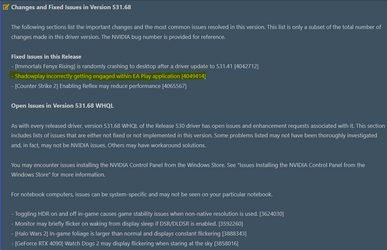
Solved BSOD Only with EA Play Games


So the Turbo one under Power Management is what makes it fluctuate? Yeah with Fifa im at 50C right now at 3.6 clock speed. Idle it's only 32C. How would you set it to a certain clock? I may want to set it at 80% as my cooler is smaller until I get a better cooler.
Sorry went to bed, Was super early here! It might depending on what the fluctuation range is. If its between 3.6 and whatever the turbo was then its the turbo. If its dropping to like 1.2ghz for a example it will be the minimum power state in performance plan options.
If i set that to 5% my cpu will run at 5% of its capabilities at min. Ive set mine to 100% as im generally only using this for games etc.
 

My Computer My Computer

At a glance

11[email protected]Viper Steelseries 32gb@ 3600mhzGigabyte 2070 Super 8GB, +200 core + 600 memory
OS
11
Computer type
PC/Desktop
Manufacturer/Model
Custom
CPU
[email protected]
Motherboard
Gigabyte Gaming X Z490
Memory
Viper Steelseries 32gb@ 3600mhz
Graphics Card(s)
Gigabyte 2070 Super 8GB, +200 core + 600 memory
Monitor(s) Displays
ASUS 4k HDR, Two 1080p Benq and Samsung
Screen Resolution
3840x2160/2560x1440/1920x1080
Hard Drives
Adata XPG SX8200 PRO 1tb
Samsung EVO 870 500GB
PSU
Corsair RX 650
Case
NZXT h510
Cooling
CM HYPER 212 RGB
Keyboard
Razer Ornata Chroma
Mouse
Steelseries Rival 710
@roorffxi a new Nvidia driver came out today and I noticed this. Might try this new driver.

1681881228556.png
 

My Computers My Computers

  • At a glance

    Win 11 Pro 25H2 26200.8973Intel® Core™ i7-14700KG.SKILL Ripjaws S5 Series 64GB (2 x 32GB) DDR5ASUS GeForce RTX 4070 Super 12GB
    OS
    Win 11 Pro 25H2 26200.8973
    Computer type
    PC/Desktop
    Manufacturer/Model
    Self Built
    CPU
    Intel® Core™ i7-14700K
    Motherboard
    ASUS TUF Z690-PLUS WIFI (BIOS 4505)
    Memory
    G.SKILL Ripjaws S5 Series 64GB (2 x 32GB) DDR5
    Graphics Card(s)
    ASUS GeForce RTX 4070 Super 12GB
    Sound Card
    Sound Blaster AE-5 Plus
    Monitor(s) Displays
    ASUS TUF Gaming 27" 2K HDR Gaming
    Screen Resolution
    2560 x 1440
    Hard Drives
    Samsung 990 Pro 1TB NVMe (Win 11 25H2)
    SK hynix P41 500GB NVMe
    SK hynix P41 2TB NVMe (x3)
    Crucial P3 Plus 4TB
    PSU
    Corsair RM850x Shift
    Case
    Antec Dark Phantom DP502 FLUX
    Cooling
    Corsair Nautilus 360 RS AIO
    Keyboard
    Logitech MK 320
    Mouse
    Razer Basilisk V3
    Internet Speed
    750Mbs
    Browser
    Firefox
    Antivirus
    Winows Security
    Other Info
    MR 8.1 Home
  • At a glance

    Win 11 Pro 25H2 26200.8973Intel Core i5-1140064 GB DDR4MSI GeForce RTX 3060 Ventus 2X 12GB
    Operating System
    Win 11 Pro 25H2 26200.8973
    Computer type
    PC/Desktop
    Manufacturer/Model
    Self Built
    CPU
    Intel Core i5-11400
    Motherboard
    Asus TUF Gaming Z590 Plus WiFi (BIOS 2803)
    Memory
    64 GB DDR4
    Graphics card(s)
    MSI GeForce RTX 3060 Ventus 2X 12GB
    Sound Card
    SoundBlaster Audigy Fx V2
    Monitor(s) Displays
    Samsung F27T350
    Screen Resolution
    1920x1080
    Hard Drives
    Samsung 980 Pro 1TB
    Samsung 970 EVO Plus 2TB
    Samsung 870 EVO 500GB SSD
    PSU
    Corsair HX750
    Case
    Cougar MX330-G Window
    Cooling
    Thermalright Frozen Edge 240 Black AIO
    Internet Speed
    350Mbps
    Browser
    Firefox
    Antivirus
    Windows Security
  • System Three
    Win 11 Pro 25H2 26200.8973
    ASUS PRIME Z370-P II BIOS 3004 7/12/21
    Intel Core i7-8700 CPU @ 3.20GHz
    32GB DDR4 RAM (4x8)
    iGPU Intel UHD Graphics 630
    Cooler Master Hyper 212
    Mid-Tower Desktop
@roorffxi a new Nvidia driver came out today and I noticed this. Might try this new driver.

View attachment 58203


Hmm interesting. I dont think that would fix the issues as I have had 0 BSOD since i disabled Turbo mode in the BIOS, but maybe ill re-enable after i update drivers.
 

My Computer My Computer

At a glance

Windows 11Intel® Core™ Processor i9-10850K 10/20 3.60GH...16GB (8GBx2) DDR4/3200MHz RGB MEMORYGeForce RTX™ 3070 8GB GDDR6X (Ampere) [VR Ready]
OS
Windows 11
Computer type
PC/Desktop
Manufacturer/Model
CyberPower
CPU
Intel® Core™ Processor i9-10850K 10/20 3.60GHz [Turbo 5
Motherboard
Z590 ATX ARGB, 1GBE LAN 2 PCIE X16 2 PCIE X1 3X M.2, 4 SATA/PCIE LGA 1200 (
Memory
16GB (8GBx2) DDR4/3200MHz RGB MEMORY
Graphics Card(s)
GeForce RTX™ 3070 8GB GDDR6X (Ampere) [VR Ready]
Monitor(s) Displays
LG 27GL83A-B / Older Samsung
Screen Resolution
2560 x 1440
Hard Drives
1TB WD Blue SN550 Series PCIe NVMe M.2 SSD - Seq R/W: Up to 2400/1950 MB/s, Rnd R/W up to 410/405k
PSU
800 Watts - Standard 80 Plus Gold Certified Power Supply
Case
CyberpowerPC P418X Mid-Tower Gaming Case
Cooling
CyberPowerPC MasterLiquid Lite 120mm ARGB CPU Liquid Cooler with Dual Chamber Pump & Copper Cold Plate And 3X Apevia Dual addressable digital RGB 120mm Fan 3Pins
Keyboard
HyperX
Mouse
Logitech G403
Internet Speed
400mbps
Browser
Chrome
Antivirus
Windows Built-In
Other Info
Network: RTL8821 AC WIFI PCIE CARD
So the Turbo one under Power Management is what makes it fluctuate? Yeah with Fifa im at 50C right now at 3.6 clock speed. Idle it's only 32C. How would you set it to a certain clock? I may want to set it at 80% as my cooler is smaller until I get a better cooler.

Turbo Boost is an Intel feature (Auto-OC - lowering and increasing frequencies depending on CPU usage) - but the others you mentioned in your previous message are ASUS Auto-OC features. The thing is.... the CPU was already boosted to maximum - starting with first stress apps you've tried (mentioned in the beginning). Even stayed at max frequencies during those tests (if i recall correctly, you ran them for hours?🤔). Tho, neither of those tests triggered BSOD. And normally... they should have - if the Auto-OC is/was unstable (main purpose of those stressing apps - to stress the CPU way above even the most extreme usage - on a daily basis - thus triggering a BSOD/Crash if unstable).

Back in the old days (still practiced even now) - back when Turbo Boost wasn't a feature yet - the OC potential of a CPU was defined by those max frequency - which a user would find through trial and error (raise the frequencies & voltage little by little - till the CPU started crashing, thus - the max stable frequency - was your CPU's OC potential). Intel kinda took that away from the OC community by finding the max stables frequency themselves - and thus - Turbo Boost became a feature. Even more than that - companies like ASUS who target OC enthusiasts - included extra OC features - which would squeeze the little potential left by Intel (since this CPU's were meant for mass production and not all OC the same - Intel's Turbo Boost - was always set slightly lower than the max achievable frequencies - to keep it on the safe side).

Anyway, the golden era for OC enthusiasts - started around 20 years ago and peaked over 10 years ago (when Turbo Boost was implemented). Some are still fond of OC to this days - it's just that with every new generation the CPUs kept raising in potentials - even without extra OC (compared to Intel AMD is actually famous for taking things to the limit - leaving very little room for extra OC). After all, it's highly unfair to compare a last gen CPU at Standard Frequencies (without Turbo Boost applied) - vs heavily OC'ed High End CPUs from over a decade ago. That being said, common sense wise - it's also a matter of needs. For example - this days i spend most of my time on a laptop with a 9th Gen i7 CPU, yet - for even an older generation CPU like this - can fit my needs at standard frequencies - while still noticing a big improvement - compared to my last system. That, and laptops struggle with cooling (limited by design) - not to mention "the noise levels of their small fans running at 6000 RPM" - to be able to cool a CPU while Turbo Boost gets triggered. You can disable Turbo Boost even from windows - but there's actually a better way, as in: limiting the max frequencies from the Power Plan.
There's two ways to do this:

1] - setting a mix and max percentage for power saving. Just search for "Edit Power Plan" - > Change Plan settings - > Change Advanced Power Settings - > Processor Power Management - and here you have a Minimum Processor State (idle or close to idle frequencies) and Maximum Processor (if set to 100% Turbo Boost gets triggered - if set to 99% it hovers close to Max Standard Frequency).

2] And this is actually what i prefer, as in - you enable a hidden power feature called "Maximum-Processor Frequency" Add or Remove Maximum Processor Frequency in Windows 10 Power Options Once enabled you follow the steps from 1] - cause that too can be set from Processor Power Management - > Maximum-Processor Frequency - where you can set/lock the Max to 3600 Mhz.
Do keep in mind that it's normal even recommended for frequencies to scale up and down (fluctuate) - since at idle state it can scale down lower than 1000 Mhz - a similar frequency used even while browsing the net (without accessing Media content ofc - like YouTube). Tho, Turbo Boost - and especially the extra OC features implemented in the mother board - are a whole nother story (the latter even more than Intel's feature alone). You do need a proper cooling solution - to handle that. And... it's also a matter of luck - since not all CPUs are the same - despite of being exactly the same model, point being: some if most - are stable even when the extra OC is applied beyond Turbo Boost (well, not with a basic cooler ofc - proper/extra cooling is still necessary), while others - can struggle even with Turbo Boost.

PS.Fun Fact: extreme OC enthusiasts (using Liquid Nitrogen for Cooling) - actually burn multiple CPUs - in their search for the so called "Golden sample (most capable CPU at OC-ing)".

 

My Computer My Computer

At a glance

WinDOS 25H2Intel & AMDSO-DIMM SK Hynix 15.8 GB Dual-Channel DDR4-26...nVidia RTX 2060 6GB Mobile GPU (TU106M)
OS
WinDOS 25H2
Computer type
Laptop
CPU
Intel & AMD
Memory
SO-DIMM SK Hynix 15.8 GB Dual-Channel DDR4-2666 (2 x 8 GB) 1329MHz (19-19-19-43)
Graphics Card(s)
nVidia RTX 2060 6GB Mobile GPU (TU106M)
Sound Card
Onbord Realtek ALC1220
Screen Resolution
1920 x 1080
Hard Drives
1x Samsung PM981 NVMe PCIe M.2 512GB / 1x Seagate Expansion ST1000LM035 1TB
This reminds me of my Dual Celeron 366MHz build on an Intel 440BX chipset, I used to have about 20 years ago. With a few mother board mods, I got it to run stable at 732MHz @133MHz FSB. Essentally doubling the frequency and more than doubling real world performance. :)
 

My Computers My Computers

  • At a glance

    Win 11 Pro 25H2 26200.8894 / Linux Mint 22.3Ryzen 7 2700U Pro32GBiGPU Vega 10
    OS
    Win 11 Pro 25H2 26200.8894 / Linux Mint 22.3
    Computer type
    Laptop
    Manufacturer/Model
    Lenovo A485
    CPU
    Ryzen 7 2700U Pro
    Motherboard
    Lenovo (WiFi/BT module upgraded to Intel Wireless-AC-9260)
    Memory
    32GB
    Graphics Card(s)
    iGPU Vega 10
    Sound Card
    Realtek
    Monitor(s) Displays
    14" FHD (built-in) + 14" Lenovo Thinkvision M14t (touch+pen) + 32" Asus PB328
    Screen Resolution
    FHD + FHD + 1440p
    Hard Drives
    Intel 660p m.2 nVME PCIe3.0 x2 512GB
    PSU
    125W(Dock)/65W(Travel Adapter)
    Keyboard
    Thinkpad / Logitech MX Keys
    Mouse
    Logitech MX Master 2S
    Internet Speed
    1/1Gbit
    Browser
    Firefox
    Antivirus
    Windows Defender
    Other Info
    SecureBoot: Enabled
    TPM2.0: Enabled
    AMD-V: Enabled
  • At a glance

    Win 11 Pro 25H2 26200.8968(RP)i7-7700k @4.8GHz32GB 2x16GB 2133MHz CL15EVGA GTX1080Ti FTW 11GB
    Operating System
    Win 11 Pro 25H2 26200.8968(RP)
    Computer type
    PC/Desktop
    Manufacturer/Model
    Custom
    CPU
    i7-7700k @4.8GHz
    Motherboard
    Asus PRIME Z270-A
    Memory
    32GB 2x16GB 2133MHz CL15
    Graphics card(s)
    EVGA GTX1080Ti FTW 11GB
    Sound Card
    Integrated
    Monitor(s) Displays
    32" 10-bit Asus PB328Q
    Screen Resolution
    WQHD 2560x1440
    Hard Drives
    512GB ADATA SX8000NP NVMe PCIe Gen 3 x4
    PSU
    850W
    Case
    Fractal Design Define 7
    Cooling
    Noctua NH-D15 chromax.black
    Keyboard
    Logitech MX Keys
    Mouse
    Logitech MX Master 2S
    Internet Speed
    1/1Gbit
    Browser
    Firefox
    Antivirus
    Windows Defender
    Other Info
    AC WiFi Card
  • Asus U46SV (laptop), i5-2410M, 8GB RAM, 500GB SSD, 750GB HDD, Windows 10. (used as a local Minecraft server and data dump)

Latest Support Threads

Back
Top Bottom