
Can I create a custom keyboard shortcut for an action in File Explorer?


Ferrara

Member
Local time
7:16 AM
Posts
26
OS
Windows 11
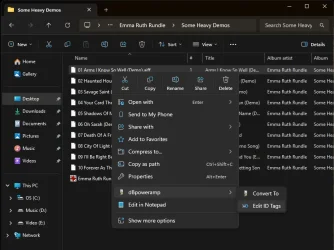
I sometimes need to edit the metadata in a folder of music files for an album I've ripped or downloaded. It can be tedious editing individual files for song title, composer credits and track number, where I have to right click the file, move the mouse pointer down a list of options, hover over dBpoweramp which then opens another menu to either "Convert To" or "Edit ID Tags", then left click to edit. Can I create a custom keyboard shortcut that will open the metadata edit window with one click after highlighting the file? How would I do this? And will Windows remember the shortcut when I change to a different keyboard, since I just ordered a spiffy new backlit keyboard with my Dell Reward points and am awaiting delivery?Screenshot 2026-03-09 185932.webp
 

My Computer

System One

  • OS
    Windows 11
    Computer type
    PC/Desktop
    Manufacturer/Model
    Dell Pro Max Tower T2 FCT2250 Desktop PC
    Monitor(s) Displays
    Dell E2225HSM Pro 22" Adjustable Stand Monitor, Sony Bravia 4K VH21 KD-43X85K 43" 4K HDR LED Google TV
    Screen Resolution
    1920 X 1080, 3840 X 2160
I can't remember the name of the programs available, but what you are asking is possible. Perhaps someone here can remember the name of the package I am thinking of. It allows you to assign shortcuts to any key.
 

My Computer

System One

  • OS
    Win 11 Pro 25H2
    Computer type
    PC/Desktop
    Manufacturer/Model
    Self build
    CPU
    Intel i7 13700KF
    Motherboard
    Gigabyte Z790 UD AC
    Memory
    32 GB Team Group DDR5 - 6000 CL 30
    Graphics Card(s)
    ASUS TUF GAMING RTX 3070 Ti
    Sound Card
    On board Realtek
    Monitor(s) Displays
    ACER 34 inch
    Screen Resolution
    4K
    Hard Drives
    1 TB Samsung 980 Pro Nvme, 1 TB Samsung 970 EVO Nvme, 2 x Samsung 970 2TB SSD SATA
    PSU
    EVGA 1000Q
    Case
    Rosewill something or other
    Cooling
    Noctua NH-D15. A whole schwak of Noctua case fans. $$$
    Keyboard
    Logitech G815
    Mouse
    Logitech G502 Hero
    Internet Speed
    700 up, 600 down
    Browser
    Firefox
    Antivirus
    MalwareBytes

My Computer

System One

  • OS
    Windows 11
    Computer type
    PC/Desktop
    Manufacturer/Model
    Dell Pro Max Tower T2 FCT2250 Desktop PC
    Monitor(s) Displays
    Dell E2225HSM Pro 22" Adjustable Stand Monitor, Sony Bravia 4K VH21 KD-43X85K 43" 4K HDR LED Google TV
    Screen Resolution
    1920 X 1080, 3840 X 2160
Any good macro app can do what you want. I use AlomWare Toolbox myself, but I don't have dBpoweramp to test it with. I looked at their website because I was going to try making a macro for you, but I'm not sure which trial version of dBpoweramp to download? Which one is the one you're using?
 

My Computer

System One

  • OS
    Windows 11 Pro
Back
Top Bottom


