Can I identify which application is filling AppData\Local\Temp


stefanjan

Member
Local time
10:36 AM
Posts
4
OS
Windows 11
My 500GB m.2 Windows drive keeps on getting full due to getting full of temporary files which I then have to manually delete.

Last time I checked there was 193GB of files in C:\Users\username\AppData\Local\Temp.

Is there a way in Windows to identify the application which is creating these files?
 
Windows Build/Version
Version 23H2

My Computer My Computer

At a glance

Windows 113.20 gigahertz AMD Ryzen 7 2700 Eight-Core32714 MegabytesNVIDIA GeForce RTX 3060
OS
Windows 11
Computer type
PC/Desktop
Manufacturer/Model
PC Specialist
CPU
3.20 gigahertz AMD Ryzen 7 2700 Eight-Core
Motherboard
X470 AORUS ULTRA
Memory
32714 Megabytes
Graphics Card(s)
NVIDIA GeForce RTX 3060
It's usually web browser stuff...
If you use chrome you might see "chrome" prefixed folders...
You can usually figure out the source from the folder names.. many apps use it..
Others are empty log files.

You can safely delete the contents permanently or to recycle bin.
Windows won't delete anything being used.
 

My Computer My Computer

At a glance

Win11 Pro 25H2 Latest GA buildIntel(R) Core(TM) i9-14900KF 3.20 GHzG.Skill DDR5-5600 / PC5-44800 DDR5 SDRAM UDIMMGIGABYTE GeForce RTX 4070 Ti WINDFORCE OC 12G...
OS
Win11 Pro 25H2 Latest GA build
Computer type
PC/Desktop
Manufacturer/Model
Powerspec
CPU
Intel(R) Core(TM) i9-14900KF 3.20 GHz
Motherboard
MSI PRO Z690-A WIFI (latest BIOS)
Memory
G.Skill DDR5-5600 / PC5-44800 DDR5 SDRAM UDIMM
Graphics Card(s)
GIGABYTE GeForce RTX 4070 Ti WINDFORCE OC 12G (GV-N407TWF3OC-12GD)
Sound Card
OnBoard
Monitor(s) Displays
Dell - various (3)
Screen Resolution
1920x1080
Hard Drives
SSD/HDD/NVME
PSU
850 Watt 80+ Gold Modular
Case
PowerSpec/Lian Li ATX 205 Mesh
Cooling
Coolermaster MASTERLIQUID ML240L V2 RGB
Keyboard
Logi MX Keys S
Mouse
MX Master 3S
Internet Speed
600 mbps
Browser
various (Opera, Vivaldi, Edge, Brave, Chrome)
Antivirus
anitmalwarebytes; superantispyware; defender
Other Info
Windows Feature Experience Pack 1000.26100.36.0
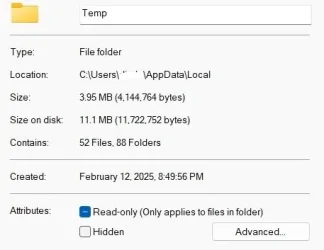
In my Windows 11 the temp folder is only 3.95 MB

I use Firefox+++ and Edge as my Browsers.
 

Attachments

  • Screen Shot 02-15-25 at 01.34 PM.webp
    Screen Shot 02-15-25 at 01.34 PM.webp
    13.4 KB · Views: 1

My Computer My Computer

At a glance

windows 11 ,Ubuntu Cinnamon - for tinkering onlyIntel i51140016 GB0
OS
windows 11 ,Ubuntu Cinnamon - for tinkering only
Computer type
PC/Desktop
Manufacturer/Model
No Name - Assembled by a Compute shop in a Strip Mall.
CPU
Intel i511400
Motherboard
ASUS PRIME B560-PLUS motherboard
Memory
16 GB
Graphics Card(s)
0
Sound Card
0
Monitor(s) Displays
25 in BenQ
Screen Resolution
1920 x 1080
Hard Drives
9 SSDs 4 Nvme, 2 in M.2 slot and 2 in PCIE with adapter + 5 Sata. DVD drive
PSU
600w
Case
Antec- VSK4000E-U3 Mid Tower
Internet Speed
Bell pure fibre optic. 3 GB package. 6E Wireless adapter 750/500
Browser
Firefox, Microsoft Edge
Antivirus
Defender
For anyone coming across this thread with the same problem. I downloaded Process Monitor from Microsoft and added a Path filter.

I identified the application which was creating the files. It was actually cache being created by my DAM software. Moved the cache to another m.2 SSD.
 

My Computer My Computer

At a glance

Windows 113.20 gigahertz AMD Ryzen 7 2700 Eight-Core32714 MegabytesNVIDIA GeForce RTX 3060
OS
Windows 11
Computer type
PC/Desktop
Manufacturer/Model
PC Specialist
CPU
3.20 gigahertz AMD Ryzen 7 2700 Eight-Core
Motherboard
X470 AORUS ULTRA
Memory
32714 Megabytes
Graphics Card(s)
NVIDIA GeForce RTX 3060
I empty that temp folder at shutdown of the computer with a script. As a lot of programs don't cleanup there temp files properly.
 

My Computer My Computer

At a glance

Windows 11
OS
Windows 11
Computer type
PC/Desktop
I empty that temp folder at shutdown of the computer with a script. As a lot of programs don't cleanup there temp files properly.
Would be great if you could share your script. Sounds like a great idea.
 

My Computer My Computer

At a glance

Windows 113.20 gigahertz AMD Ryzen 7 2700 Eight-Core32714 MegabytesNVIDIA GeForce RTX 3060
OS
Windows 11
Computer type
PC/Desktop
Manufacturer/Model
PC Specialist
CPU
3.20 gigahertz AMD Ryzen 7 2700 Eight-Core
Motherboard
X470 AORUS ULTRA
Memory
32714 Megabytes
Graphics Card(s)
NVIDIA GeForce RTX 3060
If you want to do it in a batch file, you could use

forfiles /p %TEMP% /m *.* /s /d -2 /c "cmd.exe /c del /q @path"

Explanation:

Code:
forfiles  - for each file
/p %TEMP% - in the path %TEMP%, the defined temp directory
/m *.*    - matching the pattern *.*, so any file
/s        - including sub directories
/d -2     - with a modified date at least 2 days ago
/c        - Run this command to delete the files...
"cmd.exe /c del /q @path"
 
Last edited:

My Computer My Computer

At a glance

Windows 11 Enterprise 25H2
OS
Windows 11 Enterprise 25H2
If you have not Windows Pro but Home, you cannot use a script i think for logoff/shutdown.
You can use the command in a bat file on your desktop like pseymour said, and then add a line for shutdown.
Then add an icon like this to the file Google Search so it looks good, and then use that file to shutdown your pc, instead of the shutdown option in startmenu.

Batch:
@echo off

:: Clean up temp files older than 1 day
forfiles /p "%TEMP%" /m *.* /s /d -1 /c "cmd /c del /q @path"

:: Add more folders or paths to clean up.

:: Shutdown the computer
shutdown /s /t 0
 

My Computer My Computer

At a glance

Windows 11
OS
Windows 11
Computer type
PC/Desktop
Thanks, I have Windows 11 Pro so will give this a go.
 

My Computer My Computer

At a glance

Windows 113.20 gigahertz AMD Ryzen 7 2700 Eight-Core32714 MegabytesNVIDIA GeForce RTX 3060
OS
Windows 11
Computer type
PC/Desktop
Manufacturer/Model
PC Specialist
CPU
3.20 gigahertz AMD Ryzen 7 2700 Eight-Core
Motherboard
X470 AORUS ULTRA
Memory
32714 Megabytes
Graphics Card(s)
NVIDIA GeForce RTX 3060
is that good on SSD to clean-up daily?

usually trimming is enough on SSD. when needed, do format than delete. I would do this way.
 

My Computer My Computer

At a glance

Windows 7/11Intel i7-11800H32GB DDR4 3200MHzNVIDIA GeForce RTX 3070
OS
Windows 7/11
Computer type
PC/Desktop
Manufacturer/Model
HP/Lenovo/Asus
CPU
Intel i7-11800H
Motherboard
Lenovo Legion 5i Pro Gen 6
Memory
32GB DDR4 3200MHz
Graphics Card(s)
NVIDIA GeForce RTX 3070
Monitor(s) Displays
LG 35WN65C-B
Screen Resolution
3440 x 1440
Hard Drives
1TB PCIe SSD
Other Info
Edition Windows 11 Pro
Version 25H2
Installed on ‎12/‎12/‎2025
OS build 26200.7462
Livetime on good SSD is over 900TB written. Will take you along time to do that on for example 500gb or 1TB disk..
And for me Cache should not be in Temp folder. As it is part of Application Data, and should not be cleared up, otherwise it will re-generate every time.
 

My Computer My Computer

At a glance

Windows 11
OS
Windows 11
Computer type
PC/Desktop

Latest Support Threads

Back
Top Bottom