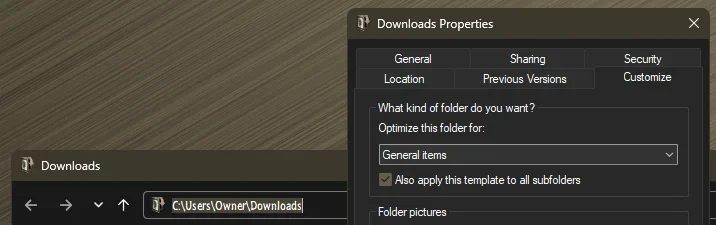
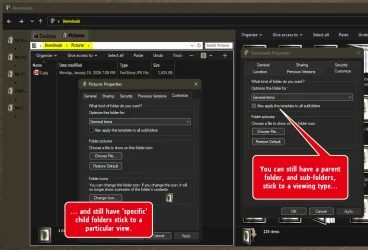
Can I make Downloads folder a regular folder in Windows 11?


From some specific version of Windows 10, Microsoft decided the "Downloads" folder has to be in details view, sorted and grouped by date.
And they enforced this decision in Windows 11, made the change of folder view for me to comfortably use the Downloads folder impossible.
Your explanation in post #1 is spot on. That is, the standard Downloads folder type applies to the subfolders as well in Windows 11.

But this post seems to imply that you're locked into Details and grouped by date which is not true. That view can be changed using the "Apply to Folders" button or using WinSetView (as previously stated).

The issue is not having the ability to change folder types within Downloads.
 

My Computer

System One

  • OS
    Windows 10/11
    Computer type
    Laptop
    Manufacturer/Model
    Acer
You could probably just create a normal folder in the root of your C directory, change the icon of it to the downloads icon, and change the path of file downloads in your web browser. Pin it to Quick Access to find it easily and unpin on the old "real Downloads" folder from Quick Access. That might be the least destructive way imo.
FWIW, that's all I do, and my Downloads folder is on a totally different logical drive. My browsers all point to that folder, and all my downloads go there.
 

My Computers

System One System Two

  • OS
    Win 11 Pro 25H2, Build 26200.8524
    Computer type
    PC/Desktop
    Manufacturer/Model
    Home Brew
    CPU
    Intel Core i5 14500
    Motherboard
    Gigabyte B760M G P WIFI
    Memory
    64GB DDR4
    Graphics Card(s)
    GeForce RTX 4060
    Sound Card
    Chipset Realtek
    Monitor(s) Displays
    LG 45" Ultragear, Acer 24" 1080p
    Screen Resolution
    5120x1440, 1920x1080
    Hard Drives
    Crucial P310 2TB 2280 PCIe Gen4 3D NAND NVMe M.2 SSD (O/S)
    Silicon Power 2TB US75 NVMe PCIe Gen4 M.2 2280 SSD (backup)
    Crucial BX500 2TB 3D NAND (2nd backup)
    Seagate 4TB Ironwolf, rotating HDD archive files
    External off-line backup Drives: 2 NVMe 4TB drives in external enclosures
    PSU
    Thermaltake Toughpower GF3 750W
    Case
    LIAN LI LANCOOL 216 E-ATX PC Case
    Cooling
    Lots of fans!
    Keyboard
    Microsoft Comfort Curve 2000
    Mouse
    Logitech G305
    Internet Speed
    Verizon FiOS 1GB
    Browser
    Firefox
    Antivirus
    Malware Bytes & Windows Defender Security
  • Operating System
    Win 11 Pro 25H2, Build 26200.8524
    Computer type
    PC/Desktop
    Manufacturer/Model
    Home Brew
    CPU
    Intel Core i5 14400
    Motherboard
    Gigabyte B760M DS3H AX
    Memory
    32GB DDR5
    Graphics card(s)
    Intel 700 Embedded GPU
    Sound Card
    Realtek Embedded
    Monitor(s) Displays
    27" HP 1080p
    Screen Resolution
    1920x1080
    Hard Drives
    Crucial P310 2TB 2280 PCIe Gen4 eD NAND PCIe SSD
    Samsung EVO 990 2TB NVMe Gen4 SSD
    Samsung 2TB SATA SSD
    PSU
    Thermaltake Smart BM3 650W
    Case
    Okinos Micro ATX Case
    Cooling
    Fans
    Keyboard
    Microsoft Comfort Curve 2000
    Mouse
    Logitech G305
    Internet Speed
    Verizon FiOS 1GB
    Browser
    Firefox
    Antivirus
    Malware Bytes & Windows Defender Security

My Computers

System One System Two

  • OS
    Windows 11 Pro
    Computer type
    PC/Desktop
    Manufacturer/Model
    ASUS ROG Strix
  • Operating System
    Windows 11 Pro
    Computer type
    Laptop
    Manufacturer/Model
    ASUS VivoBook
I'm a little confused as to exactly what the issues are.

For one, I don't want my Downloads folder buried in the user profile, so that was a non-starter for me.
 

My Computers

System One System Two

  • OS
    Win 11 Pro 25H2, Build 26200.8524
    Computer type
    PC/Desktop
    Manufacturer/Model
    Home Brew
    CPU
    Intel Core i5 14500
    Motherboard
    Gigabyte B760M G P WIFI
    Memory
    64GB DDR4
    Graphics Card(s)
    GeForce RTX 4060
    Sound Card
    Chipset Realtek
    Monitor(s) Displays
    LG 45" Ultragear, Acer 24" 1080p
    Screen Resolution
    5120x1440, 1920x1080
    Hard Drives
    Crucial P310 2TB 2280 PCIe Gen4 3D NAND NVMe M.2 SSD (O/S)
    Silicon Power 2TB US75 NVMe PCIe Gen4 M.2 2280 SSD (backup)
    Crucial BX500 2TB 3D NAND (2nd backup)
    Seagate 4TB Ironwolf, rotating HDD archive files
    External off-line backup Drives: 2 NVMe 4TB drives in external enclosures
    PSU
    Thermaltake Toughpower GF3 750W
    Case
    LIAN LI LANCOOL 216 E-ATX PC Case
    Cooling
    Lots of fans!
    Keyboard
    Microsoft Comfort Curve 2000
    Mouse
    Logitech G305
    Internet Speed
    Verizon FiOS 1GB
    Browser
    Firefox
    Antivirus
    Malware Bytes & Windows Defender Security
  • Operating System
    Win 11 Pro 25H2, Build 26200.8524
    Computer type
    PC/Desktop
    Manufacturer/Model
    Home Brew
    CPU
    Intel Core i5 14400
    Motherboard
    Gigabyte B760M DS3H AX
    Memory
    32GB DDR5
    Graphics card(s)
    Intel 700 Embedded GPU
    Sound Card
    Realtek Embedded
    Monitor(s) Displays
    27" HP 1080p
    Screen Resolution
    1920x1080
    Hard Drives
    Crucial P310 2TB 2280 PCIe Gen4 eD NAND PCIe SSD
    Samsung EVO 990 2TB NVMe Gen4 SSD
    Samsung 2TB SATA SSD
    PSU
    Thermaltake Smart BM3 650W
    Case
    Okinos Micro ATX Case
    Cooling
    Fans
    Keyboard
    Microsoft Comfort Curve 2000
    Mouse
    Logitech G305
    Internet Speed
    Verizon FiOS 1GB
    Browser
    Firefox
    Antivirus
    Malware Bytes & Windows Defender Security
I'm a little confused as to exactly what the issues are.
The OP wants different folder types within downloads.

In Windows 10, only the root of Downloads is folder type Downloads, so you can set subfolders to any type you like.

In Windows 11 that flexibility is removed which means you have to set subfolder views one folder at a time (i.e. you can't change a whole subtree) if you want them different than other folders in Downloads.

I don't think Microsoft intended for users to keep files in Downloads long term (i.e so no need for different views), but there's nothing really wrong with doing that.

Using the Windows 10 Explorer in Windows 11 unfortunately does not remove that limitation.
 

My Computer

System One

  • OS
    Windows 10/11
    Computer type
    Laptop
    Manufacturer/Model
    Acer
I'm a little confused as to exactly what the issues are.

The issue is basically some users have system mods like the OP. There is similar one about icon spacing just caused by some mods.

None of these 'problems' exist on my non-modded File Explorer.
 

My Computer

System One

  • OS
    Windows 11
I do a few tweaks, but I've refrained from adding tons of add-on file managers, etc. simple because it makes updating somewhat complicated sometimes.
 

My Computers

System One System Two

  • OS
    Win 11 Pro 25H2, Build 26200.8524
    Computer type
    PC/Desktop
    Manufacturer/Model
    Home Brew
    CPU
    Intel Core i5 14500
    Motherboard
    Gigabyte B760M G P WIFI
    Memory
    64GB DDR4
    Graphics Card(s)
    GeForce RTX 4060
    Sound Card
    Chipset Realtek
    Monitor(s) Displays
    LG 45" Ultragear, Acer 24" 1080p
    Screen Resolution
    5120x1440, 1920x1080
    Hard Drives
    Crucial P310 2TB 2280 PCIe Gen4 3D NAND NVMe M.2 SSD (O/S)
    Silicon Power 2TB US75 NVMe PCIe Gen4 M.2 2280 SSD (backup)
    Crucial BX500 2TB 3D NAND (2nd backup)
    Seagate 4TB Ironwolf, rotating HDD archive files
    External off-line backup Drives: 2 NVMe 4TB drives in external enclosures
    PSU
    Thermaltake Toughpower GF3 750W
    Case
    LIAN LI LANCOOL 216 E-ATX PC Case
    Cooling
    Lots of fans!
    Keyboard
    Microsoft Comfort Curve 2000
    Mouse
    Logitech G305
    Internet Speed
    Verizon FiOS 1GB
    Browser
    Firefox
    Antivirus
    Malware Bytes & Windows Defender Security
  • Operating System
    Win 11 Pro 25H2, Build 26200.8524
    Computer type
    PC/Desktop
    Manufacturer/Model
    Home Brew
    CPU
    Intel Core i5 14400
    Motherboard
    Gigabyte B760M DS3H AX
    Memory
    32GB DDR5
    Graphics card(s)
    Intel 700 Embedded GPU
    Sound Card
    Realtek Embedded
    Monitor(s) Displays
    27" HP 1080p
    Screen Resolution
    1920x1080
    Hard Drives
    Crucial P310 2TB 2280 PCIe Gen4 eD NAND PCIe SSD
    Samsung EVO 990 2TB NVMe Gen4 SSD
    Samsung 2TB SATA SSD
    PSU
    Thermaltake Smart BM3 650W
    Case
    Okinos Micro ATX Case
    Cooling
    Fans
    Keyboard
    Microsoft Comfort Curve 2000
    Mouse
    Logitech G305
    Internet Speed
    Verizon FiOS 1GB
    Browser
    Firefox
    Antivirus
    Malware Bytes & Windows Defender Security
The issue is basically some users have system mods like the OP. There is similar one about icon spacing just caused by some mods.

None of these 'problems' exist on my non-modded File Explorer.
The topic here has anything to do with mods.

The icon spacing thread, OTH, is likely related to mods.
 
Last edited:

My Computer

System One

  • OS
    Windows 10/11
    Computer type
    Laptop
    Manufacturer/Model
    Acer
Just create a new folder somewhere and point all your downloads to this folder. There are numerous ways of doing this within Windows/Apps.
 

My Computer

System One

  • OS
    Win 7/10/11
    Computer type
    PC/Desktop
    Other Info
    I'm a computer enthusiast so have quite a few systems that I run. More like an advanced hobby.
The OP wants different folder types within downloads.
I re-read the OP's Post #15..., I figured that's what they were after!
Yup..., tried it, won't work!
 

My Computers

System One System Two

  • OS
    Windows 11 Pro
    Computer type
    PC/Desktop
    Manufacturer/Model
    ASUS ROG Strix
  • Operating System
    Windows 11 Pro
    Computer type
    Laptop
    Manufacturer/Model
    ASUS VivoBook
However...
Nope. That does nothing. All subfolders will remain as type Downloads. As I stated previously, it shows as type "General items", but it is not.

To see for yourself, set your General Items view differently than your Downloads view, using the "Apply to Folders" button. Then it should be clear that whatever view you have set for Downloads is what you get in all subfolders of Downloads.

Edit: If you're using the Windows 11 Explorer, "Apply to Folders" will work as expected on the Downloads folder. With the Windows 10 Explorer it's inconsistent; sometimes you can update the view for Downloads and sometimes it reverts back to the template view.
 
Last edited:

My Computer

System One

  • OS
    Windows 10/11
    Computer type
    Laptop
    Manufacturer/Model
    Acer
To see for yourself, set your General Items view differently than your Downloads view, using the "Apply to Folders" buttons. Then it should be clear that whatever view you have set for Downloads is what you get in all subfolders of Downloads.
Ah! I see what you're gettin at!
Strange eh?
 

My Computers

System One System Two

  • OS
    Windows 11 Pro
    Computer type
    PC/Desktop
    Manufacturer/Model
    ASUS ROG Strix
  • Operating System
    Windows 11 Pro
    Computer type
    Laptop
    Manufacturer/Model
    ASUS VivoBook
The issue is basically some users have system mods like the OP. There is similar one about icon spacing just caused by some mods.

None of these 'problems' exist on my non-modded File Explorer.
It really has nothing to do with "mods". Things used to work just don't work anymore out of the box.
 

My Computer

System One

  • OS
    Windows 11
    Computer type
    PC/Desktop
    Manufacturer/Model
    DELL
    CPU
    i7 12700f
    Motherboard
    DELL
    Memory
    32GB DDR5
    Graphics Card(s)
    RTX 4070 SUPER
    Monitor(s) Displays
    4K 32'
    Screen Resolution
    3840*2160
The topic here has anything to do with mods.

The icon spacing thread, OTH, is likely related to mods.
I don't really know if restoring something disabled by default count as mods, besides the spacing is totally fine under 100%, 125%, and 150% display scaling.
 

My Computer

System One

  • OS
    Windows 11
    Computer type
    PC/Desktop
    Manufacturer/Model
    DELL
    CPU
    i7 12700f
    Motherboard
    DELL
    Memory
    32GB DDR5
    Graphics Card(s)
    RTX 4070 SUPER
    Monitor(s) Displays
    4K 32'
    Screen Resolution
    3840*2160
I don't really know if restoring something disabled by default count as mods, besides the spacing is totally fine under 100%, 125%, and 150% display scaling.
I was thinking it might be a combination of the higher scaling and the older xp/vista view mode, but I haven't had a chance to look into it yet. The older view mode code certainly predates high dpi monitors and enabling it could be considered a "mod".
 

My Computer

System One

  • OS
    Windows 10/11
    Computer type
    Laptop
    Manufacturer/Model
    Acer
Back
Top Bottom