Cannot set permanent file-associations (Video files)


mingle

Well-known member
Member
Local time
1:38 PM
Posts
84
OS
Windows 11
Hi Guys,

I'm having issues with file-associations (specifically video files). I'm using MPC-HC as my video-player and whenever I click on a video (.avi, mp4, .mkv. etc) I get a popup, asking which application I want to use to open the file. I don't get the usual "Always use this app..." option either.

I did a quick Google and came up with this thread: Video file default application Windows 11

So it seems like it's not only me.

Has anyone managed to find a registry-tweak or other workaround for this?

Cheers,

Mike.
 

My Computer My Computer

At a glance

Windows 11
OS
Windows 11
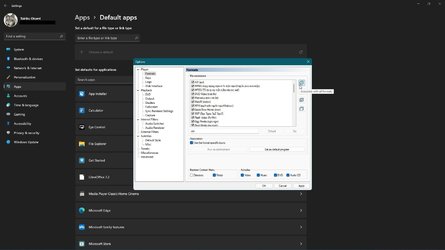
Run MPC-HC as admin, then pick all file types and OK.
Now it should be registered with Windows default apps.

capture_11142021_113031.jpg

P.S. It is better if you use x64 1.9.17 version, since 11 is x64 only.
 

My Computer My Computer

At a glance

Home2FH2CanAMD Ryzen 5 8600G (07/24)2x32GB Kingston FURY DDR5 5600 MHz CL36 @5200...ASROCK Radeon RX 6600 Challenger D 8G @48FPS ...
OS
Home2FH2Can
Computer type
PC/Desktop
CPU
AMD Ryzen 5 8600G (07/24)
Motherboard
ASROCK B650M-HDV/M.2 (07/24) BIOS 4.43 AGESA ComboAM5 1.3.0.1b Patch A (07/26)
Memory
2x32GB Kingston FURY DDR5 5600 MHz CL36 @5200 CL40 (07/24)
Graphics Card(s)
ASROCK Radeon RX 6600 Challenger D 8G @48FPS (08/24)
Sound Card
Creative Sound BlasterX AE-5 Plus (05/24)
Monitor(s) Displays
24" Philips 24M1N3200ZS/00 (05/24)
Screen Resolution
1920×1080@165Hz via DP1.4
Hard Drives
Kingston KC3000 NVMe 2TB (05/24)
ADATA XPG GAMMIX S11 Pro 512GB (07/19)
PSU
Seasonic Core GM 550 Gold (04/24)
Case
Fractal Design Define 7 Mini with 3x Noctua NF-P14s/12@555rpm (04/24)
Cooling
Noctua NH-U12S with Noctua NF-P12 (04/24)
Keyboard
HP Pavilion Wired Keyboard 300 (07/24) + Rabalux 76017 Parker (01/24)
Mouse
Logitech M330 Silent Plus (07/26)
Internet Speed
500/100 Mbps via RouterOS (05/21) & TCP Optimizer
Browser
Edge, Brave for YouTube, LibreWolf for FB
Antivirus
NextDNS blocking 1/3 Traffic
Other Info
Phone: Motorola Moto G86 (02/26)
Backup: Hasleo Backup Suite (PreOS)
Headphones: Sennheiser RS170 (09/10)
Chair: Huzaro Force 4.4 Grey Mesh (05/24)
Notifier: Xiaomi Mi Band 9 Milanese (10/24)
FlexCore USB-C 3.2 Gen 1 (M) to LAN (F) (08/25)
MPC-BE has cmd commands for association, i do not know if MPC-HC

Run As Administrator

mpc-be64.exe /regvid - Create file associations for video files
mpc-be64.exe /regaud - Create file associations for audio files
mpc-be64.exe /regpl - Create file associations for playlist files
mpc-be64.exe /regall - Create file associations for all supported file types
mpc-be64.exe /unregall - Remove all file associations

change mpc-be64.exe TO mpc-hc64.exe, and try.
 

My Computer My Computer

At a glance

Windows 11 25H2 Home Single Language (26200.8...Intel Core i3-1115G48GBon-board
OS
Windows 11 25H2 Home Single Language (26200.8037)
Computer type
Laptop
Manufacturer/Model
LENOVO IdeaPad 5 15ITL05
CPU
Intel Core i3-1115G4
Motherboard
There is no such a God, I only know mother-Earth
Memory
8GB
Graphics Card(s)
on-board
Sound Card
on-board
Monitor(s) Displays
(s) is too ambitious for me
Screen Resolution
1920*1080
Hard Drives
256GB (SSD)
PSU
I was very young when I last saw a PSU
Case
...
Cooling
My coldness is enough to cool the computer
Keyboard
A broken and very clean keyboard
Mouse
Rat
Internet Speed
Slowest internet connection in Europe
Browser
ChromePortable / FirefoxPortable / TorBrowser
Antivirus
G-Virus
Other Info
I can simply say that I took the red pill and I am not happy with it.
K-Lite Codec Pack Full has an installer that lets me set up MPC-HC with madVR in such a way that is easier, less time consuming than anything I have ever seen before when it comes to playback of video files (and I have seen lots... I used to live on forum websites like Doom9.org and Videohelp.com before it was cool 😂).
 

My Computers My Computers

  • At a glance

    11 Homei7 13650HX16GB DDR5GeForce RTX 4060 Mobile
    OS
    11 Home
    Computer type
    Laptop
    Manufacturer/Model
    Asus TUF Gaming F16 (2024)
    CPU
    i7 13650HX
    Memory
    16GB DDR5
    Graphics Card(s)
    GeForce RTX 4060 Mobile
    Sound Card
    Eastern Electric MiniMax DAC Supreme; Emotiva UMC-200; Astell & Kern AK240
    Monitor(s) Displays
    Sony Bravia XR-55X90J
    Screen Resolution
    3840×2160
    Hard Drives
    512GB SSD internal
    37TB external
    PSU
    Li-ion
    Cooling
    2× Arc Flow Fans, 4× exhaust vents, 5× heatpipes
    Keyboard
    Logitech K800
    Mouse
    Logitech G402
    Internet Speed
    30Mbit/s up, 500Mbit/s down
    Browser
    FF
    Antivirus
    What's an antivirus?
  • At a glance

    11 Homei5 1135G716GB DDR4Intel Iris Xe
    Operating System
    11 Home
    Computer type
    Laptop
    Manufacturer/Model
    Medion S15450
    CPU
    i5 1135G7
    Memory
    16GB DDR4
    Graphics card(s)
    Intel Iris Xe
    Sound Card
    Eastern Electric MiniMax DAC Supreme; Emotiva UMC-200; Astell & Kern AK240
    Monitor(s) Displays
    Sony Bravia XR-55X90J
    Screen Resolution
    3840×2160
    Hard Drives
    2TB SSD internal
    37TB external
    PSU
    Li-ion
    Keyboard
    Logitech K800
    Mouse
    Logitech G402
    Internet Speed
    30Mbit/s up, 500Mbit/s down
    Browser
    FF
@hdmi post gave me an idea for a workaround. I installed the K-Lite Codec pack, setting Media Player Classic (MPC-HC) as the main media player during the installation. Then from Windows default apps for Media Player Classic I was able to change .MP4 and other formats to VLC my preferred player (MP4). Pain in the butt, but it works.
 

My Computer My Computer

At a glance

Windows 11Ryzen 9 5900X16GB DDR4RTX 3070
OS
Windows 11
Computer type
PC/Desktop
Manufacturer/Model
Stormforce Prism RTX 3070
CPU
Ryzen 9 5900X
Motherboard
Asus AMD TUF Gaming X570-Plus ATX Motherboard – Aura Sync RGB
Memory
16GB DDR4
Graphics Card(s)
RTX 3070
Monitor(s) Displays
2 x Samsung U32H850UMU 32 inch 4K
Screen Resolution
3840x2160
Hard Drives
1 x M2.2
1x M2.1
5 x HDD
Cooling
Cooler Master 120L AIO Watercooler
Keyboard
Rii wireless
Mouse
Generic cable
Internet Speed
320Mbps
Browser
Firefox & Chrome
Antivirus
Norton

My Computer My Computer

At a glance

W11 HomeIntel Core i9-13900KFDDR5 32GB (2x16GB) DDR5 4600RTX 4080 12GB
OS
W11 Home
Computer type
PC/Desktop
Manufacturer/Model
Build Date: March 2022
CPU
Intel Core i9-13900KF
Motherboard
ASUS Prime 690-P
Memory
DDR5 32GB (2x16GB) DDR5 4600
Graphics Card(s)
RTX 4080 12GB
Screen Resolution
1920 x 1080 (scaled 125%) (144Mhz Refresh Rate)
PSU
1000 Watt
Cooling
AIO
Internet Speed
1GB
Browser
Chrome and Edge
Antivirus
Malwarebytes Premium
Uninstall any video player you are currently using as well as Media Player (Turn Windows Features on or off).

Install VLC for all your audio and video needs. Best program IMHO since it's inception years ago.

Wouldn't force it on the OP but xD
Personally i ditched anything years ago too and went with VLC, Its not pretty, Its not fancy, But it does absolutely everything perfectly.
Whether its you're go to or not, Think everyone can say VLC is worthy of a shout.
 

My Computer My Computer

At a glance

1110700k@5.2Viper Steelseries 32gb@ 3600mhzGigabyte 2070 Super 8GB, +200 core + 600 memory
OS
11
Computer type
PC/Desktop
Manufacturer/Model
Custom
CPU
10700k@5.2
Motherboard
Gigabyte Gaming X Z490
Memory
Viper Steelseries 32gb@ 3600mhz
Graphics Card(s)
Gigabyte 2070 Super 8GB, +200 core + 600 memory
Monitor(s) Displays
ASUS 4k HDR, Two 1080p Benq and Samsung
Screen Resolution
3840x2160/2560x1440/1920x1080
Hard Drives
Adata XPG SX8200 PRO 1tb
Samsung EVO 870 500GB
PSU
Corsair RX 650
Case
NZXT h510
Cooling
CM HYPER 212 RGB
Keyboard
Razer Ornata Chroma
Mouse
Steelseries Rival 710
Hi Guys,

I'm having issues with file-associations (specifically video files). I'm using MPC-HC as my video-player and whenever I click on a video (.avi, mp4, .mkv. etc) I get a popup, asking which application I want to use to open the file. I don't get the usual "Always use this app..." option either.

I did a quick Google and came up with this thread: Video file default application Windows 11

So it seems like it's not only me.

Has anyone managed to find a registry-tweak or other workaround for this?

Cheers,

Mike.
I had the same issue with still picture .jpg's. I had them set for Irfanview64 as the default but when i opened them the opened with the default viewer. Windows 10 would allow me to use Open With on the right mouse click on the file and then select more then the check box would appear Allways use this to open this type of file. This didn't exist in 11 then thy must of updated it and it appeared and I was able to view all .jpg's in Infraview64.
 

My Computers My Computers

  • At a glance

    Windows 10Intel Quad-Core i7-8650U, 4.2GHz16GBNvidia GeForce GTX 1060, 6GB
    OS
    Windows 10
    Computer type
    Laptop
    Manufacturer/Model
    Microsoft Surface Book 2
    CPU
    Intel Quad-Core i7-8650U, 4.2GHz
    Memory
    16GB
    Graphics Card(s)
    Nvidia GeForce GTX 1060, 6GB
    Sound Card
    Dolby Atmos support for headphones
    Screen Resolution
    15-inch display, 3240 x 2160, 260 PPI.
    Hard Drives
    512GB SSD 512
  • At a glance

    Windows 10 Proi9-9900 Turbo Boost to 5ghz64 gbNVIDIA GeForce GTX 1650
    Operating System
    Windows 10 Pro
    Computer type
    PC/Desktop
    Manufacturer/Model
    HP ENVY All-in-One 32
    CPU
    i9-9900 Turbo Boost to 5ghz
    Motherboard
    HP 86C7 0001
    Memory
    64 gb
    Graphics card(s)
    NVIDIA GeForce GTX 1650
    Sound Card
    Realtek(R) Audio
    Monitor(s) Displays
    HP ALL-in-One
    Screen Resolution
    4K UHD (3840 x 2160)
I had the same issue with still picture .jpg's. I had them set for Irfanview64 as the default but when i opened them the opened with the default viewer. Windows 10 would allow me to use Open With on the right mouse click on the file and then select more then the check box would appear Allways use this to open this type of file. This didn't exist in 11 then thy must of updated it and it appeared and I was able to view all .jpg's in Infraview64.
Reset the photo app, you should then be able to assign jpg to your favoured viewer.
 

My Computer My Computer

At a glance

Windows 11Ryzen 9 5900X16GB DDR4RTX 3070
OS
Windows 11
Computer type
PC/Desktop
Manufacturer/Model
Stormforce Prism RTX 3070
CPU
Ryzen 9 5900X
Motherboard
Asus AMD TUF Gaming X570-Plus ATX Motherboard – Aura Sync RGB
Memory
16GB DDR4
Graphics Card(s)
RTX 3070
Monitor(s) Displays
2 x Samsung U32H850UMU 32 inch 4K
Screen Resolution
3840x2160
Hard Drives
1 x M2.2
1x M2.1
5 x HDD
Cooling
Cooler Master 120L AIO Watercooler
Keyboard
Rii wireless
Mouse
Generic cable
Internet Speed
320Mbps
Browser
Firefox & Chrome
Antivirus
Norton
Reset the photo app, you should then be able to assign jpg to your favoured viewer.

Would it also work if you reset and repair of the default video program?

I solved my issue with Irfanview and Jpg files after reading the answer here.


My Computer My Computer

At a glance

windows 11 ,Ubuntu Cinnamon - for tinkering onlyIntel i51140016 GB0
OS
windows 11 ,Ubuntu Cinnamon - for tinkering only
Computer type
PC/Desktop
Manufacturer/Model
No Name - Assembled by a Compute shop in a Strip Mall.
CPU
Intel i511400
Motherboard
ASUS PRIME B560-PLUS motherboard
Memory
16 GB
Graphics Card(s)
0
Sound Card
0
Monitor(s) Displays
25 in BenQ
Screen Resolution
1920 x 1080
Hard Drives
9 SSDs 4 Nvme, 2 in M.2 slot and 2 in PCIE with adapter + 5 Sata. DVD drive
PSU
600w
Case
Antec- VSK4000E-U3 Mid Tower
Internet Speed
Bell pure fibre optic. 3 GB package. 6E Wireless adapter 1.5GB/ 1.0 GB best result
Browser
Firefox, Microsoft Edge
Antivirus
Defender
Wouldn't force it on the OP but xD
Personally i ditched anything years ago too and went with VLC, Its not pretty, Its not fancy, But it does absolutely everything perfectly.
Whether its you're go to or not, Think everyone can say VLC is worthy of a shout.
I ditched it in 2009 because it was causing the playback of 1080p x264 MKV files to stutter heavily on my laptop with an Intel Core 2 Duo T5800 and an Nvidia Geforce 9800 GTX (256MB). The only solution that worked for me back then was to use Haali Media Splitter in concert with EVR Custom Presenter and LAV CUVID in MPC-HC, to futz around with things like the V-sync settings and the EVR Custom Presenter's number of buffers, to spend weeks to find the best custom resolution for 23p content in the Nvidia Control Panel, and to copy the file "dtsdecoderdll.dll" from ArcSoft TotalMedia Theatre 3 to enable DTS-HD decoding in LAV Audio. DXVA2 was not supported on the 9800 GTX so DXVA2 copyback was a no go for me. The CUDA hardware acceleration of LAV CUVID was therefore a strict necessity, as software decoding x264 in 1080p resolution just couldn't handle the high bitrates with this kind of dual core CPU. In short, VLC was still nowhere close back then. Finally, if you aren't familiar with madVR, which VLC does not support, then just about every experienced HTPC enthusiast will tell you that you are a complete noob.
 

My Computers My Computers

  • At a glance

    11 Homei7 13650HX16GB DDR5GeForce RTX 4060 Mobile
    OS
    11 Home
    Computer type
    Laptop
    Manufacturer/Model
    Asus TUF Gaming F16 (2024)
    CPU
    i7 13650HX
    Memory
    16GB DDR5
    Graphics Card(s)
    GeForce RTX 4060 Mobile
    Sound Card
    Eastern Electric MiniMax DAC Supreme; Emotiva UMC-200; Astell & Kern AK240
    Monitor(s) Displays
    Sony Bravia XR-55X90J
    Screen Resolution
    3840×2160
    Hard Drives
    512GB SSD internal
    37TB external
    PSU
    Li-ion
    Cooling
    2× Arc Flow Fans, 4× exhaust vents, 5× heatpipes
    Keyboard
    Logitech K800
    Mouse
    Logitech G402
    Internet Speed
    30Mbit/s up, 500Mbit/s down
    Browser
    FF
    Antivirus
    What's an antivirus?
  • At a glance

    11 Homei5 1135G716GB DDR4Intel Iris Xe
    Operating System
    11 Home
    Computer type
    Laptop
    Manufacturer/Model
    Medion S15450
    CPU
    i5 1135G7
    Memory
    16GB DDR4
    Graphics card(s)
    Intel Iris Xe
    Sound Card
    Eastern Electric MiniMax DAC Supreme; Emotiva UMC-200; Astell & Kern AK240
    Monitor(s) Displays
    Sony Bravia XR-55X90J
    Screen Resolution
    3840×2160
    Hard Drives
    2TB SSD internal
    37TB external
    PSU
    Li-ion
    Keyboard
    Logitech K800
    Mouse
    Logitech G402
    Internet Speed
    30Mbit/s up, 500Mbit/s down
    Browser
    FF
I ditched it in 2009 because it was causing the playback of 1080p x264 MKV files to stutter heavily on my laptop with an Intel Core 2 Duo T5800 and an Nvidia Geforce 9800 GTX (256MB). The only solution that worked for me back then was to use Haali Media Splitter in concert with EVR Custom Presenter and LAV CUVID in MPC-HC, to futz around with things like the V-sync settings and the EVR Custom Presenter's number of buffers, to spend weeks to find the best custom resolution for 23p content in the Nvidia Control Panel, and to copy the file "dtsdecoderdll.dll" from ArcSoft TotalMedia Theatre 3 to enable DTS-HD decoding in LAV Audio. DXVA2 was not supported on the 9800 GTX so DXVA2 copyback was a no go for me. The CUDA hardware acceleration of LAV CUVID was therefore a strict necessity, as software decoding x264 in 1080p resolution just couldn't handle the high bitrates with this kind of dual core CPU. In short, VLC was still nowhere close back then. Finally, if you aren't familiar with madVR, which VLC does not support, then just about every experienced HTPC enthusiast will tell you that you are a complete noob.
Meh never had a low enough specced pc before that couldnt playback a video so yeah thats not a problem for me. Dont run or play something you're system can't, Thats more of a you problem than a vlc problem.
As far madVR, I have heard of it but you're the first person i've met to mention it to me online :)
Thankfully, also never needed to use an HTPC either! Really? If i was looking to find out new information on HTPC i'd be called a noob? XD haven't heard that term since i was about 12 playing online games! Good to know communities are as flamey as ever if its normal to call someone names for not knowing something xD.
Oh and was the OP talking about an HTPC? Didn't think so.
 

My Computer My Computer

At a glance

1110700k@5.2Viper Steelseries 32gb@ 3600mhzGigabyte 2070 Super 8GB, +200 core + 600 memory
OS
11
Computer type
PC/Desktop
Manufacturer/Model
Custom
CPU
10700k@5.2
Motherboard
Gigabyte Gaming X Z490
Memory
Viper Steelseries 32gb@ 3600mhz
Graphics Card(s)
Gigabyte 2070 Super 8GB, +200 core + 600 memory
Monitor(s) Displays
ASUS 4k HDR, Two 1080p Benq and Samsung
Screen Resolution
3840x2160/2560x1440/1920x1080
Hard Drives
Adata XPG SX8200 PRO 1tb
Samsung EVO 870 500GB
PSU
Corsair RX 650
Case
NZXT h510
Cooling
CM HYPER 212 RGB
Keyboard
Razer Ornata Chroma
Mouse
Steelseries Rival 710
Oh and was the OP talking about an HTPC? Didn't think so.
That's because he is a noob. Why else would he ask what's best? Those who aren't noobs are those who already know the answer. Since HTPC literally stands for Home Theater PC, wouldn't you agree that HTPC enthusiasts are among people who are in the know when it comes to video playback related software? Or was the OP talking about what's best only for those who will just probably never learn? ;)
 

My Computers My Computers

  • At a glance

    11 Homei7 13650HX16GB DDR5GeForce RTX 4060 Mobile
    OS
    11 Home
    Computer type
    Laptop
    Manufacturer/Model
    Asus TUF Gaming F16 (2024)
    CPU
    i7 13650HX
    Memory
    16GB DDR5
    Graphics Card(s)
    GeForce RTX 4060 Mobile
    Sound Card
    Eastern Electric MiniMax DAC Supreme; Emotiva UMC-200; Astell & Kern AK240
    Monitor(s) Displays
    Sony Bravia XR-55X90J
    Screen Resolution
    3840×2160
    Hard Drives
    512GB SSD internal
    37TB external
    PSU
    Li-ion
    Cooling
    2× Arc Flow Fans, 4× exhaust vents, 5× heatpipes
    Keyboard
    Logitech K800
    Mouse
    Logitech G402
    Internet Speed
    30Mbit/s up, 500Mbit/s down
    Browser
    FF
    Antivirus
    What's an antivirus?
  • At a glance

    11 Homei5 1135G716GB DDR4Intel Iris Xe
    Operating System
    11 Home
    Computer type
    Laptop
    Manufacturer/Model
    Medion S15450
    CPU
    i5 1135G7
    Memory
    16GB DDR4
    Graphics card(s)
    Intel Iris Xe
    Sound Card
    Eastern Electric MiniMax DAC Supreme; Emotiva UMC-200; Astell & Kern AK240
    Monitor(s) Displays
    Sony Bravia XR-55X90J
    Screen Resolution
    3840×2160
    Hard Drives
    2TB SSD internal
    37TB external
    PSU
    Li-ion
    Keyboard
    Logitech K800
    Mouse
    Logitech G402
    Internet Speed
    30Mbit/s up, 500Mbit/s down
    Browser
    FF
That's because he is a noob. Why else would he ask what's best? Those who aren't noobs are those who already know the answer. Since HTPC literally stands for Home Theater PC, wouldn't you agree that HTPC enthusiasts are among people who are in the know when it comes to video playback related software? Or was the OP talking about what's best only for those who will just probably never learn? ;)
I still dont see the need to call people names, which to some would be deemed offensive. I would say that they would of course know they're stuff, But again everything is opinion, Just like a windows enthusiast probably wont know absolutely everything, Or they will have a different way of doing it to another. Put it this way, I use VLC for my 4k HDR Atmos files, They run amazing, look great, No issues. So why do i or the OP need something that people use for home theatres, when no one has even mentioned it. He was asking for video playback, Not everyone has a pc specified as an HTPC. Mine does all :)
Not every PC is a HTPC, But every pc( OFC ones that are insanely old or low specced like the one you had issues on 13 years ago) will play videos and movies.
The guys asking for software to use to watch videos, Not building on a home cinema or theatre xD!
 

My Computer My Computer

At a glance

1110700k@5.2Viper Steelseries 32gb@ 3600mhzGigabyte 2070 Super 8GB, +200 core + 600 memory
OS
11
Computer type
PC/Desktop
Manufacturer/Model
Custom
CPU
10700k@5.2
Motherboard
Gigabyte Gaming X Z490
Memory
Viper Steelseries 32gb@ 3600mhz
Graphics Card(s)
Gigabyte 2070 Super 8GB, +200 core + 600 memory
Monitor(s) Displays
ASUS 4k HDR, Two 1080p Benq and Samsung
Screen Resolution
3840x2160/2560x1440/1920x1080
Hard Drives
Adata XPG SX8200 PRO 1tb
Samsung EVO 870 500GB
PSU
Corsair RX 650
Case
NZXT h510
Cooling
CM HYPER 212 RGB
Keyboard
Razer Ornata Chroma
Mouse
Steelseries Rival 710
The guys asking for software to use to watch videos, Not building on a home cinema or theatre xD!
Do you mean to tell me that the people who build their own home cinema or theater aren't using it to watch videos? Why be so offensive against them? :p
 
Last edited:

My Computers My Computers

  • At a glance

    11 Homei7 13650HX16GB DDR5GeForce RTX 4060 Mobile
    OS
    11 Home
    Computer type
    Laptop
    Manufacturer/Model
    Asus TUF Gaming F16 (2024)
    CPU
    i7 13650HX
    Memory
    16GB DDR5
    Graphics Card(s)
    GeForce RTX 4060 Mobile
    Sound Card
    Eastern Electric MiniMax DAC Supreme; Emotiva UMC-200; Astell & Kern AK240
    Monitor(s) Displays
    Sony Bravia XR-55X90J
    Screen Resolution
    3840×2160
    Hard Drives
    512GB SSD internal
    37TB external
    PSU
    Li-ion
    Cooling
    2× Arc Flow Fans, 4× exhaust vents, 5× heatpipes
    Keyboard
    Logitech K800
    Mouse
    Logitech G402
    Internet Speed
    30Mbit/s up, 500Mbit/s down
    Browser
    FF
    Antivirus
    What's an antivirus?
  • At a glance

    11 Homei5 1135G716GB DDR4Intel Iris Xe
    Operating System
    11 Home
    Computer type
    Laptop
    Manufacturer/Model
    Medion S15450
    CPU
    i5 1135G7
    Memory
    16GB DDR4
    Graphics card(s)
    Intel Iris Xe
    Sound Card
    Eastern Electric MiniMax DAC Supreme; Emotiva UMC-200; Astell & Kern AK240
    Monitor(s) Displays
    Sony Bravia XR-55X90J
    Screen Resolution
    3840×2160
    Hard Drives
    2TB SSD internal
    37TB external
    PSU
    Li-ion
    Keyboard
    Logitech K800
    Mouse
    Logitech G402
    Internet Speed
    30Mbit/s up, 500Mbit/s down
    Browser
    FF
I had the same issue with still picture .jpg's. I had them set for Irfanview64 as the default but when i opened them the opened with the default viewer. Windows 10 would allow me to use Open With on the right mouse click on the file and then select more then the check box would appear Allways use this to open this type of file. This didn't exist in 11 then thy must of updated it and it appeared and I was able to view all .jpg's in Infraview64.

I have used Irfanview for 20 years, it's come a long way since then. However, I also tried the 64 bit version and found some glitches. I used Revo Uninstaller Pro to remove all of the 64 bit version then downloaded the latest 32 bit version. I got it all back the way it use to be.

You will come across an occasional image extension that has no relationship to a photo viewer/editor. Just use Open With, choose Irfanview32. During your "test opening" of a file, be sure you uncheck "always open with this app" (words to that effect). If It opened nicely, open the image again, choose Irfanview32 to be the app that always opens this file type.

Yes you can choose (all images file types) during setup but I know where my .png, .jpg, .gif are located. Yes there are many more image extensions but most likely you use the three I mentioned above the most. Set Irfanview32 as your default Photo Viewer through Settings in either W11 or W10.

Good luck!

PS My least favorite image viewer/editor is Photo by Microsoft. I used Powershell to remove that and other apps long ago.
 
Last edited:

My Computer My Computer

At a glance

W11 HomeIntel Core i9-13900KFDDR5 32GB (2x16GB) DDR5 4600RTX 4080 12GB
OS
W11 Home
Computer type
PC/Desktop
Manufacturer/Model
Build Date: March 2022
CPU
Intel Core i9-13900KF
Motherboard
ASUS Prime 690-P
Memory
DDR5 32GB (2x16GB) DDR5 4600
Graphics Card(s)
RTX 4080 12GB
Screen Resolution
1920 x 1080 (scaled 125%) (144Mhz Refresh Rate)
PSU
1000 Watt
Cooling
AIO
Internet Speed
1GB
Browser
Chrome and Edge
Antivirus
Malwarebytes Premium
@hdmi post gave me an idea for a workaround. I installed the K-Lite Codec pack, setting Media Player Classic (MPC-HC) as the main media player during the installation. Then from Windows default apps for Media Player Classic I was able to change .MP4 and other formats to VLC my preferred player (MP4). Pain in the butt, but it works.
This BS file association borkage is the sort of thing that has me looking again at Linux. However, your workaround worked like a charm and saved my sanity, thank you.
 

My Computer My Computer

At a glance

Windows 11Ryzen 9 5900X16GB DDR4RTX 3070
OS
Windows 11
Computer type
PC/Desktop
Manufacturer/Model
Stormforce Prism RTX 3070
CPU
Ryzen 9 5900X
Motherboard
Asus AMD TUF Gaming X570-Plus ATX Motherboard – Aura Sync RGB
Memory
16GB DDR4
Graphics Card(s)
RTX 3070
Monitor(s) Displays
2 x Samsung U32H850UMU 32 inch 4K
Screen Resolution
3840x2160
Hard Drives
1 x M2.2
1x M2.1
5 x HDD
Cooling
Cooler Master 120L AIO Watercooler
Keyboard
Rii wireless
Mouse
Generic cable
Internet Speed
320Mbps
Browser
Firefox & Chrome
Antivirus
Norton
The fastest way I believe there is would be to select a group of media files of diferent media kind you intended to associate to a media player and then .... open with... choose default app ... and select the player. no way to be faster than that on windows 11👍😆...
You can also use Everything Search Tool, filter by videos and then select all then .... open with... choose default app ... and select the player.
 

My Computer My Computer

At a glance

Windows 11
OS
Windows 11
Back
Top Bottom