JavaScript is disabled. For a better experience, please enable JavaScript in your browser before proceeding.
You are using an out of date browser. It may not display this or other websites correctly.
You should upgrade or use an
alternative browser .
Solved Can't disable Selective suspend for network adapter
Hi! I'm developing long run app on Windows 11 laptop. I want to avoid power save for network adapter. So I've tried following steps but still power save seems not to be disabled.
1. Uncheck "Allow the computer to turn off this device to save power" option
Like
step 8 in this post , I unchecked it. But still power seems to be saved in 2-3 hours.
2.
Disable-NetAdapterPowerManagement command
I've try this command and confirm status by
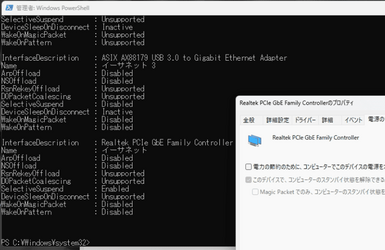
Get-NetAdapterPowerManagement . The network adapter on USB-LAN adapter is changed to disable but the Realtek's network adapter doesn't change to disable. (Please find an attached image.)
How can I disable it?
Which parameter should modify to run network adapter without saving power?
img.png
36.6 KB
· Views: 4
Well-known member
Member
VIP
Hello and welcome to forums!
Like
step 8 in this post , I unchecked it. But still power seems to be saved in 2-3 hours.
How do you know? does the checkbox enable itself again somehow?
but the Realtek's network adapter doesn't change to disable.
I understand from your screenshot that in device manager it says disabled but in PowerShell it says otherwise right?
Power management is a feature controlled by driver, are you using latest driver from mobo site for your NIC?
Windows 11 Pro 23H2 Intel i3 8100 @3.6Ghz 1 x 16GB DDR4 @2400 MHz Nvidia GeForce GT 1030 2GB SDDR4 Windows 11 Pro 23H2 PC/Desktop MSI / MS-7B29 Intel i3 8100 @3.6Ghz H310M PRO-VDH (MS-7B29) 1 x 16GB DDR4 @2400 MHz Nvidia GeForce GT 1030 2GB SDDR4 Realtek VEN_10EC&DEV_0887 / NVIDIA VEN_10DE&DEV_0081 Acer V226HQL 1920 x 1080 SSD 500 GB Crucial MX500 / HDD 1 TB TOSHIBA DT01ACA100 ATX, details unknown Everest 551B details unknown Mechanical Gaming Hydra R7 - Rampage Logitech G703 Down: 28Mbps / Up: 19Mbps Microsoft Edge Microsoft Defender Antivirus Bluetooth: TP Link 5.0 Nano USB adapter UB500
Antidisestablishmentarianist
Pro User
VIP
he network adapter on USB-LAN adapter
If this is a USB plugged in device, you may also need to adjust USB power Management settings in Device Manager.
Windows 11 23H2 Current build AMD Ryzen 9 3950X 4 * 32 GB - Corsair Vengeance 3600 MHz EVGA GeForce RTX 3080 Ti XC3 ULTRA GAMING (12... Windows 11 23H2 Current build PC/Desktop HomeBrew AMD Ryzen 9 3950X MSI MEG X570 GODLIKE 4 * 32 GB - Corsair Vengeance 3600 MHz EVGA GeForce RTX 3080 Ti XC3 ULTRA GAMING (12G-P5-3955-KR) Realtek® ALC1220 Codec 2x Eve Spectrum ES07D03 4K Gaming Monitor (Matte) | Eve Spectrum ES07DC9 4K Gaming Monitor (Glossy) 3x 3840 x 2160 3x Samsung 980 Pro NVMe PCIe 4 M.2 2 TB SSD (MZ-V8P2T0B/AM) } 3x Sabrent Rocket NVMe 4.0 1 TB SSD (USB) PC Power & Cooling’s Silencer Series 1050 Watt, 80 Plus Platinum Fractal Design Define 7 XL Dark ATX Full Tower Case Arctic Liquid Freezer III 420 RGB + Air 3x 140mm case fans (pull front) + 1x 120 mm (push back) and 1 x 120 mm (pull bottom) SteelSeries Apex Pro Wired Gaming Keyboard Logitech MX Master 3S | MX Master 3 for Business AT&T LightSpeed Gigabit Duplex Ftth Nightly (default) + Firefox (stable), Chrome, Edge , Arc Defender + MB 5 Beta
ChromeOS Flex Dev Channel (current) Intel(R) Core(TM) i5-6300U CPU @ 2.40GHz, 250... 16 GB Intel(R) HD Graphics 520 ChromeOS Flex Dev Channel (current) Laptop Dell Latitude E5470 Intel(R) Core(TM) i5-6300U CPU @ 2.40GHz, 2501 Mhz, 2 Core(s), 4 Logical Processor(s) Dell 16 GB Intel(R) HD Graphics 520 Intel(R) HD Graphics 520 + RealTek Audio Dell laptop display 15" 1920 * 1080 Toshiba 128GB M.2 22300 drive Dell Dell Dell Dell Logitech MX Master 3S (shared w. Sys 1) | Dell TouchPad AT&T LightSpeed Gigabit Duplex Ftth