Can't Login to my Netgear Nighthawk AC1900 Router ( -but I used to be able to)


bob17821

Well-known member
Local time
12:23 PM
Posts
89
OS
Windows 11 25H2 26200.7462
I want to create some SSIDs. I've done that in the past by going to "routerlogin.net". But now when I enter routerlogin.net I am taken to what is obviously a Netgear corporate site. This is happening on a new Alienware laptop. But my old Lenovo tower is doing the same thing. Curiously my iPad gets me to the router. In all three cases I am using Chrome.

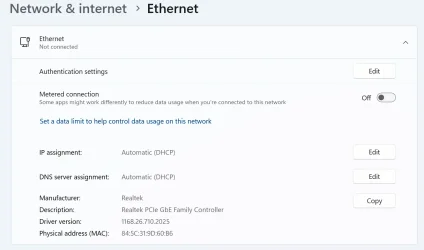
I suspect that this is probably a DNS issue and I know nothing about DNS. But here is what the Alienware says about it:

1766855598620.webp


So it looks like I could specify a DNS address, but I would have no idea what to set it to. And I have been able to find out what the iPad is using.

Thanks very much for any insight anyone might be able to provide. Bob
 

My Computers

System One System Two

  • OS
    Windows 11 25H2 26200.7462
    Computer type
    Laptop
    Manufacturer/Model
    Alienware 16X Aurora
    Memory
    32GB
    Graphics Card(s)
    NVIDIA GeForce RTX5060
    Screen Resolution
    4K
  • Operating System
    Win11
    Computer type
    PC/Desktop
    Manufacturer/Model
    Lenovo Legion
    CPU
    Intel Core i7-12700
    Motherboard
    No Idea
    Memory
    16GB
    Graphics card(s)
    GEFORCE RTX 3060Ti
    Monitor(s) Displays
    Samsung
    Screen Resolution
    4K
Sorry - Version is 25H2 / 26200.7462
 

My Computers

System One System Two

  • OS
    Windows 11 25H2 26200.7462
    Computer type
    Laptop
    Manufacturer/Model
    Alienware 16X Aurora
    Memory
    32GB
    Graphics Card(s)
    NVIDIA GeForce RTX5060
    Screen Resolution
    4K
  • Operating System
    Win11
    Computer type
    PC/Desktop
    Manufacturer/Model
    Lenovo Legion
    CPU
    Intel Core i7-12700
    Motherboard
    No Idea
    Memory
    16GB
    Graphics card(s)
    GEFORCE RTX 3060Ti
    Monitor(s) Displays
    Samsung
    Screen Resolution
    4K

My Computers

System One System Two

  • OS
    All Branches but Release
    Computer type
    Laptop
    Manufacturer/Model
    Acer Nitro ANV15-51
    CPU
    AMD Ryzen 7 7735HS 3200-4500 Mhz 8 cores x 2
    Motherboard
    Sportage_RBH
    Memory
    32 GB DDR5
    Graphics Card(s)
    Radeon Graphic / NVIDIA GeForce RTX 4060 8 GB GDDR6
    Sound Card
    AMD/Realtek(R) Audio
    Monitor(s) Displays
    Integrated Monitor (15.3"vis)
    Screen Resolution
    FHD 1920X1080 16:9 144Hz
    Hard Drives
    KINGSTON OM8SEP4512Q-AA 1TB
    Western Digital 256GB
    PSU
    19V DC 6.32 A 120 W
    Cooling
    Dual Fans
    Mouse
    MS Bluetooth
    Internet Speed
    Fiber 1GB Cox -us & 1GB Orange-fr
    Browser
    Edge Canary- Firefox Nightly-Chrome Dev-Chrome Dev
    Antivirus
    Windows Defender
  • Operating System
    Windows 11 Beta
    Computer type
    Laptop
    Manufacturer/Model
    Asus X751BP
    CPU
    AMD A9-9420
    Memory
    8 GB of DDR4
    Graphics card(s)
    AMD Radeon R5
    Screen Resolution
    1600x900
    Hard Drives
    Seagate 1 TB
Thanks very much OAT. That rang a bell. But when I try it ...

1766857392428.webp

But it must be up and running because I am connnected through it right now!
 

My Computers

System One System Two

  • OS
    Windows 11 25H2 26200.7462
    Computer type
    Laptop
    Manufacturer/Model
    Alienware 16X Aurora
    Memory
    32GB
    Graphics Card(s)
    NVIDIA GeForce RTX5060
    Screen Resolution
    4K
  • Operating System
    Win11
    Computer type
    PC/Desktop
    Manufacturer/Model
    Lenovo Legion
    CPU
    Intel Core i7-12700
    Motherboard
    No Idea
    Memory
    16GB
    Graphics card(s)
    GEFORCE RTX 3060Ti
    Monitor(s) Displays
    Samsung
    Screen Resolution
    4K
Try connecting using other web browser also try your phone to test connection.
 

My Computer

System One

  • OS
    Windows 11
    Computer type
    PC/Desktop
    Manufacturer/Model
    HP Pavilion
    CPU
    AMD Ryzen 7 5700G
    Motherboard
    Erica6
    Memory
    Micron Technology DDR4-3200 16GB
    Graphics Card(s)
    NVIDIA GeForce RTX 3060
    Sound Card
    Realtek ALC671
    Monitor(s) Displays
    Samsung SyncMaster U28E590
    Screen Resolution
    3840 x 2160
    Hard Drives
    SAMSUNG MZVLQ1T0HALB-000H1

My Computers

System One System Two

  • OS
    Windows 11 Pro 25H2
    Computer type
    PC/Desktop
    Manufacturer/Model
    Dell Optiplex 7080
    CPU
    i9-10900 10 core 20 threads
    Motherboard
    DELL 0J37VM
    Memory
    32 gb
    Graphics Card(s)
    none-Intel UHD Graphics 630
    Sound Card
    Integrated Realtek
    Monitor(s) Displays
    Benq 27
    Screen Resolution
    2560x1440
    Hard Drives
    2x1tb Solidigm m.2 nvme /External drives 512gb Samsung m.2 sata+2tb Kingston m2.nvme
    PSU
    500w
    Case
    MT
    Cooling
    Dell Premium
    Keyboard
    Logitech wired
    Mouse
    Logitech wireless
    Internet Speed
    so slow I'm too embarrassed to tell
    Browser
    #1 Edge #2 Firefox
    Antivirus
    Defender+MWB Premium
  • Operating System
    Windows 11 Pro 24H2 26200.8457
    Computer type
    PC/Desktop
    Manufacturer/Model
    Beelink Mini PC SER5
    CPU
    AMD Ryzen 7 6800U
    Memory
    32 gb
    Graphics card(s)
    integrated
    Sound Card
    integrated
    Monitor(s) Displays
    Benq 27
    Screen Resolution
    2560x1440
    Hard Drives
    1TB Crucial nvme
    Keyboard
    Logitech wired
    Mouse
    Logitech wireless
    Internet Speed
    still too embarrassed to tell
    Browser
    Firefox
    Antivirus
    Defender
    Other Info
    System 3 is non compliant Dell 9020 i7-4770/24gb ram Win11 PRO 26200.8457
OAT and FreeBooter - Thants for responding. I should have said earlier that my network configuration is somewhat messed up by the fact that my ISP insists that I use their router, an Arris. But I use it only to get to my router. Here is what my router knows about its connections:

IMG_0023.webp

But it doesn't identify its own address. At least not in a form recognizable to me.
 

My Computers

System One System Two

  • OS
    Windows 11 25H2 26200.7462
    Computer type
    Laptop
    Manufacturer/Model
    Alienware 16X Aurora
    Memory
    32GB
    Graphics Card(s)
    NVIDIA GeForce RTX5060
    Screen Resolution
    4K
  • Operating System
    Win11
    Computer type
    PC/Desktop
    Manufacturer/Model
    Lenovo Legion
    CPU
    Intel Core i7-12700
    Motherboard
    No Idea
    Memory
    16GB
    Graphics card(s)
    GEFORCE RTX 3060Ti
    Monitor(s) Displays
    Samsung
    Screen Resolution
    4K
I suggest you use the Nighthawk app described on that page. . Router Login & Setup | NETGEAR
Hi Glasskuter, I tried it this morning before my post here, but was having problems with it. This morning I couldn't even get logged in to the router. Since then I have solved that problem but still would much prefer a real computer interface where my fat fingers are not a problem and where there is plenty of display space. But it also seems buggy - I've asked it several times to check for firmware updates and each time it has failed. But now I am also very curious about how "routerlogin.net" takes to one site on Windows and to my router on my iPad. Thanks, Bob
 

My Computers

System One System Two

  • OS
    Windows 11 25H2 26200.7462
    Computer type
    Laptop
    Manufacturer/Model
    Alienware 16X Aurora
    Memory
    32GB
    Graphics Card(s)
    NVIDIA GeForce RTX5060
    Screen Resolution
    4K
  • Operating System
    Win11
    Computer type
    PC/Desktop
    Manufacturer/Model
    Lenovo Legion
    CPU
    Intel Core i7-12700
    Motherboard
    No Idea
    Memory
    16GB
    Graphics card(s)
    GEFORCE RTX 3060Ti
    Monitor(s) Displays
    Samsung
    Screen Resolution
    4K
My Router is Netgear 1900 C6900. The default gateway can come with: 192.168.1.1 or can be 10.0.0.1 for isp compatibility.
From your Windows command prompt, type ipconfig To find out what the default gateway is.
 

My Computers

System One System Two

  • OS
    Windows 11 Pro 25H2, Linux Mint 21.3
    Computer type
    PC/Desktop
    Manufacturer/Model
    Self Build Feb.2024
    CPU
    Intel Core i9-14900K @5.8GHZ
    Motherboard
    MSI MAG Z790 Tomahawk Max WiFi 7
    Memory
    64GB (2XG Skill F5-6400J3239G32G) @6800
    Graphics Card(s)
    Radeon (TM) RX 480 Graphics (8 GB)
    Sound Card
    Intergrated Realtek
    Monitor(s) Displays
    Samsung
    Screen Resolution
    3840x2160
    Hard Drives
    1 - Crucial 705 1TB GEN5
    1 - Crucial 705 2TB GEN5
    2 - Crucial T500 2TB Gen4
    PSU
    750W EVGA-G3
    Case
    Antec NX410
    Cooling
    H2O Thermalright
    Keyboard
    Logitech K800
    Mouse
    Logitech Master 2S
    Internet Speed
    600 Mbps
    Browser
    Chrome
    Antivirus
    WD
  • Operating System
    Windows 11 Pro & Linux Mint X64
    Computer type
    PC/Desktop
    Manufacturer/Model
    MSI Z77 MPower (MS-7751)
    CPU
    Intel(R) Core(TM) i7-3770K CPU @ 4.20 GHz
    Motherboard
    Z77 MPower (MS-7751)
    Memory
    32.0GB Dual-Channel CMY16GX3M2A1600C9
    Graphics card(s)
    NVIDIA GeForce GT 740
    Monitor(s) Displays
    40" Samsung
    Screen Resolution
    1920X1080
    Hard Drives
    WIN10 - 111GB Samsung SSD 840 Series
    WIN11 - 223GB Crucial CT240BX500SSD
    2X931GB Crucial CT1000BX500SSD1
    PSU
    Antec 850W
    Case
    Antec 900
    Cooling
    H20
    Keyboard
    Logitech K800 Wireless
    Mouse
    Logitech MX Master 2S
    Internet Speed
    100 Mbps
    Browser
    Chrome
    Antivirus
    Windows Defender
My Router is Netgear 1900 C6900. The default gateway can come with: 192.168.1.1 or can be 10.0.0.1 for isp compatibility.
From your Windows command prompt, type ipconfig To find out what the default gateway is.
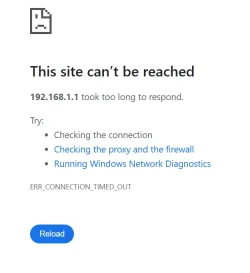
Thanks very much Topguncp but both resulted in error messages.
 

My Computers

System One System Two

  • OS
    Windows 11 25H2 26200.7462
    Computer type
    Laptop
    Manufacturer/Model
    Alienware 16X Aurora
    Memory
    32GB
    Graphics Card(s)
    NVIDIA GeForce RTX5060
    Screen Resolution
    4K
  • Operating System
    Win11
    Computer type
    PC/Desktop
    Manufacturer/Model
    Lenovo Legion
    CPU
    Intel Core i7-12700
    Motherboard
    No Idea
    Memory
    16GB
    Graphics card(s)
    GEFORCE RTX 3060Ti
    Monitor(s) Displays
    Samsung
    Screen Resolution
    4K

My Computers

System One System Two

  • OS
    Windows 11 25H2 26200.7462
    Computer type
    Laptop
    Manufacturer/Model
    Alienware 16X Aurora
    Memory
    32GB
    Graphics Card(s)
    NVIDIA GeForce RTX5060
    Screen Resolution
    4K
  • Operating System
    Win11
    Computer type
    PC/Desktop
    Manufacturer/Model
    Lenovo Legion
    CPU
    Intel Core i7-12700
    Motherboard
    No Idea
    Memory
    16GB
    Graphics card(s)
    GEFORCE RTX 3060Ti
    Monitor(s) Displays
    Samsung
    Screen Resolution
    4K
The correct command to get your default gateways is ipconfig /all
 

My Computers

System One System Two

  • OS
    Windows 11 Pro 25H2
    Computer type
    PC/Desktop
    Manufacturer/Model
    Dell Optiplex 7080
    CPU
    i9-10900 10 core 20 threads
    Motherboard
    DELL 0J37VM
    Memory
    32 gb
    Graphics Card(s)
    none-Intel UHD Graphics 630
    Sound Card
    Integrated Realtek
    Monitor(s) Displays
    Benq 27
    Screen Resolution
    2560x1440
    Hard Drives
    2x1tb Solidigm m.2 nvme /External drives 512gb Samsung m.2 sata+2tb Kingston m2.nvme
    PSU
    500w
    Case
    MT
    Cooling
    Dell Premium
    Keyboard
    Logitech wired
    Mouse
    Logitech wireless
    Internet Speed
    so slow I'm too embarrassed to tell
    Browser
    #1 Edge #2 Firefox
    Antivirus
    Defender+MWB Premium
  • Operating System
    Windows 11 Pro 24H2 26200.8457
    Computer type
    PC/Desktop
    Manufacturer/Model
    Beelink Mini PC SER5
    CPU
    AMD Ryzen 7 6800U
    Memory
    32 gb
    Graphics card(s)
    integrated
    Sound Card
    integrated
    Monitor(s) Displays
    Benq 27
    Screen Resolution
    2560x1440
    Hard Drives
    1TB Crucial nvme
    Keyboard
    Logitech wired
    Mouse
    Logitech wireless
    Internet Speed
    still too embarrassed to tell
    Browser
    Firefox
    Antivirus
    Defender
    Other Info
    System 3 is non compliant Dell 9020 i7-4770/24gb ram Win11 PRO 26200.8457
The correct command to get your default gateways is ipconfig /all
Thanks glasskuter! I've got some committments this aftermoon but I will be back on this tomorrow morning. Thanks, Bob
 

My Computers

System One System Two

  • OS
    Windows 11 25H2 26200.7462
    Computer type
    Laptop
    Manufacturer/Model
    Alienware 16X Aurora
    Memory
    32GB
    Graphics Card(s)
    NVIDIA GeForce RTX5060
    Screen Resolution
    4K
  • Operating System
    Win11
    Computer type
    PC/Desktop
    Manufacturer/Model
    Lenovo Legion
    CPU
    Intel Core i7-12700
    Motherboard
    No Idea
    Memory
    16GB
    Graphics card(s)
    GEFORCE RTX 3060Ti
    Monitor(s) Displays
    Samsung
    Screen Resolution
    4K
Probably a Browser Setting, security setting or Cookie or added security App of some kind getting in the way.

I don't use Chrome anymore but in Edge settings:
Settings > Privacy, search, and services > Security > ...

Settings > Privacy, search, and services > Cookies > See all Cookies and site data > obviously look for 192.168.1.1 and routerlogin.net and delete those cookies.
But now when I enter routerlogin.net I am taken to what is obviously a Netgear corporate site. This is happening on a new Alienware laptop. But my old Lenovo tower is doing the same thing.
That is due to a Web Browser setting.
In Edge settings:
Privacy > Search and connected experiences > Suggest similar sites when a website can't be found > Off.
Address bar and search > Search suggestions and filters >...

Obviously for the Chrome Browser Settings/routes and expressions will be different and maybe other settings need to be addressed.

I use a Netgear Router and Firmware updates are manual now.
 

My Computer

System One

  • OS
    Windows 11
The correct command to get your default gateways is ipconfig /all
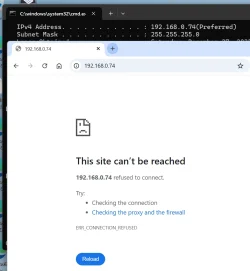
Hi glasskuter, Thanks. I used to be familiar with such tools but that was in an earlier life time. So looking at the output of ipconfig it looked to my ignorant eyes like the router address is 192.168.0.74 but ... (or maybe wsa correct but the router is in a foul mood?)

1767106275613.webp
 

My Computers

System One System Two

  • OS
    Windows 11 25H2 26200.7462
    Computer type
    Laptop
    Manufacturer/Model
    Alienware 16X Aurora
    Memory
    32GB
    Graphics Card(s)
    NVIDIA GeForce RTX5060
    Screen Resolution
    4K
  • Operating System
    Win11
    Computer type
    PC/Desktop
    Manufacturer/Model
    Lenovo Legion
    CPU
    Intel Core i7-12700
    Motherboard
    No Idea
    Memory
    16GB
    Graphics card(s)
    GEFORCE RTX 3060Ti
    Monitor(s) Displays
    Samsung
    Screen Resolution
    4K
I suggest you use the Nighthawk app described on that page. . Router Login & Setup | NETGEAR
Thanks. Yes I've been working on the app in parallel. It took a while to get it working but now that it mostly seems to work it loops forever when I tap on the "support" option. I think that the problem is that the router soft/firmware is too old. But without a working address there is now way to update the software (from windows - maybe there would be a way from my iPad if I just understood its file system).
 

My Computers

System One System Two

  • OS
    Windows 11 25H2 26200.7462
    Computer type
    Laptop
    Manufacturer/Model
    Alienware 16X Aurora
    Memory
    32GB
    Graphics Card(s)
    NVIDIA GeForce RTX5060
    Screen Resolution
    4K
  • Operating System
    Win11
    Computer type
    PC/Desktop
    Manufacturer/Model
    Lenovo Legion
    CPU
    Intel Core i7-12700
    Motherboard
    No Idea
    Memory
    16GB
    Graphics card(s)
    GEFORCE RTX 3060Ti
    Monitor(s) Displays
    Samsung
    Screen Resolution
    4K
Open File Explorer and click Network from navigation pane and find your router, right-click it select View Device Webpage.
 

My Computer

System One

  • OS
    Windows 11
    Computer type
    PC/Desktop
    Manufacturer/Model
    HP Pavilion
    CPU
    AMD Ryzen 7 5700G
    Motherboard
    Erica6
    Memory
    Micron Technology DDR4-3200 16GB
    Graphics Card(s)
    NVIDIA GeForce RTX 3060
    Sound Card
    Realtek ALC671
    Monitor(s) Displays
    Samsung SyncMaster U28E590
    Screen Resolution
    3840 x 2160
    Hard Drives
    SAMSUNG MZVLQ1T0HALB-000H1
I don't know if is is interesting or helpful ... but whatever is at 192.168.0.74 responds to a ping. But I guess most things would. Right?
 

My Computers

System One System Two

  • OS
    Windows 11 25H2 26200.7462
    Computer type
    Laptop
    Manufacturer/Model
    Alienware 16X Aurora
    Memory
    32GB
    Graphics Card(s)
    NVIDIA GeForce RTX5060
    Screen Resolution
    4K
  • Operating System
    Win11
    Computer type
    PC/Desktop
    Manufacturer/Model
    Lenovo Legion
    CPU
    Intel Core i7-12700
    Motherboard
    No Idea
    Memory
    16GB
    Graphics card(s)
    GEFORCE RTX 3060Ti
    Monitor(s) Displays
    Samsung
    Screen Resolution
    4K
Your Netgear is in Access Point mode, so it may not have an IP address as such - routerlogin.com/net acts like a captive portal to redirect you to the Netgear admin page (not all browsers / devices handle that the same way, hence some of the issues you're seeing on different devices). 192.168.0.74 is one of your devices named Aurora. Personally I would back up the Netgear configuration, save the latest firmware to a PC, connect the PC via ethernet to one of the LAN ports on the Netgear and update it manually that way. (Don't do a firmware upgrade over wifi connection). Support page for that router is here, with latest firmware, AP mode info etc.
You might need to take it out of AP mode to access the admin page directly and do the update.
 
Last edited:

My Computer

System One

  • OS
    Win11Pro 24H2 (26100.7462)
    Computer type
    PC/Desktop
    Manufacturer/Model
    self-built
    CPU
    i7-12700f
    Motherboard
    gigabyte auros b660
    Memory
    32gb ddr4
    Graphics Card(s)
    nvidia rtx3060ti
    Sound Card
    onboard realtek
    Monitor(s) Displays
    1 x benq, 2 x lg
    Screen Resolution
    1 at 2560x1080, 2 at 1920x1080
    Hard Drives
    nvme 1tb crucial ssd
    sata 1tb samsung ssd
    1tb HDD, 3tb HDD
    PSU
    corsair rm750
    Case
    NZXT H710
    Cooling
    BeQuiet Dark Rock
    Keyboard
    steelseries apex 3
    Mouse
    generic usb
    Internet Speed
    500 down 20 up
    Browser
    librewolf
    Antivirus
    eset nod32
Back
Top Bottom