Can't Logon / No Safe Mode


binky

New member
Local time
2:45 PM
Posts
7
OS
Windows 11
I have, also, posted the following to the O&O Software forum and it's written for people who aren't familiar with O&O Shutup.

I'm setting up a Lenovo v15 Gen 2 laptop with wondows11. It was set up for password-less login.

I've created a restore point every time I use Revo uninstall. I used WinUtil to set updates to the "Security" setting. Before applying changes with O&O Shutup10++ (version as of 2025/11) I set a restore point and performed only the "Apply only recommended settings" (green. yes) settings.

When I restarted, I received a "Hello" screen and when I clicked on it, I came to a password screen. It didn't accept a blank password or the Admin password.

I can logon to the recovery option screen (shift+restart) > "Troubleshoot" > "Advanced Options" > "startup repair" says it couldn't repair your PC.

Next I went to > "Troubleshoot" > "Advanced Options" > "System Restore" and the process can't find any restore points.

When I try the restart options, "Troubleshoot" > "Advanced Options" > "Startup Settings" > "Restart" > F4 to enter into "Save Mode". When the system reboots, I return to the Hello screen followed by the logon screen. Never entering Save mode.

When I use the "Command Prompt" option, it starts at X:\windows\system32" and when I DIR C: there is nothing there. My copy of O&O Shutup is located in C:\UserApps which doesn't show up in a DIR of the drive. So, I can't use the CMD to access O&O Shutup.

Bottom line is that I can't get into Safe Mode and can't come up with any way to run O&O Shutup's restore option. I do have a system recovery USB which doesn't seem to have any options not available with the recovery options.

Does anyone have a solution to my logon problem?
 

My Computer

System One

  • OS
    Windows 11
    Computer type
    Laptop
    Manufacturer/Model
    Lenovo/ V15 Gen 2
Sounds to me like there's either no recovery partition or it's corrupted since you can't get into recovery options.

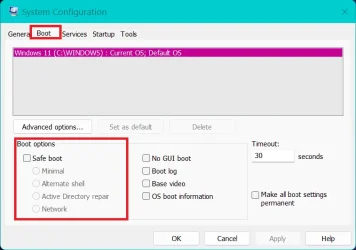
Msconfig-option 2 here
 

Attachments

  • Screenshot 2025-11-10 183259.webp
    Screenshot 2025-11-10 183259.webp
    24 KB · Views: 2

My Computers

System One System Two

  • OS
    Windows 11 Pro 25H2
    Computer type
    PC/Desktop
    Manufacturer/Model
    Dell Optiplex 7080
    CPU
    i9-10900 10 core 20 threads
    Motherboard
    DELL 0J37VM
    Memory
    32 gb
    Graphics Card(s)
    none-Intel UHD Graphics 630
    Sound Card
    Integrated Realtek
    Monitor(s) Displays
    Benq 27
    Screen Resolution
    2560x1440
    Hard Drives
    2x1tb Solidigm m.2 nvme /External drives 512gb Samsung m.2 sata+2tb Kingston m2.nvme
    PSU
    500w
    Case
    MT
    Cooling
    Dell Premium
    Keyboard
    Logitech wired
    Mouse
    Logitech wireless
    Internet Speed
    so slow I'm too embarrassed to tell
    Browser
    #1 Edge #2 Firefox
    Antivirus
    Defender+MWB Premium
  • Operating System
    Windows 11 Pro 24H2 26200.8457
    Computer type
    PC/Desktop
    Manufacturer/Model
    Beelink Mini PC SER5
    CPU
    AMD Ryzen 7 6800U
    Memory
    32 gb
    Graphics card(s)
    integrated
    Sound Card
    integrated
    Monitor(s) Displays
    Benq 27
    Screen Resolution
    2560x1440
    Hard Drives
    1TB Crucial nvme
    Keyboard
    Logitech wired
    Mouse
    Logitech wireless
    Internet Speed
    still too embarrassed to tell
    Browser
    Firefox
    Antivirus
    Defender
    Other Info
    System 3 is non compliant Dell 9020 i7-4770/24gb ram Win11 PRO 26200.8457
"Command Prompt" option, it starts at X:\windows\system32"
That indicates that you are in the Recovery environment [WinRE].

WinRE decides what to call each drive it finds as it finds it. Disk drive letters are often not the same as when Windows finds & labels them.
So you'll have to browse around to find put the [temporary] drive letters being used for your drives.


Denis
 

My Computer

System One

  • OS
    Windows 11 Home x64 Version 25H2 Build 26200.8037
please try
start > Windows tools > system configuration

in this Window
second tab > boot
about halfway down is a check box for 'safe boot'
also you check other options here like networking.

save settings and then restart into safe mode.
best of luck Steve ..
 

My Computers

System One System Two

  • OS
    Debian Trixie KDE Windows 11 Home
    Computer type
    PC/Desktop
    Manufacturer/Model
    HP 24" AiO
    CPU
    Ryzen 7 5825u
    Motherboard
    HP
    Memory
    64GB DDR4 3200
    Graphics Card(s)
    Ryzen 7 5825u
    Sound Card
    RealTek
    Monitor(s) Displays
    24" HP AiO
    Screen Resolution
    1920 x 1080 @60 Hz
    Hard Drives
    1TB WD Blue SN580 M2 SSD Partitioned.
    2x 1TB USB HDD External Backup/Storage.
    PSU
    90W external power brick
    Case
    24" All in One
    Cooling
    Default Air Cooling
    Keyboard
    HP WiFi UK extended
    Mouse
    HP WiFi 3 Button
    Internet Speed
    1GB full fibre
    Browser
    Edge & Firefox
    Antivirus
    AVG Internet Security/Windows Defender
    Other Info
    Mainly Open Source Software
  • Operating System
    Ubuntu 22.04.5 LTS
    Computer type
    Laptop
    Manufacturer/Model
    Dell 13" Latitude 2017
    CPU
    i5 7200u
    Motherboard
    Dell
    Memory
    16GB DDR4
    Graphics card(s)
    Intel
    Sound Card
    Intel
    Monitor(s) Displays
    13" Dell Laptop
    Hard Drives
    250GB Crucial 2.5" SSD
    Mouse
    Generic WiFi 3 button
    Internet Speed
    WiFi only
    Browser
    Firefox
    Antivirus
    ClamAV TK
    Other Info
    Mainly Open Source Software
That indicates that you are in the Recovery environment [WinRE].

WinRE decides what to call each drive it finds as it finds it. Disk drive letters are often not the same as when Windows finds & labels them.
So you'll have to browse around to find put the [temporary] drive letters being used for your drives.


Denis
I figured out that the X: was assigned by "recovery" itself. Below is a variation of a solution I remember from the distant past. I don't like to make changes without a backout plan and will try to gather other opinions about this solution before continuing. Can't form a picture of the password assignment at the last step and would really like a clear understanding of that section before getting into it.

Anyway, once I get to the revovery "Command Prompt" option I'm to follow these steps.

"D:" is the system drive in this example.

1) Run the following command
----------------------------
"copy D:\Windows\System32\Utilman.exe D:\ D:\Windows\System32\Utilman.exebak"

2) Run the following command
----------------------------
"copy D:\Windows\System32\cmd.exe D:\ D:\Windows\System32\Utilman.exe /y"

3) Reboot into Windows - At the login screen, click on "accessibility options", which will open command prompt.

4) In CMD, type: "net localgroup administrators", to list all accounts.

5) Choose the user which you want to reset, with this command - "net user SomeAccount *"

6) Give the account a new password, and you are ready to go.
 

My Computer

System One

  • OS
    Windows 11
    Computer type
    Laptop
    Manufacturer/Model
    Lenovo/ V15 Gen 2
I figured out that the X: was assigned by "recovery" itself
That's correct. WinRE [& WinPE] assign drive letter X:\ to the system drive of the recovery environment.

1) Run the following command
"copy D:\Windows\System32\Utilman.exe D:\ D:\Windows\System32\Utilman.exebak"
2) Run the following command
"copy D:\Windows\System32\cmd.exe D:\ D:\Windows\System32\Utilman.exe /y"
Yes, that is one way of doing it *** but do be careful to check what the normal system drive letter is when in the Recovery environment.
It won't be X:\ as that refers to the WinRE system drive only and that will have disapepared when you reboot.
*** Freebooter [below] says that does not work anymore.

4) In CMD, type: "net localgroup administrators", to list all accounts
The normal cmd to list all accounts is
net user
The cmd you mentioned
net localgroup administrators
lists all Admin accounts.

5) Choose the user which you want to reset, with this command - "net user SomeAccount *"
Assuming the account concerned is a local account then resetting its password can be done on the computer itself.
See Reset account password - ElevenForumTutorials

6) Give the account a new password
Assuming the account concerned is a local account then setting a new password can be done on the computer itself.
See Change account password - ElevenForumTutorials


Denis
 
Last edited:

My Computer

System One

  • OS
    Windows 11 Home x64 Version 25H2 Build 26200.8037
Denis -

I guess I should have said that this laptop is on a single computer network and I'm the only user. That's the reason I bypassed login.

Thank you for your comments!
 

My Computer

System One

  • OS
    Windows 11
    Computer type
    Laptop
    Manufacturer/Model
    Lenovo/ V15 Gen 2
1) Run the following command
"copy D:\Windows\System32\Utilman.exe D:\ D:\Windows\System32\Utilman.exebak"
"copy D:\Windows\System32\cmd.exe D:\ D:\Windows\System32\Utilman.exe /y"

I've only just noticed that you have additional D:\ entries in the middle of your commands. They will cause the cmds to go wrong.
"copy D:\Windows\System32\Utilman.exe D:\ D:\Windows\System32\Utilman.exebak"
"copy D:\Windows\System32\cmd.exe D:\ D:\Windows\System32\Utilman.exe /y"


Denis
 

My Computer

System One

  • OS
    Windows 11 Home x64 Version 25H2 Build 26200.8037
BTW - The name over the login password box is "anona". This is a Windows generated 'account" and is one of the entries under C:Users and almost anything I use is part of the "anona" path to Documents, AppData etc., but is it a real account or does it have a password. Haven't run the "net user" command yet. I guess I wondering who the login screen is referring to by "anona". I can't see any way to change to a known user.
 

My Computer

System One

  • OS
    Windows 11
    Computer type
    Laptop
    Manufacturer/Model
    Lenovo/ V15 Gen 2
"anona". This is a Windows generated 'account"
Windows does not generate an account called anona.
If you created an MSAccount, did you by any chance tell them your name was anona-something?
For MSAccount-linked user accounts, Windows uses a short title consisting of the first five characters of the name used when creating the MSAccount.
So I think that's what is happening in this case.
If, for example, you enter this command into a cmd prompt window
echo %UserName%
I think you'll find that anona is your short-form username.

You'll probably know more when you've run the
Net user
command and I suggest you also run
Net user anona
to get some details about that particular account.

does it have a password
There's no way of finding out for a local user account except by trying to leave the password inout box empty when logging in since that will either work or not work.
Every MSAccount-linked user account has a password.


Best of luck,
Denis
 

My Computer

System One

  • OS
    Windows 11 Home x64 Version 25H2 Build 26200.8037
This is from reddit article and has more to say.

Utilman.exe Trick: This involves replacing utilman.exe with cmd.exe to reset passwords. "I just discovered and successfully used the trick where one can rename Utilman.exe to something else and cmd.exe to utilman.exe and use this to bypass the windows password."
I do have a rescue USB.
 

My Computer

System One

  • OS
    Windows 11
    Computer type
    Laptop
    Manufacturer/Model
    Lenovo/ V15 Gen 2
This video guide provides a detailed walkthrough on enabling the Windows built-in Administrator account using Hiren's BootCD.


My Computer

System One

  • OS
    Windows 11
    Computer type
    PC/Desktop
    Manufacturer/Model
    HP Pavilion
    CPU
    AMD Ryzen 7 5700G
    Motherboard
    Erica6
    Memory
    Micron Technology DDR4-3200 16GB
    Graphics Card(s)
    NVIDIA GeForce RTX 3060
    Sound Card
    Realtek ALC671
    Monitor(s) Displays
    Samsung SyncMaster U28E590
    Screen Resolution
    3840 x 2160
    Hard Drives
    SAMSUNG MZVLQ1T0HALB-000H1
Another thing I forgot to say is that this is the first time I have a pre-built computer. Normally, I buy the parts, assemble, and install software.
 

My Computer

System One

  • OS
    Windows 11
    Computer type
    Laptop
    Manufacturer/Model
    Lenovo/ V15 Gen 2

My Computer

System One

  • OS
    Windows 11 Home x64 Version 25H2 Build 26200.8037
Denis,

Hiren's was a joy to use and, I'm up and running again. Will take your advice about the dual Admin accounts. I up here in Tacoma, WA should you ever need anything from this area or need a hand online. Again many thanks.
 

My Computer

System One

  • OS
    Windows 11
    Computer type
    Laptop
    Manufacturer/Model
    Lenovo/ V15 Gen 2
Glad it's all resolved,
Denis
 

My Computer

System One

  • OS
    Windows 11 Home x64 Version 25H2 Build 26200.8037
BTW - The name over the login password box is "anona"
When you first setup Win 11 did you allow Windows to do a standard install using a MS account. If you did, is anona the first 5 characters of your email address. Not being allowed to chose a user name and where you want to save your User folders is why I use a Win 11 install disk made with Rufus. IMO, Mamma MS has no right to decide what my username is going to be and where I want my User folders located. They say it's about security but I call it Bull! My thought about where MS wants the User folders located is so they can con users into either subscribing to MS 365 or buy more more OneDrive storage space, Using OneDrive for ones User folder is not necessary, If one knows how the User folders can be moved to a local drive. Again this is just MHO, MS is hoping that users don't know this is a option or how to do it if that's what they want. I won't get political except to say that the politicians in Washington could stop it if they wanted.
 

My Computers

System One System Two

  • OS
    Windows 11 Pro 25H2
    Computer type
    PC/Desktop
    Manufacturer/Model
    PowerSpec B746
    CPU
    Intel Core i7-10700K
    Motherboard
    ASRock Z490 Phantom Gaming 4/ax
    Memory
    16GB (8GB PC4-19200 DDR4 SDRAM x2)
    Graphics Card(s)
    NVIDIA GeForce GTX 1050 TI
    Sound Card
    Realtek Audio
    Monitor(s) Displays
    #1. LG ULTRAWIDE 34" #2. AOC Q32G2WG3 32"
    Screen Resolution
    #1. 3440 X 1440 #2. 1920 x 1080
    Hard Drives
    NVMe WDC WDS100T2B0C-00PXH0 1TB
    Samsung SSD 860 EVO 1TB
    PSU
    750 Watts (62.5A)
    Case
    PowerSpec/Lian Li ATX 205
    Keyboard
    Logitech K270
    Mouse
    Logitech M185
    Browser
    Microsoft Edge and Firefox
    Antivirus
    Webroot SecureAnywhere CE 26.1
  • Operating System
    Windows 11 Canary Channel
    Computer type
    PC/Desktop
    Manufacturer/Model
    PowerSpec G156
    CPU
    Intel Core i5-8400 CPU @ 2.80GHz
    Motherboard
    AsusTeK Prime B360M-A
    Memory
    16 MB DDR 4-2666
    Monitor(s) Displays
    23" Speptre HDMI 75Hz
    Screen Resolution
    1920x1080
    Hard Drives
    Samsung 970 EVO 500GB NVMe
    Keyboard
    Logitek K270
    Mouse
    Logitek M185
    Browser
    Firefox, Edge and Edge Canary
    Antivirus
    Windows Defender
Back
Top Bottom