Can't (re)register School/Work account


Shibogama

Member
Member
Local time
5:32 AM
Posts
6
OS
Win11 Pro 25H2 26200.7309
Hello All,
I hope this is the proper department.
It's about accounts.

After a recent security alert Microsoft blocked my email (a work & school account) and I was not able to send emails. Our admin has unblocked it with a new password - and it works.
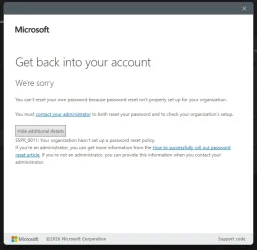
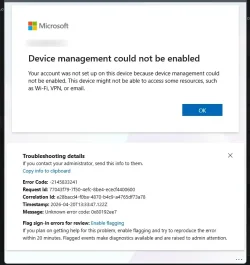
However, I cannot re-register it under Accounts > School & Work Accounts. I get error messages (see attachments)
I don't see the account listed there. One could say "Why bother ... as long as it works". But it buggs me and something is not right.
I tried to enable Device Manager (as suggested) but did not find a way to do so.
Nothing has been changed in the machine anyways and it always worked.
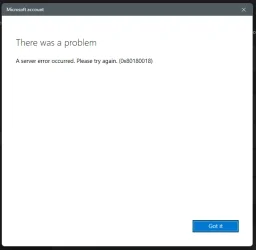
Also tried "cant access your account?" but : error - server error occurred (0x80180018)
(please see attachments)

Any suggestions?
Thanks
 
Windows Build/Version
Win11 Pro - 25H2 - 26200.8246

Attachments
  • Screenshot 2026-04-20 090959.webp
    Screenshot 2026-04-20 090959.webp
    9 KB · Views: 1
  • Screenshot 2026-04-20 114006.webp
    Screenshot 2026-04-20 114006.webp
    25.3 KB · Views: 1
  • Screenshot 2026-04-20 083405.webp
    Screenshot 2026-04-20 083405.webp
    29.5 KB · Views: 1

My Computer

System One

  • OS
    Win11 Pro 25H2 26200.7309
    Computer type
    PC/Desktop
    Manufacturer/Model
    Custom
    CPU
    13th gen i9-13900F
    Motherboard
    ASUSTeK COMPUTER INC. Model ROG MAXIMUS Z790 HERO (LGA1700)
    Memory
    32 GB
    Graphics Card(s)
    Nvidia GeForce RTX 4070
    Monitor(s) Displays
    DELL UP2716D on NVIDIA GeForce RTX 4070 - VG939Sm
    Screen Resolution
    2560x1440 pixels
    Hard Drives
    WD_BLACK SN850X 1000GB (SSD) x 2
    Browser
    Edge
    Antivirus
    Windows Defender / Malwarebytes
Courtesy of AI
Error 0x80180018 almost always means the device is still registered in Azure AD/Intune under your account, even if Windows shows nothing locally. When your account was blocked, the device record likely got stuck.

Your admin needs to:
  • Delete the old device entry in Azure AD → Devices (If it shows as Disabled, Blocked, or just stale, remove it.)
  • Make sure your account is allowed to:Join devices, Register devices, and Enroll in MDM.
  • After the device is removed server‑side, Windows will usually let you re‑add the Work/School account normally.
It’s almost never a PC issue — it’s a server‑side device registration mismatch after the account was unblocked.
 

My Computers

System One System Two

  • OS
    Windows 11 Pro 25H2 26200.8655
    Computer type
    PC/Desktop
    Manufacturer/Model
    Dell Optiplex 7080
    CPU
    i9-10900 10 core 20 threads
    Motherboard
    DELL 0J37VM
    Memory
    32 gb
    Graphics Card(s)
    none-Intel UHD Graphics 630
    Sound Card
    Integrated Realtek
    Monitor(s) Displays
    Benq 27
    Screen Resolution
    2560x1440
    Hard Drives
    2x1tb Solidigm m.2 nvme /External drives 512gb Samsung m.2 sata+2tb Kingston m2.nvme
    PSU
    500w
    Case
    MT
    Cooling
    Dell Premium
    Keyboard
    Logitech wired
    Mouse
    Logitech wireless
    Internet Speed
    so slow I'm too embarrassed to tell
    Browser
    #1 Edge #2 Firefox
    Antivirus
    Defender+MWB Premium
  • Operating System
    Windows 11 Pro 24H2 26200.8457
    Computer type
    PC/Desktop
    Manufacturer/Model
    Beelink Mini PC SER5
    CPU
    AMD Ryzen 7 6800U
    Memory
    32 gb
    Graphics card(s)
    integrated
    Sound Card
    integrated
    Monitor(s) Displays
    Benq 27
    Screen Resolution
    2560x1440
    Hard Drives
    1TB Crucial nvme
    Keyboard
    Logitech wired
    Mouse
    Logitech wireless
    Internet Speed
    still too embarrassed to tell
    Browser
    Firefox
    Antivirus
    Defender
    Other Info
    System 3 is non compliant Dell 9020 i7-4770/24gb ram Win11 PRO 26200.8457
Hello glasscutter,
thanks for the reply!
Would it be too much too ask for step-by-step instruction to do it?
I'm the administrator on this machine/

Thanks
 

My Computer

System One

  • OS
    Win11 Pro 25H2 26200.7309
    Computer type
    PC/Desktop
    Manufacturer/Model
    Custom
    CPU
    13th gen i9-13900F
    Motherboard
    ASUSTeK COMPUTER INC. Model ROG MAXIMUS Z790 HERO (LGA1700)
    Memory
    32 GB
    Graphics Card(s)
    Nvidia GeForce RTX 4070
    Monitor(s) Displays
    DELL UP2716D on NVIDIA GeForce RTX 4070 - VG939Sm
    Screen Resolution
    2560x1440 pixels
    Hard Drives
    WD_BLACK SN850X 1000GB (SSD) x 2
    Browser
    Edge
    Antivirus
    Windows Defender / Malwarebytes

I'd be more than happy to...if I knew the answer. As I said, the response I gave came from AI. I believe your Entra(ie:Azure)/Intune administrator has to do it. I would suggest contacting your IT department.
 

My Computers

System One System Two

  • OS
    Windows 11 Pro 25H2 26200.8655
    Computer type
    PC/Desktop
    Manufacturer/Model
    Dell Optiplex 7080
    CPU
    i9-10900 10 core 20 threads
    Motherboard
    DELL 0J37VM
    Memory
    32 gb
    Graphics Card(s)
    none-Intel UHD Graphics 630
    Sound Card
    Integrated Realtek
    Monitor(s) Displays
    Benq 27
    Screen Resolution
    2560x1440
    Hard Drives
    2x1tb Solidigm m.2 nvme /External drives 512gb Samsung m.2 sata+2tb Kingston m2.nvme
    PSU
    500w
    Case
    MT
    Cooling
    Dell Premium
    Keyboard
    Logitech wired
    Mouse
    Logitech wireless
    Internet Speed
    so slow I'm too embarrassed to tell
    Browser
    #1 Edge #2 Firefox
    Antivirus
    Defender+MWB Premium
  • Operating System
    Windows 11 Pro 24H2 26200.8457
    Computer type
    PC/Desktop
    Manufacturer/Model
    Beelink Mini PC SER5
    CPU
    AMD Ryzen 7 6800U
    Memory
    32 gb
    Graphics card(s)
    integrated
    Sound Card
    integrated
    Monitor(s) Displays
    Benq 27
    Screen Resolution
    2560x1440
    Hard Drives
    1TB Crucial nvme
    Keyboard
    Logitech wired
    Mouse
    Logitech wireless
    Internet Speed
    still too embarrassed to tell
    Browser
    Firefox
    Antivirus
    Defender
    Other Info
    System 3 is non compliant Dell 9020 i7-4770/24gb ram Win11 PRO 26200.8457
  1. portal.azure.com
  2. Click on Microsoft Entra ID at the top (under Azure Services)
  3. on the left, under Manage, click Devices
  4. click on "All devices," and search for the device name.
  5. Per instructions above, if it shows as Disabled, Blocked, or just stale, remove it.
To re-add the device, you'll need permissions. Your IT department may or may not let you re-register on your own. We, for example, allow registrations but not joins.
 

My Computer

System One

  • OS
    Windows 11 Pro 25H2
    Computer type
    PC/Desktop
    Manufacturer/Model
    Intel NUC12WSHi7
    CPU
    12th Gen Core i7-1260P
    Motherboard
    NUC12WSBi7
    Memory
    64 GB Micron PC4-25600
    Graphics Card(s)
    Intel Iris Xe Graphics
    Sound Card
    on-board Realtek HD Audio
    Monitor(s) Displays
    Dell U3219Q
    Screen Resolution
    3840 x 2160
    Hard Drives
    Samsung SSD 990 PRO 1TB
    Crucial MX500 2 TB
    Antivirus
    Microsoft Defender

My Computers

System One System Two

  • OS
    Windows 11 Pro 25H2 26200.8655
    Computer type
    PC/Desktop
    Manufacturer/Model
    Dell Optiplex 7080
    CPU
    i9-10900 10 core 20 threads
    Motherboard
    DELL 0J37VM
    Memory
    32 gb
    Graphics Card(s)
    none-Intel UHD Graphics 630
    Sound Card
    Integrated Realtek
    Monitor(s) Displays
    Benq 27
    Screen Resolution
    2560x1440
    Hard Drives
    2x1tb Solidigm m.2 nvme /External drives 512gb Samsung m.2 sata+2tb Kingston m2.nvme
    PSU
    500w
    Case
    MT
    Cooling
    Dell Premium
    Keyboard
    Logitech wired
    Mouse
    Logitech wireless
    Internet Speed
    so slow I'm too embarrassed to tell
    Browser
    #1 Edge #2 Firefox
    Antivirus
    Defender+MWB Premium
  • Operating System
    Windows 11 Pro 24H2 26200.8457
    Computer type
    PC/Desktop
    Manufacturer/Model
    Beelink Mini PC SER5
    CPU
    AMD Ryzen 7 6800U
    Memory
    32 gb
    Graphics card(s)
    integrated
    Sound Card
    integrated
    Monitor(s) Displays
    Benq 27
    Screen Resolution
    2560x1440
    Hard Drives
    1TB Crucial nvme
    Keyboard
    Logitech wired
    Mouse
    Logitech wireless
    Internet Speed
    still too embarrassed to tell
    Browser
    Firefox
    Antivirus
    Defender
    Other Info
    System 3 is non compliant Dell 9020 i7-4770/24gb ram Win11 PRO 26200.8457

Latest Support Threads

Back
Top Bottom