Can't Remove Samsung Security From Windows 11


ZetaCancri

Zeta Cancri
Local time
10:32 PM
Posts
9
Location
NY
OS
Windows 11 Home (Version 25H2)
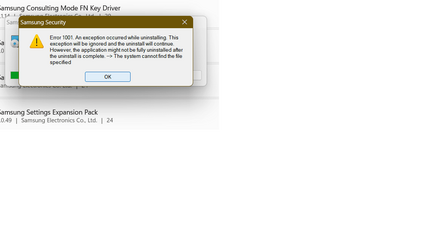
I recently upgraded to Windows 11, and I can't seem to remove this program from the Apps menu - it gives me an error message and does not let me uninstall it.

Even more weird is I can't seem to find any information on how to remove it on google, either. I've posted screenshots below of the app and the error...

Despite the error message saying the uninstall with continue, it doesn't, and still leaves the app in the apps list.

Any help is greatly appreciated!
 
Windows Build/Version
Windows 11 22H2

Attachments

  • error.png
    error.png
    21.7 KB · Views: 15
  • samsecurity.png
    samsecurity.png
    5.9 KB · Views: 12

My Computer My Computer

At a glance

Windows 11 Home (Version 25H2)Intel(R) Core(TM) i7-8550U8 GBIntel UHD Graphics 620
OS
Windows 11 Home (Version 25H2)
Computer type
Laptop
Manufacturer/Model
Samsung Notebook 9 15" (NP900X5T-K01US)
CPU
Intel(R) Core(TM) i7-8550U
Memory
8 GB
Graphics Card(s)
Intel UHD Graphics 620
Monitor(s) Displays
1
Screen Resolution
1920x1080
Hard Drives
SSD
Browser
Chrome
Antivirus
Windows Defender
Security measures are put in place to protect your device and data, and it's generally not recommended to disable or bypass them.

Samsung is a hardware manufacturer and doesn't typically include specific security features in Windows 11. Windows 11 itself has built-in security features to help safeguard your system and personal information.

If you're facing a specific issue related to Samsung hardware or Windows 11 security settings, I recommend seeking assistance from Samsung support or Microsoft support. They will be better equipped to provide you with the necessary guidance and troubleshooting steps to address your concerns while maintaining the security of your system.
 

My Computer My Computer

At a glance

WINDOWS 10
OS
WINDOWS 10
It would help if you re-submitted the photo error.png but this time separate the overlapping windows so that we can see better what is happening.

In general I agree with @Sunday Smartzee but I would also ask why do you want to uninstall the app? Is it because it has appeared after upgrading to Windows 11 and it is causing you trouble? If it is not causing problems then leave it alone. It may be system related.
 

My Computers My Computers

  • At a glance

    Windows 11 ProAMD Ryzen 9 8945HS32GB DDR5 SO-DIMMIntegrated AMD Radeon 780M (4.00 GHz)
    OS
    Windows 11 Pro
    Computer type
    PC/Desktop
    Manufacturer/Model
    GMKtec K11
    CPU
    AMD Ryzen 9 8945HS
    Memory
    32GB DDR5 SO-DIMM
    Graphics Card(s)
    Integrated AMD Radeon 780M (4.00 GHz)
    Monitor(s) Displays
    Benq 2250HM
    Screen Resolution
    1920 x 1080
    Hard Drives
    1 TB PCIe 4.0 NVMe M.2 SSD
    Antivirus
    Bit Defender Total Security
  • At a glance

    Windows 11 HomeIntel® Core™ Ultra 7 - 255H processor16 GB LPDDR5 SDRAMIntel Arc 140T onboard graphics
    Operating System
    Windows 11 Home
    Computer type
    Laptop
    Manufacturer/Model
    ASUS Zenbook 14 OLED 14" Laptop - UX3405CA-QL192W
    CPU
    Intel® Core™ Ultra 7 - 255H processor
    Memory
    16 GB LPDDR5 SDRAM
    Graphics card(s)
    Intel Arc 140T onboard graphics
    Screen Resolution
    1920 x 1200 (16:10 WUXGA resolution) OLED Touchscreen
    Hard Drives
    1TB SSD
    Antivirus
    Bit Defender Total Security
Samsung Device security is a utility you can integrate into your Samsung device and that serves to protect your device from malicious archives and any security attack. This means you don't have to turn to an external antivirus that takes up space on your device memory.
If you really want to uninstall it try reinstalling or repair installing the app you can also use Revo Uninstaller Pro to force uninstall the app. Uninstall Software, Remove programs easily - Revo Uninstaller Pro
 

My Computer My Computer

At a glance

Windows 11AMD Ryzen 7 5700GMicron Technology DDR4-3200 16GBNVIDIA GeForce RTX 3060
OS
Windows 11
Computer type
PC/Desktop
Manufacturer/Model
HP Pavilion
CPU
AMD Ryzen 7 5700G
Motherboard
Erica6
Memory
Micron Technology DDR4-3200 16GB
Graphics Card(s)
NVIDIA GeForce RTX 3060
Sound Card
Realtek ALC671
Monitor(s) Displays
Samsung SyncMaster U28E590
Screen Resolution
3840 x 2160
Hard Drives
SAMSUNG MZVLQ1T0HALB-000H1
had a look at the manual for this extra..
do you by any chance have any of its functions set to on. if so turn them off and try again
 

My Computer My Computer

At a glance

w7/10/11ipi5 11th gen
OS
w7/10/11ip
Computer type
Laptop
Manufacturer/Model
hp probook 450 g8
CPU
i5 11th gen

Latest Support Threads

Back
Top Bottom