CARDFILE_32.EXE stopped working after today's Windows Update


Apesbrain

Active member
Local time
5:32 PM
Posts
25
OS
Most Win 11P x64; One Win 10P x64
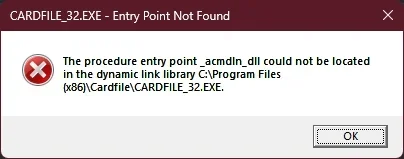
Yes, I still use this app and it has always worked until today:

Clipboard01.webp

Is there any way to get around this? Thanks.
 

My Computer

System One

  • OS
    Most Win 11P x64; One Win 10P x64
It's probably caused by a recent update. That can be confirmed by checking update history. Others, who are not operating on 4 hours of sleep followed by 20 hours of gaming and blogging, will probably be around shortly to help you properly diagnose and solve your problem...Good luck.
 

My Computer

System One

  • OS
    Windows 11 22H2 Pro (X-lite Micro 11 version)
    Computer type
    Laptop
    Manufacturer/Model
    Dell/ Precision 7680
    CPU
    i7 13850HX (20 cores, 28 threads)
    Motherboard
    Dell
    Memory
    32GB DDR5
    Graphics Card(s)
    Intel UHD/ RTX 1000 ADA
    Sound Card
    Realtek
    Monitor(s) Displays
    4K UHD Touchscreen
    Screen Resolution
    3840 x 2400
    Hard Drives
    Samsung 512GB system drive
    WD Blue 1TB game drive
    PSU
    240W AC adapter, 1800W when docked
    Internet Speed
    1 gigabit symmetrical
    Browser
    Firefox, Librewolf
    Antivirus
    None. Manully configured so nobody except me can change any critical system files. (Don't ask how, it's probably against some rule somewhere)
Try reinstalling the CardFile app so that it restores the missing DLL file.
 

My Computer

System One

  • OS
    Windows 11 Pro
Try reinstalling the CardFile app so that it restores the missing DLL file.
Unfortunately, there isn't anything to "install"; it's just CARDFILE_32.EXE.
 

My Computer

System One

  • OS
    Most Win 11P x64; One Win 10P x64
You can try to check and change the settings for this particular exe file in the Windows Security > App & browser control > Exploit protection > Program settings (look for this program or add it to current custom list). Because it is old, some common system protection settings may be now harmful for this file. Try to override the default settings step-by-step.

Another option is to set one of the previous OS in the compatibility section of the properties of exe file or its shortcut.
 

My Computer

System One

  • OS
    Windows 11 Pro 25H2
    Computer type
    Laptop
    Manufacturer/Model
    Lenovo Legion 5-15ARH05
    CPU
    AMD Rysen 5 4600H
    Memory
    32 GB (2 x 16 GB Samsung SO-DIMM DDR4-3200)
    Graphics Card(s)
    GeForce GTX 1650 Ti, 4 GB GDDR6
    Screen Resolution
    1920x1080
    Hard Drives
    SSD M.2 512 GB SAMSUNG MZALQ512; SSD M.2 1 TB Seagate FireCuda 530
    Mouse
    Logitech M650L in Bluetooth mode
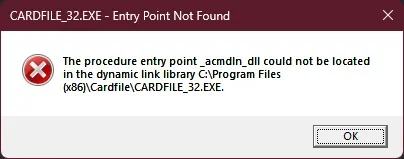
@Slavic, thanks for those suggestions but no luck so far.

1775124541476.webp
 

My Computer

System One

  • OS
    Most Win 11P x64; One Win 10P x64
_acmdln is a global variable provided by the Microsoft C Runtime library, for Windows apps to know what command line options were used.

Windows will make bug or security updates to the C Runtime, and this time it finally broke CARDFILE_32.EXE. You probably can't fix it without going backwards to an earlier Windows update, and never installing newer Monthly Updates.

There are 3rd-party alternatives to CARDFILE_32.EXE, which can also import the .crd files. Maybe it's time to move on...
 

My Computer

System One

  • OS
    Windows 7
Tested using Cardfile.exe (I don't have any access to Cardfile32.exe).

Copying this crtdll.dll file from this location:
"C:\Windows\WinSxS\x86_microsoft-windows-crtdll_31bf3856ad364e35_10.0.26100.1_none_82a9fe5e3ade4a14\crtdll.dll"
into the same folder as Cardfile.exe appears to work for Cardfile.exe, whereas the crtdll.dll located under SysWOW64 gives the same Entry Point error.

It might be worth trying the same with Cardfile_32.exe?

pn: At the end of the day, as @garlin pointed out, it would indeed be time to move on.
 

My Computer

System One

  • OS
    Win 11 25H2
    Computer type
    PC/Desktop
    Manufacturer/Model
    custom
    CPU
    intel i7-8700
    Motherboard
    Asus Z370 TUF Gaming
    Memory
    32Gb
    Graphics Card(s)
    Intel iGPU
    Sound Card
    Realtek
    Hard Drives
    Samsung
    PSU
    Corsair
    Cooling
    Fans
CRT.DLL is an ancient C library, the more modern are MSVCRTxx.DLL and MSVCPxxx.DLL. While it's possible to keep the old library in the location of the program, which will prevent its update, it would be much better to move forward, i.e. use the modern card database.
 

My Computer

System One

  • OS
    Windows 11 Pro 25H2
    Computer type
    Laptop
    Manufacturer/Model
    Lenovo Legion 5-15ARH05
    CPU
    AMD Rysen 5 4600H
    Memory
    32 GB (2 x 16 GB Samsung SO-DIMM DDR4-3200)
    Graphics Card(s)
    GeForce GTX 1650 Ti, 4 GB GDDR6
    Screen Resolution
    1920x1080
    Hard Drives
    SSD M.2 512 GB SAMSUNG MZALQ512; SSD M.2 1 TB Seagate FireCuda 530
    Mouse
    Logitech M650L in Bluetooth mode

My Computer

System One

  • OS
    Windows 11 Professional 25H2
    Computer type
    PC/Desktop
    Manufacturer/Model
    Digital Storm VELOX
    CPU
    Intel Core i9 11900K
    Motherboard
    ASUS PRIME Z590-P
    Memory
    64GB
    Graphics Card(s)
    NVIDIA GeForce GTX 1650
    Sound Card
    Realtek onboard
    Monitor(s) Displays
    Acer R221Q 21.5"
    Screen Resolution
    1920 x 1080
    Hard Drives
    2 x Samsung SSD 990 EVO Plus (1 TB)
    2 x Seagate ST4000NE001 (4 TB)
    PSU
    None
    Case
    VELOX
    Cooling
    Cooler Master
    Keyboard
    Logitech
    Mouse
    Kensington trackball
    Browser
    Firefox, Chrome
    Antivirus
    Windows Defender, Malwarebytes
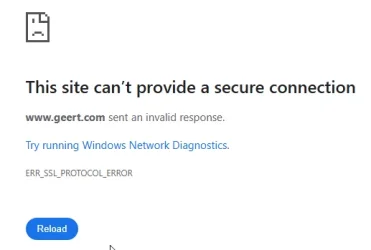
The problem is that the site is no longer considered 'secure', i.e. it does not have an 'https' address.
 

My Computers

System One System Two

  • OS
    macOS 14.x (plus Windows 11, Debian, FreeBSD for ARM64)
    Computer type
    Laptop
    Manufacturer/Model
    MacBook Pro M1 MAX
    CPU
    Apple M1 Max (T6001) - 8 performance 2 efficiency cores
    Memory
    32GB LPDDR5
    Graphics Card(s)
    Apple M1 Max (32-core)
    Hard Drives
    a) 1TB SSD + + 1TB SD Card + external SSD Drives
    Browser
    1. Safari 2. DuckDuckGo
    Antivirus
    -
  • Operating System
    Windows 11 Pro, plus VirtualBox VMs: various Windows & Linux
    Computer type
    Laptop
    Manufacturer/Model
    Microsoft Surface Laptop Studio
    CPU
    i7
    Memory
    32GB
    Hard Drives
    1TB SSD, plus external SSDs for Virtual Machines etc.
    Browser
    1. MS Edge 2. DuckDuckGo
    Antivirus
    Defender
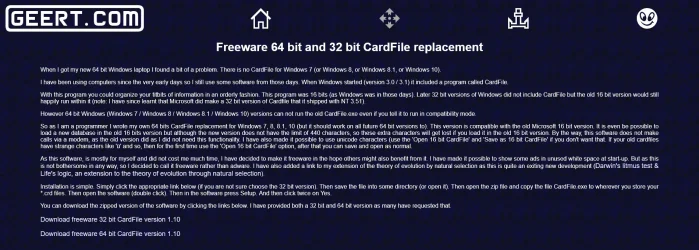
That's weird; I tried again; got the same Malwarebytes warning; told it to go to the site anyway and it did. This is using Firefox. It did try to block the download; I had to "approve" it. Another day, another mystery.

Rob
 

My Computer

System One

  • OS
    Windows 11 Professional 25H2
    Computer type
    PC/Desktop
    Manufacturer/Model
    Digital Storm VELOX
    CPU
    Intel Core i9 11900K
    Motherboard
    ASUS PRIME Z590-P
    Memory
    64GB
    Graphics Card(s)
    NVIDIA GeForce GTX 1650
    Sound Card
    Realtek onboard
    Monitor(s) Displays
    Acer R221Q 21.5"
    Screen Resolution
    1920 x 1080
    Hard Drives
    2 x Samsung SSD 990 EVO Plus (1 TB)
    2 x Seagate ST4000NE001 (4 TB)
    PSU
    None
    Case
    VELOX
    Cooling
    Cooler Master
    Keyboard
    Logitech
    Mouse
    Kensington trackball
    Browser
    Firefox, Chrome
    Antivirus
    Windows Defender, Malwarebytes
Back
Top Bottom