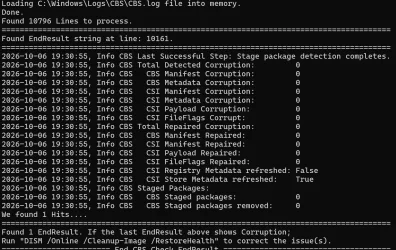
Solved CBS Check Utility.


Because the .exe showed buffer errors and the .ps1 did not. I rewrote (again) the Window Size part. It is now sitting inside a function and tests showed no errors anymore on two different systems using both the .ps1 script and the executable.

You can run the .ps1 script using powershell as admin; PS>.\Check_CBS.ps1 or run the standalone executable; CBS Check Utility.exe. Both are supplied in the 7z-file in the attachment. The version is now v1.1.1 (v1.1a was v1.1.0)

I hope that buffer issue is now a thing of the past.
 

Attachments

My Computers My Computers

  • At a glance

    Win 11 Pro 26H2 Build 26300.9550, Zorin OS ProIntel® Core™ i7-12700KF 12th Gen. (S1700)32GB DDR5 5600-36 Vengeance (2x16)PCIe4.0 Asus NVIDIA RTX3060Ti
    OS
    Win 11 Pro 26H2 Build 26300.9550, Zorin OS Pro
    Computer type
    PC/Desktop
    Manufacturer/Model
    Self built
    CPU
    Intel® Core™ i7-12700KF 12th Gen. (S1700)
    Motherboard
    ASUS Prime Z690-A, BIOS v4505 (Z690 Intel Chipset)
    Memory
    32GB DDR5 5600-36 Vengeance (2x16)
    Graphics Card(s)
    PCIe4.0 Asus NVIDIA RTX3060Ti
    Sound Card
    Onboard; Realtek
    Monitor(s) Displays
    34" LG 34UC79G-B Curved 21:9 144Hz
    Screen Resolution
    2560x1080 (No HDR)
    Hard Drives
    250Gb Samsung 870PRO NVMe (Win 11 Pro)
    1Tb Samsung 980PRO NVMe
    1Tb Samsung 970EVO NVMe
    2Tb Samsung 990PRO NVMe with heatsink.
    4Tb WDC WD40EZRZ Blue SATA (Int.)
    4Tb WDC WD40EZRZ Blue SATA (Int.)
    3Tb WDC WD30EFRZ Red SATA (Int.)
    256Gb Samsung 840PRO SSD (RHEL 9,5)
    256Gb Samsung 850PRO SSD (Zorin OS Pro 18)
    PSU
    Coolermaster 850W V2 Gold with internal 12cm exaust fan
    Case
    Be-Quiet Pure Base 600.
    Cooling
    3x Be-Quiet! 12/14cm "Silent Wings 4" casefans, 1x Arctic Freezer i35 CPU towerblock with fan.
    Keyboard
    Steelseries APEX 7 keyboard.
    Mouse
    Logitech G-502 Hero
    Internet Speed
    1Gb
    Browser
    Brave
    Antivirus
    F-Secure
    Other Info
    No Noise system.
    256Gb Kingston Travler USB 3.0 drive.
    64Gb Sandisk USB 3.2 drive. (Ventoy)
    8Gb Philips USB 3.0 drive. (Win. Inst.)
    8Gb Philips USB 3.0 drive. (Rescue disk)
    2Tb WD USB 3.0 Passport drive.
    USB Ext. 500Gb WD SATA drive.
    External USB 3.0 C.A. CD/DVD* burner.
  • At a glance

    Windows 11 Pro 26H2Intel® Core™ i7-6700K 6th Gen. (S1151)32Gb DDR4 2400 Corsair Vengeance (4x8)ASUS GeForce GTX1080
    Operating System
    Windows 11 Pro 26H2
    Computer type
    PC/Desktop
    Manufacturer/Model
    Selfbuild
    CPU
    Intel® Core™ i7-6700K 6th Gen. (S1151)
    Motherboard
    ASUS Maximus VIII Ranger (Intel Chipset Z170)
    Memory
    32Gb DDR4 2400 Corsair Vengeance (4x8)
    Graphics card(s)
    ASUS GeForce GTX1080
    Sound Card
    Onboard; Realtek
    Monitor(s) Displays
    LG IPS277L 27" WideLED, IPS
    Screen Resolution
    1920x1080
    Hard Drives
    Samsung 850 Pro SSD
    PSU
    Zalman ZM600-HP with internal exhaust fan. Heatpipes & Modular cables.
    Case
    Cooler Master Aero
    Cooling
    Scythe Mugen 4 dual fan towerblock.
    Keyboard
    Red Dragon
    Mouse
    Red Dragon
    Internet Speed
    1Gb
    Browser
    Brave
    Antivirus
    F-Secure
@hader Yes, perfect.

======================== Start CBS Check EndResult ===================================
File CBS.log found.
Loading C:\Windows\Logs\CBS\CBS.log file into memory.
Done.
Found 13232 Lines to process.
We found 0 Hits....
======================================================================================
Sorry; No EndResult hits found.
Do you want to run "DISM /Online /Cleanup-Image /ScanHealth" to retry? [Y] or [N]: n
======================== End CBS Check EndResult =====================================

Press Enter to continue...:
 

My Computers My Computers

  • At a glance

    Windows 11 Pro 26H2 26300.9550AMD Ryzen 7 5825U with Radeon Graphics16GB
    OS
    Windows 11 Pro 26H2 26300.9550
    Computer type
    Laptop
    Manufacturer/Model
    Acemagic LX15PRO
    CPU
    AMD Ryzen 7 5825U with Radeon Graphics
    Motherboard
    BIOS CT_BI_AMI_LX15PRO_AB8139_A-004
    Memory
    16GB
    Screen Resolution
    1920 x 1080
    Hard Drives
    SSD 2TB
    Internet Speed
    30 Mbps
    Browser
    Brave
    Antivirus
    Webroot SecureAnywhere Complete beta
  • At a glance

    Windows 11 Pro 23H2 22631.2506Atom N450 1.66GHz2GB
    Operating System
    Windows 11 Pro 23H2 22631.2506
    Computer type
    Laptop
    Manufacturer/Model
    HP Mini 210-1090NR PC (bought in late 2009!)
    CPU
    Atom N450 1.66GHz
    Memory
    2GB
    Browser
    Brave
    Antivirus
    Webroot
  • Acer Swift SF114-34 laptop
    OS Windows 11 Pro 26200.8894
    CPU Pentium Silver N6000
    RAM 4GB
    BIOS v1.17
    SSD Samsung 970 EVO Plus SSD 2TB (an upgrade)
Thank you for this Hader a clean bill of Health.
 

Attachments

  • Screenshot 2026-10-06 193537.webp
    Screenshot 2026-10-06 193537.webp
    182.5 KB · Views: 3

My Computer My Computer

At a glance

Windows 11AMD Ryzen 8700G64 GBOnboard
OS
Windows 11
Computer type
PC/Desktop
Manufacturer/Model
Generic
CPU
AMD Ryzen 8700G
Motherboard
Gigabyte B650 UD AC
Memory
64 GB
Graphics Card(s)
Onboard
Sound Card
Onboard
Monitor(s) Displays
Del U2723QE
Screen Resolution
3840 x 2160
Hard Drives
Corsiar MP600 1TB
PSU
Silverstone 750 GOLD
Case
Silverstone FARA 513
So ran this and what does it tell me. Said found 1 hit .. but hit what and what do you with that info. I ran restorehealth yesterday just for fun and found no issues

======================= Start CBS Check EndResult ===================================
File CBS.log found.
Loading C:\Windows\Logs\CBS\CBS.log file into memory.
Done.
Found 104646 Lines to process.
======================================================================================
Found EndResult string at line: 65855.
======================================================================================
2026-10-05 13:15:10, Info CBS Last Successful Step: Stage package detection completes.
2026-10-05 13:15:10, Info CBS Total Detected Corruption: 0
2026-10-05 13:15:10, Info CBS CBS Manifest Corruption: 0
2026-10-05 13:15:10, Info CBS CBS Metadata Corruption: 0
2026-10-05 13:15:10, Info CBS CSI Manifest Corruption: 0
2026-10-05 13:15:10, Info CBS CSI Metadata Corruption: 0
2026-10-05 13:15:10, Info CBS CSI Payload Corruption: 0
2026-10-05 13:15:10, Info CBS CSI FileFlags Corrupt: 0
2026-10-05 13:15:10, Info CBS Total Repaired Corruption: 0
2026-10-05 13:15:10, Info CBS CBS Manifest Repaired: 0
2026-10-05 13:15:10, Info CBS CSI Manifest Repaired: 0
2026-10-05 13:15:10, Info CBS CSI Payload Repaired: 0
2026-10-05 13:15:10, Info CBS CSI FileFlags Repaired: 0
2026-10-05 13:15:10, Info CBS CSI Registry Metadata refreshed: False
2026-10-05 13:15:10, Info CBS CSI Store Metadata refreshed: True
2026-10-05 13:15:10, Info CBS Staged Packages:
2026-10-05 13:15:10, Info CBS CBS Staged packages: 0
2026-10-05 13:15:10, Info CBS CBS Staged packages removed: 0
We found 1 Hits....
======================================================================================
Found 1 EndResult. If the last EndResult above shows Corruption;
Run "DISM /Online /Cleanup-Image /RestoreHealth" to correct the issue(s).
======================== End CBS Check EndResult =====================================
 

My Computer My Computer

At a glance

Windows 11 Intel i5 10400 HD630 graphics chipi5-1040012 gbHD630 chipset
OS
Windows 11 Intel i5 10400 HD630 graphics chip
Computer type
PC/Desktop
Manufacturer/Model
HP
CPU
i5-10400
Memory
12 gb
Graphics Card(s)
HD630 chipset
Monitor(s) Displays
LG 24inch
Hard Drives
SSD, external usb drive 1tb for files/backups
Keyboard
wireless Logi
Mouse
ms 4000 wireless mouse
Internet Speed
10meg
Browser
Firefox
Antivirus
Defender
Other Info
Win11 Home 26h2 26300.9550 09/30/2026
Do nothing, it found a record that you had run DISM, that's all.
 

My Computers My Computers

  • At a glance

    Windows 11 Pro 26H2 26300.9550AMD Ryzen 7 5825U with Radeon Graphics16GB
    OS
    Windows 11 Pro 26H2 26300.9550
    Computer type
    Laptop
    Manufacturer/Model
    Acemagic LX15PRO
    CPU
    AMD Ryzen 7 5825U with Radeon Graphics
    Motherboard
    BIOS CT_BI_AMI_LX15PRO_AB8139_A-004
    Memory
    16GB
    Screen Resolution
    1920 x 1080
    Hard Drives
    SSD 2TB
    Internet Speed
    30 Mbps
    Browser
    Brave
    Antivirus
    Webroot SecureAnywhere Complete beta
  • At a glance

    Windows 11 Pro 23H2 22631.2506Atom N450 1.66GHz2GB
    Operating System
    Windows 11 Pro 23H2 22631.2506
    Computer type
    Laptop
    Manufacturer/Model
    HP Mini 210-1090NR PC (bought in late 2009!)
    CPU
    Atom N450 1.66GHz
    Memory
    2GB
    Browser
    Brave
    Antivirus
    Webroot
  • Acer Swift SF114-34 laptop
    OS Windows 11 Pro 26200.8894
    CPU Pentium Silver N6000
    RAM 4GB
    BIOS v1.17
    SSD Samsung 970 EVO Plus SSD 2TB (an upgrade)
So ran this and what does it tell me. Said found 1 hit .. but hit what and what do you with that info. I ran restorehealth yesterday just for fun and found no issues
If something is not zero (corruption) that means you must repair it with /RestoreHealth. Everything is zero so you don't need to do that. You're fine.

It is just a quick scan to check if /ScanHealth found any issues. 1 Hit means it found the EndResult of /ScanHealth 1 time. If the CBS.log does not contain any EndResult; the program asks you if you want to run /ScanHealth. Once done; it will find a 1 Hit and shows you the EndResult. If you run /ScanHealth 3 times it will find 3 Hits. Only the bottom one is the one which you must check for non-zero's.
 

My Computers My Computers

  • At a glance

    Win 11 Pro 26H2 Build 26300.9550, Zorin OS ProIntel® Core™ i7-12700KF 12th Gen. (S1700)32GB DDR5 5600-36 Vengeance (2x16)PCIe4.0 Asus NVIDIA RTX3060Ti
    OS
    Win 11 Pro 26H2 Build 26300.9550, Zorin OS Pro
    Computer type
    PC/Desktop
    Manufacturer/Model
    Self built
    CPU
    Intel® Core™ i7-12700KF 12th Gen. (S1700)
    Motherboard
    ASUS Prime Z690-A, BIOS v4505 (Z690 Intel Chipset)
    Memory
    32GB DDR5 5600-36 Vengeance (2x16)
    Graphics Card(s)
    PCIe4.0 Asus NVIDIA RTX3060Ti
    Sound Card
    Onboard; Realtek
    Monitor(s) Displays
    34" LG 34UC79G-B Curved 21:9 144Hz
    Screen Resolution
    2560x1080 (No HDR)
    Hard Drives
    250Gb Samsung 870PRO NVMe (Win 11 Pro)
    1Tb Samsung 980PRO NVMe
    1Tb Samsung 970EVO NVMe
    2Tb Samsung 990PRO NVMe with heatsink.
    4Tb WDC WD40EZRZ Blue SATA (Int.)
    4Tb WDC WD40EZRZ Blue SATA (Int.)
    3Tb WDC WD30EFRZ Red SATA (Int.)
    256Gb Samsung 840PRO SSD (RHEL 9,5)
    256Gb Samsung 850PRO SSD (Zorin OS Pro 18)
    PSU
    Coolermaster 850W V2 Gold with internal 12cm exaust fan
    Case
    Be-Quiet Pure Base 600.
    Cooling
    3x Be-Quiet! 12/14cm "Silent Wings 4" casefans, 1x Arctic Freezer i35 CPU towerblock with fan.
    Keyboard
    Steelseries APEX 7 keyboard.
    Mouse
    Logitech G-502 Hero
    Internet Speed
    1Gb
    Browser
    Brave
    Antivirus
    F-Secure
    Other Info
    No Noise system.
    256Gb Kingston Travler USB 3.0 drive.
    64Gb Sandisk USB 3.2 drive. (Ventoy)
    8Gb Philips USB 3.0 drive. (Win. Inst.)
    8Gb Philips USB 3.0 drive. (Rescue disk)
    2Tb WD USB 3.0 Passport drive.
    USB Ext. 500Gb WD SATA drive.
    External USB 3.0 C.A. CD/DVD* burner.
  • At a glance

    Windows 11 Pro 26H2Intel® Core™ i7-6700K 6th Gen. (S1151)32Gb DDR4 2400 Corsair Vengeance (4x8)ASUS GeForce GTX1080
    Operating System
    Windows 11 Pro 26H2
    Computer type
    PC/Desktop
    Manufacturer/Model
    Selfbuild
    CPU
    Intel® Core™ i7-6700K 6th Gen. (S1151)
    Motherboard
    ASUS Maximus VIII Ranger (Intel Chipset Z170)
    Memory
    32Gb DDR4 2400 Corsair Vengeance (4x8)
    Graphics card(s)
    ASUS GeForce GTX1080
    Sound Card
    Onboard; Realtek
    Monitor(s) Displays
    LG IPS277L 27" WideLED, IPS
    Screen Resolution
    1920x1080
    Hard Drives
    Samsung 850 Pro SSD
    PSU
    Zalman ZM600-HP with internal exhaust fan. Heatpipes & Modular cables.
    Case
    Cooler Master Aero
    Cooling
    Scythe Mugen 4 dual fan towerblock.
    Keyboard
    Red Dragon
    Mouse
    Red Dragon
    Internet Speed
    1Gb
    Browser
    Brave
    Antivirus
    F-Secure
Hader have you had a chance to have a look at this months update to see if Microsoft have fixed the bug?
I installed the update, rebooted, DISM /Online /Cleanup-Image /RestoreHealth, DISM /Online /Cleanup-Image /StartComponentCleanup /ResetBase to blow away the pesky leftovers as Disk Cleanup would not remove them, DISM /Online /Cleanup-Image /ScanHealth and your Utility reported a clean bill of health.
 

My Computer My Computer

At a glance

Windows 11AMD Ryzen 8700G64 GBOnboard
OS
Windows 11
Computer type
PC/Desktop
Manufacturer/Model
Generic
CPU
AMD Ryzen 8700G
Motherboard
Gigabyte B650 UD AC
Memory
64 GB
Graphics Card(s)
Onboard
Sound Card
Onboard
Monitor(s) Displays
Del U2723QE
Screen Resolution
3840 x 2160
Hard Drives
Corsiar MP600 1TB
PSU
Silverstone 750 GOLD
Case
Silverstone FARA 513
Hader have you had a chance to have a look at this months update to see if Microsoft have fixed the bug?
I installed the update, rebooted, DISM /Online /Cleanup-Image /RestoreHealth, DISM /Online /Cleanup-Image /StartComponentCleanup /ResetBase to blow away the pesky leftovers as Disk Cleanup would not remove them, DISM /Online /Cleanup-Image /ScanHealth and your Utility reported a clean bill of health.
No! the issue is not resolved. It is still there with 26300.9550. I already notified MS about this issue several time but they seem to ignore it.
You can test it for yourself by run the DISM /Online /Cleanup-Image /RestoreHealth command and search inside the C:\Windows\Logs\CBS\CBS.log file when it's done (or watch it live with PS as Admin command: Get-Content C:\Windows\Logs\CBS\CBS.log -tail 10 -wait ) and search for the start of the download stage: "FLOW: Entering stage: Download" After that the progress is seen at each "FCAcquirerWUClient" line. It shows a counter percentage 0-100 how much % it has downloaded 274Mb at attempt 1 (successful) and attempt 2 (fails, because the MS upload server said: "You got it already!")

It always starts with CBS suspicion that maybe (not in many cases) there is something wrong:

Rich (BB code):
2026-10-05 17:4:5:58, Info                 CBS    Repr: No payload missing but suspected file flag corruption detected, continuing to acquire CIX for RepairStagedFileFlags.
2026-10-05 17:45:58, Info                  CBS    Exec: Download qualification evaluation, business scenario: Manual Corruption Repair
After this suspicion it enters always the download stage.

Search for this "sub phase: 4, sub percentage: 100" You can will find 4 hits per /RestoreHealth run and will show you how many bytes it downloaded at both attempts. The first attempt: 269364971 Bytes (varies from build to build) and a second attempt: 0 Bytes.

In some cases there are FileFlag corruptions after an update. The corruption is fixed with /RestoreHealth. But from that point onwards; it always repeats and keep on downloading every time while nothing is wrong anymore.... That's why this command always takes 3,5x times longer to run as it should be.

I cannot oversee the consequences if you do not resolve those errors. The fact remains, however, that every update includes a manifest defining files and directory's permissions. /ScanHealth checks whether that manifest matches the one on the disk. Often, there is a mismatch for unknown reasons, which could potentially pose a security risk. Crucial files could be altered when properly protected.

This utility shows that without any doubt that /ScanHealth finds corruptions while it reports that everything is in OK.
 
Last edited:

My Computers My Computers

  • At a glance

    Win 11 Pro 26H2 Build 26300.9550, Zorin OS ProIntel® Core™ i7-12700KF 12th Gen. (S1700)32GB DDR5 5600-36 Vengeance (2x16)PCIe4.0 Asus NVIDIA RTX3060Ti
    OS
    Win 11 Pro 26H2 Build 26300.9550, Zorin OS Pro
    Computer type
    PC/Desktop
    Manufacturer/Model
    Self built
    CPU
    Intel® Core™ i7-12700KF 12th Gen. (S1700)
    Motherboard
    ASUS Prime Z690-A, BIOS v4505 (Z690 Intel Chipset)
    Memory
    32GB DDR5 5600-36 Vengeance (2x16)
    Graphics Card(s)
    PCIe4.0 Asus NVIDIA RTX3060Ti
    Sound Card
    Onboard; Realtek
    Monitor(s) Displays
    34" LG 34UC79G-B Curved 21:9 144Hz
    Screen Resolution
    2560x1080 (No HDR)
    Hard Drives
    250Gb Samsung 870PRO NVMe (Win 11 Pro)
    1Tb Samsung 980PRO NVMe
    1Tb Samsung 970EVO NVMe
    2Tb Samsung 990PRO NVMe with heatsink.
    4Tb WDC WD40EZRZ Blue SATA (Int.)
    4Tb WDC WD40EZRZ Blue SATA (Int.)
    3Tb WDC WD30EFRZ Red SATA (Int.)
    256Gb Samsung 840PRO SSD (RHEL 9,5)
    256Gb Samsung 850PRO SSD (Zorin OS Pro 18)
    PSU
    Coolermaster 850W V2 Gold with internal 12cm exaust fan
    Case
    Be-Quiet Pure Base 600.
    Cooling
    3x Be-Quiet! 12/14cm "Silent Wings 4" casefans, 1x Arctic Freezer i35 CPU towerblock with fan.
    Keyboard
    Steelseries APEX 7 keyboard.
    Mouse
    Logitech G-502 Hero
    Internet Speed
    1Gb
    Browser
    Brave
    Antivirus
    F-Secure
    Other Info
    No Noise system.
    256Gb Kingston Travler USB 3.0 drive.
    64Gb Sandisk USB 3.2 drive. (Ventoy)
    8Gb Philips USB 3.0 drive. (Win. Inst.)
    8Gb Philips USB 3.0 drive. (Rescue disk)
    2Tb WD USB 3.0 Passport drive.
    USB Ext. 500Gb WD SATA drive.
    External USB 3.0 C.A. CD/DVD* burner.
  • At a glance

    Windows 11 Pro 26H2Intel® Core™ i7-6700K 6th Gen. (S1151)32Gb DDR4 2400 Corsair Vengeance (4x8)ASUS GeForce GTX1080
    Operating System
    Windows 11 Pro 26H2
    Computer type
    PC/Desktop
    Manufacturer/Model
    Selfbuild
    CPU
    Intel® Core™ i7-6700K 6th Gen. (S1151)
    Motherboard
    ASUS Maximus VIII Ranger (Intel Chipset Z170)
    Memory
    32Gb DDR4 2400 Corsair Vengeance (4x8)
    Graphics card(s)
    ASUS GeForce GTX1080
    Sound Card
    Onboard; Realtek
    Monitor(s) Displays
    LG IPS277L 27" WideLED, IPS
    Screen Resolution
    1920x1080
    Hard Drives
    Samsung 850 Pro SSD
    PSU
    Zalman ZM600-HP with internal exhaust fan. Heatpipes & Modular cables.
    Case
    Cooler Master Aero
    Cooling
    Scythe Mugen 4 dual fan towerblock.
    Keyboard
    Red Dragon
    Mouse
    Red Dragon
    Internet Speed
    1Gb
    Browser
    Brave
    Antivirus
    F-Secure
Thank you Hader, I will have to watch next month.
 

My Computer My Computer

At a glance

Windows 11AMD Ryzen 8700G64 GBOnboard
OS
Windows 11
Computer type
PC/Desktop
Manufacturer/Model
Generic
CPU
AMD Ryzen 8700G
Motherboard
Gigabyte B650 UD AC
Memory
64 GB
Graphics Card(s)
Onboard
Sound Card
Onboard
Monitor(s) Displays
Del U2723QE
Screen Resolution
3840 x 2160
Hard Drives
Corsiar MP600 1TB
PSU
Silverstone 750 GOLD
Case
Silverstone FARA 513
Back
Top Bottom