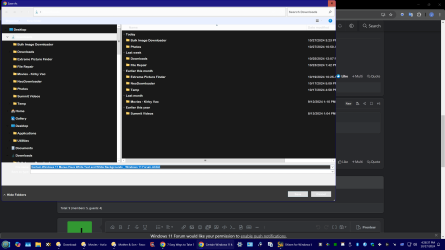
Certain Windows 11 Menus Have White Text and White Backgrounds


jkc951

Member
Local time
1:54 AM
Posts
7
Location
California
OS
Windows 11 Pro 24H2
HI,

I am running Windows 11 Pro 24H2, I use Directory Opus as a replacement fro Windows Explorer. Some of the windows menus, such as save menus and a few other have white text on a white background.

Any ideas on how to change this to something with better visibility?
 
Windows Build/Version
Windows 11 Pro 24H2

My Computer

System One

  • OS
    Windows 11 Pro 24H2
    Computer type
    PC/Desktop
    Manufacturer/Model
    Custom Build
    CPU
    Intel i9-14900KF
    Motherboard
    ASRock Z790 Thichi Lite
    Memory
    64GB Ram DDR5
    Graphics Card(s)
    Nvidia RTX 4070
    Sound Card
    Internal
    Monitor(s) Displays
    BenQ EW320U
    Screen Resolution
    3840x2160
    Hard Drives
    4TB SSD
    PSU
    Thermaltake 1200 Gold
    Case
    CoolerMaster HAF 932
    Cooling
    Water
    Keyboard
    Razer Ultimate Black Widow
    Mouse
    Logitech G900
    Internet Speed
    Rural so it varies greatly
    Browser
    Chrome
    Antivirus
    Microsoft Defender
    Other Info
    I use Gmail on Chrome.
Start with Disabling or Uninstalling Directory Opus and see if you the same issue.
 

My Computer

System One

  • OS
    Windows 11 Pro Insider 64 bit 25H2 26200.5742
    Computer type
    PC/Desktop
    Manufacturer/Model
    Gigabyte Z390 UD
    CPU
    Intel Core i7 9700K 3.60
    Motherboard
    Gigabyte Z390 UD
    Memory
    16 GB
    Graphics Card(s)
    nVidia GEForce RTX 2060 Super
    Sound Card
    onboard
    Monitor(s) Displays
    Two 27" Dell 4K monitors
    Screen Resolution
    3840 x 2160
    Hard Drives
    M.2 NVME SSD, 500 GB; Two 2TB Mechanical HDD's
    PSU
    850w PSU
    Case
    Cyberpower PC
    Cooling
    Water cooled
    Keyboard
    Backlit Cyberpower gaming keyboard
    Mouse
    Backlit Cyberpower gaming mouse
    Internet Speed
    1 GB mbps
    Browser
    Brave
    Antivirus
    Windows Security
That is the first thing I tried, and it did not fix the issue. I have tried other tweaks with out success.
 

My Computer

System One

  • OS
    Windows 11 Pro 24H2
    Computer type
    PC/Desktop
    Manufacturer/Model
    Custom Build
    CPU
    Intel i9-14900KF
    Motherboard
    ASRock Z790 Thichi Lite
    Memory
    64GB Ram DDR5
    Graphics Card(s)
    Nvidia RTX 4070
    Sound Card
    Internal
    Monitor(s) Displays
    BenQ EW320U
    Screen Resolution
    3840x2160
    Hard Drives
    4TB SSD
    PSU
    Thermaltake 1200 Gold
    Case
    CoolerMaster HAF 932
    Cooling
    Water
    Keyboard
    Razer Ultimate Black Widow
    Mouse
    Logitech G900
    Internet Speed
    Rural so it varies greatly
    Browser
    Chrome
    Antivirus
    Microsoft Defender
    Other Info
    I use Gmail on Chrome.
So we don't suggest something you have already tried,
What other Tweaks did you try?

Try Rebuilding the Icon Cache
 

My Computer

System One

  • OS
    Windows 11 Pro Insider 64 bit 25H2 26200.5742
    Computer type
    PC/Desktop
    Manufacturer/Model
    Gigabyte Z390 UD
    CPU
    Intel Core i7 9700K 3.60
    Motherboard
    Gigabyte Z390 UD
    Memory
    16 GB
    Graphics Card(s)
    nVidia GEForce RTX 2060 Super
    Sound Card
    onboard
    Monitor(s) Displays
    Two 27" Dell 4K monitors
    Screen Resolution
    3840 x 2160
    Hard Drives
    M.2 NVME SSD, 500 GB; Two 2TB Mechanical HDD's
    PSU
    850w PSU
    Case
    Cyberpower PC
    Cooling
    Water cooled
    Keyboard
    Backlit Cyberpower gaming keyboard
    Mouse
    Backlit Cyberpower gaming mouse
    Internet Speed
    1 GB mbps
    Browser
    Brave
    Antivirus
    Windows Security
Any ideas on how to change this to something with better visibility?
Can you post a complete screenshot of your Explorer with Menu samples?
 

My Computers

System One System Two

  • OS
    Windows 11 Pro
    Computer type
    PC/Desktop
    Manufacturer/Model
    ASUS ROG Strix
  • Operating System
    Windows 11 Pro
    Computer type
    Laptop
    Manufacturer/Model
    ASUS VivoBook
here is a screen shot of trying to save this page in Google.
 

Attachments

  • New_image_2024_10_27.png
    New_image_2024_10_27.png
    153.8 KB · Views: 1

My Computer

System One

  • OS
    Windows 11 Pro 24H2
    Computer type
    PC/Desktop
    Manufacturer/Model
    Custom Build
    CPU
    Intel i9-14900KF
    Motherboard
    ASRock Z790 Thichi Lite
    Memory
    64GB Ram DDR5
    Graphics Card(s)
    Nvidia RTX 4070
    Sound Card
    Internal
    Monitor(s) Displays
    BenQ EW320U
    Screen Resolution
    3840x2160
    Hard Drives
    4TB SSD
    PSU
    Thermaltake 1200 Gold
    Case
    CoolerMaster HAF 932
    Cooling
    Water
    Keyboard
    Razer Ultimate Black Widow
    Mouse
    Logitech G900
    Internet Speed
    Rural so it varies greatly
    Browser
    Chrome
    Antivirus
    Microsoft Defender
    Other Info
    I use Gmail on Chrome.
I tried seeing if such programs as winareo had any tweaks that would impack color selection of text or menus.

I will try rebuilding the icon cache and see what that does.
 

My Computer

System One

  • OS
    Windows 11 Pro 24H2
    Computer type
    PC/Desktop
    Manufacturer/Model
    Custom Build
    CPU
    Intel i9-14900KF
    Motherboard
    ASRock Z790 Thichi Lite
    Memory
    64GB Ram DDR5
    Graphics Card(s)
    Nvidia RTX 4070
    Sound Card
    Internal
    Monitor(s) Displays
    BenQ EW320U
    Screen Resolution
    3840x2160
    Hard Drives
    4TB SSD
    PSU
    Thermaltake 1200 Gold
    Case
    CoolerMaster HAF 932
    Cooling
    Water
    Keyboard
    Razer Ultimate Black Widow
    Mouse
    Logitech G900
    Internet Speed
    Rural so it varies greatly
    Browser
    Chrome
    Antivirus
    Microsoft Defender
    Other Info
    I use Gmail on Chrome.
Just did a rebuild of my icon cache and the menus still appear the same.
 

My Computer

System One

  • OS
    Windows 11 Pro 24H2
    Computer type
    PC/Desktop
    Manufacturer/Model
    Custom Build
    CPU
    Intel i9-14900KF
    Motherboard
    ASRock Z790 Thichi Lite
    Memory
    64GB Ram DDR5
    Graphics Card(s)
    Nvidia RTX 4070
    Sound Card
    Internal
    Monitor(s) Displays
    BenQ EW320U
    Screen Resolution
    3840x2160
    Hard Drives
    4TB SSD
    PSU
    Thermaltake 1200 Gold
    Case
    CoolerMaster HAF 932
    Cooling
    Water
    Keyboard
    Razer Ultimate Black Widow
    Mouse
    Logitech G900
    Internet Speed
    Rural so it varies greatly
    Browser
    Chrome
    Antivirus
    Microsoft Defender
    Other Info
    I use Gmail on Chrome.
Does anyone know of locations in the registry that control the colors for specific attributes in windows such as text and menus?
 

My Computer

System One

  • OS
    Windows 11 Pro 24H2
    Computer type
    PC/Desktop
    Manufacturer/Model
    Custom Build
    CPU
    Intel i9-14900KF
    Motherboard
    ASRock Z790 Thichi Lite
    Memory
    64GB Ram DDR5
    Graphics Card(s)
    Nvidia RTX 4070
    Sound Card
    Internal
    Monitor(s) Displays
    BenQ EW320U
    Screen Resolution
    3840x2160
    Hard Drives
    4TB SSD
    PSU
    Thermaltake 1200 Gold
    Case
    CoolerMaster HAF 932
    Cooling
    Water
    Keyboard
    Razer Ultimate Black Widow
    Mouse
    Logitech G900
    Internet Speed
    Rural so it varies greatly
    Browser
    Chrome
    Antivirus
    Microsoft Defender
    Other Info
    I use Gmail on Chrome.
here is a screen shot of trying to save this page in Google.
Are you running Aero-Lite theme? As soon as you mentioned white menus...,
and, the Close button on your screenshot are dead giveaways...

8285.jpg

If so, that's the culprit! Go back to Windows default theme and reboot.
 

My Computers

System One System Two

  • OS
    Windows 11 Pro
    Computer type
    PC/Desktop
    Manufacturer/Model
    ASUS ROG Strix
  • Operating System
    Windows 11 Pro
    Computer type
    Laptop
    Manufacturer/Model
    ASUS VivoBook
I want to profusely thank eveeryone for your assistance. It turned out to be a bad theme, as soon as I reset the theme the problem resolved itself.
 

My Computer

System One

  • OS
    Windows 11 Pro 24H2
    Computer type
    PC/Desktop
    Manufacturer/Model
    Custom Build
    CPU
    Intel i9-14900KF
    Motherboard
    ASRock Z790 Thichi Lite
    Memory
    64GB Ram DDR5
    Graphics Card(s)
    Nvidia RTX 4070
    Sound Card
    Internal
    Monitor(s) Displays
    BenQ EW320U
    Screen Resolution
    3840x2160
    Hard Drives
    4TB SSD
    PSU
    Thermaltake 1200 Gold
    Case
    CoolerMaster HAF 932
    Cooling
    Water
    Keyboard
    Razer Ultimate Black Widow
    Mouse
    Logitech G900
    Internet Speed
    Rural so it varies greatly
    Browser
    Chrome
    Antivirus
    Microsoft Defender
    Other Info
    I use Gmail on Chrome.

Latest Support Threads

Back
Top Bottom