Accounts Change Account Lockout Threshold in Windows 11

  • Thread starter Thread starter Brink
  • Start date Published: Start date Updated Updated:

Account_lockout_banner.png

This tutorial will show you how to change the Account lockout threshold to lock out a local account after a specified number of failed sign-in attempts to Windows 11 or Windows 10.

Someone who attempts to use more than a few unsuccessful passwords while trying to log on to your system might be a malicious user who is attempting to determine an account password by trial and error. Windows domain controllers keep track of logon attempts, and domain controllers can be configured to respond to this type of potential attack by disabling the account for a preset period of time. Account Lockout Policy settings control the threshold for this response and the actions to be taken after the threshold is reached.

The Account lockout threshold policy setting determines the number of failed sign-in attempts that will cause a user account to be locked. A locked account cannot be used until you reset it or until the number of minutes specified by the Account lockout duration policy setting expires. You can set a value from 1 through 999 failed sign-in attempts, or you can specify that the account will never be locked by setting the value to 0. If Account lockout threshold is set to a number greater than zero, Account lockout duration must be greater than or equal to the value of Reset account lockout counter after.

The Account lockout duration policy setting determines the number of minutes that a locked-out account remains locked out before automatically becoming unlocked. An administrator can also manually unlock a locked-out account.

The Reset account lockout counter after policy setting determines the number of minutes that must elapse from the time a user fails to log on before the failed logon attempt counter is reset to 0.

The Allow Administrator account lockout policy determines whether the built-in Administrator account is subject to account lockout policy.

Brute force password attacks can be automated to try thousands or even millions of password combinations for any or all user accounts. Limiting the number of failed sign-ins that can be performed nearly eliminates the effectiveness of such attacks. However, it is important to note that a denial-of-service (DoS) attack could be performed on a domain that has an account lockout threshold configured. A malicious user could programmatically attempt a series of password attacks against all users in the organization. If the number of attempts is greater than the value of Account lockout threshold, the attacker could potentially lock every account.

References:

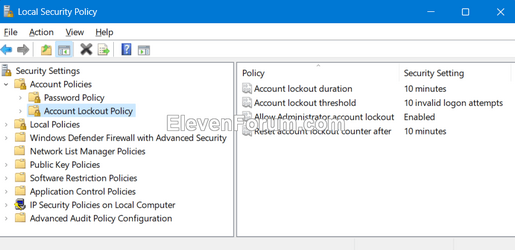
Starting with Windows 11 build 22528 and higher, the Account lockout threshold policy is now set to 10 failed sign-in attempts by default. The Account lockout duration is now set to 10 minutes by default. The Allow Administrator account lockout is now enabled by default. The Reset account lockout counter after is now set to 10 minutes by default.


The Account lockout threshold policy does not apply to Microsoft accounts. It only applies to local accounts.

You must be signed in as an administrator to change the Account lockout threshold.


Contents

  • Option One: Change Account Lockout Threshold in Local Security Policy
  • Option Two: Change Account Lockout Threshold in Windows Terminal


EXAMPLE: Locked out account

This can also be for This sign-in option is disabled because of failed sign-in attempts or repeated shutdowns. Use a different sign-in option, or keep you device powered on for at least 2 hours and the try again.


locked_out_account.jpg


Option One

Change Account Lockout Threshold in Local Security Policy


Local Security Policy is only available in the Windows 10/11 Pro, Enterprise, and Education editions.

All editions can use Option Two to set the same policy.


1 Open Local Security Policy (secpol.msc).

2 Double click/tap on Account Policies in the left pane to expand, and click/tap on Account Lockout Policy to open it. (see screenshot below)

Account_lockout_threshold-1.png

3 In the right pane of Account Lockout Policy, double click/tap on the Account lockout threshold policy to open its properties. (see screenshot above)

4 Type in a number between 0 and 999 for how many invalid logon attempts you want until locked out after, and click/tap on OK. (see screenshot below)

0 will disable the Account lockout threshold policy.

10 is the default.


Account_lockout_threshold-2.png

5 Review the suggested values under Suggested Setting that will be set, and click/tap on OK to confirm. (see screenshot below)

Account_lockout_threshold-3.png

6 If you like, you can change the Account lockout duration, Allow Administrator account lockout, and Reset account lockout counter after policies.

7 When finished, you can close the Local Security Policy window if you like. (see screenshot below)

Account_lockout_threshold-4.png


Option Two

Change Account Lockout Threshold in Windows Terminal


1 Open Windows Terminal (Admin), and select either Windows PowerShell or Command Prompt.

2 Copy and paste the net accounts command into Windows Terminal (Admin), and press Enter to see the current Lockout threshold policy setting. (see screenshot below)

Account_lockout_threshold_command-1.png

3 Type the command below into Windows Terminal (Admin), and press Enter. (see screenshot below)

net accounts /lockoutthreshold:<number>

Substitute <number> in the command above with a number between 0 and 999 for how many invalid logon attempts you want until locked out after.

0 will disable the Account lockout threshold policy.

10 is the default.

For example: net accounts /lockoutthreshold:10


Account_lockout_threshold_command-2.png

4 If you like, you can change the Account lockout duration, Allow Administrator account lockout, and Reset account lockout counter after policies.

5 When finished, you can close Windows Terminal (Admin) if you like.


That's it,
Shawn Brink


Attachments

  • 1658590851765.png
    1658590851765.png
    34.2 KB · Views: 247
Last edited:
This only affects local accounts,

I cannot see a way to modify for a microsoft account.

Do you know of any?
 

My Computers

System One System Two

  • OS
    Windows 11 Pro
    Computer type
    PC/Desktop
    Manufacturer/Model
    Custom Built
    CPU
    Ryzen 7 5700 X3D
    Motherboard
    MSI MPG B550 GAMING PLUS
    Memory
    64 GB DDR4 3600mhz Gskill Ripjaws V
    Graphics Card(s)
    RTX 4070 Super , 12GB VRAM Asus EVO Overclock
    Monitor(s) Displays
    Gigabyte M27Q (rev. 2.0) 2560 x 1440 @ 170hz HDR
    Hard Drives
    2TB Samsung nvme ssd
    4TB Western Digital nvme ssd
    PSU
    CORSAIR RMx SHIFT Series™ RM750x 80 PLUS Gold Fully Modular ATX Power Supply
    Case
    CORSAIR 3500X ARGB Mid-Tower ATX PC Case – Black
    Cooling
    ID-COOLING FROSTFLOW X 240 CPU Water Cooler
    Keyboard
    Logitech G213
    Mouse
    Logitech G203
    Internet Speed
    1.2gbps Fiber 😎
  • Operating System
    Chrome OS
    Computer type
    Laptop
    Manufacturer/Model
    HP Chromebook
    CPU
    Intel Pentium Quad Core
    Memory
    4GB LPDDR4
    Monitor(s) Displays
    14 Inch HD SVA anti glare micro edge display
    Hard Drives
    64 GB emmc

My Computer

System One

  • OS
    Home26H2Can
    Computer type
    PC/Desktop
    CPU
    AMD Ryzen 5 8600G (07/24)
    Motherboard
    ASROCK B650M-HDV/M.2 (07/24) BIOS 4.21 AGESA ComboAM5 1.3.0.1 (04/26)
    Memory
    2x32GB Kingston FURY DDR5 5600 MHz CL36 @5200 CL36 (07/24)
    Graphics Card(s)
    ASROCK Radeon RX 6600 Challenger D 8G @48FPS (08/24)
    Sound Card
    Creative Sound BlasterX AE-5 Plus (05/24)
    Monitor(s) Displays
    24" Philips 24M1N3200ZS/00 (05/24)
    Screen Resolution
    1920×1080@165Hz via DP1.4
    Hard Drives
    Kingston KC3000 NVMe 2TB (05/24)
    ADATA XPG GAMMIX S11 Pro 512GB (07/19)
    PSU
    Seasonic Core GM 550 Gold (04/24)
    Case
    Fractal Design Define 7 Mini with 3x Noctua NF-P14s/12@555rpm (04/24)
    Cooling
    Noctua NH-U12S with Noctua NF-P12 (04/24)
    Keyboard
    HP Pavilion Wired Keyboard 300 (07/24) + Rabalux 76017 Parker (01/24)
    Mouse
    Logitech M330 Silent Plus (01/26)
    Internet Speed
    500/100 Mbps via RouterOS (05/21) & TCP Optimizer
    Browser
    Edge, Brave for YouTube, LibreWolf for FB
    Antivirus
    NextDNS blocking 1/3 Traffic
    Other Info
    Phone: Motorola Moto G86 (02/26)
    Backup: Hasleo Backup Suite (PreOS)
    Headphones: Sennheiser RS170 (09/10)
    Chair: Huzaro Force 4.4 Grey Mesh (05/24)
    Notifier: Xiaomi Mi Band 9 Milanese (10/24)
    FlexCore USB-C 3.2 Gen 1 (M) to LAN (F) (08/25)
This tutorial will show you how to change the Account lockout threshold to lock out a local account
That statement at the top. I thought it worked for me at home too on a microsoft account but then wasnt sure when I was looking at this again. (at work)

Thanks for verifying
 

My Computers

System One System Two

  • OS
    Windows 11 Pro
    Computer type
    PC/Desktop
    Manufacturer/Model
    Custom Built
    CPU
    Ryzen 7 5700 X3D
    Motherboard
    MSI MPG B550 GAMING PLUS
    Memory
    64 GB DDR4 3600mhz Gskill Ripjaws V
    Graphics Card(s)
    RTX 4070 Super , 12GB VRAM Asus EVO Overclock
    Monitor(s) Displays
    Gigabyte M27Q (rev. 2.0) 2560 x 1440 @ 170hz HDR
    Hard Drives
    2TB Samsung nvme ssd
    4TB Western Digital nvme ssd
    PSU
    CORSAIR RMx SHIFT Series™ RM750x 80 PLUS Gold Fully Modular ATX Power Supply
    Case
    CORSAIR 3500X ARGB Mid-Tower ATX PC Case – Black
    Cooling
    ID-COOLING FROSTFLOW X 240 CPU Water Cooler
    Keyboard
    Logitech G213
    Mouse
    Logitech G203
    Internet Speed
    1.2gbps Fiber 😎
  • Operating System
    Chrome OS
    Computer type
    Laptop
    Manufacturer/Model
    HP Chromebook
    CPU
    Intel Pentium Quad Core
    Memory
    4GB LPDDR4
    Monitor(s) Displays
    14 Inch HD SVA anti glare micro edge display
    Hard Drives
    64 GB emmc
That statement at the top.
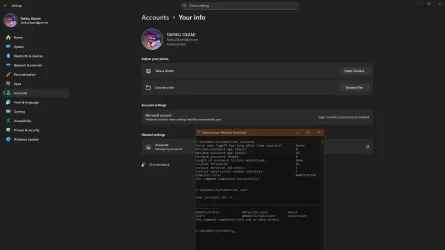
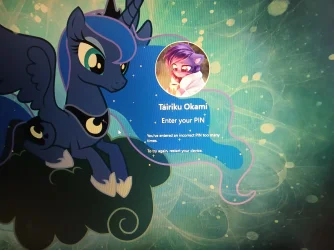
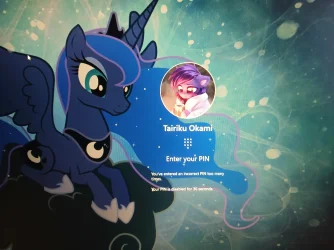
You are right, it does not actually work for MSA. I got locked out after 4-5 attempts, after restart I got 30 secs lockdown. :(
 

Attachments

  • RUID9134eee7d98a49f3a657e65ee50f26e8.webp
    RUID9134eee7d98a49f3a657e65ee50f26e8.webp
    1.1 MB · Views: 25
  • RUIDa9c50800fafd4893963f89bddce19d06.webp
    RUIDa9c50800fafd4893963f89bddce19d06.webp
    584.8 KB · Views: 26

My Computer

System One

  • OS
    Home26H2Can
    Computer type
    PC/Desktop
    CPU
    AMD Ryzen 5 8600G (07/24)
    Motherboard
    ASROCK B650M-HDV/M.2 (07/24) BIOS 4.21 AGESA ComboAM5 1.3.0.1 (04/26)
    Memory
    2x32GB Kingston FURY DDR5 5600 MHz CL36 @5200 CL36 (07/24)
    Graphics Card(s)
    ASROCK Radeon RX 6600 Challenger D 8G @48FPS (08/24)
    Sound Card
    Creative Sound BlasterX AE-5 Plus (05/24)
    Monitor(s) Displays
    24" Philips 24M1N3200ZS/00 (05/24)
    Screen Resolution
    1920×1080@165Hz via DP1.4
    Hard Drives
    Kingston KC3000 NVMe 2TB (05/24)
    ADATA XPG GAMMIX S11 Pro 512GB (07/19)
    PSU
    Seasonic Core GM 550 Gold (04/24)
    Case
    Fractal Design Define 7 Mini with 3x Noctua NF-P14s/12@555rpm (04/24)
    Cooling
    Noctua NH-U12S with Noctua NF-P12 (04/24)
    Keyboard
    HP Pavilion Wired Keyboard 300 (07/24) + Rabalux 76017 Parker (01/24)
    Mouse
    Logitech M330 Silent Plus (01/26)
    Internet Speed
    500/100 Mbps via RouterOS (05/21) & TCP Optimizer
    Browser
    Edge, Brave for YouTube, LibreWolf for FB
    Antivirus
    NextDNS blocking 1/3 Traffic
    Other Info
    Phone: Motorola Moto G86 (02/26)
    Backup: Hasleo Backup Suite (PreOS)
    Headphones: Sennheiser RS170 (09/10)
    Chair: Huzaro Force 4.4 Grey Mesh (05/24)
    Notifier: Xiaomi Mi Band 9 Milanese (10/24)
    FlexCore USB-C 3.2 Gen 1 (M) to LAN (F) (08/25)
You are right, it does not actually work for MSA. I got locked out after 4-5 attempts, after restart I got 30 secs lockdown. :(

well dang that sucks. I would like to make it even more strict than that ha. Wonder if there is a way then
 

My Computers

System One System Two

  • OS
    Windows 11 Pro
    Computer type
    PC/Desktop
    Manufacturer/Model
    Custom Built
    CPU
    Ryzen 7 5700 X3D
    Motherboard
    MSI MPG B550 GAMING PLUS
    Memory
    64 GB DDR4 3600mhz Gskill Ripjaws V
    Graphics Card(s)
    RTX 4070 Super , 12GB VRAM Asus EVO Overclock
    Monitor(s) Displays
    Gigabyte M27Q (rev. 2.0) 2560 x 1440 @ 170hz HDR
    Hard Drives
    2TB Samsung nvme ssd
    4TB Western Digital nvme ssd
    PSU
    CORSAIR RMx SHIFT Series™ RM750x 80 PLUS Gold Fully Modular ATX Power Supply
    Case
    CORSAIR 3500X ARGB Mid-Tower ATX PC Case – Black
    Cooling
    ID-COOLING FROSTFLOW X 240 CPU Water Cooler
    Keyboard
    Logitech G213
    Mouse
    Logitech G203
    Internet Speed
    1.2gbps Fiber 😎
  • Operating System
    Chrome OS
    Computer type
    Laptop
    Manufacturer/Model
    HP Chromebook
    CPU
    Intel Pentium Quad Core
    Memory
    4GB LPDDR4
    Monitor(s) Displays
    14 Inch HD SVA anti glare micro edge display
    Hard Drives
    64 GB emmc
MMmmm ... the other day I was trying to access a folder share on my desktop from my laptop and entered the wrong password a bunch of times. Then I got a couple wrong PIN entries logging into the desktop normally the next day and suddenly I was locked out for 2 hours. This is Win 11 Pro with the default lockout policy 10 attempts and 10 minutes. Now two days have passed and still if I enter the wrong PIN even once I get locked out again for 2 hours. (I'm very bad about being patient enough to enter the PIN 100% correct every time...) Any ideas what's up with this? Thanks.
 

My Computer

System One

  • OS
    Windows 11
    Computer type
    PC/Desktop
MMmmm ... the other day I was trying to access a folder share on my desktop from my laptop and entered the wrong password a bunch of times. Then I got a couple wrong PIN entries logging into the desktop normally the next day and suddenly I was locked out for 2 hours. This is Win 11 Pro with the default lockout policy 10 attempts and 10 minutes. Now two days have passed and still if I enter the wrong PIN even once I get locked out again for 2 hours. (I'm very bad about being patient enough to enter the PIN 100% correct every time...) Any ideas what's up with this? Thanks.

Hello, :alien:

Just to confirm, is this for a local account or Microsoft account?


The Account lockout threshold policy does not apply to Microsoft accounts. It only applies to local accounts.

If it is a local account, the you could disable this policy to not get locked out anymore from entering an incorrect sign-in option.
 

My Computers

System One System Two

  • OS
    Windows 11 Pro for Workstations
    Computer type
    PC/Desktop
    Manufacturer/Model
    Custom self build
    CPU
    Intel i7-8700K 5 GHz
    Motherboard
    ASUS ROG Maximus XI Formula Z390
    Memory
    64 GB (4x16GB) G.SKILL TridentZ RGB DDR4 3600 MHz (F4-3600C18D-32GTZR)
    Graphics Card(s)
    ASUS ROG-STRIX-GTX1080TI-O11G-GAMING (11GB GDDR5X)
    Sound Card
    Integrated Digital Audio (S/PDIF)
    Monitor(s) Displays
    2 x Samsung Odyssey G75 27"
    Screen Resolution
    2560x1440
    Hard Drives
    1TB Samsung 990 PRO M.2,
    4TB Samsung 990 PRO M.2,
    TerraMaster F8 SSD Plus NAS
    PSU
    Seasonic Prime Titanium 850W
    Case
    Thermaltake Core P3 wall mounted
    Cooling
    Corsair Hydro H115i
    Keyboard
    Amazon Basics Wired Full Keyboard MD005
    Mouse
    Logitech MX Master 4
    Internet Speed
    2 Gbps Download and 100 Mbps Upload
    Browser
    Chrome and Edge
    Antivirus
    Microsoft Defender
    Other Info
    Logitech Z625 speaker system,
    Logitech BRIO 4K Pro webcam,
    HP Color LaserJet Pro MFP M477fdn,
    CyberPower CP1500PFCLCD
    Galaxy S23 Plus phone
  • Operating System
    Windows 11 Pro
    Computer type
    Laptop
    Manufacturer/Model
    Surface Laptop 7 Copilot+ PC
    CPU
    Snapdragon X Elite (12 core) 3.42 GHz
    Memory
    16 GB LPDDR5x-7467 MHz
    Monitor(s) Displays
    15" HDR
    Screen Resolution
    2496 x 1664
    Hard Drives
    1 TB SSD
    Internet Speed
    Wi-Fi 7 and Bluetooth 5.4
    Browser
    Chrome and Edge
    Antivirus
    Microsoft Defender
@Brink Thx for the quick reply it's an MS account. Is there a way to change the lockout policy for MS accounts?
 

My Computer

System One

  • OS
    Windows 11
    Computer type
    PC/Desktop

My Computers

System One System Two

  • OS
    Windows 11 Pro for Workstations
    Computer type
    PC/Desktop
    Manufacturer/Model
    Custom self build
    CPU
    Intel i7-8700K 5 GHz
    Motherboard
    ASUS ROG Maximus XI Formula Z390
    Memory
    64 GB (4x16GB) G.SKILL TridentZ RGB DDR4 3600 MHz (F4-3600C18D-32GTZR)
    Graphics Card(s)
    ASUS ROG-STRIX-GTX1080TI-O11G-GAMING (11GB GDDR5X)
    Sound Card
    Integrated Digital Audio (S/PDIF)
    Monitor(s) Displays
    2 x Samsung Odyssey G75 27"
    Screen Resolution
    2560x1440
    Hard Drives
    1TB Samsung 990 PRO M.2,
    4TB Samsung 990 PRO M.2,
    TerraMaster F8 SSD Plus NAS
    PSU
    Seasonic Prime Titanium 850W
    Case
    Thermaltake Core P3 wall mounted
    Cooling
    Corsair Hydro H115i
    Keyboard
    Amazon Basics Wired Full Keyboard MD005
    Mouse
    Logitech MX Master 4
    Internet Speed
    2 Gbps Download and 100 Mbps Upload
    Browser
    Chrome and Edge
    Antivirus
    Microsoft Defender
    Other Info
    Logitech Z625 speaker system,
    Logitech BRIO 4K Pro webcam,
    HP Color LaserJet Pro MFP M477fdn,
    CyberPower CP1500PFCLCD
    Galaxy S23 Plus phone
  • Operating System
    Windows 11 Pro
    Computer type
    Laptop
    Manufacturer/Model
    Surface Laptop 7 Copilot+ PC
    CPU
    Snapdragon X Elite (12 core) 3.42 GHz
    Memory
    16 GB LPDDR5x-7467 MHz
    Monitor(s) Displays
    15" HDR
    Screen Resolution
    2496 x 1664
    Hard Drives
    1 TB SSD
    Internet Speed
    Wi-Fi 7 and Bluetooth 5.4
    Browser
    Chrome and Edge
    Antivirus
    Microsoft Defender
lame *cough cough* go MS... yet another flaw in Windows, but I still love it!
 

My Computer

System One

  • OS
    Windows 11
    Computer type
    PC/Desktop

Latest Support Threads

Back
Top Bottom