Personalization Change Category for App in Start Menu All Apps on Windows 11


Start_banner.webp

This tutorial will show you how to change which category an app will appear in on the Start Menu All apps section for your account in Windows 11.

The Start menu in Windows 11 is comprised of three sections: Pinned, Recent, and All apps.

The All apps section on the Start menu shows all your installed apps in either a Category, Grid, or List view. With All now on the top-level, apps are easily accessible without having to navigate to a secondary page. The new default Category view automatically groups your apps by category for quick access to your most used categories and apps. So, if your most used apps are Outlook and Solitaire, you can expect those apps to bubble up to the top in their respective categories. Categories are formed when there are at least 3 apps in each respective category. Otherwise, they will remain in the “Other” category. Grid view is ordered alphabetically like List view but allows for better scanning of all your installed apps with more horizontal real estate. The Start menu will remember your last used view so you can reliably launch your apps with the view you prefer most.

The All apps section automatically organizes apps into the Productivity, Creativity, Utilities & Tools, Other, Entertainment, Developer Tools, Accessibility, and Information & Reading categories by default.

When you have the Start Menu All apps section set to Category view, you can change which category each app appears in to customize it how you want instead of the default category.

You can also select to assign an app to no category to hide (remove) it from showing.


EXAMPLE: Start Menu All apps section in Category view

Start_Menu_All_apps_category_view.webp


Here's How:

1 Open Registry Editor (regedit.exe).

2 Navigate to the key below in the left pane of Registry Editor. (see screenshots below step 5)

HKEY_CURRENT_USER\Software\Microsoft\Windows\CurrentVersion\Start\TileProperties​

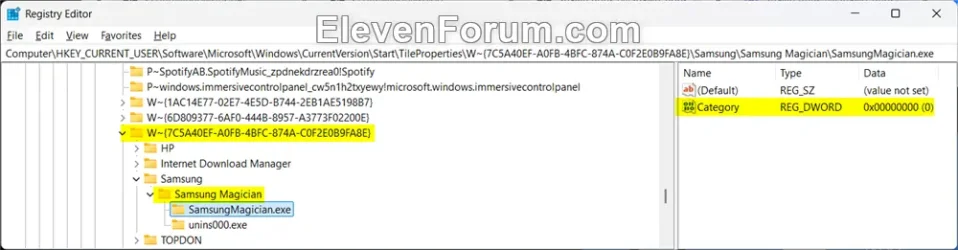
3 Expand open the TileProperties key in the left pane to see a list of all apps. (see screenshots below step 5)

4 Click/tap on an app (ex: "P~Clipchamp.Clipchamp_yxz26nhyzhsrt!App") you want to change which category it appears in on the Start Menu All apps section. (see screenshots below step 5)

5 In the right pane of the app (ex: "P~Clipchamp.Clipchamp_yxz26nhyzhsrt!App"), double click/tap on the Category DWORD to modify it. (see screenshots below)

You may need to expand open some listed apps in the left pane until you see its Category DWORD in the right pane.
Expanding_more.webp


Start_Menu_All_apps_category_regedit-1.webp
Start_Menu_All_apps_category_regedit-2.webp

6 Select (dot) Decimal, enter a value data from the table below for the category you want the app to appear in, and click/tap on OK. (see screenshot below)

Category​
Value Data​
(none)0
Accessibility1
Creativity6, 7, 22, 23
Developer Tools15
Entertainment3, 16, 17, 26
Information & Reading14, 21, 24, 25
Other2, 4, 8, 10
Productivity5, 13
Utilities & Tools9

Start_Menu_All_apps_category_regedit-3.webp

7 When finished changing categories for apps, you can close Registry Editor.

8 Either restart explorer process, sign out and sign in, or restart the computer to apply your changes.


That's it,
Shawn Brink


Last edited:
Excellent ! Hard to use it with extreme caution, but very helpful. Thanks :love:
 

My Computers My Computers

  • At a glance

    Windows 11 Pro 25H2Intel Core Ultra 5 125H32GBIntegrated Intel ARC
    OS
    Windows 11 Pro 25H2
    Computer type
    PC/Desktop
    Manufacturer/Model
    Asus NUC 14 Pro +
    CPU
    Intel Core Ultra 5 125H
    Motherboard
    NUC14RVS
    Memory
    32GB
    Graphics Card(s)
    Integrated Intel ARC
    Sound Card
    Integrated
    Monitor(s) Displays
    DELL U2719D
    Screen Resolution
    2560x1440
    Hard Drives
    SSD Crucial T500 - 4TB
    SSD Integral - 1TB
    PSU
    Integrated
    Case
    Integrated
    Cooling
    Integrated
    Keyboard
    Dell WK717
    Mouse
    Logitech M650L
    Internet Speed
    Orange / Fiber @ 1 gbps
    Browser
    Edge
    Antivirus
    Integrated (WD)
    Other Info
    Routers/Mesh TP-Link BE550 + TP-Link AX53
    Phone Google Pixel 7 @ Android 16 & Orange 4G
  • At a glance

    Windows 10 Pro x64Intel Core i3-322012GBnVidia GT1030 GDDR5
    Operating System
    Windows 10 Pro x64
    Computer type
    PC/Desktop
    Manufacturer/Model
    Home made
    CPU
    Intel Core i3-3220
    Motherboard
    Intel DH77EB
    Memory
    12GB
    Graphics card(s)
    nVidia GT1030 GDDR5
    Sound Card
    Asus Xonar DX
    Monitor(s) Displays
    Sony FW-43BZ35F @ Android TV 9
    Screen Resolution
    3840x2160
    Hard Drives
    SSD Sandisk - 240GB
    HDD WD - 1.5TB
    PSU
    Antec Earthwatts 380W
    Case
    Lian-Li PC-C37
    Cooling
    Stock cooler
    Keyboard
    Logitech K400
    Browser
    Edge
    Antivirus
    Integrated (WD)
Nice to know. Now you can edit some things like programs you don't want to appear (never used) do not show up inside a category or show programs that doesn't appear. Those layout of just only 9 category sucks and not very stable. Pressed Start once and "Information & Reading" was there. Switched from category view to list and back again. Pressed Start a second time and that "Information & Reading" category was just gone.....

*Edit the next day;* "Information & Reading" is still not there while some keys have that category property. Weird.
 
Last edited:

My Computers My Computers

  • At a glance

    Win 11 Pro 25H2 Build 26200.9550, Zorin OS ProIntel® Core™ i7-12700KF 12th Gen. (S1700)32GB DDR5 5600-36 Vengeance (2x16)PCIe4.0 Asus NVIDIA RTX3060Ti
    OS
    Win 11 Pro 25H2 Build 26200.9550, Zorin OS Pro
    Computer type
    PC/Desktop
    Manufacturer/Model
    Self built
    CPU
    Intel® Core™ i7-12700KF 12th Gen. (S1700)
    Motherboard
    ASUS Prime Z690-A, BIOS v4505 (Z690 Intel Chipset)
    Memory
    32GB DDR5 5600-36 Vengeance (2x16)
    Graphics Card(s)
    PCIe4.0 Asus NVIDIA RTX3060Ti
    Sound Card
    Onboard; Realtek
    Monitor(s) Displays
    34" LG 34UC79G-B Curved 21:9 144Hz
    Screen Resolution
    2560x1080 (No HDR)
    Hard Drives
    250Gb Samsung 870PRO NVMe (Win 11 Pro)
    1Tb Samsung 980PRO NVMe
    1Tb Samsung 970EVO NVMe
    2Tb Samsung 990PRO NVMe with heatsink.
    4Tb WDC WD40EZRZ Blue SATA (Int.)
    4Tb WDC WD40EZRZ Blue SATA (Int.)
    3Tb WDC WD30EFRZ Red SATA (Int.)
    256Gb Samsung 840PRO SSD (RHEL 9,5)
    256Gb Samsung 850PRO SSD (Zorin OS Pro 18)
    PSU
    Coolermaster 850W V2 Gold with internal 12cm exaust fan
    Case
    Be-Quiet Pure Base 600.
    Cooling
    3x Be-Quiet! 12/14cm "Silent Wings 4" casefans, 1x Arctic Freezer i35 CPU towerblock with fan.
    Keyboard
    Steelseries APEX 7 keyboard.
    Mouse
    Logitech G-502 Hero
    Internet Speed
    1Gb
    Browser
    Brave
    Antivirus
    F-Secure
    Other Info
    No Noise system.
    256Gb Kingston Travler USB 3.0 drive.
    64Gb Sandisk USB 3.2 drive. (Ventoy)
    8Gb Philips USB 3.0 drive. (Win. Inst.)
    8Gb Philips USB 3.0 drive. (Rescue disk)
    2Tb WD USB 3.0 Passport drive.
    USB Ext. 500Gb WD SATA drive.
    External USB 3.0 C.A. CD/DVD* burner.
  • At a glance

    Windows 11 Pro 25H2Intel® Core™ i7-6700K 6th Gen. (S1151)32Gb DDR4 2400 Corsair Vengeance (4x8)ASUS GeForce GTX1080
    Operating System
    Windows 11 Pro 25H2
    Computer type
    PC/Desktop
    Manufacturer/Model
    Selfbuild
    CPU
    Intel® Core™ i7-6700K 6th Gen. (S1151)
    Motherboard
    ASUS Maximus VIII Ranger (Intel Chipset Z170)
    Memory
    32Gb DDR4 2400 Corsair Vengeance (4x8)
    Graphics card(s)
    ASUS GeForce GTX1080
    Sound Card
    Onboard; Realtek
    Monitor(s) Displays
    LG IPS277L 27" WideLED, IPS
    Screen Resolution
    1920x1080
    Hard Drives
    Samsung 850 Pro SSD
    PSU
    Zalman ZM600-HP with internal exhaust fan. Heatpipes & Modular cables.
    Case
    Cooler Master Aero
    Cooling
    Scythe Mugen 4 dual fan towerblock.
    Keyboard
    Red Dragon
    Mouse
    Red Dragon
    Internet Speed
    1Gb
    Browser
    Chrome
    Antivirus
    F-Secure
Hi Shawn and thank you for this tutorial!

I am a little confused about selecting the correct Category, Value Data where there is more than one value in some categories. Are each of the programs (or desired programs to show up in the respective Categories) supposed to get a unique value data?

Also, I can't find or just don't know the program name to remove (or add) it from (to) a Category. For instance, Windows places 7-Zip Help (circled in red in the screen shot below) in the Utilities and Tools category and I want to remove it. I believe the file name is "7-zip.chm" and found that under the key "W~{6D809377-6AF0-444B-8957-A3773F02200E}" in my Registry Editor under TileProperties (also below in red).

Start menu in Categories (7ziip help).webp
Reg edit 7-zip.webp


When I restart, the program still remains in the Utilities & Tools category, so I don't think I picked the correct key/string(?).

Can you help me out?

Thanks in advance.

Kind regards,

tecknot
 

My Computer My Computer

At a glance

Windows 11 Pro 25H2 build 26200.9168Intel i7 8750H @ 2.2 GHz16 GB (all Samsung) DDR4-3200 SODIMM (non-ECC...Intel UHD Graphics 630 & NVIDIA Quadro P600
OS
Windows 11 Pro 25H2 build 26200.9168
Computer type
Laptop
Manufacturer/Model
Lenovo ThinkPad Workstation P72
CPU
Intel i7 8750H @ 2.2 GHz
Motherboard
Lenovo 01YU291
Memory
16 GB (all Samsung) DDR4-3200 SODIMM (non-ECC) PCIe 3
Graphics Card(s)
Intel UHD Graphics 630 & NVIDIA Quadro P600
Sound Card
Realtek ALC3286 & Focusrite Saffire 24 Pro DSP
Monitor(s) Displays
17.3"
Screen Resolution
3840x2160
Hard Drives
1TB SSD Samsung 860 EVO SATA 3
1TB SSD Samsung 970 EVO M.2 NVMe PCIe 3 x 4
2TB SSD Samsung 990 PRO M.2 NVMe PCIe 3 x 4
PSU
230W
Cooling
fan
Keyboard
UltraNav
Mouse
Kensington wireless Orbit
Internet Speed
640Mbps
Browser
DuckDuckGo and Firefox
Antivirus
Defender
Other Info
CM246 Chipset
Hi Shawn and thank you for this tutorial!

I am a little confused about selecting the correct Category, Value Data where there is more than one value in some categories. Are each of the programs (or desired programs to show up in the respective Categories) supposed to get a unique value data?

Also, I can't find or just don't know the program name to remove (or add) it from (to) a Category. For instance, Windows places 7-Zip Help (circled in red in the screen shot below) in the Utilities and Tools category and I want to remove it. I believe the file name is "7-zip.chm" and found that under the key "W~{6D809377-6AF0-444B-8957-A3773F02200E}" in my Registry Editor under TileProperties (also below in red).

View attachment 184607

View attachment 184608


When I restart, the program still remains in the Utilities & Tools category, so I don't think I picked the correct key/string(?).

Can you help me out?

Thanks in advance.

Kind regards,

tecknot

Hello mate,

Yeah, it doesn't help that some categories have more than one value that can be used for it. These multiple values are basically sub categories grouped into the same main category.

One way to help ID the app name when it's not obvious is to drag it from the Start Menu, and drop it on your desktop to create a shortcut of the app. You can then right click on the shortcut, and click on Properties. In the Shortcut tab, you'll see the app name as the target to help find it.

Once you find the app listed in the registry, you can look at its current Category value to verify that's the one you want to change.
 

My Computers My Computers

  • At a glance

    Windows 11 Pro for WorkstationsIntel i7-8700K 5 GHz64 GB (4x16GB) G.SKILL TridentZ RGB DDR4 3600...ASUS ROG-STRIX-GTX1080TI-O11G-GAMING (11GB GD...
    OS
    Windows 11 Pro for Workstations
    Computer type
    PC/Desktop
    Manufacturer/Model
    Custom self build
    CPU
    Intel i7-8700K 5 GHz
    Motherboard
    ASUS ROG Maximus XI Formula Z390
    Memory
    64 GB (4x16GB) G.SKILL TridentZ RGB DDR4 3600 MHz (F4-3600C18D-32GTZR)
    Graphics Card(s)
    ASUS ROG-STRIX-GTX1080TI-O11G-GAMING (11GB GDDR5X)
    Sound Card
    Integrated Digital Audio (S/PDIF)
    Monitor(s) Displays
    2 x Samsung Odyssey G75 27"
    Screen Resolution
    2560x1440
    Hard Drives
    1TB Samsung 990 PRO M.2,
    4TB Samsung 990 PRO M.2,
    TerraMaster F8 SSD Plus NAS
    PSU
    Seasonic Prime Titanium 850W
    Case
    Thermaltake Core P3 wall mounted
    Cooling
    Corsair Hydro H115i
    Keyboard
    Amazon Basics Wired Full Keyboard MD005
    Mouse
    Logitech MX Master 4
    Internet Speed
    2 Gbps Download and 100 Mbps Upload
    Browser
    Chrome and Edge
    Antivirus
    Microsoft Defender
    Other Info
    Logitech Z625 speaker system,
    Logitech BRIO 4K Pro webcam,
    HP Color LaserJet Pro MFP M477fdn,
    CyberPower CP1500PFCLCD
    Galaxy S23 Plus phone
  • At a glance

    Windows 11 ProSnapdragon X Elite (12 core) 3.42 GHz16 GB LPDDR5x-7467 MHz
    Operating System
    Windows 11 Pro
    Computer type
    Laptop
    Manufacturer/Model
    Surface Laptop 7 Copilot+ PC
    CPU
    Snapdragon X Elite (12 core) 3.42 GHz
    Memory
    16 GB LPDDR5x-7467 MHz
    Monitor(s) Displays
    15" HDR
    Screen Resolution
    2496 x 1664
    Hard Drives
    1 TB SSD
    Internet Speed
    Wi-Fi 7 and Bluetooth 5.4
    Browser
    Chrome and Edge
    Antivirus
    Microsoft Defender
Thank you, Shawn.

Kind regards,

tecknot
 

My Computer My Computer

At a glance

Windows 11 Pro 25H2 build 26200.9168Intel i7 8750H @ 2.2 GHz16 GB (all Samsung) DDR4-3200 SODIMM (non-ECC...Intel UHD Graphics 630 & NVIDIA Quadro P600
OS
Windows 11 Pro 25H2 build 26200.9168
Computer type
Laptop
Manufacturer/Model
Lenovo ThinkPad Workstation P72
CPU
Intel i7 8750H @ 2.2 GHz
Motherboard
Lenovo 01YU291
Memory
16 GB (all Samsung) DDR4-3200 SODIMM (non-ECC) PCIe 3
Graphics Card(s)
Intel UHD Graphics 630 & NVIDIA Quadro P600
Sound Card
Realtek ALC3286 & Focusrite Saffire 24 Pro DSP
Monitor(s) Displays
17.3"
Screen Resolution
3840x2160
Hard Drives
1TB SSD Samsung 860 EVO SATA 3
1TB SSD Samsung 970 EVO M.2 NVMe PCIe 3 x 4
2TB SSD Samsung 990 PRO M.2 NVMe PCIe 3 x 4
PSU
230W
Cooling
fan
Keyboard
UltraNav
Mouse
Kensington wireless Orbit
Internet Speed
640Mbps
Browser
DuckDuckGo and Firefox
Antivirus
Defender
Other Info
CM246 Chipset
Thank you, Shawn.

Kind regards,

tecknot

You're most welcome.

If setting its category to "0" doesn't remove it, you should also be able to delete its shortcut using an option below to remove it.


My Computers My Computers

  • At a glance

    Windows 11 Pro for WorkstationsIntel i7-8700K 5 GHz64 GB (4x16GB) G.SKILL TridentZ RGB DDR4 3600...ASUS ROG-STRIX-GTX1080TI-O11G-GAMING (11GB GD...
    OS
    Windows 11 Pro for Workstations
    Computer type
    PC/Desktop
    Manufacturer/Model
    Custom self build
    CPU
    Intel i7-8700K 5 GHz
    Motherboard
    ASUS ROG Maximus XI Formula Z390
    Memory
    64 GB (4x16GB) G.SKILL TridentZ RGB DDR4 3600 MHz (F4-3600C18D-32GTZR)
    Graphics Card(s)
    ASUS ROG-STRIX-GTX1080TI-O11G-GAMING (11GB GDDR5X)
    Sound Card
    Integrated Digital Audio (S/PDIF)
    Monitor(s) Displays
    2 x Samsung Odyssey G75 27"
    Screen Resolution
    2560x1440
    Hard Drives
    1TB Samsung 990 PRO M.2,
    4TB Samsung 990 PRO M.2,
    TerraMaster F8 SSD Plus NAS
    PSU
    Seasonic Prime Titanium 850W
    Case
    Thermaltake Core P3 wall mounted
    Cooling
    Corsair Hydro H115i
    Keyboard
    Amazon Basics Wired Full Keyboard MD005
    Mouse
    Logitech MX Master 4
    Internet Speed
    2 Gbps Download and 100 Mbps Upload
    Browser
    Chrome and Edge
    Antivirus
    Microsoft Defender
    Other Info
    Logitech Z625 speaker system,
    Logitech BRIO 4K Pro webcam,
    HP Color LaserJet Pro MFP M477fdn,
    CyberPower CP1500PFCLCD
    Galaxy S23 Plus phone
  • At a glance

    Windows 11 ProSnapdragon X Elite (12 core) 3.42 GHz16 GB LPDDR5x-7467 MHz
    Operating System
    Windows 11 Pro
    Computer type
    Laptop
    Manufacturer/Model
    Surface Laptop 7 Copilot+ PC
    CPU
    Snapdragon X Elite (12 core) 3.42 GHz
    Memory
    16 GB LPDDR5x-7467 MHz
    Monitor(s) Displays
    15" HDR
    Screen Resolution
    2496 x 1664
    Hard Drives
    1 TB SSD
    Internet Speed
    Wi-Fi 7 and Bluetooth 5.4
    Browser
    Chrome and Edge
    Antivirus
    Microsoft Defender
Okay. Thanks, Shawn.

Kind regards,

tecknot
 

My Computer My Computer

At a glance

Windows 11 Pro 25H2 build 26200.9168Intel i7 8750H @ 2.2 GHz16 GB (all Samsung) DDR4-3200 SODIMM (non-ECC...Intel UHD Graphics 630 & NVIDIA Quadro P600
OS
Windows 11 Pro 25H2 build 26200.9168
Computer type
Laptop
Manufacturer/Model
Lenovo ThinkPad Workstation P72
CPU
Intel i7 8750H @ 2.2 GHz
Motherboard
Lenovo 01YU291
Memory
16 GB (all Samsung) DDR4-3200 SODIMM (non-ECC) PCIe 3
Graphics Card(s)
Intel UHD Graphics 630 & NVIDIA Quadro P600
Sound Card
Realtek ALC3286 & Focusrite Saffire 24 Pro DSP
Monitor(s) Displays
17.3"
Screen Resolution
3840x2160
Hard Drives
1TB SSD Samsung 860 EVO SATA 3
1TB SSD Samsung 970 EVO M.2 NVMe PCIe 3 x 4
2TB SSD Samsung 990 PRO M.2 NVMe PCIe 3 x 4
PSU
230W
Cooling
fan
Keyboard
UltraNav
Mouse
Kensington wireless Orbit
Internet Speed
640Mbps
Browser
DuckDuckGo and Firefox
Antivirus
Defender
Other Info
CM246 Chipset
Nice to know. Now you can edit some things like programs you don't want to appear (never used) do not show up inside a category or show programs that doesn't appear. Those layout of just only 9 category sucks and not very stable. Pressed Start once and it was there. Switched from category view to list and back again. Pressed Start a second time and that Information & Reading category was just gone.....
You can export registry key "HKEY_CURRENT_USER\Software\Microsoft\Windows\CurrentVersion\Start\TileProperties" after you had change values into it. If category(ies) are gone following a mishap, just import what you exported earlier (or double-click on exported reg file).

This is an example of exported values in *.reg file :

Code:
Windows Registry Editor Version 5.00

; None

[HKEY_CURRENT_USER\Software\Microsoft\Windows\CurrentVersion\Start\TileProperties\P~Microsoft.SecHealthUI_8wekyb3d8bbwe!SecHealthUI]
"Category"=dword:00000000

[HKEY_CURRENT_USER\Software\Microsoft\Windows\CurrentVersion\Start\TileProperties\P~Microsoft.WindowsStore_8wekyb3d8bbwe!App]
"Category"=dword:00000000

[HKEY_CURRENT_USER\Software\Microsoft\Windows\CurrentVersion\Start\TileProperties\P~MicrosoftWindows.Client.CBS_cw5n1h2txyewy!WebExperienceHost]
"Category"=dword:00000000

[HKEY_CURRENT_USER\Software\Microsoft\Windows\CurrentVersion\Start\TileProperties\P~windows.immersivecontrolpanel_cw5n1h2txyewy!microsoft.windows.immersivecontrolpanel]
"Category"=dword:00000000

[HKEY_CURRENT_USER\Software\Microsoft\Windows\CurrentVersion\Start\TileProperties\W~Microsoft.Windows.AdministrativeTools]
"Category"=dword:00000000

[HKEY_CURRENT_USER\Software\Microsoft\Windows\CurrentVersion\Start\TileProperties\W~MSEdge]
"Category"=dword:00000000

; Accessibility

[HKEY_CURRENT_USER\Software\Microsoft\Windows\CurrentVersion\Start\TileProperties\W~{1AC14E77-02E7-4E5D-B744-2EB1AE5198B7}\charmap.exe]
"Category"=dword:00000001

[HKEY_CURRENT_USER\Software\Microsoft\Windows\CurrentVersion\Start\TileProperties\W~{1AC14E77-02E7-4E5D-B744-2EB1AE5198B7}\LiveCaptions.exe]
"Category"=dword:00000001

[HKEY_CURRENT_USER\Software\Microsoft\Windows\CurrentVersion\Start\TileProperties\W~{1AC14E77-02E7-4E5D-B744-2EB1AE5198B7}\magnify.exe]
"Category"=dword:00000001

[HKEY_CURRENT_USER\Software\Microsoft\Windows\CurrentVersion\Start\TileProperties\W~{1AC14E77-02E7-4E5D-B744-2EB1AE5198B7}\narrator.exe]
"Category"=dword:00000001

[HKEY_CURRENT_USER\Software\Microsoft\Windows\CurrentVersion\Start\TileProperties\W~{1AC14E77-02E7-4E5D-B744-2EB1AE5198B7}\osk.exe]
"Category"=dword:00000001

[HKEY_CURRENT_USER\Software\Microsoft\Windows\CurrentVersion\Start\TileProperties\W~{1AC14E77-02E7-4E5D-B744-2EB1AE5198B7}\voiceaccess.exe]
"Category"=dword:00000001

; Utilities & Tools

[HKEY_CURRENT_USER\Software\Microsoft\Windows\CurrentVersion\Start\TileProperties\P~Microsoft.WindowsNotepad_8wekyb3d8bbwe!App]
"Category"=dword:00000009

[HKEY_CURRENT_USER\Software\Microsoft\Windows\CurrentVersion\Start\TileProperties\P~Microsoft.WindowsTerminal_8wekyb3d8bbwe!App]
"Category"=dword:00000009

[HKEY_CURRENT_USER\Software\Microsoft\Windows\CurrentVersion\Start\TileProperties\P~MicrosoftWindows.Client.CBS_cw5n1h2txyewy!WindowsBackup]
"Category"=dword:00000009

[HKEY_CURRENT_USER\Software\Microsoft\Windows\CurrentVersion\Start\TileProperties\W~Microsoft.Windows.Explorer]
"Category"=dword:00000009
 
Last edited:

My Computers My Computers

  • At a glance

    Windows 11 Pro 25H2Intel Core Ultra 5 125H32GBIntegrated Intel ARC
    OS
    Windows 11 Pro 25H2
    Computer type
    PC/Desktop
    Manufacturer/Model
    Asus NUC 14 Pro +
    CPU
    Intel Core Ultra 5 125H
    Motherboard
    NUC14RVS
    Memory
    32GB
    Graphics Card(s)
    Integrated Intel ARC
    Sound Card
    Integrated
    Monitor(s) Displays
    DELL U2719D
    Screen Resolution
    2560x1440
    Hard Drives
    SSD Crucial T500 - 4TB
    SSD Integral - 1TB
    PSU
    Integrated
    Case
    Integrated
    Cooling
    Integrated
    Keyboard
    Dell WK717
    Mouse
    Logitech M650L
    Internet Speed
    Orange / Fiber @ 1 gbps
    Browser
    Edge
    Antivirus
    Integrated (WD)
    Other Info
    Routers/Mesh TP-Link BE550 + TP-Link AX53
    Phone Google Pixel 7 @ Android 16 & Orange 4G
  • At a glance

    Windows 10 Pro x64Intel Core i3-322012GBnVidia GT1030 GDDR5
    Operating System
    Windows 10 Pro x64
    Computer type
    PC/Desktop
    Manufacturer/Model
    Home made
    CPU
    Intel Core i3-3220
    Motherboard
    Intel DH77EB
    Memory
    12GB
    Graphics card(s)
    nVidia GT1030 GDDR5
    Sound Card
    Asus Xonar DX
    Monitor(s) Displays
    Sony FW-43BZ35F @ Android TV 9
    Screen Resolution
    3840x2160
    Hard Drives
    SSD Sandisk - 240GB
    HDD WD - 1.5TB
    PSU
    Antec Earthwatts 380W
    Case
    Lian-Li PC-C37
    Cooling
    Stock cooler
    Keyboard
    Logitech K400
    Browser
    Edge
    Antivirus
    Integrated (WD)
Back
Top Bottom