Personalization Change Icon of Library in Windows 11


Libraries_banner.png

This tutorial will show you how to change the icon of a library for your account in Windows 10 and Windows 11.

Windows 7 introduced libraries, which provide users with a single, coherent view of their files even when those files are stored in different locations. Libraries can be configured and organized by a user and a library can contain folders that are found on the user's computer and also folders that have been shared over a network. Libraries present a simpler view of the underlying storage system because, to the user, the files and folders in a library are displayed in one single view location, no matter where they are actually physically stored.

In File Explorer, users interact with libraries in ways similar to how they would interact with other folders. Libraries are built upon the legacy known folders (such as Camera Roll, Documents, Music, Pictures, Saved Pictures, and Videos), and these known folders are automatically included in the default libraries and set as the default save location.

You can change the the icon of a library to any custom icon you want.

References:



Contents

  • Option One: Change Icon of New Library in Properties
  • Option Two: Change Icon of Library in Library Description schema file


EXAMPLE: Library default icons

Libraries_default_icons.png


Option One

Change Icon of New Library in Properties


1 Open Libraries in File Explorer (Win+E).

2 Perform one of the following actions: (see screenshots below)
  • Select the new library you want to change the icon of, click/tap on the See more (3 dots) button on the command bar, and click/tap on Properties.
  • Right click or press and hold on the new library you want to change the icon of, and click/tap on Properties.
change_new_library_icon-1.png
change_new_library_icon-2.png

3 Click/tap on Change library icon. (see screenshot below)

change_new_library_icon-3.png

4 Perform the following actions: (see screenshots below)
  1. Click/tap on Browse.
  2. Navigate to and select the .ico file or file that contains the icon you want.
  3. Click/tap on Open.
  4. Click/tap on OK.
change_new_library_icon-4.png
change_new_library_icon-5.png

5 Click/tap on OK to apply. (see screenshot below)

change_new_library_icon-6.png


Option Two

Change Icon of Library in Library Description schema file


1 Open the Notepad app.

2 Open the %AppData%\Microsoft\Windows\Libraries in File Explorer (Win+E).

3 Drag and drop the library (ex: Pictures) you want to change the icon of into Notepad. (see screenshots below)

change_library_icon-1.png

4 Perform the following actions: (see screenshot below)
  1. Look for the <iconReference>imageres.dll,-1003</iconReference> type line in Notepad.
  2. Change the middle part (ex: "imageres.dll,-1003") in red with the full path of the .ico file you want to use.

You can also reference a .dll file with an added comma and number position of the icon in the .dll file. If you like, you can use the free program IconViewer to make knowing what the number position is.
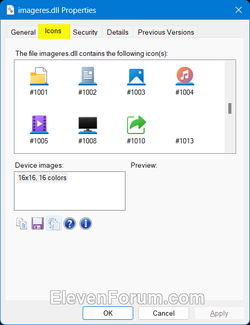
IconViewer.png


Default Library Icons:

Camera Roll = <iconReference>imageres.dll,-1003</iconReference>
Documents = <iconReference>imageres.dll,-1002</iconReference>
Music = <iconReference>imageres.dll,-1004</iconReference>
Pictures = <iconReference>imageres.dll,-1003</iconReference>
Recorded TV = <iconReference>imageres.dll,-1008</iconReference>
Saved Pictures = <iconReference>imageres.dll,-1003</iconReference>
Videos = <iconReference>imageres.dll,-1005</iconReference>


change_library_icon-2.png

5 When finished, click/tap on File on the menu bar of Notepad, and click/tap on Save. (see screenshot below)

change_library_icon-3.png

6 You can now close File Explorer and Notepad if you like.


That's it,
Shawn Brink


Last edited:
Is there a way to change the ones highlighted below? I did change the icons under c:\users\my username but in the main This PC window they don't change. I even changed the libraries folders as per the guide above but the ones in This PC are still the same

Also, is there a way to save all those icon changes that I dragged into Notepad and manually edited the icon location so I don't have to go through this when I format?

2023-05-28_115926.png
 

My Computers My Computers

  • At a glance

    Windows 11 ProIntel Core Ultra 9 386HSamsung 32GB LPDDR5X 8533 RAMGeForce RTX 5070 Ti 12GB GDDR7
    OS
    Windows 11 Pro
    Computer type
    Laptop
    Manufacturer/Model
    ASUS ROG Zephyrus G14 GU405AR
    CPU
    Intel Core Ultra 9 386H
    Motherboard
    ASUS
    Memory
    Samsung 32GB LPDDR5X 8533 RAM
    Graphics Card(s)
    GeForce RTX 5070 Ti 12GB GDDR7
    Sound Card
    4-speaker (dual-force woofer) system with Smart Amplifier Technology, 2 Tweeters
    Monitor(s) Displays
    INNOCN GA27T1M 27' 1440p 320Hz Mini-LED Monitor
    Screen Resolution
    QHD (2560x1440)
    Hard Drives
    Samsung 990 Pro 4TB SSD
    PSU
    Rectangle Conn, 250W AC Adapter
    Cooling
    Thermal Grizzly Conductonaut + IETS GT600 Cooling Pad
    Keyboard
    ROG Strix Scope II 96 RX Wireless
    Mouse
    ROG Chakram X Origin
    Internet Speed
    1 GBPS Down / 921 MBPS Up
    Browser
    Google Chrome
  • At a glance

    Windows 11 EducationAMD Ryzen 9 27016GB LPDDR5X 7500 RAMnVIDIA GeForce RTX 5050 8GB GDDR7
    Operating System
    Windows 11 Education
    Computer type
    Laptop
    Manufacturer/Model
    ASUS ROG Zephyrus G14 GA403UH
    CPU
    AMD Ryzen 9 270
    Memory
    16GB LPDDR5X 7500 RAM
    Graphics card(s)
    nVIDIA GeForce RTX 5050 8GB GDDR7
    Sound Card
    Realtek
    Monitor(s) Displays
    14' ROG Nebula Display 3K OLED 120Hz
    Screen Resolution
    2880 x 1800
    Hard Drives
    Samsung 990 PRO 4TB SSD
    PSU
    Rectangle Conn, 200W AC Adapter
    Cooling
    Thermal Grizzly Conductonaut
    Mouse
    ASUS ROG Chakram X Origin Gaming Mouse
    Internet Speed
    1 GBPS Down / 875 MBPS Up
    Browser
    Google Chrome
    Antivirus
    AVG Internet Security
Is there a way to change the ones highlighted below? I did change the icons under c:\users\my username but in the main This PC window they don't change. I even changed the libraries folders as per the guide above but the ones in This PC are still the same

Also, is there a way to save all those icon changes that I dragged into Notepad and manually edited the icon location so I don't have to go through this when I format?

Hello mate, :alien:

Those would be folders instead of a library.


My Computers My Computers

  • At a glance

    Windows 11 Pro for WorkstationsIntel i7-8700K 5 GHz64 GB (4x16GB) G.SKILL TridentZ RGB DDR4 3600...ASUS ROG-STRIX-GTX1080TI-O11G-GAMING (11GB GD...
    OS
    Windows 11 Pro for Workstations
    Computer type
    PC/Desktop
    Manufacturer/Model
    Custom self build
    CPU
    Intel i7-8700K 5 GHz
    Motherboard
    ASUS ROG Maximus XI Formula Z390
    Memory
    64 GB (4x16GB) G.SKILL TridentZ RGB DDR4 3600 MHz (F4-3600C18D-32GTZR)
    Graphics Card(s)
    ASUS ROG-STRIX-GTX1080TI-O11G-GAMING (11GB GDDR5X)
    Sound Card
    Integrated Digital Audio (S/PDIF)
    Monitor(s) Displays
    2 x Samsung Odyssey G75 27"
    Screen Resolution
    2560x1440
    Hard Drives
    1TB Samsung 990 PRO M.2,
    4TB Samsung 990 PRO M.2,
    TerraMaster F8 SSD Plus NAS
    PSU
    Seasonic Prime Titanium 850W
    Case
    Thermaltake Core P3 wall mounted
    Cooling
    Corsair Hydro H115i
    Keyboard
    Amazon Basics Wired Full Keyboard MD005
    Mouse
    Logitech MX Master 4
    Internet Speed
    2 Gbps Download and 100 Mbps Upload
    Browser
    Chrome and Edge
    Antivirus
    Microsoft Defender
    Other Info
    Logitech Z625 speaker system,
    Logitech BRIO 4K Pro webcam,
    HP Color LaserJet Pro MFP M477fdn,
    CyberPower CP1500PFCLCD
    Galaxy S23 Plus phone
  • At a glance

    Windows 11 ProSnapdragon X Elite (12 core) 3.42 GHz16 GB LPDDR5x-7467 MHz
    Operating System
    Windows 11 Pro
    Computer type
    Laptop
    Manufacturer/Model
    Surface Laptop 7 Copilot+ PC
    CPU
    Snapdragon X Elite (12 core) 3.42 GHz
    Memory
    16 GB LPDDR5x-7467 MHz
    Monitor(s) Displays
    15" HDR
    Screen Resolution
    2496 x 1664
    Hard Drives
    1 TB SSD
    Internet Speed
    Wi-Fi 7 and Bluetooth 5.4
    Browser
    Chrome and Edge
    Antivirus
    Microsoft Defender

My Computers My Computers

  • At a glance

    Windows 11 ProIntel Core Ultra 9 386HSamsung 32GB LPDDR5X 8533 RAMGeForce RTX 5070 Ti 12GB GDDR7
    OS
    Windows 11 Pro
    Computer type
    Laptop
    Manufacturer/Model
    ASUS ROG Zephyrus G14 GU405AR
    CPU
    Intel Core Ultra 9 386H
    Motherboard
    ASUS
    Memory
    Samsung 32GB LPDDR5X 8533 RAM
    Graphics Card(s)
    GeForce RTX 5070 Ti 12GB GDDR7
    Sound Card
    4-speaker (dual-force woofer) system with Smart Amplifier Technology, 2 Tweeters
    Monitor(s) Displays
    INNOCN GA27T1M 27' 1440p 320Hz Mini-LED Monitor
    Screen Resolution
    QHD (2560x1440)
    Hard Drives
    Samsung 990 Pro 4TB SSD
    PSU
    Rectangle Conn, 250W AC Adapter
    Cooling
    Thermal Grizzly Conductonaut + IETS GT600 Cooling Pad
    Keyboard
    ROG Strix Scope II 96 RX Wireless
    Mouse
    ROG Chakram X Origin
    Internet Speed
    1 GBPS Down / 921 MBPS Up
    Browser
    Google Chrome
  • At a glance

    Windows 11 EducationAMD Ryzen 9 27016GB LPDDR5X 7500 RAMnVIDIA GeForce RTX 5050 8GB GDDR7
    Operating System
    Windows 11 Education
    Computer type
    Laptop
    Manufacturer/Model
    ASUS ROG Zephyrus G14 GA403UH
    CPU
    AMD Ryzen 9 270
    Memory
    16GB LPDDR5X 7500 RAM
    Graphics card(s)
    nVIDIA GeForce RTX 5050 8GB GDDR7
    Sound Card
    Realtek
    Monitor(s) Displays
    14' ROG Nebula Display 3K OLED 120Hz
    Screen Resolution
    2880 x 1800
    Hard Drives
    Samsung 990 PRO 4TB SSD
    PSU
    Rectangle Conn, 200W AC Adapter
    Cooling
    Thermal Grizzly Conductonaut
    Mouse
    ASUS ROG Chakram X Origin Gaming Mouse
    Internet Speed
    1 GBPS Down / 875 MBPS Up
    Browser
    Google Chrome
    Antivirus
    AVG Internet Security
Hey mate, I got the libraries icon sorted, just the left pane icons now, only the desktop folder icon changed. What am I missing?

You could see if unpining and repinning those folders may allow them to change in the navigation pane.

If not, then check the properties page of the folders in the navigation pane for their source location to change the folder icon at the source.
 

My Computers My Computers

  • At a glance

    Windows 11 Pro for WorkstationsIntel i7-8700K 5 GHz64 GB (4x16GB) G.SKILL TridentZ RGB DDR4 3600...ASUS ROG-STRIX-GTX1080TI-O11G-GAMING (11GB GD...
    OS
    Windows 11 Pro for Workstations
    Computer type
    PC/Desktop
    Manufacturer/Model
    Custom self build
    CPU
    Intel i7-8700K 5 GHz
    Motherboard
    ASUS ROG Maximus XI Formula Z390
    Memory
    64 GB (4x16GB) G.SKILL TridentZ RGB DDR4 3600 MHz (F4-3600C18D-32GTZR)
    Graphics Card(s)
    ASUS ROG-STRIX-GTX1080TI-O11G-GAMING (11GB GDDR5X)
    Sound Card
    Integrated Digital Audio (S/PDIF)
    Monitor(s) Displays
    2 x Samsung Odyssey G75 27"
    Screen Resolution
    2560x1440
    Hard Drives
    1TB Samsung 990 PRO M.2,
    4TB Samsung 990 PRO M.2,
    TerraMaster F8 SSD Plus NAS
    PSU
    Seasonic Prime Titanium 850W
    Case
    Thermaltake Core P3 wall mounted
    Cooling
    Corsair Hydro H115i
    Keyboard
    Amazon Basics Wired Full Keyboard MD005
    Mouse
    Logitech MX Master 4
    Internet Speed
    2 Gbps Download and 100 Mbps Upload
    Browser
    Chrome and Edge
    Antivirus
    Microsoft Defender
    Other Info
    Logitech Z625 speaker system,
    Logitech BRIO 4K Pro webcam,
    HP Color LaserJet Pro MFP M477fdn,
    CyberPower CP1500PFCLCD
    Galaxy S23 Plus phone
  • At a glance

    Windows 11 ProSnapdragon X Elite (12 core) 3.42 GHz16 GB LPDDR5x-7467 MHz
    Operating System
    Windows 11 Pro
    Computer type
    Laptop
    Manufacturer/Model
    Surface Laptop 7 Copilot+ PC
    CPU
    Snapdragon X Elite (12 core) 3.42 GHz
    Memory
    16 GB LPDDR5x-7467 MHz
    Monitor(s) Displays
    15" HDR
    Screen Resolution
    2496 x 1664
    Hard Drives
    1 TB SSD
    Internet Speed
    Wi-Fi 7 and Bluetooth 5.4
    Browser
    Chrome and Edge
    Antivirus
    Microsoft Defender

Latest Support Threads

Back
Top Bottom