Accounts Change Name of User Profile Folder in Windows 11

  • Thread starter Thread starter Brink
  • Start date Published: Start date Updated Updated:
  • Tags Tags
    folder

User_profile_folder_banner.png

This tutorial will show you how to rename a user profile folder for any account (local account or Microsoft account) in Windows 10 and Windows 11.

When adding a new user account in Windows, a profile for the account is automatically created when the user signs in to the new account for the first time.

A user profile is a collection of settings that make the computer look and work the way you want it to for a user account. It is stored in the account's C:\Users\<user name> profile folder, and contains the account's settings for desktop backgrounds, screen savers, pointer preferences, sound settings, and other features. User profiles ensure that your personal preferences are used whenever you sign in to Windows.

A user's profile folder also contains their personal folders such as the Contacts, Desktop, Documents, Downloads, Favorites, Links, Music, OneDrive, Pictures, Saved Games, Searches, and Videos folders.

Since a user's profile folder is automatically named by Windows by default, it will not always be named what you may have wanted its name to be. For example, when you add a Microsoft account to the PC, its user profile folder in the "C:\Users" folder will be named with the first 5 characters of the email address used for the Microsoft account.

Starting with Windows 11 build 26100.8524 (24H2) and build 26200.8524 (25H2), you can now choose a custom name for your user folder on the Device Name page when going through Windows setup. This most recent update now makes it easier to choose a custom name. The naming option is available during setup only. If you skip this step, Windows will use the default folder name and continue setup as usual. User folder names must follow standard Windows naming requirements.

Reference:

You must be signed in as an administrator to change the name of a user profile folder.

Changing the name of an account's user profile folder will not change the user account name.


Here's How:

1 Sign out of the user account (ex: "Brink2") you want to change the name of its user profile folder (ex: "C:\Users\Brink2").

2 Sign in to any administrator account on the PC that you are not changing its user profile folder name.

If you do not have another administrator account, then you can temporarily enable the built-in Administrator to sign in to do these steps.


3 Open Windows Terminal, and select either Windows PowerShell or Command Prompt.

4 Copy and paste the command below into Windows Terminal, and press Enter. (see screenshot below)

powershell "Get-LocalUser | Select-Object -Property @('Name', 'SID')"

Make note of the SID for the account (ex: "Brink2") you want to change the name of its user profile folder. You will need to know this SID in step 6 below.


SID.webp

5 Open Registry Editor (regedit.exe).

6 Navigate to the key below in the left pane of Registry Editor. (see screenshot below)

HKEY_LOCAL_MACHINE\SOFTWARE\Microsoft\Windows NT\CurrentVersion\ProfileList\<SID>

Substitute <SID> in the registry key path above with the actual SID (ex: "S-1-5-21-2212846312-626644311-134141314-1002") from step 4 above for the account name (ex: "Brink2") you want to change the name of its user profile folder.

For example:
HKEY_LOCAL_MACHINE\SOFTWARE\Microsoft\Windows NT\CurrentVersion\ProfileList\S-1-5-21-2212846312-626644311-134141314-1002


User_profile_folder_name_regedit-1.png

7 In the right pane of the SID key (ex: "S-1-5-21-2212846312-626644311-134141314-1002"), double click/tap on the ProfileImagePath expandable string value (REG_EXPAND_SZ) to modify it. (see screenshot above)

8 Change the current name of the user profile folder in its full path (ex: "C:\Users\Brink2") to what you want (ex: "C:\Users\Brink3") instead, and click/tap on OK. (see screenshot below)

Make note of the current full path and name (ex: "C:\Users\Brink2") and new name (ex: "Brink3") for this account's user profile folder.

You will need to know both in step 10 and step 12 below.


User_profile_folder_name_regedit-2.png

9 You can close Registry Editor and Windows Terminal if you like. (see screenshot below)

User_profile_folder_name_regedit-3.png

10 Open File Explorer (Win+E), and navigate to the original full path of the user profile folder (ex: "C:\Users\Brink2") from step 8 above.

11 Select the user profile folder (ex: "Brink2"), and click/tap on the Rename icon on the command bar at the top. (see screenshot below)

User_profile_folder_name_File_Explorer-1.png

12 Change the current name of the user profile folder (ex: "Brink2") to the same new name (ex: "Brink3") from step 8 above. (see screenshot below)

User_profile_folder_name_File_Explorer-2.png

13 You can now close File Explorer if you like.

14 Create a symbolic link using the command below in an elevated command prompt. This symbolic link will show as a folder shortcut with the old profile name so anything that still references the old user profile folder name will be automatically redirected to the new user profile folder name.

You can skip this step 14 if you like so as not to have a folder shortcut with the old profile name.

If you skip this step 14 and have any issues of something not able to find your new profile folder name, then you will just need to do this step 14 to fix it.


mklink /d "Full path of old profile folder name" "full path of new profile folder name"

Substitute Full path of old profile folder name in the command above with the actual full path of the old user profile folder name (ex: "C:\Users\Brink2").

Substitute full path of new profile folder name in the command above with the full path of the new user profile folder name (ex: "C:\Users\Brink3").

For example: mklink /d "C:\Users\Brink2" "C:\Users\Brink3"


15 If you use OneDrive, then while signed in to the account you ranamed its profile folder for, change the OneDrive folder location to correct it for the new user profile folder name (ex: "Brink3") if needed. (see screenshot below)

User_profile_folder_name_OneDrive.png

16 Reset and rebuild the Windows Search index to clear any entries pointing to the old profile folder name.


That's it,
Shawn Brink


 
Last edited:
No worries.

The steps in the tutorial have links to help more as needed.

The tutorial below can help show you how to enable the built-in Administrator account, and disable it once done renaming the other account.

Thank you! Either I'm blind (technically am lol) or something didn't load right the first time I read the steps, because I couldn't access any links. It was all text. Hmm.

Anyways! I've successfully activated the built-in Admin and will try renaming tomorrow. Thank you again!
 

My Computer My Computer

At a glance

Windows 11
OS
Windows 11
Computer type
PC/Desktop
Manufacturer/Model
MSI
Thank you! Either I'm blind (technically am lol) or something didn't load right the first time I read the steps, because I couldn't access any links. It was all text. Hmm.

Anyways! I've successfully activated the built-in Admin and will try renaming tomorrow. Thank you again!

I hope it goes smoothly.
 

My Computers My Computers

  • At a glance

    Windows 11 Pro for WorkstationsIntel i7-8700K 5 GHz64 GB (4x16GB) G.SKILL TridentZ RGB DDR4 3600...ASUS ROG-STRIX-GTX1080TI-O11G-GAMING (11GB GD...
    OS
    Windows 11 Pro for Workstations
    Computer type
    PC/Desktop
    Manufacturer/Model
    Custom self build
    CPU
    Intel i7-8700K 5 GHz
    Motherboard
    ASUS ROG Maximus XI Formula Z390
    Memory
    64 GB (4x16GB) G.SKILL TridentZ RGB DDR4 3600 MHz (F4-3600C18D-32GTZR)
    Graphics Card(s)
    ASUS ROG-STRIX-GTX1080TI-O11G-GAMING (11GB GDDR5X)
    Sound Card
    Integrated Digital Audio (S/PDIF)
    Monitor(s) Displays
    2 x Samsung Odyssey G75 27"
    Screen Resolution
    2560x1440
    Hard Drives
    1TB Samsung 990 PRO M.2,
    4TB Samsung 990 PRO M.2,
    TerraMaster F8 SSD Plus NAS
    PSU
    Seasonic Prime Titanium 850W
    Case
    Thermaltake Core P3 wall mounted
    Cooling
    Corsair Hydro H115i
    Keyboard
    Amazon Basics Wired Full Keyboard MD005
    Mouse
    Logitech MX Master 4
    Internet Speed
    2 Gbps Download and 100 Mbps Upload
    Browser
    Chrome and Edge
    Antivirus
    Microsoft Defender
    Other Info
    Logitech Z625 speaker system,
    Logitech BRIO 4K Pro webcam,
    HP Color LaserJet Pro MFP M477fdn,
    CyberPower CP1500PFCLCD
    Galaxy S23 Plus phone
  • At a glance

    Windows 11 ProSnapdragon X Elite (12 core) 3.42 GHz16 GB LPDDR5x-7467 MHz
    Operating System
    Windows 11 Pro
    Computer type
    Laptop
    Manufacturer/Model
    Surface Laptop 7 Copilot+ PC
    CPU
    Snapdragon X Elite (12 core) 3.42 GHz
    Memory
    16 GB LPDDR5x-7467 MHz
    Monitor(s) Displays
    15" HDR
    Screen Resolution
    2496 x 1664
    Hard Drives
    1 TB SSD
    Internet Speed
    Wi-Fi 7 and Bluetooth 5.4
    Browser
    Chrome and Edge
    Antivirus
    Microsoft Defender
I hope it goes smoothly.
Hi again,

I got stuck at step 13. Windows is telling me that I can't rename the folder because it, or a file in it, is open in another program.
 

My Computer My Computer

At a glance

Windows 11
OS
Windows 11
Computer type
PC/Desktop
Manufacturer/Model
MSI
Hi again,

I got stuck at step 13. Windows is telling me that I can't rename the folder because it, or a file in it, is open in another program.

Just to confirm, did you do step 1 and 2 to make sure the account you are renaming its profile folder is not signed in?

If so, you can try booting into Safe Mode, and sign in to the built-in Administrator to do the steps.


My Computers My Computers

  • At a glance

    Windows 11 Pro for WorkstationsIntel i7-8700K 5 GHz64 GB (4x16GB) G.SKILL TridentZ RGB DDR4 3600...ASUS ROG-STRIX-GTX1080TI-O11G-GAMING (11GB GD...
    OS
    Windows 11 Pro for Workstations
    Computer type
    PC/Desktop
    Manufacturer/Model
    Custom self build
    CPU
    Intel i7-8700K 5 GHz
    Motherboard
    ASUS ROG Maximus XI Formula Z390
    Memory
    64 GB (4x16GB) G.SKILL TridentZ RGB DDR4 3600 MHz (F4-3600C18D-32GTZR)
    Graphics Card(s)
    ASUS ROG-STRIX-GTX1080TI-O11G-GAMING (11GB GDDR5X)
    Sound Card
    Integrated Digital Audio (S/PDIF)
    Monitor(s) Displays
    2 x Samsung Odyssey G75 27"
    Screen Resolution
    2560x1440
    Hard Drives
    1TB Samsung 990 PRO M.2,
    4TB Samsung 990 PRO M.2,
    TerraMaster F8 SSD Plus NAS
    PSU
    Seasonic Prime Titanium 850W
    Case
    Thermaltake Core P3 wall mounted
    Cooling
    Corsair Hydro H115i
    Keyboard
    Amazon Basics Wired Full Keyboard MD005
    Mouse
    Logitech MX Master 4
    Internet Speed
    2 Gbps Download and 100 Mbps Upload
    Browser
    Chrome and Edge
    Antivirus
    Microsoft Defender
    Other Info
    Logitech Z625 speaker system,
    Logitech BRIO 4K Pro webcam,
    HP Color LaserJet Pro MFP M477fdn,
    CyberPower CP1500PFCLCD
    Galaxy S23 Plus phone
  • At a glance

    Windows 11 ProSnapdragon X Elite (12 core) 3.42 GHz16 GB LPDDR5x-7467 MHz
    Operating System
    Windows 11 Pro
    Computer type
    Laptop
    Manufacturer/Model
    Surface Laptop 7 Copilot+ PC
    CPU
    Snapdragon X Elite (12 core) 3.42 GHz
    Memory
    16 GB LPDDR5x-7467 MHz
    Monitor(s) Displays
    15" HDR
    Screen Resolution
    2496 x 1664
    Hard Drives
    1 TB SSD
    Internet Speed
    Wi-Fi 7 and Bluetooth 5.4
    Browser
    Chrome and Edge
    Antivirus
    Microsoft Defender
Just to confirm, did you do step 1 and 2 to make sure the account you are renaming its profile folder is not signed in?

If so, you can try booting into Safe Mode, and sign in to the built-in Administrator to do the steps.

I did steps 1 and 2, yeah. I just fixed it. Looks like it needed me to restart the computer from the built-in Admin, not shut down as was suggested in another post. How odd!
 

My Computer My Computer

At a glance

Windows 11
OS
Windows 11
Computer type
PC/Desktop
Manufacturer/Model
MSI
I did steps 1 and 2, yeah. I just fixed it. Looks like it needed me to restart the computer from the built-in Admin, not shut down as was suggested in another post. How odd!

:shawn:
 

My Computers My Computers

  • At a glance

    Windows 11 Pro for WorkstationsIntel i7-8700K 5 GHz64 GB (4x16GB) G.SKILL TridentZ RGB DDR4 3600...ASUS ROG-STRIX-GTX1080TI-O11G-GAMING (11GB GD...
    OS
    Windows 11 Pro for Workstations
    Computer type
    PC/Desktop
    Manufacturer/Model
    Custom self build
    CPU
    Intel i7-8700K 5 GHz
    Motherboard
    ASUS ROG Maximus XI Formula Z390
    Memory
    64 GB (4x16GB) G.SKILL TridentZ RGB DDR4 3600 MHz (F4-3600C18D-32GTZR)
    Graphics Card(s)
    ASUS ROG-STRIX-GTX1080TI-O11G-GAMING (11GB GDDR5X)
    Sound Card
    Integrated Digital Audio (S/PDIF)
    Monitor(s) Displays
    2 x Samsung Odyssey G75 27"
    Screen Resolution
    2560x1440
    Hard Drives
    1TB Samsung 990 PRO M.2,
    4TB Samsung 990 PRO M.2,
    TerraMaster F8 SSD Plus NAS
    PSU
    Seasonic Prime Titanium 850W
    Case
    Thermaltake Core P3 wall mounted
    Cooling
    Corsair Hydro H115i
    Keyboard
    Amazon Basics Wired Full Keyboard MD005
    Mouse
    Logitech MX Master 4
    Internet Speed
    2 Gbps Download and 100 Mbps Upload
    Browser
    Chrome and Edge
    Antivirus
    Microsoft Defender
    Other Info
    Logitech Z625 speaker system,
    Logitech BRIO 4K Pro webcam,
    HP Color LaserJet Pro MFP M477fdn,
    CyberPower CP1500PFCLCD
    Galaxy S23 Plus phone
  • At a glance

    Windows 11 ProSnapdragon X Elite (12 core) 3.42 GHz16 GB LPDDR5x-7467 MHz
    Operating System
    Windows 11 Pro
    Computer type
    Laptop
    Manufacturer/Model
    Surface Laptop 7 Copilot+ PC
    CPU
    Snapdragon X Elite (12 core) 3.42 GHz
    Memory
    16 GB LPDDR5x-7467 MHz
    Monitor(s) Displays
    15" HDR
    Screen Resolution
    2496 x 1664
    Hard Drives
    1 TB SSD
    Internet Speed
    Wi-Fi 7 and Bluetooth 5.4
    Browser
    Chrome and Edge
    Antivirus
    Microsoft Defender
Oh dear. Now when I try to access certain folders, I am given this error? The red "white out" was the old name
1775763386680.webp
 

My Computer My Computer

At a glance

Windows 11
OS
Windows 11
Computer type
PC/Desktop
Manufacturer/Model
MSI
Oh dear. Now when I try to access certain folders, I am given this error? The red "white out" was the old nameView attachment 168231

Just to confirm, did you do step 14 to create the symbolic link to point the old name to the new one?
 

My Computers My Computers

  • At a glance

    Windows 11 Pro for WorkstationsIntel i7-8700K 5 GHz64 GB (4x16GB) G.SKILL TridentZ RGB DDR4 3600...ASUS ROG-STRIX-GTX1080TI-O11G-GAMING (11GB GD...
    OS
    Windows 11 Pro for Workstations
    Computer type
    PC/Desktop
    Manufacturer/Model
    Custom self build
    CPU
    Intel i7-8700K 5 GHz
    Motherboard
    ASUS ROG Maximus XI Formula Z390
    Memory
    64 GB (4x16GB) G.SKILL TridentZ RGB DDR4 3600 MHz (F4-3600C18D-32GTZR)
    Graphics Card(s)
    ASUS ROG-STRIX-GTX1080TI-O11G-GAMING (11GB GDDR5X)
    Sound Card
    Integrated Digital Audio (S/PDIF)
    Monitor(s) Displays
    2 x Samsung Odyssey G75 27"
    Screen Resolution
    2560x1440
    Hard Drives
    1TB Samsung 990 PRO M.2,
    4TB Samsung 990 PRO M.2,
    TerraMaster F8 SSD Plus NAS
    PSU
    Seasonic Prime Titanium 850W
    Case
    Thermaltake Core P3 wall mounted
    Cooling
    Corsair Hydro H115i
    Keyboard
    Amazon Basics Wired Full Keyboard MD005
    Mouse
    Logitech MX Master 4
    Internet Speed
    2 Gbps Download and 100 Mbps Upload
    Browser
    Chrome and Edge
    Antivirus
    Microsoft Defender
    Other Info
    Logitech Z625 speaker system,
    Logitech BRIO 4K Pro webcam,
    HP Color LaserJet Pro MFP M477fdn,
    CyberPower CP1500PFCLCD
    Galaxy S23 Plus phone
  • At a glance

    Windows 11 ProSnapdragon X Elite (12 core) 3.42 GHz16 GB LPDDR5x-7467 MHz
    Operating System
    Windows 11 Pro
    Computer type
    Laptop
    Manufacturer/Model
    Surface Laptop 7 Copilot+ PC
    CPU
    Snapdragon X Elite (12 core) 3.42 GHz
    Memory
    16 GB LPDDR5x-7467 MHz
    Monitor(s) Displays
    15" HDR
    Screen Resolution
    2496 x 1664
    Hard Drives
    1 TB SSD
    Internet Speed
    Wi-Fi 7 and Bluetooth 5.4
    Browser
    Chrome and Edge
    Antivirus
    Microsoft Defender
Just to confirm, did you do step 14 to create the symbolic link to point the old name to the new one?
I did, yeah. I went all the way to the end.


When I logged back into my account, C:/Users showed two folders, one with the new name and the other with the old name. I deleted the folder with the old name, thinking it was no longer needed. Is this why?
 

My Computer My Computer

At a glance

Windows 11
OS
Windows 11
Computer type
PC/Desktop
Manufacturer/Model
MSI
I did, yeah. I went all the way to the end.


When I logged back into my account, C:/Users showed two folders, one with the new name and the other with the old name. I deleted the folder with the old name, thinking it was no longer needed. Is this why?

Yep, that would be why. The folder with the old name is the symbolic link created by step 14. You'll just need to repeat step 14 again to recreate it.

When anything tries to reference the old name instead of the new name, this symbolic link will automatically redirect it to the new name folder instead.
 

My Computers My Computers

  • At a glance

    Windows 11 Pro for WorkstationsIntel i7-8700K 5 GHz64 GB (4x16GB) G.SKILL TridentZ RGB DDR4 3600...ASUS ROG-STRIX-GTX1080TI-O11G-GAMING (11GB GD...
    OS
    Windows 11 Pro for Workstations
    Computer type
    PC/Desktop
    Manufacturer/Model
    Custom self build
    CPU
    Intel i7-8700K 5 GHz
    Motherboard
    ASUS ROG Maximus XI Formula Z390
    Memory
    64 GB (4x16GB) G.SKILL TridentZ RGB DDR4 3600 MHz (F4-3600C18D-32GTZR)
    Graphics Card(s)
    ASUS ROG-STRIX-GTX1080TI-O11G-GAMING (11GB GDDR5X)
    Sound Card
    Integrated Digital Audio (S/PDIF)
    Monitor(s) Displays
    2 x Samsung Odyssey G75 27"
    Screen Resolution
    2560x1440
    Hard Drives
    1TB Samsung 990 PRO M.2,
    4TB Samsung 990 PRO M.2,
    TerraMaster F8 SSD Plus NAS
    PSU
    Seasonic Prime Titanium 850W
    Case
    Thermaltake Core P3 wall mounted
    Cooling
    Corsair Hydro H115i
    Keyboard
    Amazon Basics Wired Full Keyboard MD005
    Mouse
    Logitech MX Master 4
    Internet Speed
    2 Gbps Download and 100 Mbps Upload
    Browser
    Chrome and Edge
    Antivirus
    Microsoft Defender
    Other Info
    Logitech Z625 speaker system,
    Logitech BRIO 4K Pro webcam,
    HP Color LaserJet Pro MFP M477fdn,
    CyberPower CP1500PFCLCD
    Galaxy S23 Plus phone
  • At a glance

    Windows 11 ProSnapdragon X Elite (12 core) 3.42 GHz16 GB LPDDR5x-7467 MHz
    Operating System
    Windows 11 Pro
    Computer type
    Laptop
    Manufacturer/Model
    Surface Laptop 7 Copilot+ PC
    CPU
    Snapdragon X Elite (12 core) 3.42 GHz
    Memory
    16 GB LPDDR5x-7467 MHz
    Monitor(s) Displays
    15" HDR
    Screen Resolution
    2496 x 1664
    Hard Drives
    1 TB SSD
    Internet Speed
    Wi-Fi 7 and Bluetooth 5.4
    Browser
    Chrome and Edge
    Antivirus
    Microsoft Defender
Yep, that would be why. The folder with the old name is the symbolic link created by step 14. You'll just need to repeat step 14 again to recreate it.

When anything tries to reference the old name instead of the new name, this symbolic link will automatically redirect it to the new name folder instead.
Thank you very much! Everything is running smoothly now.
 

My Computer My Computer

At a glance

Windows 11
OS
Windows 11
Computer type
PC/Desktop
Manufacturer/Model
MSI

My Computers My Computers

  • At a glance

    Windows 11 Pro for WorkstationsIntel i7-8700K 5 GHz64 GB (4x16GB) G.SKILL TridentZ RGB DDR4 3600...ASUS ROG-STRIX-GTX1080TI-O11G-GAMING (11GB GD...
    OS
    Windows 11 Pro for Workstations
    Computer type
    PC/Desktop
    Manufacturer/Model
    Custom self build
    CPU
    Intel i7-8700K 5 GHz
    Motherboard
    ASUS ROG Maximus XI Formula Z390
    Memory
    64 GB (4x16GB) G.SKILL TridentZ RGB DDR4 3600 MHz (F4-3600C18D-32GTZR)
    Graphics Card(s)
    ASUS ROG-STRIX-GTX1080TI-O11G-GAMING (11GB GDDR5X)
    Sound Card
    Integrated Digital Audio (S/PDIF)
    Monitor(s) Displays
    2 x Samsung Odyssey G75 27"
    Screen Resolution
    2560x1440
    Hard Drives
    1TB Samsung 990 PRO M.2,
    4TB Samsung 990 PRO M.2,
    TerraMaster F8 SSD Plus NAS
    PSU
    Seasonic Prime Titanium 850W
    Case
    Thermaltake Core P3 wall mounted
    Cooling
    Corsair Hydro H115i
    Keyboard
    Amazon Basics Wired Full Keyboard MD005
    Mouse
    Logitech MX Master 4
    Internet Speed
    2 Gbps Download and 100 Mbps Upload
    Browser
    Chrome and Edge
    Antivirus
    Microsoft Defender
    Other Info
    Logitech Z625 speaker system,
    Logitech BRIO 4K Pro webcam,
    HP Color LaserJet Pro MFP M477fdn,
    CyberPower CP1500PFCLCD
    Galaxy S23 Plus phone
  • At a glance

    Windows 11 ProSnapdragon X Elite (12 core) 3.42 GHz16 GB LPDDR5x-7467 MHz
    Operating System
    Windows 11 Pro
    Computer type
    Laptop
    Manufacturer/Model
    Surface Laptop 7 Copilot+ PC
    CPU
    Snapdragon X Elite (12 core) 3.42 GHz
    Memory
    16 GB LPDDR5x-7467 MHz
    Monitor(s) Displays
    15" HDR
    Screen Resolution
    2496 x 1664
    Hard Drives
    1 TB SSD
    Internet Speed
    Wi-Fi 7 and Bluetooth 5.4
    Browser
    Chrome and Edge
    Antivirus
    Microsoft Defender
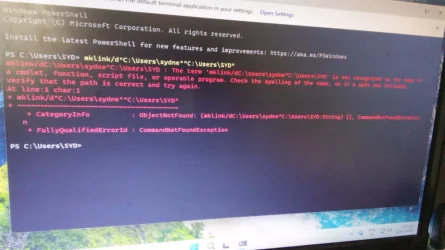
i tried step 14 but it failed there is an error. i dont what does this mean.
 

Attachments

  • Messenger_creation_8B2CE2B7-A839-4878-9287-A7B121656706.webp
    Messenger_creation_8B2CE2B7-A839-4878-9287-A7B121656706.webp
    124 KB · Views: 8

My Computer My Computer

At a glance

windows 11
OS
windows 11
Computer type
PC/Desktop
Manufacturer/Model
Lenovo
i tried step 14 but it failed there is an error. i dont what does this mean.

Hello, and welcome to the forum. :alien:

It looks like you used PowerShell instead of an elevated command prompt, and the spacing in the command is not correct.
 

My Computers My Computers

  • At a glance

    Windows 11 Pro for WorkstationsIntel i7-8700K 5 GHz64 GB (4x16GB) G.SKILL TridentZ RGB DDR4 3600...ASUS ROG-STRIX-GTX1080TI-O11G-GAMING (11GB GD...
    OS
    Windows 11 Pro for Workstations
    Computer type
    PC/Desktop
    Manufacturer/Model
    Custom self build
    CPU
    Intel i7-8700K 5 GHz
    Motherboard
    ASUS ROG Maximus XI Formula Z390
    Memory
    64 GB (4x16GB) G.SKILL TridentZ RGB DDR4 3600 MHz (F4-3600C18D-32GTZR)
    Graphics Card(s)
    ASUS ROG-STRIX-GTX1080TI-O11G-GAMING (11GB GDDR5X)
    Sound Card
    Integrated Digital Audio (S/PDIF)
    Monitor(s) Displays
    2 x Samsung Odyssey G75 27"
    Screen Resolution
    2560x1440
    Hard Drives
    1TB Samsung 990 PRO M.2,
    4TB Samsung 990 PRO M.2,
    TerraMaster F8 SSD Plus NAS
    PSU
    Seasonic Prime Titanium 850W
    Case
    Thermaltake Core P3 wall mounted
    Cooling
    Corsair Hydro H115i
    Keyboard
    Amazon Basics Wired Full Keyboard MD005
    Mouse
    Logitech MX Master 4
    Internet Speed
    2 Gbps Download and 100 Mbps Upload
    Browser
    Chrome and Edge
    Antivirus
    Microsoft Defender
    Other Info
    Logitech Z625 speaker system,
    Logitech BRIO 4K Pro webcam,
    HP Color LaserJet Pro MFP M477fdn,
    CyberPower CP1500PFCLCD
    Galaxy S23 Plus phone
  • At a glance

    Windows 11 ProSnapdragon X Elite (12 core) 3.42 GHz16 GB LPDDR5x-7467 MHz
    Operating System
    Windows 11 Pro
    Computer type
    Laptop
    Manufacturer/Model
    Surface Laptop 7 Copilot+ PC
    CPU
    Snapdragon X Elite (12 core) 3.42 GHz
    Memory
    16 GB LPDDR5x-7467 MHz
    Monitor(s) Displays
    15" HDR
    Screen Resolution
    2496 x 1664
    Hard Drives
    1 TB SSD
    Internet Speed
    Wi-Fi 7 and Bluetooth 5.4
    Browser
    Chrome and Edge
    Antivirus
    Microsoft Defender
Hi, just following the steps in this tutorial and hit the same issue as jamesmevans back in 2021, ie. 'The action can't be completed because the folder or file is open in another program' when trying to rename in Windows Explorer - do you know if there was a solution. Like him at the time, nothing is running on my PC except Windows Explorer
 

My Computer My Computer

At a glance

Windows 11 Pro 25H2Intel(R) Core(TM) i7-1070016GB
OS
Windows 11 Pro 25H2
Computer type
PC/Desktop
Manufacturer/Model
Dell Optiplex
CPU
Intel(R) Core(TM) i7-10700
Memory
16GB
Monitor(s) Displays
Dell U2722DE
Screen Resolution
2560x1440
Hard Drives
NVMe Kioxia 512GB
Keyboard
Logi MX Keys
Mouse
Logi MX Vertical
Internet Speed
76
Browser
Edge/Chrome/Firefox
Antivirus
Bitdefender
Hi, just following the steps in this tutorial and hit the same issue as jamesmevans back in 2021, ie. 'The action can't be completed because the folder or file is open in another program' when trying to rename in Windows Explorer - do you know if there was a solution. Like him at the time, nothing is running on my PC except Windows Explorer

Hello, :alien:

Be sure you are signed out of the account you want to rename its profile folder.

If you are, then you can try using the steps while booted into Safe Mode to avoid this in use issue.


My Computers My Computers

  • At a glance

    Windows 11 Pro for WorkstationsIntel i7-8700K 5 GHz64 GB (4x16GB) G.SKILL TridentZ RGB DDR4 3600...ASUS ROG-STRIX-GTX1080TI-O11G-GAMING (11GB GD...
    OS
    Windows 11 Pro for Workstations
    Computer type
    PC/Desktop
    Manufacturer/Model
    Custom self build
    CPU
    Intel i7-8700K 5 GHz
    Motherboard
    ASUS ROG Maximus XI Formula Z390
    Memory
    64 GB (4x16GB) G.SKILL TridentZ RGB DDR4 3600 MHz (F4-3600C18D-32GTZR)
    Graphics Card(s)
    ASUS ROG-STRIX-GTX1080TI-O11G-GAMING (11GB GDDR5X)
    Sound Card
    Integrated Digital Audio (S/PDIF)
    Monitor(s) Displays
    2 x Samsung Odyssey G75 27"
    Screen Resolution
    2560x1440
    Hard Drives
    1TB Samsung 990 PRO M.2,
    4TB Samsung 990 PRO M.2,
    TerraMaster F8 SSD Plus NAS
    PSU
    Seasonic Prime Titanium 850W
    Case
    Thermaltake Core P3 wall mounted
    Cooling
    Corsair Hydro H115i
    Keyboard
    Amazon Basics Wired Full Keyboard MD005
    Mouse
    Logitech MX Master 4
    Internet Speed
    2 Gbps Download and 100 Mbps Upload
    Browser
    Chrome and Edge
    Antivirus
    Microsoft Defender
    Other Info
    Logitech Z625 speaker system,
    Logitech BRIO 4K Pro webcam,
    HP Color LaserJet Pro MFP M477fdn,
    CyberPower CP1500PFCLCD
    Galaxy S23 Plus phone
  • At a glance

    Windows 11 ProSnapdragon X Elite (12 core) 3.42 GHz16 GB LPDDR5x-7467 MHz
    Operating System
    Windows 11 Pro
    Computer type
    Laptop
    Manufacturer/Model
    Surface Laptop 7 Copilot+ PC
    CPU
    Snapdragon X Elite (12 core) 3.42 GHz
    Memory
    16 GB LPDDR5x-7467 MHz
    Monitor(s) Displays
    15" HDR
    Screen Resolution
    2496 x 1664
    Hard Drives
    1 TB SSD
    Internet Speed
    Wi-Fi 7 and Bluetooth 5.4
    Browser
    Chrome and Edge
    Antivirus
    Microsoft Defender
Hello again,
Thanks for previous answer, all OK this time, except when completed, there was still an <oldname> folder with just my Desktop folder in it. Moved that folder to <newname> and deleted the <oldname> folder. Now keep getting nagged that <oldname>Desktop is unavailable on boot. Registry entry maybe?
 

My Computer My Computer

At a glance

Windows 11 Pro 25H2Intel(R) Core(TM) i7-1070016GB
OS
Windows 11 Pro 25H2
Computer type
PC/Desktop
Manufacturer/Model
Dell Optiplex
CPU
Intel(R) Core(TM) i7-10700
Memory
16GB
Monitor(s) Displays
Dell U2722DE
Screen Resolution
2560x1440
Hard Drives
NVMe Kioxia 512GB
Keyboard
Logi MX Keys
Mouse
Logi MX Vertical
Internet Speed
76
Browser
Edge/Chrome/Firefox
Antivirus
Bitdefender
Hello again,
Thanks for previous answer, all OK this time, except when completed, there was still an <oldname> folder with just my Desktop folder in it. Moved that folder to <newname> and deleted the <oldname> folder. Now keep getting nagged that <oldname>Desktop is unavailable on boot. Registry entry maybe?
And lost all apps previously pinned to taskbar and can't repin - can try but nothing happens
 

My Computer My Computer

At a glance

Windows 11 Pro 25H2Intel(R) Core(TM) i7-1070016GB
OS
Windows 11 Pro 25H2
Computer type
PC/Desktop
Manufacturer/Model
Dell Optiplex
CPU
Intel(R) Core(TM) i7-10700
Memory
16GB
Monitor(s) Displays
Dell U2722DE
Screen Resolution
2560x1440
Hard Drives
NVMe Kioxia 512GB
Keyboard
Logi MX Keys
Mouse
Logi MX Vertical
Internet Speed
76
Browser
Edge/Chrome/Firefox
Antivirus
Bitdefender
Hello again,
Thanks for previous answer, all OK this time, except when completed, there was still an <oldname> folder with just my Desktop folder in it. Moved that folder to <newname> and deleted the <oldname> folder. Now keep getting nagged that <oldname>Desktop is unavailable on boot. Registry entry maybe?

Just to confirm, did you so step 14 and leave the symbolic link it created?

In addition, you can check using the tutorial below to make your Desktop folder is pointing to the renamed profile folder.


My Computers My Computers

  • At a glance

    Windows 11 Pro for WorkstationsIntel i7-8700K 5 GHz64 GB (4x16GB) G.SKILL TridentZ RGB DDR4 3600...ASUS ROG-STRIX-GTX1080TI-O11G-GAMING (11GB GD...
    OS
    Windows 11 Pro for Workstations
    Computer type
    PC/Desktop
    Manufacturer/Model
    Custom self build
    CPU
    Intel i7-8700K 5 GHz
    Motherboard
    ASUS ROG Maximus XI Formula Z390
    Memory
    64 GB (4x16GB) G.SKILL TridentZ RGB DDR4 3600 MHz (F4-3600C18D-32GTZR)
    Graphics Card(s)
    ASUS ROG-STRIX-GTX1080TI-O11G-GAMING (11GB GDDR5X)
    Sound Card
    Integrated Digital Audio (S/PDIF)
    Monitor(s) Displays
    2 x Samsung Odyssey G75 27"
    Screen Resolution
    2560x1440
    Hard Drives
    1TB Samsung 990 PRO M.2,
    4TB Samsung 990 PRO M.2,
    TerraMaster F8 SSD Plus NAS
    PSU
    Seasonic Prime Titanium 850W
    Case
    Thermaltake Core P3 wall mounted
    Cooling
    Corsair Hydro H115i
    Keyboard
    Amazon Basics Wired Full Keyboard MD005
    Mouse
    Logitech MX Master 4
    Internet Speed
    2 Gbps Download and 100 Mbps Upload
    Browser
    Chrome and Edge
    Antivirus
    Microsoft Defender
    Other Info
    Logitech Z625 speaker system,
    Logitech BRIO 4K Pro webcam,
    HP Color LaserJet Pro MFP M477fdn,
    CyberPower CP1500PFCLCD
    Galaxy S23 Plus phone
  • At a glance

    Windows 11 ProSnapdragon X Elite (12 core) 3.42 GHz16 GB LPDDR5x-7467 MHz
    Operating System
    Windows 11 Pro
    Computer type
    Laptop
    Manufacturer/Model
    Surface Laptop 7 Copilot+ PC
    CPU
    Snapdragon X Elite (12 core) 3.42 GHz
    Memory
    16 GB LPDDR5x-7467 MHz
    Monitor(s) Displays
    15" HDR
    Screen Resolution
    2496 x 1664
    Hard Drives
    1 TB SSD
    Internet Speed
    Wi-Fi 7 and Bluetooth 5.4
    Browser
    Chrome and Edge
    Antivirus
    Microsoft Defender
No I didn't create the symbolic link. I have a bacup Desktop folder from a couple of days ago before I started this exrcise. It"s now under the <newname> folder. How can I stop Windows looking for it under <oldname> when the <oldname> folder no longer exists?
 

My Computer My Computer

At a glance

Windows 11 Pro 25H2Intel(R) Core(TM) i7-1070016GB
OS
Windows 11 Pro 25H2
Computer type
PC/Desktop
Manufacturer/Model
Dell Optiplex
CPU
Intel(R) Core(TM) i7-10700
Memory
16GB
Monitor(s) Displays
Dell U2722DE
Screen Resolution
2560x1440
Hard Drives
NVMe Kioxia 512GB
Keyboard
Logi MX Keys
Mouse
Logi MX Vertical
Internet Speed
76
Browser
Edge/Chrome/Firefox
Antivirus
Bitdefender
Back
Top Bottom