
Changing the start menu button


Sure you can!
... that way, if you wish to modify the appearance of the pinned Taskbar item only, which creates it's own shortcut at:
C:\Users\xxxxx\AppData\Roaming\Microsoft\Internet Explorer\Quick Launch\User Pinned\TaskBar
... you can do so, while leaving the original alone.
Of course, if you un-pin it, you have to start all over! 🤷‍♂️
 

My Computers My Computers

  • At a glance

    Windows 11 Pro
    OS
    Windows 11 Pro
    Computer type
    PC/Desktop
    Manufacturer/Model
    ASUS ROG Strix
  • At a glance

    Windows 11 Pro
    Operating System
    Windows 11 Pro
    Computer type
    Laptop
    Manufacturer/Model
    ASUS VivoBook
  • ASUS VivoBook 'Lite' ~ Windows 11 Home
... that way, if you wish to modify the appearance of the pinned Taskbar item only, which creates it's own shortcut at:
C:\Users\xxxxx\AppData\Roaming\Microsoft\Internet Explorer\Quick Launch\User Pinned\TaskBar
... then you can leave the original alone.
Of course, if you un-pin it, you have to start all over! 🤷‍♂️
It doesn't take much anyway.
 

My Computers My Computers

  • At a glance

    Windows 11 ProAMD Ryzen 7 9800X3D32GB DDR5 CL30 Kingston FuryASUS Prime Radeon RX 9060 XT OC Edition 16GB
    OS
    Windows 11 Pro
    Computer type
    PC/Desktop
    CPU
    AMD Ryzen 7 9800X3D
    Motherboard
    MSI PRO B850-P Wifi
    Memory
    32GB DDR5 CL30 Kingston Fury
    Graphics Card(s)
    ASUS Prime Radeon RX 9060 XT OC Edition 16GB
    Monitor(s) Displays
    LG Ultrawide 34" 1440p+ MSI 27" 4K UHD
    Screen Resolution
    3440x1440
    Hard Drives
    Main Boot Drive : 512GB Adata XPG RGB Gen3x4 NVMe M.2 SSD
    PSU
    EVGA 750 Watts 80+ Gold
    Case
    Deepcool Genome II
    Cooling
    Thermalright Burst Assassin 120
    Internet Speed
    FTTH 3Gbps
    Browser
    Chrome
    Antivirus
    "Moderna"
  • At a glance

    Windows 11 Proi7-4790K16GB Corsair Vengeance ProMSI R9 290
    Operating System
    Windows 11 Pro
    Computer type
    PC/Desktop
    CPU
    i7-4790K
    Motherboard
    ASRock Xtreme6 Z97
    Memory
    16GB Corsair Vengeance Pro
    Graphics card(s)
    MSI R9 290
    Monitor(s) Displays
    LG Ultrawide 34"
    Screen Resolution
    3440x1440
    Hard Drives
    500GB Adata SSD (OS Only)
    PSU
    Thermaltake 475 Watts 80 Bronze
    Case
    Thermaltake Commander I Snow Edition
    Cooling
    Deep Cool Archer Air Cooler
    Keyboard
    Armageddon MKA-5R RGB-Hornet
    Mouse
    Logitech G402
    Internet Speed
    1Gbps
    Browser
    Chrome
    Antivirus
    Moderna :)
So..., @esebm
you good now?
I need to know so I can un-install Open-Shell for the last time!!! :p
 

My Computers My Computers

  • At a glance

    Windows 11 Pro
    OS
    Windows 11 Pro
    Computer type
    PC/Desktop
    Manufacturer/Model
    ASUS ROG Strix
  • At a glance

    Windows 11 Pro
    Operating System
    Windows 11 Pro
    Computer type
    Laptop
    Manufacturer/Model
    ASUS VivoBook
  • ASUS VivoBook 'Lite' ~ Windows 11 Home
OK, uninstall it. I didn't mean to get on your collective nerves, sorry about that.
 

My Computer My Computer

At a glance

win 11Ryzen 5600G32 GB DDR4on board
OS
win 11
Computer type
PC/Desktop
Manufacturer/Model
Home build
CPU
Ryzen 5600G
Motherboard
B450 Tomahawk Max
Memory
32 GB DDR4
Graphics Card(s)
on board
Monitor(s) Displays
LG 27MR400
Screen Resolution
1280 x 1024
Hard Drives
SSD
Internet Speed
3MB/s
Browser
Opera
Antivirus
Windows
OK, uninstall it. I didn't mean to get on your collective nerves, sorry about that.
LOL!!!
All good chief! I was just messin with ya!
No problem!
 

My Computers My Computers

  • At a glance

    Windows 11 Pro
    OS
    Windows 11 Pro
    Computer type
    PC/Desktop
    Manufacturer/Model
    ASUS ROG Strix
  • At a glance

    Windows 11 Pro
    Operating System
    Windows 11 Pro
    Computer type
    Laptop
    Manufacturer/Model
    ASUS VivoBook
  • ASUS VivoBook 'Lite' ~ Windows 11 Home
Ladies & Gentlemen, sorry but I still need some advice.
I have uninstalled and reinstalled Open Shell, hoping that would bring that pinned start menu button back, but no dice. It's not even on the taskbar anymore. Can someone help finding and pinning it?
 

My Computer My Computer

At a glance

win 11Ryzen 5600G32 GB DDR4on board
OS
win 11
Computer type
PC/Desktop
Manufacturer/Model
Home build
CPU
Ryzen 5600G
Motherboard
B450 Tomahawk Max
Memory
32 GB DDR4
Graphics Card(s)
on board
Monitor(s) Displays
LG 27MR400
Screen Resolution
1280 x 1024
Hard Drives
SSD
Internet Speed
3MB/s
Browser
Opera
Antivirus
Windows
Ladies & Gentlemen, sorry but I still need some advice.
I have uninstalled and reinstalled Open Shell, hoping that would bring that pinned start menu button back, but no dice. It's not even on the taskbar anymore. Can someone help finding and pinning it?
Scroll back to reply #37.
 

My Computers My Computers

  • At a glance

    Windows 11 ProAMD Ryzen 7 9800X3D32GB DDR5 CL30 Kingston FuryASUS Prime Radeon RX 9060 XT OC Edition 16GB
    OS
    Windows 11 Pro
    Computer type
    PC/Desktop
    CPU
    AMD Ryzen 7 9800X3D
    Motherboard
    MSI PRO B850-P Wifi
    Memory
    32GB DDR5 CL30 Kingston Fury
    Graphics Card(s)
    ASUS Prime Radeon RX 9060 XT OC Edition 16GB
    Monitor(s) Displays
    LG Ultrawide 34" 1440p+ MSI 27" 4K UHD
    Screen Resolution
    3440x1440
    Hard Drives
    Main Boot Drive : 512GB Adata XPG RGB Gen3x4 NVMe M.2 SSD
    PSU
    EVGA 750 Watts 80+ Gold
    Case
    Deepcool Genome II
    Cooling
    Thermalright Burst Assassin 120
    Internet Speed
    FTTH 3Gbps
    Browser
    Chrome
    Antivirus
    "Moderna"
  • At a glance

    Windows 11 Proi7-4790K16GB Corsair Vengeance ProMSI R9 290
    Operating System
    Windows 11 Pro
    Computer type
    PC/Desktop
    CPU
    i7-4790K
    Motherboard
    ASRock Xtreme6 Z97
    Memory
    16GB Corsair Vengeance Pro
    Graphics card(s)
    MSI R9 290
    Monitor(s) Displays
    LG Ultrawide 34"
    Screen Resolution
    3440x1440
    Hard Drives
    500GB Adata SSD (OS Only)
    PSU
    Thermaltake 475 Watts 80 Bronze
    Case
    Thermaltake Commander I Snow Edition
    Cooling
    Deep Cool Archer Air Cooler
    Keyboard
    Armageddon MKA-5R RGB-Hornet
    Mouse
    Logitech G402
    Internet Speed
    1Gbps
    Browser
    Chrome
    Antivirus
    Moderna :)
I see the the icon that I want to remove in the Open Shell folder but I can't get the new icon into that folder or any icon onto the taskbar.
 

My Computer My Computer

At a glance

win 11Ryzen 5600G32 GB DDR4on board
OS
win 11
Computer type
PC/Desktop
Manufacturer/Model
Home build
CPU
Ryzen 5600G
Motherboard
B450 Tomahawk Max
Memory
32 GB DDR4
Graphics Card(s)
on board
Monitor(s) Displays
LG 27MR400
Screen Resolution
1280 x 1024
Hard Drives
SSD
Internet Speed
3MB/s
Browser
Opera
Antivirus
Windows
I see the the icon that I want to remove in the Open Shell folder but I can't get the new icon into that folder or any icon onto the taskbar.
Isn't the shortcut you want to pin to the Taskbar, at the top of the Start Menu, as I pointed out in Post #24?
 

My Computers My Computers

  • At a glance

    Windows 11 Pro
    OS
    Windows 11 Pro
    Computer type
    PC/Desktop
    Manufacturer/Model
    ASUS ROG Strix
  • At a glance

    Windows 11 Pro
    Operating System
    Windows 11 Pro
    Computer type
    Laptop
    Manufacturer/Model
    ASUS VivoBook
  • ASUS VivoBook 'Lite' ~ Windows 11 Home
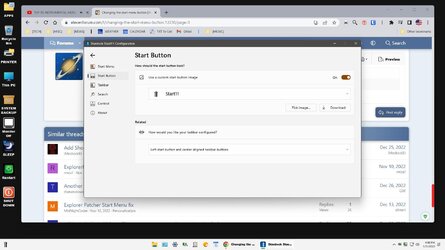
Nope!
 

My Computer My Computer

At a glance

win 11Ryzen 5600G32 GB DDR4on board
OS
win 11
Computer type
PC/Desktop
Manufacturer/Model
Home build
CPU
Ryzen 5600G
Motherboard
B450 Tomahawk Max
Memory
32 GB DDR4
Graphics Card(s)
on board
Monitor(s) Displays
LG 27MR400
Screen Resolution
1280 x 1024
Hard Drives
SSD
Internet Speed
3MB/s
Browser
Opera
Antivirus
Windows
Well..., somewhere in Settings, under misc. I think, there's an option to re-create the Start11 shortcut..., you'll have to find it yourself.
 

My Computers My Computers

  • At a glance

    Windows 11 Pro
    OS
    Windows 11 Pro
    Computer type
    PC/Desktop
    Manufacturer/Model
    ASUS ROG Strix
  • At a glance

    Windows 11 Pro
    Operating System
    Windows 11 Pro
    Computer type
    Laptop
    Manufacturer/Model
    ASUS VivoBook
  • ASUS VivoBook 'Lite' ~ Windows 11 Home
Well..., somewhere in Settings, under misc. I think, there's an option to re-create the Start11 shortcut..., you'll have to find it yourself.
Screenshot (20230131-164838).jpg
Refer to the inserted pix. It may help. Good luck.
 

My Computers My Computers

  • At a glance

    Windows 11 (25H2)Core(TM) i5-12400T12.0 GB (11.7 GB usable)Intel(R) UHD Graphics 730
    OS
    Windows 11 (25H2)
    Computer type
    PC/Desktop
    Manufacturer/Model
    HP Pavilion 577B5AA#ABA
    CPU
    Core(TM) i5-12400T
    Motherboard
    HP 89E9
    Memory
    12.0 GB (11.7 GB usable)
    Graphics Card(s)
    Intel(R) UHD Graphics 730
    Sound Card
    DFX Audio
    Monitor(s) Displays
    HO Generic PnP Monitor
    Screen Resolution
    1920 x 1080
    Hard Drives
    SAMSUNG MZVLQ10HBLB00BH1 SSD 1TB
    PSU
    HP Std. for this product
    Case
    All-in-One
    Cooling
    Fan
    Keyboard
    HP Wireless / Bluetooth
    Mouse
    HP Wireless / Bluetooth
    Internet Speed
    Link speed (Receive/Transmit): 1000/1000 (Mbps)
    Browser
    Firefox
    Antivirus
    Malwarebytes Pro / Windows Security
    Other Info
    Retired IT professional.
  • At a glance

    Windows 11 (25H2)Intel I-7-1165G78 GB DDR4-3200 SDRAMIntel Iris Xe Graphics
    Operating System
    Windows 11 (25H2)
    Computer type
    Laptop
    Manufacturer/Model
    HP 15tegooo [HP Pavilion Laptop Intel I-7]
    CPU
    Intel I-7-1165G7
    Motherboard
    HP
    Memory
    8 GB DDR4-3200 SDRAM
    Graphics card(s)
    Intel Iris Xe Graphics
    Sound Card
    Realtek
    Monitor(s) Displays
    HP HD micro edge, Bright View, 250 nits
    Screen Resolution
    1366 x768
    Hard Drives
    256 GB DD4-3200 SDRAM
    PSU
    HP
    Case
    Std HP Laptop
    Cooling
    Fan
    Keyboard
    std
    Mouse
    Logi M585
    Browser
    Edge
    Antivirus
    Windows Security
Guys, update: I had contacted the MS support and they told me that the menu button was hidden under the open shell orb. Uninstalling open shell revealed the button and it works now. It did work before, the Orb in the left corner AND the menu button on the taskbar. Isn't that the way it's supposed to be?
 

My Computer My Computer

At a glance

win 11Ryzen 5600G32 GB DDR4on board
OS
win 11
Computer type
PC/Desktop
Manufacturer/Model
Home build
CPU
Ryzen 5600G
Motherboard
B450 Tomahawk Max
Memory
32 GB DDR4
Graphics Card(s)
on board
Monitor(s) Displays
LG 27MR400
Screen Resolution
1280 x 1024
Hard Drives
SSD
Internet Speed
3MB/s
Browser
Opera
Antivirus
Windows

Latest Support Threads

Back
Top Bottom




