
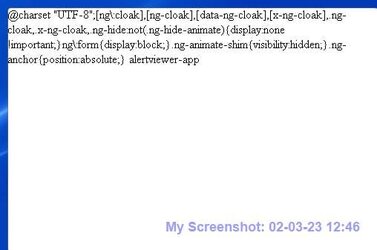
@charset... on my desktop-can't get rid of it.


Mike650

Member
Local time
12:51 PM
Posts
3
OS
Windows 11 Home
This screenshot appears on my desktop since a couple of days ago. It doesn't appear to be a 'window', there is no 'Close' button, it doesn't show up on Alt-Tab, and I can't get rid of it. I haven't downloaded anything recently except a couple of PDF documents. I've 'Restarted' several times, but it keeps popping up.
Any help? Windows 11 Home on a Dell XPS PC.
Mike650
 

Attachments
  • ScreenShot 02-03-23 @charset.jpg
    ScreenShot 02-03-23 @charset.jpg
    17 KB · Views: 2
Last edited by a moderator:

My Computer My Computer

At a glance

Windows 11 Home12th Gen i7-12700K 3.61 GHz16 GBNVidia High Definition Audio
OS
Windows 11 Home
Computer type
PC/Desktop
Manufacturer/Model
Dell XPS 8950
CPU
12th Gen i7-12700K 3.61 GHz
Motherboard
?
Memory
16 GB
Graphics Card(s)
NVidia High Definition Audio
Sound Card
?
Monitor(s) Displays
Toshiba HDMI
Screen Resolution
High
Hard Drives
565 GB SSD & 1 TB HDD.
PSU
?
Case
Tower
Cooling
Fan
Keyboard
USB - AZIO HID
Mouse
USB - Microsoft HID
Internet Speed
100+ mbs
Browser
Chrome/Edge
Antivirus
McAfee/MalwareBytes

My Computer My Computer

At a glance

Win 11 25H2intel i7-870032GbIntel iGPU
OS
Win 11 25H2
Computer type
PC/Desktop
Manufacturer/Model
custom
CPU
intel i7-8700
Motherboard
Asus Z370 TUF Gaming
Memory
32Gb
Graphics Card(s)
Intel iGPU
Sound Card
Realtek
Hard Drives
Samsung
PSU
Corsair
Cooling
Fans
@Mike650
Welcome to the forums! :-)

Not a good idea to post your email!
 

My Computers My Computers

  • At a glance

    Windows 11 Pro
    OS
    Windows 11 Pro
    Computer type
    PC/Desktop
    Manufacturer/Model
    ASUS ROG Strix
  • At a glance

    Windows 11 Pro
    Operating System
    Windows 11 Pro
    Computer type
    Laptop
    Manufacturer/Model
    ASUS VivoBook
  • ASUS VivoBook 'Lite' ~ Windows 11 Home
@Mike650
Welcome to the forums! :-)

Not a good idea to post your email!
Thanks for that advice! I won't do that again. Wasn't sure how I would get a response without providing email, but I get it now.
 

My Computer My Computer

At a glance

Windows 11 Home12th Gen i7-12700K 3.61 GHz16 GBNVidia High Definition Audio
OS
Windows 11 Home
Computer type
PC/Desktop
Manufacturer/Model
Dell XPS 8950
CPU
12th Gen i7-12700K 3.61 GHz
Motherboard
?
Memory
16 GB
Graphics Card(s)
NVidia High Definition Audio
Sound Card
?
Monitor(s) Displays
Toshiba HDMI
Screen Resolution
High
Hard Drives
565 GB SSD & 1 TB HDD.
PSU
?
Case
Tower
Cooling
Fan
Keyboard
USB - AZIO HID
Mouse
USB - Microsoft HID
Internet Speed
100+ mbs
Browser
Chrome/Edge
Antivirus
McAfee/MalwareBytes
Do you have Mcafee by any chance ? If so, have a look here for the issue:
Yes, I do, and got a new message in that popup window today hinting it to be a McAfee thing. Followed the suggestions you sent & now all fixed, but I was hoping to use the extra internet security options besides the Smart (Recommended) option. Guess I'll have to pick whether to have special firewall options & see that annoying popup or just use the Smart option until McAfee fixes it. Thank you!
 

My Computer My Computer

At a glance

Windows 11 Home12th Gen i7-12700K 3.61 GHz16 GBNVidia High Definition Audio
OS
Windows 11 Home
Computer type
PC/Desktop
Manufacturer/Model
Dell XPS 8950
CPU
12th Gen i7-12700K 3.61 GHz
Motherboard
?
Memory
16 GB
Graphics Card(s)
NVidia High Definition Audio
Sound Card
?
Monitor(s) Displays
Toshiba HDMI
Screen Resolution
High
Hard Drives
565 GB SSD & 1 TB HDD.
PSU
?
Case
Tower
Cooling
Fan
Keyboard
USB - AZIO HID
Mouse
USB - Microsoft HID
Internet Speed
100+ mbs
Browser
Chrome/Edge
Antivirus
McAfee/MalwareBytes

Latest Support Threads

Back
Top Bottom




