Choosing the right SSD...


@TheMystic I just had a look at thunderbolt 3 enclosures and the price is way more than I want to pay £100 + so that is just right for me
 

My Computers My Computers

  • At a glance

    Windows 11 Pro13th Gen Core i9 13900HX32GB DDR5 @4800MHz 2x16GBGeforce RTX 4090HX 16GB
    OS
    Windows 11 Pro
    Computer type
    Laptop
    Manufacturer/Model
    Alienware M18 R1
    CPU
    13th Gen Core i9 13900HX
    Memory
    32GB DDR5 @4800MHz 2x16GB
    Graphics Card(s)
    Geforce RTX 4090HX 16GB
    Sound Card
    Nvidia HD / Realtek ALC3254
    Monitor(s) Displays
    18" QHD+
    Screen Resolution
    25660 X 1600
    Hard Drives
    C: KIOXIA (Toshiba) 2TB KXG80ZNV2T04 NVMe PCIe M.2 SSD
    D: KIOXIA (Toshiba) 2TB KXG80ZNV2T04 NVMe PCIe M.2 SSD
    Case
    Dark Metallic Moon
    Keyboard
    Alienware M Series per-key AlienFX RGB
    Mouse
    Alienware AW610M
    Browser
    Chrome and Firefox
    Antivirus
    Norton
    Other Info
    Killer E3000 Ethernet Controller
    Killer Killer AX1690 Wi-Fi Network Adaptor Wi-Fi 6E
    Bluetooth 5.2
    Alienware Z01G Graphic Amplifier
  • At a glance

    Windows 11 Pro10th Gen i-9 10900 K32Gb Dual Channel DDR4 @ 8843MHzNvidia RTX 2080 Super
    Operating System
    Windows 11 Pro
    Computer type
    Laptop
    Manufacturer/Model
    Alienware Area 51m R2
    CPU
    10th Gen i-9 10900 K
    Memory
    32Gb Dual Channel DDR4 @ 8843MHz
    Graphics card(s)
    Nvidia RTX 2080 Super
    Sound Card
    Nvidia
    Screen Resolution
    1920 x 1080
    Hard Drives
    Hard Drive C: Samsung 2TB SSD PM981a NVMe
    Hard Drive D:Samsung 2TB SSD 970 EVO Plus
    Mouse
    Alienware 610M
    Browser
    Chrome
    Antivirus
    Norton
Hi,
All of this has been about storage not os disks.

But either way you wouldn't want to put a os on a qvo either lol
I don't think it is as bad as you are making it out to be.
 

My Computer My Computer

At a glance

Windows 11Intel Core i7 3630QM16 GBIntel HD Graphics 4000 & Nvidia GeForce GT 635M
OS
Windows 11
Computer type
Laptop
Manufacturer/Model
HP Envy dv7
CPU
Intel Core i7 3630QM
Motherboard
HP
Memory
16 GB
Graphics Card(s)
Intel HD Graphics 4000 & Nvidia GeForce GT 635M
Sound Card
IDT High Definition
Screen Resolution
1080p
Hard Drives
1 TB Crucial MX500 on bay 1.
1 TB Seagate HDD on bay 2.
Antivirus
Windows Defender
Hi,
Beating a dead horse at this point but qvo is the hdd of ssd's and only three year warranty to top it off.
 

My Computer My Computer

At a glance

Win-7-10-11Pro's10900k & 9940x & 5930kTrident-Z Royal 4000c16 2x16gb & Trident-Z 36...Titan Xp & 1080ti FTW3 & evga 980ti gaming
OS
Win-7-10-11Pro's
Computer type
PC/Desktop
Manufacturer/Model
Acer 17" Nitro 7840sn/ 2x16gb 5600c40/ 4060/ stock 1tb-os/ 4tb sn850x
CPU
10900k & 9940x & 5930k
Motherboard
z490-Apex & x299-Apex & x99-Sabertooth
Memory
Trident-Z Royal 4000c16 2x16gb & Trident-Z 3600c16 4x8gb & 3200c14 4x8gb
Graphics Card(s)
Titan Xp & 1080ti FTW3 & evga 980ti gaming
Sound Card
Onboard Realtek x3
Monitor(s) Displays
1-AOC G2460PG 24"G-Sync 144Hz/ 2nd 1-ASUS VG248QE 24"/ 3rd LG 43" series
Screen Resolution
1920-1080 not sure what the t.v is besides 43" class scales from 1920-1080 perfectly
Hard Drives
2-WD-sn850x 4tb/ 970evo+500gb/ 980 pro 2tb.
PSU
1000p2 & 1200p2 & 850p2
Case
D450 x2 & 1 Test bench in cherry Entertainment center
Cooling
Custom water loops x3 with 2x mora 360mm rads only 980ti gaming air cooled
Keyboard
G710+x3
Mouse
Redragon x3
Internet Speed
xfinity gigabyte
Browser
Firefox
Antivirus
mbam pro
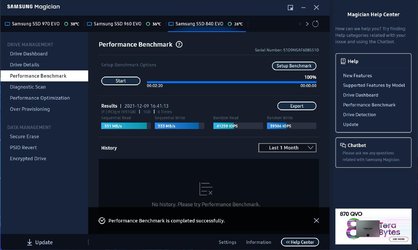
Today, it doesn't matter if you have ssd TLC or DLC, TBW is important because it keeps ssd correct or not. I have samsung ssd 840 1TB which serves for games and today 28 tb writing.
Today they are the best supporting M.2 PCI Express module up to
Gen4x4 (64 Gb / s) samsung ssd 980 pro 7200 MBR (sory)
 

Attachments

  • Screenshot (20211209-164130).jpg
    Screenshot (20211209-164130).jpg
    143.4 KB · Views: 3
Last edited:

My Computer My Computer

At a glance

Win11 PRORyzen Threadripper 1920xHyperx 32GB 3600MhzAsus GeForce TURBO RTX 2080Ti 11GB
OS
Win11 PRO
Computer type
PC/Desktop
Manufacturer/Model
AsRock
CPU
Ryzen Threadripper 1920x
Motherboard
AsRock Fatal1ty
Memory
Hyperx 32GB 3600Mhz
Graphics Card(s)
Asus GeForce TURBO RTX 2080Ti 11GB
Sound Card
matheboard and Logitech G933 Gaming Headset
Monitor(s) Displays
ASUS 28"
Screen Resolution
3840 x 2160
Hard Drives
ssd m2 970, 960, ssd 840 EVO 1TB, 4 x 4TB HDD
PSU
corsair 1200W
Case
big tower
Cooling
corsair H150IPro
Keyboard
logitech k800
Mouse
logitech G603
Internet Speed
download 200 Mbps upload 100 Mbps
Browser
Maxthon
Antivirus
avira
Hi,
Games are about the only data worth the expense of ssd storage
OS on a ssd is a no brainer

Videos/ movies/ t.v. series/ images/ office doc's all are perfectly suited for hdd's as long as they are at minimum 7200rmp which all of mine are and will stay on western digital black and work perfectly well.

The "hdd's are noisy" remarks is probably because it's a defective hdd all mine are silent.
 

My Computer My Computer

At a glance

Win-7-10-11Pro's10900k & 9940x & 5930kTrident-Z Royal 4000c16 2x16gb & Trident-Z 36...Titan Xp & 1080ti FTW3 & evga 980ti gaming
OS
Win-7-10-11Pro's
Computer type
PC/Desktop
Manufacturer/Model
Acer 17" Nitro 7840sn/ 2x16gb 5600c40/ 4060/ stock 1tb-os/ 4tb sn850x
CPU
10900k & 9940x & 5930k
Motherboard
z490-Apex & x299-Apex & x99-Sabertooth
Memory
Trident-Z Royal 4000c16 2x16gb & Trident-Z 3600c16 4x8gb & 3200c14 4x8gb
Graphics Card(s)
Titan Xp & 1080ti FTW3 & evga 980ti gaming
Sound Card
Onboard Realtek x3
Monitor(s) Displays
1-AOC G2460PG 24"G-Sync 144Hz/ 2nd 1-ASUS VG248QE 24"/ 3rd LG 43" series
Screen Resolution
1920-1080 not sure what the t.v is besides 43" class scales from 1920-1080 perfectly
Hard Drives
2-WD-sn850x 4tb/ 970evo+500gb/ 980 pro 2tb.
PSU
1000p2 & 1200p2 & 850p2
Case
D450 x2 & 1 Test bench in cherry Entertainment center
Cooling
Custom water loops x3 with 2x mora 360mm rads only 980ti gaming air cooled
Keyboard
G710+x3
Mouse
Redragon x3
Internet Speed
xfinity gigabyte
Browser
Firefox
Antivirus
mbam pro
There is a lot of perception snobbery concerning QLC drives I feel. I have an Intel 660p QLC 512Gb NVME OS drive.
Three years old, many wipes and re installs, many app installs, deletes ect, still 95% endurance left, 6 second boot times, perfectly fine as an OS drive, have never thought to myself "I wish this drive was faster".
At my current usage style it will wear out in approx 50 years, I'll be 106.... :)
For mass static storage HDDs are still currently unbeatable value no doubt, but even QLC SSDs have their place and in normal use are magnitudes faster than spinners.
 

My Computer My Computer

At a glance

Windows 11 Pro 22H2, build: 22621.521Intel i7-12700K 3.6GHz Base (5.0GHz Turbo)64GB DDR 3600MhzAsus Tuff RTX 3080 10GB OC
OS
Windows 11 Pro 22H2, build: 22621.521
Computer type
PC/Desktop
Manufacturer/Model
Scan 3XS Custom 1700
CPU
Intel i7-12700K 3.6GHz Base (5.0GHz Turbo)
Motherboard
Asus ProArt Creator B660 D4
Memory
64GB DDR 3600Mhz
Graphics Card(s)
Asus Tuff RTX 3080 10GB OC
Sound Card
Onboard Realtek
Monitor(s) Displays
Gigabyte G32QC 32inch 16:9 curved @2560 x 1440p 165Hz Freesync Premium Pro/ Dell SE2422H 24inch 16:9 1920 x 1080p 75Hz Freesync
Screen Resolution
2560 x 1440p & 1920 x 1080p
Hard Drives
WD SN570 1TB NVME (Boot), Samsung 870QVO 1TB (SSD), SanDisk 3D Ultra 500Gb (SSD) x2, Seagate 3Tb Expansion Desk (Ext HDD), 2x Toshiba 1Tb P300 (Ext HDD)
PSU
Corsair RM1000X Modular
Case
Corsair 4000D Airflow Desktop
Cooling
Corsair Hydro H150i RGB Pro XT 360mm Liquid Cooler, 3 x 120mm fans, 1x Exhaust
Keyboard
Microsoft Ergonomic
Mouse
Logitech G402
Internet Speed
800Mbs
Browser
Edge Chromium
Antivirus
Defender, Malwarebytes
Hi,
I have mx100 that all are still at 99%
These are nearly 7 years old :zany:
 

My Computer My Computer

At a glance

Win-7-10-11Pro's10900k & 9940x & 5930kTrident-Z Royal 4000c16 2x16gb & Trident-Z 36...Titan Xp & 1080ti FTW3 & evga 980ti gaming
OS
Win-7-10-11Pro's
Computer type
PC/Desktop
Manufacturer/Model
Acer 17" Nitro 7840sn/ 2x16gb 5600c40/ 4060/ stock 1tb-os/ 4tb sn850x
CPU
10900k & 9940x & 5930k
Motherboard
z490-Apex & x299-Apex & x99-Sabertooth
Memory
Trident-Z Royal 4000c16 2x16gb & Trident-Z 3600c16 4x8gb & 3200c14 4x8gb
Graphics Card(s)
Titan Xp & 1080ti FTW3 & evga 980ti gaming
Sound Card
Onboard Realtek x3
Monitor(s) Displays
1-AOC G2460PG 24"G-Sync 144Hz/ 2nd 1-ASUS VG248QE 24"/ 3rd LG 43" series
Screen Resolution
1920-1080 not sure what the t.v is besides 43" class scales from 1920-1080 perfectly
Hard Drives
2-WD-sn850x 4tb/ 970evo+500gb/ 980 pro 2tb.
PSU
1000p2 & 1200p2 & 850p2
Case
D450 x2 & 1 Test bench in cherry Entertainment center
Cooling
Custom water loops x3 with 2x mora 360mm rads only 980ti gaming air cooled
Keyboard
G710+x3
Mouse
Redragon x3
Internet Speed
xfinity gigabyte
Browser
Firefox
Antivirus
mbam pro
I don't agree with you TrashZone games on ssd don't have to be fast 7200 Mb / s internet speed is important download and upload I had games installed on hdd 7200 MB / s and now on ssd 840 there is no difference in speed
 

My Computer My Computer

At a glance

Win11 PRORyzen Threadripper 1920xHyperx 32GB 3600MhzAsus GeForce TURBO RTX 2080Ti 11GB
OS
Win11 PRO
Computer type
PC/Desktop
Manufacturer/Model
AsRock
CPU
Ryzen Threadripper 1920x
Motherboard
AsRock Fatal1ty
Memory
Hyperx 32GB 3600Mhz
Graphics Card(s)
Asus GeForce TURBO RTX 2080Ti 11GB
Sound Card
matheboard and Logitech G933 Gaming Headset
Monitor(s) Displays
ASUS 28"
Screen Resolution
3840 x 2160
Hard Drives
ssd m2 970, 960, ssd 840 EVO 1TB, 4 x 4TB HDD
PSU
corsair 1200W
Case
big tower
Cooling
corsair H150IPro
Keyboard
logitech k800
Mouse
logitech G603
Internet Speed
download 200 Mbps upload 100 Mbps
Browser
Maxthon
Antivirus
avira
Some tips to maximize SSD life:

1. Over provisioning: Leave 10% or more space unallocated for the system to use it for maintenance purposes.

2. Free space: SSDs begin to slow down just like HDDs when the disk is low on space. It is best to have 25% or more free space available in every partition you make. This not only increases performance, but also helps increase longevity.

I don't use overprovisioning cause I tend to keep drives below 60 percent capacity (70% max). This is where data management helps.

As for the rocket science, I keep it simple: I only buy Samsung SSD/NVMe drives. And only their top (pro) and mid-tier (EVO) drives.

That's me :)
 

My Computers My Computers

  • At a glance

    Windows 11 Pro 24H2 (Build 26100.4770)Intel Core 9 Ultra 285K64G (4x16) DDR5 Corsair RGB Dominator Platinu...Radeon (XFX Mercury) RX 9070XT OC (with Magne...
    OS
    Windows 11 Pro 24H2 (Build 26100.4770)
    Computer type
    PC/Desktop
    Manufacturer/Model
    Custom built
    CPU
    Intel Core 9 Ultra 285K
    Motherboard
    Gigabyte Aorus Z890 Xtreme AI Top
    Memory
    64G (4x16) DDR5 Corsair RGB Dominator Platinum (6400Mhz)
    Graphics Card(s)
    Radeon (XFX Mercury) RX 9070XT OC (with Magnetic Fans)
    Sound Card
    Onboard (DTS:X® Ultra Audio: ESS ES9280A DAC)
    Monitor(s) Displays
    27-inch Eizo Color Edge - CG2700X
    Screen Resolution
    3840 x 2160
    Hard Drives
    4 Samsung NVM 990 Pro drives: 1TB (OS), 2TB, 2 X 4TB.
    PSU
    Seasonic TX-1300 (1300 Watts)
    Case
    Cooler Master H500M
    Cooling
    Corsair Link Titan 280 RX RGB
    Keyboard
    Logitech Craft
    Mouse
    Logitech MX Master 3S
    Internet Speed
    1TB Download. 512mb Upload
    Browser
    Microsoft Edge Chromium
    Antivirus
    Windows Security
    Other Info
    System used for gaming, photography, music, school.
  • At a glance

    Windows 11 Pro 24H2 (Build 26100.4061)Intel Core i9-9900K32gig (4 x 8) Corsair Dominator Platinum DDR4...Radeon XFX Merc 7900XT (20gig)
    Operating System
    Windows 11 Pro 24H2 (Build 26100.4061)
    Computer type
    PC/Desktop
    Manufacturer/Model
    Custom built
    CPU
    Intel Core i9-9900K
    Motherboard
    Gigabyte Z390 Aorus Xtreme
    Memory
    32gig (4 x 8) Corsair Dominator Platinum DDR4 3600Mhz (B-Die)
    Graphics card(s)
    Radeon XFX Merc 7900XT (20gig)
    Sound Card
    Onboard
    Monitor(s) Displays
    24-Inch NEC PA242W
    Screen Resolution
    2880 x 1800
    Hard Drives
    2 X NVME, 1 X SATA SSD
    PSU
    EVGA Super Nova 1000 P2 (1000 Watt)
    Case
    Phantek Enthoo Luxe
    Cooling
    Corsair H115i Elite AIO Cooler
    Keyboard
    Logitech Keys
    Mouse
    Logitech MX Master 3
    Internet Speed
    1TB Download. 512mb Upload
    Browser
    Microsoft Edge Chromium
    Antivirus
    Windows Security
    Other Info
    Backup System
There is a lot of perception snobbery concerning QLC drives I feel. I have an Intel 660p QLC 512Gb NVME OS drive.
Three years old, many wipes and re installs, many app installs, deletes ect, still 95% endurance left, 6 second boot times, perfectly fine as an OS drive, have never thought to myself "I wish this drive was faster".
At my current usage style it will wear out in approx 50 years, I'll be 106.... :)
For mass static storage HDDs are still currently unbeatable value no doubt, but even QLC SSDs have their place and in normal use are magnitudes faster than spinners.
Yeah, QLC drives can be just fine. As long as you aren't using them for high speed continuous writing, you probably won't notice much difference. It's only when you fully deplete the reserved nand blocks running as SLC that the performance really drops off. (and if you fill up the drive to near capacity, you won't have nearly as much SLC type nand blocks to work from, so the performance drop off will occur much sooner when drives are over 70% usage.) For the vast majority of their usage, they will certainly exceed the speed of spinners.

And while they will have a shorter lifespan, people always exaggerate how quickly their drives are going to die on them. I've got an 80GB SSD from around 2009 that's still working. People thought mine would be dead in 2-3 years back in the day and suggested I move all of my writes off the drive to keep its longevity as long as possible. At this point, it's the fact that the drive is only 80GB that's the issue.
 

My Computers My Computers

  • At a glance

    Windows 11 ProIntel Core i5-8279u32GB DDR4 2666MhzIntel Iris Plus 655
    OS
    Windows 11 Pro
    Computer type
    PC/Desktop
    Manufacturer/Model
    Beelink SEI8
    CPU
    Intel Core i5-8279u
    Motherboard
    AZW SEI
    Memory
    32GB DDR4 2666Mhz
    Graphics Card(s)
    Intel Iris Plus 655
    Sound Card
    Intel SST
    Monitor(s) Displays
    Asus ProArt PA278QV
    Screen Resolution
    2560x1440
    Hard Drives
    512GB NVMe
    PSU
    NA
    Case
    NA
    Cooling
    NA
    Keyboard
    NA
    Mouse
    NA
    Internet Speed
    500/50
    Browser
    Edge
    Antivirus
    Defender
    Other Info
    Mini PC used for testing Windows 11.
  • At a glance

    Windows 10 ProRyzen 9 5900x64GB DDR4-3600EVGA GeForce 3080 FT3 Ultra
    Operating System
    Windows 10 Pro
    Computer type
    PC/Desktop
    Manufacturer/Model
    Custom
    CPU
    Ryzen 9 5900x
    Motherboard
    Asus Rog Strix X570-E Gaming
    Memory
    64GB DDR4-3600
    Graphics card(s)
    EVGA GeForce 3080 FT3 Ultra
    Sound Card
    Onboard
    Monitor(s) Displays
    ASUS TUF Gaming VG27AQ. ASUS ProArt Display PA278QV 27” WQHD
    Screen Resolution
    2560x1440
    Hard Drives
    2TB WD SN850 PCI-E Gen 4 NVMe
    2TB Sandisk Ultra 2.5" SATA SSD
    PSU
    Seasonic Focus 850
    Case
    Fractal Meshify S2 in White
    Cooling
    Dark Rock Pro CPU cooler, 3 x 140mm case fans
    Keyboard
    Corsiar K65 RGB Lux
    Mouse
    Logitech G9 Laser Mouse
    Internet Speed
    500/50
    Browser
    Chrome
    Antivirus
    Defender.
I don't agree with you TrashZone games on ssd don't have to be fast 7200 Mb / s internet speed is important download and upload I had games installed on hdd 7200 MB / s and now on ssd 840 there is no difference in speed
I think he was saying 7200 RPM, not 7200 MB/s. I don't think for storage of things like video, music, documents and such that even being at 7200 RPM is a real necessity. If i want to listen to a 4 minute song of my F drive, it has 4 minutes to read all of the data....doesn't really matter if it's 75MB/sec, or 92MB/sec.
 

My Computers My Computers

  • At a glance

    Windows 11 ProIntel Core i5-8279u32GB DDR4 2666MhzIntel Iris Plus 655
    OS
    Windows 11 Pro
    Computer type
    PC/Desktop
    Manufacturer/Model
    Beelink SEI8
    CPU
    Intel Core i5-8279u
    Motherboard
    AZW SEI
    Memory
    32GB DDR4 2666Mhz
    Graphics Card(s)
    Intel Iris Plus 655
    Sound Card
    Intel SST
    Monitor(s) Displays
    Asus ProArt PA278QV
    Screen Resolution
    2560x1440
    Hard Drives
    512GB NVMe
    PSU
    NA
    Case
    NA
    Cooling
    NA
    Keyboard
    NA
    Mouse
    NA
    Internet Speed
    500/50
    Browser
    Edge
    Antivirus
    Defender
    Other Info
    Mini PC used for testing Windows 11.
  • At a glance

    Windows 10 ProRyzen 9 5900x64GB DDR4-3600EVGA GeForce 3080 FT3 Ultra
    Operating System
    Windows 10 Pro
    Computer type
    PC/Desktop
    Manufacturer/Model
    Custom
    CPU
    Ryzen 9 5900x
    Motherboard
    Asus Rog Strix X570-E Gaming
    Memory
    64GB DDR4-3600
    Graphics card(s)
    EVGA GeForce 3080 FT3 Ultra
    Sound Card
    Onboard
    Monitor(s) Displays
    ASUS TUF Gaming VG27AQ. ASUS ProArt Display PA278QV 27” WQHD
    Screen Resolution
    2560x1440
    Hard Drives
    2TB WD SN850 PCI-E Gen 4 NVMe
    2TB Sandisk Ultra 2.5" SATA SSD
    PSU
    Seasonic Focus 850
    Case
    Fractal Meshify S2 in White
    Cooling
    Dark Rock Pro CPU cooler, 3 x 140mm case fans
    Keyboard
    Corsiar K65 RGB Lux
    Mouse
    Logitech G9 Laser Mouse
    Internet Speed
    500/50
    Browser
    Chrome
    Antivirus
    Defender.
I don't use overprovisioning cause I tend to keep drives below 60 percent capacity (70% max). This is where data management helps.

As for the rocket science, I keep it simple: I only buy Samsung SSD/NVMe drives. And only their top (pro) and mid-tier (EVO) drives.

That's me :)
Both the points essentially refer to having free, unused space for the system to do its maintenance. Whichever way it is done, it is fine as long as there is sufficient free space.

As with brands, I tend to like having a little variety even if one is an absolute winner. :)
 

My Computer My Computer

At a glance

Windows 11Intel Core i7 3630QM16 GBIntel HD Graphics 4000 & Nvidia GeForce GT 635M
OS
Windows 11
Computer type
Laptop
Manufacturer/Model
HP Envy dv7
CPU
Intel Core i7 3630QM
Motherboard
HP
Memory
16 GB
Graphics Card(s)
Intel HD Graphics 4000 & Nvidia GeForce GT 635M
Sound Card
IDT High Definition
Screen Resolution
1080p
Hard Drives
1 TB Crucial MX500 on bay 1.
1 TB Seagate HDD on bay 2.
Antivirus
Windows Defender
And while they will have a shorter lifespan, people always exaggerate how quickly their drives are going to die on them.

Yeah, I find the whole "shorter lifespan" argument nothing but fear mongering relying on a heavy dose of misunderstanding - what you do with the drive you. If you're one who is constantly moving terabytes of data around on a 24/7/365 basis, yeah, you'll probably wear out the drive fast.

For the other 99 percent (me included) who don't do the above, you'll likely to replace the drive before it nears wearing out. Also, not living on the edge of full capacity also helps.

With that, I always get a drive twice the size of the data I intend to store on it. Again, this is also where data management helps. Example, my OS drive is only 512gig because I don't keep photos, games, or music on it. Instead, I have dedicated drives for those items, and each of those drives are either 1 or 2TB in size. To keep the game drive from reaching 70 percent capacity, I don't install games no longer played.

Tip: If you've got Steam or Origin, you don't need to download all your games. Simply leave them on the server until needed. That frees up a lot of storage space for you. And again, archive files no longer needed. That's data management ;)

My two cents :)
 

My Computers My Computers

  • At a glance

    Windows 11 Pro 24H2 (Build 26100.4770)Intel Core 9 Ultra 285K64G (4x16) DDR5 Corsair RGB Dominator Platinu...Radeon (XFX Mercury) RX 9070XT OC (with Magne...
    OS
    Windows 11 Pro 24H2 (Build 26100.4770)
    Computer type
    PC/Desktop
    Manufacturer/Model
    Custom built
    CPU
    Intel Core 9 Ultra 285K
    Motherboard
    Gigabyte Aorus Z890 Xtreme AI Top
    Memory
    64G (4x16) DDR5 Corsair RGB Dominator Platinum (6400Mhz)
    Graphics Card(s)
    Radeon (XFX Mercury) RX 9070XT OC (with Magnetic Fans)
    Sound Card
    Onboard (DTS:X® Ultra Audio: ESS ES9280A DAC)
    Monitor(s) Displays
    27-inch Eizo Color Edge - CG2700X
    Screen Resolution
    3840 x 2160
    Hard Drives
    4 Samsung NVM 990 Pro drives: 1TB (OS), 2TB, 2 X 4TB.
    PSU
    Seasonic TX-1300 (1300 Watts)
    Case
    Cooler Master H500M
    Cooling
    Corsair Link Titan 280 RX RGB
    Keyboard
    Logitech Craft
    Mouse
    Logitech MX Master 3S
    Internet Speed
    1TB Download. 512mb Upload
    Browser
    Microsoft Edge Chromium
    Antivirus
    Windows Security
    Other Info
    System used for gaming, photography, music, school.
  • At a glance

    Windows 11 Pro 24H2 (Build 26100.4061)Intel Core i9-9900K32gig (4 x 8) Corsair Dominator Platinum DDR4...Radeon XFX Merc 7900XT (20gig)
    Operating System
    Windows 11 Pro 24H2 (Build 26100.4061)
    Computer type
    PC/Desktop
    Manufacturer/Model
    Custom built
    CPU
    Intel Core i9-9900K
    Motherboard
    Gigabyte Z390 Aorus Xtreme
    Memory
    32gig (4 x 8) Corsair Dominator Platinum DDR4 3600Mhz (B-Die)
    Graphics card(s)
    Radeon XFX Merc 7900XT (20gig)
    Sound Card
    Onboard
    Monitor(s) Displays
    24-Inch NEC PA242W
    Screen Resolution
    2880 x 1800
    Hard Drives
    2 X NVME, 1 X SATA SSD
    PSU
    EVGA Super Nova 1000 P2 (1000 Watt)
    Case
    Phantek Enthoo Luxe
    Cooling
    Corsair H115i Elite AIO Cooler
    Keyboard
    Logitech Keys
    Mouse
    Logitech MX Master 3
    Internet Speed
    1TB Download. 512mb Upload
    Browser
    Microsoft Edge Chromium
    Antivirus
    Windows Security
    Other Info
    Backup System
Both the points essentially refer to having free, unused space for the system to do its maintenance. Whichever way it is done, it is fine as long as there is sufficient free space.
Yep, that's what you quoted me as saying :)

As with brands, I tend to like having a little variety even if one is an absolute winner. :)
I tend to be brand loyal. I've only used Western Digital HDD drives (beginning with my first PC in 1998). only use Samsung SSD/NVMe drives, Corsair memory, Epson printers, AMD GPU's, Intel CPU's. My last five motherboards have all been Gigabyte (2010-2019).

I've been with all those brands for at least 9 (Samsung, Gigabyte) to 23 years (WD, Epson, Intel). ATI/AMD (video cards) for at least 20 :)

That's me.
 

My Computers My Computers

  • At a glance

    Windows 11 Pro 24H2 (Build 26100.4770)Intel Core 9 Ultra 285K64G (4x16) DDR5 Corsair RGB Dominator Platinu...Radeon (XFX Mercury) RX 9070XT OC (with Magne...
    OS
    Windows 11 Pro 24H2 (Build 26100.4770)
    Computer type
    PC/Desktop
    Manufacturer/Model
    Custom built
    CPU
    Intel Core 9 Ultra 285K
    Motherboard
    Gigabyte Aorus Z890 Xtreme AI Top
    Memory
    64G (4x16) DDR5 Corsair RGB Dominator Platinum (6400Mhz)
    Graphics Card(s)
    Radeon (XFX Mercury) RX 9070XT OC (with Magnetic Fans)
    Sound Card
    Onboard (DTS:X® Ultra Audio: ESS ES9280A DAC)
    Monitor(s) Displays
    27-inch Eizo Color Edge - CG2700X
    Screen Resolution
    3840 x 2160
    Hard Drives
    4 Samsung NVM 990 Pro drives: 1TB (OS), 2TB, 2 X 4TB.
    PSU
    Seasonic TX-1300 (1300 Watts)
    Case
    Cooler Master H500M
    Cooling
    Corsair Link Titan 280 RX RGB
    Keyboard
    Logitech Craft
    Mouse
    Logitech MX Master 3S
    Internet Speed
    1TB Download. 512mb Upload
    Browser
    Microsoft Edge Chromium
    Antivirus
    Windows Security
    Other Info
    System used for gaming, photography, music, school.
  • At a glance

    Windows 11 Pro 24H2 (Build 26100.4061)Intel Core i9-9900K32gig (4 x 8) Corsair Dominator Platinum DDR4...Radeon XFX Merc 7900XT (20gig)
    Operating System
    Windows 11 Pro 24H2 (Build 26100.4061)
    Computer type
    PC/Desktop
    Manufacturer/Model
    Custom built
    CPU
    Intel Core i9-9900K
    Motherboard
    Gigabyte Z390 Aorus Xtreme
    Memory
    32gig (4 x 8) Corsair Dominator Platinum DDR4 3600Mhz (B-Die)
    Graphics card(s)
    Radeon XFX Merc 7900XT (20gig)
    Sound Card
    Onboard
    Monitor(s) Displays
    24-Inch NEC PA242W
    Screen Resolution
    2880 x 1800
    Hard Drives
    2 X NVME, 1 X SATA SSD
    PSU
    EVGA Super Nova 1000 P2 (1000 Watt)
    Case
    Phantek Enthoo Luxe
    Cooling
    Corsair H115i Elite AIO Cooler
    Keyboard
    Logitech Keys
    Mouse
    Logitech MX Master 3
    Internet Speed
    1TB Download. 512mb Upload
    Browser
    Microsoft Edge Chromium
    Antivirus
    Windows Security
    Other Info
    Backup System
do we still have SLC in market?
 

My Computer My Computer

At a glance

Windows 11i7-9750H16GBGTX 1650
OS
Windows 11
Computer type
Laptop
Manufacturer/Model
Dell/XPS 7590
CPU
i7-9750H
Memory
16GB
Graphics Card(s)
GTX 1650
I stick with certain brands too.
mobos: Gigabyte or Asus
memory: G.Skill
Power supplies: Seasonic
GPU: EVGA

For SSD/NVMe's, I've been really happy with Samsung, Western Digital and Intel. My son is running 2 x 1TB WD SN750's, I'm running 1 x 2TB WD SN850 and my wife is running a 1 x 1TB WD SN750. My daugher has 1 x 512GB Intel and 1 x 512GB Samsung. I did put a 2TB Sandisk Ultra into my machine to supplement my 2TB SN850 and it's for holding games. I went with Sandisk because it was the right price and since it's owned by WD, the same management software can be used for both my WD SN850 and the Sandisk 2TB.

For other scratch drives, I've got a Crucial 1TB NVMe in a 10Gbps external enclosure, I've got a 512GB Sandisk Ultra that I use as a test drive, and a 240GB PNY drive in an external USB 3 enclosure that I run my Raspberry Pi off from.

Never had any of my SSD's ever fail.
 

My Computers My Computers

  • At a glance

    Windows 11 ProIntel Core i5-8279u32GB DDR4 2666MhzIntel Iris Plus 655
    OS
    Windows 11 Pro
    Computer type
    PC/Desktop
    Manufacturer/Model
    Beelink SEI8
    CPU
    Intel Core i5-8279u
    Motherboard
    AZW SEI
    Memory
    32GB DDR4 2666Mhz
    Graphics Card(s)
    Intel Iris Plus 655
    Sound Card
    Intel SST
    Monitor(s) Displays
    Asus ProArt PA278QV
    Screen Resolution
    2560x1440
    Hard Drives
    512GB NVMe
    PSU
    NA
    Case
    NA
    Cooling
    NA
    Keyboard
    NA
    Mouse
    NA
    Internet Speed
    500/50
    Browser
    Edge
    Antivirus
    Defender
    Other Info
    Mini PC used for testing Windows 11.
  • At a glance

    Windows 10 ProRyzen 9 5900x64GB DDR4-3600EVGA GeForce 3080 FT3 Ultra
    Operating System
    Windows 10 Pro
    Computer type
    PC/Desktop
    Manufacturer/Model
    Custom
    CPU
    Ryzen 9 5900x
    Motherboard
    Asus Rog Strix X570-E Gaming
    Memory
    64GB DDR4-3600
    Graphics card(s)
    EVGA GeForce 3080 FT3 Ultra
    Sound Card
    Onboard
    Monitor(s) Displays
    ASUS TUF Gaming VG27AQ. ASUS ProArt Display PA278QV 27” WQHD
    Screen Resolution
    2560x1440
    Hard Drives
    2TB WD SN850 PCI-E Gen 4 NVMe
    2TB Sandisk Ultra 2.5" SATA SSD
    PSU
    Seasonic Focus 850
    Case
    Fractal Meshify S2 in White
    Cooling
    Dark Rock Pro CPU cooler, 3 x 140mm case fans
    Keyboard
    Corsiar K65 RGB Lux
    Mouse
    Logitech G9 Laser Mouse
    Internet Speed
    500/50
    Browser
    Chrome
    Antivirus
    Defender.
do we still have SLC in market?
They exist, but they are usually in the enterprise space and cost 10x as much. For home use, effectively no...you aren't going to find an SLC.
 

My Computers My Computers

  • At a glance

    Windows 11 ProIntel Core i5-8279u32GB DDR4 2666MhzIntel Iris Plus 655
    OS
    Windows 11 Pro
    Computer type
    PC/Desktop
    Manufacturer/Model
    Beelink SEI8
    CPU
    Intel Core i5-8279u
    Motherboard
    AZW SEI
    Memory
    32GB DDR4 2666Mhz
    Graphics Card(s)
    Intel Iris Plus 655
    Sound Card
    Intel SST
    Monitor(s) Displays
    Asus ProArt PA278QV
    Screen Resolution
    2560x1440
    Hard Drives
    512GB NVMe
    PSU
    NA
    Case
    NA
    Cooling
    NA
    Keyboard
    NA
    Mouse
    NA
    Internet Speed
    500/50
    Browser
    Edge
    Antivirus
    Defender
    Other Info
    Mini PC used for testing Windows 11.
  • At a glance

    Windows 10 ProRyzen 9 5900x64GB DDR4-3600EVGA GeForce 3080 FT3 Ultra
    Operating System
    Windows 10 Pro
    Computer type
    PC/Desktop
    Manufacturer/Model
    Custom
    CPU
    Ryzen 9 5900x
    Motherboard
    Asus Rog Strix X570-E Gaming
    Memory
    64GB DDR4-3600
    Graphics card(s)
    EVGA GeForce 3080 FT3 Ultra
    Sound Card
    Onboard
    Monitor(s) Displays
    ASUS TUF Gaming VG27AQ. ASUS ProArt Display PA278QV 27” WQHD
    Screen Resolution
    2560x1440
    Hard Drives
    2TB WD SN850 PCI-E Gen 4 NVMe
    2TB Sandisk Ultra 2.5" SATA SSD
    PSU
    Seasonic Focus 850
    Case
    Fractal Meshify S2 in White
    Cooling
    Dark Rock Pro CPU cooler, 3 x 140mm case fans
    Keyboard
    Corsiar K65 RGB Lux
    Mouse
    Logitech G9 Laser Mouse
    Internet Speed
    500/50
    Browser
    Chrome
    Antivirus
    Defender.
Some tips to maximize SSD life:

1. Over provisioning: Leave 10% or more space unallocated for the system to use it for maintenance purposes.

2. Free space: SSDs begin to slow down just like HDDs when the disk is low on space. It is best to have 25% or more free space available in every partition you make. This not only increases performance, but also helps increase longevity.
If you are going to leave 25% free in every partition created there is absolutely no reason to leave an additional 10% unallocated for over provisioning. Empty space on the SSD is treated exactly the same by the controller regardless of partitioning. An empty cell is an empty cell. There are no partition boundaries on an SSD.
 

My Computers My Computers

  • At a glance

    Windows 11AMD Ryzen 7 3800XT32GBEVGA GeForce GTX 1080 Ti
    OS
    Windows 11
    Computer type
    PC/Desktop
    Manufacturer/Model
    Homebuilt
    CPU
    AMD Ryzen 7 3800XT
    Motherboard
    ASUS ROG Crosshair VII Hero (WiFi)
    Memory
    32GB
    Graphics Card(s)
    EVGA GeForce GTX 1080 Ti
  • At a glance

    Windows 11 EducationIntel i7-8550U32GBNvidia Geforce MX150
    Operating System
    Windows 11 Education
    Computer type
    Laptop
    Manufacturer/Model
    Dell Inspiron 7773
    CPU
    Intel i7-8550U
    Memory
    32GB
    Graphics card(s)
    Nvidia Geforce MX150
    Sound Card
    Realtek
    Monitor(s) Displays
    17"
    Screen Resolution
    1920 x 1080
    Hard Drives
    Toshiba 512GB NVMe SSD
    SK Hynix 512GB SATA SSD
    Internet Speed
    Fast!
If you are going to leave 25% free in every partition created there is absolutely no reason to leave an additional 10% unallocated for over provisioning. Empty space on the SSD is treated exactly the same by the controller regardless of partitioning. An empty cell is an empty cell. There are no partition boundaries on an SSD.
Isn't that dependent on what the partition is used for?

On my T5, I have a total of 10 partitions, of which 8 are APFS+ or HFS+,1 is NTFS and 1 is exFAT. When I connect my T5 to my Windows laptop, the system sees only the last two partitions (NTFS & exFAT).

If these partitions are full, won't it hamper performance since none of the other partitions are visible and therefore it doesn't matter how full or empty they are?

Likewise, I have installed Windows in that NTFS partition. If I boot from it and lets say it is 90% full, won't it hamper performance?

In these cases, I think the SSD can make use of over-provisioning since the unallocated space is always accessible.
 

My Computer My Computer

At a glance

Windows 11Intel Core i7 3630QM16 GBIntel HD Graphics 4000 & Nvidia GeForce GT 635M
OS
Windows 11
Computer type
Laptop
Manufacturer/Model
HP Envy dv7
CPU
Intel Core i7 3630QM
Motherboard
HP
Memory
16 GB
Graphics Card(s)
Intel HD Graphics 4000 & Nvidia GeForce GT 635M
Sound Card
IDT High Definition
Screen Resolution
1080p
Hard Drives
1 TB Crucial MX500 on bay 1.
1 TB Seagate HDD on bay 2.
Antivirus
Windows Defender
Yes, HDD still have a place in the market, but mostly only for storage. It shouldn't be bought to install OS and run applications.
For storage only, I'll take a good HDD (WD Gold, etc.) over an SSD any day.
 

My Computer My Computer

At a glance

Windows 11 ProIntel Core Ultra 265KTeamGroup T-Force Vulcan DDR5 6400MHz 32GBMSI GeForce RTX 3050
OS
Windows 11 Pro
Computer type
PC/Desktop
Manufacturer/Model
Self Build
CPU
Intel Core Ultra 265K
Motherboard
Gigabyte Z890 AOROS Elite
Memory
TeamGroup T-Force Vulcan DDR5 6400MHz 32GB
Graphics Card(s)
MSI GeForce RTX 3050
Sound Card
GPU NVIDIA High Definition Audio via HDMI to Denon AVR-S670BT Receiver
Monitor(s) Displays
LG 32UN650 32" 4k
Screen Resolution
3840x2160 @ 60Hz (175% scaling)
Hard Drives
Samsung 980 Pro NVMe 1TB x2
PSU
Corsair RM850x
Case
be quiet! Pure Base 600
Cooling
Thermalright Phantom Spirit 120SE & be quiet! Silent Wings Pro x3 case fans
Keyboard
Arteck Backlit USB Wired
Mouse
Logitech M510
Internet Speed
500Mb down/12Mb up
Browser
Firefox & Edge
Antivirus
Windows Defender & Free MBAM
Other Info
Main PC

Latest Support Threads

Back
Top Bottom