Chrome Banner is too large vertically when Win scaling is on


mlg

Active member
Member
Local time
5:53 PM
Posts
31
OS
Windows 11
Windows Pro 25H2 Build 26200.7462
I need to have scaling set to, ideally, 150% on my desktop so that I'm able to read the screen. Already changed font to Roboto (a great suggestions) and am using System Font Changer to read Explorer, menus etc. So I can see everything. But with these settings the Chrome banner (similar for other browsers) is much too large and takes up a lot of vertical real estate. It's frustrating to say the least.

Does anyone know a way to resize the banner? I'm speaking of tabs, url/extensions and bookmark bar. A long long time ago Firefox had some "compact themes" which were automatically designed to preserve vertical space. But that was then....
Thanks
 

My Computer My Computer

At a glance

Windows 11AMD Ryzen 9 9900X 4.4GHz 12 Core 120WKingston DDR5-5600 64GBPNY GeForce RTX 5060 Ti Dual Fan 16GB
OS
Windows 11
Computer type
PC/Desktop
Manufacturer/Model
custom built
CPU
AMD Ryzen 9 9900X 4.4GHz 12 Core 120W
Motherboard
Asus ProArt X870E-Creator WiFi
Memory
Kingston DDR5-5600 64GB
Graphics Card(s)
PNY GeForce RTX 5060 Ti Dual Fan 16GB
Sound Card
built in Realtek
Monitor(s) Displays
Dell U2722DE
Screen Resolution
2560x1440
Hard Drives
Crucial T705 2TB Gen5 M.2 SSD and 3 Samsung EVO SSDs: 250GB, 2 TB and 4 TB (2 partitions)
PSU
Super Flower LEADEX VII Gold 1300W
Case
Fractal Design Define 7
Cooling
Asetek 624S-M2 240mm CPU Cooler plus 3 140mm Noctua fans
Keyboard
Kinesis Freestyle Pro
Mouse
Razer Basilisk Pro
Internet Speed
FIOS 2 gb
Browser
Chrome
Antivirus
Bitdefender
Other Info
Plan to use a VPN with adblocker

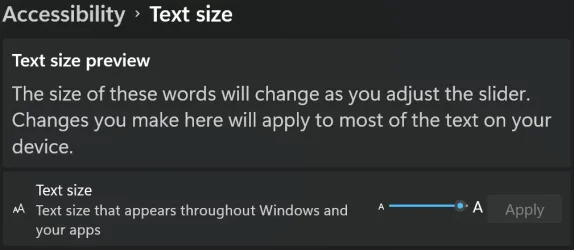
If you scale back to 125% or 100% you can adjust the size of your text. It will even increase the text size within the settings menu.

1767338985147.webp
 

My Computers My Computers

  • At a glance

    Win 11 Pro 25H2 26200.8894Intel® Core™ i7-14700KG.SKILL Ripjaws S5 Series 64GB (2 x 32GB) DDR5ASUS GeForce RTX 4070 Super 12GB
    OS
    Win 11 Pro 25H2 26200.8894
    Computer type
    PC/Desktop
    Manufacturer/Model
    Self Built
    CPU
    Intel® Core™ i7-14700K
    Motherboard
    ASUS TUF Z690-PLUS WIFI (BIOS 4505)
    Memory
    G.SKILL Ripjaws S5 Series 64GB (2 x 32GB) DDR5
    Graphics Card(s)
    ASUS GeForce RTX 4070 Super 12GB
    Sound Card
    Sound Blaster AE-5 Plus
    Monitor(s) Displays
    ASUS TUF Gaming 27" 2K HDR Gaming
    Screen Resolution
    2560 x 1440
    Hard Drives
    Samsung 990 Pro 1TB NVMe (Win 11 25H2)
    SK hynix P41 500GB NVMe
    SK hynix P41 2TB NVMe (x3)
    Crucial P3 Plus 4TB
    PSU
    Corsair RM850x Shift
    Case
    Antec Dark Phantom DP502 FLUX
    Cooling
    Corsair Nautilus 360 RS AIO
    Keyboard
    Logitech MK 320
    Mouse
    Razer Basilisk V3
    Internet Speed
    750Mbs
    Browser
    Firefox
    Antivirus
    Winows Security
    Other Info
    MR 8.1 Home
  • At a glance

    Win 11 Pro 25H2 26200.8894Intel Core i5-1140064 GB DDR4MSI GeForce RTX 3060 Ventus 2X 12GB
    Operating System
    Win 11 Pro 25H2 26200.8894
    Computer type
    PC/Desktop
    Manufacturer/Model
    Self Built
    CPU
    Intel Core i5-11400
    Motherboard
    Asus TUF Gaming Z590 Plus WiFi (BIOS 2803)
    Memory
    64 GB DDR4
    Graphics card(s)
    MSI GeForce RTX 3060 Ventus 2X 12GB
    Sound Card
    SoundBlaster Audigy Fx V2
    Monitor(s) Displays
    Samsung F27T350
    Screen Resolution
    1920x1080
    Hard Drives
    Samsung 980 Pro 1TB
    Samsung 970 EVO Plus 2TB
    Samsung 870 EVO 500GB SSD
    PSU
    Corsair HX750
    Case
    Cougar MX330-G Window
    Cooling
    Thermalright Frozen Edge 240 Black AIO
    Internet Speed
    350Mbps
    Browser
    Firefox
    Antivirus
    Windows Security
  • System Three
    Win 11 Pro 25H2 26200.8894
    ASUS PRIME Z370-P II BIOS 3004 7/12/21
    Intel Core i7-8700 CPU @ 3.20GHz
    32GB DDR4 RAM (4x8)
    iGPU Intel UHD Graphics 630
    Mid-Tower Desktop
If you scale back to 125% or 100% you can adjust the size of your text. It will even increase the text size within the settings menu.

View attachment 158619
Yes, I can make the chrome text larger. However, I have other apps such as eMclient email and WPS Office that adhere quite closely to the Windows font and size.
Thanks for the idea but I'm looking to keep the display size if at all possible.
 

My Computer My Computer

At a glance

Windows 11AMD Ryzen 9 9900X 4.4GHz 12 Core 120WKingston DDR5-5600 64GBPNY GeForce RTX 5060 Ti Dual Fan 16GB
OS
Windows 11
Computer type
PC/Desktop
Manufacturer/Model
custom built
CPU
AMD Ryzen 9 9900X 4.4GHz 12 Core 120W
Motherboard
Asus ProArt X870E-Creator WiFi
Memory
Kingston DDR5-5600 64GB
Graphics Card(s)
PNY GeForce RTX 5060 Ti Dual Fan 16GB
Sound Card
built in Realtek
Monitor(s) Displays
Dell U2722DE
Screen Resolution
2560x1440
Hard Drives
Crucial T705 2TB Gen5 M.2 SSD and 3 Samsung EVO SSDs: 250GB, 2 TB and 4 TB (2 partitions)
PSU
Super Flower LEADEX VII Gold 1300W
Case
Fractal Design Define 7
Cooling
Asetek 624S-M2 240mm CPU Cooler plus 3 140mm Noctua fans
Keyboard
Kinesis Freestyle Pro
Mouse
Razer Basilisk Pro
Internet Speed
FIOS 2 gb
Browser
Chrome
Antivirus
Bitdefender
Other Info
Plan to use a VPN with adblocker

Back
Top Bottom