Chrome Banner is too large vertically when Win scaling is on


mlg

Active member
Member
Local time
6:37 AM
Posts
31
OS
Windows 11
Windows Pro 25H2 Build 26200.7462
I need to have scaling set to, ideally, 150% on my desktop so that I'm able to read the screen. Already changed font to Roboto (a great suggestions) and am using System Font Changer to read Explorer, menus etc. So I can see everything. But with these settings the Chrome banner (similar for other browsers) is much too large and takes up a lot of vertical real estate. It's frustrating to say the least.

Does anyone know a way to resize the banner? I'm speaking of tabs, url/extensions and bookmark bar. A long long time ago Firefox had some "compact themes" which were automatically designed to preserve vertical space. But that was then....
Thanks
 

My Computer

System One

  • OS
    Windows 11
    Computer type
    PC/Desktop
    Manufacturer/Model
    custom built
    CPU
    AMD Ryzen 9 9900X 4.4GHz 12 Core 120W
    Motherboard
    Asus ProArt X870E-Creator WiFi
    Memory
    Kingston DDR5-5600 64GB
    Graphics Card(s)
    PNY GeForce RTX 5060 Ti Dual Fan 16GB
    Sound Card
    built in Realtek
    Monitor(s) Displays
    Dell U2722DE
    Screen Resolution
    2560x1440
    Hard Drives
    Crucial T705 2TB Gen5 M.2 SSD and 3 Samsung EVO SSDs: 250GB, 2 TB and 4 TB (2 partitions)
    PSU
    Super Flower LEADEX VII Gold 1300W
    Case
    Fractal Design Define 7
    Cooling
    Asetek 624S-M2 240mm CPU Cooler plus 3 140mm Noctua fans
    Keyboard
    Kinesis Freestyle Pro
    Mouse
    Razer Basilisk Pro
    Internet Speed
    FIOS 2 gb
    Browser
    Chrome
    Antivirus
    Bitdefender
    Other Info
    Plan to use a VPN with adblocker

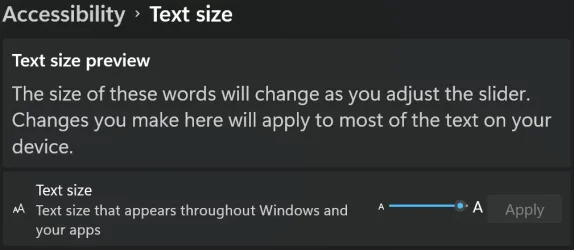
If you scale back to 125% or 100% you can adjust the size of your text. It will even increase the text size within the settings menu.

1767338985147.webp
 

My Computers

System One System Two

  • OS
    Win 11 Pro 25H2 26200.8524
    Computer type
    PC/Desktop
    Manufacturer/Model
    Self Built
    CPU
    Intel® Core™ i7-14700K
    Motherboard
    ASUS TUF Z690-PLUS WIFI BIOS 4505 11/29/25
    Memory
    G.SKILL Ripjaws S5 Series 64GB (2 x 32GB) DDR5
    Graphics Card(s)
    ASUS GeForce RTX 4070 Super 12GB
    Sound Card
    Sound Blaster AE-5 Plus
    Monitor(s) Displays
    ASUS TUF Gaming 27" 2K HDR Gaming
    Screen Resolution
    2560 x 1440
    Hard Drives
    Samsung 990 Pro 1TB NVMe (Win 11 25H2)
    SK hynix P41 500GB NVMe 25H2 DEV/Games
    SK hynix P41 2TB NVMe (x3)
    Crucial P3 Plus 4TB
    PSU
    Corsair RM850x Shift
    Case
    Antec Dark Phantom DP502 FLUX
    Cooling
    Corsair Nautilus 360 RS AIO
    Keyboard
    Logitech MK 320
    Mouse
    Razer Basilisk V3
    Internet Speed
    350Mbs
    Browser
    Firefox
    Antivirus
    Winows Security
    Other Info
    MR 8.1 Home

    System 3 Specs
    Win 11 Pro 25H2 26200.8524
    ASUS PRIME Z370-P II BIOS 3004 7/12/21
    Intel Core i7-8700 CPU @ 3.20GHz
    32GB DDR4 RAM (4x8)
    iGPU Intel UHD Graphics 630
  • Operating System
    Win 11 Pro 25H2 26200.8524
    Computer type
    PC/Desktop
    Manufacturer/Model
    Self Built
    CPU
    Intel Core i7-11700F
    Motherboard
    Asus TUF Gaming Z590 Plus WiFi (BIOS 2803)
    Memory
    64 GB DDR4
    Graphics card(s)
    MSI GeForce RTX 3060 Ventus 2X 12GB
    Sound Card
    SoundBlaster Audigy Fx V2
    Monitor(s) Displays
    Samsung F27T350
    Screen Resolution
    1920x1080
    Hard Drives
    Samsung 980 Pro 1TB
    Samsung 970 EVO Plus 2TB
    Samsung 870 EVO 500GB SSD
    PSU
    Corsair HX750
    Case
    Cougar MX330-G Window
    Cooling
    Thermalright Frozen Edge 240 Black AIO
    Internet Speed
    350Mbps
    Browser
    Firefox
    Antivirus
    Windows Security
If you scale back to 125% or 100% you can adjust the size of your text. It will even increase the text size within the settings menu.

View attachment 158619
Yes, I can make the chrome text larger. However, I have other apps such as eMclient email and WPS Office that adhere quite closely to the Windows font and size.
Thanks for the idea but I'm looking to keep the display size if at all possible.
 

My Computer

System One

  • OS
    Windows 11
    Computer type
    PC/Desktop
    Manufacturer/Model
    custom built
    CPU
    AMD Ryzen 9 9900X 4.4GHz 12 Core 120W
    Motherboard
    Asus ProArt X870E-Creator WiFi
    Memory
    Kingston DDR5-5600 64GB
    Graphics Card(s)
    PNY GeForce RTX 5060 Ti Dual Fan 16GB
    Sound Card
    built in Realtek
    Monitor(s) Displays
    Dell U2722DE
    Screen Resolution
    2560x1440
    Hard Drives
    Crucial T705 2TB Gen5 M.2 SSD and 3 Samsung EVO SSDs: 250GB, 2 TB and 4 TB (2 partitions)
    PSU
    Super Flower LEADEX VII Gold 1300W
    Case
    Fractal Design Define 7
    Cooling
    Asetek 624S-M2 240mm CPU Cooler plus 3 140mm Noctua fans
    Keyboard
    Kinesis Freestyle Pro
    Mouse
    Razer Basilisk Pro
    Internet Speed
    FIOS 2 gb
    Browser
    Chrome
    Antivirus
    Bitdefender
    Other Info
    Plan to use a VPN with adblocker

Back
Top Bottom