Clearing the Windows event log


pokeefe0001

Well-known member
Member
VIP
Local time
8:43 PM
Posts
299
Location
Pacific Northwest USA
OS
Windows 11
Is there anyway to clear out old event log records but leave recent ones ... where I get to define "recent"? I've got many thousands of records going back to March (when I installed Win11 maybe?). I see I can do a Save and Clear, but as near as I can tell that saves and clears everything.
 
Windows Build/Version
Win 11 Pro x64 22000.978

My Computers My Computers

  • At a glance

    Windows 11Intel Core i5-840016GBIntel UHD Graphics 630
    OS
    Windows 11
    Computer type
    PC/Desktop
    Manufacturer/Model
    Microsoft
    CPU
    Intel Core i5-8400
    Motherboard
    ASUS PRIME H370-PLUS
    Memory
    16GB
    Graphics Card(s)
    Intel UHD Graphics 630
    Sound Card
    On board
    Monitor(s) Displays
    Samsung SyncMaster 2043BWX
    Screen Resolution
    1680 x 1050
    Hard Drives
    Samsung SSD 850 256GB
    WDC 1TB NVMe
    WD 3TB external USB drive
    PSU
    I don't remember
    Case
    Corsair something-or-other
    Cooling
    Air CPU + 2 case fans
    Keyboard
    DAS S Pro (Cherry Brown)
    Mouse
    Logitech USB of some sort
  • At a glance

    Windows 10 21H1i5-840016GBon board
    Operating System
    Windows 10 21H1
    Computer type
    PC/Desktop
    Manufacturer/Model
    Homegrown
    CPU
    i5-8400
    Motherboard
    ASUS PRIME H370-PLUS
    Memory
    16GB
    Graphics card(s)
    on board
    Sound Card
    on board
    Monitor(s) Displays
    Samsung SyncMaster 2043 BWX
    Screen Resolution
    1280 x 1024
    Hard Drives
    Samsung SSD 850 EVO 250GB, WDS100T3X0C-00SJG0
    PSU
    don't remember
    Case
    Corsair Carbide 100r
    Cooling
    stock
    Keyboard
    DAC something or other
    Mouse
    Logitech M-U-0007
    Internet Speed
    80/6 Mbs
    Browser
    FireFox
    Antivirus
    Kaspersky Internet security
Is there anyway to clear out old event log records but leave recent ones ... where I get to define "recent"? I've got many thousands of records going back to March (when I installed Win11 maybe?). I see I can do a Save and Clear, but as near as I can tell that saves and clears everything.


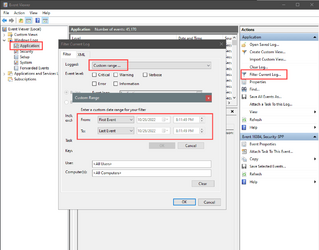
This is a pic from Win 10 but it should be the same or similar on Win 11...
You can "filter" what you're about to clear, by date, among other things...

Image1.png


1. On the left choose a log.
2. On the far right choose: Filter Current Log
3. Choose: Custom Range
4. Choose the dates.


Personally, I've found that just Clearing all of Event Viewer, then rebooting, works the best.
 

My Computers My Computers

  • At a glance

    Win 11 Home ♦♦♦26200.8655 ♦♦♦♦♦♦♦25H2AMD Ryzen 7 3700XG.Skill (F4-3200C14D-16GTZKW)EVGA RTX 2070 (08G-P4-2171-KR)
    OS
    Win 11 Home ♦♦♦26200.8655 ♦♦♦♦♦♦♦25H2
    Computer type
    PC/Desktop
    Manufacturer/Model
    Built by Ghot® [May 2020]
    CPU
    AMD Ryzen 7 3700X
    Motherboard
    Asus Pro WS X570-ACE (BIOS 5302)
    Memory
    G.Skill (F4-3200C14D-16GTZKW)
    Graphics Card(s)
    EVGA RTX 2070 (08G-P4-2171-KR)
    Sound Card
    Realtek ALC1220P / ALC S1220A
    Monitor(s) Displays
    Dell U3011 30"
    Screen Resolution
    2560 x 1600
    Hard Drives
    2x Samsung 860 EVO 500GB,
    WD 4TB Black FZBX - SATA III,
    WD 8TB Black FZBX - SATA III,
    DRW-24B1ST CD/DVD Burner
    PSU
    PC Power & Cooling 750W Quad EPS12V
    Case
    Cooler Master ATCS 840 Tower
    Cooling
    CM Hyper 212 EVO (push/pull)
    Keyboard
    Ducky DK9008 Shine II Blue LED
    Mouse
    Logitech Optical M-100
    Internet Speed
    300/300
    Browser
    Firefox (latest)
    Antivirus
    Bitdefender Total Security
    Other Info
    Speakers: Klipsch Pro Media 2.1
  • At a glance

    Windows XP Pro 32bit w/SP3AMD Athlon 64 X2 5000+ (OC'd @ 3.2Ghz)TWIN2X2048-6400C4DHX (2 x 1GB, DDR2 800)EVGA 256-P2-N758-TR GeForce 8600GT SSC
    Operating System
    Windows XP Pro 32bit w/SP3
    Computer type
    PC/Desktop
    Manufacturer/Model
    Built by Ghot® (not in use)
    CPU
    AMD Athlon 64 X2 5000+ (OC'd @ 3.2Ghz)
    Motherboard
    ASUS M2N32-SLI Deluxe Wireless Edition
    Memory
    TWIN2X2048-6400C4DHX (2 x 1GB, DDR2 800)
    Graphics card(s)
    EVGA 256-P2-N758-TR GeForce 8600GT SSC
    Sound Card
    Onboard
    Monitor(s) Displays
    ViewSonic G90FB Black 19" Professional (CRT)
    Screen Resolution
    up to 2048 x 1536
    Hard Drives
    WD 36GB 10,000rpm Raptor SATA
    Seagate 80GB 7200rpm SATA
    Lite-On LTR-52246S CD/RW
    Lite-On LH-18A1P CD/DVD Burner
    PSU
    PC Power & Cooling Silencer 750 Quad EPS12V
    Case
    Generic Beige case, 80mm fans
    Cooling
    ZALMAN 9500A 92mm CPU Cooler
    Keyboard
    Logitech Classic Keybooard 200
    Mouse
    Logitech Optical M-BT96a
    Internet Speed
    300/300
    Browser
    Firefox 3.x ??
    Antivirus
    Symantec (Norton)
    Other Info
    Still assembled, still runs. Haven't turned it on for 15 years?

My Computer My Computer

At a glance

Windows 11Ryzen 5 5600T-Force Vulcan Z - 32 GB (2x16) @ 3600 MHzSapphire RX 7600
OS
Windows 11
Computer type
PC/Desktop
CPU
Ryzen 5 5600
Motherboard
MSI B550 Tomahawk
Memory
T-Force Vulcan Z - 32 GB (2x16) @ 3600 MHz
Graphics Card(s)
Sapphire RX 7600
Monitor(s) Displays
Sansui ES-G27F2Q
Screen Resolution
2560 x 1440P
Hard Drives
XPG SX8200 240GB M.2 PCIe Gen3x4 NVMe
Samsung 850 EVO 250 GB
Adata SU800 1 TB
WD Black SN750 500GB
PSU
EVGA SuperNOVA 650 G3
Case
Deepcool CK500WH
Cooling
Thermalright Frozen Warframe 240 SE, plus 3 140 MM case fans (2 in front, 1 in rear)
Keyboard
Logitech G213 Prodigy
Mouse
Logitech ERGO M575
Using PowerShell (as Administrator), change the log retention policy to N days.

Code:
PS C:\Windows\system32> Get-EventLog -List

  Max(K) Retain OverflowAction        Entries Log
  ------ ------ --------------        ------- ---
  20,480      0 OverwriteAsNeeded           0 HardwareEvents
     512      7 OverwriteOlder              0 Internet Explorer
  20,480      0 OverwriteAsNeeded           0 Key Management Service
  20,480      0 OverwriteAsNeeded       1,527 Security
  20,480      0 OverwriteAsNeeded         786 System
  15,360      0 OverwriteAsNeeded          74 Windows PowerShell

PS C:\Windows\system32> Limit-EventLog -LogName System -OverflowAction OverwriteOlder -RetentionDays 14
PS C:\Windows\system32> Get-EventLog -List

  Max(K) Retain OverflowAction        Entries Log
  ------ ------ --------------        ------- ---
  20,480      0 OverwriteAsNeeded         548 Application
  20,480      0 OverwriteAsNeeded           0 HardwareEvents
     512      7 OverwriteOlder              0 Internet Explorer
  20,480      0 OverwriteAsNeeded           0 Key Management Service
  20,480      0 OverwriteAsNeeded       1,527 Security
  20,480     14 OverwriteOlder            787 System
  15,360      0 OverwriteAsNeeded          74 Windows PowerShell
 

My Computer My Computer

At a glance

Windows 7
OS
Windows 7
This is a pic from Win 10 but it should be the same or similar on Win 11...
You can "filter" what you're about to clear, by date, among other things...

View attachment 43466


1. On the left choose a log.
2. On the far right choose: Filter Current Log
3. Choose: Custom Range
4. Choose the dates.


Personally, I've found that just Clearing all of Event Viewer, then rebooting, works the best.
Aha. Thanks! I never noticed the Clear button on the Filter display. (And I notice it does not say it clears just filtered records.) I'll give that a try.

I could clear all, but I'd rather keep the last month or two of event records. I never know when I'll want to get a recent historical trend.
 

My Computers My Computers

  • At a glance

    Windows 11Intel Core i5-840016GBIntel UHD Graphics 630
    OS
    Windows 11
    Computer type
    PC/Desktop
    Manufacturer/Model
    Microsoft
    CPU
    Intel Core i5-8400
    Motherboard
    ASUS PRIME H370-PLUS
    Memory
    16GB
    Graphics Card(s)
    Intel UHD Graphics 630
    Sound Card
    On board
    Monitor(s) Displays
    Samsung SyncMaster 2043BWX
    Screen Resolution
    1680 x 1050
    Hard Drives
    Samsung SSD 850 256GB
    WDC 1TB NVMe
    WD 3TB external USB drive
    PSU
    I don't remember
    Case
    Corsair something-or-other
    Cooling
    Air CPU + 2 case fans
    Keyboard
    DAS S Pro (Cherry Brown)
    Mouse
    Logitech USB of some sort
  • At a glance

    Windows 10 21H1i5-840016GBon board
    Operating System
    Windows 10 21H1
    Computer type
    PC/Desktop
    Manufacturer/Model
    Homegrown
    CPU
    i5-8400
    Motherboard
    ASUS PRIME H370-PLUS
    Memory
    16GB
    Graphics card(s)
    on board
    Sound Card
    on board
    Monitor(s) Displays
    Samsung SyncMaster 2043 BWX
    Screen Resolution
    1280 x 1024
    Hard Drives
    Samsung SSD 850 EVO 250GB, WDS100T3X0C-00SJG0
    PSU
    don't remember
    Case
    Corsair Carbide 100r
    Cooling
    stock
    Keyboard
    DAC something or other
    Mouse
    Logitech M-U-0007
    Internet Speed
    80/6 Mbs
    Browser
    FireFox
    Antivirus
    Kaspersky Internet security
Aha. Thanks! I never noticed the Clear button on the Filter display. (And I notice it does not say it clears just filtered records.) I'll give that a try.

I could clear all, but I'd rather keep the last month or two of event records. I never know when I'll want to get a recent historical trend.


Event Viewer since after Windows 7 anyhow... has gotten to be a bit of a drama queen.
Most of it is useless. That's why clearing the whole Event Viewer is not really a problem.
After 2-3 days and 2-3 reboots, you'll have all the "events" back again. :-)
 

My Computers My Computers

  • At a glance

    Win 11 Home ♦♦♦26200.8655 ♦♦♦♦♦♦♦25H2AMD Ryzen 7 3700XG.Skill (F4-3200C14D-16GTZKW)EVGA RTX 2070 (08G-P4-2171-KR)
    OS
    Win 11 Home ♦♦♦26200.8655 ♦♦♦♦♦♦♦25H2
    Computer type
    PC/Desktop
    Manufacturer/Model
    Built by Ghot® [May 2020]
    CPU
    AMD Ryzen 7 3700X
    Motherboard
    Asus Pro WS X570-ACE (BIOS 5302)
    Memory
    G.Skill (F4-3200C14D-16GTZKW)
    Graphics Card(s)
    EVGA RTX 2070 (08G-P4-2171-KR)
    Sound Card
    Realtek ALC1220P / ALC S1220A
    Monitor(s) Displays
    Dell U3011 30"
    Screen Resolution
    2560 x 1600
    Hard Drives
    2x Samsung 860 EVO 500GB,
    WD 4TB Black FZBX - SATA III,
    WD 8TB Black FZBX - SATA III,
    DRW-24B1ST CD/DVD Burner
    PSU
    PC Power & Cooling 750W Quad EPS12V
    Case
    Cooler Master ATCS 840 Tower
    Cooling
    CM Hyper 212 EVO (push/pull)
    Keyboard
    Ducky DK9008 Shine II Blue LED
    Mouse
    Logitech Optical M-100
    Internet Speed
    300/300
    Browser
    Firefox (latest)
    Antivirus
    Bitdefender Total Security
    Other Info
    Speakers: Klipsch Pro Media 2.1
  • At a glance

    Windows XP Pro 32bit w/SP3AMD Athlon 64 X2 5000+ (OC'd @ 3.2Ghz)TWIN2X2048-6400C4DHX (2 x 1GB, DDR2 800)EVGA 256-P2-N758-TR GeForce 8600GT SSC
    Operating System
    Windows XP Pro 32bit w/SP3
    Computer type
    PC/Desktop
    Manufacturer/Model
    Built by Ghot® (not in use)
    CPU
    AMD Athlon 64 X2 5000+ (OC'd @ 3.2Ghz)
    Motherboard
    ASUS M2N32-SLI Deluxe Wireless Edition
    Memory
    TWIN2X2048-6400C4DHX (2 x 1GB, DDR2 800)
    Graphics card(s)
    EVGA 256-P2-N758-TR GeForce 8600GT SSC
    Sound Card
    Onboard
    Monitor(s) Displays
    ViewSonic G90FB Black 19" Professional (CRT)
    Screen Resolution
    up to 2048 x 1536
    Hard Drives
    WD 36GB 10,000rpm Raptor SATA
    Seagate 80GB 7200rpm SATA
    Lite-On LTR-52246S CD/RW
    Lite-On LH-18A1P CD/DVD Burner
    PSU
    PC Power & Cooling Silencer 750 Quad EPS12V
    Case
    Generic Beige case, 80mm fans
    Cooling
    ZALMAN 9500A 92mm CPU Cooler
    Keyboard
    Logitech Classic Keybooard 200
    Mouse
    Logitech Optical M-BT96a
    Internet Speed
    300/300
    Browser
    Firefox 3.x ??
    Antivirus
    Symantec (Norton)
    Other Info
    Still assembled, still runs. Haven't turned it on for 15 years?
There's an incredible amount of dross, but every once in a while useful information shows up.

Just today I noticed I've been getting NTFS event id 55 a couple of times a month for the past few months. I guess I have a bad flash memory drive. (I knew it was slow, but I guess it's sick.)
 

My Computers My Computers

  • At a glance

    Windows 11Intel Core i5-840016GBIntel UHD Graphics 630
    OS
    Windows 11
    Computer type
    PC/Desktop
    Manufacturer/Model
    Microsoft
    CPU
    Intel Core i5-8400
    Motherboard
    ASUS PRIME H370-PLUS
    Memory
    16GB
    Graphics Card(s)
    Intel UHD Graphics 630
    Sound Card
    On board
    Monitor(s) Displays
    Samsung SyncMaster 2043BWX
    Screen Resolution
    1680 x 1050
    Hard Drives
    Samsung SSD 850 256GB
    WDC 1TB NVMe
    WD 3TB external USB drive
    PSU
    I don't remember
    Case
    Corsair something-or-other
    Cooling
    Air CPU + 2 case fans
    Keyboard
    DAS S Pro (Cherry Brown)
    Mouse
    Logitech USB of some sort
  • At a glance

    Windows 10 21H1i5-840016GBon board
    Operating System
    Windows 10 21H1
    Computer type
    PC/Desktop
    Manufacturer/Model
    Homegrown
    CPU
    i5-8400
    Motherboard
    ASUS PRIME H370-PLUS
    Memory
    16GB
    Graphics card(s)
    on board
    Sound Card
    on board
    Monitor(s) Displays
    Samsung SyncMaster 2043 BWX
    Screen Resolution
    1280 x 1024
    Hard Drives
    Samsung SSD 850 EVO 250GB, WDS100T3X0C-00SJG0
    PSU
    don't remember
    Case
    Corsair Carbide 100r
    Cooling
    stock
    Keyboard
    DAC something or other
    Mouse
    Logitech M-U-0007
    Internet Speed
    80/6 Mbs
    Browser
    FireFox
    Antivirus
    Kaspersky Internet security
There's an incredible amount of dross, but every once in a while useful information shows up.

Just today I noticed I've been getting NTFS event id 55 a couple of times a month for the past few months. I guess I have a bad flash memory drive. (I knew it was slow, but I guess it's sick.)


You can check your flash memory drive with CrystalDiskInfo (free, portable).

The one in the .zip file, is the portable one...
 

My Computers My Computers

  • At a glance

    Win 11 Home ♦♦♦26200.8655 ♦♦♦♦♦♦♦25H2AMD Ryzen 7 3700XG.Skill (F4-3200C14D-16GTZKW)EVGA RTX 2070 (08G-P4-2171-KR)
    OS
    Win 11 Home ♦♦♦26200.8655 ♦♦♦♦♦♦♦25H2
    Computer type
    PC/Desktop
    Manufacturer/Model
    Built by Ghot® [May 2020]
    CPU
    AMD Ryzen 7 3700X
    Motherboard
    Asus Pro WS X570-ACE (BIOS 5302)
    Memory
    G.Skill (F4-3200C14D-16GTZKW)
    Graphics Card(s)
    EVGA RTX 2070 (08G-P4-2171-KR)
    Sound Card
    Realtek ALC1220P / ALC S1220A
    Monitor(s) Displays
    Dell U3011 30"
    Screen Resolution
    2560 x 1600
    Hard Drives
    2x Samsung 860 EVO 500GB,
    WD 4TB Black FZBX - SATA III,
    WD 8TB Black FZBX - SATA III,
    DRW-24B1ST CD/DVD Burner
    PSU
    PC Power & Cooling 750W Quad EPS12V
    Case
    Cooler Master ATCS 840 Tower
    Cooling
    CM Hyper 212 EVO (push/pull)
    Keyboard
    Ducky DK9008 Shine II Blue LED
    Mouse
    Logitech Optical M-100
    Internet Speed
    300/300
    Browser
    Firefox (latest)
    Antivirus
    Bitdefender Total Security
    Other Info
    Speakers: Klipsch Pro Media 2.1
  • At a glance

    Windows XP Pro 32bit w/SP3AMD Athlon 64 X2 5000+ (OC'd @ 3.2Ghz)TWIN2X2048-6400C4DHX (2 x 1GB, DDR2 800)EVGA 256-P2-N758-TR GeForce 8600GT SSC
    Operating System
    Windows XP Pro 32bit w/SP3
    Computer type
    PC/Desktop
    Manufacturer/Model
    Built by Ghot® (not in use)
    CPU
    AMD Athlon 64 X2 5000+ (OC'd @ 3.2Ghz)
    Motherboard
    ASUS M2N32-SLI Deluxe Wireless Edition
    Memory
    TWIN2X2048-6400C4DHX (2 x 1GB, DDR2 800)
    Graphics card(s)
    EVGA 256-P2-N758-TR GeForce 8600GT SSC
    Sound Card
    Onboard
    Monitor(s) Displays
    ViewSonic G90FB Black 19" Professional (CRT)
    Screen Resolution
    up to 2048 x 1536
    Hard Drives
    WD 36GB 10,000rpm Raptor SATA
    Seagate 80GB 7200rpm SATA
    Lite-On LTR-52246S CD/RW
    Lite-On LH-18A1P CD/DVD Burner
    PSU
    PC Power & Cooling Silencer 750 Quad EPS12V
    Case
    Generic Beige case, 80mm fans
    Cooling
    ZALMAN 9500A 92mm CPU Cooler
    Keyboard
    Logitech Classic Keybooard 200
    Mouse
    Logitech Optical M-BT96a
    Internet Speed
    300/300
    Browser
    Firefox 3.x ??
    Antivirus
    Symantec (Norton)
    Other Info
    Still assembled, still runs. Haven't turned it on for 15 years?
This is a pic from Win 10 but it should be the same or similar on Win 11...
You can "filter" what you're about to clear, by date, among other things...

View attachment 43466


1. On the left choose a log.
2. On the far right choose: Filter Current Log
3. Choose: Custom Range
4. Choose the dates.


Personally, I've found that just Clearing all of Event Viewer, then rebooting, works the best.
I finally got around to trying this. It indeed allows me to filter the range of records I want to delete, but it looks like the filter is applied just to the display. Clear Log cleared the entire log - not what I wanted. I've restored the system from a couple days old backup and will try another technique.

I think I'll try @garlin's suggestion.
 

My Computers My Computers

  • At a glance

    Windows 11Intel Core i5-840016GBIntel UHD Graphics 630
    OS
    Windows 11
    Computer type
    PC/Desktop
    Manufacturer/Model
    Microsoft
    CPU
    Intel Core i5-8400
    Motherboard
    ASUS PRIME H370-PLUS
    Memory
    16GB
    Graphics Card(s)
    Intel UHD Graphics 630
    Sound Card
    On board
    Monitor(s) Displays
    Samsung SyncMaster 2043BWX
    Screen Resolution
    1680 x 1050
    Hard Drives
    Samsung SSD 850 256GB
    WDC 1TB NVMe
    WD 3TB external USB drive
    PSU
    I don't remember
    Case
    Corsair something-or-other
    Cooling
    Air CPU + 2 case fans
    Keyboard
    DAS S Pro (Cherry Brown)
    Mouse
    Logitech USB of some sort
  • At a glance

    Windows 10 21H1i5-840016GBon board
    Operating System
    Windows 10 21H1
    Computer type
    PC/Desktop
    Manufacturer/Model
    Homegrown
    CPU
    i5-8400
    Motherboard
    ASUS PRIME H370-PLUS
    Memory
    16GB
    Graphics card(s)
    on board
    Sound Card
    on board
    Monitor(s) Displays
    Samsung SyncMaster 2043 BWX
    Screen Resolution
    1280 x 1024
    Hard Drives
    Samsung SSD 850 EVO 250GB, WDS100T3X0C-00SJG0
    PSU
    don't remember
    Case
    Corsair Carbide 100r
    Cooling
    stock
    Keyboard
    DAC something or other
    Mouse
    Logitech M-U-0007
    Internet Speed
    80/6 Mbs
    Browser
    FireFox
    Antivirus
    Kaspersky Internet security
from the cmd as admin, this will clear them all out.

for /F "tokens=*" %1 in ('wevtutil.exe el') DO wevtutil.exe cl "%1" <enter>
 

My Computers My Computers

  • At a glance

    All Branches but ReleaseAMD Ryzen 7 7735HS 3200-4500 Mhz 8 cores x 232 GB DDR5Radeon Graphic / NVIDIA GeForce RTX 4060 8 GB...
    OS
    All Branches but Release
    Computer type
    Laptop
    Manufacturer/Model
    Acer Nitro ANV15-51
    CPU
    AMD Ryzen 7 7735HS 3200-4500 Mhz 8 cores x 2
    Motherboard
    Sportage_RBH
    Memory
    32 GB DDR5
    Graphics Card(s)
    Radeon Graphic / NVIDIA GeForce RTX 4060 8 GB GDDR6
    Sound Card
    AMD/Realtek(R) Audio
    Monitor(s) Displays
    Integrated Monitor (15.3"vis)
    Screen Resolution
    FHD 1920X1080 16:9 144Hz
    Hard Drives
    KINGSTON OM8SEP4512Q-AA 1TB
    Western Digital 256GB
    PSU
    19V DC 6.32 A 120 W
    Cooling
    Dual Fans
    Mouse
    MS Bluetooth
    Internet Speed
    Fiber 1GB Cox -us & 1GB Orange-fr
    Browser
    Edge Canary- Firefox Nightly-Chrome Dev-Chrome Dev
    Antivirus
    Windows Defender
  • At a glance

    Windows 11 BetaAMD A9-94208 GB of DDR4AMD Radeon R5
    Operating System
    Windows 11 Beta
    Computer type
    Laptop
    Manufacturer/Model
    Asus X751BP
    CPU
    AMD A9-9420
    Memory
    8 GB of DDR4
    Graphics card(s)
    AMD Radeon R5
    Screen Resolution
    1600x900
    Hard Drives
    Seagate 1 TB
from the cmd as admin, this will clear them all out.

for /F "tokens=*" %1 in ('wevtutil.exe el') DO wevtutil.exe cl "%1" <enter>
I don't WANT to clear them all out. I want to clear out all records from the first records in the log (sometime last March) through the end of August.
 

My Computers My Computers

  • At a glance

    Windows 11Intel Core i5-840016GBIntel UHD Graphics 630
    OS
    Windows 11
    Computer type
    PC/Desktop
    Manufacturer/Model
    Microsoft
    CPU
    Intel Core i5-8400
    Motherboard
    ASUS PRIME H370-PLUS
    Memory
    16GB
    Graphics Card(s)
    Intel UHD Graphics 630
    Sound Card
    On board
    Monitor(s) Displays
    Samsung SyncMaster 2043BWX
    Screen Resolution
    1680 x 1050
    Hard Drives
    Samsung SSD 850 256GB
    WDC 1TB NVMe
    WD 3TB external USB drive
    PSU
    I don't remember
    Case
    Corsair something-or-other
    Cooling
    Air CPU + 2 case fans
    Keyboard
    DAS S Pro (Cherry Brown)
    Mouse
    Logitech USB of some sort
  • At a glance

    Windows 10 21H1i5-840016GBon board
    Operating System
    Windows 10 21H1
    Computer type
    PC/Desktop
    Manufacturer/Model
    Homegrown
    CPU
    i5-8400
    Motherboard
    ASUS PRIME H370-PLUS
    Memory
    16GB
    Graphics card(s)
    on board
    Sound Card
    on board
    Monitor(s) Displays
    Samsung SyncMaster 2043 BWX
    Screen Resolution
    1280 x 1024
    Hard Drives
    Samsung SSD 850 EVO 250GB, WDS100T3X0C-00SJG0
    PSU
    don't remember
    Case
    Corsair Carbide 100r
    Cooling
    stock
    Keyboard
    DAC something or other
    Mouse
    Logitech M-U-0007
    Internet Speed
    80/6 Mbs
    Browser
    FireFox
    Antivirus
    Kaspersky Internet security
There is no API to remove selected events from a log. If there was, it would be an obvious security hole for erasing your activity.
The only solution is to export all (or part) of an existing log, before clearing it.

For log retention, your options are set to unlimited, max days old, or max file size (where it deletes old events to make room).
 

My Computer My Computer

At a glance

Windows 7
OS
Windows 7
The only solution is to export all (or part) of an existing log, before clearing it.

Hmm. I suppose I would run into permission problems if I
  • exported part of a log (and optionally cleared it)
  • deleted C:\Windows\System32\winevt\Logs\<whatever>
  • copied the exported log to C:\Windows\System32\winevt\Logs\<whatever>
For log retention, your options are set to unlimited, max days old, or max file size (where it deletes old events to make room).
I tried changing the retention period but it seemed to do nothing. Does that just effect new records? Or does it not take effect until I clear the log?

I tried changing the max file size and got a popup saying it would not take effect until I cleared the log.
 

My Computers My Computers

  • At a glance

    Windows 11Intel Core i5-840016GBIntel UHD Graphics 630
    OS
    Windows 11
    Computer type
    PC/Desktop
    Manufacturer/Model
    Microsoft
    CPU
    Intel Core i5-8400
    Motherboard
    ASUS PRIME H370-PLUS
    Memory
    16GB
    Graphics Card(s)
    Intel UHD Graphics 630
    Sound Card
    On board
    Monitor(s) Displays
    Samsung SyncMaster 2043BWX
    Screen Resolution
    1680 x 1050
    Hard Drives
    Samsung SSD 850 256GB
    WDC 1TB NVMe
    WD 3TB external USB drive
    PSU
    I don't remember
    Case
    Corsair something-or-other
    Cooling
    Air CPU + 2 case fans
    Keyboard
    DAS S Pro (Cherry Brown)
    Mouse
    Logitech USB of some sort
  • At a glance

    Windows 10 21H1i5-840016GBon board
    Operating System
    Windows 10 21H1
    Computer type
    PC/Desktop
    Manufacturer/Model
    Homegrown
    CPU
    i5-8400
    Motherboard
    ASUS PRIME H370-PLUS
    Memory
    16GB
    Graphics card(s)
    on board
    Sound Card
    on board
    Monitor(s) Displays
    Samsung SyncMaster 2043 BWX
    Screen Resolution
    1280 x 1024
    Hard Drives
    Samsung SSD 850 EVO 250GB, WDS100T3X0C-00SJG0
    PSU
    don't remember
    Case
    Corsair Carbide 100r
    Cooling
    stock
    Keyboard
    DAC something or other
    Mouse
    Logitech M-U-0007
    Internet Speed
    80/6 Mbs
    Browser
    FireFox
    Antivirus
    Kaspersky Internet security
Copying over the log file doesn't work while the logger is still running. You would have to terminate it first.

What pop-up are we seeing? PS commands just take effect, there are no confirmation dialogs.
 

My Computer My Computer

At a glance

Windows 7
OS
Windows 7
Another method to view event viewer recordings is to view them as text files.

The V2 log collector automatically creates text files of the event viewer records.


The text files can then be scanned from oldest to newest or newest to oldest.

If you want more detail on any text file you can return to the event viewer and use its filter.
 

My Computer My Computer

At a glance

Windows 10Intel(R) Core(TM) i7-4800MQ CPU @ 2.70GHz16 GB Total: Manufacturer : Samsung MemoryTyp...NVIDIA Quadro K3100M; Intel(R) HD Graphics 4600
OS
Windows 10
Computer type
Laptop
Manufacturer/Model
HP
CPU
Intel(R) Core(TM) i7-4800MQ CPU @ 2.70GHz
Motherboard
Product : 190A Version : KBC Version 94.56
Memory
16 GB Total: Manufacturer : Samsung MemoryType : DDR3 FormFactor : SODIMM Capacity : 8GB Speed : 1600
Graphics Card(s)
NVIDIA Quadro K3100M; Intel(R) HD Graphics 4600
Sound Card
IDT High Definition Audio CODEC; PNP Device ID HDAUDIO\FUNC_01&VEN_111D&DEV_76E0
Hard Drives
Model Hitachi HTS727575A9E364
Antivirus
Microsoft Defender
Other Info
Mobile Workstation
Just today I noticed I've been getting NTFS event id 55 a couple of times a month for the past few months. I guess I have a bad flash memory drive. (I knew it was slow, but I guess it's sick.)

Naturally, it is up to you but doesn't that example make you realise that allowing older Event log entries to remain provides data for investigating faults that might have existed for some time before you notice their symptoms?

Not that I'm agreeing that
getting NTFS event id 55
indicates that there is a fault to fix.

Do bear in mind that the Event logs exist for Windows' benefit not ours.
Event log entries might be recorded merely as triggers for other Windows processes to refer to and successful completion of those other processes might well not be reflected in an Event log entry that can be recognised as being related to the first [trigger] entry.
The existence of an entry in an Event log is not really a sufficient indicator that there is a problem worth using your time & effort to investigate.
Conversely, if you are investigating a problem for which there are fault symptoms, Event logs can provide data that might be helpful.


All the best,
Denis
 
Last edited:

My Computer My Computer

At a glance

Windows 11 Home x64 Version 25H2 Build 26200....
OS
Windows 11 Home x64 Version 25H2 Build 26200.8037
What pop-up are we seeing? PS commands just take effect, there are no confirmation dialogs.
I used the PS command to change the retention period, but I was able to change the file size via Properties in the context menu of the individual log files in Event Viewer. When I decreased the file size I got this display:
1671247981704.png
 

My Computers My Computers

  • At a glance

    Windows 11Intel Core i5-840016GBIntel UHD Graphics 630
    OS
    Windows 11
    Computer type
    PC/Desktop
    Manufacturer/Model
    Microsoft
    CPU
    Intel Core i5-8400
    Motherboard
    ASUS PRIME H370-PLUS
    Memory
    16GB
    Graphics Card(s)
    Intel UHD Graphics 630
    Sound Card
    On board
    Monitor(s) Displays
    Samsung SyncMaster 2043BWX
    Screen Resolution
    1680 x 1050
    Hard Drives
    Samsung SSD 850 256GB
    WDC 1TB NVMe
    WD 3TB external USB drive
    PSU
    I don't remember
    Case
    Corsair something-or-other
    Cooling
    Air CPU + 2 case fans
    Keyboard
    DAS S Pro (Cherry Brown)
    Mouse
    Logitech USB of some sort
  • At a glance

    Windows 10 21H1i5-840016GBon board
    Operating System
    Windows 10 21H1
    Computer type
    PC/Desktop
    Manufacturer/Model
    Homegrown
    CPU
    i5-8400
    Motherboard
    ASUS PRIME H370-PLUS
    Memory
    16GB
    Graphics card(s)
    on board
    Sound Card
    on board
    Monitor(s) Displays
    Samsung SyncMaster 2043 BWX
    Screen Resolution
    1280 x 1024
    Hard Drives
    Samsung SSD 850 EVO 250GB, WDS100T3X0C-00SJG0
    PSU
    don't remember
    Case
    Corsair Carbide 100r
    Cooling
    stock
    Keyboard
    DAC something or other
    Mouse
    Logitech M-U-0007
    Internet Speed
    80/6 Mbs
    Browser
    FireFox
    Antivirus
    Kaspersky Internet security

Naturally, it is up to you but doesn't that example make you realise that allowing older Event log entries to remain provide data for investigating faults that might have existed for some time before you noticed their symptoms?
Well, that's why I don't want to clear all records. I think saving 3 months worth of records should be enough, though. I really need 8 or 9 months of records.
 

My Computers My Computers

  • At a glance

    Windows 11Intel Core i5-840016GBIntel UHD Graphics 630
    OS
    Windows 11
    Computer type
    PC/Desktop
    Manufacturer/Model
    Microsoft
    CPU
    Intel Core i5-8400
    Motherboard
    ASUS PRIME H370-PLUS
    Memory
    16GB
    Graphics Card(s)
    Intel UHD Graphics 630
    Sound Card
    On board
    Monitor(s) Displays
    Samsung SyncMaster 2043BWX
    Screen Resolution
    1680 x 1050
    Hard Drives
    Samsung SSD 850 256GB
    WDC 1TB NVMe
    WD 3TB external USB drive
    PSU
    I don't remember
    Case
    Corsair something-or-other
    Cooling
    Air CPU + 2 case fans
    Keyboard
    DAS S Pro (Cherry Brown)
    Mouse
    Logitech USB of some sort
  • At a glance

    Windows 10 21H1i5-840016GBon board
    Operating System
    Windows 10 21H1
    Computer type
    PC/Desktop
    Manufacturer/Model
    Homegrown
    CPU
    i5-8400
    Motherboard
    ASUS PRIME H370-PLUS
    Memory
    16GB
    Graphics card(s)
    on board
    Sound Card
    on board
    Monitor(s) Displays
    Samsung SyncMaster 2043 BWX
    Screen Resolution
    1280 x 1024
    Hard Drives
    Samsung SSD 850 EVO 250GB, WDS100T3X0C-00SJG0
    PSU
    don't remember
    Case
    Corsair Carbide 100r
    Cooling
    stock
    Keyboard
    DAC something or other
    Mouse
    Logitech M-U-0007
    Internet Speed
    80/6 Mbs
    Browser
    FireFox
    Antivirus
    Kaspersky Internet security

There is no hard rule for keeping a specific set of months (unless you work in an organization that has a data retention policy).

The number of "normal" events can vary by function. For example, there are Setup logs which are only written when you do a clean install or in-place upgrade, and never written to again. Setup events can be years old, but take up virtually no space.

Other event classes can get swamped by unexpected errors (HW problems, or software bugs) which flood and overflow the default length.

You have to adjust based on growth. "Get-EventLog -List" in my posted example gives you a quick idea of how fast it changes. I believe the Properties setting on evtx files isn't allowed to truncate logs by itself, and warns you to take other steps. If the logger has been updated by PS, then it should self-truncate when a specific log exceeds the configured limits.
 

My Computer My Computer

At a glance

Windows 7
OS
Windows 7
Back
Top Bottom