Computer Seems Slower Since Moment 5?


swerd

Well-known member
Member
VIP
Local time
8:26 PM
Posts
354
OS
Windows 11 Pro
Hi all,

I have noticed my PC seems slower since updating to moment 5.

Has anyone else noticed this?

Cheers
 

My Computers My Computers

  • At a glance

    Windows 11 ProAMD Ryzen 7 9800X3D64GBAMD Radeon RX 9070XT
    OS
    Windows 11 Pro
    Computer type
    PC/Desktop
    Manufacturer/Model
    Custom
    CPU
    AMD Ryzen 7 9800X3D
    Motherboard
    Gigabyte X870 Aorus Elite WiFi7 Motherboard
    Memory
    64GB
    Graphics Card(s)
    AMD Radeon RX 9070XT
    Sound Card
    Realtek ALC1220 HD Audio
    Monitor(s) Displays
    Dell Alienware AW3425DW 34.2" Curved OLED Gaming Monitor
    Screen Resolution
    3440x1440
    Hard Drives
    Kingston KC3000 M.2 NVMe Gen4 SSD 2TB
    WD Black SN850X NVMe SSD 4TB
    Crucial T500 M.2 2280 NVMe PCIe 4.0 SSD 4TB
    Kingston KC3000 M.2 NVMe Gen4 SSD 4TB
    PSU
    1000W Gigabyte UD1000GM 80 PLUS Gold
    Case
    Phanteks Enthoo Pro 2 D-RGB Tempered Glass Full Tower Black
    Internet Speed
    750Mbps
    Browser
    Firefox / Chrome / Edge / Brave
    Antivirus
    Kaspersky Standard
  • At a glance

    Windows 11 ProQuadCore Intel Core i5-10210U, 3100 MHz16GB (2x8)Intel(R) UHD Graphics
    Operating System
    Windows 11 Pro
    Computer type
    Laptop
    Manufacturer/Model
    Lenovo
    CPU
    QuadCore Intel Core i5-10210U, 3100 MHz
    Motherboard
    Lenovo ThinkPad E15
    Memory
    16GB (2x8)
    Graphics card(s)
    Intel(R) UHD Graphics
    Sound Card
    Conexant CX8070 @ Intel Comet Point-LP PCH
    Monitor(s) Displays
    Lenovo N156HCA-EAB
    Screen Resolution
    1920 x 1080
    Hard Drives
    SAMSUNG MZVLB256HBHQ-000L7
    ST2000LM007-1R8174
    Internet Speed
    750 Mbps
    Browser
    Chrome / Edge / Firefox / Brave
    Antivirus
    Bitdefender Total Security
maybe
 

My Computers My Computers

  • At a glance

    Windows 11 Pro x64i9 14900K P/E 5.8/4.5 GHz, cache 5.0 GHz96GB (2x48) G.skill Ripjaws 6800 MT/sAsus ROG Strix 4070 Ti OC
    OS
    Windows 11 Pro x64
    Computer type
    PC/Desktop
    Manufacturer/Model
    📷🔈🎧 🪛 DIY Photoshop/Audio/Game/tinker
    CPU
    i9 14900K P/E 5.8/4.5 GHz, cache 5.0 GHz
    Motherboard
    Asus ROG Maximus Z790 Dark Hero
    Memory
    🐏 96GB (2x48) G.skill Ripjaws 6800 MT/s
    Graphics Card(s)
    Asus ROG Strix 4070 Ti OC
    Sound Card
    🔊Bowers & Wilkins 606 S3 speakers; Audiolabs 7000a integrated amp; RSL 10S Mk2 sub; Creative Pebble Pro Minimilist
    Monitor(s) Displays
    🖥️🖥️ Eizo CG2730 ColorEdge, ViewSonic VP2768
    Screen Resolution
    🖥️🖥️ 2560 x 1440p x 2
    Hard Drives
    💾 WDC SN850X 4TB nvme, SN850 1TB nvme, SK-Hynix 2 TB P41 nvme,. Sabrent USB-C DS-SC5B 5-bay docking station: 6TB WDC Black, 6TB Ironwolf Pro; 2x 2TB WDC Black HDD
    PSU
    ⚡️ 850W Seasonic Vertex PX-850 ATX 3.0/PCI-E 5.0
    Case
    Fractal Design North XL Mesh, Black Walnut
    Cooling
    ❄️ EK Nucleus black 360 AIO w/Phanteks T30-120 fans, 2 Noctua NF-A14 Chromax case fan, 1 T30-120 fan cooling memory
    Keyboard
    ⌨️ Keychron Q3 Max TKL with custom GMK Redsuns Red Samuri keycaps, TX Stabs
    Mouse
    🖱️ Logitech G305 wireless gaming
    Internet Speed
    ⬇️ 500 Mb/s ⬆️ 12 Mb/s
    Browser
    🔥🦊 Firefox
    Antivirus
    🦺 Defender, Macrium Reflect X 🏆
    Other Info
    Phangkey Amaterasu V2 Desk Mat
  • At a glance

    Apple M1
    Computer type
    Laptop
    Manufacturer/Model
    💻 Apple 13" Macbook Pro 2020 (m1)

    CPU
    Apple M1
    Screen Resolution
    2560x1600
    Browser
    Firefox
The main things I have noticed is that the weather widget takes ages to load. Also, loading Gmail takes much longer than before.
 

My Computers My Computers

  • At a glance

    Windows 11 ProAMD Ryzen 7 9800X3D64GBAMD Radeon RX 9070XT
    OS
    Windows 11 Pro
    Computer type
    PC/Desktop
    Manufacturer/Model
    Custom
    CPU
    AMD Ryzen 7 9800X3D
    Motherboard
    Gigabyte X870 Aorus Elite WiFi7 Motherboard
    Memory
    64GB
    Graphics Card(s)
    AMD Radeon RX 9070XT
    Sound Card
    Realtek ALC1220 HD Audio
    Monitor(s) Displays
    Dell Alienware AW3425DW 34.2" Curved OLED Gaming Monitor
    Screen Resolution
    3440x1440
    Hard Drives
    Kingston KC3000 M.2 NVMe Gen4 SSD 2TB
    WD Black SN850X NVMe SSD 4TB
    Crucial T500 M.2 2280 NVMe PCIe 4.0 SSD 4TB
    Kingston KC3000 M.2 NVMe Gen4 SSD 4TB
    PSU
    1000W Gigabyte UD1000GM 80 PLUS Gold
    Case
    Phanteks Enthoo Pro 2 D-RGB Tempered Glass Full Tower Black
    Internet Speed
    750Mbps
    Browser
    Firefox / Chrome / Edge / Brave
    Antivirus
    Kaspersky Standard
  • At a glance

    Windows 11 ProQuadCore Intel Core i5-10210U, 3100 MHz16GB (2x8)Intel(R) UHD Graphics
    Operating System
    Windows 11 Pro
    Computer type
    Laptop
    Manufacturer/Model
    Lenovo
    CPU
    QuadCore Intel Core i5-10210U, 3100 MHz
    Motherboard
    Lenovo ThinkPad E15
    Memory
    16GB (2x8)
    Graphics card(s)
    Intel(R) UHD Graphics
    Sound Card
    Conexant CX8070 @ Intel Comet Point-LP PCH
    Monitor(s) Displays
    Lenovo N156HCA-EAB
    Screen Resolution
    1920 x 1080
    Hard Drives
    SAMSUNG MZVLB256HBHQ-000L7
    ST2000LM007-1R8174
    Internet Speed
    750 Mbps
    Browser
    Chrome / Edge / Firefox / Brave
    Antivirus
    Bitdefender Total Security
No problem here.
 

My Computer My Computer

At a glance

Windows 11AMD Ryzen 7 5700GMicron Technology DDR4-3200 16GBNVIDIA GeForce RTX 3060
OS
Windows 11
Computer type
PC/Desktop
Manufacturer/Model
HP Pavilion
CPU
AMD Ryzen 7 5700G
Motherboard
Erica6
Memory
Micron Technology DDR4-3200 16GB
Graphics Card(s)
NVIDIA GeForce RTX 3060
Sound Card
Realtek ALC671
Monitor(s) Displays
Samsung SyncMaster U28E590
Screen Resolution
3840 x 2160
Hard Drives
SAMSUNG MZVLQ1T0HALB-000H1
Not me.
 

My Computers My Computers

  • At a glance

    Windows 11 Pro 25H2 26200.8655i9-10900 10 core 20 threads32 gbnone-Intel UHD Graphics 630
    OS
    Windows 11 Pro 25H2 26200.8655
    Computer type
    PC/Desktop
    Manufacturer/Model
    Dell Optiplex 7080
    CPU
    i9-10900 10 core 20 threads
    Motherboard
    DELL 0J37VM
    Memory
    32 gb
    Graphics Card(s)
    none-Intel UHD Graphics 630
    Sound Card
    Integrated Realtek
    Monitor(s) Displays
    Benq 27
    Screen Resolution
    2560x1440
    Hard Drives
    2x1tb Solidigm m.2 nvme /External drives 512gb Samsung m.2 sata+2tb Kingston m2.nvme
    PSU
    500w
    Case
    MT
    Cooling
    Dell Premium
    Keyboard
    Logitech wired
    Mouse
    Logitech wireless
    Internet Speed
    so slow I'm too embarrassed to tell
    Browser
    #1 Edge #2 Firefox
    Antivirus
    Defender+MWB Premium
  • At a glance

    Windows 11 Pro 24H2 26200.8457AMD Ryzen 7 6800U32 gbintegrated
    Operating System
    Windows 11 Pro 24H2 26200.8457
    Computer type
    PC/Desktop
    Manufacturer/Model
    Beelink Mini PC SER5
    CPU
    AMD Ryzen 7 6800U
    Memory
    32 gb
    Graphics card(s)
    integrated
    Sound Card
    integrated
    Monitor(s) Displays
    Benq 27
    Screen Resolution
    2560x1440
    Hard Drives
    1TB Crucial nvme
    Keyboard
    Logitech wired
    Mouse
    Logitech wireless
    Internet Speed
    still too embarrassed to tell
    Browser
    Firefox
    Antivirus
    Defender
    Other Info
    System 3 is non compliant Dell 9020 i7-4770/24gb ram Win11 PRO 26200.8457
No. But i don't use Widgets and have dozens of Windows features/settings/services disabled as well - which tends to impact access time to some extent. Tho, this days - biggest (most potent) speed tweak is hardware related (nVme SSDs). And you have one as well.

Go to Windows Search and type Delete Temporary Files

Click on Temporary Files + hit Refresh and remove all files.

Next open C:\Windows\prefetch and delete everything

Go to Windows search again and type Defragment and Optimize Drives and hit Optimize on C:\Windows partition.

Restart the PC. Did that help?


My Computer My Computer

At a glance

WinDOS 25H2Intel & AMDSO-DIMM SK Hynix 15.8 GB Dual-Channel DDR4-26...nVidia RTX 2060 6GB Mobile GPU (TU106M)
OS
WinDOS 25H2
Computer type
Laptop
CPU
Intel & AMD
Memory
SO-DIMM SK Hynix 15.8 GB Dual-Channel DDR4-2666 (2 x 8 GB) 1329MHz (19-19-19-43)
Graphics Card(s)
nVidia RTX 2060 6GB Mobile GPU (TU106M)
Sound Card
Onbord Realtek ALC1220
Screen Resolution
1920 x 1080
Hard Drives
1x Samsung PM981 NVMe PCIe M.2 512GB / 1x Seagate Expansion ST1000LM035 1TB
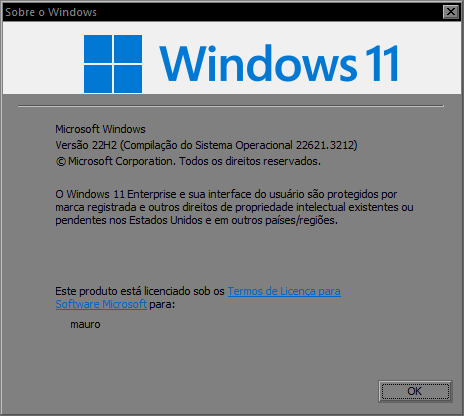
here I left 22h2 I think it's faster than 23h2

tfjfGO0.png
 

My Computer My Computer

At a glance

Windows 11 Iot Enterprise 21h2 22000.3260xeon E5-2697v232gb 8x4gb ddr3 1333 mhzgtx 570 poit of view
OS
Windows 11 Iot Enterprise 21h2 22000.3260
Computer type
PC/Desktop
Manufacturer/Model
Asus
CPU
xeon E5-2697v2
Motherboard
rampage iv extreme
Memory
32gb 8x4gb ddr3 1333 mhz
Graphics Card(s)
gtx 570 poit of view
Sound Card
realtek HD (ALC898)
Monitor(s) Displays
samsung b2030
Screen Resolution
1600x900
Hard Drives
2tb hd 5400 rpm
3tb hd 5400 rpm
1tb nvme pcie 3.0
PSU
hx850w
Keyboard
mtek
Internet Speed
500/250 gpon
Browser
r3dfox 146.0
Antivirus
none
There is no realistic evidence to support latest updates are slower.

In virtually all cases, there is an underlying reason if somebody has an issue e.g. programs running in background, fragmented drive or little spare capacity after update, something is corrupted in OS, drive is failing etc.

A blanket statement "my pc seems slower" is rather meaningless.

One has to do some diagnostics, run benchmarks etc.

It is suprising how often it simply comes down to perception. One of my friends was convinced his pc was slower after upgrading from 22H2 to 23H2. Fortunately we had made an imaged backup, so we reinstated 22H2 and benchmarked it with passmark, then reinstated 23H2 and did the same. The results were virtually identical.
 

My Computer My Computer

At a glance

Windows 11 Pro + Win11 Canary VM.I9 13th gen i9-13900H 2.60 GHZ16 GB solderedIntegrated Intel Iris XE
OS
Windows 11 Pro + Win11 Canary VM.
Computer type
Laptop
Manufacturer/Model
ASUS Zenbook 14
CPU
I9 13th gen i9-13900H 2.60 GHZ
Motherboard
Yep, Laptop has one.
Memory
16 GB soldered
Graphics Card(s)
Integrated Intel Iris XE
Sound Card
Realtek built in
Monitor(s) Displays
laptop OLED screen
Screen Resolution
2880x1800 touchscreen
Hard Drives
1 TB NVME SSD (only weakness is only one slot)
PSU
Internal + 65W thunderbolt USB4 charger
Case
Yep, got one
Cooling
Stella Artois (UK pint cans - 568 ml) - extra cost.
Keyboard
Built in UK keybd
Mouse
Bluetooth , wireless dongled, wired
Internet Speed
900 mbs (ethernet), wifi 6 typical 350-450 mb/s both up and down
Browser
Edge
Antivirus
Defender
Other Info
TPM 2.0, 2xUSB4 thunderbolt, 1xUsb3 (usb a), 1xUsb-c, hdmi out, 3.5 mm audio out/in combo, ASUS backlit trackpad (inc. switchable number pad)

Macrium Reflect Home V8
Office 365 Family (6 users each 1TB onedrive space)
Hyper-V (a vm runs almost as fast as my older laptop)
There is no realistic evidence to support latest updates are slower.

In virtually all cases, there is an underlying reason if somebody has an issue e.g. programs running in background, fragmented drive or little spare capacity after update, something is corrupted in OS, drive is failing etc.

A blanket statement "my pc seems slower" is rather meaningless.

One has to do some diagnostics, run benchmarks etc.

It is suprising how often it simply comes down to perception. One of my friends was convinced his pc was slower after upgrading from 22H2 to 23H2. Fortunately we had made an imaged backup, so we reinstated 22H2 and benchmarked it with passmark, then reinstated 23H2 and did the same. The results were virtually identical.
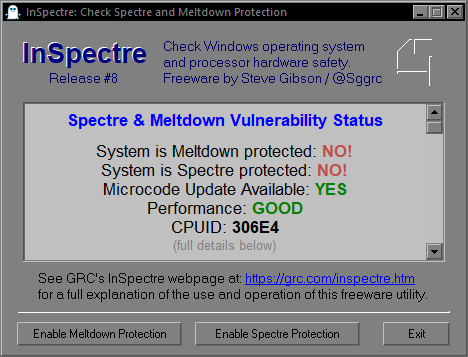
Does disabling spectrum and meltdown give any performance gains? on old cpus 2016 or more older

iGHbWmi.png


How much performance does active spectre and meltdown lose in windows on an ivy bridge cpu?

Show drafts

Specter and Meltdown performance loss on Ivy Bridge CPUs in Windows can vary significantly depending on several factors, such as:Attack type: Spectre: generally causes a performance loss of 5% to 30%, but may be greater in some specific cases. Meltdown: Typically causes a 10% to 40% performance loss, but can be even greater in software that relies heavily on branch prediction.System setup: Processor: Specific Ivy Bridge models may be more or less affected. Operating system: Windows updates can reduce the impact of vulnerabilities. Software: Some programs may be affected more than others.Mitigation measures: Software updates: Installing Windows and application security updates is crucial to minimizing the impact of vulnerabilities. Enabling mitigations in the BIOS: Some motherboards provide options in the BIOS to enable mitigations against Specter and Meltdown, but these may have an impact on performance. Use of antivirus software: Some antiviruses offer protection against Specter and Meltdown, but they may have an impact on performance.In general, the performance loss with Specter and Meltdown active in Windows on Ivy Bridge CPUs can be significant, ranging from 5% to 40% or more.Recommendations: Apply all Windows and application security updates. Enable mitigations in BIOS if available for your motherboard. Consider using antivirus software with Specter and Meltdown protection. Monitor your system performance to identify any significant impacts.Remember that the best way to protect yourself against Specter and Meltdown is to install security updates for Windows and applications.Additional features: Microsoft article on Specter and Meltdown: [Invalid URL removed] List of CPUs affected by Specter and Meltdown: [Invalid URL removed]
 
Last edited:

My Computer My Computer

At a glance

Windows 11 Iot Enterprise 21h2 22000.3260xeon E5-2697v232gb 8x4gb ddr3 1333 mhzgtx 570 poit of view
OS
Windows 11 Iot Enterprise 21h2 22000.3260
Computer type
PC/Desktop
Manufacturer/Model
Asus
CPU
xeon E5-2697v2
Motherboard
rampage iv extreme
Memory
32gb 8x4gb ddr3 1333 mhz
Graphics Card(s)
gtx 570 poit of view
Sound Card
realtek HD (ALC898)
Monitor(s) Displays
samsung b2030
Screen Resolution
1600x900
Hard Drives
2tb hd 5400 rpm
3tb hd 5400 rpm
1tb nvme pcie 3.0
PSU
hx850w
Keyboard
mtek
Internet Speed
500/250 gpon
Browser
r3dfox 146.0
Antivirus
none
same, Windows Explorer and Setting apps are somehow extremely slow idk why, even the start menu is kinda slower at searching apps
 

My Computer My Computer

At a glance

Windows 11
OS
Windows 11
Computer type
PC/Desktop

Latest Support Threads

Back
Top Bottom