Converting TIFF Images to JPG For Sharing - Software Suggestions


baumgrenze

Active member
Member
Local time
10:50 AM
Posts
25
OS
win11/pro
I have a few TIFF images that I want to share as JPEG images with as little distortion as possible.

What are the most reliable programs?

What are the most reliable free programs? What are their downsides?

thanks
baumgrenze
 

My Computer My Computer

At a glance

win11/proIntel Core i7-9700KKingston HyperX DDR4-3000 4 x 16 GBASUS TUF-GTX1660-06G
OS
win11/pro
Computer type
PC/Desktop
Manufacturer/Model
gamepc/custom
CPU
Intel Core i7-9700K
Motherboard
ASRock Z390 Taichi Ultimate//ASRK
Memory
Kingston HyperX DDR4-3000 4 x 16 GB
Graphics Card(s)
ASUS TUF-GTX1660-06G
Sound Card
Roland Edirol UA-1AX
Monitor(s) Displays
Acer V277 bmix
Screen Resolution
1920 x 1080
Hard Drives
Samsung 970 Pro NVMe M.2 512 GB SSD (Sys/Prog)
Crucial CT2000MX500SSD1 MX500 2TB (Data)
PSU
Silverstone ST65F_PT 650W
Case
Fractal Design Define R5 Black
Keyboard
Dell SK
Mouse
HPX4000
Internet Speed
Community Wireless 268 Mbps down/ 230 up
Browser
SeaMonkey
Antivirus
Windows
Basically any photo editing app can handle that. You can just open the TIFF files in paint and click File > Save As and change the format to jpeg. JPEGs will always be lower quality than a TIFF, but mostly it will not be noticeable to the human eye
 

My Computer My Computer

At a glance

Linux Mint
OS
Linux Mint
Computer type
Laptop
Manufacturer/Model
System76 Lemur Pro
You might have a look at the freeware Faststone Image Viewer.
Beside being a great app to manage pictures in all kinds of formats and editing them according to the most often used functions, that app can convert and resize pictures in batch. So a whole folder at once can be converted and settings for that can be saved for later use.

It is very user-friendly.

Other apps like Irfanview (is freeware as well) can do the same, but I like Faststone Image Viewer more because of its ease to use.

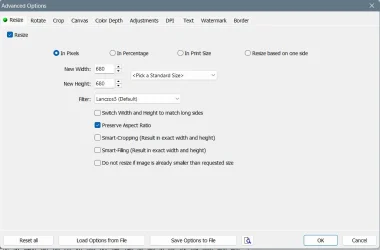
Edit: as an example I took a screenshot of the options that you can set (and save if wanted so) for file conversions:

001726.webp

Here I activated resize, but you can convert without resizing as well. Every method of conversion (including Resizing formats) can be saved to a settings file.
 
Last edited:

My Computer My Computer

At a glance

Windows 11 Pro 25H2AMD Ryzen 7 5700GKingston FURY Beast 2x16GB DIMM DDR4 2666 CL16MSI GeForce GT 730 2GB LP V1
OS
Windows 11 Pro 25H2
Computer type
PC/Desktop
Manufacturer/Model
Build by vendor to my specs
CPU
AMD Ryzen 7 5700G
Motherboard
MSI PRO B550M-P Gen3
Memory
Kingston FURY Beast 2x16GB DIMM DDR4 2666 CL16
Graphics Card(s)
MSI GeForce GT 730 2GB LP V1
Sound Card
Creative Sound Blaster Audigy FX
Monitor(s) Displays
Samsung S24E450F 24"
Screen Resolution
1920 x 1080
Hard Drives
1. SSD Crucial P5 Plus 500GB PCIe M.2
2. SSD-SATA Crucial MX500-2TB
PSU
Corsair CV650W
Case
Cooler Master Silencio S400
Cooling
Cooler Master Hyper H412R with Be Quiet Pure Wings 2 PWM BL038 fan
Keyboard
Cherry Stream (wired, scissor keys)
Mouse
Asus WT465 (wireless)
Internet Speed
70 Mbps down / 80 Mbps up
Browser
Firefox 130.0
Antivirus
F-Secure (Internetprovider version)
Other Info
Router: FRITZBox 7490
Oracle VirtualBox 7 for testing software on Win 10 or 11

My Computers My Computers

  • At a glance

    Windows 11 Pro 25H2 26200.8655i9-10900 10 core 20 threads32 gbnone-Intel UHD Graphics 630
    OS
    Windows 11 Pro 25H2 26200.8655
    Computer type
    PC/Desktop
    Manufacturer/Model
    Dell Optiplex 7080
    CPU
    i9-10900 10 core 20 threads
    Motherboard
    DELL 0J37VM
    Memory
    32 gb
    Graphics Card(s)
    none-Intel UHD Graphics 630
    Sound Card
    Integrated Realtek
    Monitor(s) Displays
    Benq 27
    Screen Resolution
    2560x1440
    Hard Drives
    2x1tb Solidigm m.2 nvme /External drives 512gb Samsung m.2 sata+2tb Kingston m2.nvme
    PSU
    500w
    Case
    MT
    Cooling
    Dell Premium
    Keyboard
    Logitech wired
    Mouse
    Logitech wireless
    Internet Speed
    so slow I'm too embarrassed to tell
    Browser
    #1 Edge #2 Firefox
    Antivirus
    Defender+MWB Premium
  • At a glance

    Windows 11 Pro 24H2 26200.8457AMD Ryzen 7 6800U32 gbintegrated
    Operating System
    Windows 11 Pro 24H2 26200.8457
    Computer type
    PC/Desktop
    Manufacturer/Model
    Beelink Mini PC SER5
    CPU
    AMD Ryzen 7 6800U
    Memory
    32 gb
    Graphics card(s)
    integrated
    Sound Card
    integrated
    Monitor(s) Displays
    Benq 27
    Screen Resolution
    2560x1440
    Hard Drives
    1TB Crucial nvme
    Keyboard
    Logitech wired
    Mouse
    Logitech wireless
    Internet Speed
    still too embarrassed to tell
    Browser
    Firefox
    Antivirus
    Defender
    Other Info
    System 3 is non compliant Dell 9020 i7-4770/24gb ram Win11 PRO 26200.8457
I agree with @Kees, Faststone Image Viewer is a good choice.

You will find the image bactch converter here:
Menu Line > Tools > Open Batch Converter / Rename Dialog > Tab: "Batch Convert"

Also download the Tutorial and check out "Chapter 44. Use Batch Convert to Resize/Convert/Resample Image Files (for advanced users)"
 

My Computer My Computer

At a glance

Windows 11
OS
Windows 11
Back
Top Bottom