
Solved CPU Speed remain always High even at IDLE!


My Computers My Computers

  • At a glance

    Win 11 Home ♦♦♦26200.8875 ♦♦♦♦♦♦♦25H2AMD Ryzen 7 3700XG.Skill (F4-3200C14D-16GTZKW)EVGA RTX 2070 (08G-P4-2171-KR)
    OS
    Win 11 Home ♦♦♦26200.8875 ♦♦♦♦♦♦♦25H2
    Computer type
    PC/Desktop
    Manufacturer/Model
    Built by Ghot® [May 2020]
    CPU
    AMD Ryzen 7 3700X
    Motherboard
    Asus Pro WS X570-ACE (BIOS 5302)
    Memory
    G.Skill (F4-3200C14D-16GTZKW)
    Graphics Card(s)
    EVGA RTX 2070 (08G-P4-2171-KR)
    Sound Card
    Realtek ALC1220P / ALC S1220A
    Monitor(s) Displays
    Dell U3011 30"
    Screen Resolution
    2560 x 1600
    Hard Drives
    2x Samsung 860 EVO 500GB,
    WD 4TB Black FZBX - SATA III,
    WD 8TB Black FZBX - SATA III,
    DRW-24B1ST CD/DVD Burner
    PSU
    PC Power & Cooling 750W Quad EPS12V
    Case
    Cooler Master ATCS 840 Tower
    Cooling
    CM Hyper 212 EVO (push/pull)
    Keyboard
    Ducky DK9008 Shine II Blue LED
    Mouse
    Logitech Optical M-100
    Internet Speed
    300/300
    Browser
    Firefox (latest)
    Antivirus
    Bitdefender Total Security
    Other Info
    Speakers: Klipsch Pro Media 2.1
  • At a glance

    Windows XP Pro 32bit w/SP3AMD Athlon 64 X2 5000+ (OC'd @ 3.2Ghz)TWIN2X2048-6400C4DHX (2 x 1GB, DDR2 800)EVGA 256-P2-N758-TR GeForce 8600GT SSC
    Operating System
    Windows XP Pro 32bit w/SP3
    Computer type
    PC/Desktop
    Manufacturer/Model
    Built by Ghot® (not in use)
    CPU
    AMD Athlon 64 X2 5000+ (OC'd @ 3.2Ghz)
    Motherboard
    ASUS M2N32-SLI Deluxe Wireless Edition
    Memory
    TWIN2X2048-6400C4DHX (2 x 1GB, DDR2 800)
    Graphics card(s)
    EVGA 256-P2-N758-TR GeForce 8600GT SSC
    Sound Card
    Onboard
    Monitor(s) Displays
    ViewSonic G90FB Black 19" Professional (CRT)
    Screen Resolution
    up to 2048 x 1536
    Hard Drives
    WD 36GB 10,000rpm Raptor SATA
    Seagate 80GB 7200rpm SATA
    Lite-On LTR-52246S CD/RW
    Lite-On LH-18A1P CD/DVD Burner
    PSU
    PC Power & Cooling Silencer 750 Quad EPS12V
    Case
    Generic Beige case, 80mm fans
    Cooling
    ZALMAN 9500A 92mm CPU Cooler
    Keyboard
    Logitech Classic Keybooard 200
    Mouse
    Logitech Optical M-BT96a
    Internet Speed
    300/300
    Browser
    Firefox 3.x ??
    Antivirus
    Symantec (Norton)
    Other Info
    Still assembled, still runs. Haven't turned it on for 15 years?
On MSI Intel boards there is a bios setting called Enhanced Turbo that can be enabled to boost the cpu.
I have this disabled and my 14600k drops down to 2 GHz or less at low usage or when at idle.

On MSI AMD boards it "looks" to me (I am not familiar with AMD) like this is called Precision Boost Overdrive.
I'm not sure how all this works on AMD boards but you could see if have this setting and what is it set to.

You could also post your question In the MSI forum. The users on there have been very helpful to me.

peace
wanna
Yes you are right that AMD has Precision Boost Overdrive and i have disabled it, still i get high CPU speed. I even ask chatgpt and gemini. Gave all specs and tried disabling those Overclocking settings, still CPU speed remain high.
 

My Computer My Computer

At a glance

Windows 11 ProAMD Ryzen 7 7700xMicron Technology 32GBGTX 1650 Super
OS
Windows 11 Pro
Computer type
PC/Desktop
Manufacturer/Model
MSI
CPU
AMD Ryzen 7 7700x
Motherboard
MSI Pro b650m-p
Memory
Micron Technology 32GB
Graphics Card(s)
GTX 1650 Super
Sound Card
Windows Default
Monitor(s) Displays
1
Screen Resolution
1080p
Hard Drives
1 SSD and 1 NVMe
PSU
600W
Internet Speed
500 mbps down / 24 mbps up
Think this may have been mentioned already, but what happens when Windows is booted into Safe Mode?
 

My Computers My Computers

  • At a glance

    Windows 11 Pro 25H2Intel Core i9 13900KCorsair Dominator Platinum 64gb 5600MT/s DDR5...Sapphire NITRO+ AMD Radeon RX 7900 XTX Vapor-...
    OS
    Windows 11 Pro 25H2
    Computer type
    PC/Desktop
    Manufacturer/Model
    Homebuilt
    CPU
    Intel Core i9 13900K
    Motherboard
    Asus ProArt Z790 Creator WiFi - Bios 3107
    Memory
    Corsair Dominator Platinum 64gb 5600MT/s DDR5 Dual Channel
    Graphics Card(s)
    Sapphire NITRO+ AMD Radeon RX 7900 XTX Vapor-X 24GB
    Sound Card
    External DAC: Cambridge Audio DACMagic200M - Headphone Amp: Topping L50
    Monitor(s) Displays
    Panasonic MX950 Mini LED 55" TV 120hz
    Screen Resolution
    3840 x 2160 120hz
    Hard Drives
    Samsung 980 Pro 2TB (OS)
    Samsung 980 Pro 1TB (Files)
    Lexar NZ790 4TB
    LaCie d2 Professional 6TB external - USB 3.1
    Seagate Expansion 16TB external - USB 3.2
    Seagate One Touch 18TB external HD - USB 3.0
    PSU
    Corsair RM1200x Shift
    Case
    Corsair RGB Smart Case 5000x (white)
    Cooling
    Corsair iCue H150i Elite Capellix XT
    Keyboard
    Incase Ergonomic USB (Microsoft clone)
    Mouse
    Logitech MX Master 3S
    Internet Speed
    Fibre 900/500 Mbps
    Browser
    Microsoft Edge Chromium
    Antivirus
    Bitdefender Total Security
    Other Info
    AMD Radeon Software & Drivers 26.1.1
    Hasleo Backup Suite
    Dashlane password manager
    Kensington Verimark fingerprint reader
    Logitech Brio 4K webcam
    Orico 10-port powered USB 3.0 hub
  • At a glance

    Windows 11 Pro 25H2Intel® Core™ i9-13900H32GB DDR4-3200 Dual channel*Intel Iris Xᵉ Graphics G7
    Operating System
    Windows 11 Pro 25H2
    Computer type
    Laptop
    Manufacturer/Model
    Asus Vivobook X1605VA
    CPU
    Intel® Core™ i9-13900H
    Motherboard
    Asus X1605VA bios 309
    Memory
    32GB DDR4-3200 Dual channel
    Graphics card(s)
    *Intel Iris Xᵉ Graphics G7
    Sound Card
    Realtek | Intel SST Bluetooth & USB
    Monitor(s) Displays
    16.0-inch, WUXGA 16:10 aspect ratio, IPS-level Panel
    Screen Resolution
    1920 x 1200 60hz
    Hard Drives
    512GB M.2 NVMe™ PCIe® 3.0 SSD
    Mouse
    Logitech MX Ergo Trackball
    Antivirus
    Bitdefender Total Security
    Other Info
    720p Webcam
    WiFi & USB to ethernet
Years ago i recall a MS Dev. blog and from memory they stated that computations/calculations for cpu were based on base clock speed.

The readout from task manager is incorrect in regards to actual current clock speed.
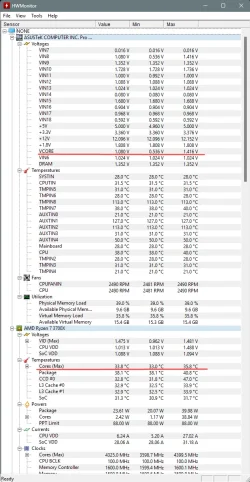
Hwinfo64 will show actual real time clocks and cores speeds.
Example of mine,
hwinfo64.webp
 

My Computer My Computer

At a glance

Windows 11 Pro.(25H2)Ryzen 5 9600XT-Create expert 2 x 16GB 6000 CL30-36-36.RX9070XT Hellhound
OS
Windows 11 Pro.(25H2)
Computer type
PC/Desktop
Manufacturer/Model
Self build
CPU
Ryzen 5 9600X
Motherboard
Aorus elite wifi7 B850
Memory
T-Create expert 2 x 16GB 6000 CL30-36-36.
Graphics Card(s)
RX9070XT Hellhound
Sound Card
Onboard/Logitech Z313 speakers
Monitor(s) Displays
Samsung G5 Odyssey 27in.
Screen Resolution
2560 x 1440, 144Hz
Hard Drives
Lexar NM790 2TB
PSU
Corsair RM850 (2019 model)
Case
Kendomen Titanium, 5 x 120mm fans
Cooling
Phantom Spirit 120 SE Black CPU cooler
Keyboard
Logitech MK120
Mouse
Logitech M90
Browser
Edge, Chrome
Antivirus
Defender
I'm no system builder but I know to try a few things to test that can eliminate certain things being the issue.

1. Monitor temps. If high, reapply thermal paste.
2. with all overclocking off, boot into safe boot. If CPU is normal, look toward 3rd party drivers
3. Use a clean boot to eliminate software conflict. If it doesn't happen in clean boot it's software.

Think this may have been mentioned already, but what happens when Windows is booted into Safe Mode?
I already tried booting in safe mode still same thing.
 

My Computer My Computer

At a glance

Windows 11 ProAMD Ryzen 7 7700xMicron Technology 32GBGTX 1650 Super
OS
Windows 11 Pro
Computer type
PC/Desktop
Manufacturer/Model
MSI
CPU
AMD Ryzen 7 7700x
Motherboard
MSI Pro b650m-p
Memory
Micron Technology 32GB
Graphics Card(s)
GTX 1650 Super
Sound Card
Windows Default
Monitor(s) Displays
1
Screen Resolution
1080p
Hard Drives
1 SSD and 1 NVMe
PSU
600W
Internet Speed
500 mbps down / 24 mbps up
Hi @PressF5

As suggested by @glasskuter try a clean boot if you haven't already done so. There is a full tutorial here at Elevenforum.


My Computers My Computers

  • At a glance

    Windows 11 Pro 25H2Intel Core i9 13900KCorsair Dominator Platinum 64gb 5600MT/s DDR5...Sapphire NITRO+ AMD Radeon RX 7900 XTX Vapor-...
    OS
    Windows 11 Pro 25H2
    Computer type
    PC/Desktop
    Manufacturer/Model
    Homebuilt
    CPU
    Intel Core i9 13900K
    Motherboard
    Asus ProArt Z790 Creator WiFi - Bios 3107
    Memory
    Corsair Dominator Platinum 64gb 5600MT/s DDR5 Dual Channel
    Graphics Card(s)
    Sapphire NITRO+ AMD Radeon RX 7900 XTX Vapor-X 24GB
    Sound Card
    External DAC: Cambridge Audio DACMagic200M - Headphone Amp: Topping L50
    Monitor(s) Displays
    Panasonic MX950 Mini LED 55" TV 120hz
    Screen Resolution
    3840 x 2160 120hz
    Hard Drives
    Samsung 980 Pro 2TB (OS)
    Samsung 980 Pro 1TB (Files)
    Lexar NZ790 4TB
    LaCie d2 Professional 6TB external - USB 3.1
    Seagate Expansion 16TB external - USB 3.2
    Seagate One Touch 18TB external HD - USB 3.0
    PSU
    Corsair RM1200x Shift
    Case
    Corsair RGB Smart Case 5000x (white)
    Cooling
    Corsair iCue H150i Elite Capellix XT
    Keyboard
    Incase Ergonomic USB (Microsoft clone)
    Mouse
    Logitech MX Master 3S
    Internet Speed
    Fibre 900/500 Mbps
    Browser
    Microsoft Edge Chromium
    Antivirus
    Bitdefender Total Security
    Other Info
    AMD Radeon Software & Drivers 26.1.1
    Hasleo Backup Suite
    Dashlane password manager
    Kensington Verimark fingerprint reader
    Logitech Brio 4K webcam
    Orico 10-port powered USB 3.0 hub
  • At a glance

    Windows 11 Pro 25H2Intel® Core™ i9-13900H32GB DDR4-3200 Dual channel*Intel Iris Xᵉ Graphics G7
    Operating System
    Windows 11 Pro 25H2
    Computer type
    Laptop
    Manufacturer/Model
    Asus Vivobook X1605VA
    CPU
    Intel® Core™ i9-13900H
    Motherboard
    Asus X1605VA bios 309
    Memory
    32GB DDR4-3200 Dual channel
    Graphics card(s)
    *Intel Iris Xᵉ Graphics G7
    Sound Card
    Realtek | Intel SST Bluetooth & USB
    Monitor(s) Displays
    16.0-inch, WUXGA 16:10 aspect ratio, IPS-level Panel
    Screen Resolution
    1920 x 1200 60hz
    Hard Drives
    512GB M.2 NVMe™ PCIe® 3.0 SSD
    Mouse
    Logitech MX Ergo Trackball
    Antivirus
    Bitdefender Total Security
    Other Info
    720p Webcam
    WiFi & USB to ethernet
I have an AMD Ryzen 7 5700X3D (8-core, 16-thread) AM4 processor with a 3.0 GHz base clock and a 4.1 GHz boost clock.

In Task Manager > Performance > CPU I was seeing a constant 4.0GHz. My power settings showed Performance so I changed it to AMD Balanced. The Task Manager then showed 3.8GHz all the time.

Performance CPU.webp

HWMonitor shows the cores speeds vary from 2.8 to 4.1 GHz.

AMD Ryzen 7 5700X3D clock.webp
 

My Computers My Computers

  • At a glance

    Windows 11 Pro 25H2 (26200.6901)AMD Ryzen 7 6800H with Radeon 680M GPU (486MB...Crucial DDR5-4800 (2400MHz) 32GB (2 x 16GB)NVIDIA RTX 3060 Laptop (6GB RAM)
    OS
    Windows 11 Pro 25H2 (26200.6901)
    Computer type
    Laptop
    Manufacturer/Model
    ASUS TUF Gaming A15 (2022)
    CPU
    AMD Ryzen 7 6800H with Radeon 680M GPU (486MB RAM)
    Memory
    Crucial DDR5-4800 (2400MHz) 32GB (2 x 16GB)
    Graphics Card(s)
    NVIDIA RTX 3060 Laptop (6GB RAM)
    Sound Card
    n/a
    Monitor(s) Displays
    15.6-inch
    Screen Resolution
    1920x1080 300Hz
    Hard Drives
    2 x Samsung 990 Evo Plus (2TB M.2 NVME SSD)
    PSU
    n/a
    Mouse
    Wireless Mouse M510
    Internet Speed
    2100Mbps/300Mbps
    Browser
    Firefox
    Antivirus
    Malwarebytes
  • At a glance

    Windows 11 Pro 25H2 (26200.8246)AMD Ryzen 7 5700X3DG.SKILL Flare X 32GB (2x16GB) DDR4ASUS ROG-STRIX-RTX3060TI-08G-V2-GAMING (RTX 3...
    Operating System
    Windows 11 Pro 25H2 (26200.8246)
    Computer type
    PC/Desktop
    Manufacturer/Model
    Custom build
    CPU
    AMD Ryzen 7 5700X3D
    Motherboard
    ASUS ROG Strix B550-F Gaming WiFi II
    Memory
    G.SKILL Flare X 32GB (2x16GB) DDR4
    Graphics card(s)
    ASUS ROG-STRIX-RTX3060TI-08G-V2-GAMING (RTX 3060-Ti, 8GB RAM)
    Monitor(s) Displays
    Samsung G50D IPS 27"
    Screen Resolution
    1440p/180Hz
    Hard Drives
    SAMSUNG 990 EVO Plus (2TB] M.2 NVME SSD
    SAMSUNG 990 EVO Plus (4TB) M.2 NVME SSD
    PSU
    Corsair RM750x (750 watts)
    Case
    Cooler Master MasterCase 5
    Cooling
    Scythe Mugen 6
    Keyboard
    Logitech K520 (MK540 keyboard/mouse combo)
    Mouse
    Logitech M310 (MK540 keyboard/mouse combo)
    Internet Speed
    2100 Mbps down / 300 Mbps up
    Browser
    Firefox, Edge, Chrome
    Antivirus
    Malwarebytes (Premium)
    Other Info
    ASUS Blu-ray Burner BW-16D1HT (SATA) || Western Digital Easystore 20TB USB 3.0 external hard drive used with Acronis True Image 2025 backup software || HP OfficeJet Pro 6975 Printer/Scanner
True, Base is 4.2 GHz which is normal. But i am pretty sure that CPU does not run at base speed at Idle. It should go down around 2Ghz or something, As i have seen in many computers when they are idle their Speed go down. Even my previous built were not had this issue. But i guess it is what it is.
Hi,

Check also in the Power plan, there is a setting minimum processor state - lower it to 5% if it's not already set.

Good luck,
werty
 

My Computer My Computer

At a glance

Windows 11 Pro 25H2AMD Ryzen™ 7 6800H 3.2-4.7 GHz32 GB DDR5 4800MHz Dual Channel CrucialNVIDIA GeForce RTX™ 3050
OS
Windows 11 Pro 25H2
Computer type
Laptop
Manufacturer/Model
ASUS ROG STRIX G513RC
CPU
AMD Ryzen™ 7 6800H 3.2-4.7 GHz
Memory
32 GB DDR5 4800MHz Dual Channel Crucial
Graphics Card(s)
NVIDIA GeForce RTX™ 3050
Monitor(s) Displays
15.6 inches FHD (1920 x 1080) IPS Display
Hard Drives
Crucial T500 2TB
Western Digital Black SN770 2TB
Keyboard
RGB Keyboard
Hi,

Check also in the Power plan, there is a setting minimum processor state - lower it to 5% if it's not already set.

Good luck,
werty
Here it is the power plan, by default, core parking min cores was set to 100%, but i changed to 25%:
1763756546553.webp
 

My Computer My Computer

At a glance

Windows 11 ProAMD Ryzen 7 7700xMicron Technology 32GBGTX 1650 Super
OS
Windows 11 Pro
Computer type
PC/Desktop
Manufacturer/Model
MSI
CPU
AMD Ryzen 7 7700x
Motherboard
MSI Pro b650m-p
Memory
Micron Technology 32GB
Graphics Card(s)
GTX 1650 Super
Sound Card
Windows Default
Monitor(s) Displays
1
Screen Resolution
1080p
Hard Drives
1 SSD and 1 NVMe
PSU
600W
Internet Speed
500 mbps down / 24 mbps up
I'm curious as to how & why you have 'processor performance core parking min cores' setting.

Isn't that an additional setting for server boards?
 

My Computer My Computer

At a glance

Windows 11 Pro.(25H2)Ryzen 5 9600XT-Create expert 2 x 16GB 6000 CL30-36-36.RX9070XT Hellhound
OS
Windows 11 Pro.(25H2)
Computer type
PC/Desktop
Manufacturer/Model
Self build
CPU
Ryzen 5 9600X
Motherboard
Aorus elite wifi7 B850
Memory
T-Create expert 2 x 16GB 6000 CL30-36-36.
Graphics Card(s)
RX9070XT Hellhound
Sound Card
Onboard/Logitech Z313 speakers
Monitor(s) Displays
Samsung G5 Odyssey 27in.
Screen Resolution
2560 x 1440, 144Hz
Hard Drives
Lexar NM790 2TB
PSU
Corsair RM850 (2019 model)
Case
Kendomen Titanium, 5 x 120mm fans
Cooling
Phantom Spirit 120 SE Black CPU cooler
Keyboard
Logitech MK120
Mouse
Logitech M90
Browser
Edge, Chrome
Antivirus
Defender
I'm curious as to how & why you have 'processor performance core parking min cores' setting.

Isn't that an additional setting for server boards?
I am not sure about that it is related to Server settings. My CPU cores were active all the time and i wanted them to put to sleep while not active. Reason that is active CPU cores even at idle raised CPU Temperature for no reason. When i turn on Power saver power plan, it reduced heat. Thus, i searched on google and found out there is setting on registry to control those cores even with balanced power plan. Those cores are enable when needed. But CPU speed also should go down which i was trying to achieve in this forum.
 

My Computer My Computer

At a glance

Windows 11 ProAMD Ryzen 7 7700xMicron Technology 32GBGTX 1650 Super
OS
Windows 11 Pro
Computer type
PC/Desktop
Manufacturer/Model
MSI
CPU
AMD Ryzen 7 7700x
Motherboard
MSI Pro b650m-p
Memory
Micron Technology 32GB
Graphics Card(s)
GTX 1650 Super
Sound Card
Windows Default
Monitor(s) Displays
1
Screen Resolution
1080p
Hard Drives
1 SSD and 1 NVMe
PSU
600W
Internet Speed
500 mbps down / 24 mbps up
@PressF5

I believe the maximum should still be set at 100%
 

My Computers My Computers

  • At a glance

    Win 11 Home ♦♦♦26200.8875 ♦♦♦♦♦♦♦25H2AMD Ryzen 7 3700XG.Skill (F4-3200C14D-16GTZKW)EVGA RTX 2070 (08G-P4-2171-KR)
    OS
    Win 11 Home ♦♦♦26200.8875 ♦♦♦♦♦♦♦25H2
    Computer type
    PC/Desktop
    Manufacturer/Model
    Built by Ghot® [May 2020]
    CPU
    AMD Ryzen 7 3700X
    Motherboard
    Asus Pro WS X570-ACE (BIOS 5302)
    Memory
    G.Skill (F4-3200C14D-16GTZKW)
    Graphics Card(s)
    EVGA RTX 2070 (08G-P4-2171-KR)
    Sound Card
    Realtek ALC1220P / ALC S1220A
    Monitor(s) Displays
    Dell U3011 30"
    Screen Resolution
    2560 x 1600
    Hard Drives
    2x Samsung 860 EVO 500GB,
    WD 4TB Black FZBX - SATA III,
    WD 8TB Black FZBX - SATA III,
    DRW-24B1ST CD/DVD Burner
    PSU
    PC Power & Cooling 750W Quad EPS12V
    Case
    Cooler Master ATCS 840 Tower
    Cooling
    CM Hyper 212 EVO (push/pull)
    Keyboard
    Ducky DK9008 Shine II Blue LED
    Mouse
    Logitech Optical M-100
    Internet Speed
    300/300
    Browser
    Firefox (latest)
    Antivirus
    Bitdefender Total Security
    Other Info
    Speakers: Klipsch Pro Media 2.1
  • At a glance

    Windows XP Pro 32bit w/SP3AMD Athlon 64 X2 5000+ (OC'd @ 3.2Ghz)TWIN2X2048-6400C4DHX (2 x 1GB, DDR2 800)EVGA 256-P2-N758-TR GeForce 8600GT SSC
    Operating System
    Windows XP Pro 32bit w/SP3
    Computer type
    PC/Desktop
    Manufacturer/Model
    Built by Ghot® (not in use)
    CPU
    AMD Athlon 64 X2 5000+ (OC'd @ 3.2Ghz)
    Motherboard
    ASUS M2N32-SLI Deluxe Wireless Edition
    Memory
    TWIN2X2048-6400C4DHX (2 x 1GB, DDR2 800)
    Graphics card(s)
    EVGA 256-P2-N758-TR GeForce 8600GT SSC
    Sound Card
    Onboard
    Monitor(s) Displays
    ViewSonic G90FB Black 19" Professional (CRT)
    Screen Resolution
    up to 2048 x 1536
    Hard Drives
    WD 36GB 10,000rpm Raptor SATA
    Seagate 80GB 7200rpm SATA
    Lite-On LTR-52246S CD/RW
    Lite-On LH-18A1P CD/DVD Burner
    PSU
    PC Power & Cooling Silencer 750 Quad EPS12V
    Case
    Generic Beige case, 80mm fans
    Cooling
    ZALMAN 9500A 92mm CPU Cooler
    Keyboard
    Logitech Classic Keybooard 200
    Mouse
    Logitech Optical M-BT96a
    Internet Speed
    300/300
    Browser
    Firefox 3.x ??
    Antivirus
    Symantec (Norton)
    Other Info
    Still assembled, still runs. Haven't turned it on for 15 years?
@PressF5

I believe the maximum should still be set at 100%
True, but reducing cores let me boost CPU clock up to 5.4 GHZ without increment in Temperature, Even when i am gaming or under heavy load, 4 cores are in use most. But if computer need more cores to use, it can unparked them and use them.
 

My Computer My Computer

At a glance

Windows 11 ProAMD Ryzen 7 7700xMicron Technology 32GBGTX 1650 Super
OS
Windows 11 Pro
Computer type
PC/Desktop
Manufacturer/Model
MSI
CPU
AMD Ryzen 7 7700x
Motherboard
MSI Pro b650m-p
Memory
Micron Technology 32GB
Graphics Card(s)
GTX 1650 Super
Sound Card
Windows Default
Monitor(s) Displays
1
Screen Resolution
1080p
Hard Drives
1 SSD and 1 NVMe
PSU
600W
Internet Speed
500 mbps down / 24 mbps up
True, but reducing cores let me boost CPU clock up to 5.4 GHZ without increment in Temperature, Even when i am gaming or under heavy load, 4 cores are in use most. But if computer need more cores to use, it can unparked them and use them.


Well, let us know how it works out. :-)
 

My Computers My Computers

  • At a glance

    Win 11 Home ♦♦♦26200.8875 ♦♦♦♦♦♦♦25H2AMD Ryzen 7 3700XG.Skill (F4-3200C14D-16GTZKW)EVGA RTX 2070 (08G-P4-2171-KR)
    OS
    Win 11 Home ♦♦♦26200.8875 ♦♦♦♦♦♦♦25H2
    Computer type
    PC/Desktop
    Manufacturer/Model
    Built by Ghot® [May 2020]
    CPU
    AMD Ryzen 7 3700X
    Motherboard
    Asus Pro WS X570-ACE (BIOS 5302)
    Memory
    G.Skill (F4-3200C14D-16GTZKW)
    Graphics Card(s)
    EVGA RTX 2070 (08G-P4-2171-KR)
    Sound Card
    Realtek ALC1220P / ALC S1220A
    Monitor(s) Displays
    Dell U3011 30"
    Screen Resolution
    2560 x 1600
    Hard Drives
    2x Samsung 860 EVO 500GB,
    WD 4TB Black FZBX - SATA III,
    WD 8TB Black FZBX - SATA III,
    DRW-24B1ST CD/DVD Burner
    PSU
    PC Power & Cooling 750W Quad EPS12V
    Case
    Cooler Master ATCS 840 Tower
    Cooling
    CM Hyper 212 EVO (push/pull)
    Keyboard
    Ducky DK9008 Shine II Blue LED
    Mouse
    Logitech Optical M-100
    Internet Speed
    300/300
    Browser
    Firefox (latest)
    Antivirus
    Bitdefender Total Security
    Other Info
    Speakers: Klipsch Pro Media 2.1
  • At a glance

    Windows XP Pro 32bit w/SP3AMD Athlon 64 X2 5000+ (OC'd @ 3.2Ghz)TWIN2X2048-6400C4DHX (2 x 1GB, DDR2 800)EVGA 256-P2-N758-TR GeForce 8600GT SSC
    Operating System
    Windows XP Pro 32bit w/SP3
    Computer type
    PC/Desktop
    Manufacturer/Model
    Built by Ghot® (not in use)
    CPU
    AMD Athlon 64 X2 5000+ (OC'd @ 3.2Ghz)
    Motherboard
    ASUS M2N32-SLI Deluxe Wireless Edition
    Memory
    TWIN2X2048-6400C4DHX (2 x 1GB, DDR2 800)
    Graphics card(s)
    EVGA 256-P2-N758-TR GeForce 8600GT SSC
    Sound Card
    Onboard
    Monitor(s) Displays
    ViewSonic G90FB Black 19" Professional (CRT)
    Screen Resolution
    up to 2048 x 1536
    Hard Drives
    WD 36GB 10,000rpm Raptor SATA
    Seagate 80GB 7200rpm SATA
    Lite-On LTR-52246S CD/RW
    Lite-On LH-18A1P CD/DVD Burner
    PSU
    PC Power & Cooling Silencer 750 Quad EPS12V
    Case
    Generic Beige case, 80mm fans
    Cooling
    ZALMAN 9500A 92mm CPU Cooler
    Keyboard
    Logitech Classic Keybooard 200
    Mouse
    Logitech Optical M-BT96a
    Internet Speed
    300/300
    Browser
    Firefox 3.x ??
    Antivirus
    Symantec (Norton)
    Other Info
    Still assembled, still runs. Haven't turned it on for 15 years?

Well, let us know how it works out. :-)
I have been using my computer with this configuration for a month and it is running pretty well.
 

My Computer My Computer

At a glance

Windows 11 ProAMD Ryzen 7 7700xMicron Technology 32GBGTX 1650 Super
OS
Windows 11 Pro
Computer type
PC/Desktop
Manufacturer/Model
MSI
CPU
AMD Ryzen 7 7700x
Motherboard
MSI Pro b650m-p
Memory
Micron Technology 32GB
Graphics Card(s)
GTX 1650 Super
Sound Card
Windows Default
Monitor(s) Displays
1
Screen Resolution
1080p
Hard Drives
1 SSD and 1 NVMe
PSU
600W
Internet Speed
500 mbps down / 24 mbps up
But CPU speed also should go down which i was trying to achieve in this forum.
Task manager cannot show the current real time clock speed on amd zen processors, their cores fluctuate multiple times too fast for it.
As i said, hwinfo64 is has the closest readout to real time effective clock speeds, so ignore task manager speed read out.
 

My Computer My Computer

At a glance

Windows 11 Pro.(25H2)Ryzen 5 9600XT-Create expert 2 x 16GB 6000 CL30-36-36.RX9070XT Hellhound
OS
Windows 11 Pro.(25H2)
Computer type
PC/Desktop
Manufacturer/Model
Self build
CPU
Ryzen 5 9600X
Motherboard
Aorus elite wifi7 B850
Memory
T-Create expert 2 x 16GB 6000 CL30-36-36.
Graphics Card(s)
RX9070XT Hellhound
Sound Card
Onboard/Logitech Z313 speakers
Monitor(s) Displays
Samsung G5 Odyssey 27in.
Screen Resolution
2560 x 1440, 144Hz
Hard Drives
Lexar NM790 2TB
PSU
Corsair RM850 (2019 model)
Case
Kendomen Titanium, 5 x 120mm fans
Cooling
Phantom Spirit 120 SE Black CPU cooler
Keyboard
Logitech MK120
Mouse
Logitech M90
Browser
Edge, Chrome
Antivirus
Defender
Just got an upgrade for my am4 pc - an 5950X on a x570 MSI motherboard and I have the same issue on win11 - clock won`t go lower than 4.3GHz. But it does so in a safe mode - clock drops around 1.9GHz, Same thing on fedora Linux, drops low when idle. Tried clean install of win 11 and no good - in normal mode clock won`t wind down as it does on linux or in safe mode. Win11 25H2
 

My Computer My Computer

At a glance

Win11Ryzen 9 5950X32GB5070ti
OS
Win11
Computer type
PC/Desktop
Manufacturer/Model
MSI
CPU
Ryzen 9 5950X
Motherboard
MSI X570 Gaming Plus
Memory
32GB
Graphics Card(s)
5070ti
Back
Top Bottom




