Create Custom or Lite Version of Windows 11


blacxarea

Active member
Member
VIP
Local time
10:43 PM
Posts
207
Location
Indonesia
OS
Windows 11
The full version of Windows 11 build in the form of ISO image actually can be copied to another new image with some customizations.
Say we are going to install Windows 11 on an old PC without TPM and SecureBoot, even worse doesn't have SSD and GPT/UEFI,
or for some people that don't really need the "full perfect" package that MS delivered, we can add and/or remove many components
from the full version build to just like what we exactly need.

First of all, get the newest full version ISO if you don't already have one:

0. UUPDump

One of the most popular software to edit the operating system ISO is NTLite. This tool have the easy-to-use GUI interface even for the
beginner. But be careful when removing the components, and make sure that you only remove what is not needed. I tried with deleting
all the Modern Apps, Hyper-V, WSL, and Microsoft Edge. Then add Mozilla Firefox, Classic Paint and Classic Calculator.

We can also add some new themes to replace the original Windows 11 themes, but make sure to install the new theme engine. When
it's Windows 10, UltraUXTheme is the most popular theme engine, but I had check that it's not working for Windows 11, so we can
use SecureUXTheme. The old themes from Windows 10 still can be used in Windows 11. Just make sure it's for the latest build of Windows 10.
Niivu from Deviant Art created so many excellent themes.

Check and re-check after finish adding and removing components, before compile the ISO to the new lighter image.
Why there's no detailed step-by-step instructions? Because I know most people here are more clever than me.

Here are the links for the softwares:

1. NTLite
2. Mozilla Firefox
3. Classic Paint
4. Classic Calculator
5. SecureUXTheme
6. Windows Themes

After carefully add and remove components, I have the new ISO that's only 1,9GB, added some registry tweaks including the tweaks for bypassing SecureBoot
and TPM requirements, also replace the Windows 11 explorer.exe with the one from Windows 11. Use Rufus to make a bootable USB drive for a clean install,
or you can directly install Windows 11 to a USB drive using WinToUSB.

7. Rufus
8. WinToUSB

That's all.
DON"T ever try to download some already made lite version of Windows (any build), because there's no trusted and official release for these custom versions.
I've checked some already made ISO, they mostly removed Windows Defender and included some suspicious new files inside.
So, it will be much better if you make it by yourself, make it and use it safely for your own need.

Go! Dig!
 
Windows Build/Version
Windows 11 Build 22000.71

My Computer My Computer

At a glance

Windows 11AMD Phenom(tm) II X2 555 Processor 3.20 GHzKingston 16GB DDR3NVidia GeForce GTX 650
OS
Windows 11
Computer type
PC/Desktop
Manufacturer/Model
Unbranded
CPU
AMD Phenom(tm) II X2 555 Processor 3.20 GHz
Motherboard
Asus M4A785T-M
Memory
Kingston 16GB DDR3
Graphics Card(s)
NVidia GeForce GTX 650
Sound Card
VIA HD Audio
Monitor(s) Displays
2x LG 20" Display
Screen Resolution
1600 x 900 60MHz
Hard Drives
WD Blue 1TB HDD
ADATA 500GB SSD
Midas Force 500GB SSD
PSU
Enermax 500W
Case
Unbranded
Cooling
Unbranded
Keyboard
Logitech Wired K120
Mouse
Logitech Wired B100
Internet Speed
20MB Download 1,5MB Upload
Browser
Firefox
Antivirus
McAffee, Malwarebytes, Windows Defender
Other Info
Are you sneaking?

What is the point of doing a lite version?

They do not improve performance and on most modern drives, the amount of space saving is insignificant.

Forums are littered with tales of woe where somebody removed e.g. Cortana or Defender and then found they could not reinstate them when needed, or they could not get updates etc.

People often hack windows following dodgy guides on web WHICH never mention the most crucial advice "MAKE AN IMAGE BACKUP FIRST".

I dispute claims that Lite versions perform better. It just means user has not properly optimised installation e.g. turn off various privacy options, stop background apps running etc.

My laptop (new and old) both idle at around 1% CPU, with barely any disk/network access in normal operation.I tried a lite version and it made no detectable difference as I expected.

Of course, some people have an obsession with getting rid of stuff they do not use, so I guess there will always be a market for lite versions, but do not kid yourself it has an operational benefit, except perhaps on low end machines with limited disk space.
 

My Computer My Computer

At a glance

Windows 11 Pro + Win11 Canary VM.I9 13th gen i9-13900H 2.60 GHZ16 GB solderedIntegrated Intel Iris XE
OS
Windows 11 Pro + Win11 Canary VM.
Computer type
Laptop
Manufacturer/Model
ASUS Zenbook 14
CPU
I9 13th gen i9-13900H 2.60 GHZ
Motherboard
Yep, Laptop has one.
Memory
16 GB soldered
Graphics Card(s)
Integrated Intel Iris XE
Sound Card
Realtek built in
Monitor(s) Displays
laptop OLED screen
Screen Resolution
2880x1800 touchscreen
Hard Drives
1 TB NVME SSD (only weakness is only one slot)
PSU
Internal + 65W thunderbolt USB4 charger
Case
Yep, got one
Cooling
Stella Artois (UK pint cans - 568 ml) - extra cost.
Keyboard
Built in UK keybd
Mouse
Bluetooth , wireless dongled, wired
Internet Speed
900 mbs (ethernet), wifi 6 typical 350-450 mb/s both up and down
Browser
Edge
Antivirus
Defender
Other Info
TPM 2.0, 2xUSB4 thunderbolt, 1xUsb3 (usb a), 1xUsb-c, hdmi out, 3.5 mm audio out/in combo, ASUS backlit trackpad (inc. switchable number pad)

Macrium Reflect Home V8
Office 365 Family (6 users each 1TB onedrive space)
Hyper-V (a vm runs almost as fast as my older laptop)
What is the point of doing a lite version?

They do not improve performance and on most modern drives, the amount of space saving is insignificant.

Forums are littered with tales of woe where somebody removed e.g. Cortana or Defender and then found they could not reinstate them when needed, or they could not get updates etc.

People often hack windows following dodgy guides on web WHICH never mention the most crucial advice "MAKE AN IMAGE BACKUP FIRST".

I dispute claims that Lite versions perform better. It just means user has not properly optimised installation e.g. turn off various privacy options, stop background apps running etc.

My laptop (new and old) both idle at around 1% CPU, with barely any disk/network access in normal operation.I tried a lite version and it made no detectable difference as I expected.

Of course, some people have an obsession with getting rid of stuff they do not use, so I guess there will always be a market for lite versions, but do not kid yourself it has an operational benefit, except perhaps on low end machines with limited disk space.
100% agree with comments expressed.
Things like nLite etc were perhaps fine during XP days when drives were quite small and horribly slow IDE spinners.

These days a standard W11 / W10 install even with Office installed and a few apps like photoshop rarely takes more than 40 GB - if that -- absolutely no point in messing around with this stuff to save a few GB = and as there's no moving parts on an SSD / NVMe I'm at a loss to see how you could gain any performance improvement whatsoever. Data access on these devices take the same time wherever data is located on the drive -- not like having to move a physical head and set cylinder / cluster commands.

Cheers
jimbo
 

My Computer My Computer

At a glance

Windows XP,11 Linux Fedora Rawhide pre-releas...2 X Intel i7
OS
Windows XP,11 Linux Fedora Rawhide pre-release 46
Computer type
PC/Desktop
CPU
2 X Intel i7
Screen Resolution
4KUHD X 2
I tried to go this way, but you would not believe dependencies there are, like removing Edge might prevent you from playing some games, even simply disabling something might break apps, let alone removing it and the only way to get it back is reinstall. I used to install Windows like twice a day. It is a great hobby, if you have plenty of time, I prefer install and forget, so post-installation setup.

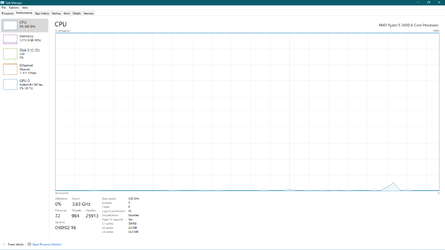
This is mine lite OS. 70 processes, 1000 threads, 25000 handles and zero CPU/Disk/Network activity.

12-Sep-21.png
 

My Computer My Computer

At a glance

Home2FH2CanAMD Ryzen 5 8600G (07/24)2x32GB Kingston FURY DDR5 5600 MHz CL36 @5200...ASROCK Radeon RX 6600 Challenger D 8G @48FPS ...
OS
Home2FH2Can
Computer type
PC/Desktop
CPU
AMD Ryzen 5 8600G (07/24)
Motherboard
ASROCK B650M-HDV/M.2 (07/24) BIOS 4.43 AGESA ComboAM5 1.3.0.1b Patch A (07/26)
Memory
2x32GB Kingston FURY DDR5 5600 MHz CL36 @5200 CL40 (07/24)
Graphics Card(s)
ASROCK Radeon RX 6600 Challenger D 8G @48FPS (08/24)
Sound Card
Creative Sound BlasterX AE-5 Plus (05/24)
Monitor(s) Displays
24" Philips 24M1N3200ZS/00 (05/24)
Screen Resolution
1920×1080@165Hz via DP1.4
Hard Drives
Kingston KC3000 NVMe 2TB (05/24)
ADATA XPG GAMMIX S11 Pro 512GB (07/19)
PSU
Seasonic Core GM 550 Gold (04/24)
Case
Fractal Design Define 7 Mini with 3x Noctua NF-P14s/12@555rpm (04/24)
Cooling
Noctua NH-U12S with Noctua NF-P12 (04/24)
Keyboard
HP Pavilion Wired Keyboard 300 (07/24) + Rabalux 76017 Parker (01/24)
Mouse
Logitech M330 Silent Plus (07/26)
Internet Speed
500/100 Mbps via RouterOS (05/21) & TCP Optimizer
Browser
Edge, Brave for YouTube, LibreWolf for FB
Antivirus
NextDNS blocking 1/3 Traffic
Other Info
Phone: Motorola Moto G86 (02/26)
Backup: Hasleo Backup Suite (PreOS)
Headphones: Sennheiser RS170 (09/10)
Chair: Huzaro Force 4.4 Grey Mesh (05/24)
Notifier: Xiaomi Mi Band 9 Milanese (10/24)
FlexCore USB-C 3.2 Gen 1 (M) to LAN (F) (08/25)
I tried to go this way, but you would not believe dependencies there are, like removing Edge might prevent you from playing some games, even simply disabling something might break apps, let alone removing it and the only way to get it back is reinstall. I used to install Windows like twice a day. It is a great hobby, if you have plenty of time, I prefer install and forget, so post-installation setup.

This is mine lite OS. 70 processes, 1000 threads, 25000 handles and zero CPU/Disk/Network activity.

View attachment 7788
Lol, I have 3.5x the amount of processes, 3.3x the amount Threads and 105000 more Handles going on on my laptop currently.

Great job there! 😄
 

My Computers My Computers

  • At a glance

    Win 11 Pro 25H2 26200.9445 / Linux Mint 22.3Ryzen 7 2700U Pro32GBiGPU Vega 10
    OS
    Win 11 Pro 25H2 26200.9445 / Linux Mint 22.3
    Computer type
    Laptop
    Manufacturer/Model
    Lenovo A485
    CPU
    Ryzen 7 2700U Pro
    Motherboard
    Lenovo (WiFi/BT module upgraded to Intel Wireless-AC-9260)
    Memory
    32GB
    Graphics Card(s)
    iGPU Vega 10
    Sound Card
    Realtek
    Monitor(s) Displays
    14" FHD (built-in) + 14" Lenovo Thinkvision M14t (touch+pen) + 32" Asus PB328
    Screen Resolution
    FHD + FHD + 1440p
    Hard Drives
    Intel 660p m.2 nVME PCIe3.0 x2 512GB
    PSU
    125W(Dock)/65W(Travel Adapter)
    Keyboard
    Thinkpad / Logitech MX Keys
    Mouse
    Logitech MX Master 2S
    Internet Speed
    1/1Gbit
    Browser
    Firefox
    Antivirus
    Windows Defender
    Other Info
    SecureBoot: Enabled
    TPM2.0: Enabled
    AMD-V: Enabled
  • At a glance

    Win 11 Pro 25H2 26200.9539(RP)i7-7700k @4.8GHz32GB 2x16GB 2133MHz CL15EVGA GTX1080Ti FTW 11GB
    Operating System
    Win 11 Pro 25H2 26200.9539(RP)
    Computer type
    PC/Desktop
    Manufacturer/Model
    Custom
    CPU
    i7-7700k @4.8GHz
    Motherboard
    Asus PRIME Z270-A
    Memory
    32GB 2x16GB 2133MHz CL15
    Graphics card(s)
    EVGA GTX1080Ti FTW 11GB
    Sound Card
    Integrated
    Monitor(s) Displays
    32" 10-bit Asus PB328Q
    Screen Resolution
    WQHD 2560x1440
    Hard Drives
    512GB ADATA SX8000NP NVMe PCIe Gen 3 x4
    PSU
    850W
    Case
    Fractal Design Define 7
    Cooling
    Noctua NH-D15 chromax.black
    Keyboard
    Logitech MX Keys
    Mouse
    Logitech MX Master 2S
    Internet Speed
    1/1Gbit
    Browser
    Firefox
    Antivirus
    Windows Defender
    Other Info
    AC WiFi Card
  • Asus U46SV (laptop), i5-2410M, 8GB RAM, 500GB SSD, 750GB HDD, Windows 10. (used as a local Minecraft server and data dump)
another tool like ntlite ?
 

My Computer My Computer

At a glance

windows 10 pro / windows 11 pro testingi5 7400 3.3 GHZ turbo 3.516 GB DDR4 2400Nvidia GTX 1050 TI 4GB DX12
OS
windows 10 pro / windows 11 pro testing
Computer type
PC/Desktop
CPU
i5 7400 3.3 GHZ turbo 3.5
Motherboard
ASUS H110 m-r
Memory
16 GB DDR4 2400
Graphics Card(s)
Nvidia GTX 1050 TI 4GB DX12
Monitor(s) Displays
HP 22
Screen Resolution
1920x1080
Hard Drives
1TB WD GReen 500GB HDD
Internet Speed
300 mb/s
Browser
Chrome
Antivirus
Eset
Can with nlite we do a custom windows iso file with more than one win10 and win11 versions?
For example to one and only iso file i have in it win10 pro, win10 home, win11 pro, win11 home.

Can you please tell me what parameters i must choose so i make the latest win11 iso i download from ms site doesn't have.

01. The tpm protection and i can install it even at very old pc's without this.
02. I can install it even at old pc without uefi bios
03. When i make a clean install install ALL the win11 into one and only partition and not to two or three partitions.
04. If i can disable the automatic updates.

Now i am at an old pc with win7sp1 and i want to custom the win11 iso file from this system.
Can i do that with the ntlite program?
 

My Computer My Computer

At a glance

Windows 7 and 11 and 12
OS
Windows 7 and 11 and 12
Computer type
PC/Desktop
Browser
Firefox
Back
Top Bottom